transmission CHEVROLET LOW CAB FORWARD 2018 User Guide
[x] Cancel search | Manufacturer: CHEVROLET, Model Year: 2018, Model line: LOW CAB FORWARD, Model: CHEVROLET LOW CAB FORWARD 2018Pages: 358, PDF Size: 6.32 MB
Page 102 of 358
Chevrolet Low Cab Forward Owner Manual (GMNA-Localizing-U.S.-
11254764) - 2018 - crc - 12/5/16
Infotainment System 101
As an example, "CH1" is
displayed.
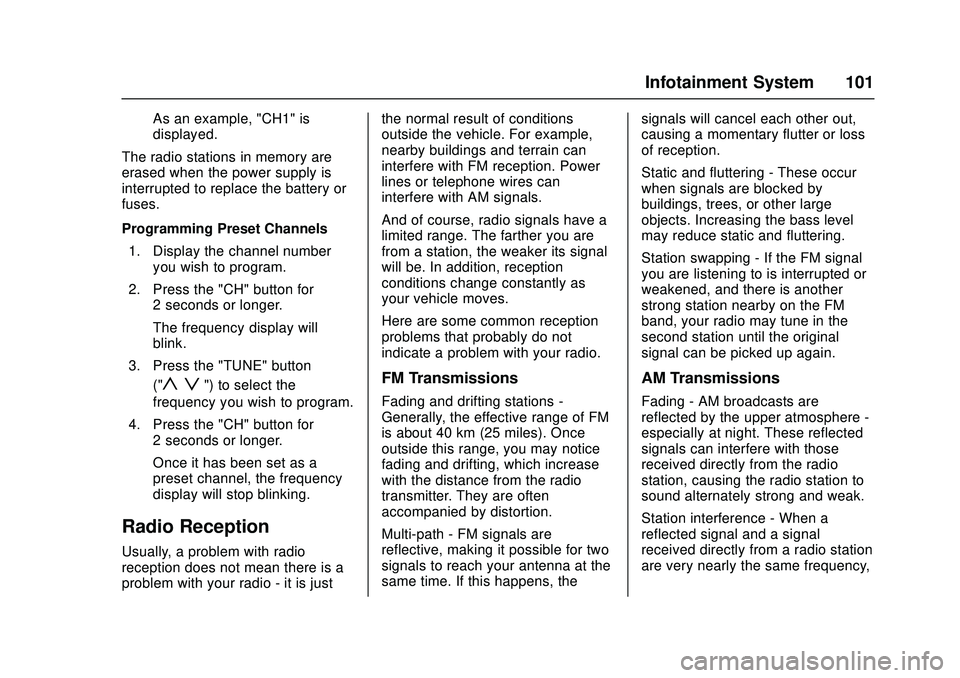
The radio stations in memory are
erased when the power supply is
interrupted to replace the battery or
fuses.
Programming Preset Channels 1. Display the channel number you wish to program.
2. Press the "CH" button for 2 seconds or longer.
The frequency display will
blink.
3. Press the "TUNE" button ("
y z") to select the
frequency you wish to program.
4. Press the "CH" button for 2 seconds or longer.
Once it has been set as a
preset channel, the frequency
display will stop blinking.
Radio Reception
Usually, a problem with radio
reception does not mean there is a
problem with your radio - it is just the normal result of conditions
outside the vehicle. For example,
nearby buildings and terrain can
interfere with FM reception. Power
lines or telephone wires can
interfere with AM signals.
And of course, radio signals have a
limited range. The farther you are
from a station, the weaker its signal
will be. In addition, reception
conditions change constantly as
your vehicle moves.
Here are some common reception
problems that probably do not
indicate a problem with your radio.
FM Transmissions
Fading and drifting stations -
Generally, the effective range of FM
is about 40 km (25 miles). Once
outside this range, you may notice
fading and drifting, which increase
with the distance from the radio
transmitter. They are often
accompanied by distortion.
Multi-path - FM signals are
reflective, making it possible for two
signals to reach your antenna at the
same time. If this happens, the
signals will cancel each other out,
causing a momentary flutter or loss
of reception.
Static and fluttering - These occur
when signals are blocked by
buildings, trees, or other large
objects. Increasing the bass level
may reduce static and fluttering.
Station swapping - If the FM signal
you are listening to is interrupted or
weakened, and there is another
strong station nearby on the FM
band, your radio may tune in the
second station until the original
signal can be picked up again.
AM Transmissions
Fading - AM broadcasts are
reflected by the upper atmosphere -
especially at night. These reflected
signals can interfere with those
received directly from the radio
station, causing the radio station to
sound alternately strong and weak.
Station interference - When a
reflected signal and a signal
received directly from a radio station
are very nearly the same frequency,
Page 112 of 358

Chevrolet Low Cab Forward Owner Manual (GMNA-Localizing-U.S.-
11254764) - 2018 - crc - 12/5/16
Infotainment System 111
z: Decrease folder number.
Repeat Playback 1. Press the "FUNC" button for less than 1 second to
display "RPT."
2. Playback method can be selected between "RPT OFF,"
"RPT ON," and "FLD RPT ON"
every time the "TRACK" button
("
y z") is pressed.
"RPT OFF": Repeat playback
is off.
"RPT ON": File being played
back will be repeatedly
played back.
"FLD RPT ON": Files in the
folder being played back will be
repeatedly played back.
Random Playback 1. Press the "FUNC" button for less than 1 second to
display "RDM." 2. Playback method can be
selected between "RDM OFF,"
"RDM ON," and "FLD RDM
ON" every time the "TRACK"
button ("
y z") is pressed.
"RDM OFF": Random playback
is off.
"RDM ON": Files in the USB
device are randomly
played back.
"FLD RDM ON": The files
stored inside the folder being
played back are randomly
played back.
Root Directory
When the "FLD" button is pressed
for 1 second or more, the first folder
in the USB device is selected to
start playback.
Switching the Displayed Items on
the Display
Every time the "DISP" button is
pressed for 1 second or more, the
file number and elapsed time is
switched. If an Error Appears in the Display
If a problem occurs with the USB
device during playback, an error
appears in the display.
Message/Description
E1 An unsupported USB device
is connected.
Connect a supported USB
device.
E2 This message appears
when operation of some
problem is not possible due
to the player.
Remove the connected USB
device.
E3 This message appears
when the temperature inside
the player is too high or
another extreme condition is
detected.
Wait a while before trying to
operate the player again.
E4 This message appears
when failed playback or
difficulty in transmission is
detected.
Reconnect the USB device.
Page 122 of 358

Chevrolet Low Cab Forward Owner Manual (GMNA-Localizing-U.S.-
11254764) - 2018 - crc - 12/5/16
Driving and Operating 121
Driving and
Operating
Driving Information
Driver Behavior . . . . . . . . . . . . . . . 122
Distracted Driving . . . . . . . . . . . . 122
Control of a Vehicle . . . . . . . . . . . 122
Braking . . . . . . . . . . . . . . . . . . . . . . . 126
Steering . . . . . . . . . . . . . . . . . . . . . . 131
Driving on Wet Roads . . . . . . . . 132
Hill and Mountain Roads . . . . . 132
Winter Driving . . . . . . . . . . . . . . . . 133
If the Vehicle Is Stuck . . . . . . . . 136
Emergencies(Troubleshooting) . . . . . . . . . . . 137
Emergencies (Disabled Vehicle) . . . . . . . . . . . . . . . . . . . . . 146
Starting and Operating
New Vehicle Break-In . . . . . . . . . 147
Pedals . . . . . . . . . . . . . . . . . . . . . . . . 148
Ignition Positions . . . . . . . . . . . . . 148
Starting and Stopping theVehicle . . . . . . . . . . . . . . . . . . . . . . 149
Operating Temperature . . . . . . . 153
Winter Cover . . . . . . . . . . . . . . . . . 154
Engine Heater . . . . . . . . . . . . . . . . 154
Engine Alarm and Automatic Shutdown . . . . . . . . . . . . . . . . . . . 155 Idle Shutdown . . . . . . . . . . . . . . . . 155
High Idle System . . . . . . . . . . . . . 155
Engine Checks Before
Operating . . . . . . . . . . . . . . . . . . . 156
Parking over Things
That Burn . . . . . . . . . . . . . . . . . . . 157
Engine Exhaust
Engine Exhaust . . . . . . . . . . . . . . 159
Running the Vehicle WhileParked . . . . . . . . . . . . . . . . . . . . . . 160
Diesel Particulate Filter
Diesel Particulate Filter . . . . . . . 161
Diesel Exhaust Fluid
Diesel Exhaust Fluid . . . . . . . . . . 170
Automatic Transmission
Automatic Transmission . . . . . . 185
Selector Lever . . . . . . . . . . . . . . . . 194
Overdrive Off . . . . . . . . . . . . . . . . . 195
Brakes
Antilock BrakeSystem (ABS) . . . . . . . . . . . . . . . 196
Parking Brake . . . . . . . . . . . . . . . . 200
Exhaust Brake . . . . . . . . . . . . . . . . 201
Cruise Control
Cruise Control . . . . . . . . . . . . . . . . 202
Fuel
Fuel for Diesel Engines . . . . . . . 206
Biodiesel . . . . . . . . . . . . . . . . . . . . . 207
Cold Weather Operation . . . . . . 209
Water in Fuel . . . . . . . . . . . . . . . . . 209
Running Out of Fuel . . . . . . . . . . 212
Filling the Tank . . . . . . . . . . . . . . . 213
Conversions and Add-Ons
Add-On Electrical Equipment . . . . . . . . . . . . . . . . . . 215
Power Take-Off (PTO) . . . . . . . . 215
Page 129 of 358

Chevrolet Low Cab Forward Owner Manual (GMNA-Localizing-U.S.-
11254764) - 2018 - crc - 12/5/16
128 Driving and Operating
Warning (Continued)
You and others could be seriously
injured.
The exhaust brake should be turned
on as soon as service brake
malfunction is detected. This will
slow the engine speed. With the
engine speed under control and
providing the grade conditions
permit, the transmission can be
progressively downshifted using the
exhaust brake in each gear.
Eventually the exhaust brake should
slow the vehicle to a controllable
“crawl.” Gradually pull the parking
brake lever while firmly holding on
to the steering wheel. Stop the
vehicle on the side of the road. The
vehicle should not be driven further
until corrective measures are taken.
See Exhaust Brake 0201 and
Parking Brake 0200. Riding the Brake{Warning
"Riding the brake" by resting your
foot on the pedal, when you do
not intend to brake, can overheat
the brakes and wear out the
brake linings faster. This may also
damage the brakes and will waste
fuel. It can also result in reduced
braking performance.
You and others could be seriously
injured.
Applying the Parking Brake
Except in an emergency, do not
apply the parking brake until the
vehicle has come to a complete
stop. Applying the parking brake
before the vehicle has stopped can
cause a breakdown.
Refer to
Parking Brake 0200.
Parking Safely on a Slope
Avoid parking your vehicle on a
slope as much as possible and
choose a level and flat place. If you must park your vehicle on a slope,
be sure to set the parking brake
fully. Make sure that the vehicle
does not move, and block the
wheels with chocks for added
safety. Also, leave the vehicle in
gear to further ensure that it will not
move. Leave the steering wheel
turned such that the vehicle will be
stopped by an obstruction (for
example, the curb) in the unlikely
event that it moves.
Stopping and Parking with the
Engine Running
{Warning
When parking with the engine
running, first come to a complete
stop, then firmly apply the parking
brake, then move the selector
lever to the "P" (Park) position.
Unless you take these steps, any
unintended pressure on the
accelerator pedal could cause an
accident.
(Continued)
Page 131 of 358

Chevrolet Low Cab Forward Owner Manual (GMNA-Localizing-U.S.-
11254764) - 2018 - crc - 12/5/16
130 Driving and Operating
1. Hold the regular brake pedaldown with your right foot and
apply the parking brake all the
way before shifting the
transmission. Follow the
Parking Brake instructions in
this manual for your vehicle.
2. To move the selector lever to "P" (Park), hold in the button
on the lever and push the lever
all the way toward the front of
your vehicle.
3. Turn the key to "LOCK".
4. Remove the key and take it with you.
5. Before you leave the driver's seat, be sure the vehicle is not
moving, or check that your
vehicle is in Park by trying to
pull the selector lever out of "P"
(Park) by pulling the selector
lever toward you without
pushing the button. If you can
do this, it means that the
selector lever was not fully
locked into "P" (Park).Driving Down a Long Slope
When driving down a long slope,
use the exhaust brake together with
the foot brakes. Using the exhaust
brake and low-gears reduces the
work load on the foot brakes and
yields greater braking force. Even
so, use the foot brakes
appropriately to prevent the engine
over-revving.
Frequent use of the foot brakes can
cause vapor lock and brake fade,
resulting in reduced brake
effectiveness.
Brake Fade : Frequent use of the
brakes can cause the brakes to
overheat so that the frictional force
of the brake linings decreases and
the brakes become less effective
than normal. This phenomenon is
called brake fade.
Vapor Lock : If the brakes overheat
due to frequent use, the heat can
cause the brake fluid to boil so that
air bubbles are created in the brake
fluid. Pressing the brake pedal
simply compresses the air bubbles;
pressure is not transmitted to the
wheel cylinders, so the brakes' effectiveness sharply deteriorates.
This phenomenon is called
vapor lock.
Even so, you should be very careful
when using engine braking in a low
gear because the engine is likely to
over-rev.
See
Exhaust Brake 0201 and
Selector Lever 0194.
Do not adjust the exhaust brake
valve.
The engine should never be allowed
to exceed the governed speed.
Supplement the exhaust brake with
vehicle service brakes intermittently
and/or shift to higher transmission
gear to prevent engine overspeed.
A rule of thumb for gear selection is
that the vehicle should be driven
down a grade in the same gear that
would be used to climb that grade.
{Warning
To reduce the risk of personal
injury, before going down a steep
or long grade, reduce speed, turn (Continued)
Page 132 of 358

Chevrolet Low Cab Forward Owner Manual (GMNA-Localizing-U.S.-
11254764) - 2018 - crc - 12/5/16
Driving and Operating 131
Warning (Continued)
on the exhaust brake and shift the
transmission to the next lower
gear. This will help control your
speed. Do not hold the brake
pedal down too long or too often
while going down a steep or long
grade. This could cause the
brakes to get hot and not to work
as well. As a result, the truck will
not slow down at the usual rate.
Failure to take these steps could
result in loss of vehicle control.
You and others could be seriously
injured.
Brake Effectiveness When the
Vehicle Has Been Driven on a
Flooded Road or Washed
{Warning
When the vehicle is driven on a
flooded road, parked on a flooded
road or washed, water can get(Continued)
Warning (Continued)
into the brakes and reduce their
effectiveness. If the brakes do not
work well afterward, drive slowly
and gently press the brake pedal
several times until the brakes dry
out and start working normally.
Always do this after driving
through water or washing the
vehicle to help reduce the risk of
personal injury. Before parking
the vehicle in winter, press the
brake pedal several times in the
same way to get rid of moisture in
the brakes. Otherwise, the
moisture in the brakes may freeze
and make the vehicle immovable.
You and others could be seriously
injured.
If the vehicle must be driven on a
flooded road or is parked in an area
that becomes flooded, promptly
perform a check for the following
points:
. Effectiveness of the brakes .
Water-ingress or damage to
drum brakes, disc brakes
. Engine damage due to
water-ingress
. Shorting of electrical
components
. Oil level and degradation
(cloudiness) of the engine,
transmission, differential
. Greasing of each components
(lubrication)
Steering
Do Not Leave the Steering
Wheel Fully Turned for a
Long Time
{Warning
If you leave the steering wheel
fully turned for a long time, the oil
in the power steering oil pump will
become extremely hot. This
would cause poor lubrication, oil
tank damage and seal
deterioration, leading to power
(Continued)
Page 137 of 358

Chevrolet Low Cab Forward Owner Manual (GMNA-Localizing-U.S.-
11254764) - 2018 - crc - 12/5/16
136 Driving and Operating
Remove snow that has stuck to the
inside of the fenders and to the
brake hoses. Otherwise, it may
damage components. After driving
on a salted road, wash the
underside of the vehicle as soon as
possible to prevent the salt from
causing rust. Spraying water under
high pressure is an effective way to
get the salt off.
After washing the vehicle, wipe the
door openings dry.
If the Vehicle Is Stuck
When Driving on Bad Roads
Freeing the Vehicle from Sand,
Mud, Snow, and Ice
If your vehicle gets stuck in sand,
mud, snow or ice, move the selector
lever from "Second" to "Reverse".
Apply a light pressure to the
accelerator pedal while the
transmission is in gear. Remove
your foot from the accelerator and
press the brake pedal while shifting.
Do not race the engine. For best
traction, avoid spinning the wheels.
When you cannot avoid drivingthrough deep mud, using tire chains
is an effective way to avoid getting
stuck.
Do not allow wheels to spin freely in
mud, sand, snow, ice or other poor
road conditions. This free spinning
will damage the rear axle. Even
vehicles equipped with LSD (Limited
Slip Differential) have traction
limitations. If your vehicle gets stuck
and it is difficult to extricate,
immediately stop driving and have
the vehicle towed. Spinning wheels
for an extended period of time may
cause abnormal noises or
malfunction to LSD.
Do not spin wheels faster than
32 km/h (20 MPH). Damage may
result from excessive wheel
spinning, including tire, transmission
and/or rear axle malfunction.
When driving in sand or mud, avoid
hard braking, sudden acceleration
and sharp turns of the steering
wheel. Such actions could get the
vehicle stuck and make it difficult to
extricate.
After driving through deep mud: any
mud stuck to the vehicle can harm
the steering, brakes and powertrain.
Wash the vehicle and remove all
mud and other incrustation.
The vehicle speed sensors are fitted
on the wheels. When removing mud
and other incrustation, take great
care not to damage the
components.
Do not use a sharp implement to
remove mud. Sharp edges could
damage rubber parts.
Refer to
Antilock Brake System
(ABS) 0196 andExterior Care
0 293.
Page 146 of 358
Chevrolet Low Cab Forward Owner Manual (GMNA-Localizing-U.S.-
11254764) - 2018 - crc - 12/5/16
Driving and Operating 145
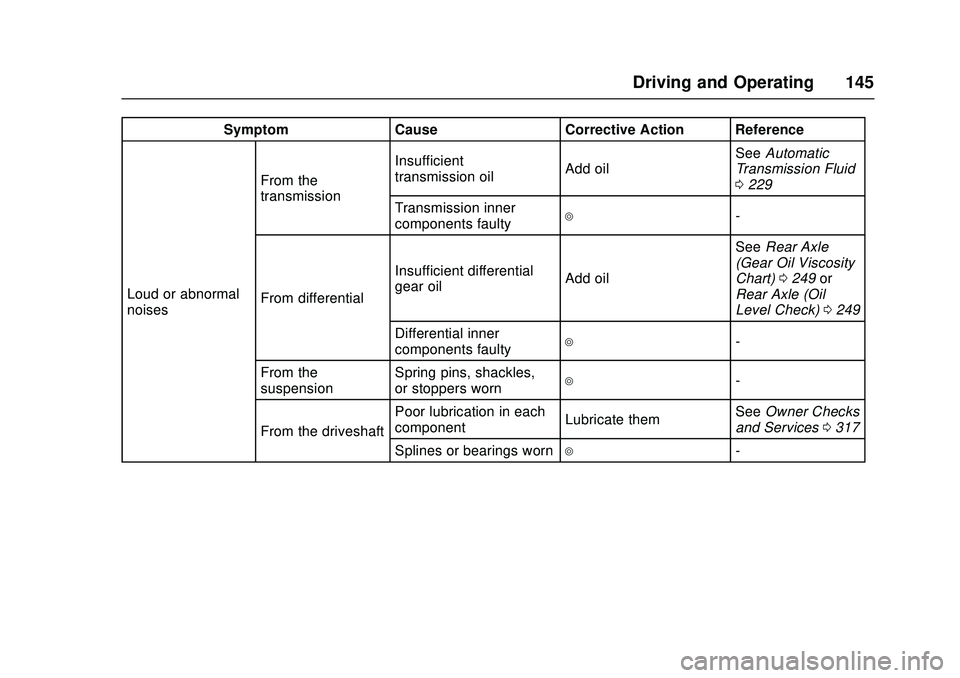
SymptomCauseCorrective Action Reference
Loud or abnormal
noises From the
transmission
Insufficient
transmission oil
Add oilSee
Automatic
Transmission Fluid
0 229
Transmission inner
components faulty
4-
From differential Insufficient differential
gear oil
Add oilSee
Rear Axle
(Gear Oil Viscosity
Chart) 0249 or
Rear Axle (Oil
Level Check) 0249
Differential inner
components faulty
4-
From the
suspension Spring pins, shackles,
or stoppers worn
4-
From the driveshaft Poor lubrication in each
component
Lubricate themSee
Owner Checks
and Services 0317
Splines or bearings worn
4-
Page 148 of 358
Chevrolet Low Cab Forward Owner Manual (GMNA-Localizing-U.S.-
11254764) - 2018 - crc - 12/5/16
Driving and Operating 147
If There is a Fuel Leak
{Danger
Leaking fuel from the vehicle is
dangerous due to possible
combustion or explosion. Stop the
engine immediately.
You and others could be seriously
injured or killed.
Starting and
Operating
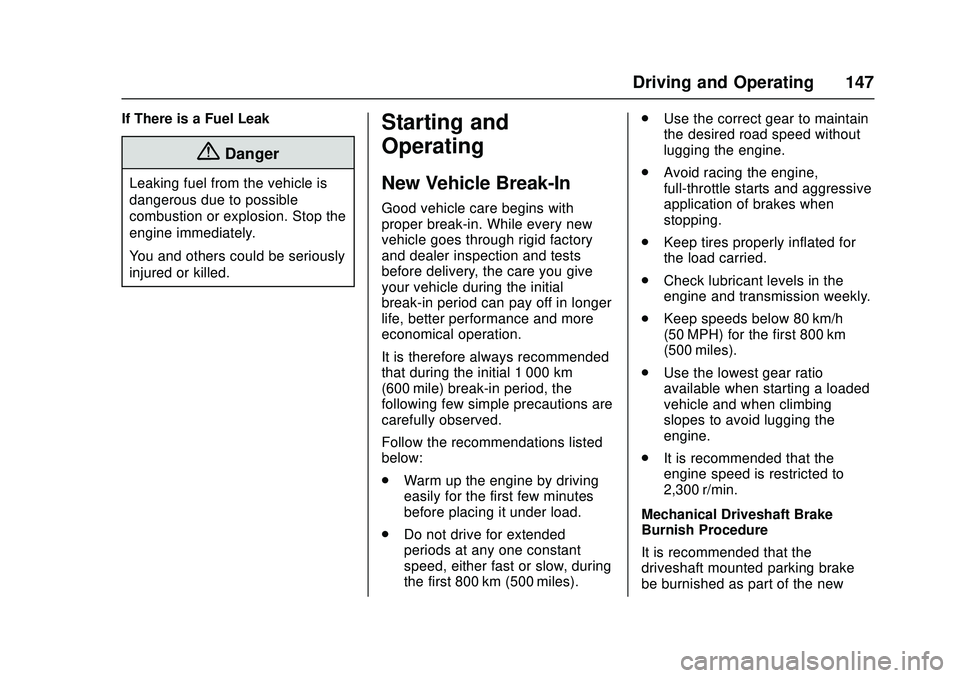
New Vehicle Break-In
Good vehicle care begins with
proper break-in. While every new
vehicle goes through rigid factory
and dealer inspection and tests
before delivery, the care you give
your vehicle during the initial
break-in period can pay off in longer
life, better performance and more
economical operation.
It is therefore always recommended
that during the initial 1 000 km
(600 mile) break-in period, the
following few simple precautions are
carefully observed.
Follow the recommendations listed
below:
.Warm up the engine by driving
easily for the first few minutes
before placing it under load.
. Do not drive for extended
periods at any one constant
speed, either fast or slow, during
the first 800 km (500 miles). .
Use the correct gear to maintain
the desired road speed without
lugging the engine.
. Avoid racing the engine,
full-throttle starts and aggressive
application of brakes when
stopping.
. Keep tires properly inflated for
the load carried.
. Check lubricant levels in the
engine and transmission weekly.
. Keep speeds below 80 km/h
(50 MPH) for the first 800 km
(500 miles).
. Use the lowest gear ratio
available when starting a loaded
vehicle and when climbing
slopes to avoid lugging the
engine.
. It is recommended that the
engine speed is restricted to
2,300 r/min.
Mechanical Driveshaft Brake
Burnish Procedure
It is recommended that the
driveshaft mounted parking brake
be burnished as part of the new
Page 154 of 358
Chevrolet Low Cab Forward Owner Manual (GMNA-Localizing-U.S.-
11254764) - 2018 - crc - 12/5/16
Driving and Operating 153
To prevent the battery from going
dead, turn the engine control switch
to the ACC or LOCK position after
stopping the engine. If you leave the
vehicle for an extended period of
time, place the engine control switch
in the LOCK position.
Let the engine idle for 3 minutes
before shutting off the engine. This
allows the turbocharger to slow
down while keeping the bearings
lubricated.
If the Vehicle Has Not Been Used
for a Long Period
If a diesel vehicle has been
standing for an extended period of
time, the turbocharger bearings
should be pre-lubricated prior to
starting. See your authorized dealer
for more detailed information.
Before using a vehicle that has not
been driven for a long period, check
the engine and transmission for oil
leakage, and make sure the oil is at
the required levels. If there is
insufficient oil, it will not adequately
reach and lubricate components,
and a breakdown will result.Start the engine and allow it to idle
for at least five minutes. Check for
abnormal noises.
For instructions on warming up the
engine, refer to
“Starting the Engine”
previously in this section.
If one year has passed since the
diesel exhaust fluid (DEF) in the
DEF tank was added, the DEF in
the tank should be replaced. Be
careful not to inhale the ammonia
odor when replacing the DEF. Also,
please contact your nearest dealer
about the replacement work.
Operating Temperature
Recommendations for Warming
Up the Engine
The engine is sufficiently warmed
up when the needle of the engine
coolant temperature gauge starts
to move.
Do not race the engine or quickly
accelerate before the engine has
sufficiently warmed up. Oil would
not have adequately reached and
lubricated components, and a
breakdown may result. The exhaust pipe becomes
extremely hot while the engine is
idling. Before warming up the
engine, make sure there is no
flammable material, such as grass,
waste paper, oil, or old tires near the
exhaust pipe.
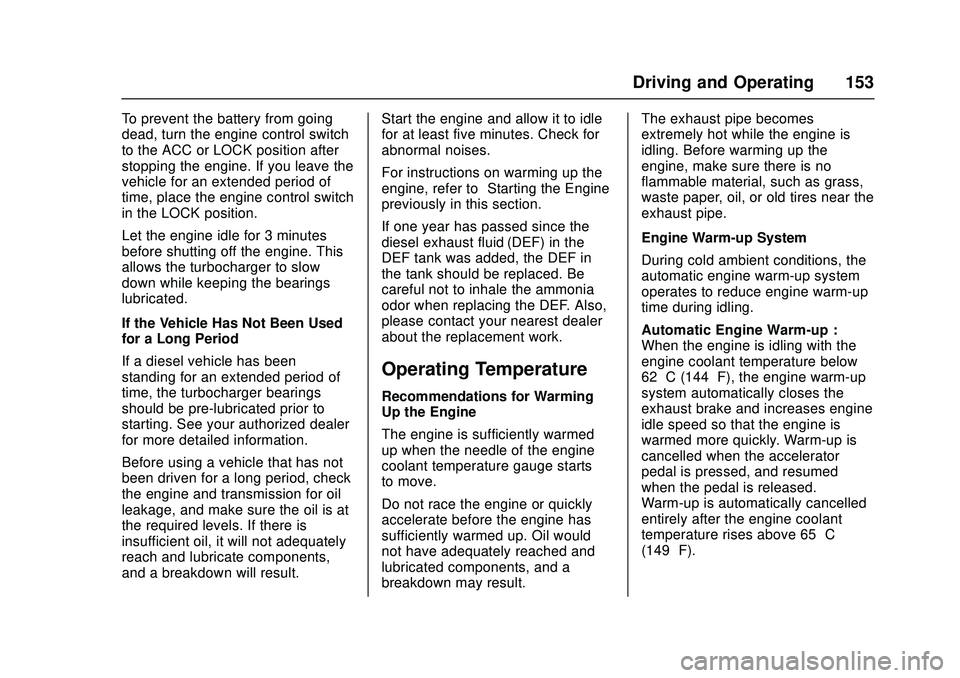
Engine Warm-up System
During cold ambient conditions, the
automatic engine warm-up system
operates to reduce engine warm-up
time during idling.
Automatic Engine Warm-up :
When the engine is idling with the
engine coolant temperature below
62 °C (144 °F), the engine warm-up
system automatically closes the
exhaust brake and increases engine
idle speed so that the engine is
warmed more quickly. Warm-up is
cancelled when the accelerator
pedal is pressed, and resumed
when the pedal is released.
Warm-up is automatically cancelled
entirely after the engine coolant
temperature rises above 65 °C
(149 °F).