reset CHEVROLET LOW CAB FORWARD 2018 Owner's Manual
[x] Cancel search | Manufacturer: CHEVROLET, Model Year: 2018, Model line: LOW CAB FORWARD, Model: CHEVROLET LOW CAB FORWARD 2018Pages: 358, PDF Size: 6.32 MB
Page 72 of 358

Chevrolet Low Cab Forward Owner Manual (GMNA-Localizing-U.S.-
11254764) - 2018 - crc - 12/5/16
Instruments and Controls 71
Speedometer
The speedometer shows the
vehicle's speed in either kilometers
per hour (km/h) or miles per
hour (mph).
Odometer
The odometer shows how far the
vehicle has been driven, in either
kilometers or miles.
Each time the reset knob is pressed
with the engine control switch in the
ON position, the odometer/trip meter
shows ODO, TRIP A, and TRIP B in
this sequence. With the key
removed, the odometer and trip
meter continue to indicate for about
five minutes.
Odometer Check Switch
Press the Odometer Check switch
to display the odometer and trip
meter mileage after the key is
turned off. The fuel gauge will also
operate when this switch is pressed.
The DIC and some lights will
illuminate on the instrument panel.
Trip Odometer
The trip odometer shows how far
the vehicle has been driven since
the trip odometer was last reset.
Press the trip odometer reset stem
next to the odometer to switch
between the odometer and trip
odometer.
To reset the trip odometer to zero,
press and hold the trip odometer
reset stem while TRIP A or TRIP B
is displayed. The engine control
switch should be in the ON position.When the battery is disconnected,
TRIP A and TRIP B will be reset to
zero. The per trip fuel economy is
also reset by the TRIP B reset. See
Driver Information Center (DIC)
0
82.
When you turn the engine control
switch to the ON position, the
odometer/trip odometer shows what
was displayed the last time the
engine control switch was turned to
LOCK or ACC.
To set the odometer to display each
time you turn the engine control
switch to the ON position, turn the
engine control switch to LOCK or
ACC while the odometer is
displayed. With the reset stem
pressed, turn the engine control
switch to the ON position and then
within three seconds, turn the
engine control switch back to the
LOCK or ACC position. Follow the
same procedure to cancel the
setting.
Page 84 of 358
Chevrolet Low Cab Forward Owner Manual (GMNA-Localizing-U.S.-
11254764) - 2018 - crc - 12/5/16
Instruments and Controls 83
2. Automatic transmission shiftindicator
3. Diesel Exhaust Fluid (DEF) gauge
{Warning
Warning or indicator lights
indicated on the DIC can be
temporarily cleared (for
60 seconds) by pressing the DIC
selector once. However, if the
warning light you have cleared is
an engine overheat warning or
other critical circumstance, never
continue driving without taking the
necessary actions. Otherwise,
you will be in danger of vehicle
breakdown or accident. Should
any of the critical warning lights
come on, immediately contact the
nearest dealer.
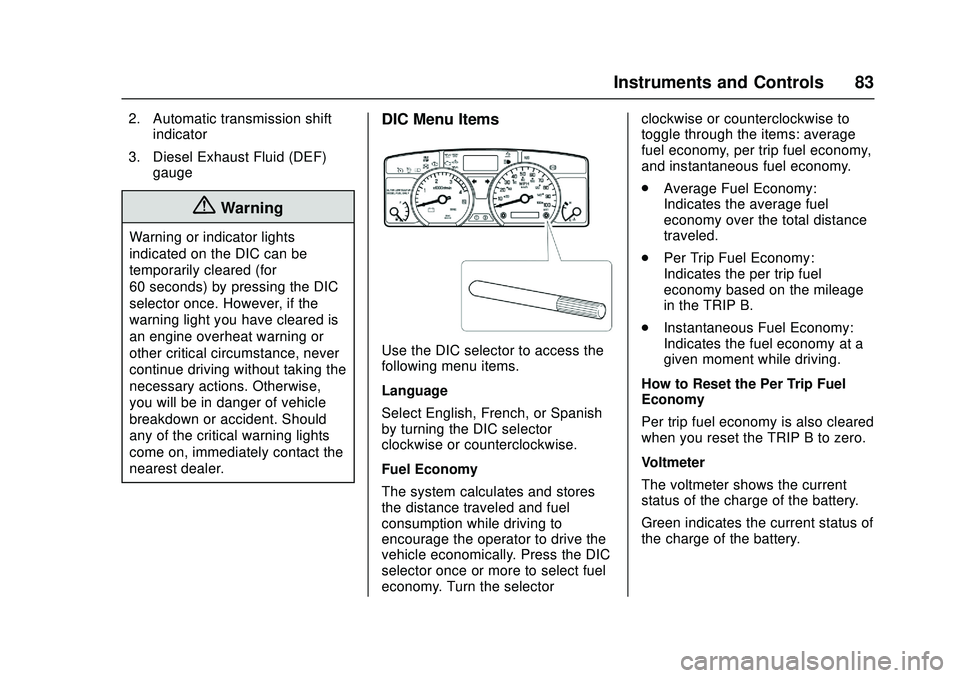
DIC Menu Items
Use the DIC selector to access the
following menu items.
Language
Select English, French, or Spanish
by turning the DIC selector
clockwise or counterclockwise.
Fuel Economy
The system calculates and stores
the distance traveled and fuel
consumption while driving to
encourage the operator to drive the
vehicle economically. Press the DIC
selector once or more to select fuel
economy. Turn the selector clockwise or counterclockwise to
toggle through the items: average
fuel economy, per trip fuel economy,
and instantaneous fuel economy.
.
Average Fuel Economy:
Indicates the average fuel
economy over the total distance
traveled.
. Per Trip Fuel Economy:
Indicates the per trip fuel
economy based on the mileage
in the TRIP B.
. Instantaneous Fuel Economy:
Indicates the fuel economy at a
given moment while driving.
How to Reset the Per Trip Fuel
Economy
Per trip fuel economy is also cleared
when you reset the TRIP B to zero.
Voltmeter
The voltmeter shows the current
status of the charge of the battery.
Green indicates the current status of
the charge of the battery.
Page 86 of 358
Chevrolet Low Cab Forward Owner Manual (GMNA-Localizing-U.S.-
11254764) - 2018 - crc - 12/5/16
Instruments and Controls 85
display. Complete the resetting by
pressing and holding the DIC
selector for more than two seconds.
To cancel the setting procedure,
press the DIC selector once. The
display will go back to the previous
screen.
Resetting/Setting the Change
Interval (Odometer Reading)
Engine Oil and Filter Light :On
the DIC, go to the engine oil and
filter light. Enter the resetting screen
by pressing and holding the DIC
selector for more than two seconds.
Complete the resetting by pressing
and holding the DIC selector for
more than two seconds.
Transmission and Differential
Gear Oil Light, Fuel Filter Light,
Power Steering Fluid Light, and
Tire Rotation Light : On the DIC,
go to the particular maintenance
item to reset/adjust. Enter the
setting change screen by pressing
and holding the DIC selector. Set
the change interval by turning the
DIC selector. (Transmission and
Differential Oil, Steering Fluid, and
Tire Rotation Only). Turn clockwise to increase distance and
counterclockwise to decrease
distance. The distance increases
and decreases by 4,000 km
(2,500 mi) increments. Complete the
resetting by pressing and holding
the DIC selector.
Transmission and Differential Gear
Oil and Power Steering Fluid: Initial
value: 48,000 km (30,000 mi).
Adjustable minimum value:
32,000 km (20,000 mi). Adjustable
maximum value: 48,000 km
(30,000 mi).
Tire Rotation: Initial value: OFF.
Adjustable minimum value:
6,000 km (4,000 mi). Adjustable
maximum value: 62,000 km
(39,000 mi).
Starter Indicator Light :
On the
DIC, go to the starter indicator light.
Enter the resetting screen by
pressing and holding the DIC
selector for more than ten seconds.
Complete the resetting by pressing
and holding the DIC selector for
more than ten seconds. If you want to cancel the setting
procedure, press the DIC selector
once. The display will go back to the
previous screen.
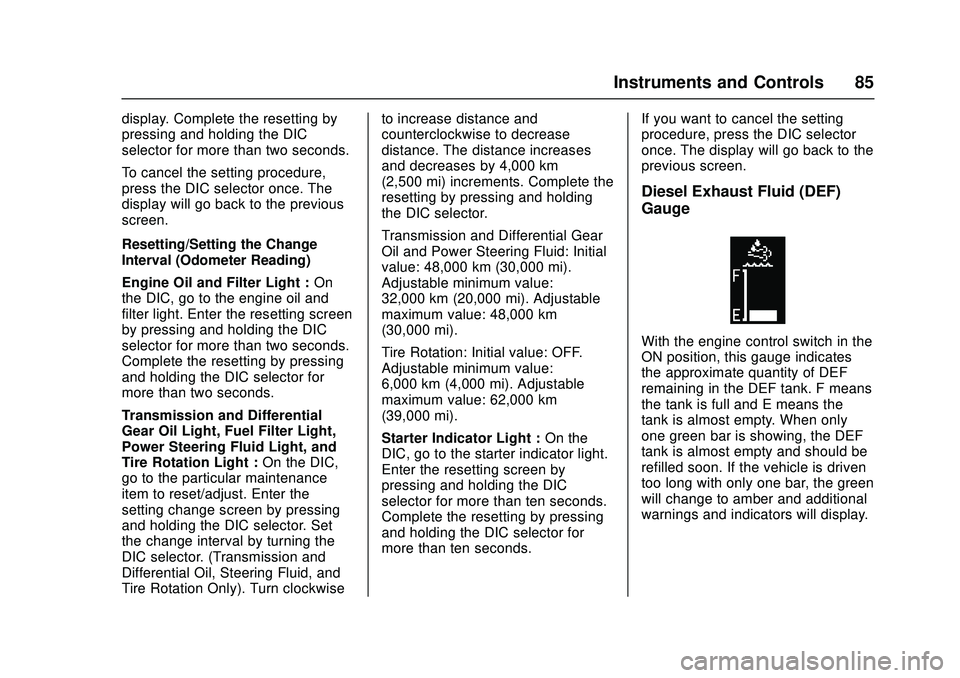
Diesel Exhaust Fluid (DEF)
Gauge
With the engine control switch in the
ON position, this gauge indicates
the approximate quantity of DEF
remaining in the DEF tank. F means
the tank is full and E means the
tank is almost empty. When only
one green bar is showing, the DEF
tank is almost empty and should be
refilled soon. If the vehicle is driven
too long with only one bar, the green
will change to amber and additional
warnings and indicators will display.
Page 91 of 358

Chevrolet Low Cab Forward Owner Manual (GMNA-Localizing-U.S.-
11254764) - 2018 - crc - 12/5/16
90 Instruments and Controls
MAINTENANCE ON or
MAINTENANCE OFF
This indicator displays and hides
maintenance items. When
MAINTENANCE ON is displayed,
maintenance items will be
displayed. When MAINTENANCE
OFF is displayed, maintenance
items will not be displayed.
When MAINTENANCE OFF is
displayed, there will be no display of
maintenance items such as rotation
intervals or replacement intervals
even when such intervals arrive.
ENG OIL & FILTER
When this message and light
display green, it shows the distance
remaining until the next engine oil
and filter change. When this
message displays amber, the next
change of engine oil and filter is
near or has been reached.
T/M & DIFF OIL
When this message and light
display green, it shows the distance
remaining until the next
transmission oil and differential oil
change. When this messagedisplays amber, the next change of
transmission oil and differential oil is
near or has been reached.
FUEL FILTER
When this message and light
display green, it shows the distance
remaining until the next fuel filter
change. When this message
displays amber, the next change of
fuel filter is near or has been
reached.
STEERING OIL
When this message and light
display green, it shows the distance
remaining until the next power
steering fluid change. When this
message displays amber, the next
change of power steering fluid is
near or has been reached.
TIRE ROTATION
When this message and light show
green with OFF, it means the
vehicle has been shipped from the
factory with no tire rotation interval
set. When this message displays
green it has the distance until the
next tire rotation displayed. When
this message displays amber the
next tire rotation is near or has
already been reached.
STARTER
When this message and light is
green, it displays the number of
engine starts remaining until a
starter motor is replaced. When this
message and light is amber, it
displays when the time for a starter
motor replacement is near or has
already been reached.
For the starter indicator light, the
displayed color will change from
green to amber when remaining
time is below 0 times and the
screen is selected.
For resetting or setting maintenance
data intervals, see
Driver
Information Center (DIC) 082.
Hour Meter
HOUR METER
This message and light indicate how
many hours the engine has been
run. The figure(s) on the left side of
Page 100 of 358
Chevrolet Low Cab Forward Owner Manual (GMNA-Localizing-U.S.-
11254764) - 2018 - crc - 12/5/16
Infotainment System 99
Adjusting Treble1. Press the "FUNC" button to display "TRE."
2. Press the "TUNE/TRACK" button ("
y z") while "TRE" is
displayed to adjust the treble
level.
y: Level will increase every
time the button is pressed.
z: Level will decrease every
time the button is pressed.
It can be adjusted in the range
of -5 . -4 . -3 . -2 . -1 . 0 . 1 . 2 .
3 . 4 . 5.
Default setting is 0.
Adjusting Fader 1. Press the "FUNC" button to display "FAD."
2. Press the "TUNE/TRACK" button ("
y z") while "FAD" is
displayed to adjust the front
and rear speaker volume.
y: Front speaker volume will
increase every time the button
is pressed.
z: Rear speaker volume will
increase every time the button
is pressed.
It can be adjusted in the range
of R7 . R6 . R5 . R4 . R3 . R2 .
R1 . 0 . F1 . F2 . F3 . F4 . F5 .
F6 . F7.
Default setting is 0.
Adjustment of rear speaker volume
is not possible if there are no rear
speakers installed.
Adjusting Balance 1. Press the "FUNC" button to display "BAL."
2. Press the "TUNE/TRACK" button ("
y z") while "BAL" is
displayed to adjust the balance
of volume from the left and
right speakers.
y: Right speaker volume will
increase every time the button
is pressed.
z: Left speaker volume will
increase every time the button
is pressed. It can be adjusted in the range
of L7 . L6 . L5 . L4 . L3 . L2 .
L1 . 0 . R1 . R2 . R3 . R4 . R5 .
R6 . R7.
Default setting is 0.
Switching the Time Display 1. Press the "FUNC" button for less than 1 second to
display "CLK."
2. Press the "TUNE/TRACK" button ("
y z") while “CLK”is
displayed and select
“ON"/"OFF."
"ON": Clock is displayed.
"OFF": Clock is not displayed.
When the clock display is "ON," it is
displayed prioritized over the audio
display (radio frequency, song
number, or elapsed time).
When the power source is
interrupted by battery disconnection,
the time of the clock will be reset.
Setting the Hour 1. Press the "FUNC" button to display "CLK" and make the
clock display (hours) blink.
Page 101 of 358
Chevrolet Low Cab Forward Owner Manual (GMNA-Localizing-U.S.-
11254764) - 2018 - crc - 12/5/16
100 Infotainment System
2. Press the "TUNE/TRACK"button ("
y z") while the
clock display (hours) is blinking
to adjust the time (hours).
y: Time (hours) will increase
every time the button is
pressed.
z: Time (hours) will decrease
every time the button is
pressed.
Setting the Minutes 1. Press the "FUNC" button to display "CLK" and make the
clock display (minutes) blink.
2. Press the "TUNE/TRACK" button ("
y z") while the
clock display (minutes) is
blinking to adjust the time
(minutes).
y: Time (minutes) will
increase every time the button
is pressed.
z: Time (minutes) will
decrease every time the button
is pressed.
Tuner Mode Operations
Tuning
1. Press the "MODE" button when the power is on to select either
AM radio or FM radio.
It is switched to AM radio when
"AM" is displayed, and FM
radio when "FM" is displayed.
2. Press the "TUNE" button ("
y z") for less than
2 seconds to select a radio
station manually. The display
should be checked in order to
adjust the frequency because
AM radio frequency will range
from 10 kHz or FM radio
frequency will range from
0.2 MHz.
Press the "TUNE" button
("
y z") for 2 seconds or
longer to select a radio station
automatically. The automatic
tuning will stop after detecting
a receivable station. Press the
"TUNE" button ("
y z") again
to cancel this function. When the displayed frequency
reaches the highest frequency, it will
return to the lowest frequency.
When the lowest frequency has
been reached, it will return to the
highest frequency.
Program your preferred radio
stations to the preset channels in
advance to conveniently use while
driving.
Reception frequency :
AM 530 - 1710 kHz (10 kHz step)
FM 87.7 - 107.9 MHz (0.2
MHz step)
Calling Out Preset Channels
A maximum of 6 stations can be
programmed and called out in the
"Preset" channels for each of the
FM radio and AM radio.
1. Press the "CH" button for less than 2 seconds.
2. Press the "TUNE" button ("
y z") and select the station
programmed in the preset
channels.
Page 102 of 358
Chevrolet Low Cab Forward Owner Manual (GMNA-Localizing-U.S.-
11254764) - 2018 - crc - 12/5/16
Infotainment System 101
As an example, "CH1" is
displayed.
The radio stations in memory are
erased when the power supply is
interrupted to replace the battery or
fuses.
Programming Preset Channels 1. Display the channel number you wish to program.
2. Press the "CH" button for 2 seconds or longer.
The frequency display will
blink.
3. Press the "TUNE" button ("
y z") to select the
frequency you wish to program.
4. Press the "CH" button for 2 seconds or longer.
Once it has been set as a
preset channel, the frequency
display will stop blinking.
Radio Reception
Usually, a problem with radio
reception does not mean there is a
problem with your radio - it is just the normal result of conditions
outside the vehicle. For example,
nearby buildings and terrain can
interfere with FM reception. Power
lines or telephone wires can
interfere with AM signals.
And of course, radio signals have a
limited range. The farther you are
from a station, the weaker its signal
will be. In addition, reception
conditions change constantly as
your vehicle moves.
Here are some common reception
problems that probably do not
indicate a problem with your radio.
FM Transmissions
Fading and drifting stations -
Generally, the effective range of FM
is about 40 km (25 miles). Once
outside this range, you may notice
fading and drifting, which increase
with the distance from the radio
transmitter. They are often
accompanied by distortion.
Multi-path - FM signals are
reflective, making it possible for two
signals to reach your antenna at the
same time. If this happens, the
signals will cancel each other out,
causing a momentary flutter or loss
of reception.
Static and fluttering - These occur
when signals are blocked by
buildings, trees, or other large
objects. Increasing the bass level
may reduce static and fluttering.
Station swapping - If the FM signal
you are listening to is interrupted or
weakened, and there is another
strong station nearby on the FM
band, your radio may tune in the
second station until the original
signal can be picked up again.
AM Transmissions
Fading - AM broadcasts are
reflected by the upper atmosphere -
especially at night. These reflected
signals can interfere with those
received directly from the radio
station, causing the radio station to
sound alternately strong and weak.
Station interference - When a
reflected signal and a signal
received directly from a radio station
are very nearly the same frequency,
Page 174 of 358

Chevrolet Low Cab Forward Owner Manual (GMNA-Localizing-U.S.-
11254764) - 2018 - crc - 12/5/16
Driving and Operating 173
Warning (Continued)
Do not add substances such as
gasoline or diesel fuel to the DEF
tank. You and others could be
seriously injured.
Caution
When opening the DEF tank cap,
be careful not to let dirt or other
foreign matter enter inside the
DEF tank. Intrusion of foreign
matter can cause a clogging of
the filter or affect the quality of
DEF, which may result in a SCR
system failure.
If DEF is spilled on the body or
frame, it may cause generation of
rust, so wipe it off and then rinse
it away with water.
When DEF dries it will leave a
crystalline residue, this condition is
normal. Wash with water or wipe
away the residue to prevent it from
entering the DEF tank. Adding DEF in Cold Weather
DEF freezes at low temperature but
the engine coolant circulates to
thaw the DEF tank and to prevent
DEF from freezing. Vehicle can be
driven normally when DEF is frozen.
If the refill diesel exhaust fluid (DEF)
warning light is on and the
remaining DEF in the DEF tank is
frozen, the warning lights, indicator
lights and restriction will not be
canceled until the DEF thaws even
if the DEF tank is refilled.
It is not recommended parking the
vehicle for long periods with the refill
diesel exhaust fluid (DEF) warning
light on in cold weather. The DEF
gauge will not register correctly
should the DEF freeze in this
condition causing the DEF low level
warning system not to reset when
DEF is added. Take the following
actions to avoid this condition in
cold weather:
1. Refill the DEF as soon as possible after parking the
vehicle. 2. Turn the engine control switch
to the ON position from the
LOCK position.
3. Wait for the warning buzzers and warning lights to turn off.
4. If the buzzer does not stop, return the engine control switch
back to the LOCK position and
add more DEF, and then start
over from step (2) above.
5. Turn the engine control switch to the LOCK position.
The DEF freezes at approximately
−11 °C (12 °F).
In cold weather, when the vehicle is
left without performing these actions
and the DEF tank freezes, the low
DEF level warnings and indicators
may not turn off when DEF is added
until after the tank defrosts.
Make sure to stop the engine before
adding the DEF. See Warning
Buzzers 091.
When DEF Freezes
Engine coolant circulates through
the DEF tank to thaw it when frozen
and prevent it from freezing while
Page 175 of 358

Chevrolet Low Cab Forward Owner Manual (GMNA-Localizing-U.S.-
11254764) - 2018 - crc - 12/5/16
174 Driving and Operating
the engine is running. The vehicle
can be driven normally when DEF is
frozen in the DEF tank.
If the Refill DEF warning light is on
and the remaining DEF in the DEF
tank is frozen, the vehicle low level
warning system cannot be reset by
adding DEF. The DEF gauge will not
register correctly should the
remaining DEF freeze at this level.
Move the vehicle to a location to
allow the DEF to thaw. Once the
DEF is thawed the DEF gauge
should read correctly allowing the
low level warning system to reset.
To avoid this condition follow the
instructions for Adding DEF in Cold
Weather.
{Warning
Do not warm up the DEF tank
using a burner, heater, etc. You
and others could be seriously
injured.DEF Storage
Seal the container and store it in an
indoor place with good ventilation
avoiding direct sunlight.
When storing DEF, the shelf life
varies depending on the room
temperature of the storage place.
For details, please contact the
distributor of the DEF.
For storage of DEF, seal the
container to prevent the moisture
from evaporating.
Even when DEF has been frozen,
its quality is maintained when it is
thawed. It can be used as it is.
To store or carry DEF, use the
original container in which the DEF
was kept at the time of purchase.
Also, if other containers are used,
prepare a clean container for
exclusive use, which can be a
polyethylene resin tank (PE) or
stainless steel container, and do not
introduce foreign matter such as
water or contamination. DEF Disposal
Do not dispose of DEF and the
empty container into lakes, marine
areas, rivers, etc. DEF must be
disposed of in a method conforming
to the regulatory requirements in
your state.
Selective Catalytic Reduction
(SCR) System
The Selective Catalytic Reduction
(SCR) system reduces nitrogen
oxide (NOx) emissions emitted from
a diesel engine. The SCR system
reduces NOx by adding (injecting)
Diesel Exhaust Fluid (DEF) into the
exhaust system and inducing a
reaction converting NOx into water
vapor and nitrogen.
The SCR system consists of the
DEF tank, DEF Control Unit, DEF
Supply Pump and Injector, and the
SCR Catalyst. It is important to keep
a good supply of DEF in the DEF
tank at all times. Monitor the DEF
gauge to be sure the DEF tank level
does not become too low.
Page 206 of 358
Chevrolet Low Cab Forward Owner Manual (GMNA-Localizing-U.S.-
11254764) - 2018 - crc - 12/5/16
Driving and Operating 205
Press the cruise control main switch
again to turn the cruise control
system off. The cruise control main
indicator light will go out.
The cruise control set speed is
canceled in the following cases:
.When the brake pedal is
pressed.
. When the selector lever is
shifted to the N position.
. When cruising speed is
approximately 27 km/h (17
MPH). *
. When the vehicle speed
decreases more than 20% below
your set speed.
. When the cruise control main
switch is turned off. *
. When the engine control switch
is turned to the LOCK position. *
. When trouble develops in the
system. *
Memory speed is eliminated. *
When you do not use the cruise
control, be sure to place the cruise
control main switch into off. When you place the engine control
switch into ACC, place the cruise
control main switch into off, then
reset the cruise control if you want
to use the cruise control again.
Using Cruise Control on Hills
How well your cruise control will
work on hills depends upon your
speed, load and the steepness of
the hills. When going up steep hills,
you may want to step on the
accelerator pedal to maintain your
speed. When going downhill, you
may have to brake or shift to a lower
gear to keep your speed down. Of
course, applying the brake takes
you out of cruise control. Many
drivers find this to be too much
trouble and do not use cruise
control on steep hills.
When Returning to Cruise Control
Driving
If you have canceled cruise control
under the following conditions, you
can return to the cruise control
driving condition before cancellation
when you operate and release the
cruise control resume switch. The
moment the resume switch is
released, the cruise set indicator
light comes on.
.
When pressing the brake pedal.
. When the selector lever is
shifted to the N position.
When the vehicle speed decreases
to 40 km/h (25 MPH) or less, it is
not possible to return to the cruise
control driving. You must reset the
cruise control.
If the cruise control is turned back
on while the vehicle speed exceeds
what is set prior to the cancellation
of cruise control, the set vehicle
speed cannot be changed until the
vehicle reaches to the set speed.
Also, the vehicle speed must be 1
MPH below the previously set
vehicle speed.
If you hold the switch at the +RES
position, the vehicle will keep going
faster until you release the switch or
apply the brake. So unless you want
to go faster, do not hold the switch
at the +RES position.