fuel CHEVROLET LOW CAB FORWARD 2019 User Guide
[x] Cancel search | Manufacturer: CHEVROLET, Model Year: 2019, Model line: LOW CAB FORWARD, Model: CHEVROLET LOW CAB FORWARD 2019Pages: 382, PDF Size: 5.95 MB
Page 85 of 382
Chevrolet Low Cab Forward 5.2L Diesel Engine 4500/5500 Series (GMNA-
Localizing-U.S.-12407814) - 2019 - crc - 12/13/17
84 Instruments and Controls
Red means the battery voltage is
too low or too high. If the voltmeter
sign appears in red, have the
vehicle checked and serviced at
your dealer. During or immediately
after the engine is started, a red
abnormal L voltage may display on
the DIC. If the warning disappears
after the engine has started, there is
no problem with the battery voltage.
Calendar and Clock
{Warning
The calendar and clock can be
set only while the vehicle is
stationary. When setting the
calendar or clock, park your
vehicle in a safe place where
stopping or parking is permitted
and that is well clear of traffic.
Press the DIC selector once or
more to select the calendar. Press
and hold the DIC selector to enter
the clock setting screen. The year
segment will flash. Turn the DIC
selector clockwise or
counterclockwise to increase or decrease the year. While in the year
setting screen, press the DIC
selector once to switch to the month
setting screen. The month segment
will flash. Use the same method to
set the month. While in the month
setting screen, press the DIC
selector again to switch to the day
setting mode. Adjust the day using
the selector.
Press and hold the DIC selector to
complete the calendar setting.
When complete, the normal
calendar display will resume. Use
this same method to set the hour
and minute when in the clock setting
screen.
Dimmer
The brightness of the DIC can be
adjusted while the light control
switch is off. Select this screen and
turn the DIC selector clockwise or
counterclockwise to brighten or dim
the illumination. The brightness is
linked to the adjustment of the
instrument panel light level control
while the light control switch is on.
See
Instrument Panel Illumination
Control 095.
Warning Lights and Messages
.
Engine Overheat Warning Light
. Low Coolant Warning Light
. Water Separator Warning Light
. Air Cleaner Light
. Low Fuel Warning Light
. Regeneration Warning Lights
. Exhaust System Warning Light
. Refill DEF Warning Light
. DIC Errors
. Maintenance Data
. Hour Meter
See Vehicle Messages 086.
Maintenance Data Functions
Display/Not Display the
Maintenance Data Function
Maintenance Light: On the DIC, go
to the Maintenance Indicator Light.
Switch the display by pressing and
holding the DIC selector for more
than two seconds. Turn the DIC
selector clockwise or
counterclockwise to switch the
Page 86 of 382
Chevrolet Low Cab Forward 5.2L Diesel Engine 4500/5500 Series (GMNA-
Localizing-U.S.-12407814) - 2019 - crc - 12/13/17
Instruments and Controls 85
display. Complete the resetting by
pressing and holding the DIC
selector for more than two seconds.
To cancel the setting procedure,
press the DIC selector once. The
display will go back to the previous
screen.
Resetting/Setting the Change
Interval (Odometer Reading)
Engine Oil and Filter Light :On
the DIC, go to the engine oil and
filter light. Enter the resetting screen
by pressing and holding the DIC
selector for more than two seconds.
Complete the resetting by pressing
and holding the DIC selector for
more than two seconds.
Transmission and Differential
Gear Oil Light, Fuel Filter Light,
Power Steering Fluid Light, and
Tire Rotation Light : On the DIC,
go to the particular maintenance
item to reset/adjust. Enter the
setting change screen by pressing
and holding the DIC selector. Set
the change interval by turning the
DIC selector. (Transmission and
Differential Oil, Steering Fluid, and Tire Rotation Only). Turn clockwise
to increase distance and
counterclockwise to decrease
distance. The distance increases
and decreases by 4,000 km
(2,500 mi) increments. Complete the
resetting by pressing and holding
the DIC selector.
Transmission and Differential Gear
Oil and Power Steering Fluid: Initial
value: 48,000 km (30,000 mi).
Adjustable minimum value:
32,000 km (20,000 mi). Adjustable
maximum value: 48,000 km
(30,000 mi).
Tire Rotation: Initial value: OFF.
Adjustable minimum value:
6,000 km (4,000 mi). Adjustable
maximum value: 62,000 km
(39,000 mi).
Starter Indicator Light :
On the
DIC, go to the starter indicator light.
Enter the resetting screen by
pressing and holding the DIC
selector for more than ten seconds.
Complete the resetting by pressing
and holding the DIC selector for
more than ten seconds. If you want to cancel the setting
procedure, press the DIC selector
once. The display will go back to the
previous screen.
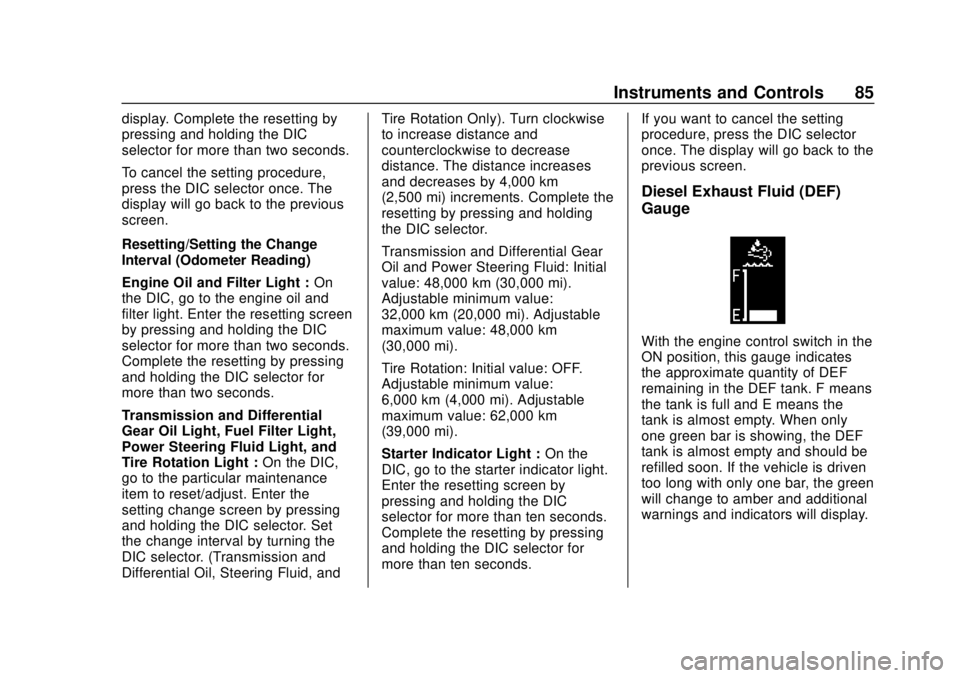
Diesel Exhaust Fluid (DEF)
Gauge
With the engine control switch in the
ON position, this gauge indicates
the approximate quantity of DEF
remaining in the DEF tank. F means
the tank is full and E means the
tank is almost empty. When only
one green bar is showing, the DEF
tank is almost empty and should be
refilled soon. If the vehicle is driven
too long with only one bar, the green
will change to amber and additional
warnings and indicators will display.
Page 88 of 382

Chevrolet Low Cab Forward 5.2L Diesel Engine 4500/5500 Series (GMNA-
Localizing-U.S.-12407814) - 2019 - crc - 12/13/17
Instruments and Controls 87
Low Coolant Warning Light
LOW COOLANT
If this message and light come on,
the system is low on engine coolant
and the engine may overheat.
A warning tone also sounds. If this
light comes on while driving, stop
the vehicle immediately and check
the cooling system for leaks. See
Engine Coolant0253 and have the
vehicle serviced by your dealer. This
light will also activate the engine
alarm and automatic shutdown
system.
See Engine Alarm and Automatic
Shutdown 0173 andEngine
Shutdown Warning Light 080.
Water Separator (Fuel Filter)
Warning Light
WATER SEPARATOR
This message displays and a
warning light appears when the
level in the water separator on the
fuel line is beyond the specified
level. Drain water following the
instructions in the Water in Fuel section and make sure the warning
light goes out. See
Water in Fuel
0 231.
If you continue driving with the
message displayed, the fuel
injection system may fail. See Water
in Fuel 0231.
Air Cleaner Light
CHECK AIR FILTER
This message displays and a
warning light appears when the next
air cleaner element service interval
is near or has already been
reached.
Replace the air cleaner element.
See Engine Air Cleaner/Filter 0253.
Low Fuel Warning Light
LOW FUEL
This message displays and a
warning light appears when the fuel
level in the tank becomes too low
while the engine is running. Add fuel
at the earliest possible time. If the
vehicle runs out of fuel, air bleeding
procedure must be performed. See
Fuel for Diesel Engines 0227,
Fuel Gauge 071, and Running Out
of Fuel 0233.
Regeneration Required
Warning Light
REGEN. REQUIRED
This light (amber) comes on when
Running regeneration or Switch
regeneration is required. When this
light comes on, perform DPF
regeneration soon. If the engine
continues to run without performing
DPF regeneration, this light will
change color from amber to red.
If this light turns red, perform DPF
regeneration immediately. If you do
not perform DPF regeneration, the
check engine malfunction indicator
light and reduced engine power
indicator light will come on,
imposing performance restriction on
the vehicle. If this happens, the
vehicle must be serviced at your
dealer. See Diesel Particulate Filter
0 180.
Page 91 of 382
Chevrolet Low Cab Forward 5.2L Diesel Engine 4500/5500 Series (GMNA-
Localizing-U.S.-12407814) - 2019 - crc - 12/13/17
90 Instruments and Controls
MAINTENANCE ON or
MAINTENANCE OFF
This indicator displays and hides
maintenance items. When
MAINTENANCE ON is displayed,
maintenance items will be
displayed. When MAINTENANCE
OFF is displayed, maintenance
items will not be displayed.
When MAINTENANCE OFF is
displayed, there will be no display of
maintenance items such as rotation
intervals or replacement intervals
even when such intervals arrive.
ENG OIL & FILTER
When this message and light
display green, it shows the distance
remaining until the next engine oil
and filter change. When this
message displays amber, the next
change of engine oil and filter is
near or has been reached.
T/M & DIFF OIL
When this message and light
display green, it shows the distance
remaining until the next
transmission oil and differential oilchange. When this message
displays amber, the next change of
transmission oil and differential oil is
near or has been reached.
FUEL FILTER
When this message and light
display green, it shows the distance
remaining until the next fuel filter
change. When this message
displays amber, the next change of
fuel filter is near or has been
reached.
STEERING OIL
When this message and light
display green, it shows the distance
remaining until the next power
steering fluid change. When this
message displays amber, the next
change of power steering fluid is
near or has been reached.
TIRE ROTATION
When this message and light show
green with OFF, it means the
vehicle has been shipped from the
factory with no tire rotation interval
set. When this message displays
green it has the distance until thenext tire rotation displayed. When
this message displays amber the
next tire rotation is near or has
already been reached.
STARTER
When this message and light is
green, it displays the number of
engine starts remaining until a
starter motor is replaced. When this
message and light is amber, it
displays when the time for a starter
motor replacement is near or has
already been reached.
For the starter indicator light, the
displayed color will change from
green to amber when the display
reaches zero and the screen is
selected.
For resetting or setting maintenance
data intervals, see
Driver
Information Center (DIC) 082.
Page 139 of 382
Chevrolet Low Cab Forward 5.2L Diesel Engine 4500/5500 Series (GMNA-
Localizing-U.S.-12407814) - 2019 - crc - 12/13/17
138 Driving and Operating
Driving and
Operating
Driving Information
Driver Behavior . . . . . . . . . . . . . . . 139
Distracted Driving . . . . . . . . . . . . 139
Control of a Vehicle . . . . . . . . . . . 139
Braking . . . . . . . . . . . . . . . . . . . . . . . 143
Steering . . . . . . . . . . . . . . . . . . . . . . 149
Driving on Wet Roads . . . . . . . . 149
Hill and Mountain Roads . . . . . 150
Winter Driving . . . . . . . . . . . . . . . . 151
If the Vehicle Is Stuck . . . . . . . . 153
Emergencies(Troubleshooting) . . . . . . . . . . . 154
Emergencies (Disabled Vehicle) . . . . . . . . . . . . . . . . . . . . . 164
Starting and Operating
New Vehicle Break-In . . . . . . . . . 165
Pedals . . . . . . . . . . . . . . . . . . . . . . . . 166
Ignition Positions . . . . . . . . . . . . . 166
Starting and Stopping theVehicle . . . . . . . . . . . . . . . . . . . . . . 168
Operating Temperature . . . . . . . 171
Winter Cover . . . . . . . . . . . . . . . . . 172
Engine Heater . . . . . . . . . . . . . . . . 172 Engine Alarm and Automatic
Shutdown . . . . . . . . . . . . . . . . . . . 173
Idle Shutdown . . . . . . . . . . . . . . . . 174
High Idle System . . . . . . . . . . . . . 174
Engine Checks Before Operating . . . . . . . . . . . . . . . . . . . 175
Parking over Things That Burn . . . . . . . . . . . . . . . . . . . 176
Engine Exhaust
Engine Exhaust . . . . . . . . . . . . . . 177
Running the Vehicle WhileParked . . . . . . . . . . . . . . . . . . . . . . 179
Diesel Particulate Filter
Diesel Particulate Filter . . . . . . . 180
Diesel Exhaust Fluid
Diesel Exhaust Fluid . . . . . . . . . . 189
Automatic Transmission
Automatic Transmission . . . . . . 205
Selector Lever . . . . . . . . . . . . . . . . 214
Overdrive Off . . . . . . . . . . . . . . . . . 215
Brakes
Antilock BrakeSystem (ABS) . . . . . . . . . . . . . . . 216
Parking Brake . . . . . . . . . . . . . . . . 220
Exhaust Brake . . . . . . . . . . . . . . . . 222
Cruise Control
Cruise Control . . . . . . . . . . . . . . . . 223
Fuel
Fuel for Diesel Engines . . . . . . . 227
Biodiesel . . . . . . . . . . . . . . . . . . . . . 228
Cold Weather Operation . . . . . . 230
Water in Fuel . . . . . . . . . . . . . . . . . 231
Running Out of Fuel . . . . . . . . . . 233
Filling the Tank . . . . . . . . . . . . . . . 235
Conversions and Add-Ons
Add-On Electrical Equipment . . . . . . . . . . . . . . . . . . 236
Power Take-Off (PTO) . . . . . . . . 237
Page 142 of 382

Chevrolet Low Cab Forward 5.2L Diesel Engine 4500/5500 Series (GMNA-
Localizing-U.S.-12407814) - 2019 - crc - 12/13/17
Driving and Operating 141
Never Stop the Engine While
Driving
{Warning
Do not move the engine control
switch away from the "ON"
position while the vehicle is being
driven.
If the engine stops while the
vehicle is moving, the brake
booster does not work, and the
brakes would not work properly.
The engine could also be
damaged.
Stopping the engine while driving
would be extremely dangerous
because the power steering
would stop working, making the
steering wheel extremely hard
to turn.
Stopping the engine while driving
would be extremely dangerous
because the warning lights,(Continued)
Warning (Continued)
indicator lights and other
electrical circuitry would
completely stop working.
Placing the engine control switch
in the "LOCK" position while
driving would be extremely
dangerous because the key could
come out, causing the steering
wheel to lock so that you could
not turn it.
You and others could be seriously
injured.
Avoid Unnecessary Idling of
the Engine
If the engine idles too long, the
engine coolant temperature will fall
below the operating range. Low
engine operating temperature
causes several conditions that are
harmful to engine operation and life.
Incomplete combustion of fuel in an
engine that is not fully warmed-up
causes crankcase dilution and
forms lacquer and gummy deposits on valves, pistons, and rings. It also
causes rapid accumulation of
sludge within the engine.
Driving at Night
Nighttime driving is more dangerous
than daytime driving because the
field of view is narrower. Keep your
speed down, and maintain an ample
headway distance.
Metallic Plinking Sound from
the Muffler
Immediately after stopping the
engine, you may hear a metallic
plinking sound from the muffler. This
sound occurs as the muffler cools
down and contracts. It does not
indicate an abnormality or
breakdown.
Page 144 of 382
Chevrolet Low Cab Forward 5.2L Diesel Engine 4500/5500 Series (GMNA-
Localizing-U.S.-12407814) - 2019 - crc - 12/13/17
Driving and Operating 143
fluid leakage, fuel leakage and
component damage. If any part of
the vehicle is damaged or broken,
promptly have the vehicle inspected
and repaired.
Highways
.Speeds on highways are higher
than those on regular roads, so
there is more danger. Also, a
breakdown on a highway
represents a hazard to other
vehicles and can cause a crash.
Concentrate on safe driving.
Remember to perform daily
pre-operation inspections and
use highway driving techniques.
When performing daily
pre-operation inspections,
perform the checks shown in the
table on the left with particularly
great care.
Refer to Owner Checks and
Services 0340.
. When merging with traffic on a
highway, use the turn signal
lights to indicate your intentions
ahead of time. Speed up
sufficiently when you are in the acceleration lane. Pay attention
to vehicles behind you and to
conditions in the lane you are
joining. Merge in such a way that
you do not obstruct vehicles in
the lane.
. Your sense of how fast you are
traveling becomes distorted on
long highway drives. Constantly
keep an eye on the
speedometer, and maintain a
suitable headway distance.
. During high-speed driving, even
a little turn of the steering wheel
causes a big movement of the
vehicle. Turn the steering wheel
slowly.
. Excessive use of the brake
pedal is extremely dangerous
because it rapidly wears the
brake linings and causes brake
fade. Make effective use of the
engine brake and the exhaust
brake when you want to
decelerate.
. When you want to turn off a
highway, use the turn signal
lights to indicate your intentions ahead of time. Paying attention
to vehicles behind you, turn off
the highway smoothly so as not
to obstruct other vehicles.
Brake Fade : Frequent use of the
brakes can cause the brakes to
overheat so that the frictional force
of the brake linings decreases and
the brakes become less effective
than normal. This phenomenon is
called brake fade.
Braking
Brake Operation
The brakes give strong braking
force with only light pressure on the
pedal. Do not press the brake pedal
hard except in the event of an
emergency.
Actual stopping distances vary
greatly. Your ability to stop safely
will be greatly affected by the
surface of the road, whether it is
pavement or gravel; the condition of
the road, whether it is wet, dry or
icy; tire tread; the condition of the
brakes; the weight of the vehicle;
the weight of the load; and the
Page 146 of 382

Chevrolet Low Cab Forward 5.2L Diesel Engine 4500/5500 Series (GMNA-
Localizing-U.S.-12407814) - 2019 - crc - 12/13/17
Driving and Operating 145
Brake System Warning Light
Caution
If brake low vacuum warning light
(4500HD, 4500XD models), brake
booster warning light (5500HD,
5500XD models), or brake system
warning light comes on during
operation, have brake system
checked immediately.
Refer to Warning Lights, Gauges,
and Indicators 068.
When the Brakes Do Not Work
{Warning
It is very dangerous to suddenly
pull the parking brake lever all the
way while moving at high speed.
Reduce speed first by shifting
down and then gradually pull the
parking brake lever.
You and others could be seriously
injured. The exhaust brake should be turned
on as soon as service brake
malfunction is detected. This will
slow the engine speed. With the
engine speed under control and
providing the grade conditions
permit, the transmission can be
progressively downshifted using the
exhaust brake in each gear.
Eventually the exhaust brake should
slow the vehicle to a controllable
“crawl.”
Gradually pull the parking
brake lever while firmly holding on
to the steering wheel. Stop the
vehicle on the side of the road. The
vehicle should not be driven further
until corrective measures are taken.
See Exhaust Brake 0222 and
Parking Brake 0220.
Riding the Brake
{Warning
"Riding the brake" by resting your
foot on the pedal, when you do
not intend to brake, can overheat
the brakes and wear out the (Continued)
Warning (Continued)
brake linings faster. This may also
damage the brakes and will waste
fuel. It can also result in reduced
braking performance.
You and others could be seriously
injured.
Applying the Parking Brake
Except in an emergency, do not
apply the parking brake until the
vehicle has come to a complete
stop. Applying the parking brake
before the vehicle has stopped can
cause a breakdown.
Refer toParking Brake 0220.
Parking Safely on a Slope
Avoid parking your vehicle on a
slope as much as possible and
choose a level and flat place. If you
must park your vehicle on a slope,
be sure to set the parking brake
fully. Make sure that the vehicle
does not move, and block the
wheels with chocks for added
Page 153 of 382

Chevrolet Low Cab Forward 5.2L Diesel Engine 4500/5500 Series (GMNA-
Localizing-U.S.-12407814) - 2019 - crc - 12/13/17
152 Driving and Operating
Before Sitting in the Driver’s Seat
Remove snow and ice from your
shoes when getting into the vehicle.
If you try to drive with snow on your
shoes, your shoes would slip on the
pedals and you would not be able to
press the pedals properly, meaning
that your driving would be
inconsistent. Also, the cabin could
become more humid, causing the
glass to fog up.
Check Fuel Level
Fuel consumption increases when
tire chains are used. Determine how
much fuel you need to reach your
destination and fill up the tank in
advance. Refer to Fuel for Diesel
Engines 0227.
Removing Snow from Glass
and Underbody
Do not use a sharp implement to
remove snow. Sharp edges could
damage rubber parts.
To maintain an adequate field of
view, use a plastic scraper to
remove snow and frost from the
glass surfaces. By using a plastic scraper, you can remove the snow
and frost without scratching the
glass. At this time, check whether
the wiper blades are frozen onto the
glass.
Also, look under the vehicle and
remove any lumps of ice that are
stuck to the underbody. Be careful
not to damage components.
Driving on Snowy or Frozen
Roads
On slippery roads, never accelerate
rapidly, brake hard, decelerate
rapidly or make sharp turns of the
steering wheel.
There is a risk of reduced grip
between the tires and road surface
and of increased braking distances.
The danger of icy road surfaces is
particularly great on bridges, in
shady places and where there are
puddles.
Keep your speed down and be sure
to use tire chains or winter tires on
snowy or frozen road surfaces.
Use engine brakes together with the
foot brakes to decelerate. Using the
exhaust brake on a slippery road
surface could cause the tires to slip.
Pay Attention to the Way the
Steering Wheel Turns and Feels
On snowy roads, water and snow
splashed up by the tires can freeze
and accumulate inside the fenders,
making the steering wheel hard to
turn. From time to time, get out of
the vehicle and remove any
accumulated snow.
Check the Brakes from Time
to Time
When the vehicle is driven or
parked on a snowy surface, ice can
form on the brakes, decreasing their
effectiveness. From time to time
while you are driving, press the
brake pedal lightly and check the
effectiveness of the brakes. Pay
attention to vehicles both ahead of
and behind you when checking the
brakes in this way.
Also, check the effectiveness of the
brakes as soon as possible when
starting to drive the vehicle after it
Page 157 of 382

Chevrolet Low Cab Forward 5.2L Diesel Engine 4500/5500 Series (GMNA-
Localizing-U.S.-12407814) - 2019 - crc - 12/13/17
156 Driving and Operating
SymptomCauseCorrective Action Reference
Engine does not
start Starter turns over No fuel
Make sure there are no
fuel leaks, and then
add fuel-
Air in the fuel system Bleed fuel system See
Running Out
of Fuel 0233
Fuel filter clogged
4-
Fuel is frozen Warm fuel pipe with hot
water or wait until it gets
warmer
-
Common rail system is
faulty
4-
Preheating system is
faulty
4-
Engine starts, but immediately stops Idling speed too low
4-
Fuel filter is clogged
4-
Air cleaner is clogged
4-
Common rail system is
faulty
4-
Fuel system is faulty
4-