lock CHEVROLET MALIBU 2003 5.G Owner's Manual
[x] Cancel search | Manufacturer: CHEVROLET, Model Year: 2003, Model line: MALIBU, Model: CHEVROLET MALIBU 2003 5.GPages: 326, PDF Size: 2.41 MB
Page 77 of 326
Power Windows
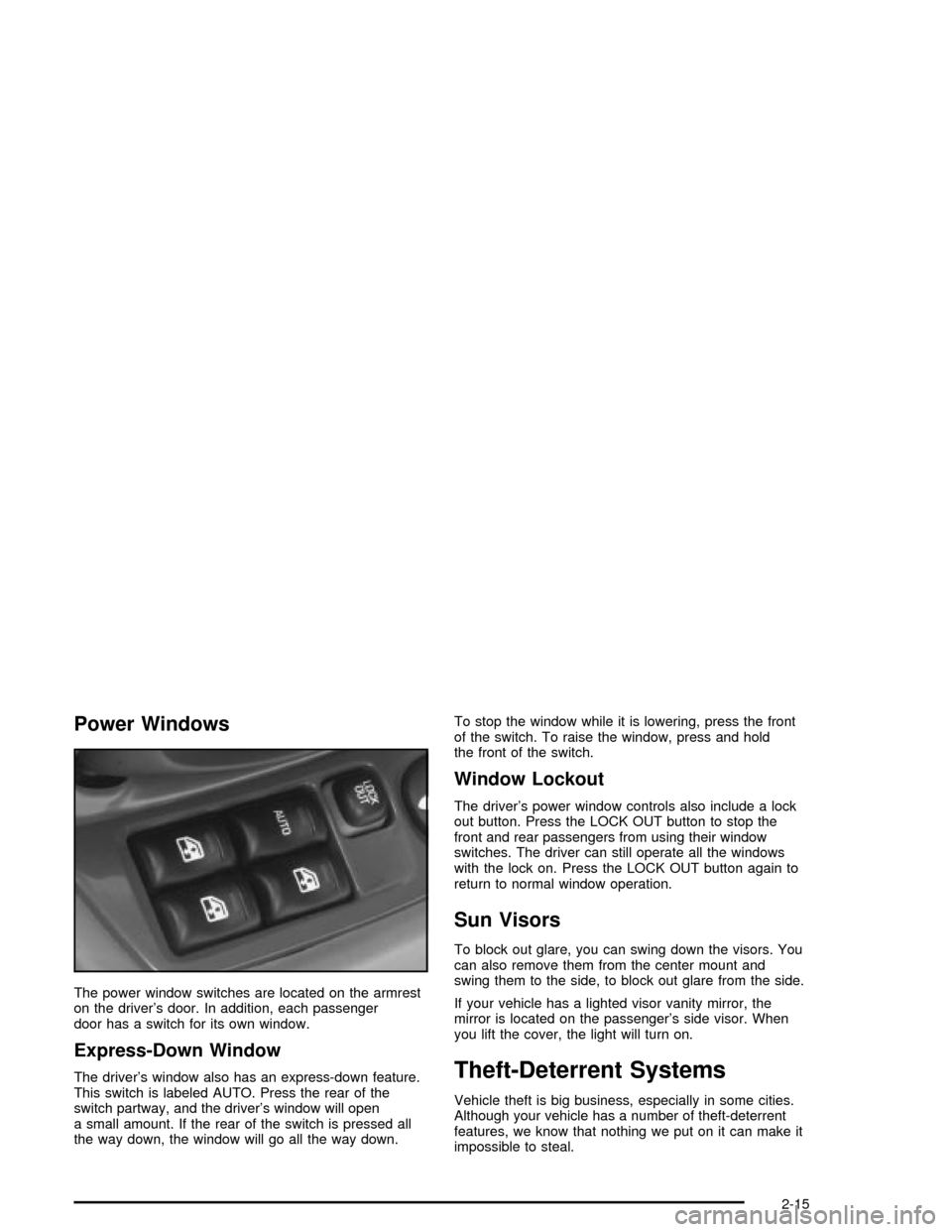
The power window switches are located on the armrest
on the driver's door. In addition, each passenger
door has a switch for its own window.
Express-Down Window
The driver's window also has an express-down feature.
This switch is labeled AUTO. Press the rear of the
switch partway, and the driver's window will open
a small amount. If the rear of the switch is pressed all
the way down, the window will go all the way down.To stop the window while it is lowering, press the front
of the switch. To raise the window, press and hold
the front of the switch.
Window Lockout
The driver's power window controls also include a lock
out button. Press the LOCK OUT button to stop the
front and rear passengers from using their window
switches. The driver can still operate all the windows
with the lock on. Press the LOCK OUT button again to
return to normal window operation.
Sun Visors
To block out glare, you can swing down the visors. You
can also remove them from the center mount and
swing them to the side, to block out glare from the side.
If your vehicle has a lighted visor vanity mirror, the
mirror is located on the passenger's side visor. When
you lift the cover, the light will turn on.
Theft-Deterrent Systems
Vehicle theft is big business, especially in some cities.
Although your vehicle has a number of theft-deterrent
features, we know that nothing we put on it can make it
impossible to steal.
2-15
Page 78 of 326

Passlockž
Your vehicle has the Passlockžtheft-deterrent system.
Passlock
žis a passive theft-deterrent system.
Passlockženables fuel if the ignition lock cylinder is
turned with a valid key. If a correct key is not used or the
ignition lock cylinder is tampered with, the fuel system
is disabled and the vehicle will not start.
During normal operation, the THEFT SYSTEM light will
turn off approximately ®ve seconds after the ignition
key is turned to ON and the engine is started.
After attempting to start the engine, if the THEFT
SYSTEM light ¯ashes or stays on, wait ten minutes with
the key in ON until the light goes off. Then turn the
ignition to OFF before attempting to start the engine
again.
Starting and Operating Your
Vehicle
New Vehicle Break-In
Notice:Your vehicle doesn't need an elaborate
ªbreak-in.º But it will perform better in the long run
if you follow these guidelines:
·Don't drive at any one speed Ð fast or
slow Ð for the ®rst 500 miles (805 km).
Don't make full-throttle starts.
·Avoid making hard stops for the ®rst 200 miles
(322 km) or so. During this time your new
brake linings aren't yet broken in. Hard stops
with new linings can mean premature wear and
earlier replacement. Follow this breaking-in
guideline every time you get new brake linings.
·Don't tow a trailer during break-in. See ªTowing
a Trailerº in the Index for more information.
2-16
Page 79 of 326

Ignition Positions
With the key in the ignition switch, you can turn it to four
different positions.
Notice:If your key seems stuck in OFF and you
can't turn it, be sure you are using the correct key;
if so, is it all the way in? Turn the key only with
your hand. Using a tool to force it could break the
key or the ignition switch. If none of this works, then
your vehicle needs service.A (OFF):This is the only position from which you can
remove the key. It also locks your ignition and transaxle.
A warning chime will sound if you open the driver's
door when the ignition is off and the key is in the ignition.
B (ACCESSORY):This position lets you use things
like the radio and windshield wipers when the engine is
not running. To use ACCESSORY, turn the key
clockwise to the ®rst position.
Use this position if your vehicle must be pushed or
towed, but never try to push-start your vehicle.
See
Recreational Vehicle Towing on page 4-28.
C (ON):This position unlocks the ignition. It is also the
position to where the key returns after you start the
engine and release the switch. The switch will stay in
this position when the engine is running. But even when
the engine is not running, you can use ON to operate
your electrical accessories, and to display some
instrument panel warning lights.
D (START):This position starts the engine. When the
engine starts, release the key. The ignition switch
will return to ON for normal driving.
2-17
Page 82 of 326

Instead of trying to list everything here, we ask that you
contact your dealer in the area where you'll be parking
your vehicle. The dealer can give you the best advice for
that particular area.
Automatic Transaxle Operation
Your automatic transaxle
has a shift lever located on
the console between the
seats.
PARK (P):This position locks your front wheels.
It's the best position to use when you start your engine
because your vehicle can't move easily.
{CAUTION:
It is dangerous to get out of your vehicle if the
shift lever is not fully in PARK (P) with the
parking brake ®rmly set. Your vehicle can roll.
Do not leave your vehicle when the engine is
running unless you have to. If you have left the
engine running, the vehicle can move
suddenly. You or others could be injured. To
be sure your vehicle will not move, even when
you are on fairly level ground, always set your
parking brake and move the shift lever to
PARK (P). See ªShifting Into Park (P)º in the
Index. If you are pulling a trailer, see ªTowing
a Trailerº in the Index.
Ensure the shift lever is fully in PARK (P) before starting
the engine. Your vehicle has an automatic transaxle shift
lock control system. You have to apply your regular brake
before you can shift from PARK (P) when the ignition key
is in ON. If you cannot shift out of PARK (P), ease
pressure on the shift lever ± push the shift lever all the
way into PARK (P) ± as you maintain brake application.
2-20
Page 86 of 326
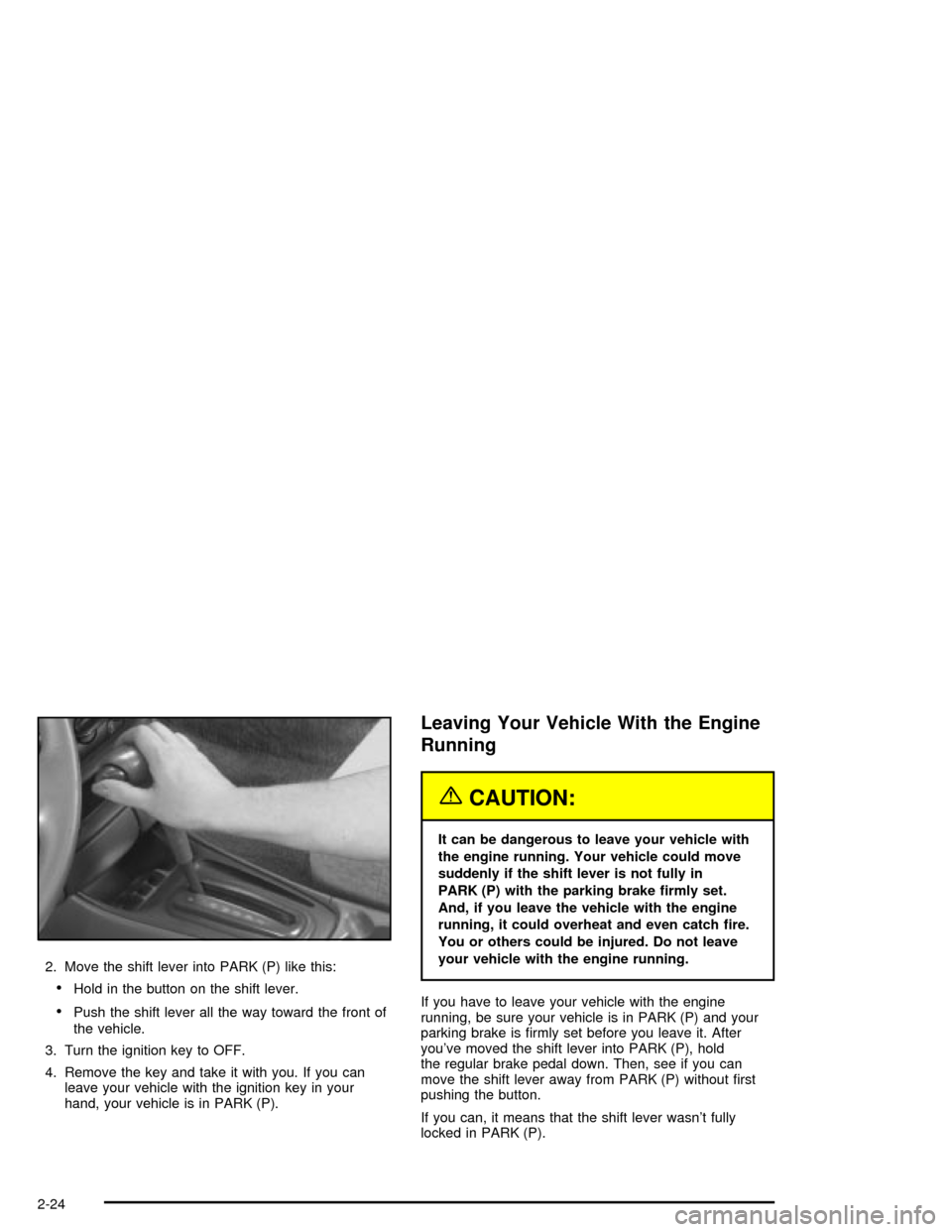
2. Move the shift lever into PARK (P) like this:
·Hold in the button on the shift lever.
·Push the shift lever all the way toward the front of
the vehicle.
3. Turn the ignition key to OFF.
4. Remove the key and take it with you. If you can
leave your vehicle with the ignition key in your
hand, your vehicle is in PARK (P).
Leaving Your Vehicle With the Engine
Running
{CAUTION:
It can be dangerous to leave your vehicle with
the engine running. Your vehicle could move
suddenly if the shift lever is not fully in
PARK (P) with the parking brake ®rmly set.
And, if you leave the vehicle with the engine
running, it could overheat and even catch ®re.
You or others could be injured. Do not leave
your vehicle with the engine running.
If you have to leave your vehicle with the engine
running, be sure your vehicle is in PARK (P) and your
parking brake is ®rmly set before you leave it. After
you've moved the shift lever into PARK (P), hold
the regular brake pedal down. Then, see if you can
move the shift lever away from PARK (P) without ®rst
pushing the button.
If you can, it means that the shift lever wasn't fully
locked in PARK (P).
2-24
Page 87 of 326

Torque Lock
If you are parking on a hill and you don't shift your
transaxle into PARK (P) properly, the weight of
the vehicle may put too much force on the parking pawl
in the transaxle. You may ®nd it difficult to pull the
shift lever out of PARK (P). This is called ªtorque lock.º
To prevent torque lock, set the parking brake and
then shift into PARK (P) properly before you leave the
driver's seat. To ®nd out how, see
Shifting Into Park (P)
on page 2-23.
When you are ready to drive, move the shift lever out of
PARK (P)
beforeyou release the parking brake.
If torque lock does occur, you may need to have another
vehicle push yours a little uphill to take some of the
pressure from the parking pawl in the transaxle, so you
can pull the shift lever out of PARK (P).
Shifting Out of Park (P)
Your vehicle has an automatic transaxle shift lock
control system. You have to apply your regular brake
before you can shift from PARK (P) when the ignition is
in ON. See
Automatic Transaxle Operation on
page 2-20.If you cannot shift out of PARK (P), ease pressure on
the shift lever and push the shift lever all the way
into PARK (P) as you maintain brake application. Then
move the shift lever into the gear you wish. Press
the shift lever button before moving the shift lever.
If you ever hold the brake pedal down but still can't shift
out of PARK (P), try this:
1. Turn the ignition key to ACCESSORY.
2. Apply and hold the regular brake until the end of
Step 5.
3. Shift to NEUTRAL (N).
4. Turn the ignition key to START, to start the vehicle.
5. Shift to the drive gear you want.
6. Have the vehicle ®xed as soon as you can.
2-25
Page 95 of 326

Instrument Panel Overview...............................3-2
Hazard Warning Flashers................................3-4
Other Warning Devices...................................3-4
Horn.............................................................3-5
Tilt Wheel.....................................................3-5
Turn Signal/Multifunction Lever.........................3-5
Exterior Lamps.............................................3-12
Interior Lamps..............................................3-15
Accessory Power Outlets...............................3-16
Ashtrays and Cigarette Lighter........................3-17
Climate Controls............................................3-17
Climate Control System.................................3-17
Outlet Adjustment.........................................3-21
Warning Lights, Gages and Indicators.............3-22
Instrument Panel Cluster................................3-23
Speedometer and Odometer...........................3-24
Tachometer.................................................3-25
Safety Belt Reminder Light.............................3-25
Air Bag Readiness Light................................3-26
Charging System Light..................................3-27
Brake System Warning Light..........................3-27
Anti-Lock Brake System Warning Light.............3-28
Engine Coolant Temperature Gage..................3-29
Low Coolant Warning Light............................3-29
Malfunction Indicator Lamp.............................3-30Oil Pressure Light.........................................3-32
Check Oil Level Light....................................3-33
Passlock
žWarning Light................................3-34
Low Washer Fluid Warning Light.....................3-34
Door Ajar Light.............................................3-34
Service Vehicle Soon Light............................3-35
Fuel Gage...................................................3-35
Audio System(s).............................................3-36
Setting the Time for Radios without
Radio Data Systems (RDS)........................3-36
Setting the Time for Radios with
Radio Data Systems (RDS)........................3-37
Radio with CD (Base Level)...........................3-37
Radio with CD (Up Level)..............................3-41
Radio with Cassette and CD..........................3-48
Theft-Deterrent Feature
(Non-RDS Radios).....................................3-57
Theft-Deterrent Feature
(RDS Radios)...........................................3-57
Understanding Radio Reception......................3-57
Care of Your Cassette Tape Player.................3-58
Care of Your CDs.........................................3-59
Care of Your CD Player................................3-59
Fixed Mast Antenna......................................3-59
Chime Level Adjustment................................3-59
Section 3 Instrument Panel
3-1
Page 97 of 326

The main components of your instrument panel are the
following:
A. Side Window Defogger Vents. See ªDefogging and
Defrostingº in
Climate Control System on
page 3-17.
B. Vent Outlets. See
Outlet Adjustment on page 3-21.
C. Instrument Panel Brightness Thumbwheel. See
Interior Lamps on page 3-15.
D. Fog Lamp Button (If Equipped). See ªFog Lampsº in
Exterior Lamps on page 3-12.
E. Turn Signal/Multifunction Lever. See
Turn
Signal/Multifunction Lever on page 3-5.
F. Cruise Control Buttons (If Equipped). See ªCruise
Controlº in
Turn Signal/Multifunction Lever on
page 3-5.
G. Instrument Panel Cluster. See
Instrument Panel
Cluster on page 3-23.
H. Windshield Wiper/Washer Lever. See ªWindshield
Wipersº in
Turn Signal/Multifunction Lever on
page 3-5.
I. Ignition Switch. See
Ignition Positions on
page 2-17.J. Hazard Warning Flashers Button. See
Hazard
Warning Flashers on page 3-4.
K. Instrument Panel Fuse Blocks. See
Fuses and
Circuit Breakers on page 5-77.
L. Instrument Panel Cupholder. See
Cupholder(s) on
page 2-30.
M. Remote Trunk Release Button. See ªRemote Trunk
Releaseº in
Trunk on page 2-11.
N. Hood Release. See
Hood Release on page 5-10.
O. Tilt Wheel Lever. See
Tilt Wheel on page 3-5.
P. Parking Brake. See
Parking Brake on page 2-23.
Q. Horn. See
Horn on page 3-5.
R. Audio System. See
Audio System(s) on page 3-36.
S. Cigarette Lighter. See
Ashtrays and Cigarette
Lighter on page 3-17.
T. Ashtray. See
Ashtrays and Cigarette Lighter on
page 3-17.
U. Accessory Power Outlet. See
Accessory Power
Outlets on page 3-16.
V. Climate Control System. See
Climate Control
System on page 3-17.
3-3
Page 99 of 326
Horn
You can sound the horn by pressing the horn symbol on
your steering wheel.
Tilt Wheel
A tilt wheel allows you to adjust the steering wheel before
you drive. You can raise it to the highest level to give your
legs more room when you exit and enter your vehicle.
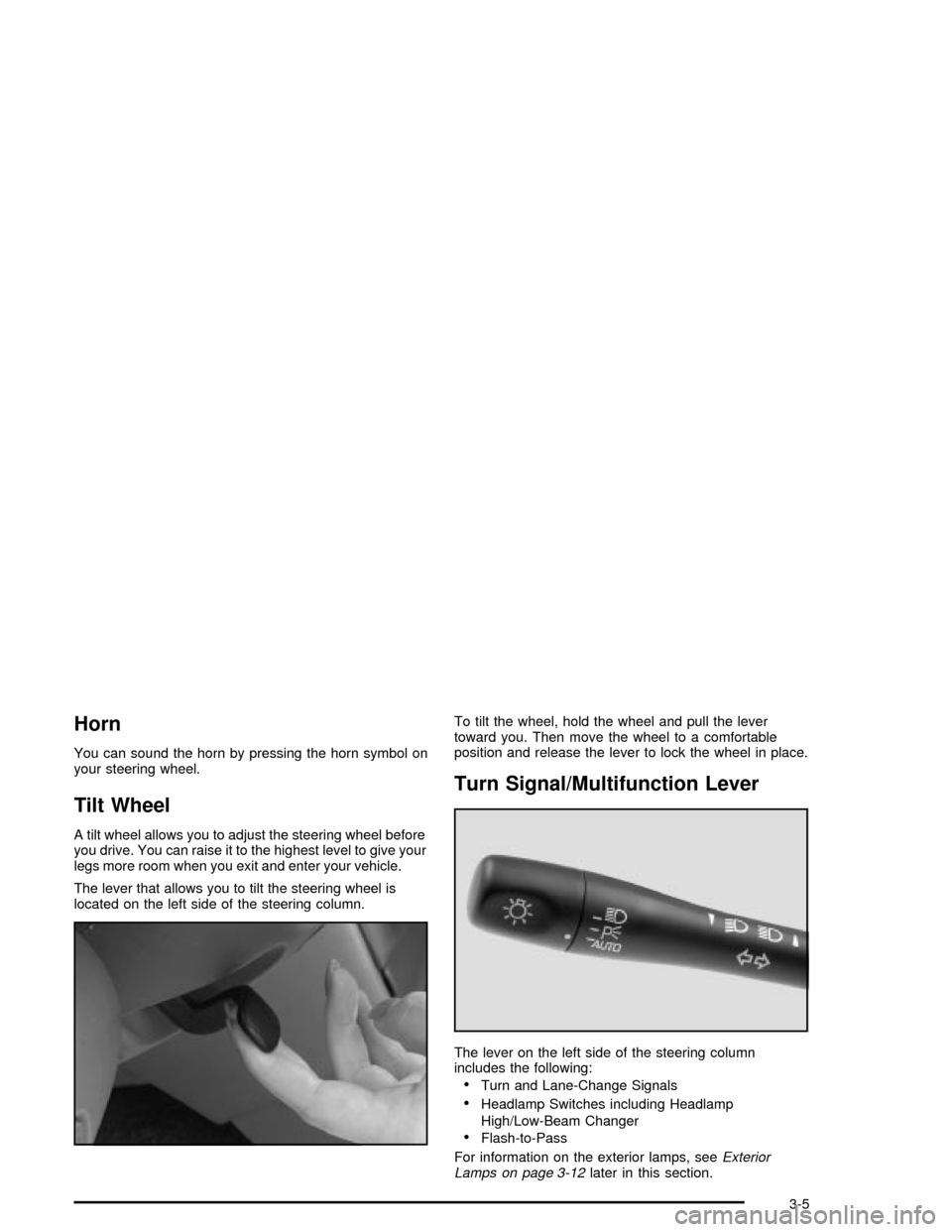
The lever that allows you to tilt the steering wheel is
located on the left side of the steering column.To tilt the wheel, hold the wheel and pull the lever
toward you. Then move the wheel to a comfortable
position and release the lever to lock the wheel in place.
Turn Signal/Multifunction Lever
The lever on the left side of the steering column
includes the following:
·Turn and Lane-Change Signals
·Headlamp Switches including Headlamp
High/Low-Beam Changer
·Flash-to-Pass
For information on the exterior lamps, see
Exterior
Lamps on page 3-12later in this section.
3-5
Page 103 of 326

Winshield Washer
To wash your windshield, push in the button at the end
of the lever until the washers begin.
{CAUTION:
In freezing weather, don't use your washer
until the windshield is warmed. Otherwise the
washer ¯uid can form ice on the windshield,
blocking your vision.
When you release the button, the washers will stop,
but the wipers will continue to wipe for about three
cycles and will either stop or will resume the speed
you were using before.
Cruise Control
If your vehicle has cruise control, you can maintain a
speed of about 25 mph (40 km/h) or more without
keeping your foot on the accelerator. This can really
help on long trips. Cruise control does not work at
speeds below 25 mph (40 km/h).
{CAUTION:
·Cruise control can be dangerous where
you can't drive safely at a steady speed.
So, don't use your cruise control on
winding roads or in heavy traffic.
·Cruise control can be dangerous on
slippery roads. On such roads, fast
changes in tire traction can cause
needless wheel spinning, and you could
lose control. Don't use cruise control on
slippery roads.
3-9