service reset CHEVROLET MALIBU 2006 6.G Owners Manual
[x] Cancel search | Manufacturer: CHEVROLET, Model Year: 2006, Model line: MALIBU, Model: CHEVROLET MALIBU 2006 6.GPages: 442, PDF Size: 2.61 MB
Page 117 of 442
Automatic Dimming Rearview Mirror
with OnStar
®and Compass
Your vehicle may have an automatic dimming rearview
mirror with a compass and OnStar®controls. For
more information about OnStar®, seeOnStar®System
on page 2-44.
The automatic dimming feature turns on each time
the vehicle is started. To turn automatic dimming off
or on, press the left button below the mirror. A green
indicator light will be on when automatic dimming is on.
There are also three OnStar
®buttons located at
the bottom of the mirror. See your dealer for more
information on the system and how to subscribe
to OnStar
®. SeeOnStar®System on page 2-44for
more information about the service OnStar®provides.
Compass Operation
Press the on/off button once to turn the compass
on or off.
When the ignition and the compass feature are on,
the compass will show two character boxes for a
few seconds. After a few seconds, the mirror will
display the current compass direction.
Compass Calibration
If after a few seconds the display does not show a
compass direction, (N for North for example), there
may be a strong magnetic eld interfering with the
compass. Such interference may be caused by a
magnetic antenna mount, note pad holder, or similar
object. If the letter C appears in the compass window,
the compass may need to be reset or calibrated.
The mirror can be calibrated by driving the vehicle in
circles at 5 mph (8 km/h) or less until the display reads
a direction.
2-39
Page 169 of 442
The Driver Information Center (DIC) may display a
BRAKE FLUID message. SeeDIC Warnings and
Messages on page 3-50for more information.
If the light comes on while you are driving, pull off the
road and stop carefully. You may notice that the pedal
is harder to push or the pedal may go closer to the
oor. It may take longer to stop. Try turning off
and restarting the vehicle one or two times, if the
light is still on, have the vehicle towed for service.
SeeTowing Your Vehicle on page 4-39.
{CAUTION:
Your brake system may not be working
properly if the brake system warning light is
on. Driving with the brake system warning light
on can lead to an accident. If the light is still
on after you have pulled off the road and
stopped carefully, have the vehicle towed
for service.
Anti-Lock Brake System
Warning Light
If your vehicle has the
anti-lock brake system, the
light will come on when
your engine is started and
may stay on for several
seconds. That’s normal.
If the light stays on, turn the ignition to off. If the light
comes on and the chime sounds when you are driving,
stop as soon as possible and turn the ignition off.
Then start the engine again to reset the system. If the
light still stays on, or comes on again while you are
driving, your vehicle needs service. If the regular brake
system warning light is not on, you still have brakes,
but you do not have anti-lock brakes. If the regular
brake system warning light is also on, you do not have
anti-lock brakes and there is a problem with your
regular brakes. SeeBrake System Warning Light on
page 3-36earlier in this section.
The anti-lock brake system warning light will come on
briey when you turn the ignition key to ON. This is
normal. If the light does not come on then, have it xed
so it will be ready to warn you if there is a problem.
3-37
Page 182 of 442
DIC Warnings and Messages
These messages will appear if there is a problem
detected in one of your vehicle’s systems.
Any message will clear when the vehicle’s condition
is no longer present. To acknowledge a message and
clear it from the display, press any of the three DIC
buttons. The warning message will come back on
the next time the vehicle is turned off and back on
if the condition is still present. With most messages,
a warning chime will sound when the message is
displayed. Your vehicle may have other warning
messages.
AUTO (Automatic) LIGHTS OFF:This message will
display if the automatic headlamp system is disabled
with the headlamp switch.
AUTO (Automatic) LIGHTS ON:This message will
display if the automatic headlamp system is enabled
with the headlamp switch.
BRAKE FLUID:This message will display to inform the
driver that the brake uid level is low while the ignition
is in ON. Have the brake system serviced by your
GM dealer as soon as possible.CHANGE OIL SOON:This message will display when
the life of the engine oil has expired and it should be
changed.
When you acknowledge the CHANGE OIL SOON
message by clearing it from the display, you still must
reset the engine oil life system separately. SeeEngine
Oil Life System on page 5-20,Engine Oil on page 5-17,
andScheduled Maintenance on page 6-4for more
information.
CHECK GAS CAP:This message will display if the
gas cap has not been fully tightened. You should
recheck your gas cap to make sure that it is on properly.
A few driving trips with the cap properly installed
should turn the message off.
DOOR AJAR:This message will display if one or more
of the vehicle’s doors are not closed properly. When
this message displays, you should make sure that the
door is closed completely.
ENGINE DISABLED:This message will display if the
starting of the engine is disabled. Have your vehicle
serviced immediately by your GM dealer.
3-50
Page 199 of 442
XM™ Radio Messages
Radio Display
MessageCondition Action Required
XL (Explicit Language
Channels)XL on the radio display,
after the channel name,
indicates content with
explicit language.These channels, or any others, can be blocked at a
customer’s request, by calling 1-800-852-XMXM (9696).
Updating Updating
encryption codeThe encryption code in the receiver is being updated, and
no action is required. This process should take no longer
than 30 seconds.
No Signal Loss of signal The system is functioning correctly, but the vehicle is in a
location that is blocking the XM signal. When the vehicle
is moved into an open area, the signal should return.
Loading XM Acquiring channel audio
(after 4 second delay)The audio system is acquiring and processing audio and
text data. No action is needed. This message should
disappear shortly.
CH Off Air Channel not in service This channel is not currently in service. Tune to another
channel.
CH Unavail Channel no longer
availableThis previously assigned channel is no longer assigned.
Tune to another station. If this station was one of the
presets, choose another station for that preset button.
No Info Artist Name/Feature
not availableNo artist information is available at this time on this channel.
The system is working properly.
No Info Song/Program Title
not availableNo song title information is available at this time on this
channel. The system is working properly.
3-67
Page 210 of 442
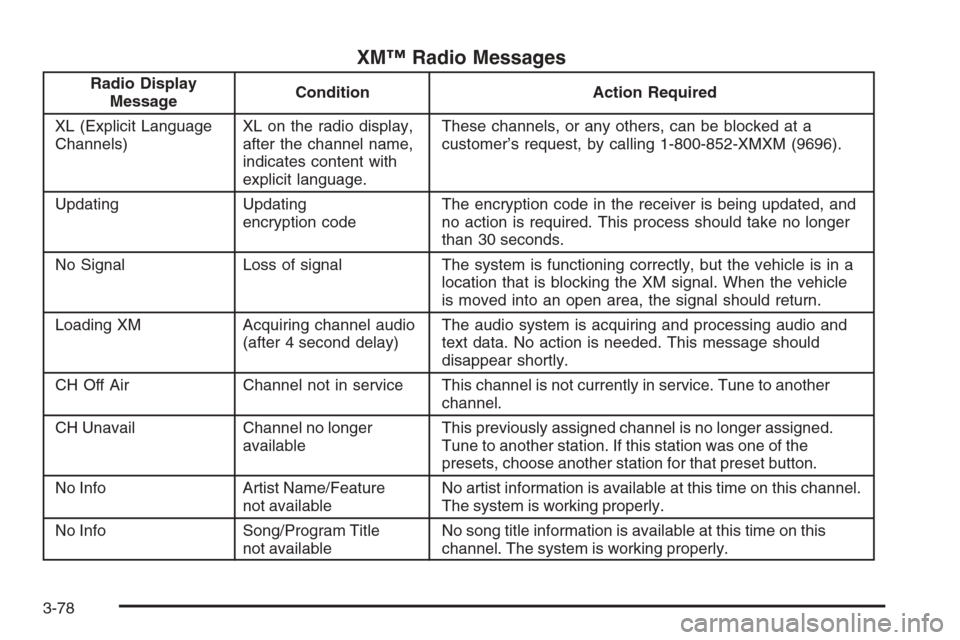
XM™ Radio Messages
Radio Display
MessageCondition Action Required
XL (Explicit Language
Channels)XL on the radio display,
after the channel name,
indicates content with
explicit language.These channels, or any others, can be blocked at a
customer’s request, by calling 1-800-852-XMXM (9696).
Updating Updating
encryption codeThe encryption code in the receiver is being updated, and
no action is required. This process should take no longer
than 30 seconds.
No Signal Loss of signal The system is functioning correctly, but the vehicle is in a
location that is blocking the XM signal. When the vehicle
is moved into an open area, the signal should return.
Loading XM Acquiring channel audio
(after 4 second delay)The audio system is acquiring and processing audio and
text data. No action is needed. This message should
disappear shortly.
CH Off Air Channel not in service This channel is not currently in service. Tune to another
channel.
CH Unavail Channel no longer
availableThis previously assigned channel is no longer assigned.
Tune to another station. If this station was one of the
presets, choose another station for that preset button.
No Info Artist Name/Feature
not availableNo artist information is available at this time on this channel.
The system is working properly.
No Info Song/Program Title
not availableNo song title information is available at this time on this
channel. The system is working properly.
3-78
Page 308 of 442
If you are in an area of extreme cold, where
the temperature falls below−20°F (−29°C), it is
recommended that you use either an SAE 5W-30
synthetic oil or an SAE 0W-30 oil. Both will provide
easier cold starting and better protection for your engine
at extremely low temperatures.
Engine Oil Additives
Do not add anything to your oil. The recommended oils
with the starburst symbol that meet GM Standard
GM6094M are all you will need for good performance
and engine protection.
Engine Oil Life System
When to Change Engine Oil
Your vehicle has a computer system that lets you know
when to change the engine oil and lter. This is based
on engine revolutions and engine temperature, and not
on mileage. Based on driving conditions, the mileage
at which an oil change will be indicated can vary
considerably. For the oil life system to work properly,
you must reset the system every time the oil is changed.When the system has calculated that oil life has
been diminished, it will indicate that an oil change is
necessary. A Change Oil Soon message will come on.
Change your oil as soon as possible within the next
600 miles (1 000 km). It is possible that, if you are
driving under the best conditions, the oil life system may
not indicate that an oil change is necessary for over a
year. However, your engine oil and lter must be
changed at least once a year and at this time the system
must be reset. Your dealer has GM-trained service
people who will perform this work using genuine GM
parts and reset the system. It is also important to check
your oil regularly and keep it at the proper level.
If the system is ever reset accidentally, you must change
your oil at 3,000 miles (5 000 km) since your last oil
change. Remember to reset the oil life system whenever
the oil is changed.
5-20
Page 309 of 442
How to Reset the Engine Oil Life
System
The Engine Oil Life System calculates when to change
your engine oil and lter based on vehicle use. Anytime
your oil is changed, reset the system so it can calculate
when the next oil change is required. If a situation occurs
where you change your oil prior to a Change Oil Soon
message being turned on, reset the system.
After changing the engine oil, reset the system by
performing the following steps:
1. Display OIL LIFE RESET on the DIC.
2. Press and hold the ENTER button for at least
one second. An ACKNOWLEDGED display
message will appear for three seconds or until
the next button is pressed. This will tell you
the system has been reset.
3. Turn the key to OFF.
If the Change Oil Soon message comes back on when
you start your vehicle, the engine oil life system has
not reset. Repeat the procedure.
What to Do with Used Oil
Used engine oil contains certain elements that may be
unhealthy for your skin and could even cause cancer.
Do not let used oil stay on your skin for very long. Clean
your skin and nails with soap and water, or a good
hand cleaner. Wash or properly dispose of clothing or
rags containing used engine oil. See the manufacturer’s
warnings about the use and disposal of oil products.
Used oil can be a threat to the environment. If you
change your own oil, be sure to drain all the oil from the
lter before disposal. Never dispose of oil by putting it in
the trash, pouring it on the ground, into sewers, or into
streams or bodies of water. Instead, recycle it by taking it
to a place that collects used oil. If you have a problem
properly disposing of your used oil, ask your dealer, a
service station or a local recycling center for help.
5-21
Page 319 of 442
If you no longer have the overheat warning, you can
drive. Just to be safe, drive slower for about 10 minutes.
If the warning does not come back on, you can drive
normally.
If the warning continues, pull over, stop, and park your
vehicle right away.
If there is still no sign of steam, idle the engine for
three minutes while you are parked. If you still have the
warning, turn off the engine and get everyone out of
the vehicle until it cools down.
You may decide not to lift the hood but to get service
help right away.Overheated Engine Protection
Operating Mode
(3.5L V6 and 3.9L V6 Engines)
This emergency operating mode allows your vehicle to
be driven to a safe place in an emergency situation.
If an overheated engine condition exists, an overheat
protection mode which alternates ring groups of
cylinders helps prevent engine damage. In this mode,
you will notice a signicant loss in power and engine
performance. The temperature gage will indicate
an overheat condition exists. Driving extended
miles (km) and/or towing a trailer in the overheat
protection mode should be avoided.
Notice:After driving in the overheated engine
protection operating mode, to avoid engine damage,
allow the engine to cool before attempting any repair.
The engine oil will be severely degraded. Repair the
cause of coolant loss, change the oil and reset the oil
life system. SeeEngine Oil on page 5-17.
5-31
Page 400 of 442
Scheduled Maintenance
When the Change Oil Soon message in the
Driver Information Center (DIC) comes on, it means
that service is required for your vehicle. Have your
vehicle serviced as soon as possible within the next
600 miles (1 000 km). It is possible that, if you are
driving under the best conditions, the engine oil life
system may not indicate that vehicle service is
necessary for over a year. However, your engine
oil and lter must be changed at least once a year
and at this time the system must be reset. Your
GM Goodwrench
®dealer has GM-trained service
technicians who will perform this work using genuine
GM parts and reset the system.
If the engine oil life system is ever reset accidentally, you
must service your vehicle within 3,000 miles (5 000 km)
since your last service. Remember to reset the oil life
system whenever the oil is changed. SeeEngine Oil Life
System on page 5-20for information on the Engine Oil
Life System and resetting the system.When the Change Oil Soon message appears,
certain services, checks, and inspections are required.
Required services are described in the following for
“MaintenanceI” and “MaintenanceII.” Generally,
it is recommended that your rst service be
MaintenanceI, your second service be MaintenanceII,
and that you alternate MaintenanceIand MaintenanceII
thereafter. However, in some cases, MaintenanceII
may be required more often.
MaintenanceI— Use MaintenanceIif the message
comes on within 10 months since the vehicle was
purchased or MaintenanceIIwas performed.
MaintenanceII— Use MaintenanceIIif the previous
service performed was MaintenanceI. Always use
MaintenanceIIwhenever the message comes on
10 months or more since the last service or if the
message has not come on at all for one year.
6-4
Page 401 of 442
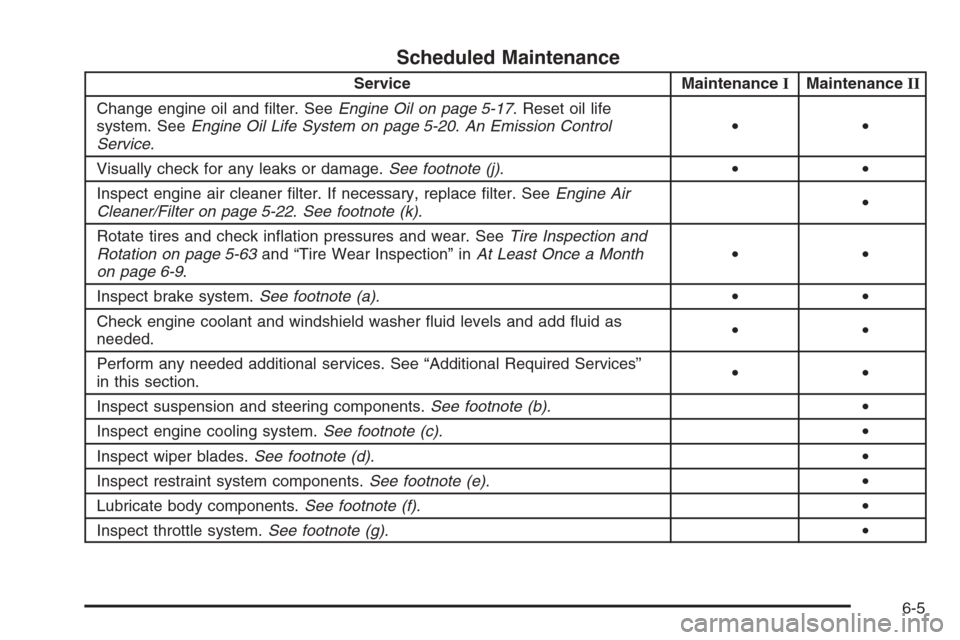
Scheduled Maintenance
Service MaintenanceIMaintenanceII
Change engine oil and lter. SeeEngine Oil on page 5-17. Reset oil life
system. SeeEngine Oil Life System on page 5-20.An Emission Control
Service.••
Visually check for any leaks or damage.See footnote (j).••
Inspect engine air cleaner lter. If necessary, replace lter. SeeEngine Air
Cleaner/Filter on page 5-22.See footnote (k).•
Rotate tires and check ination pressures and wear. SeeTire Inspection and
Rotation on page 5-63and “Tire Wear Inspection” inAt Least Once a Month
on page 6-9.••
Inspect brake system.See footnote (a).••
Check engine coolant and windshield washer uid levels and add uid as
needed.••
Perform any needed additional services. See “Additional Required Services”
in this section.••
Inspect suspension and steering components.See footnote (b).•
Inspect engine cooling system.See footnote (c).•
Inspect wiper blades.See footnote (d).•
Inspect restraint system components.See footnote (e).•
Lubricate body components.See footnote (f).•
Inspect throttle system.See footnote (g).•
6-5