ignition CHEVROLET MALIBU 2009 7.G Workshop Manual
[x] Cancel search | Manufacturer: CHEVROLET, Model Year: 2009, Model line: MALIBU, Model: CHEVROLET MALIBU 2009 7.GPages: 420, PDF Size: 2.27 MB
Page 188 of 420
To change the time default setting from 12 hour to
24 hour or to change the date default setting from
month/day/year to day/month/year:
1. Press
Hand then the softkey located below the
forward arrow label. Once the time 12H and 24H,
and the date MM/DD/YYYY (month, day, and year)
and DD/MM/YYYY (day, month, and year) displays.
2. Press the softkey located below the desired option.
3. Press
Hagain to apply the selected default, or
let the screen time out.
Six-Disc CD (MP3) Player
To set the time and date:
1. Turn the ignition key to ACC/ACCESSORY or
ON/RUN. Press
Oto turn the radio on.
2. Press MENU.
3. Press the softkey below the
Htab. The HR, MIN,
MM, DD, YYYY displays.
4. Press the softkey below any one of the tabs you
want to change.
5. To increase the time or date do one of the following:
Press the softkey located below the selected tab.
Press¨SEEK, or\FWD.
Turnfclockwise.6. To decrease the time or date do one of the
following:
Press©SEEK orsREV.
Turnfcounterclockwise.
The date does not automatically display. To see the date
press MENU and then softkey below the
Htab while
the radio is on. The date with display times out after a
few seconds and goes back to the normal radio and time
display.
To change the time default setting from 12 hour to
24 hour or to change the date default setting from
month/day/year to day/month/year:
1. Press MENU, and then the softkey below the
Htab. The HR, MIN, MM, DD, YYYY displays.
2. Press the softkey below the forward arrow tab.
The time 12H and 24H, and the date MM/DD/YYYY
(month, day, and year) and DD/MM/YYYY (day,
month, and year) displays.
3. Press the softkey located below the desired option.
4. Press MENU again to apply the selected default,
or let the screen time out.
3-58
Page 191 of 420
To scan preset stations in the selected band, press
and hold
©SEEK for four seconds until a double
beep sounds. The radio goes to a stored preset,
plays for a few seconds, then goes to the next stored
preset. Press
©SEEK again to stop scanning preset
stations.
¨SEEK:Press to seek or scan stations with a strong
signal in the selected band.
To seek stations, press and release¨SEEK to go
to the next station and stay there.
To scan stations, press and hold¨SEEK for a
few seconds until the radio beeps once. The radio
goes to a station, plays for a few seconds, then
goes to the next station. Press
¨SEEK again to
stop scanning.
To scan preset stations in the selected band, press
and hold
¨SEEK for four seconds until a double
beep sounds. The radio goes to a stored preset,
plays for a few seconds, then goes to the next stored
preset. Press
¨SEEK again to stop scanning preset
stations.
4(Information):For vehicles with the Radio with CD
(Base), press to switch the display between the radio
station frequency and the time. While the ignition is off,
press
4to display the time.
For vehicles with XM, MP3, WMA, or RDS features,
press
4to display additional text information related to the
current FM-RDS or XM station; or CD, MP3, WMA song.
Song title information will be displayed on the top line of
the display while the artist information will be displayed
on the bottom line, it the information is available during
XM, CD, MP3, or WMA playback. When information is not
available, “No Info” displays.
3-61
Page 198 of 420
Playing a CD
If the ignition or radio is turned off with a CD in the
player it stays in the player. When the ignition or radio
is turned on, the CD starts to play where it stopped, if it
was the last selected audio source.
f(Tune):Turn to select tracks on the CD currently
playing.
©SEEK:Press to go to the start of the current track, if
more than ten seconds have played. Press and hold or
press multiple times to continue moving backward
through the tracks on the CD.
¨SEEK:Press to go to the next track. Press and hold
or press multiple times to continue moving forward
through the tracks on the CD.
sREV (Reverse):Press and hold to reverse playback
quickly within a track. Sound is heard at a reduced
volume and the elapsed time of the track displays.
Release to resume playing the track.
\FWD (Fast Forward):Press and hold to advance
playback quickly within a track. Sound is heard at a
reduced volume and the elapsed time of the track
displays. Release to resume playing the track.RDM (Random):Tracks can be listened to in random,
rather than sequential order, on one CD or all CDs
in a Six-Disc CD player.
To use random on the base radio with Single CD player:
1. Press the softkey below RDM tab until Random
Current Disc displays.
2. Press the softkey again to turn off random play.
To use random on a radio with a Six-Disc CD player:
1. To play tracks from all CDs loaded in random order,
press the softkey below the RDM tab until
Randomize All Discs displays.
2. To play tracks from the CD currently playing in
random order, press the softkey below the RDM
tab until Random Current Disc displays.
3. To turn off random, press the same softkey again.
BAND:Press to listen to the radio while a CD is
playing. The CD remains inside the radio for future
listening.
CD/AUX (CD/Auxiliary):Press to play a CD while
listening to the radio. The CD icon and a message
showing the track number displays when a CD is
in the player. Press this button again and the system
automatically searches for an auxiliary input device, such
as a portable audio player. If a portable audio player is
not connected, No Aux Input Device Found may display.
3-68
Page 222 of 420
Backglass Antenna
The AM-FM antenna is integrated with the rear window
defogger, located in the rear window. Make sure that
the inside surface of the rear window is not scratched
and that the lines on the glass are not damaged. If the
inside surface is damaged, it could interfere with radio
reception. For proper radio reception, the antenna
connector needs to be properly attached to the post
on the glass.
If a cellular telephone antenna needs to be attached to
the glass, make sure that the grid lines for the AM-FM
antenna are not damaged. There is enough space
between the grid lines to attach a cellular telephone
antenna without interfering with radio reception.
Notice:Using a razor blade or sharp object to clear
the inside rear window can damage the rear window
antenna and/or the rear window defogger. Repairs
would not be covered by the vehicle warranty. Do not
clear the inside rear window with sharp objects.
Notice:Do not apply aftermarket glass tinting
with metallic lm. The metallic lm in some tinting
materials will interfere with or distort the incoming
radio reception. Any damage caused to your
backglass antenna due to metallic tinting materials
will not be covered by the vehicle warranty.
XM™ Satellite Radio Antenna
System
The XM Satellite Radio antenna is located on the roof of
the vehicle. Keep the antenna clear of obstructions for
clear radio reception.
If the vehicle has a sunroof, the performance of the XM
system may be affected if the sunroof is open.
Chime Level Adjustment
The radio may be used to adjust the vehicle’s chime
level. If the radio can be used to change the volume
level of the chime, press and hold the sixth numbered
pushbutton or the sixth FAV pushbutton with the ignition
on and the radio power off. The volume level changes
between Normal and Loud. The selected volume
level appears on the radio display.
Removing the radio and not replacing it with a factory
radio or chime module will disable vehicle chimes.
3-92
Page 238 of 420
Hill and Mountain Roads
Driving on steep hills or through mountains is different
than driving on at or rolling terrain. Tips for driving
in these conditions include:
Keep the vehicle serviced and in good shape.
Check all uid levels and brakes, tires, cooling
system, and transmission.
Going down steep or long hills, shift to a lower gear.
{CAUTION:
If you do not shift down, the brakes could get so
hot that they would not work well. You would then
have poor braking or even none going down a hill.
You could crash. Shift down to let the engine
assist the brakes on a steep downhill slope.
{CAUTION:
Coasting downhill in N (Neutral) or with the ignition
off is dangerous. The brakes will have to do all the
work of slowing down and they could get so hot
that they would not work well. You would then
have poor braking or even none going down a hill.
You could crash. Always have the engine running
and the vehicle in gear when going downhill.
Stay in your own lane. Do not swing wide or cut
across the center of the road. Drive at speeds
that let you stay in your own lane.
Top of hills: Be alert — something could be in your
lane (stalled car, accident).
Pay attention to special road signs (falling rocks
area, winding roads, long grades, passing or
no-passing zones) and take appropriate action.
4-16
Page 249 of 420
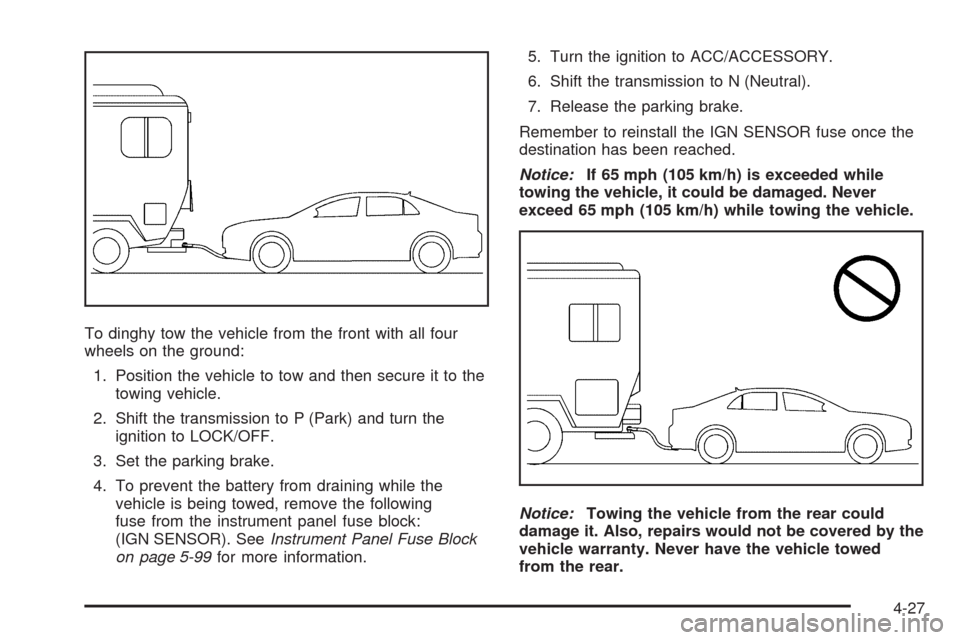
To dinghy tow the vehicle from the front with all four
wheels on the ground:
1. Position the vehicle to tow and then secure it to the
towing vehicle.
2. Shift the transmission to P (Park) and turn the
ignition to LOCK/OFF.
3. Set the parking brake.
4. To prevent the battery from draining while the
vehicle is being towed, remove the following
fuse from the instrument panel fuse block:
(IGN SENSOR). SeeInstrument Panel Fuse Block
on page 5-99for more information.5. Turn the ignition to ACC/ACCESSORY.
6. Shift the transmission to N (Neutral).
7. Release the parking brake.
Remember to reinstall the IGN SENSOR fuse once the
destination has been reached.
Notice:If 65 mph (105 km/h) is exceeded while
towing the vehicle, it could be damaged. Never
exceed 65 mph (105 km/h) while towing the vehicle.
Notice:Towing the vehicle from the rear could
damage it. Also, repairs would not be covered by the
vehicle warranty. Never have the vehicle towed
from the rear.
4-27
Page 250 of 420
Dolly Towing
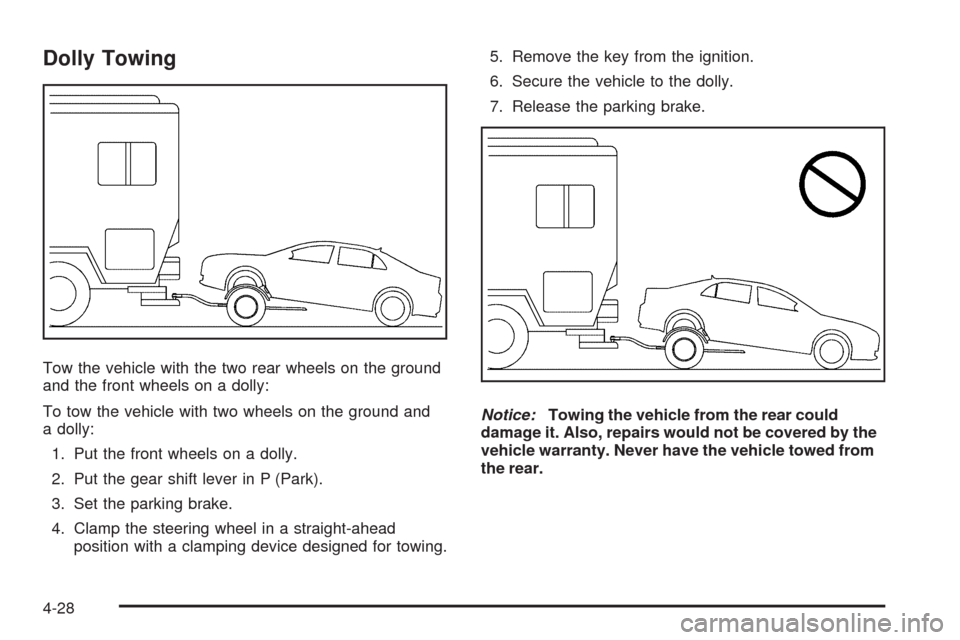
Tow the vehicle with the two rear wheels on the ground
and the front wheels on a dolly:
To tow the vehicle with two wheels on the ground and
a dolly:
1. Put the front wheels on a dolly.
2. Put the gear shift lever in P (Park).
3. Set the parking brake.
4. Clamp the steering wheel in a straight-ahead
position with a clamping device designed for towing.5. Remove the key from the ignition.
6. Secure the vehicle to the dolly.
7. Release the parking brake.
Notice:Towing the vehicle from the rear could
damage it. Also, repairs would not be covered by the
vehicle warranty. Never have the vehicle towed from
the rear.
4-28
Page 283 of 420
How to Reset the Engine Oil Life
System
The Engine Oil Life System calculates when to change
the engine oil and lter based on vehicle use. Whenever
the oil is changed, reset the system so it can calculate
when the next oil change is required. If a situation occurs
where the oil is changed prior to a CHANGE OIL SOON
message being turned on, reset the system.
After changing the engine oil, reset the system:
1. With the engine off, turn the ignition key to ON/RUN.
2. Press and hold both the INFO and reset buttons
for at least one second to access the
personalization menu and display the OIL LIFE
RESET message.
3. Press and hold the reset button for at least
one second. An ACKNOWLEDGED message
will appear when the system has been reset.
4. Turn the key to LOCK/OFF.
If the CHANGE OIL SOON message comes back on
when the vehicle is started, the engine oil life system
has not reset. Repeat the procedure.
What to Do with Used Oil
Used engine oil contains certain elements that can be
unhealthy for your skin and could even cause cancer.
Do not let used oil stay on your skin for very long. Clean
your skin and nails with soap and water, or a good hand
cleaner. Wash or properly dispose of clothing or rags
containing used engine oil. See the manufacturer’s
warnings about the use and disposal of oil products.
Used oil can be a threat to the environment. If you
change your own oil, be sure to drain all the oil from
the lter before disposal. Never dispose of oil by putting
it in the trash, pouring it on the ground, into sewers,
or into streams or bodies of water. Recycle it by taking
it to a place that collects used oil.
5-25
Page 301 of 420
Jump Starting
If the battery has run down, you may want to use
another vehicle and some jumper cables to start your
vehicle. Be sure to use the following steps to do it safely.
{CAUTION:
Batteries can hurt you. They can be dangerous
because:
They contain acid that can burn you.
They contain gas that can explode or ignite.
They contain enough electricity to burn you.
If you do not follow these steps exactly, some or
all of these things can hurt you.
Notice:Ignoring these steps could result in costly
damage to the vehicle that would not be covered
by the warranty.
Trying to start the vehicle by pushing or pulling it
will not work, and it could damage the vehicle.
1. Check the other vehicle. It must have a 12-volt
battery with a negative ground system.Notice:If the other vehicle’s system is not a 12-volt
system with a negative ground, both vehicles can
be damaged. Only use vehicles with 12-volt systems
with negative grounds to jump start your vehicle.
2. Get the vehicles close enough so the jumper cables
can reach, but be sure the vehicles are not touching
each other. If they are, it could cause a ground
connection you do not want. You would not be able
to start your vehicle, and the bad grounding could
damage the electrical systems.
To avoid the possibility of the vehicles rolling,
set the parking brake rmly on both vehicles involved
in the jump start procedure. Put an automatic
transmission in P (Park) or a manual transmission
in N (Neutral) before setting the parking brake.
Notice:If you leave the radio or other accessories
on during the jump starting procedure, they could
be damaged. The repairs would not be covered by
the warranty. Always turn off the radio and other
accessories when jump starting the vehicle.
3. Turn off the ignition on both vehicles. Unplug
unnecessary accessories plugged into the cigarette
lighter or the accessory power outlet. Turn off the
radio and all lamps that are not needed. This will
avoid sparks and help save both batteries. And it
could save the radio!
5-43
Page 320 of 420
Federal Communications
Commission (FCC) and Industry
and Science Canada
The Tire Pressure Monitor System (TPMS) operates
on a radio frequency and complies with Part 15 of the
FCC Rules. Operation is subject to the following two
conditions:
1. This device may not cause harmful interference.
2. This device must accept any interference received,
including interference that may cause undesired
operation.
Vehicles with TPMS operate on a radio frequency and
comply with RSS-210 of Industry and Science Canada.
Operation is subject to the following two conditions:
1. This device may not cause interference.
2. This device must accept any interference received,
including interference that may cause undesired
operation of the device.
Changes or modications to this system by other than
an authorized service facility could void authorization to
use this equipment.
Tire Pressure Monitor Operation
This vehicle may have a Tire Pressure Monitor
System (TPMS). The TPMS is designed to warn
the driver when a low tire pressure condition exists.
TPMS sensors are mounted onto each tire and wheel
assembly, excluding the spare tire and wheel assembly.
The TPMS sensors monitor the air pressure in the
vehicle’s tires and transmits the tire pressure readings
to a receiver located in the vehicle.
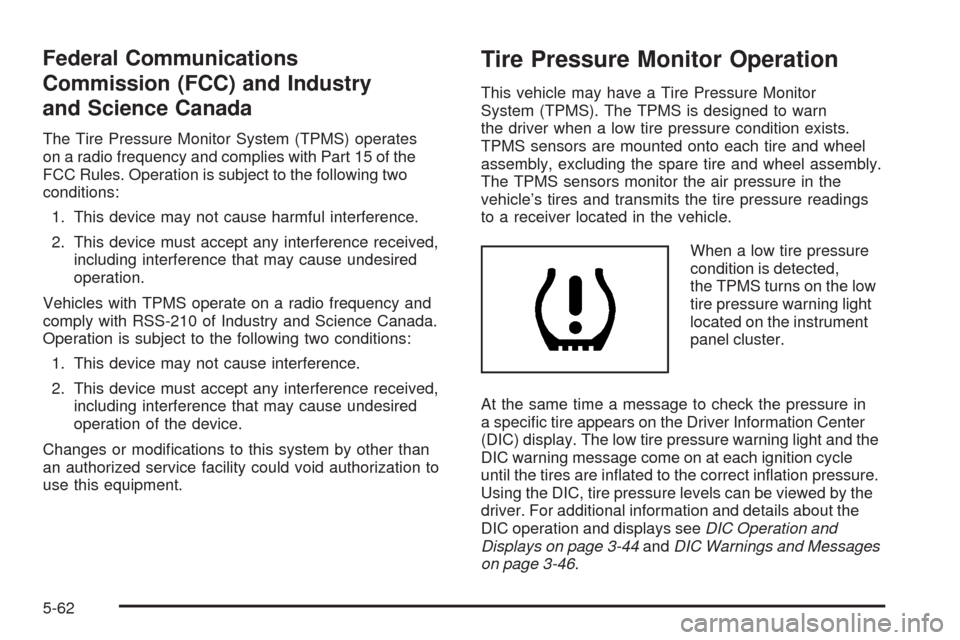
When a low tire pressure
condition is detected,
the TPMS turns on the low
tire pressure warning light
located on the instrument
panel cluster.
At the same time a message to check the pressure in
a specic tire appears on the Driver Information Center
(DIC) display. The low tire pressure warning light and the
DIC warning message come on at each ignition cycle
until the tires are inated to the correct ination pressure.
Using the DIC, tire pressure levels can be viewed by the
driver. For additional information and details about the
DIC operation and displays seeDIC Operation and
Displays on page 3-44andDIC Warnings and Messages
on page 3-46.
5-62