ECO mode CHEVROLET MALIBU 2012 7.G User Guide
[x] Cancel search | Manufacturer: CHEVROLET, Model Year: 2012, Model line: MALIBU, Model: CHEVROLET MALIBU 2012 7.GPages: 398, PDF Size: 6.06 MB
Page 168 of 398
Black plate (18,1)Chevrolet Malibu Owner Manual - 2012
7-18 Infotainment System
Playing an MP3
Order of Play
Tracks are played in the following
order:
.Play begins from the first track in
the first playlist and continues
sequentially through all tracks in
each playlist. When the last
track of the last playlist has
played, play continues from the
first track of the first playlist.
.Play begins from the first track in
the first folder and continues
sequentially through all tracks in
each folder. When the last track
of the last folder has played,
play continues from the first
track of the first folder.
When playback starts from a new
folder, the new track name displays
unless folder mode has been
chosen as the default display, then
the new folder name displays. Buttons and Knobs
The buttons and knobs on the radio
control the following features.
f(Tune):
Turn to select MP3 files
on the disc.
©SEEK: Press to go to the start of
the track, if more than ten seconds
have played. Press and hold or
press multiple times to continue
moving backward through tracks.
¨SEEK: Press to go to the next
track. Press and hold or press
multiple times to continue moving
forward through tracks.
sREV (Reverse): Press and hold
to reverse playback quickly. Sound
is heard at a reduced volume and
the elapsed time of the track
displays. Release
sREV to
resume playing.
\FWD (Fast Forward): Press
and hold to advance playback
quickly. Sound is heard at a reduced
volume and the elapsed time of the
track displays. Release
\FWD to
resume playing.
4(Information): Press to display
available additional information
about the current track.
BAND: Press to listen to the
radio while an MP3 disc is playing.
The MP3 disc remains inside the
CD player.
CD/AUX (CD/Auxiliary): Press to
play an MP3 disc while listening to
the radio or a portable audio device.
Press this button again and the
system automatically searches for
an auxiliary input device, such as a
portable audio player. If a portable
audio player is not connected,
No Aux Input Device Found may
display.
Page 169 of 398
Black plate (19,1)Chevrolet Malibu Owner Manual - 2012
Infotainment System 7-19
Softkeys
The five softkeys below the radio
display are used to control functions
that display as tabs.
The softkeys below the radio display
control the following features.
Sc(Previous Folder): Press
the softkey below
S cto go to the
first track in the previous folder.
cT (Next Folder): Press the
softkey below
cT to go to the first
track in the next folder.
RDM (Random): MP3 files can be
listened to on a CD in random,
rather than sequential order.
To use random:
1. Press the softkey under the RDM tab until Random Current
Disc displays to play songs from
the current CD in random order.
2. Press the same softkey again to turn off random play.
h(Music Navigator): Press the
softkey below
hto have the files
played in order by artist or album.
The player scans the disc to sort the
files by artist and album ID3 tag
information. It can take several
minutes to scan the disc depending
on the number of files on the disc.
The radio may begin playing while it
is scanning in the background.
When the scan is finished, the disc
begins playing files in order by
artist. The current artist playing is
shown on the second line of the
display. Once all songs by that artist
are played, the player moves to the
next artist in alphabetical order and
begins playing files by that artist.
To listen to files by another artist,
press the softkey located below
either arrow tab. The disc goes to
the next or previous artist in
alphabetical order. Continue
pressing either softkey below the
arrow tab until the desired artist
displays. To change from playback by artist to
playback by album:
1. Press the softkey located below
the Sort By tab.
2. Press one of the softkeys below the album tab from the sort
screen.
3. Press the softkey below the back tab to return to the main
music navigator screen.
The album name displays on the
second line between the arrows
and songs from the current album
begins to play. Once all songs
from that album have played, the
player moves to the next album in
alphabetical order on the disc and
begins playing MP3 files from that
album.
To exit music navigator mode, press
the softkey below the Back tab to
return to normal MP3 playback.
Page 172 of 398
Black plate (22,1)Chevrolet Malibu Owner Manual - 2012
7-22 Infotainment System
Order of Play
Tracks are played in the following
order:
.Play begins from the first track in
the first playlist and continues
sequentially through all tracks in
each playlist. When the last
track of the last playlist has
played, play continues from the
first track of the first playlist.
.Play begins from the first track in
the first folder and continues
sequentially through all tracks in
each folder. When the last track
of the last folder has played,
play continues from the first
track of the first folder.
When play enters a new folder, the
display does not automatically show
the new folder name unless the
folder mode has been chosen as
the default display. The new track
name displays.
Connecting a USB Storage
Device or iPod
The radio buttons, knobs and
softkeys are used to control a USB
storage device or an iPod when it is
connected to the USB port.
To connect a USB storage device,
connect the device to the USB port
located on the front of the radio.
To connect an iPod, connect one
end of the USB cable that came
with the iPod to the iPod’s dock
connector and connect the other
end to the USB port located on the
front of the radio. If the vehicle is on
and the USB connection works,
“OK to disconnect” and a GM logo
may appear on the iPod and iPod
appears on the radio's display.
The iPod charges while it is
connected to the USB port if the
ingition is in the ACC/ACCESSORY
or ON/RUN position. When the
ignition is turned OFF, the iPod automatically powers off and will not
charge or draw power from the
vehicle's battery.
Older iPod's that are not supported
can still be used by connecting it to
the 3.5 mm (1/8 in) auxiliary input
jack using a 3.5 mm (1/8 in) cable.
Using a USB Storage Device
or iPod
The buttons and knobs on the
radio and the softkeys below the
radio display are used to control a
USB storage device or an iPod.
Buttons and Knobs
The buttons and knobs on the radio
control the following features.
f(Tune):
Turn to select files.
©SEEK:Press to go to the start of
the track, if more than ten seconds
have played. Press and hold
©SEEK or press it multiple times
to continue moving backward
through tracks.
Page 174 of 398
Black plate (24,1)Chevrolet Malibu Owner Manual - 2012
7-24 Infotainment System
h(Music Navigator):Press the
softkey below
hto view and
select a track on an iPod. Files are
sorted by:
.Playlists
.Artists
.Albums
.Genres
.Songs
.Composers
To select tracks:
1. Press the softkey below
h.
2. Turn
fto scroll through the list
of menus.
3. Press
fto select the
desired menu.
4. Turn
fto scroll through the
folders or files in the
selected menu.
5. Press
fto select the track. To skip through large lists, the five
softkeys can be used to navigate in
the following order:
.First softkey, first item in the list.
.Second softkey, 1% through the
list each time the softkey is
pressed.
.Third softkey, 5% through the list
each time the softkey is pressed.
.Fourth softkey, 10% through the
list each time the softkey is
pressed.
.Fifth softkey, end of the list.
"(Repeat All):
Press the softkey
below
"to repeat all tracks.
The tab appears lowered when
Repeat All is being used. This is the
default mode when a USB storage
device or iPod is first connected.
'(Repeat Track): Press the
softkey below
'to repeat one
track. The tab appears raised when
Repeat Track is being used. Press the softkey below
>,2,
Cor=to select between
Shuffle Off, Shuffle All Songs/
Shuffle Songs, Shuffle Album,
or Shuffle Folder.
>(Shuffle Off): Press the
softkey below
2to turn shuffle
off. This is the default mode when a
USB storage device or iPod is first
connected.
2(Shuffle All Songs / Shuffle
Songs): Press the softkey below
=orCto shuffle all songs on
the USB storage device or iPod.
C(Shuffle Album): Press the
softkey below
>to shuffle all
songs in the current album on
an iPod.
=(Shuffle Folder): Press the
softkey below
>to shuffle all
songs in the current folder on a
USB storage device.
Page 175 of 398
Black plate (25,1)Chevrolet Malibu Owner Manual - 2012
Infotainment System 7-25
Phone
Bluetooth
For vehicles equipped with
Bluetooth capability, the system can
interact with many cell phones,
allowing:
.Placement and receipt of calls
in a hands-free mode.
.Sharing of the cell phone’s
address book or contact list with
the vehicle.
To minimize driver distraction,
before driving, and with the vehicle
parked:
.Become familiar with the
features of the cell phone.
Organize the phone book and
contact lists clearly and delete
duplicate or rarely used entries.
If possible, program speed dial
or other shortcuts.
.Review the controls and
operation of the infotainment
system.
.Pair cell phone(s) to the vehicle.
The system may not work with
all cell phones. See “Pairing a
Phone” in this section for more
information.
.If the cell phone has voice
dialing capability, learn to use
that feature to access the
address book or contact list.
See “Voice Pass-Thru” in this
section for more information.
.See “Storing and Deleting Phone
Numbers” in this section for
more information.
{WARNING
When using a cell phone, it can
be distracting to look too long or
too often at the screen of the
phone or the infotainment
(navigation) system. Taking your
eyes off the road too long or
too often could cause a crash
resulting in injury or death.
Focus your attention on driving.
A Bluetooth system can use a
Bluetooth‐capable cell phone with a
Hands Free Profile to make and
receive phone calls. The system
can be used while the key is in
ON/RUN or ACC/ACCESSORY
position. The range of the Bluetooth
system can be up to 9.1 m (30 ft).
Not all phones support all functions,
and not all phones work with the
in-vehicle Bluetooth system. See
www.gm.com/bluetooth for more
information on compatible phones.
Page 185 of 398
Black plate (3,1)Chevrolet Malibu Owner Manual - 2012
Climate Controls 8-3
If the air-conditioning button is
pressed while in defrost mode, the
indicator light turns on. If the button
is pressed again, the light turns off.
Recirculation cannot be selected
while in the defrost mode.
To help clear the windshield quickly,
do the following:
1. Select
0.
2. Select the highest temperature.
3. Select the highest fan speed.
#(Air Conditioning): Press to
turn the air conditioning system on
or off. An indicator light comes on to
show it is on.
The air-conditioning system
removes moisture from the air, so a
small amount of water might drip
under the vehicle while it is idling or
after the engine is turned off is
normal.
Maximum Air Conditioning
On hot days, open the windows to
let hot inside air escape; then close
them. This helps reduce the time it
takes for the vehicle to cool down.
It also helps the air conditioning
system operate more efficiently.
For quick cool down on hot days,
do the following:
1. Select the
Cvent mode.
2. Select the highest fan speed.
3. Select
#air conditioning.
4. Select the
?
recirculation mode.
5. Select the coolest temperature.
Using these settings together for
long periods of time can cause the
air inside of the vehicle to become
too dry. To prevent this from
happening, after the air in the
vehicle has cooled, turn the
recirculation mode off.
:(Outside Air): Press to
turn the outside air mode on.
An indicator light comes on to
show that it is on. Air from outside
the vehicle will circulate throughout
the vehicle. The outside air mode
can be used with all modes,
but it cannot be used with the
recirculation mode. Press
:to
cancel the recirculation mode.
?(Recirculation): Press to
turn the recirculation mode on.
An indicator light comes on to show
that it is on. This mode recirculates
and helps to quickly cool the air
inside the vehicle. It can be used
to prevent outside air and odors
from entering the vehicle.
The recirculation indicator light
blinks three times if you try to use
recirculation in a mode in which it
cannot function.
Pressing this button cancels the
outside air mode. When switching
to the defog or defrost modes
the system automatically moves
from recirculation to outside air.
Page 188 of 398

Black plate (6,1)Chevrolet Malibu Owner Manual - 2012
8-6 Climate Controls
2. Set the temperature.An initial setting of 73°F (23°C)
is recommended. Allow about
20 minutes for the system to
regulate. Press
worxto
adjust the temperature setting as
necessary. If the temperature is
set at 60°F (15°C) the system
remains at the maximum cooling
setting. If the temperature is set
at 90°F (32°C) the system
remains at the maximum heat
setting. Choosing either
maximum setting does not
cause the vehicle to heat or
cool any faster.
Do not to cover the sensor
located on the top of the
instrument panel near the
windshield. This sensor
regulates air temperature based
on the intensity of the sun. Also do not cover the sensor
grille on the lower right side of
the climate control faceplate,
as this regulates the inside
temperature.
To avoid blowing cold air at
engine start-up in cold weather,
the system delays turning on the
fan until warm air is available.
The length of delay depends on
the engine coolant temperature.
Turning the fan knob overrides
this delay and changes the fan
to the selected speed.
Manual Operation
o(Off):
Select this position on the
fan knob to turn off the entire
climate control system. Outside air
still enters the vehicle. The airflow
direction and temperature can be
adjusted.
x/wTemperature Control:
Press the arrows to increase or
decrease the temperature inside the
vehicle.
9(Fan Control): Turn clockwise
or counterclockwise to increase or
decrease the fan speed.
Air Delivery Mode Control: Turn
clockwise or counterclockwise to
change the direction of the airflow in
the vehicle.
Page 193 of 398
Black plate (1,1)Chevrolet Malibu Owner Manual - 2012
Driving and Operating 9-1
Driving and
Operating
Driving Information
Distracted Driving . . . . . . . . . . . . . 9-2
Defensive Driving . . . . . . . . . . . . . 9-3
Drunk Driving . . . . . . . . . . . . . . . . . 9-3
Control of a Vehicle . . . . . . . . . . . 9-3
Braking . . . . . . . . . . . . . . . . . . . . . . . 9-3
Steering . . . . . . . . . . . . . . . . . . . . . . . 9-4
Off-Road Recovery . . . . . . . . . . . . 9-5
Loss of Control . . . . . . . . . . . . . . . . 9-6
Driving on Wet Roads . . . . . . . . . 9-6
Highway Hypnosis . . . . . . . . . . . . 9-7
Hill and Mountain Roads . . . . . . 9-8
Winter Driving . . . . . . . . . . . . . . . . . 9-8
If the Vehicle Is Stuck . . . . . . . . 9-10
Vehicle Load Limits . . . . . . . . . . 9-11
Starting and Operating
New Vehicle Break-In . . . . . . . . 9-16
Ignition Positions . . . . . . . . . . . . 9-16
Starting the Engine . . . . . . . . . . 9-18
Engine Heater . . . . . . . . . . . . . . . 9-20
Retained AccessoryPower (RAP) . . . . . . . . . . . . . . . 9-21 Shifting Into Park . . . . . . . . . . . . 9-21
Shifting out of Park . . . . . . . . . . 9-22
Parking over Things
That Burn . . . . . . . . . . . . . . . . . . 9-23
Engine Exhaust
Engine Exhaust . . . . . . . . . . . . . . 9-23
Running the Vehicle WhileParked . . . . . . . . . . . . . . . . . . . . . 9-24
Automatic Transmission
Automatic Transmission . . . . . 9-24
Manual Mode . . . . . . . . . . . . . . . . 9-26
Brakes
Antilock BrakeSystem (ABS) . . . . . . . . . . . . . . 9-28
Parking Brake . . . . . . . . . . . . . . . 9-29
Brake Assist . . . . . . . . . . . . . . . . . 9-29
Ride Control Systems
Traction Control System (TCS) . . . . . . . . . . . . . . 9-30
Electronic Stability Control (ESC) . . . . . . . . . . . . . . 9-32
Cruise Control
Cruise Control . . . . . . . . . . . . . . . 9-33
Fuel
Fuel . . . . . . . . . . . . . . . . . . . . . . . . . 9-36
Recommended Fuel . . . . . . . . . 9-36
Gasoline Specifications(U.S. and Canada Only) . . . . 9-37
California Fuel
Requirements . . . . . . . . . . . . . . 9-37
Fuels in Foreign Countries . . . 9-37
Fuel Additives . . . . . . . . . . . . . . . 9-37
Fuel E85 (85% Ethanol) . . . . . 9-39
Filling the Tank . . . . . . . . . . . . . . 9-40
Filling a Portable Fuel Container . . . . . . . . . . . . . . . . . . . 9-41
Towing
General TowingInformation . . . . . . . . . . . . . . . . . 9-42
Driving Characteristics and
Towing Tips . . . . . . . . . . . . . . . . 9-42
Trailer Towing . . . . . . . . . . . . . . . . 9-46
Towing Equipment . . . . . . . . . . . 9-47
Conversions and Add-Ons
Add-On Electrical Equipment . . . . . . . . . . . . . . . . . 9-48
Page 218 of 398
Black plate (26,1)Chevrolet Malibu Owner Manual - 2012
9-26 Driving and Operating
N (Neutral):In this position, the
engine does not connect with the
wheels. To restart the engine when
the vehicle is already moving,
use N (Neutral) only. Also, use
N (Neutral) when the vehicle is
being towed.
{WARNING
Shifting into a drive gear while the
engine is running at high speed is
dangerous. Unless your foot is
firmly on the brake pedal, the
vehicle could move very rapidly.
You could lose control and hit
people or objects. Do not shift
into a drive gear while the engine
is running at high speed.
Notice: Shifting out of P (Park)
or N (Neutral) with the engine
running at high speed may
damage the transmission. The repairs would not be covered
by the vehicle warranty. Be sure
the engine is not running at high
speed when shifting the vehicle.
D (Drive):
This position is for
normal driving. It provides the best
fuel economy. If you need more
power for passing, and you are:
.Going less than 56 km/h
(35 mph), push the accelerator
pedal about halfway down.
.Going about 56 km/h (35 mph) or
more, push the accelerator all
the way down.
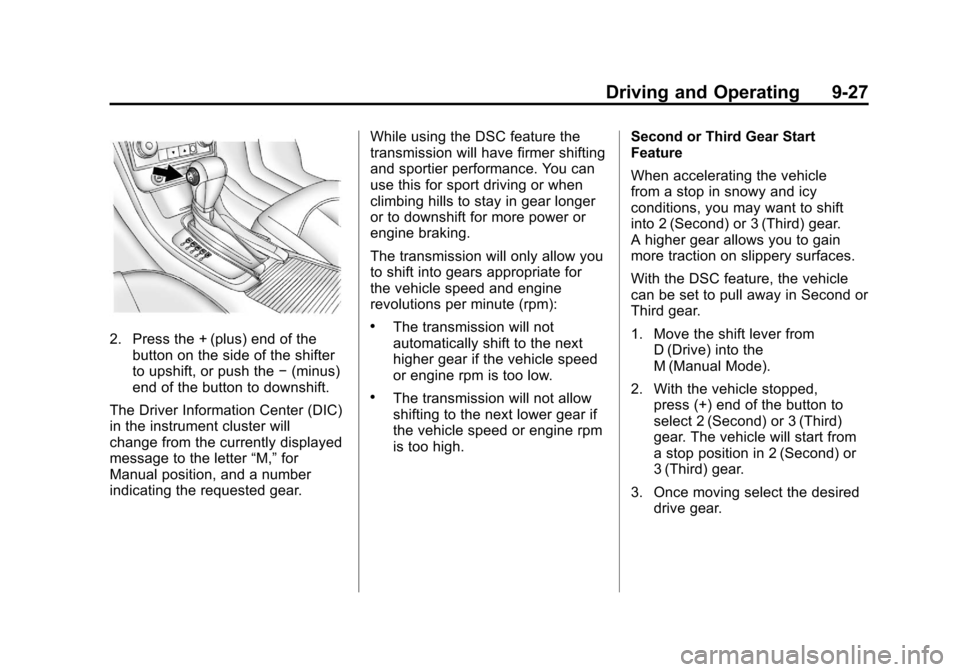
M (Manual Mode): This position,
allows you to change gears similar
to a manual transmission. If the
vehicle has this feature, see Driver
Shift Control (DSC).
Manual Mode
Driver Shift Control (DSC)
To use this feature, do the following:
1. Move the shift lever from D (Drive) rearward to
M (Manual).
While driving in manual mode,
the transmission will remain
in the driver selected gear.
When coming to a stop in the
manual position, the vehicle
will automatically shift into
2 (Second) gear.
Page 219 of 398
Black plate (27,1)Chevrolet Malibu Owner Manual - 2012
Driving and Operating 9-27
2. Press the + (plus) end of thebutton on the side of the shifter
to upshift, or push the −(minus)
end of the button to downshift.
The Driver Information Center (DIC)
in the instrument cluster will
change from the currently displayed
message to the letter “M,”for
Manual position, and a number
indicating the requested gear. While using the DSC feature the
transmission will have firmer shifting
and sportier performance. You can
use this for sport driving or when
climbing hills to stay in gear longer
or to downshift for more power or
engine braking.
The transmission will only allow you
to shift into gears appropriate for
the vehicle speed and engine
revolutions per minute (rpm):.The transmission will not
automatically shift to the next
higher gear if the vehicle speed
or engine rpm is too low.
.The transmission will not allow
shifting to the next lower gear if
the vehicle speed or engine rpm
is too high.
Second or Third Gear Start
Feature
When accelerating the vehicle
from a stop in snowy and icy
conditions, you may want to shift
into 2 (Second) or 3 (Third) gear.
A higher gear allows you to gain
more traction on slippery surfaces.
With the DSC feature, the vehicle
can be set to pull away in Second or
Third gear.
1. Move the shift lever from
D (Drive) into the
M (Manual Mode).
2. With the vehicle stopped, press (+) end of the button to
select 2 (Second) or 3 (Third)
gear. The vehicle will start from
a stop position in 2 (Second) or
3 (Third) gear.
3. Once moving select the desired drive gear.