ECO mode CHEVROLET MALIBU 2012 7.G Owners Manual
[x] Cancel search | Manufacturer: CHEVROLET, Model Year: 2012, Model line: MALIBU, Model: CHEVROLET MALIBU 2012 7.GPages: 398, PDF Size: 6.06 MB
Page 47 of 398
Black plate (17,1)Chevrolet Malibu Owner Manual - 2012
Keys, Doors, and Windows 2-17
Express Window Anti‐Pinch
Override
{WARNING
If express override is activated,
the window will not reverse
automatically. You or others could
be injured and the window could
be damaged. Before you use
express override, make sure that
all people and obstructions are
clear of the window path.
In an emergency, the anti‐pinch
feature can be overridden in a
supervised mode. Hold the window
switch all the way up to the second
position. The window rises for as
long as the switch is held. Once the
switch is released, the express
mode is re‐activated.
In this mode, the window can still
close on an object in its path. Use
care when using the override mode.
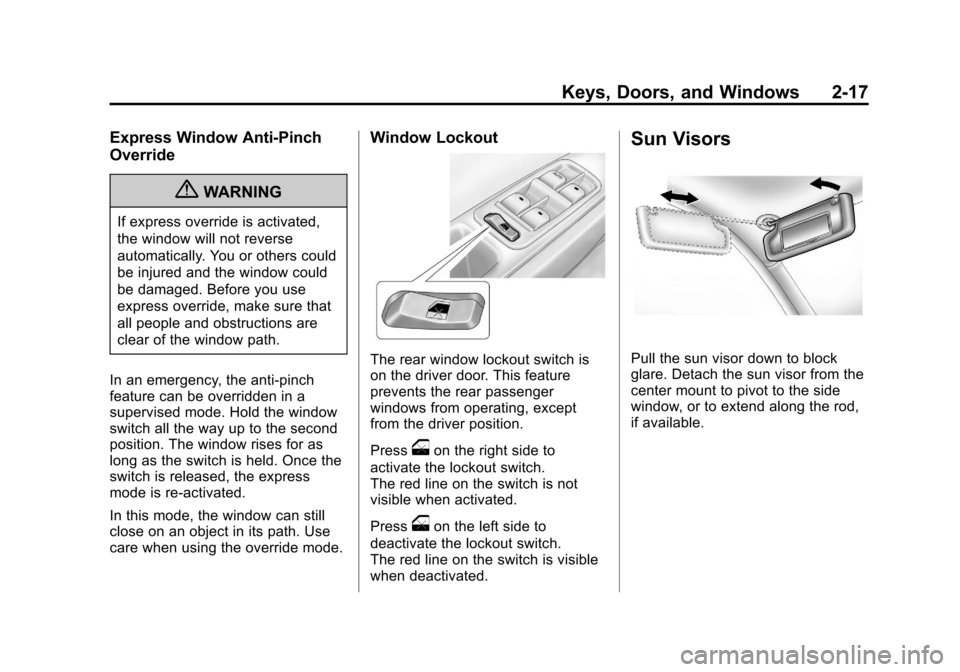
Window Lockout
The rear window lockout switch is
on the driver door. This feature
prevents the rear passenger
windows from operating, except
from the driver position.
Press
oon the right side to
activate the lockout switch.
The red line on the switch is not
visible when activated.
Press
oon the left side to
deactivate the lockout switch.
The red line on the switch is visible
when deactivated.
Sun Visors
Pull the sun visor down to block
glare. Detach the sun visor from the
center mount to pivot to the side
window, or to extend along the rod,
if available.
Page 70 of 398
Black plate (22,1)Chevrolet Malibu Owner Manual - 2012
3-22 Seats and Restraints
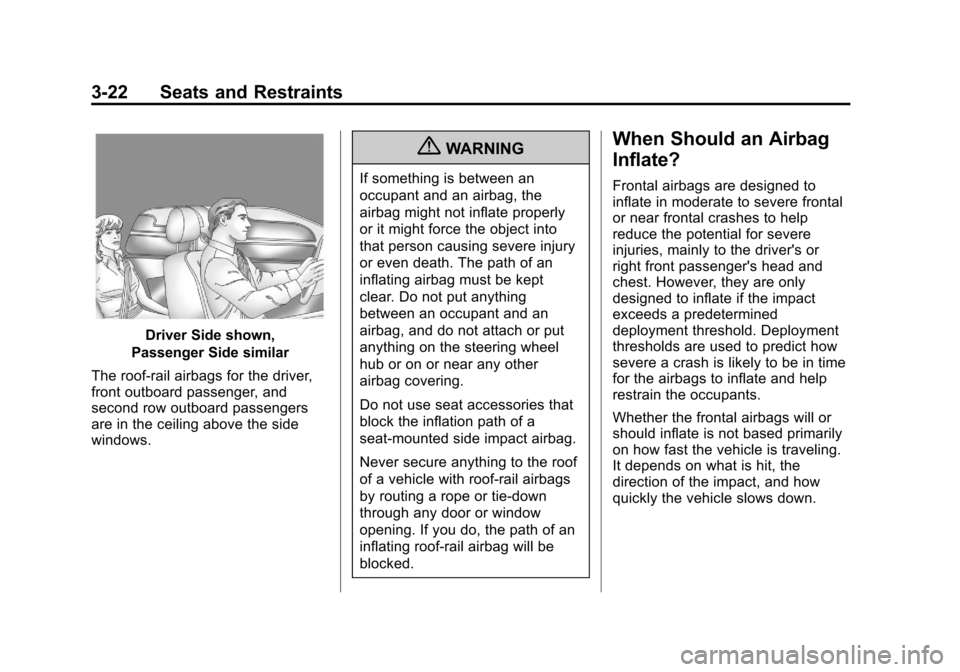
Driver Side shown,
Passenger Side similar
The roof-rail airbags for the driver,
front outboard passenger, and
second row outboard passengers
are in the ceiling above the side
windows.
{WARNING
If something is between an
occupant and an airbag, the
airbag might not inflate properly
or it might force the object into
that person causing severe injury
or even death. The path of an
inflating airbag must be kept
clear. Do not put anything
between an occupant and an
airbag, and do not attach or put
anything on the steering wheel
hub or on or near any other
airbag covering.
Do not use seat accessories that
block the inflation path of a
seat-mounted side impact airbag.
Never secure anything to the roof
of a vehicle with roof-rail airbags
by routing a rope or tie‐down
through any door or window
opening. If you do, the path of an
inflating roof-rail airbag will be
blocked.
When Should an Airbag
Inflate?
Frontal airbags are designed to
inflate in moderate to severe frontal
or near frontal crashes to help
reduce the potential for severe
injuries, mainly to the driver's or
right front passenger's head and
chest. However, they are only
designed to inflate if the impact
exceeds a predetermined
deployment threshold. Deployment
thresholds are used to predict how
severe a crash is likely to be in time
for the airbags to inflate and help
restrain the occupants.
Whether the frontal airbags will or
should inflate is not based primarily
on how fast the vehicle is traveling.
It depends on what is hit, the
direction of the impact, and how
quickly the vehicle slows down.
Page 73 of 398
Black plate (25,1)Chevrolet Malibu Owner Manual - 2012
Seats and Restraints 3-25
You can lock the doors, turn off the
interior lamps and hazard warning
flashers by using the controls for
those features.
{WARNING
A crash severe enough to inflate
the airbags may have also
damaged important functions in
the vehicle, such as the fuel
system, brake and steering
systems, etc. Even if the vehicle
appears to be drivable after a
moderate crash, there may be
concealed damage that could
make it difficult to safely operate
the vehicle.
Use caution if you should attempt
to restart the engine after a crash
has occurred.In many crashes severe enough to
inflate the airbag, windshields are
broken by vehicle deformation.
Additional windshield breakage may
also occur from the front outboard
passenger airbag..Airbags are designed to inflate
only once. After an airbag
inflates, you will need some
new parts for the airbag system.
If you do not get them, the
airbag system will not be there
to help protect you in another
crash. A new system will include
airbag modules and possibly
other parts. The service manual
for the vehicle covers the need
to replace other parts.
.The vehicle has a crash sensing
and diagnostic module which
records information after a
crash. See
Vehicle Data
Recording and Privacy on
page 13‑20 andEvent Data
Recorders on page 13‑20.
.Let only qualified technicians
work on the airbag systems.
Improper service can mean that
an airbag system will not work
properly. See your dealer for
service.
Page 130 of 398
Black plate (24,1)Chevrolet Malibu Owner Manual - 2012
5-24 Instruments and Controls
Information Displays
Driver Information
Center (DIC)
Your vehicle has a Driver
Information Center (DIC). The DIC
display gives you the status of many
of your vehicle's systems. The DIC
is also used to display driver
personalization menu modes and
warning/status messages. All
messages will appear in the DIC
display, located at the bottom of the
instrument panel cluster.
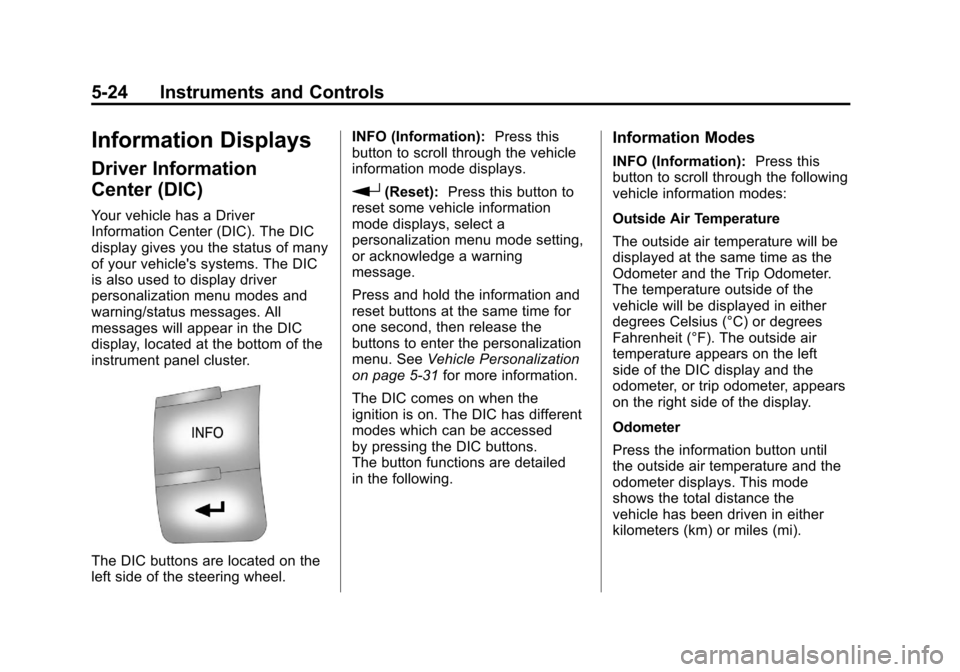
The DIC buttons are located on the
left side of the steering wheel.INFO (Information):
Press this
button to scroll through the vehicle
information mode displays.
r(Reset): Press this button to
reset some vehicle information
mode displays, select a
personalization menu mode setting,
or acknowledge a warning
message.
Press and hold the information and
reset buttons at the same time for
one second, then release the
buttons to enter the personalization
menu. See Vehicle Personalization
on page 5‑31 for more information.
The DIC comes on when the
ignition is on. The DIC has different
modes which can be accessed
by pressing the DIC buttons.
The button functions are detailed
in the following.
Information Modes
INFO (Information): Press this
button to scroll through the following
vehicle information modes:
Outside Air Temperature
The outside air temperature will be
displayed at the same time as the
Odometer and the Trip Odometer.
The temperature outside of the
vehicle will be displayed in either
degrees Celsius (°C) or degrees
Fahrenheit (°F). The outside air
temperature appears on the left
side of the DIC display and the
odometer, or trip odometer, appears
on the right side of the display.
Odometer
Press the information button until
the outside air temperature and the
odometer displays. This mode
shows the total distance the
vehicle has been driven in either
kilometers (km) or miles (mi).
Page 131 of 398
Black plate (25,1)Chevrolet Malibu Owner Manual - 2012
Instruments and Controls 5-25
To change the DIC display to
English or metric units, see“UNITS”
under Vehicle Personalization on
page 5‑31.
Trip Odometer
Press the information button until
the outside air temperature along
with A or B displays. These modes
show the current distance traveled
since the last reset for each trip
odometer in either kilometers (km)
or miles (mi). Both odometers can
be used at the same time.
To reset the trip odometer to zero,
press and hold the reset button for a
few seconds while the desired trip
odometer is displayed.
FUEL RANGE
Press the information button until
FUEL RANGE displays. This mode
shows the remaining distance you
can drive without refueling in either
kilometers (km) or miles (mi). It is
based on fuel economy and the fuel
remaining in the tank. When the fuel level is low, FUEL
RANGE LOW displays.
The fuel economy data used to
determine fuel range is an average
of recent driving conditions. As your
driving conditions change, this data
is gradually updated. The FUEL
RANGE mode cannot be reset.
MPG (L/100 KM) AVG (Average)
Press the information button until
MPG (L/100 KM) AVG displays.
This mode shows how many liters
per 100 kilometers (L/100 km) or
miles per gallon (mpg) your vehicle
is getting based on current and past
driving conditions.
To reset the average fuel economy,
press and hold the reset button
while MPG (L/100 KM) AVG is
displayed. Average fuel economy is
then calculated starting from that
point. If the average fuel economy is
not reset, it is continually updated
each time you drive.
MPG (L/100 KM) INST
(Instantaneous)
Press the information button until
MPG (L/100 KM) INST displays.
This mode shows the current fuel
economy at a particular moment
and changes frequently as driving
conditions change. This mode
shows the instantaneous fuel
economy in liters per 100 kilometers
(L/100 km) or miles per gallon
(mpg). Unlike average fuel
economy, this screen cannot be
reset.
AV (Average) SPEED
Press the information button until
AV SPEED displays. This mode
shows the vehicle's average speed
in kilometers per hour (km/h) or
miles per hour (mph).
To reset the average vehicle speed,
press and hold the reset button
while AV SPEED is displayed.
Page 137 of 398
Black plate (31,1)Chevrolet Malibu Owner Manual - 2012
Instruments and Controls 5-31
Vehicle Reminder
Messages
ICE POSSIBLE
This message displays when the
outside air temperature is cold
enough to create icy road
conditions. Adjust your driving
accordingly.
Washer Fluid Messages
LOW WASHER FLUID
This message displays when the
vehicle's windshield washer fluid is
low. Fill the windshield washer fluid
reservoir to the proper level as soon
as possible. SeeWasher Fluid on
page 10‑23.
Vehicle
Personalization
Your vehicle has personalization
capabilities that allow you to
program certain features to a
preferred setting. All of the features
listed may not be available on your
vehicle. Only the features available
will be displayed on the DIC.
The default settings for the features
were set when your vehicle left the
factory, but may have been changed
from their default state since
that time.
To change feature settings, use the
following procedure:
Entering Personalization Menu
1. Turn the ignition on while the
vehicle is stopped.
To avoid excessive drain on the
battery, it is recommended that
the headlamps are turned off. 2. Press and hold the information
and reset buttons at the
same time for one second,
then release to enter the
personalization menu.
If the vehicle speed is greater
than 3 km/h (2 mph), only the
UNITS menu will be accessible.
3. Press the information button to scroll through the available
personalization menu modes.
Press the reset button to scroll
through the available settings for
each mode.
If you do not make a selection
within ten seconds, the display
will go back to the previous
information displayed.
Page 138 of 398
Black plate (32,1)Chevrolet Malibu Owner Manual - 2012
5-32 Instruments and Controls
Personalization Menu Modes
OIL LIFE RESET
When this feature is displayed, you
can reset the engine oil life system.
To reset the system, seeEngine
Oil Life System on page 10‑12.
See “OIL LIFE” underDriver
Information Center (DIC) on
page 5‑24 for more information.
UNITS
This feature allows you to select
the units of measurement in which
the DIC will display the vehicle
information. When UNITS appears
on the display, press and hold the
reset button for at least one second
to scroll through the available
settings:
ENGLISH (default in United
States): All information will be
displayed in English units.
METRIC (default in Canada):
All information will be displayed in
metric units. To select a setting and move on
to the next feature, press the
information button while the desired
setting is displayed on the DIC.
REMOTE START
If your vehicle has remote start, this
feature allows remote start to be
turned off or on. Remote start allows
you to start the engine from outside
of the vehicle using your Remote
Keyless Entry (RKE) transmitter.
When REMOTE START appears on
the display, press and hold the reset
button for at least one second to
scroll through the available settings:
OFF:
The remote start feature will
be disabled.
ON (default): The remote start
feature will be enabled.
See Remote Vehicle Start on
page 2‑5 for more information.
To select a setting and move on to
the next feature, press the
information button while the desired
setting is displayed on the DIC. LOCK HORN
This feature, which allows the
vehicle's horn to chirp every time
the lock button on the Remote
Keyless Entry (RKE) transmitter
is pressed, can be enabled or
disabled. When LOCK HORN
appears on the display, press and
hold the reset button for at least
one second to scroll through the
available settings:
OFF (default):
The horn will not
chirp on the first press of the lock
button on the RKE transmitter.
The horn will still chirp on the
second press.
ON: The horn will chirp on the first
press of the lock button on the RKE
transmitter.
See Remote Keyless Entry (RKE)
System Operation on page 2‑3 for
more information.
To select a setting and move on
to the next feature, press the
information button while the desired
setting is displayed on the DIC.
Page 141 of 398
Black plate (35,1)Chevrolet Malibu Owner Manual - 2012
Instruments and Controls 5-35
SeeRemote Keyless Entry (RKE)
System Operation on page 2‑3 for
more information.
To select a setting and move on
to the next feature, press the
information button while the desired
setting is displayed on the DIC.
LANGUAGE
This feature allows you to select the
language in which the DIC will
display. When LANGUAGE appears
on the display, press and hold the
reset button for at least one second
to scroll through the available
settings:
ENGLISH (default): All messages
will appear in English.
FRENCH: All messages will appear
in French.
SPANISH: All messages will
appear in Spanish.
GERMAN: All messages will
appear in German. To select a setting and exit out of
the personalization menu mode,
press the information button while
the desired setting is displayed on
the DIC.
Exiting Personalization Menu
The personalization menu will be
exited when any of the following
conditions occur:
.A ten second time period has
elapsed.
.The ignition is turned off.
.The end of the personalization
menu list is reached.
Page 148 of 398
Black plate (6,1)Chevrolet Malibu Owner Manual - 2012
6-6 Lighting
Dome Lamps
The dome lamps come on when any
door is opened. They turn off after
all the doors are closed.
The dome lamps can also be turned
on by turning the instrument panel
brightness knob, located on the
instrument panel to the left of the
steering column, clockwise to the
farthest position. In this position, the
dome lamps remain on whether a
door is opened or closed.
Reading Lamps
For vehicles with front and rear
reading lamps, press the lens to
turn the lamp on and off, while the
doors are closed. These lamps
come on automatically when any
door is opened.
Lighting Features
Entry/Exit Lighting
The lamps inside the vehicle come
on when any door is opened. These
lamps fade out about 20 seconds
after all of the doors have been
closed or when the ignition is turned
to ON/RUN. They also come on
when the unlock symbol button or
the horn symbol is pressed on the
Remote Keyless Entry (RKE)
system transmitter.
The lamps inside the vehicle stay on
for about 20 seconds after the key is
removed from the ignition to provide
light as you exit.
Parade Dimming
Parade dimming is a separate
lighting mode that comes on while
the parking lamps are turned on
during the day. It prevents the
display lights and indicator lights
from being dim, while the parking
lamps are used during the day.
Battery Load
Management
The vehicle has Electric Power
Management (EPM) that estimates
the battery's temperature and state
of charge. It then adjusts the voltage
for best performance and extended
life of the battery.
When the battery's state of charge
is low, the voltage is raised slightly
to quickly bring the charge back up.
When the state of charge is high,
the voltage is lowered slightly to
prevent overcharging. If the vehicle
has a voltmeter gauge or a voltage
display on the Driver Information
Center (DIC), you may see the
voltage move up or down. This is
normal. If there is a problem, an
alert will be displayed.
The battery can be discharged at
idle if the electrical loads are very
high. This is true for all vehicles.
Page 160 of 398
Black plate (10,1)Chevrolet Malibu Owner Manual - 2012
7-10 Infotainment System
Finding an XM Channel
BAND:Press to switch between
AM, FM, or XM™, if equipped.
f(Tune): Turn to manually select
an XM channel.
©SEEK: Press to go to the
previous XM channel.
.To scan stations, press and
hold
©SEEK for a few seconds
until the radio beeps once. The
radio goes to a cahnnel, plays
for a few seconds, then goes to
the next station. Press
©SEEK
again to stop scanning.
¨SEEK: Press to go to the next
XM channel.
.To scan stations, press and
hold
¨SEEK for a few seconds
until the radio beeps once.
The radio goes to a station,
plays for a few seconds,
then goes to the next station.
Press
¨SEEK again to stop
scanning.
sREV: Press to go to the
previous XM category.
\FWD: Press to go to the next
XM category.
Finding a Category (CAT)
Channel
To find XM channels in a category:
1. Press the CAT button to display
the category tabs. Continue
pressing the CAT button until the
desired category name displays.
.Radios with CD and DVD
can also navigate the
category list by pressing
the
\FWD or thesREV
button.
2. Press either of the two softkeys below the desired category tab
to immediately tune to the first
XM station in that category. To go to the previous or next XM
station in the selected category,
do one of the following:
.Turn thefknob.
.Press the softkey below the
right or left arrows in the
category tab.
.Press©SEEK or¨SEEK.
3. To exit the category search mode, press the FAV button or
BAND button to display the
favorites again.
Adding and Removing Categories
Categories cannot be added or
removed while the vehicle is moving
faster than 8 km/h (5 mph).
To add or remove a category:
1. Press the MENU button.
2. Press the softkey located below the XM CAT tab.