ABS CHEVROLET MALIBU 2012 7.G Owners Manual
[x] Cancel search | Manufacturer: CHEVROLET, Model Year: 2012, Model line: MALIBU, Model: CHEVROLET MALIBU 2012 7.GPages: 398, PDF Size: 6.06 MB
Page 5 of 398

Black plate (5,1)Chevrolet Malibu Owner Manual - 2012
Introduction v
Vehicle Symbol Chart
Here are some additional symbols
that may be found on the vehicle
and what they mean. For more
information on the symbol, refer to
the Index.
9:Airbag Readiness Light
#:Air Conditioning
!:Antilock Brake System (ABS)
%:Audio Steering Wheel Controls
or OnStar®
$: Brake System Warning Light
":Charging System
I:Cruise Control
B: Engine Coolant Temperature
O:Exterior Lamps
#:Fog Lamps
.: Fuel Gauge
+:Fuses
3: Headlamp High/Low-Beam
Changer
j: LATCH System Child
Restraints
*: Malfunction Indicator Lamp
::Oil Pressure
}:Power
/:Remote Vehicle Start
>:Safety Belt Reminders
7:Tire Pressure Monitor
d:Traction Control/Electronic
Stability Control (ESC)
M: Windshield Washer Fluid
Page 23 of 398
Black plate (17,1)Chevrolet Malibu Owner Manual - 2012
In Brief 1-17
Storing a Favorite Station
Depending on which radio the
vehicle has, radio stations are
stored as either favorites or presets.
For radios with a FAV button, a
maximum of 36 stations can be
stored as favorites using the six
softkeys located below the radio
station frequency tabs and by using
the radio FAV button. Press FAV
to go through up to six pages of
favorites, each having six favorite
stations available per page.
Each page of favorites can contain
any combination of AM, FM,
or XM™stations.
For radios without a FAV button,
up to 18 stations (six FM1, six FM2,
and six AM), can be programmed
on the six numbered buttons.
See Operation on page 7‑2.
Setting the Clock
To set the time and date for the
Radio with CD (MP3) and USB port
or Radio with a Single CD (MP3)
player:
1. Turn the ignition key to
ACC/ACCESSORY or ON/RUN.
2. Press
Oto turn the radio on.
3. Press
Hand the HR, MIN, MM,
DD, YYYY (hour, minute, month,
day, and year) displays.
4. Press the softkey located below any one of the tabs that you
want to change.
5. Increase or decrease the time or date by turning
fclockwise or
counterclockwise.
For detailed instructions on setting
the clock for your specific audio
system, see Clock on page 5‑6.
Satellite Radio
XM is a satellite radio service based
in the 48 contiguous United States
and 10 Canadian provinces.
XM satellite radio has a wide
variety of programming and
commercial-free music, coast to
coast, and in digital-quality sound.
A fee is required to receive the
XM service.
For more information, refer to:
.www.xmradio.com or call
1-800-929-2100 (U.S.)
.www.xmradio.ca or call
1-877-438-9677 (Canada)
See Satellite Radio on page 7‑9.
Page 104 of 398
Black plate (2,1)Chevrolet Malibu Owner Manual - 2012
4-2 Storage
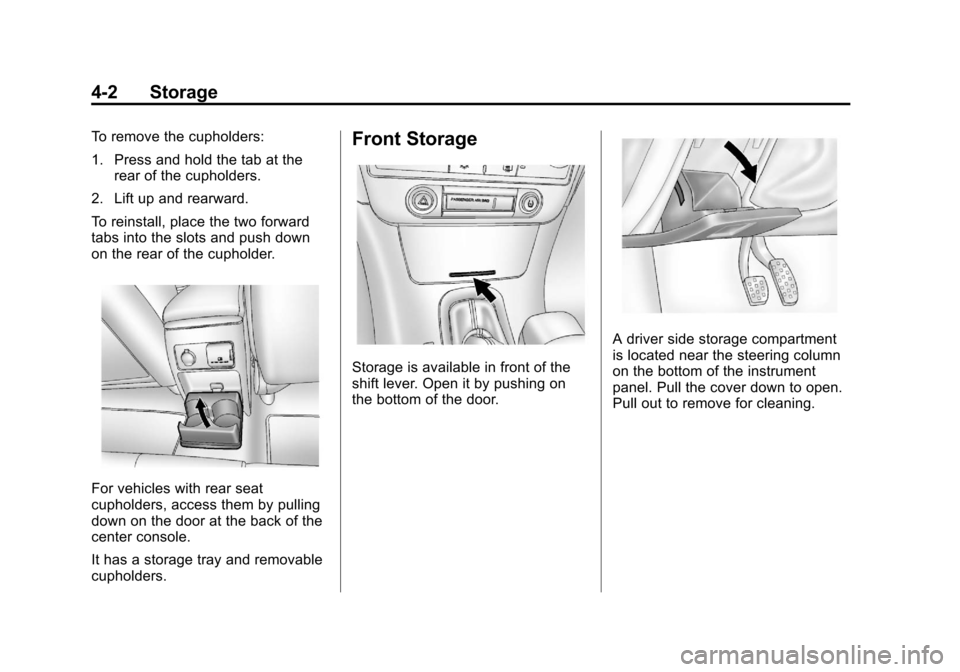
To remove the cupholders:
1. Press and hold the tab at therear of the cupholders.
2. Lift up and rearward.
To reinstall, place the two forward
tabs into the slots and push down
on the rear of the cupholder.
For vehicles with rear seat
cupholders, access them by pulling
down on the door at the back of the
center console.
It has a storage tray and removable
cupholders.
Front Storage
Storage is available in front of the
shift lever. Open it by pushing on
the bottom of the door.
A driver side storage compartment
is located near the steering column
on the bottom of the instrument
panel. Pull the cover down to open.
Pull out to remove for cleaning.
Page 107 of 398
Black plate (1,1)Chevrolet Malibu Owner Manual - 2012
Instruments and Controls 5-1
Instruments and
Controls
Controls
Steering Wheel Adjustment . . . 5-2
Steering Wheel Controls . . . . . . 5-2
Horn . . . . . . . . . . . . . . . . . . . . . . . . . . 5-3
Windshield Wiper/Washer . . . . . 5-4
Compass . . . . . . . . . . . . . . . . . . . . . 5-5
Clock . . . . . . . . . . . . . . . . . . . . . . . . . 5-6
Power Outlets . . . . . . . . . . . . . . . . . 5-7
Warning Lights, Gauges, and
Indicators
Warning Lights, Gauges, andIndicators . . . . . . . . . . . . . . . . . . . . 5-9
Instrument Cluster . . . . . . . . . . . 5-10
Speedometer . . . . . . . . . . . . . . . . 5-11
Odometer . . . . . . . . . . . . . . . . . . . . 5-11
Trip Odometer . . . . . . . . . . . . . . . 5-11
Tachometer . . . . . . . . . . . . . . . . . . 5-11
Fuel Gauge . . . . . . . . . . . . . . . . . . 5-12
Engine Coolant Temperature Gauge . . . . . . . . . . . . . . . . . . . . . . 5-13
Safety Belt Reminders . . . . . . . 5-13
Airbag Readiness Light . . . . . . 5-14 Passenger Airbag Status
Indicator . . . . . . . . . . . . . . . . . . . . 5-15
Charging System Light . . . . . . 5-16
Malfunction Indicator Lamp . . . . . . . . . . . . . 5-16
Brake System Warning Light . . . . . . . . . . . . . . . . . . . . . . . 5-18
Antilock Brake System (ABS) Warning Light . . . . . . . . . . . . . . 5-19
Traction Off Light . . . . . . . . . . . . 5-20
Electronic Stability Control (ESC) Off Light . . . . . . . . . . . . . 5-20
Electronic Stability Control (ESC)/Traction Control
System (TCS) Indicator/
Warning Light . . . . . . . . . . . . . . 5-20
Engine Coolant Temperature Warning Light . . . . . . . . . . . . . . 5-21
Tire Pressure Light . . . . . . . . . . 5-21
Engine Oil Pressure Light . . . . 5-22
Security Light . . . . . . . . . . . . . . . . 5-23
High-Beam On Light . . . . . . . . . 5-23
Cruise Control Light . . . . . . . . . 5-23
Information Displays
Driver Information Center (DIC) . . . . . . . . . . . . . . . 5-24
Vehicle Messages
Vehicle Messages . . . . . . . . . . . 5-26
Brake System Messages . . . . 5-27
Cruise Control Messages . . . . 5-27
Door Ajar Messages . . . . . . . . . 5-27
Engine Oil Messages . . . . . . . . 5-27
Engine Power Messages . . . . 5-27
Fuel System Messages . . . . . . 5-28
Key and Lock Messages . . . . . 5-28
Lamp Messages . . . . . . . . . . . . . 5-28
Ride Control SystemMessages . . . . . . . . . . . . . . . . . . 5-28
Airbag System Messages . . . . 5-30
Service Vehicle Messages . . . 5-30
Tire Messages . . . . . . . . . . . . . . . 5-30
Vehicle Reminder Messages . . . . . . . . . . . . . . . . . . 5-31
Washer Fluid Messages . . . . . 5-31
Vehicle Personalization
Vehicle Personalization . . . . . . 5-31
Page 112 of 398
Black plate (6,1)Chevrolet Malibu Owner Manual - 2012
5-6 Instruments and Controls
Clock
Without Date Display
AM/FM Base Radio with a
Single CD Player
To set the time:
1. Turn the ignition key toACC/ACCESSORY or ON/RUN.
Press the
Oknob to turn the
radio on.
2. Press the
Hbutton until the hour
begins flashing on the display.
Press the
Hbutton a second
time and the minute begins
flashing on the display.
3. While either the hour or the minute numbers are flashing,
turn the
fknob to increase or
decrease the time.
4. Press the
Hbutton again until
the clock display stops flashing
to set the currently displayed
time; otherwise, the flashing
stops after five seconds and
the current time displayed is
automatically set. To change the time default setting
from 12 hour to 24 hour, press
the
Hbutton until 12H or 24H is
displayed. Once 12H or 24H is
displayed, turn the
fknob to the
desired option to select the setting.
Press the
Hbutton again to apply
the setting, or let the screen
time out.
With Date Display
Radio with CD (MP3) and
USB Port, and Radio with
Single CD (MP3) Player
To set the time and date:
1. Turn the ignition key to ACC/ACCESSORY or ON/RUN.
Press the
Oknob to turn the
radio on.
2. Press the
Hbutton and the HR,
MIN, MM, DD, YYYY (hour,
minute, month, day, and year)
displays. 3. Press the softkey located below
any one of the tabs that you
want to change.
4. To increase the time or date do one of the following:
.Press the softkey located
below the selected tab.
.Press the¨SEEK, or
\FWD button.
.Turn thefknob clockwise.
5. To decrease the time or date do one of the following:
.Press the©SEEK or
sREV button.
.Turn thefknob
counterclockwise.
Page 125 of 398
Black plate (19,1)Chevrolet Malibu Owner Manual - 2012
Instruments and Controls 5-19
When the ignition is on, the brake
system warning light also comes on
when the parking brake is set.
The light stays on if the parking
brake does not fully release . If it
stays on after the parking brake is
fully released, it means there is a
brake problem.
The Driver Information Center (DIC)
may display a BRAKE FLUID
message. SeeBrake System
Messages on page 5‑27 for more
information.
If the light comes on while driving,
pull off the road and carefully stop.
The brake pedal may be harder to
push or the pedal may go closer to
the floor. It may take longer to stop.
Try turning off and restarting the
vehicle one or two times, if the light
is still on, have the vehicle towed for
service. See Towing the Vehicle on
page 10‑87{WARNING
The brake system might not be
working properly if the brake
system warning light is on.
Driving with the brake system
warning light on can lead to a
crash. If the light is still on after
the vehicle has been pulled off
the road and carefully stopped,
have the vehicle towed for
service.
Antilock Brake System
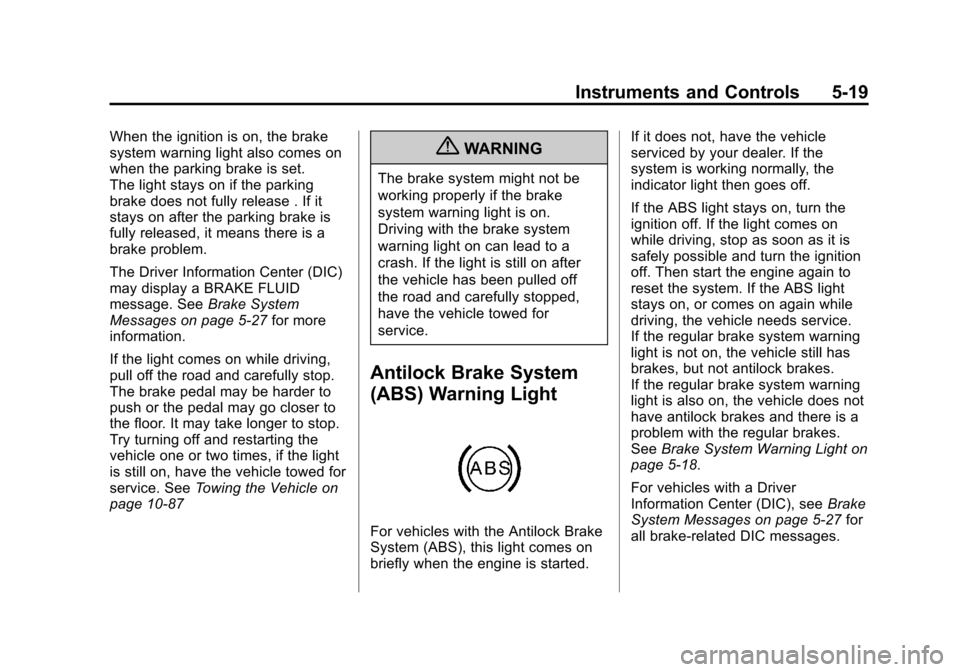
(ABS) Warning Light
For vehicles with the Antilock Brake
System (ABS), this light comes on
briefly when the engine is started. If it does not, have the vehicle
serviced by your dealer. If the
system is working normally, the
indicator light then goes off.
If the ABS light stays on, turn the
ignition off. If the light comes on
while driving, stop as soon as it is
safely possible and turn the ignition
off. Then start the engine again to
reset the system. If the ABS light
stays on, or comes on again while
driving, the vehicle needs service.
If the regular brake system warning
light is not on, the vehicle still has
brakes, but not antilock brakes.
If the regular brake system warning
light is also on, the vehicle does not
have antilock brakes and there is a
problem with the regular brakes.
See
Brake System Warning Light on
page 5‑18.
For vehicles with a Driver
Information Center (DIC), see Brake
System Messages on page 5‑27 for
all brake-related DIC messages.
Page 153 of 398
Black plate (3,1)Chevrolet Malibu Owner Manual - 2012
Infotainment System 7-3
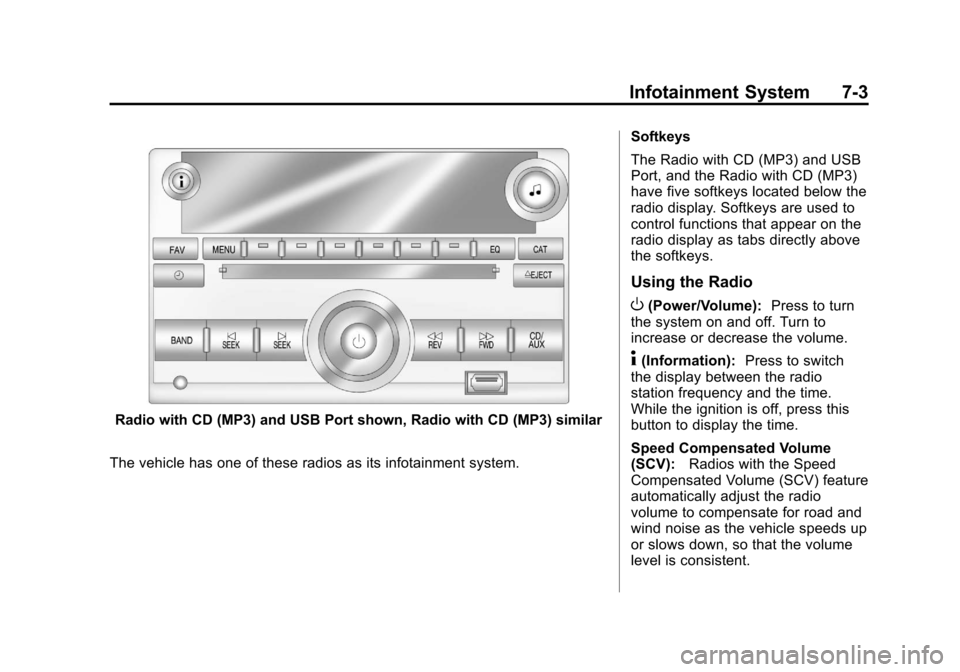
Radio with CD (MP3) and USB Port shown, Radio with CD (MP3) similar
The vehicle has one of these radios as its infotainment system. Softkeys
The Radio with CD (MP3) and USB
Port, and the Radio with CD (MP3)
have five softkeys located below the
radio display. Softkeys are used to
control functions that appear on the
radio display as tabs directly above
the softkeys.
Using the Radio
O(Power/Volume):
Press to turn
the system on and off. Turn to
increase or decrease the volume.
4(Information): Press to switch
the display between the radio
station frequency and the time.
While the ignition is off, press this
button to display the time.
Speed Compensated Volume
(SCV): Radios with the Speed
Compensated Volume (SCV) feature
automatically adjust the radio
volume to compensate for road and
wind noise as the vehicle speeds up
or slows down, so that the volume
level is consistent.
Page 154 of 398
Black plate (4,1)Chevrolet Malibu Owner Manual - 2012
7-4 Infotainment System
To activate SCV:
1. Set the radio volume to thedesired level.
2. Press MENU to display the radio setup menu.
3. Press the softkey under the AUTO VOLUM tab on the radio
display.
4. Press the softkey under the desired Speed Compensated
Volume setting (OFF, Low, Med,
or High) to select the level of
radio volume compensation.
The display times out after
approximately 10 seconds.
Each higher setting allows
for more radio volume
compensation at faster
vehicle speeds.Setting the Tone (Bass/Treble)
Radio with CD
To adjust the bass, or treble:
1. Press the
fknob until Bass or
Treble displays.
2. To adjust the setting, do one of the following:
.Turn thefknob.
.Press either¨SEEK,
or
©SEEK button.
.Press either\FWD,
or
sREV button.
EQ (Equalization): Press this
button to choose bass and treble
equalization settings designed for
different types of music. Selecting
MANUAL or changing bass or
treble, returns the EQ to the manual
bass and treble settings.
Unique EQ settings can be saved
for each source.
Setting the Tone (Bass/
Midrange/Treble) Radio with
CD (MP3) and USB Port,
Radio with CD (MP3)
BASS/MID/TREB (Bass, Midrange,
or Treble): To adjust the bass,
midrange, or treble:
1. Press the
fknob until the tone
control tabs display.
2. Highlight the desired tone control tab by doing one of the
following:
.Pressing thefknob..Press the softkey under the
desired tab.
3. Adjust the setting by doing one of the following:
.Turn thefknob clockwise
or counterclockwise.
.Press the¨SEEK,
or
©SEEK button.
.Press the\FWD,
or
sREV button.
Page 155 of 398
Black plate (5,1)Chevrolet Malibu Owner Manual - 2012
Infotainment System 7-5
If a station's frequency is weak or if
there is static, decrease the treble.
To quickly adjust bass, midrange,
or treble to the middle position,
press the softkey positioned under
the BASS, MID, or TREB tab for
more than two seconds. A beep
sounds and the level adjusts to the
middle position.
To quickly adjust all tone and
speaker controls to the middle
position, press the
fknob for more
than two seconds until a beep
sounds.
EQ (Equalization): Press this
button to choose bass and treble
equalization settings designed for
different types of music. Selecting
MANUAL or changing bass or
treble, returns the EQ to the manual
bass and treble settings.
Unique EQ settings can be saved
for each source.
If the radio has a Bose
®audio
system, the EQ settings are either
MANUAL or TALK.
Adjusting the Speakers
(Balance/Fade) Radio with CD
To adjust the balance or fade:
1. Press the
`or press the
fknob until the speaker control
label displays.
2. To adjust the setting, do one of the following:
.Turn thefknob.
.Press either¨SEEK,
or
©SEEK button.
.Press either\FWD,
or
sREV button.
Adjusting the Speakers
(Balance/Fade) Radio with
CD (MP3) and USB Port,
Radio with CD (MP3)
BAL/FADE (Balance/Fade):
To adjust the balance or fade:
1. Press the
fknob until the
speaker control tabs display.
2. Highlight the desired speaker control tab by doing one of the
following:
.Pressing thefknob.
.Press the softkey under the
desired tab.
3. Adjust the setting by doing one of the following:
.Turn thefknob clockwise
or counterclockwise.
.Press the¨SEEK,
or
©SEEK button.
.Press the\FWD,
or
sREV button.
Page 158 of 398
Black plate (8,1)Chevrolet Malibu Owner Manual - 2012
7-8 Infotainment System
Storing Radio Stations
Drivers are encouraged to store
radio station while the vehicle is
parked, seeDefensive Driving on
page 9‑3. Tune to stored radio
stations using the presets, favorites
button, and steering wheel controls,
if the vehicle has this feature.
Radios that have a FAV button store
radio stations as favorites, up to
36 stations can be programmed as
favorites using the six softkeys
below the radio station frequency
tabs and by using the FAV button.
Press the FAV button to go through
up to six pages of favorites, each
having six favorite stations available
per page. Each page of favorites
can contain any combination of AM,
FM, or XM, if equipped, stations.
Radios that do not have a FAV
button store radio stations as
presets, up to 18 stations
(six FM1, six FM2, and six AM),
can be programmed on the
six numbered pushbuttons. Storing a Radio Station as a
Preset
Radios that have numbered
pushbuttons store radio stations as
presets.
Up to 18 stations (six FM1, six FM2,
and six AM), can be programmed
on the six numbered buttons.
To store preset stations:
1. Tune to a radio station.
2. Press and hold one of the
six numbered pushbuttons for
three seconds until a beep
sounds.
3. Repeat Steps 1 and 2 to store additional radio stations.
Storing a Radio Station as a
Favorite
Radio that have a FAV button store
radio stations as favorites.
To store a station as a favorite:
1. Tune to a radio station.
2. Press the FAV button to display the page where the station will
be stored. 3. Press and hold one of the
six softkeys until a beep sounds.
4. Repeat Steps 1 through 3 to store additional radio stations.
The number of favorites pages can
be setup using the MENU button.
To setup the number of favorites
pages:
1. Press the MENU button.
2. Press the softkey located below the FAV 1-6 tab.
3. Select the number of favorites pages by pressing the softkey
located below the displayed
page numbers.
4. Press the FAV button, or let the menu time out, to return to the
original main radio screen
showing the radio station
frequency tabs and to begin
the process of programming
favorites.