ECU CHEVROLET MALIBU 2012 7.G Owners Manual
[x] Cancel search | Manufacturer: CHEVROLET, Model Year: 2012, Model line: MALIBU, Model: CHEVROLET MALIBU 2012 7.GPages: 398, PDF Size: 6.06 MB
Page 1 of 398

Black plate (1,1)Chevrolet Malibu Owner Manual - 2012
2012 Chevrolet Malibu Owner ManualM
In Brief. . . . . . . . . . . . . . . . . . . . . . . . 1-1
Instrument Panel . . . . . . . . . . . . . . 1-2
Initial Drive Information . . . . . . . . 1-4
Vehicle Features . . . . . . . . . . . . . 1-16
Performance and Maintenance . . . . . . . . . . . . . . . . 1-20
Keys, Doors, and Windows . . . . . . . . . . . . . . . . . . . . 2-1
Keys and Locks . . . . . . . . . . . . . . . 2-2
Doors . . . . . . . . . . . . . . . . . . . . . . . . . . 2-9
Vehicle Security . . . . . . . . . . . . . . 2-11
Exterior Mirrors . . . . . . . . . . . . . . . 2-13
Interior Mirrors . . . . . . . . . . . . . . . . 2-14
Windows . . . . . . . . . . . . . . . . . . . . . 2-15
Roof . . . . . . . . . . . . . . . . . . . . . . . . . . 2-18
Seats and Restraints . . . . . . . . . 3-1
Head Restraints . . . . . . . . . . . . . . . 3-2
Front Seats . . . . . . . . . . . . . . . . . . . . 3-3
Rear Seats . . . . . . . . . . . . . . . . . . . . 3-8 Safety Belts . . . . . . . . . . . . . . . . . . . . 3-9
Airbag System . . . . . . . . . . . . . . . . 3-19
Child Restraints . . . . . . . . . . . . . . 3-33
Storage . . . . . . . . . . . . . . . . . . . . . . . 4-1
Storage Compartments . . . . . . . . 4-1
Additional Storage Features . . . . . . . . . . . . . . . . . . . . . 4-3
Instruments and Controls . . . . 5-1
Controls . . . . . . . . . . . . . . . . . . . . . . . 5-2
Warning Lights, Gauges, and Indicators . . . . . . . . . . . . . . . . . . . . 5-9
Information Displays . . . . . . . . . . 5-24
Vehicle Messages . . . . . . . . . . . . 5-26
Vehicle Personalization . . . . . . . 5-31
Lighting . . . . . . . . . . . . . . . . . . . . . . . 6-1
Exterior Lighting . . . . . . . . . . . . . . . 6-1
Interior Lighting . . . . . . . . . . . . . . . . 6-5
Lighting Features . . . . . . . . . . . . . . 6-6 Infotainment System
. . . . . . . . . 7-1
Introduction . . . . . . . . . . . . . . . . . . . . 7-1
Radio . . . . . . . . . . . . . . . . . . . . . . . . . . 7-6
Audio Players . . . . . . . . . . . . . . . . 7-15
Phone . . . . . . . . . . . . . . . . . . . . . . . . 7-25
Climate Controls . . . . . . . . . . . . . 8-1
Climate Control Systems . . . . . . 8-1
Air Vents . . . . . . . . . . . . . . . . . . . . . . . 8-9
Driving and Operating . . . . . . . . 9-1
Driving Information . . . . . . . . . . . . . 9-2
Starting and Operating . . . . . . . 9-16
Engine Exhaust . . . . . . . . . . . . . . 9-23
Automatic Transmission . . . . . . 9-24
Brakes . . . . . . . . . . . . . . . . . . . . . . . 9-28
Ride Control Systems . . . . . . . . 9-30
Cruise Control . . . . . . . . . . . . . . . . 9-33
Fuel . . . . . . . . . . . . . . . . . . . . . . . . . . 9-36
Towing . . . . . . . . . . . . . . . . . . . . . . . 9-42
Conversions and Add-Ons . . . 9-48
Page 29 of 398
Black plate (23,1)Chevrolet Malibu Owner Manual - 2012
In Brief 1-23
Roadside Assistance
Program
U.S.:1-800-243-8872
TTY Users (U.S.): 1-888-889-2438
Canada: 1-800-268-6800
Mexico: 01-800-466-0800
As the owner of a new Chevrolet,
you are automatically enrolled in the
Roadside Assistance program.
See Roadside Assistance Program
(U.S. and Canada) on page 13‑7 or
Roadside Assistance Program
(Mexico) on page 13‑10 for more
information. Roadside Assistance and OnStar
(U.S. and Canada)
If you have an active OnStar
subscription, press theQbutton
and the current GPS location will be
sent to an OnStar advisor who will
assess your problem, contact
Roadside Assistance, and relay
your exact location to get the help
you need.
Online Owner Center
(U.S. and Canada)
The Online Owner Center is a
complimentary service that includes
online service reminders, vehicle
maintenance tips, online owner
manual, special privileges,
and more.
Sign up today at:
www.chevyownercenter.com
(U.S.) or www.gm.ca (Canada).
OnStar®
If equipped, this vehicle has a
comprehensive, in-vehicle system
that can connect to a live Advisor
for Emergency, Security, Navigation,
Connection, and Diagnostic
Services. See OnStar Overview on
page 14‑1 for more information.
Page 31 of 398
Black plate (1,1)Chevrolet Malibu Owner Manual - 2012
Keys, Doors, and Windows 2-1
Keys, Doors, and
Windows
Keys and Locks
Keys . . . . . . . . . . . . . . . . . . . . . . . . . . 2-2
Remote Keyless Entry (RKE)System . . . . . . . . . . . . . . . . . . . . . . 2-2
Remote Keyless Entry (RKE) System Operation . . . . . . . . . . . 2-3
Remote Vehicle Start . . . . . . . . . 2-5
Door Locks . . . . . . . . . . . . . . . . . . . 2-7
Power Door Locks . . . . . . . . . . . . 2-7
Door Ajar Reminder . . . . . . . . . . . 2-8
Delayed Locking . . . . . . . . . . . . . . 2-8
Automatic Door Locks . . . . . . . . . 2-8
Lockout Protection . . . . . . . . . . . . 2-8
Safety Locks . . . . . . . . . . . . . . . . . . 2-8
Doors
Trunk . . . . . . . . . . . . . . . . . . . . . . . . . 2-9
Vehicle Security
Vehicle Security . . . . . . . . . . . . . . 2-11
Anti-theft Alarm System . . . . . . 2-11
Immobilizer . . . . . . . . . . . . . . . . . . 2-12
Immobilizer Operation . . . . . . . 2-12
Exterior Mirrors
Convex Mirrors . . . . . . . . . . . . . . 2-13
Power Mirrors . . . . . . . . . . . . . . . . 2-14
Heated Mirrors . . . . . . . . . . . . . . . 2-14
Interior Mirrors
Manual Rearview Mirror . . . . . . 2-14
Automatic Dimming Rearview Mirror . . . . . . . . . . . . . . . . . . . . . . . 2-14
Windows
Windows . . . . . . . . . . . . . . . . . . . . . 2-15
Power Windows . . . . . . . . . . . . . 2-16
Sun Visors . . . . . . . . . . . . . . . . . . . 2-17
Roof
Sunroof . . . . . . . . . . . . . . . . . . . . . . 2-18
Page 38 of 398
Black plate (8,1)Chevrolet Malibu Owner Manual - 2012
2-8 Keys, Doors, and Windows
Door Ajar Reminder
A chime will sound and the DOOR
AJAR message will display if one
of the doors is not fully closed.
This happens when the ignition is
on and the shift lever is moved out
of P (Park) or N (Neutral). SeeDoor
Ajar Messages on page 5‑27.
Delayed Locking
This feature will delay the actual
locking of the doors and arming of
the theft-deterrent system for
five seconds when the power door
lock switch or remote keyless entry
transmitter is used to lock the
vehicle.
If any door is open when locking the
vehicle, three chimes will sound
signaling that the delayed locking
feature is active. Five seconds after
the last door is closed, all of the
doors will lock. To cancel the delay
and lock the doors immediately, press the lock button on the remote
keyless entry transmitter or the
power door lock switch a second
time. The theft deterrent system will
arm after 30 seconds.
Automatic Door Locks
The vehicle is programmed to lock
all doors automatically when the
following are met:
.All doors are closed.
.The ignition is on.
.The vehicle is shifted out of
P (Park).
This feature cannot be disabled.
All doors will unlock when the
vehicle is shifted into P (Park).
The power door unlock function can
be programmed through prompts
displayed on the Driver Information
Center (DIC). See Vehicle
Personalization on page 5‑31.
Lockout Protection
If you press the power door lock
switch when the key is in the
ignition and any door is open,
all the doors will lock and then the
driver's door will unlock. Be sure to
remove the key from the ignition
when locking your vehicle.
If the remote keyless entry
transmitter is used to lock the
doors while the key is in the ignition,
a chime will sound three times.
All doors will then lock.
Safety Locks
The vehicle has rear door security
locks to prevent passengers from
opening the rear doors from the
inside.
Page 39 of 398
Black plate (9,1)Chevrolet Malibu Owner Manual - 2012
Keys, Doors, and Windows 2-9
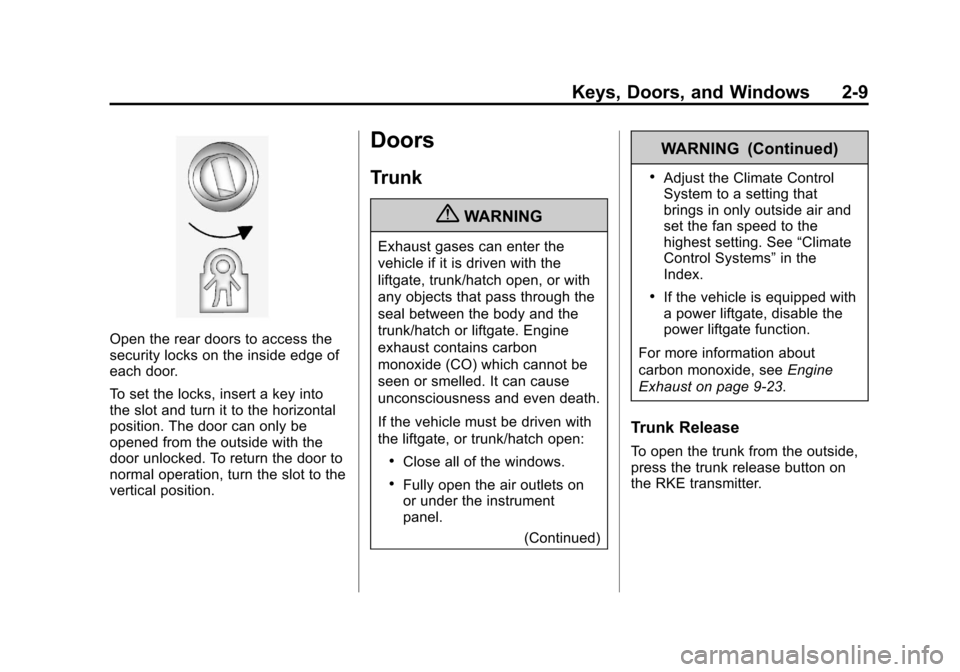
Open the rear doors to access the
security locks on the inside edge of
each door.
To set the locks, insert a key into
the slot and turn it to the horizontal
position. The door can only be
opened from the outside with the
door unlocked. To return the door to
normal operation, turn the slot to the
vertical position.
Doors
Trunk
{WARNING
Exhaust gases can enter the
vehicle if it is driven with the
liftgate, trunk/hatch open, or with
any objects that pass through the
seal between the body and the
trunk/hatch or liftgate. Engine
exhaust contains carbon
monoxide (CO) which cannot be
seen or smelled. It can cause
unconsciousness and even death.
If the vehicle must be driven with
the liftgate, or trunk/hatch open:
.Close all of the windows.
.Fully open the air outlets on
or under the instrument
panel.(Continued)
WARNING (Continued)
.Adjust the Climate Control
System to a setting that
brings in only outside air and
set the fan speed to the
highest setting. See “Climate
Control Systems” in the
Index.
.If the vehicle is equipped with
a power liftgate, disable the
power liftgate function.
For more information about
carbon monoxide, see Engine
Exhaust on page 9‑23.
Trunk Release
To open the trunk from the outside,
press the trunk release button on
the RKE transmitter.
Page 40 of 398
Black plate (10,1)Chevrolet Malibu Owner Manual - 2012
2-10 Keys, Doors, and Windows
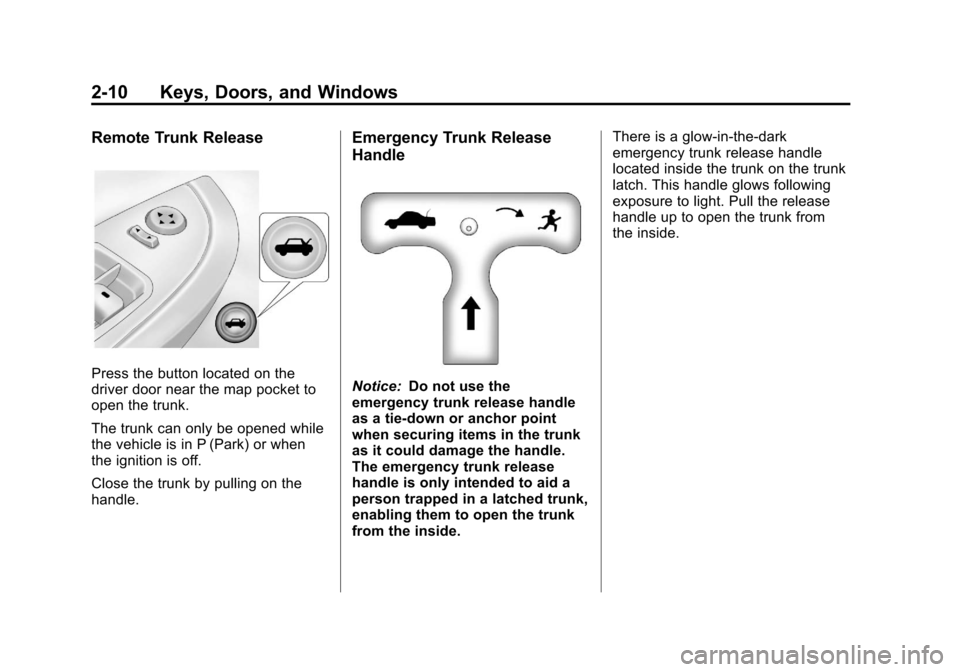
Remote Trunk Release
Press the button located on the
driver door near the map pocket to
open the trunk.
The trunk can only be opened while
the vehicle is in P (Park) or when
the ignition is off.
Close the trunk by pulling on the
handle.
Emergency Trunk Release
Handle
Notice:Do not use the
emergency trunk release handle
as a tie-down or anchor point
when securing items in the trunk
as it could damage the handle.
The emergency trunk release
handle is only intended to aid a
person trapped in a latched trunk,
enabling them to open the trunk
from the inside. There is a glow-in-the-dark
emergency trunk release handle
located inside the trunk on the trunk
latch. This handle glows following
exposure to light. Pull the release
handle up to open the trunk from
the inside.
Page 41 of 398
Black plate (11,1)Chevrolet Malibu Owner Manual - 2012
Keys, Doors, and Windows 2-11
Vehicle Security
This vehicle has theft-deterrent
features; however, they do not make
it impossible to steal.
Anti-theft Alarm System
Your vehicle may have an anti-theft
alarm system.
Arming the System
With the ignition off, press the
Remote Keyless Entry (RKE)
transmitter lock button to arm the
system.
The system will arm 30 seconds
after all the doors are closed,
or 60 seconds with any door open.
If you press the lock button on the
transmitter a second time while all
the doors are closed, the system will
arm immediately. The system will
still arm in 60 seconds if a door is
open. When the open door is
closed, the system will arm.
The security light, located on the
instrument panel cluster, comes on
to indicate that arming has been
initiated. Once the system is armed,
the security light flashes once every
three seconds.
If the security light is flashing twice
per second, this means that a door
is open.
If the system is armed and the key
is used to unlock the vehicle, the
alarm will be activated.
If you do not want to arm the
system, lock the vehicle with the
manual lock knob on the doors or
with the inside power door lock
switches.
The alarm will sound and the
exterior lights will flash if any door is
opened while armed.
Disarming the System
To disarm the system:
.Press the RKE transmitter
unlock button.
.Turn the ignition to ON/RUN.
Once the system is disarmed, the
security light will stop flashing.
How the System Alarm is
Activated
To activate the system if it is armed:
.Open the driver's door or trunk.
A ten second pre-alarm chirp
will sound followed by a
thirty second full alarm of horn
and lights.
.Open any other door. A full
alarm of horn and lights will
immediately sound for thirty
seconds.
.Open the hood. If the vehicle
has the remote start feature,
it will activate the full alarm.
Page 42 of 398
Black plate (12,1)Chevrolet Malibu Owner Manual - 2012
2-12 Keys, Doors, and Windows
When an alarm event has finished,
the system will re-arm itself
automatically.
How to Turn Off the System
Alarm
To turn off the system alarm:
.Press the lock button on the
RKE transmitter. The system will
then re-arm itself.
.Press the unlock button on the
RKE transmitter. This will also
disarm the system.
.Insert the key in the ignition and
turn it on. This will also disarm
the system.
How to Detect a Tamper
Condition
If three chirps are heard when the
unlock or lock button is pressed on
the RKE transmitter, it means that
the system alarm was previously
triggered.
Immobilizer
SeeRadio Frequency Statement on
page 13‑22 for information
regarding Part 15 of the Federal
Communications Commission (FCC)
rules and Industry Canada
Standards RSS-GEN/210/220/310.
Immobilizer Operation
This vehicle has a passive
theft-deterrent system.
The system does not have to be
manually armed or disarmed.
The vehicle is automatically
immobilized when the key is
removed from the ignition.
The system is automatically
disarmed when the vehicle is
started with the correct key. The key
uses a transponder that matches an
immobilizer control unit in the
vehicle and automatically disarms
the system. Only the correct key
starts the vehicle. The vehicle may
not start if the key is damaged.
The security light, located in the
instrument panel cluster, comes on
if there is a problem with arming or
disarming the theft-deterrent
system.
When trying to start the vehicle, the
security light comes on briefly when
the ignition is turned on.
If the engine does not start and the
security light stays on there is a
problem with the system. Turn the
ignition off and try again.
If the engine still does not start, and
the key appears to be undamaged
or the light continues to stay on, try
another ignition key. If the engine
does not start with the other key, the
vehicle needs service. If the vehicle
does start, the first key may be
Page 43 of 398
Black plate (13,1)Chevrolet Malibu Owner Manual - 2012
Keys, Doors, and Windows 2-13
damaged. See your dealer who can
service the theft-deterrent system
and have a new key made.
It is possible for the theft-deterrent
system decoder to learn the
transponder value of a new or
replacement key. Up to 10 keys can
be programmed for the vehicle.
The following procedure is for
programming additional keys only.
To program the new key:
1. Verify that the new key hasa
1stamped on it.
2. Insert the already programmed key in the ignition and start the
engine. If the engine will not
start, see your dealer for service.
3. After the engine has started, turn the key to LOCK/OFF, and
remove the key. 4. Insert the key to be programmed
and turn it to ON/RUN within
five seconds of the original key
being turned to LOCK/OFF in
Step 3.
The security light will turn off
once the key has been
programmed. It may not be
apparent that the security light
went on due to how quickly the
key is programmed.
5. Repeat Steps 1 through 4 if additional keys are to be
programmed.
Do not leave the key or device that
disarms or deactivates the theft
deterrent system in the vehicle.
Exterior Mirrors
Convex Mirrors
{WARNING
A convex mirror can make things,
like other vehicles, look farther
away than they really are. If you
cut too sharply into the right lane,
you could hit a vehicle on the
right. Check the inside mirror or
glance over your shoulder before
changing lanes.
The passenger side mirror is convex
shaped. A convex mirror's surface is
curved so more can be seen from
the driver seat.
Page 49 of 398
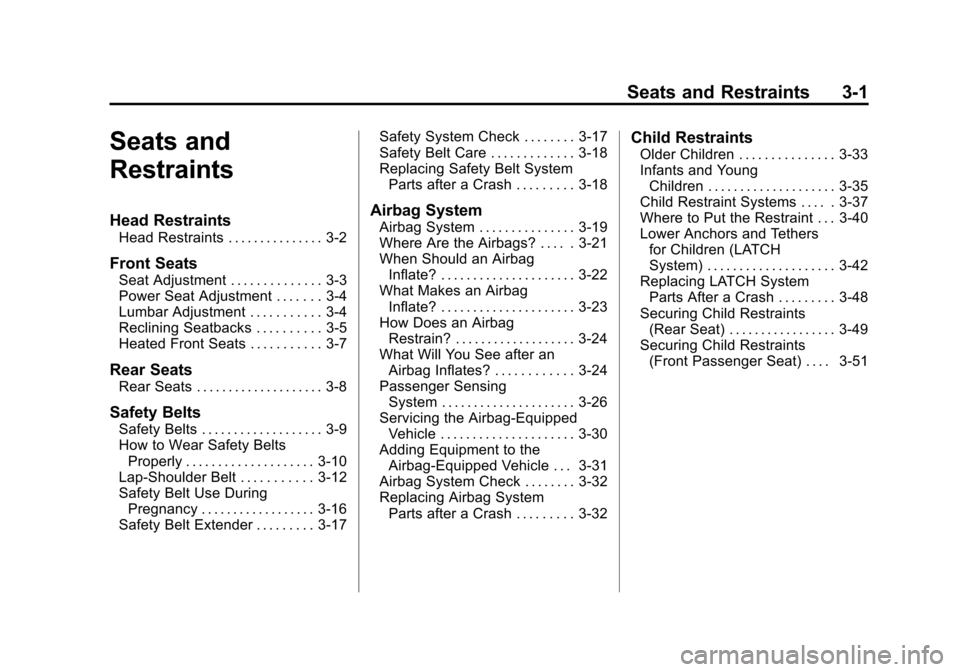
Black plate (1,1)Chevrolet Malibu Owner Manual - 2012
Seats and Restraints 3-1
Seats and
Restraints
Head Restraints
Head Restraints . . . . . . . . . . . . . . . 3-2
Front Seats
Seat Adjustment . . . . . . . . . . . . . . 3-3
Power Seat Adjustment . . . . . . . 3-4
Lumbar Adjustment . . . . . . . . . . . 3-4
Reclining Seatbacks . . . . . . . . . . 3-5
Heated Front Seats . . . . . . . . . . . 3-7
Rear Seats
Rear Seats . . . . . . . . . . . . . . . . . . . . 3-8
Safety Belts
Safety Belts . . . . . . . . . . . . . . . . . . . 3-9
How to Wear Safety BeltsProperly . . . . . . . . . . . . . . . . . . . . 3-10
Lap-Shoulder Belt . . . . . . . . . . . 3-12
Safety Belt Use During Pregnancy . . . . . . . . . . . . . . . . . . 3-16
Safety Belt Extender . . . . . . . . . 3-17 Safety System Check . . . . . . . . 3-17
Safety Belt Care . . . . . . . . . . . . . 3-18
Replacing Safety Belt System
Parts after a Crash . . . . . . . . . 3-18
Airbag System
Airbag System . . . . . . . . . . . . . . . 3-19
Where Are the Airbags? . . . . . 3-21
When Should an AirbagInflate? . . . . . . . . . . . . . . . . . . . . . 3-22
What Makes an Airbag Inflate? . . . . . . . . . . . . . . . . . . . . . 3-23
How Does an Airbag Restrain? . . . . . . . . . . . . . . . . . . . 3-24
What Will You See after an Airbag Inflates? . . . . . . . . . . . . 3-24
Passenger Sensing
System . . . . . . . . . . . . . . . . . . . . . 3-26
Servicing the Airbag-Equipped Vehicle . . . . . . . . . . . . . . . . . . . . . 3-30
Adding Equipment to the Airbag-Equipped Vehicle . . . 3-31
Airbag System Check . . . . . . . . 3-32
Replacing Airbag System Parts after a Crash . . . . . . . . . 3-32
Child Restraints
Older Children . . . . . . . . . . . . . . . 3-33
Infants and YoungChildren . . . . . . . . . . . . . . . . . . . . 3-35
Child Restraint Systems . . . . . 3-37
Where to Put the Restraint . . . 3-40
Lower Anchors and Tethers for Children (LATCH
System) . . . . . . . . . . . . . . . . . . . . 3-42
Replacing LATCH System Parts After a Crash . . . . . . . . . 3-48
Securing Child Restraints (Rear Seat) . . . . . . . . . . . . . . . . . 3-49
Securing Child Restraints (Front Passenger Seat) . . . . 3-51