instrument panel CHEVROLET MALIBU 2014 8.G Owners Manual
[x] Cancel search | Manufacturer: CHEVROLET, Model Year: 2014, Model line: MALIBU, Model: CHEVROLET MALIBU 2014 8.GPages: 428, PDF Size: 5.94 MB
Page 1 of 428

Black plate (1,1)Chevrolet Malibu Owner Manual (GMNA-Localizing-U.S./Canada/Mexico-
6081487) - 2014 - CRC - 11/19/13
2014 Chevrolet Malibu Owner ManualM
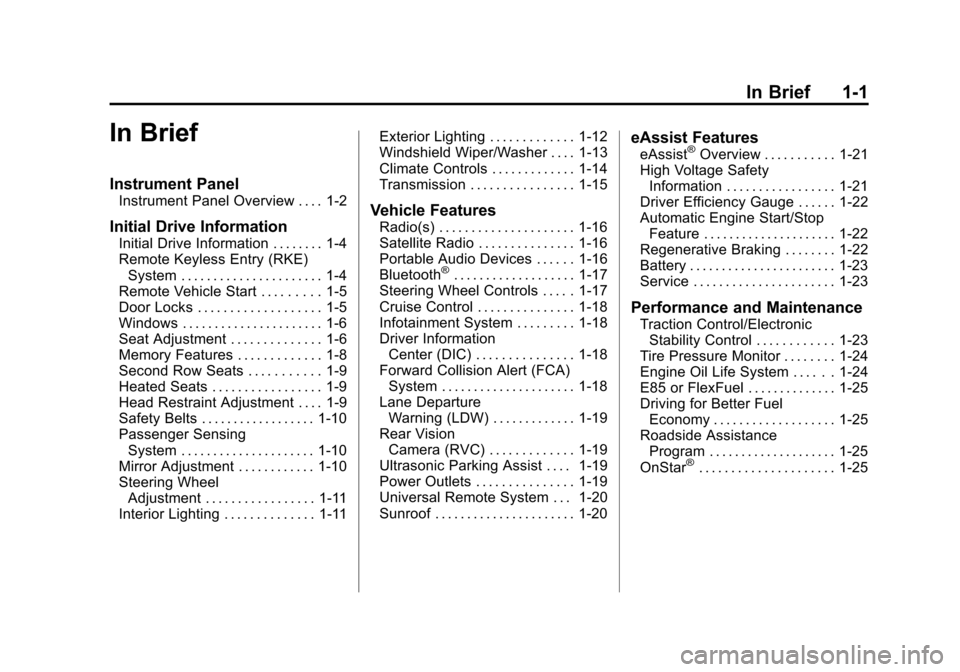
In Brief. . . . . . . . . . . . . . . . . . . . . . . . 1-1
Instrument Panel . . . . . . . . . . . . . . 1-2
Initial Drive Information . . . . . . . . 1-4
Vehicle Features . . . . . . . . . . . . . 1-16
eAssist Features . . . . . . . . . . . . . 1-21
Performance and
Maintenance . . . . . . . . . . . . . . . . 1-23
Keys, Doors, and Windows . . . . . . . . . . . . . . . . . . . . 2-1
Keys and Locks . . . . . . . . . . . . . . . 2-1
Doors . . . . . . . . . . . . . . . . . . . . . . . . 2-14
Vehicle Security . . . . . . . . . . . . . . 2-16
Exterior Mirrors . . . . . . . . . . . . . . . 2-19
Interior Mirrors . . . . . . . . . . . . . . . . 2-20
Windows . . . . . . . . . . . . . . . . . . . . . 2-21
Roof . . . . . . . . . . . . . . . . . . . . . . . . . . 2-23
Seats and Restraints . . . . . . . . . 3-1
Head Restraints . . . . . . . . . . . . . . . 3-2
Front Seats . . . . . . . . . . . . . . . . . . . . 3-3
Rear Seats . . . . . . . . . . . . . . . . . . . . 3-9
Safety Belts . . . . . . . . . . . . . . . . . . 3-11
Airbag System . . . . . . . . . . . . . . . . 3-19
Child Restraints . . . . . . . . . . . . . . 3-32 Storage
. . . . . . . . . . . . . . . . . . . . . . . 4-1
Storage Compartments . . . . . . . . 4-1
Additional Storage Features . . . 4-2
Instruments and Controls . . . . 5-1
Controls . . . . . . . . . . . . . . . . . . . . . . . 5-2
Warning Lights, Gauges, and
Indicators . . . . . . . . . . . . . . . . . . . . 5-7
Information Displays . . . . . . . . . . 5-23
Vehicle Messages . . . . . . . . . . . . 5-27
Vehicle Personalization . . . . . . . 5-34
Universal Remote System . . . . 5-40
Lighting . . . . . . . . . . . . . . . . . . . . . . . 6-1
Exterior Lighting . . . . . . . . . . . . . . . 6-1
Interior Lighting . . . . . . . . . . . . . . . . 6-5
Lighting Features . . . . . . . . . . . . . . 6-6
Infotainment System . . . . . . . . . 7-1
Introduction . . . . . . . . . . . . . . . . . . . . 7-1
Radio . . . . . . . . . . . . . . . . . . . . . . . . . . 7-9
Audio Players . . . . . . . . . . . . . . . . 7-15
Phone . . . . . . . . . . . . . . . . . . . . . . . . 7-21 Climate Controls
. . . . . . . . . . . . . 8-1
Climate Control Systems . . . . . . 8-1
Air Vents . . . . . . . . . . . . . . . . . . . . . . . 8-8
Maintenance . . . . . . . . . . . . . . . . . . . 8-9
Driving and Operating . . . . . . . . 9-1
Driving Information . . . . . . . . . . . . . 9-2
Starting and Operating . . . . . . . 9-14
Engine Exhaust . . . . . . . . . . . . . . 9-26
Automatic Transmission . . . . . . 9-27
Brakes . . . . . . . . . . . . . . . . . . . . . . . 9-30
Ride Control Systems . . . . . . . . 9-32
Cruise Control . . . . . . . . . . . . . . . . 9-35
Driver Assistance Systems . . . 9-37
Fuel . . . . . . . . . . . . . . . . . . . . . . . . . . 9-48
Trailer Towing . . . . . . . . . . . . . . . . 9-53
Conversions and Add-Ons . . . 9-58
Vehicle Care . . . . . . . . . . . . . . . . . 10-1
General Information . . . . . . . . . . 10-2
Vehicle Checks . . . . . . . . . . . . . . . 10-3
Headlamp Aiming . . . . . . . . . . . 10-28
Bulb Replacement . . . . . . . . . . 10-29
Electrical System . . . . . . . . . . . . 10-37
Wheels and Tires . . . . . . . . . . . 10-44
Jump Starting . . . . . . . . . . . . . . . 10-91
Page 7 of 428
Black plate (1,1)Chevrolet Malibu Owner Manual (GMNA-Localizing-U.S./Canada/Mexico-
6081487) - 2014 - CRC - 11/19/13
In Brief 1-1
In Brief
Instrument Panel
Instrument Panel Overview . . . . 1-2
Initial Drive Information
Initial Drive Information . . . . . . . . 1-4
Remote Keyless Entry (RKE)System . . . . . . . . . . . . . . . . . . . . . . 1-4
Remote Vehicle Start . . . . . . . . . 1-5
Door Locks . . . . . . . . . . . . . . . . . . . 1-5
Windows . . . . . . . . . . . . . . . . . . . . . . 1-6
Seat Adjustment . . . . . . . . . . . . . . 1-6
Memory Features . . . . . . . . . . . . . 1-8
Second Row Seats . . . . . . . . . . . 1-9
Heated Seats . . . . . . . . . . . . . . . . . 1-9
Head Restraint Adjustment . . . . 1-9
Safety Belts . . . . . . . . . . . . . . . . . . 1-10
Passenger Sensing System . . . . . . . . . . . . . . . . . . . . . 1-10
Mirror Adjustment . . . . . . . . . . . . 1-10
Steering Wheel Adjustment . . . . . . . . . . . . . . . . . 1-11
Interior Lighting . . . . . . . . . . . . . . 1-11 Exterior Lighting . . . . . . . . . . . . . 1-12
Windshield Wiper/Washer . . . . 1-13
Climate Controls . . . . . . . . . . . . . 1-14
Transmission . . . . . . . . . . . . . . . . 1-15
Vehicle Features
Radio(s) . . . . . . . . . . . . . . . . . . . . . 1-16
Satellite Radio . . . . . . . . . . . . . . . 1-16
Portable Audio Devices . . . . . . 1-16
Bluetooth
®. . . . . . . . . . . . . . . . . . . 1-17
Steering Wheel Controls . . . . . 1-17
Cruise Control . . . . . . . . . . . . . . . 1-18
Infotainment System . . . . . . . . . 1-18
Driver Information Center (DIC) . . . . . . . . . . . . . . . 1-18
Forward Collision Alert (FCA) System . . . . . . . . . . . . . . . . . . . . . 1-18
Lane Departure Warning (LDW) . . . . . . . . . . . . . 1-19
Rear Vision Camera (RVC) . . . . . . . . . . . . . 1-19
Ultrasonic Parking Assist . . . . 1-19
Power Outlets . . . . . . . . . . . . . . . 1-19
Universal Remote System . . . 1-20
Sunroof . . . . . . . . . . . . . . . . . . . . . . 1-20
eAssist Features
eAssist®Overview . . . . . . . . . . . 1-21
High Voltage Safety Information . . . . . . . . . . . . . . . . . 1-21
Driver Efficiency Gauge . . . . . . 1-22
Automatic Engine Start/Stop Feature . . . . . . . . . . . . . . . . . . . . . 1-22
Regenerative Braking . . . . . . . . 1-22
Battery . . . . . . . . . . . . . . . . . . . . . . . 1-23
Service . . . . . . . . . . . . . . . . . . . . . . 1-23
Performance and Maintenance
Traction Control/Electronic Stability Control . . . . . . . . . . . . 1-23
Tire Pressure Monitor . . . . . . . . 1-24
Engine Oil Life System . . . . . . 1-24
E85 or FlexFuel . . . . . . . . . . . . . . 1-25
Driving for Better Fuel Economy . . . . . . . . . . . . . . . . . . . 1-25
Roadside Assistance Program . . . . . . . . . . . . . . . . . . . . 1-25
OnStar
®. . . . . . . . . . . . . . . . . . . . . 1-25
Page 8 of 428
Black plate (2,1)Chevrolet Malibu Owner Manual (GMNA-Localizing-U.S./Canada/Mexico-
6081487) - 2014 - CRC - 11/19/13
1-2 In Brief
Instrument Panel
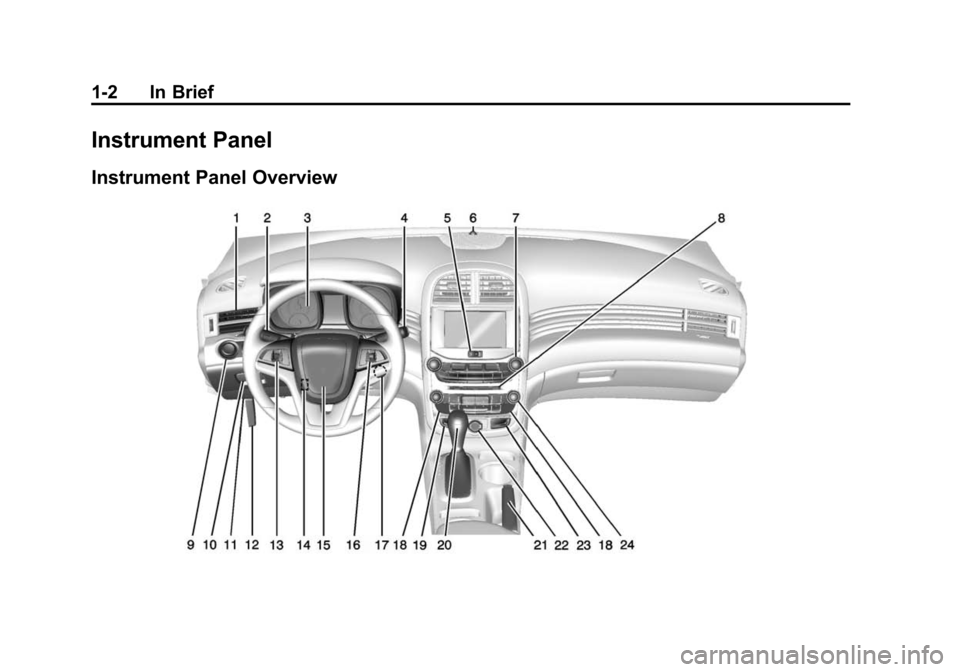
Instrument Panel Overview
Page 9 of 428

Black plate (3,1)Chevrolet Malibu Owner Manual (GMNA-Localizing-U.S./Canada/Mexico-
6081487) - 2014 - CRC - 11/19/13
In Brief 1-3
1.Air Vents on page 8-8.
2. Turn Signal Lever. See Turn and
Lane-Change Signals on
page 6-4.
Driver Information Center
Buttons. See Driver Information
Center (DIC) on page 5-24.
3. Instrument Cluster on page 5-8.
Driver Information Center (DIC)
on page 5-24.
4. Windshield Wiper/Washer on
page 5-3.
5. Storage Area (if Equipped). See Instrument Panel Storage on
page 4-1.
6. Light Sensor. See Automatic
Headlamp System on page 6-3.
7. Infotainment on page 7-1.
8. CD Player on page 7-15. 9.
Exterior Lamp Controls on
page 6-1.
Fog Lamps on page 6-4.
Instrument Panel Illumination
Control on page 6-5.
10. Storage Compartment. See Instrument Panel Storage on
page 4-1.
11. Data Link Connector (Out of View). See Malfunction
Indicator Lamp on page 5-14.
12. Hood Release. See Hood on
page 10-4.
13. Cruise Control on page 9-35.
Forward Collision Alert (FCA)
System on page 9-37 (If
Equipped).
14. Steering Wheel Adjustment on
page 5-2.
15. Horn on page 5-3.
16. Steering Wheel Controls on
page 5-2. 17.
Ignition Positions (Keyless
Access) on page 9-15 or
Ignition Positions (Key Access)
on page 9-17.
18. Heated Front Seats on
page 3-7 (If Equipped).
19. Hazard Warning Flashers on
page 6-3.
20. Shift Lever. See Automatic
Transmission on page 9-27.
21. Parking Brake on page 9-31.
22. Power Outlets on page 5-5.
23. Traction Control/Electronic
Stability Control on page 9-32.
Lane Departure Warning
(LDW) on page 9-46 (If
Equipped).
24. Climate Control Systems on
page 8-1.
Dual Automatic Climate Control
System on page 8-4.
Page 18 of 428
Black plate (12,1)Chevrolet Malibu Owner Manual (GMNA-Localizing-U.S./Canada/Mexico-
6081487) - 2014 - CRC - 11/19/13
1-12 In Brief
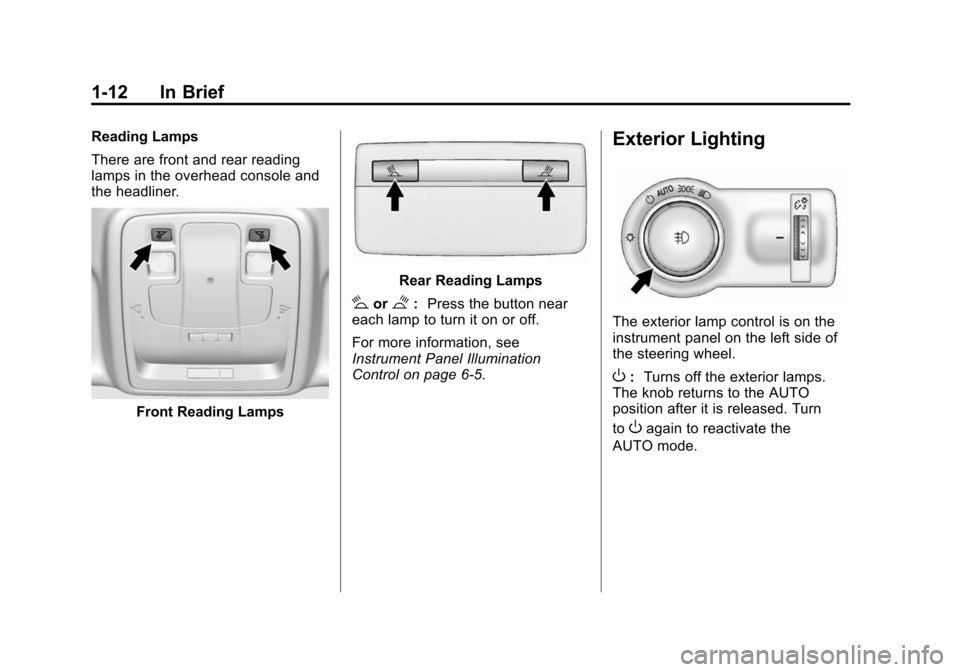
Reading Lamps
There are front and rear reading
lamps in the overhead console and
the headliner.
Front Reading Lamps
Rear Reading Lamps
#or$:Press the button near
each lamp to turn it on or off.
For more information, see
Instrument Panel Illumination
Control on page 6-5.
Exterior Lighting
The exterior lamp control is on the
instrument panel on the left side of
the steering wheel.
O: Turns off the exterior lamps.
The knob returns to the AUTO
position after it is released. Turn
to
Oagain to reactivate the
AUTO mode.
Page 19 of 428
Black plate (13,1)Chevrolet Malibu Owner Manual (GMNA-Localizing-U.S./Canada/Mexico-
6081487) - 2014 - CRC - 11/19/13
In Brief 1-13
In Canada, the headlamps will
automatically reactivate once the
vehicle is shifted out of P (Park).
AUTO:Automatically turns the
exterior lamps on and off,
depending on outside lighting.
;: Turns on the parking lamps
including all lamps, except the
headlamps.
2: Turns on the headlamps
together with the parking lamps and
instrument panel lights.
See:
.Exterior Lamp Controls on
page 6-1.
.Daytime Running Lamps (DRL)
on page 6-2.
.Fog Lamps on page 6-4.
Windshield Wiper/Washer
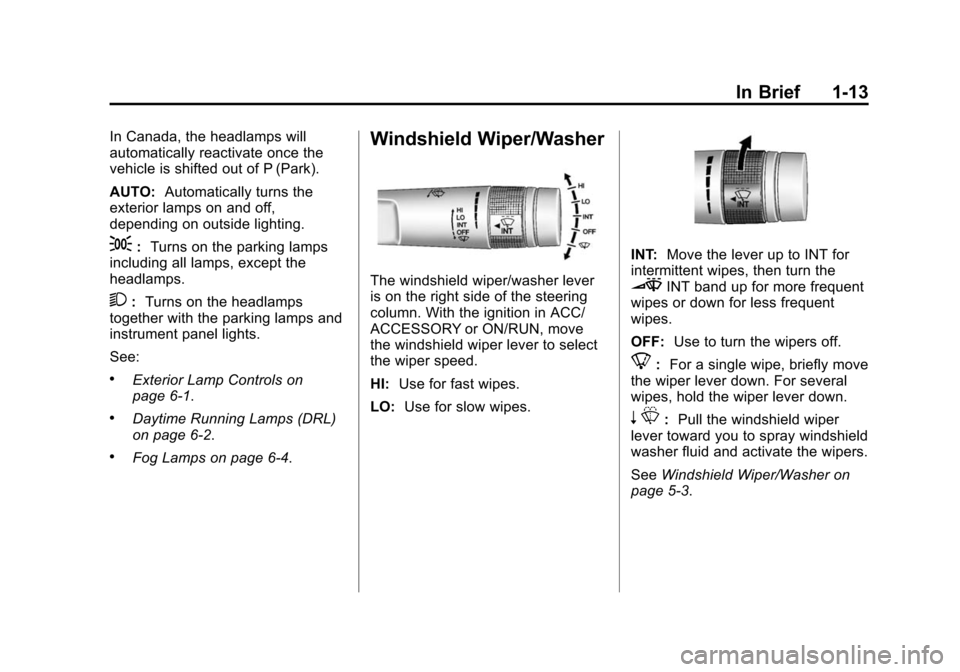
The windshield wiper/washer lever
is on the right side of the steering
column. With the ignition in ACC/
ACCESSORY or ON/RUN, move
the windshield wiper lever to select
the wiper speed.
HI: Use for fast wipes.
LO: Use for slow wipes.
INT: Move the lever up to INT for
intermittent wipes, then turn the
3INT band up for more frequent
wipes or down for less frequent
wipes.
OFF: Use to turn the wipers off.
8:For a single wipe, briefly move
the wiper lever down. For several
wipes, hold the wiper lever down.
n L: Pull the windshield wiper
lever toward you to spray windshield
washer fluid and activate the wipers.
See Windshield Wiper/Washer on
page 5-3.
Page 27 of 428
Black plate (21,1)Chevrolet Malibu Owner Manual (GMNA-Localizing-U.S./Canada/Mexico-
6081487) - 2014 - CRC - 11/19/13
In Brief 1-21
eAssist Features
eAssist®Overview
If the vehicle has eAssist, there are
several additional features that
contribute to increased efficiency.
Vehicles with eAssist have an
automatic engine start/stop feature.
This feature saves fuel by shutting
the engine off when the vehicle is
stopped. When the engine shuts off
automatically, all the accessories
will continue to operate normally. In
very hot or cold conditions, the
engine will only shut off
automatically part of the time. See
Starting the Engine on page 9-19.
There are two air conditioning
settings available. The comfort
setting maximizes cabin comfort.
The eco setting maximizes
efficiency allowing more frequent,
and longer engine stops than the
comfort setting. SeeDual Automatic
Climate Control System on
page 8-4. This vehicle has a Hill Start Assist
(HSA) feature, which may be useful
when the vehicle is stopped on a
grade. See
Hill Start Assist (HSA)
on page 9-32.
Vehicles with eAssist have a slightly
different instrument cluster, which
includes an efficiency gauge, and
an AUTO STOP indicator on the
tachometer. See Instrument Cluster
on page 5-8. There is also a Power
Flow display in the Driver
Information Center (DIC). See
Driver Information Center (DIC) on
page 5-24.
The eAssist system uses a high
voltage battery, which is cooled with
air drawn from the vehicle interior.
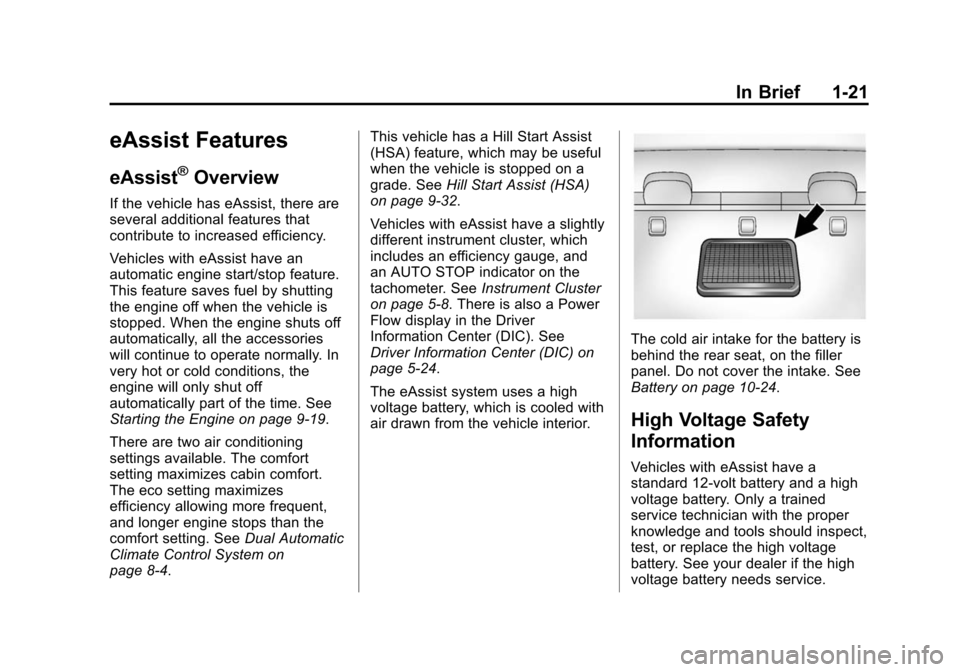
The cold air intake for the battery is
behind the rear seat, on the filler
panel. Do not cover the intake. See
Battery on page 10-24.
High Voltage Safety
Information
Vehicles with eAssist have a
standard 12-volt battery and a high
voltage battery. Only a trained
service technician with the proper
knowledge and tools should inspect,
test, or replace the high voltage
battery. See your dealer if the high
voltage battery needs service.
Page 29 of 428
Black plate (23,1)Chevrolet Malibu Owner Manual (GMNA-Localizing-U.S./Canada/Mexico-
6081487) - 2014 - CRC - 11/19/13
In Brief 1-23
Battery
This vehicle has a standard 12-volt
battery. Refer to the replacement
number on the original battery label
when a new standard 12-volt battery
is needed.
Vehicles with eAssist also have a
high voltage battery. Only a trained
service technician with the proper
knowledge and tools should inspect,
test, or replace the high voltage
battery. See your dealer if the high
voltage battery needs service.
For stop/start equipped vehicles,
there is an auxiliary battery behind
the access panel in the left rear of
the trunk. This battery is for
managing the stop/start auxiliary
loads and is not to be used for any
other purpose. See your dealer if
the auxiliary battery needs service.
SeeBattery on page 10-24.
Service
Never try to do your own service on
eAssist components. You can be
injured and the vehicle can be
damaged if you try to do your own
service work. Service and repair of
these high voltage components
should only be performed by a
trained service technician with the
proper knowledge and tools. See
Doing Your Own Service Work on
page 10-3.
Performance and
Maintenance
Traction Control/
Electronic Stability
Control
The traction control system limits
wheel spin. The system turns on
automatically every time the vehicle
is started.
The StabiliTrak system assists with
directional control of the vehicle in
difficult driving conditions. The
system turns on automatically every
time the vehicle is started.
.To turn off traction control, press
and release the TCS/StabiliTrak
button
gon the center stack.i
illuminates in the instrument
cluster.
.Press and release the TCS/
StabiliTrak button again to turn
on traction control.
Page 46 of 428
Black plate (14,1)Chevrolet Malibu Owner Manual (GMNA-Localizing-U.S./Canada/Mexico-
6081487) - 2014 - CRC - 11/19/13
2-14 Keys, Doors, and Windows
Pressv{to activate the rear door
safety locks. The indicator light in
the switch will illuminate.
Press
v {again to deactivate the
safety locks and window lockout.
If a rear door handle is being pulled
when the safety lock is deactivated,
that door will remain locked and the
indicator light may flash. Release
the handle, then press the safety
lock twice to deactivate the safety
locks.
Doors
Trunk
{Warning
Exhaust gases can enter the
vehicle if it is driven with the
liftgate, hatch/trunk open, or with
any objects that pass through the
seal between the body and the
hatch/trunk or liftgate. Engine
exhaust contains carbon
monoxide (CO) which cannot be
seen or smelled. It can cause
unconsciousness and even death.
If the vehicle must be driven with
the liftgate or hatch/trunk open:
.Close all of the windows.
.Fully open the air outlets on
or under the instrument
panel.
(Continued)
Warning (Continued)
.Adjust the climate control
system to a setting that
brings in only outside air and
set the fan speed to the
highest setting. See “Climate
Control Systems” in the
Index.
.If the vehicle is equipped with
a power liftgate, disable the
power liftgate function.
For more information about
carbon monoxide, see Engine
Exhaust on page 9-26.
Page 48 of 428
Black plate (16,1)Chevrolet Malibu Owner Manual (GMNA-Localizing-U.S./Canada/Mexico-
6081487) - 2014 - CRC - 11/19/13
2-16 Keys, Doors, and Windows
There is a glow-in-the-dark
emergency trunk release handle on
the trunk lid. This handle glows
following exposure to light. Pull the
release handle to open the trunk
from the inside.Vehicle Security
This vehicle has theft-deterrent
features; however, they do not make
the vehicle impossible to steal.
Vehicle Alarm System
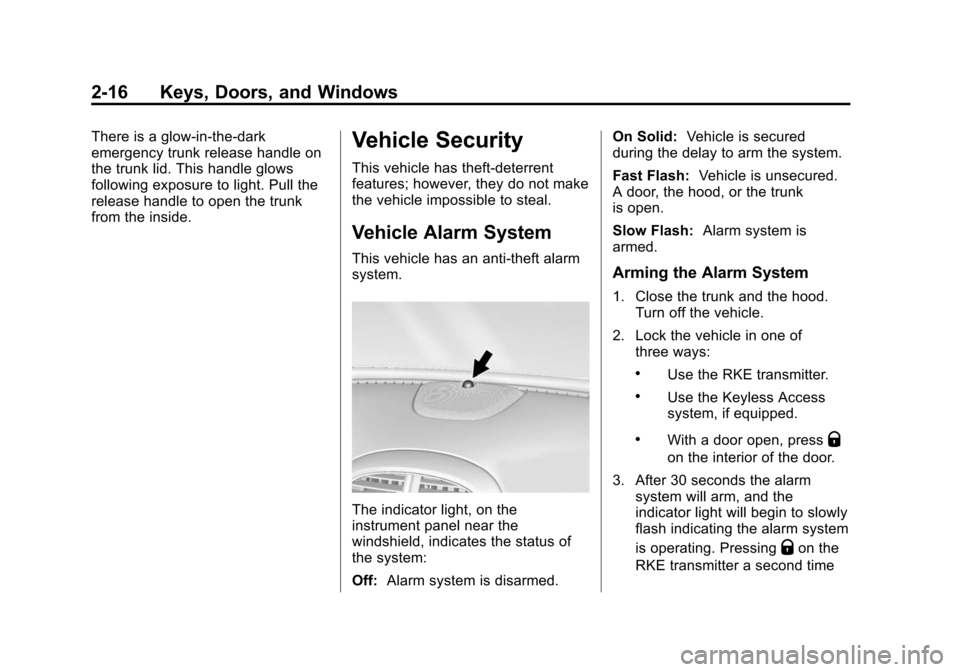
This vehicle has an anti-theft alarm
system.
The indicator light, on the
instrument panel near the
windshield, indicates the status of
the system:
Off:Alarm system is disarmed. On Solid:
Vehicle is secured
during the delay to arm the system.
Fast Flash: Vehicle is unsecured.
A door, the hood, or the trunk
is open.
Slow Flash: Alarm system is
armed.
Arming the Alarm System
1. Close the trunk and the hood. Turn off the vehicle.
2. Lock the vehicle in one of three ways:
.Use the RKE transmitter.
.Use the Keyless Access
system, if equipped.
.With a door open, pressQ
on the interior of the door.
3. After 30 seconds the alarm system will arm, and the
indicator light will begin to slowly
flash indicating the alarm system
is operating. Pressing
Qon the
RKE transmitter a second time