warning CHEVROLET MALIBU 2017 9.G Owners Manual
[x] Cancel search | Manufacturer: CHEVROLET, Model Year: 2017, Model line: MALIBU, Model: CHEVROLET MALIBU 2017 9.GPages: 419, PDF Size: 7.81 MB
Page 238 of 419
Chevrolet Malibu Owner Manual (GMNA-Localizing-U.S./Canada/Mexico-10122664) - 2017 - crc - 5/23/16
Driving and Operating 237
If driving safely on a wet road and itbecomes necessary to slam on thebrakes and continue braking toavoid a sudden obstacle, acomputer senses the wheels areslowing down. If one of the wheelsis about to stop rolling, the computerwill separately work the brakes ateach wheel.
ABS can change the brake pressureto each wheel, as required, fasterthan any driver could. This can helpyou steer around the obstacle whilebraking hard.
As the brakes are applied, thecomputer keeps receiving updateson wheel speed and controlsbraking pressure accordingly.
Remember: ABS does not changethe time needed to get a foot up tothe brake pedal or always decreasestopping distance. If you get tooclose to the vehicle in front of you,there will not be enough time toapply the brakes if that vehiclesuddenly slows or stops. Alwaysleave enough room up ahead tostop, even with ABS.
Using ABS
Do not pump the brakes. Just holdthe brake pedal down firmly and letABS work. You may hear the ABSpump or motor operating and feelthe brake pedal pulsate. This isnormal.
Braking in Emergencies
ABS allows you to steer and brakeat the same time. In manyemergencies, steering can helpmore than even the very bestbraking.
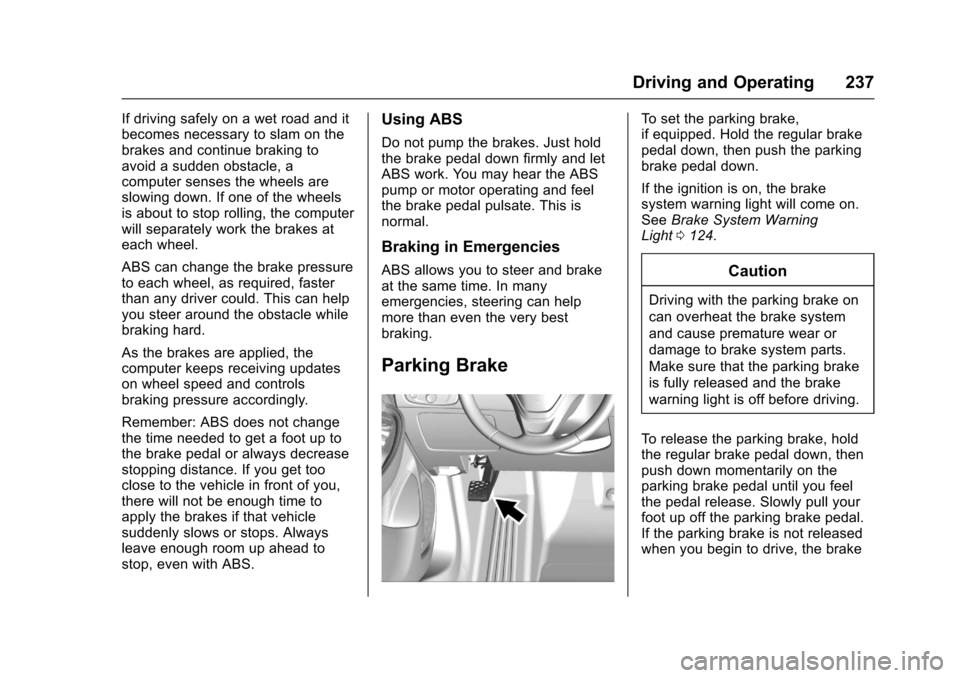
Parking Brake
To s e t t h e p a r k i n g b r a k e ,if equipped. Hold the regular brakepedal down, then push the parkingbrake pedal down.
If the ignition is on, the brakesystem warning light will come on.SeeBrake System WarningLight0124.
Caution
Driving with the parking brake on
can overheat the brake system
and cause premature wear or
damage to brake system parts.
Make sure that the parking brake
is fully released and the brake
warning light is off before driving.
To r e l e a s e t h e p a r k i n g b r a k e , h o l dthe regular brake pedal down, thenpush down momentarily on theparking brake pedal until you feelthe pedal release. Slowly pull yourfoot up off the parking brake pedal.If the parking brake is not releasedwhen you begin to drive, the brake
Page 239 of 419
Chevrolet Malibu Owner Manual (GMNA-Localizing-U.S./Canada/Mexico-10122664) - 2017 - crc - 5/23/16
238 Driving and Operating
system warning light will be on andachimewillsoundwarningyouthatthe parking brake is still on.
If you are towing a trailer and areparking on a hill, seeDrivingCharacteristics and TowingTips0272.
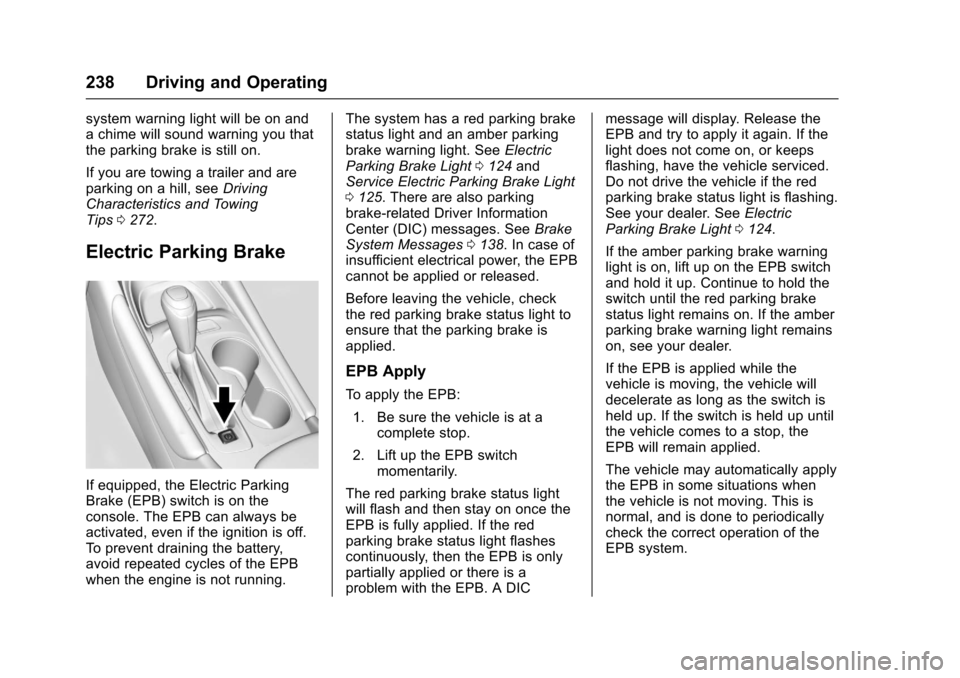
Electric Parking Brake
If equipped, the Electric ParkingBrake (EPB) switch is on theconsole. The EPB can always beactivated, even if the ignition is off.To p r e v e n t d r a i n i n g t h e b a t t e r y,avoid repeated cycles of the EPBwhen the engine is not running.
The system has a red parking brakestatus light and an amber parkingbrake warning light. SeeElectricParking Brake Light0124andService Electric Parking Brake Light0125.Therearealsoparkingbrake-related Driver InformationCenter (DIC) messages. SeeBrakeSystem Messages0138.Incaseofinsufficient electrical power, the EPBcannot be applied or released.
Before leaving the vehicle, checkthe red parking brake status light toensure that the parking brake isapplied.
EPB Apply
To a p p l y t h e E P B :
1. Be sure the vehicle is at acomplete stop.
2. Lift up the EPB switchmomentarily.
The red parking brake status lightwill flash and then stay on once theEPB is fully applied. If the redparking brake status light flashescontinuously, then the EPB is onlypartially applied or there is aproblem with the EPB. A DIC
message will display. Release theEPB and try to apply it again. If thelight does not come on, or keepsflashing, have the vehicle serviced.Do not drive the vehicle if the redparking brake status light is flashing.See your dealer. SeeElectricParking Brake Light0124.
If the amber parking brake warninglight is on, lift up on the EPB switchand hold it up. Continue to hold theswitch until the red parking brakestatus light remains on. If the amberparking brake warning light remainson, see your dealer.
If the EPB is applied while thevehicle is moving, the vehicle willdecelerate as long as the switch isheld up. If the switch is held up untilthe vehicle comes to a stop, theEPB will remain applied.
The vehicle may automatically applythe EPB in some situations whenthe vehicle is not moving. This isnormal, and is done to periodicallycheck the correct operation of theEPB system.
Page 240 of 419
Chevrolet Malibu Owner Manual (GMNA-Localizing-U.S./Canada/Mexico-10122664) - 2017 - crc - 5/23/16
Driving and Operating 239
If the EPB fails to apply, the rearwheels should be blocked toprevent vehicle movement.
EPB Release
To r e l e a s e t h e E P B :
1. Place the ignition in the ACC/ACCESSORY or ON/RUNposition.
2. Apply and hold the brakepedal.
3. Push down momentarily on theEPB switch.
The EPB is released when the redparking brake status light is off.
If the amber parking brake warninglight is on, release the EPB bypushing down on the EPB switchand holding it down. Continue tohold the switch until the red parkingbrake status light is off. If either lightstays on after release is attempted,see your dealer.
Caution
Driving with the parking brake on
can overheat the brake system
and cause premature wear or
damage to brake system parts.
Make sure that the parking brake
is fully released and the brake
warning light is off before driving.
Automatic EPB Release
The EPB will automatically release ifthe vehicle is running, placed intogear, and an attempt is made todrive away. Avoid rapid accelerationwhen the EPB is applied, topreserve parking brake lining life.
If parking on a hill, or if the vehicleis pulling a trailer, seeDrivingCharacteristics and TowingTips0272.
Brake Assist
The Brake Assist feature isdesigned to assist the driver instopping or decreasing vehiclespeed in emergency drivingconditions. This feature uses thestability system hydraulic brakecontrol module to supplement thepower brake system underconditions where the driver hasquickly and forcefully applied thebrake pedal in an attempt to quicklystop or slow down the vehicle. Thestability system hydraulic brakecontrol module increases brakepressure at each corner of thevehicle until the ABS activates.Minor brake pedal pulsation orpedal movement during this time isnormal and the driver shouldcontinue to apply the brake pedal asthe driving situation dictates. TheBrake Assist feature willautomatically disengage when thebrake pedal is released or brakepedal pressure is quicklydecreased.
Page 242 of 419
Chevrolet Malibu Owner Manual (GMNA-Localizing-U.S./Canada/Mexico-10122664) - 2017 - crc - 5/23/16
Driving and Operating 241
SeeWarning Lights, Gauges, andIndicators0111andDriverInformation Center (DIC) (BaseLevel)0131orDriver InformationCenter (DIC) (Uplevel)0134.Intheevent of a controller problem, thebrake pedal may be harder to pushand the stopping distance may belonger.
Ride Control Systems
Traction Control/
Electronic Stability
Control
System Operation
The vehicle has a Traction ControlSystem (TCS) and StabiliTrak®,anelectronic stability control system.These systems help limit wheel slipand assist the driver in maintainingcontrol, especially on slippery roadconditions.
TCS activates if it senses that anyof the drive wheels are spinning orbeginning to lose traction. When thishappens, TCS applies the brakes tothe spinning wheels and reducesengine power to limit wheel spin.
StabiliTrak activates when thevehicle senses a difference betweenthe intended path and the directionthe vehicle is actually traveling.StabiliTrak selectively appliesbraking pressure to any one of the
vehicle wheel brakes to assist thedriver in keeping the vehicle on theintended path.
If cruise control is being used andtraction control or StabiliTrak beginsto limit wheel spin, cruise control willdisengage. Cruise control may beturned back on when roadconditions allow.
Both systems come onautomatically when the vehicle isstarted and begins to move. Thesystems may be heard or felt whilethey are operating or whileperforming diagnostic checks. Thisis normal and does not mean thereis a problem with the vehicle.
It is recommended to leave bothsystems on for normal drivingconditions, but it may be necessaryto turn TCS off if the vehicle getsstuck in sand, mud, ice, or snow.SeeIf the Vehicle Is Stuck0221and“Turning the Systems Off andOn”later in this section.
Page 244 of 419
Chevrolet Malibu Owner Manual (GMNA-Localizing-U.S./Canada/Mexico-10122664) - 2017 - crc - 5/23/16
Driving and Operating 243
To t u r n o f f b o t h T C S a n d S t a b i l i T r a k ,
press and holdguntil the traction
off lightiand StabiliTrak OFF
lightgcome on and stay on in the
instrument cluster.
To t u r n T C S a n d S t a b i l i T r a k o n
again, press and releaseg.The
traction off lightiand StabiliTrak
OFF lightgin the instrument cluster
turn off.
Adding accessories can affect thevehicle performance. SeeAccessories andModifications0280.
Cruise Control
Cruise control lets the vehiclemaintain a speed of about 40 km/h(25 mph) or more without keepingyour foot on the accelerator. Cruisecontrol does not work at speedsbelow 40 km/h (25 mph).
{Warning
Cruise control can be dangerous
where you cannot drive safely at
asteadyspeed.Donotuse
cruise control on winding roads or
in heavy traffic.
Cruise control can be dangerous
on slippery roads. On such roads,
fast changes in tire traction can
cause excessive wheel slip, and
you could lose control. Do not use
cruise control on slippery roads.
With the Traction Control System(TCS) or Electronic Stability Control(ESC), the system may begin tolimit wheel spin while you are usingcruise control. If this happens,cruise control will automatically
disengage. SeeTr a c t i o n C o n t r o l /Electronic Stability Control0241.If a collision alert occurs whencruise control is activated, cruisecontrol is disengaged. SeeForwardCollision Alert (FCA) System0258.When road conditions allow you tosafely use it again, cruise controlcan be turned back on.
If the brakes are applied, cruisecontrol disengages.
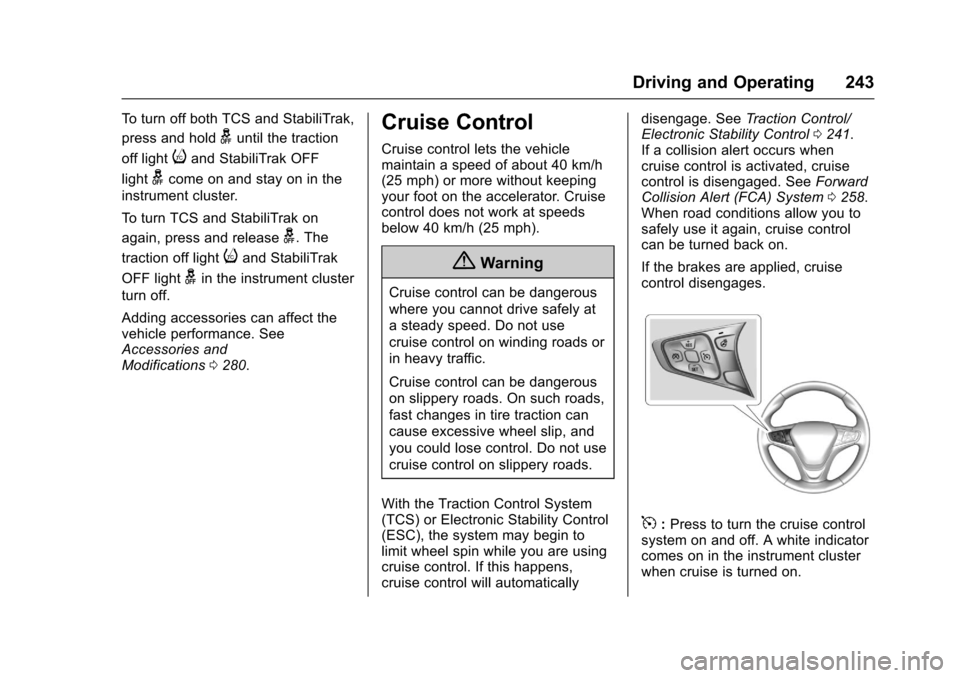
5:Press to turn the cruise controlsystem on and off. A white indicatorcomes on in the instrument clusterwhen cruise is turned on.
Page 247 of 419
Chevrolet Malibu Owner Manual (GMNA-Localizing-U.S./Canada/Mexico-10122664) - 2017 - crc - 5/23/16
246 Driving and Operating
conditions allow ACC to be safelyused, the ACC can be turnedback on.
ACC will not engage if the TCS orStabiliTrak system is disabled.
{Warning
ACC has limited braking ability
and may not have time to slow
the vehicle down enough to avoid
acollisionwithanothervehicle
you are following. This can occur
when vehicles suddenly slow or
stop ahead, or enter your lane.
Also see“Alerting the Driver”in
this section. Complete attention is
always required while driving and
you should be ready to take
action and apply the brakes. See
Defensive Driving0216.
{Warning
ACC will not detect or brake for
children, pedestrians, animals,
or other objects.
Do not use ACC when:
.On winding and hilly roadsor when the sensors areblocked by snow, ice, or dirt.The system may not detectavehicleahead.Keeptheentire front of the vehicleclean.
.Visibility is low, such as infog, rain, or snowconditions. ACCperformance is limited underthese conditions.
.On slippery roads wherefast changes in tire tractioncan cause excessivewheel slip.
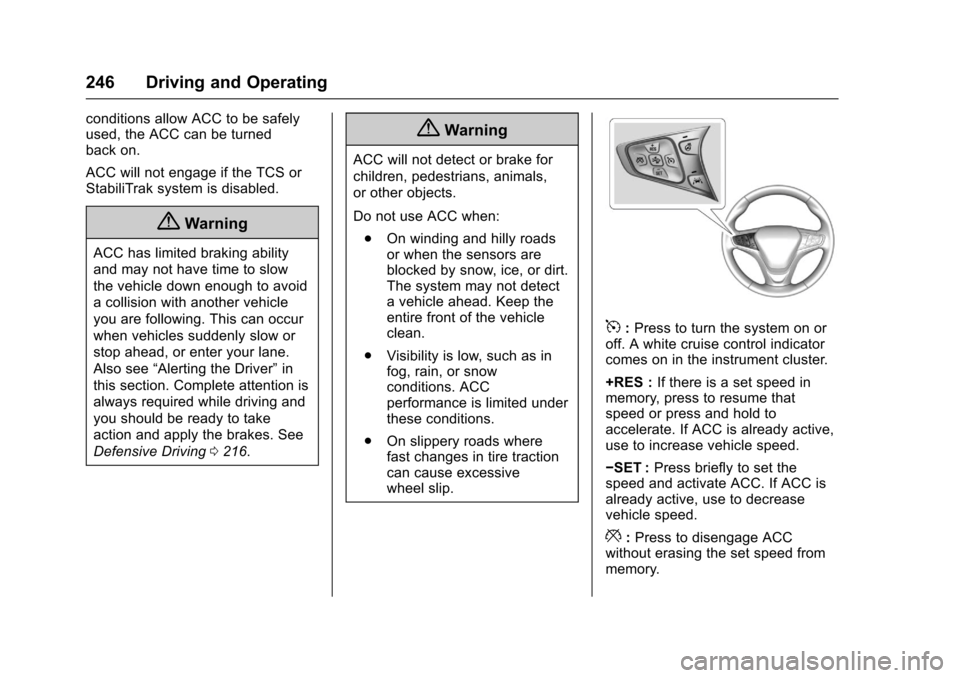
5:Press to turn the system on oroff. A white cruise control indicatorcomes on in the instrument cluster.
+RES :If there is a set speed inmemory, press to resume thatspeed or press and hold toaccelerate. If ACC is already active,use to increase vehicle speed.
✓SET :Press briefly to set thespeed and activate ACC. If ACC isalready active, use to decreasevehicle speed.
*:Press to disengage ACCwithout erasing the set speed frommemory.
Page 248 of 419
Chevrolet Malibu Owner Manual (GMNA-Localizing-U.S./Canada/Mexico-10122664) - 2017 - crc - 5/23/16
Driving and Operating 247
[:Press to select a following gaptime (or distance) setting for ACC ofFar, Medium, or Near.
Setting Adaptive Cruise Control
If ACC is on when not in use,5
could get pressed and ACC couldbecome active when not desired.Keep ACC off when it is notbeing used.
Select the set speed desired forcruise. This is the vehicle speedwhen no vehicle is detected inits path.
ACC will not set at a speed lessthan 25 km/h (16 mph), although itcan be resumed when driving atlower speeds.
To s e t A C C :
1. Press5.
2. Get up to the desired speed.
3. Press and release -SET.
4. Remove your foot from theaccelerator.
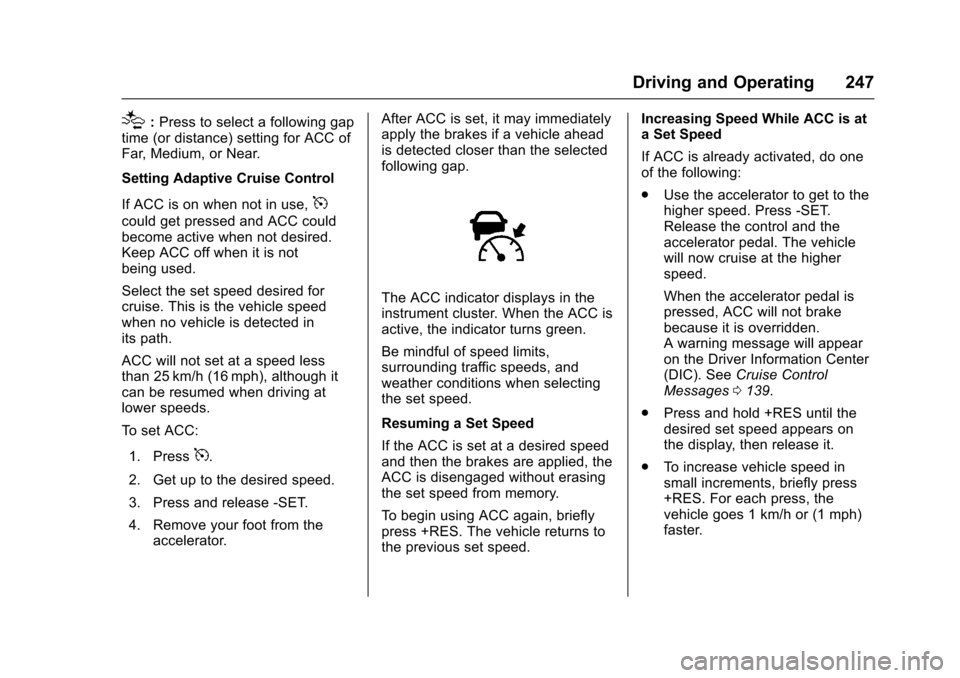
After ACC is set, it may immediatelyapply the brakes if a vehicle aheadis detected closer than the selectedfollowing gap.
The ACC indicator displays in theinstrument cluster. When the ACC isactive, the indicator turns green.
Be mindful of speed limits,surrounding traffic speeds, andweather conditions when selectingthe set speed.
Resuming a Set Speed
If the ACC is set at a desired speedand then the brakes are applied, theACC is disengaged without erasingthe set speed from memory.
To b e g i n u s i n g A C C a g a i n , b r i e f l ypress +RES. The vehicle returns tothe previous set speed.
Increasing Speed While ACC is ata Set Speed
If ACC is already activated, do oneof the following:
.Use the accelerator to get to thehigher speed. Press -SET.Release the control and theaccelerator pedal. The vehiclewill now cruise at the higherspeed.
When the accelerator pedal ispressed, ACC will not brakebecause it is overridden.Awarningmessagewillappearon the Driver Information Center(DIC). SeeCruise ControlMessages0139.
.Press and hold +RES until thedesired set speed appears onthe display, then release it.
.To i n c r e a s e v e h i c l e s p e e d i nsmall increments, briefly press+RES. For each press, thevehicle goes 1 km/h or (1 mph)faster.
Page 250 of 419
Chevrolet Malibu Owner Manual (GMNA-Localizing-U.S./Canada/Mexico-10122664) - 2017 - crc - 5/23/16
Driving and Operating 249
Approaching and Following aVehicle
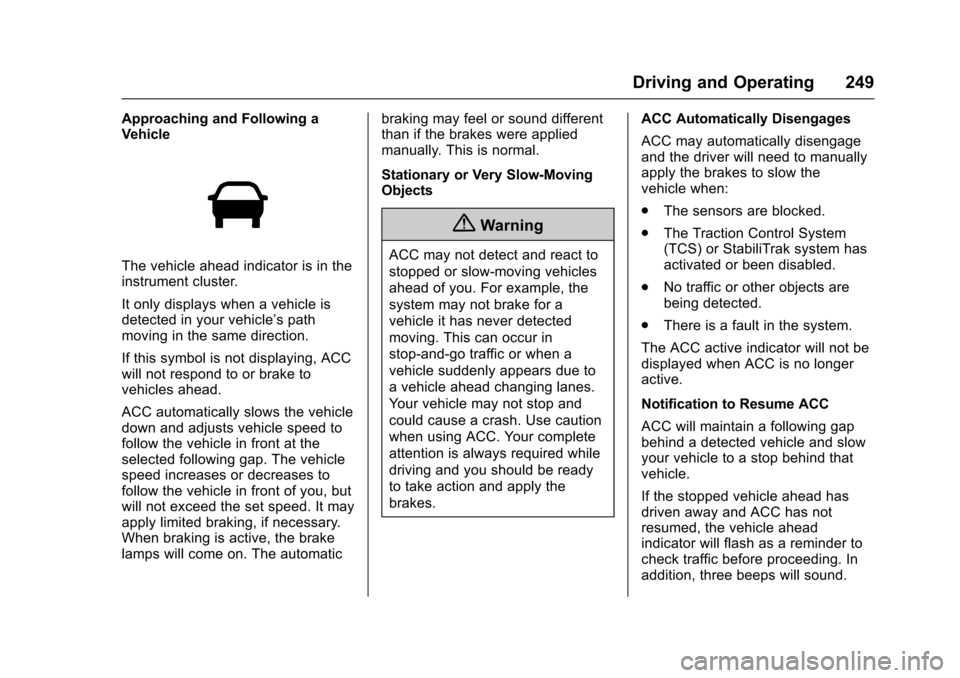
The vehicle ahead indicator is in theinstrument cluster.
It only displays when a vehicle isdetected in your vehicle’spathmoving in the same direction.
If this symbol is not displaying, ACCwill not respond to or brake tovehicles ahead.
ACC automatically slows the vehicledown and adjusts vehicle speed tofollow the vehicle in front at theselected following gap. The vehiclespeed increases or decreases tofollow the vehicle in front of you, butwill not exceed the set speed. It mayapply limited braking, if necessary.When braking is active, the brakelamps will come on. The automatic
braking may feel or sound differentthan if the brakes were appliedmanually. This is normal.
Stationary or Very Slow-MovingObjects
{Warning
ACC may not detect and react to
stopped or slow-moving vehicles
ahead of you. For example, the
system may not brake for a
vehicle it has never detected
moving. This can occur in
stop-and-go traffic or when a
vehicle suddenly appears due to
avehicleaheadchanginglanes.
Yo u r v e h i c l e m a y n o t s t o p a n d
could cause a crash. Use caution
when using ACC. Your complete
attention is always required while
driving and you should be ready
to take action and apply the
brakes.
ACC Automatically Disengages
ACC may automatically disengageand the driver will need to manuallyapply the brakes to slow thevehicle when:
.The sensors are blocked.
.The Traction Control System(TCS) or StabiliTrak system hasactivated or been disabled.
.No traffic or other objects arebeing detected.
.There is a fault in the system.
The ACC active indicator will not bedisplayed when ACC is no longeractive.
Notification to Resume ACC
ACC will maintain a following gapbehind a detected vehicle and slowyour vehicle to a stop behind thatvehicle.
If the stopped vehicle ahead hasdriven away and ACC has notresumed, the vehicle aheadindicator will flash as a reminder tocheck traffic before proceeding. Inaddition, three beeps will sound.
Page 251 of 419
Chevrolet Malibu Owner Manual (GMNA-Localizing-U.S./Canada/Mexico-10122664) - 2017 - crc - 5/23/16
250 Driving and Operating
See“Go Notifier”in“Collision/Detection Systems”underVehiclePersonalization0147.
When the vehicle ahead drivesaway, press +RES or theaccelerator pedal to resume ACC.If stopped for more thantwo minutes or if the driver door isopened and the driver safety belt isunbuckled, the ACC automaticallyapplies the Electric Parking Brake(EPB) to hold the vehicle. TheElectric Parking Brake status lightwill turn on. SeeElectric ParkingBrake0238.ToreleasetheEPB,press the accelerator pedal.
ADICwarningmessagemaydisplay indicating to shift to P (Park)before exiting the vehicle. SeeCruise Control Messages0139.
{Warning
If ACC has stopped the vehicle,
and if ACC is disengaged, turned
off, or canceled, the vehicle will
no longer be held at a stop. The
vehicle can move. When ACC is
(Continued)
Warning (Continued)
holding the vehicle at a stop,
always be prepared to manually
apply the brakes.
{Warning
Leaving the vehicle without
placing it in P (Park) can be
dangerous. Do not leave the
vehicle while it is being held at a
stop by ACC. Always place the
vehicle in P (Park) and turn off
the ignition before leaving the
vehicle.
ACC Override
If using the accelerator pedal whileACC is active, a warning messageon the DIC will indicate thatautomatic braking will not occur.SeeCruise Control Messages0139.ACCwillresumeoperationwhen the accelerator pedal is notbeing pressed.
{Warning
The ACC will not automatically
apply the brakes if your foot is
resting on the accelerator pedal.
Yo u c o u l d c r a s h i n t o a v e h i c l e
ahead of you.
Curves in the Road
{Warning
On curves, ACC may not detect a
vehicle ahead in your lane. You
could be startled if the vehicle
accelerates up to the set speed,
especially when following a
vehicle exiting or entering exit
ramps. You could lose control of
the vehicle or crash. Do not use
ACC while driving on an entrance
or exit ramp. Always be ready to
use the brakes if necessary.
Page 252 of 419
Chevrolet Malibu Owner Manual (GMNA-Localizing-U.S./Canada/Mexico-10122664) - 2017 - crc - 5/23/16
Driving and Operating 251
{Warning
On curves, ACC may respond to
avehicleinanotherlane,ormay
not have time to react to a vehicle
in your lane. You could crash into
avehicleaheadofyou,orlose
control of your vehicle. Give extra
attention in curves and be ready
to use the brakes if necessary.
Select an appropriate speed while
driving in curves.
ACC may operate differently in asharp curve. It may reduce thevehicle speed if the curve is toosharp.
When following a vehicle andentering a curve, ACC may notdetect the vehicle ahead andaccelerate to the set speed. Whenthis happens the vehicle aheadindicator will not appear.
ACC may detect a vehicle that isnot in your lane and apply thebrakes.
ACC may occasionally provide analert and/or braking that isconsidered unnecessary. It couldrespond to vehicles in differentlanes, signs, guardrails, and otherstationary objects when entering orexiting a curve. This is normaloperation. The vehicle does notneed service.
Other Vehicle Lane Changes
ACC will not detect a vehicle aheaduntil it is completely in the lane. Thebrake may need to be manuallyapplied.