reset CHEVROLET MALIBU 2017 9.G User Guide
[x] Cancel search | Manufacturer: CHEVROLET, Model Year: 2017, Model line: MALIBU, Model: CHEVROLET MALIBU 2017 9.GPages: 419, PDF Size: 7.81 MB
Page 135 of 419
Chevrolet Malibu Owner Manual (GMNA-Localizing-U.S./Canada/Mexico-10122664) - 2017 - crc - 5/23/16
134 Instruments and Controls
Best Average Fuel Economy :Thebottom displays the best averagefuel economy (AFE) that is achievedfor a selected distance. The topdisplays a running average of fueleconomy for the most recentlytraveled selected distance. Thecenter bar graph displays theinstantaneous fuel economy.
Quickly pressVto change the
settings for the distance options.
When viewing best AFE, a several
second press and hold ofVwill
reset the best value. The best valuewill show“---“until the selecteddistance has been traveled.
The display provides feedback onhow current driving behavior in thebar graph affects the runningaverage in the top display and howwell recent driving compares to thebest that has been achieved.
Drive Cycle Info (Hybrid) :Thisscreen displays the distancetraveled and average fuel economyfor the current trip. The screen willalso be shown when the vehicle isturned off displaying the previoustrip’sinformation.
Efficiency Gauge (Hybrid) :Thisgauge is a guide to driving in anefficient manner by keeping theindicator in the center of the gauge.
.Accel: If the indicator moves tothe right of the gauge,acceleration is too aggressive tooptimize efficiency.
.Brake: If the indicator moves tothe left side of the gauge,braking is too aggressive tooptimize efficiency.
Driver Information Center
(DIC) (Uplevel)
The DIC displays are shown in thecenter of the instrument cluster inthe Info app. SeeInstrument Cluster(Base Level)011 2orInstrumentCluster (Uplevel)011 4.Thedisplays show the status of manyvehicle systems.
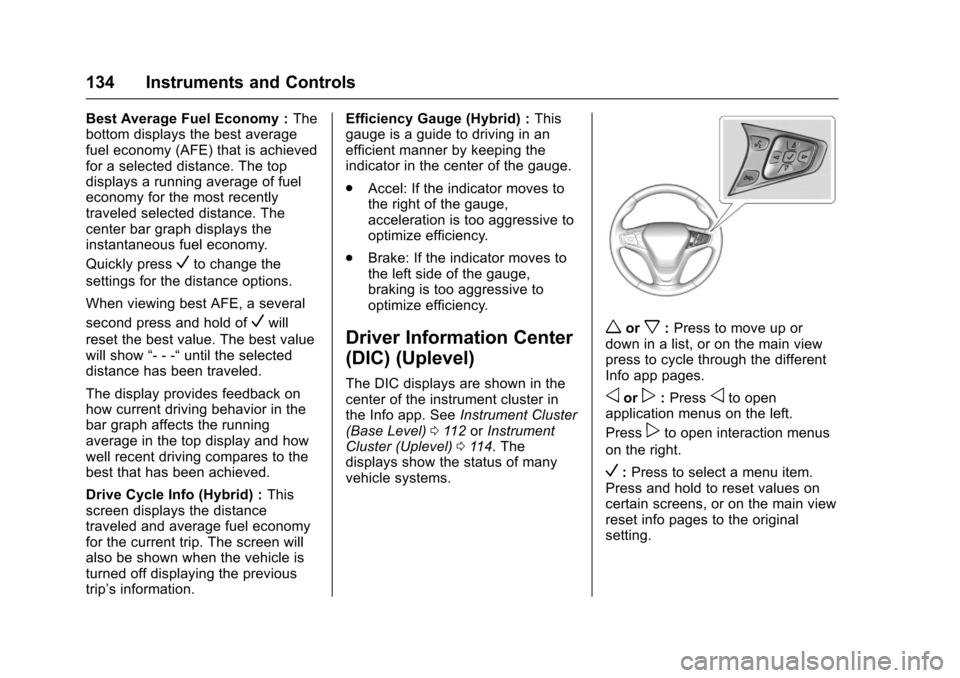
worx:Press to move up ordown in a list, or on the main viewpress to cycle through the differentInfo app pages.
oorp:Pressoto openapplication menus on the left.
Presspto open interaction menus
on the right.
V:Press to select a menu item.Press and hold to reset values oncertain screens, or on the main viewreset info pages to the originalsetting.
Page 136 of 419
Chevrolet Malibu Owner Manual (GMNA-Localizing-U.S./Canada/Mexico-10122664) - 2017 - crc - 5/23/16
Instruments and Controls 135
DIC Info Page Options
The info pages on the DIC can beturned on or off through theSettings menu.
1. Pressoto access the cluster
applications.
2. Pressworxto scroll to the
Settings application.
3. PressVto enter the
Settings menu.
4. Scroll to Info Pages and
pressp.
5. Pressworxto move
through the list of possibleinformation displays.
6. PressVwhile an item is
highlighted to select ordeselect that item. When anitem is selected, a checkmarkwill appear next to it.
DIC Info Pages
The following is the list of allpossible DIC info page displays.Some may not be available for yourparticular vehicle. Some items may
not be turned on by default but canbe turned on through the Settingsapp. See“DIC Info Page Options”earlier in this section.
Speed :Shows the vehicle speed ineither kilometers per hour (km/h) ormiles per hour (mph).
Tr i p A o r Tr i p B :Shows thecurrent distance traveled, in eitherkilometers (km) or miles (mi), sincethe trip odometer was last reset.
This also shows the approximateaverage liters per 100 kilometers(L/100 km) or miles pergallon (mpg). This number iscalculated based on the number ofL/100 km (mpg) recorded since thelast time this menu item was reset.This number reflects only theapproximate average fuel economythat the vehicle has right now, andwill change as driving conditionschange.
Press and holdVwhile this display
is active to reset the trip odometerand the average fuel economy. TripAandTripBcanalsoberesetby
pressingpand choosing reset.
Fuel Range :Shows theapproximate distance the vehiclecan be driven without refueling.LOW will be displayed when thevehicle is low on fuel. The fuelrange estimate is based on anaverage of the vehicle's fueleconomy over recent driving historyand the amount of fuel remaining inthe fuel tank.
Oil Life :Shows an estimate of theoil's remaining useful life.If REMAINING OIL LIFE 99% isdisplayed, that means 99% of thecurrent oil life remains.
When the remaining oil life is low,the CHANGE ENGINE OIL SOONmessage will appear on the display.SeeEngine Oil Messages0141.The oil should be changed as soonas possible. SeeEngine Oil0288.In addition to the engine oil lifesystem monitoring the oil life,additional maintenance isrecommended in the MaintenanceSchedule. SeeMaintenanceSchedule0369.
Page 137 of 419
Chevrolet Malibu Owner Manual (GMNA-Localizing-U.S./Canada/Mexico-10122664) - 2017 - crc - 5/23/16
136 Instruments and Controls
The Oil Life display must be resetafter each oil change. It will notreset itself. Do not to reset the OilLife display at any time other thanwhen the oil has just been changed.It cannot be reset accurately untilthe next oil change. To reset theengine oil life system, press and
holdVfor several seconds while
the Oil Life display is active. SeeEngine Oil Life System0291.
Tire Pressure :Shows theapproximate pressures of all fourtires. Tire pressure is displayed ineither kilopascal (kPa) or in poundsper square inch (psi). If the pressureis low, the value for that tire isshown in amber. SeeTire PressureMonitor System0327andTirePressure Monitor Operation0328.
Instantaneous Fuel Economy :Displays the current fuel economy inliters per 100 kilometers (L/100 km)or miles per gallon (mpg). Thisnumber reflects only theapproximate fuel economy that thevehicle has right now and changes
frequently as driving conditionschange. This display cannot bereset.
Average Vehicle Speed :Displaysthe average vehicle speed of thevehicle in kilometers per hour (km/h)or miles per hour (mph). Thisaverage is based on the variousvehicle speeds recorded since thelast reset. Reset the average speed
by pressingVwhen it is displayed.
Fuel Economy :The centerdisplays the approximateinstantaneous fuel economy as anumber and bar graph. Displayedabove the bar graph is a runningaverage of fuel economy for themost recently traveled selecteddistance. Displayed below the bargraph is the best average fueleconomy that has been achieved forthe selected distance. The selecteddistance is displayed at the top ofthe page as“last xxx mi/km.”
Presspto select the distance or
reset best value. Usewandxto
choose the distance and pressV.
Presswandxto select“Reset
Best Score.”PressVto reset the
best average fuel economy. Afterreset, the best value displays“-,-”until the selected distance has beentraveled.
The display provides information onhow current driving behavior affectsthe running average and how wellrecent driving compares to the bestthat has been achieved for theselected distance.
Timer :This display can be used as
atimer.Tostartthetimer,pressV
while this display is active. Thedisplay will show the amount of timethat has passed since the timer was
last reset. To stop the timer, pressV
briefly while this display is activeand the timer is running. To reset
the timer to zero, press and holdV
while this display is active, or
presspand select reset.
Speed Limit :Shows signinformation, which comes from aroadway database in the onboardnavigation, if equipped.
Page 142 of 419
Chevrolet Malibu Owner Manual (GMNA-Localizing-U.S./Canada/Mexico-10122664) - 2017 - crc - 5/23/16
Instruments and Controls 141
Engine Oil Messages
CHANGE ENGINE OIL SOON
This message displays when theengine oil needs to be changed.When the engine oil is changed, besure to reset the Oil Life System.SeeEngine Oil Life System0291,Driver Information Center (DIC)(Base Level)0131orDriverInformation Center (DIC) (Uplevel)0134,Engine Oil0288,andMaintenance Schedule0369.
ENGINE OIL HOT, IDLE
ENGINE
This message displays when theengine oil temperature is too hot.Stop and allow the vehicle to idleuntil it cools down.
OIL PRESSURE LOW—STOP
ENGINE
This message displays if low oilpressure levels occur. Stop thevehicle as soon as safely possibleand do not operate it until the causeof the low oil pressure has been
corrected. Check the oil as soon aspossible and have the vehicleserviced by your dealer.
Engine Power Messages
ENGINE POWER IS REDUCED
This message displays when thevehicle's engine power is reduced.Reduced engine power can affectthe vehicle's ability to accelerate.If this message is on, but there is noreduction in performance, proceedto your destination. Theperformance may be reduced thenext time the vehicle is driven. Thevehicle may be driven at a reducedspeed while this message is on, butmaximum acceleration and speedmay be reduced. Anytime thismessage stays on, or displaysrepeatedly, the vehicle should betaken to your dealer for service assoon as possible.
Fuel System Messages
FUEL LEVEL LOW
This message displays when thevehicle is low on fuel. Refuel assoon as possible.
TIGHTEN GAS CAP
This message displays when thefuel cap is not on tight. Tighten thefuel cap.
Key and Lock Messages
NO REMOTE KEY WAS
DETECTED PLACE KEY IN
TRANSMITTER POCKET THEN
START YOUR VEHICLE
This message displays when tryingto start the vehicle if an RKEtransmitter is not detected. Thetransmitter battery may be weak.See“Starting the Vehicle with a LowTransmitter Battery”underRemoteKeyless Entry (RKE) SystemOperation032.
Page 146 of 419
Chevrolet Malibu Owner Manual (GMNA-Localizing-U.S./Canada/Mexico-10122664) - 2017 - crc - 5/23/16
Instruments and Controls 145
stays on when the malfunctionindicator lamp is on, the vehicleshould be taken to your dealer forservice as soon as possible.
Ride Control System
Messages
SERVICE TRACTION
CONTROL
This message displays when thereis a problem with the TractionControl System (TCS). When thismessage is displayed, the systemwill not limit wheel spin. Adjust yourdriving accordingly. See your dealerfor service.
SERVICE STABILITRAK
This message displays if there is aproblem with the StabiliTrak system.If this message appears, try to resetthe system. Stop; turn off the enginefor at least 15 seconds; then startthe engine again. If this messagestill comes on, it means there is aproblem. See your dealer forservice. The vehicle is safe to drive;
however, you do not have thebenefit of StabiliTrak, so reduceyour speed and drive accordingly.
Airbag System Messages
SERVICE AIRBAG
This message displays if there is aproblem with the airbag system. Seeyour dealer for service.
Security Messages
THEFT ATTEMPTED
This message displays if the vehicledetects a tamper condition.
Service Vehicle Messages
SERVICE AC SYSTEM
This message displays if there is aproblem with the air conditioningsystem. Take the vehicle to yourdealer for service.
SERVICE KEYLESS START
SYSTEM
This message is displayed if there isaproblemwiththepushbuttonstartsystem. Take the vehicle to yourdealer for service.
SERVICE VEHICLE SOON
This message displays if there is aproblem with the vehicle. Take thevehicle to your dealer for service.
Steering System
Messages
SERVICE POWER STEERING
This message displays and a chimemay sound when there may be aproblem with the power steeringsystem. If this message displaysand a reduction in steeringperformance or loss of powersteering assistance is noticed, seeyour dealer.
Page 173 of 419
Chevrolet Malibu Owner Manual (GMNA-Localizing-U.S./Canada/Mexico-10122664) - 2017 - crc - 5/23/16
172 Infotainment System
functions may gray out when theyare unavailable. Many infotainmentfeatures are also available throughthe instrument cluster and steeringwheel controls.
Before driving:
.Become familiar with theoperation, faceplate buttons, andscreen buttons.
.Set up the audio by presettingfavorite stations, setting thetone, and adjusting thespeakers.
.Set up phone numbers inadvance so they can be calledeasily by pressing a singlebutton or by using a single voicecommand if equipped withBluetooth phone capability.
SeeDefensive Driving0216.
To p l a y t h e i n f o t a i n m e n t s y s t e m w i t hthe ignition off, seeRetainedAccessory Power (RAP)0230.
Theft-Deterrent Feature
The infotainment system has anelectronic security system installedto prevent theft.
The infotainment system only worksin the vehicle in which it was firstinstalled, and cannot be used inanother vehicle.
Page 175 of 419
Chevrolet Malibu Owner Manual (GMNA-Localizing-U.S./Canada/Mexico-10122664) - 2017 - crc - 5/23/16
174 Infotainment System
.Turn to highlight menuitems or to set values whilein a menu.
.Turn to manually selectradio stations.
9. Preset Buttons 1✓4
.Press and hold to store astation.
.Press to go to a presetfavorite station.
10. FAV
.Press to go to afavorite page.
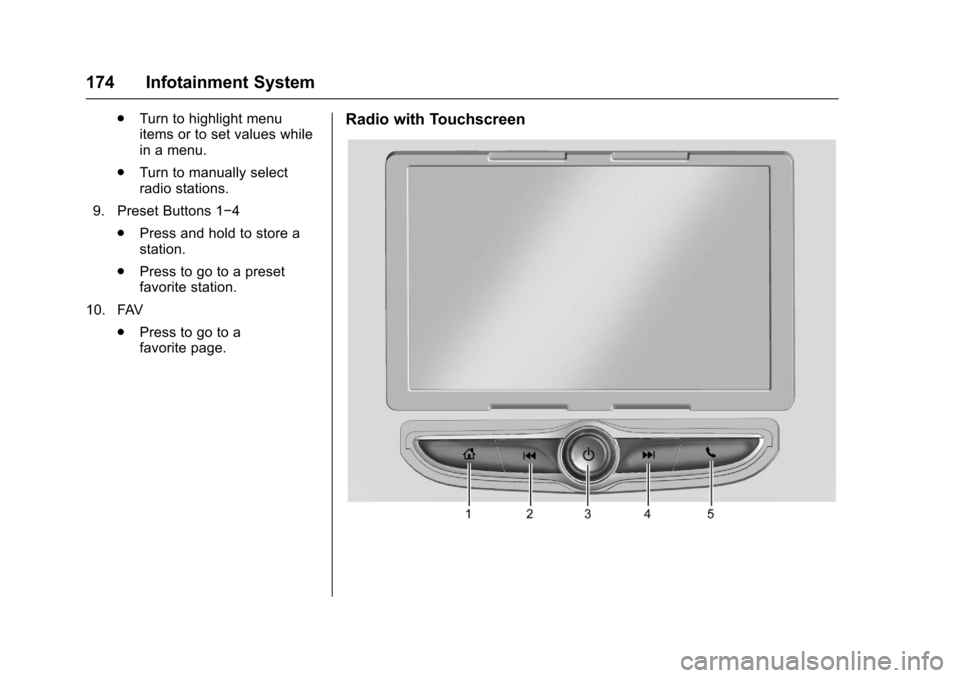
Radio with Touchscreen
Page 179 of 419
Chevrolet Malibu Owner Manual (GMNA-Localizing-U.S./Canada/Mexico-10122664) - 2017 - crc - 5/23/16
178 Infotainment System
Automatic Switch-Off
If the infotainment system has beenturned on after the ignition is turnedoff, the system will turn offautomatically after 10 minutes.
Volume Control
O:Turn to increase or decrease.
O:Press when the system is on tomute and unmute the system.
System Settings
Auto Volume
This feature automatically adjuststhe radio volume to compensate forroad and wind noise.
The level of volume compensationcan be selected, or the feature canbe turned off.
1. Touch MENU from a sourcescreen.
2. Select Auto Volume.
3. Select the desired setting.
4. Touch3to go back to the
source screen.
Tone Settings
The tone settings can be set foreach radio band and each audioplayer source.
Preset Tone Settings
1. Touch MENU.
2. Touch Tone Settings.
3. Select a preset tone setting.
Custom Tone Settings
1. Touch MENU.
2. Touch Tone Settings.
3. Touch Custom.
.Bass, Midrange, or Treble:To u c h✓or +.
.Fader or Balance: Adjustthe front/rear or left/rightspeakers by dragging thedot in the vehicle image onthe screen.
4. Touch3to go back to the
source screen.
Radio
AM-FM Radio
Playing the Radio without
Touchscreen
Audio Source Menu
O:Press and hold to turn thesystem on and off. Turn to increaseor decrease the volume or to cancelmute when the audio system ismuted.
MENU :Turn to change the radiostation.
RADIO :Press to select AMand FM.
7or6:Press to seek theprevious or next station.
Press and hold to quick seek astation.
FAV :Press to open the favoriteslist and select a favorite page orview the radio station and currentsong playing information.
Preset Buttons 1–4:Press toselect preset stations.
Page 180 of 419
Chevrolet Malibu Owner Manual (GMNA-Localizing-U.S./Canada/Mexico-10122664) - 2017 - crc - 5/23/16
Infotainment System 179
Radio Data System (RDS)
RDS is a service by FM stationsthat makes it easier to find radiostations with fault-free reception.
RDS stations are indicated by theprogram service name withbroadcasting frequency.
Selecting a Band
Press RADIO to choose AM or FM.The last station that was playingstarts playing again.
Selecting an Auxiliary Device
Press MEDIA to select a connectedauxiliary device.
Selecting a Station
Seek Tuning
If the radio station is not known:
Press7or6to automatically
search for available radio stations.
Press and hold7or6to change
the radio stations as desired, thenrelease to stop at the next availablestation.
Favorites List
There are two ways to select astation from the Favorites List:
.Press FAV repeatedly, until thedesired FAV page is displayed,then press the preset button ofthe desired FAV station.
.Press FAV, turn MENU until thedesired FAV station ishighlighted, then press MENU toselect the desired FAV station.
Stations List
1. From AM or FM, turn MENU toselect Stations List, then pressto select.
2. Turn MENU to move to thedesired station from theStations List, then press toreceive the station.
Category List
Most stations that broadcast anRDS program type code specify thetype of programming transmitted.Some stations change the programtype code depending on the
content. The system stores the RDSstations sorted by program type inthe FM category list.
To s e a r c h f o r a p r o g r a m m i n g t y p edetermined by station:
1. From the FM menu, turn MENUto select FM Category List,then press MENU.
2. Turn MENU to move to thedesired station, then pressMENU to receive the selectedbroadcasting channel.
Update Stations List
From AM or FM, press MENU, turnMENU to Update Stations List, thenpress MENU.
During the AM or FM broadcastinglist update, press the preset buttonunder Cancel or BACK to stop theupdates.
Storing a Station as a Favorite
Stations from all bands can bestored in any order in the favoritepages.
Up to four stations can be stored ineach favorite page.
Page 181 of 419
Chevrolet Malibu Owner Manual (GMNA-Localizing-U.S./Canada/Mexico-10122664) - 2017 - crc - 5/23/16
180 Infotainment System
Storing Stations
Press FAV to select the desiredpage of saved favorites.
To s t o r e t h e s t a t i o n t o a p o s i t i o n i nthe list, press and hold thecorresponding preset button 1✓4until a beep is heard.
Playing the Radio with
Touchscreen
Audio Source Menu
{:Press to go to the Home Page.
O:Press to turn on, mute,or unmute the system. Press andhold to turn off the system.
Selecting a Band
1. Press{.
2. Touch AUDIO.
3. Touch Source.
4. Select AM, FM, or SXM,if equipped.
The last station that was playingstarts playing again.
Selecting an Auxiliary Device
Connect the auxiliary device to theAUX input terminal. Play will beginwhen the system has finishedreading the information on thedevice.
If the auxiliary device is alreadyconnected:
1. Press{.
2. Touch AUDIO.
3. Touch Source.
4. Select the device.
Selecting a Station
Seek Tuning
If the radio station is not known:
Pressgordto automatically
search for available radio stations.
Direct Tune
From the AM or FM menu:
1. Touch Tune.
2. Enter the station number.
3. Touch Go.
Favorite
1. TouchSorTto scroll through
the favorite pages.
2. Touch the station to select it.
Station List
1. From the AM or FM menu,touch Menu.
2. Select Station List.
3. TouchQorRto scroll through
the list. Touch the station toselect it.
Update Station List
.From the AM or FM menu, touchMenu, then touch Update StationList. The broadcasting listupdating will begin.
.During the AM or FMbroadcasting list update, touchCancel to stop the updates.
Menu
To u c h t o c h o o s e b e t w e e n a v a i l a b l emenus for the current source.