reset CHEVROLET MALIBU 2017 9.G Owner's Manual
[x] Cancel search | Manufacturer: CHEVROLET, Model Year: 2017, Model line: MALIBU, Model: CHEVROLET MALIBU 2017 9.GPages: 419, PDF Size: 7.81 MB
Page 182 of 419
Chevrolet Malibu Owner Manual (GMNA-Localizing-U.S./Canada/Mexico-10122664) - 2017 - crc - 5/23/16
Infotainment System 181
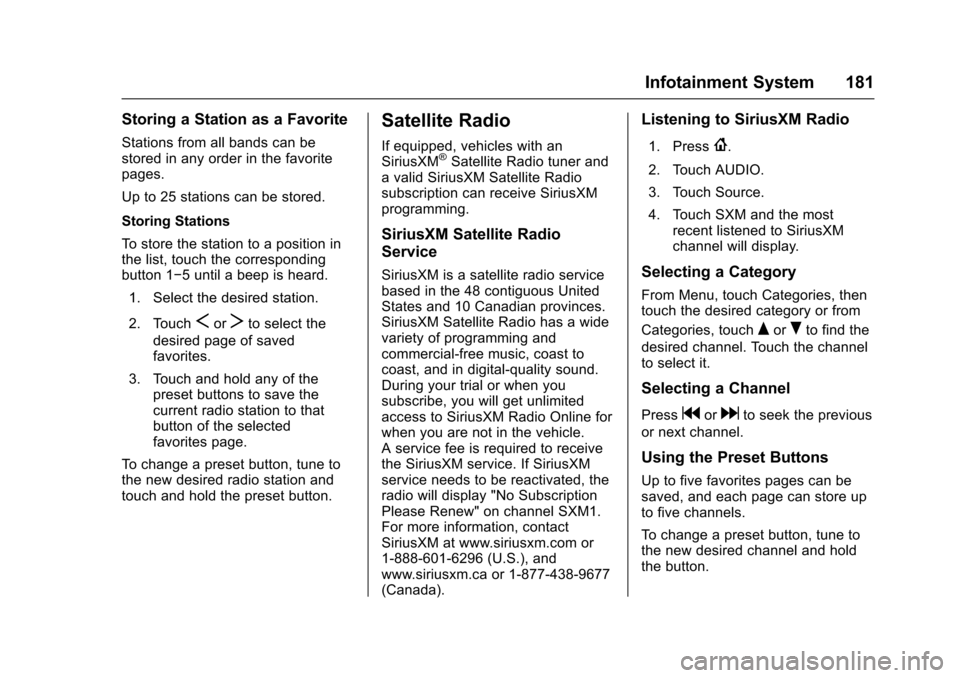
Storing a Station as a Favorite
Stations from all bands can bestored in any order in the favoritepages.
Up to 25 stations can be stored.
Storing Stations
To s t o r e t h e s t a t i o n t o a p o s i t i o n i nthe list, touch the correspondingbutton 1✓5untilabeepisheard.
1. Select the desired station.
2. TouchSorTto select the
desired page of savedfavorites.
3. Touch and hold any of thepreset buttons to save thecurrent radio station to thatbutton of the selectedfavorites page.
To c h a n g e a p r e s e t b u t t o n , t u n e t othe new desired radio station andtouch and hold the preset button.
Satellite Radio
If equipped, vehicles with anSiriusXM®Satellite Radio tuner andavalidSiriusXMSatelliteRadiosubscription can receive SiriusXMprogramming.
SiriusXM Satellite Radio
Service
SiriusXM is a satellite radio servicebased in the 48 contiguous UnitedStates and 10 Canadian provinces.SiriusXM Satellite Radio has a widevariety of programming andcommercial-free music, coast tocoast, and in digital-quality sound.During your trial or when yousubscribe, you will get unlimitedaccess to SiriusXM Radio Online forwhen you are not in the vehicle.Aservicefeeisrequiredtoreceivethe SiriusXM service. If SiriusXMservice needs to be reactivated, theradio will display "No SubscriptionPlease Renew" on channel SXM1.For more information, contactSiriusXM at www.siriusxm.com or1-888-601-6296 (U.S.), andwww.siriusxm.ca or 1-877-438-9677(Canada).
Listening to SiriusXM Radio
1. Press{.
2. Touch AUDIO.
3. Touch Source.
4. Touch SXM and the mostrecent listened to SiriusXMchannel will display.
Selecting a Category
From Menu, touch Categories, thentouch the desired category or from
Categories, touchQorRto find the
desired channel. Touch the channelto select it.
Selecting a Channel
Pressgordto seek the previous
or next channel.
Using the Preset Buttons
Up to five favorites pages can besaved, and each page can store upto five channels.
To c h a n g e a p r e s e t b u t t o n , t u n e t othe new desired channel and holdthe button.
Page 183 of 419
Chevrolet Malibu Owner Manual (GMNA-Localizing-U.S./Canada/Mexico-10122664) - 2017 - crc - 5/23/16
182 Infotainment System
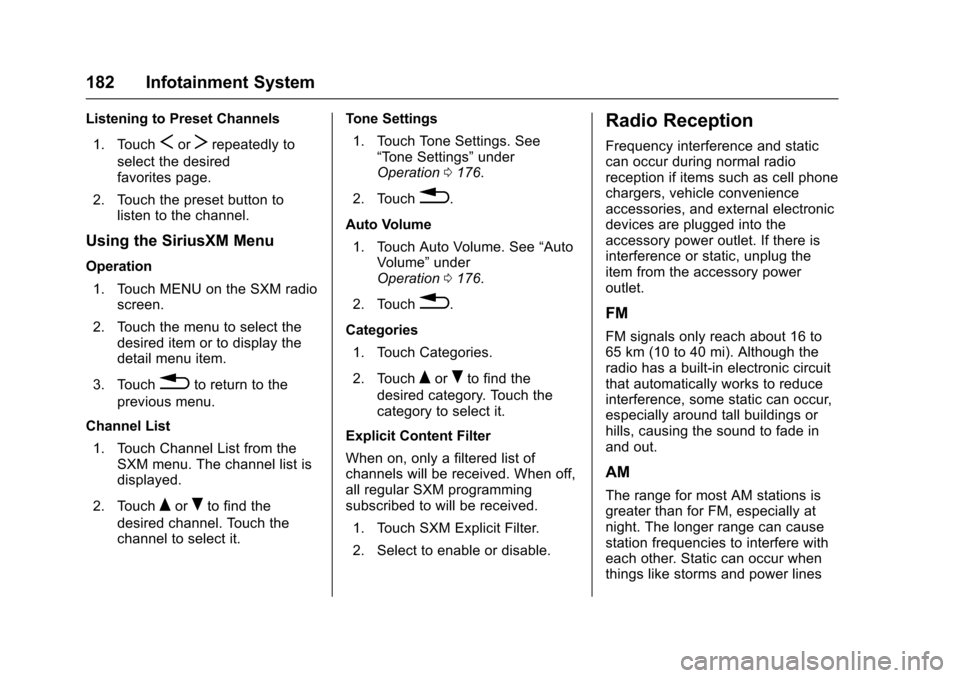
Listening to Preset Channels
1. TouchSorTrepeatedly to
select the desiredfavorites page.
2. Touch the preset button tolisten to the channel.
Using the SiriusXM Menu
Operation
1. Touch MENU on the SXM radioscreen.
2. Touch the menu to select thedesired item or to display thedetail menu item.
3. Touch0to return to the
previous menu.
Channel List
1. Touch Channel List from theSXM menu. The channel list isdisplayed.
2. TouchQorRto find the
desired channel. Touch thechannel to select it.
Tone Settings
1. Touch Tone Settings. See“To n e S e t t i n g s”underOperation0176.
2. Touch0.
Auto Volume
1. Touch Auto Volume. See“AutoVolume”underOperation0176.
2. Touch0.
Categories
1. Touch Categories.
2. TouchQorRto find the
desired category. Touch thecategory to select it.
Explicit Content Filter
When on, only a filtered list ofchannels will be received. When off,all regular SXM programmingsubscribed to will be received.
1. Touch SXM Explicit Filter.
2. Select to enable or disable.
Radio Reception
Frequency interference and staticcan occur during normal radioreception if items such as cell phonechargers, vehicle convenienceaccessories, and external electronicdevices are plugged into theaccessory power outlet. If there isinterference or static, unplug theitem from the accessory poweroutlet.
FM
FM signals only reach about 16 to65 km (10 to 40 mi). Although theradio has a built-in electronic circuitthat automatically works to reduceinterference, some static can occur,especially around tall buildings orhills, causing the sound to fade inand out.
AM
The range for most AM stations isgreater than for FM, especially atnight. The longer range can causestation frequencies to interfere witheach other. Static can occur whenthings like storms and power lines
Page 233 of 419
Chevrolet Malibu Owner Manual (GMNA-Localizing-U.S./Canada/Mexico-10122664) - 2017 - crc - 5/23/16
232 Driving and Operating
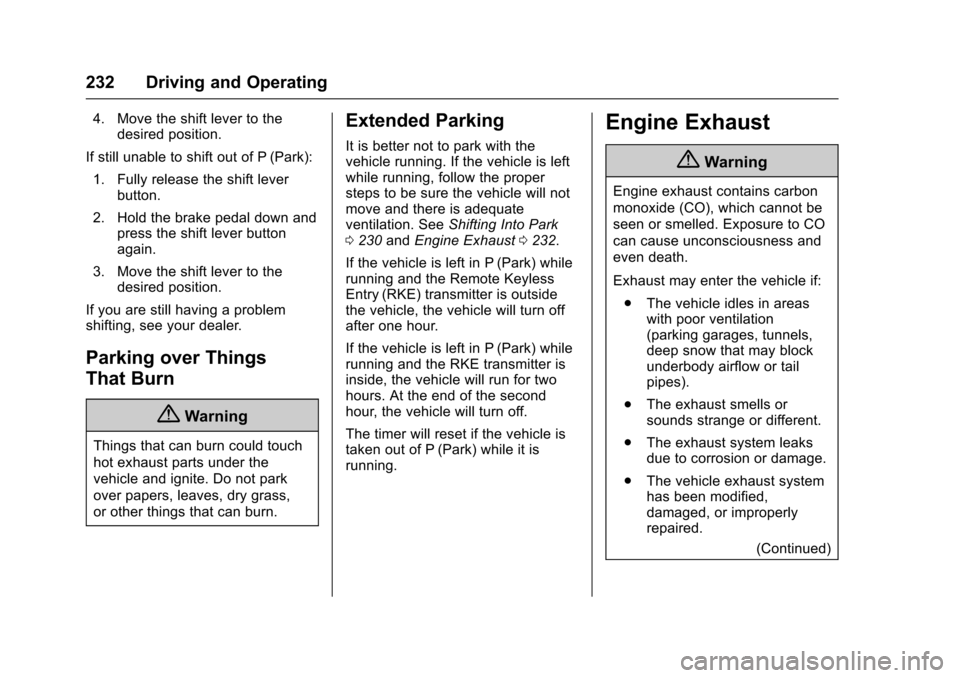
4. Move the shift lever to thedesired position.
If still unable to shift out of P (Park):
1. Fully release the shift leverbutton.
2. Hold the brake pedal down andpress the shift lever buttonagain.
3. Move the shift lever to thedesired position.
If you are still having a problemshifting, see your dealer.
Parking over Things
That Burn
{Warning
Things that can burn could touch
hot exhaust parts under the
vehicle and ignite. Do not park
over papers, leaves, dry grass,
or other things that can burn.
Extended Parking
It is better not to park with thevehicle running. If the vehicle is leftwhile running, follow the propersteps to be sure the vehicle will notmove and there is adequateventilation. SeeShifting Into Park0230andEngine Exhaust0232.
If the vehicle is left in P (Park) whilerunning and the Remote KeylessEntry (RKE) transmitter is outsidethe vehicle, the vehicle will turn offafter one hour.
If the vehicle is left in P (Park) whilerunning and the RKE transmitter isinside, the vehicle will run for twohours. At the end of the secondhour, the vehicle will turn off.
The timer will reset if the vehicle istaken out of P (Park) while it isrunning.
Engine Exhaust
{Warning
Engine exhaust contains carbon
monoxide (CO), which cannot be
seen or smelled. Exposure to CO
can cause unconsciousness and
even death.
Exhaust may enter the vehicle if:
.The vehicle idles in areaswith poor ventilation(parking garages, tunnels,deep snow that may blockunderbody airflow or tailpipes).
.The exhaust smells orsounds strange or different.
.The exhaust system leaksdue to corrosion or damage.
.The vehicle exhaust systemhas been modified,damaged, or improperlyrepaired.
(Continued)
Page 292 of 419
Chevrolet Malibu Owner Manual (GMNA-Localizing-U.S./Canada/Mexico-10122664) - 2017 - crc - 5/23/16
Vehicle Care 291
Engine Oil Life System
When to Change Engine Oil
This vehicle has a computer systemthat indicates when to change theengine oil and filter. This is basedon a combination of factors whichinclude engine revolutions, enginetemperature, and miles driven.Based on driving conditions, themileage at which an oil change isindicated can vary considerably. Forthe oil life system to work properly,the system must be reset every timethe oil is changed.
When the system has calculatedthat oil life has been diminished, itindicates that an oil change isnecessary. A CHANGE ENGINEOIL SOON message comes on. SeeEngine Oil Messages0141.Change the oil as soon as possiblewithin the next 1 000 km (600 mi).It is possible that, if driving underthe best conditions, the oil lifesystem might indicate that an oilchange is not necessary for up to ayear. The engine oil and filter mustbe changed at least once a yearand, at this time, the system must
be reset. Your dealer has trainedservice people who will perform thiswork and reset the system. It is alsoimportant to check the oil regularlyover the course of an oil draininterval and keep it at the properlevel.
If the system is ever resetaccidentally, the oil must bechanged at 5 000 km (3,000 mi)since the last oil change.Remember to reset the oil lifesystem whenever the oil is changed.
How to Reset the Engine Oil
Life System
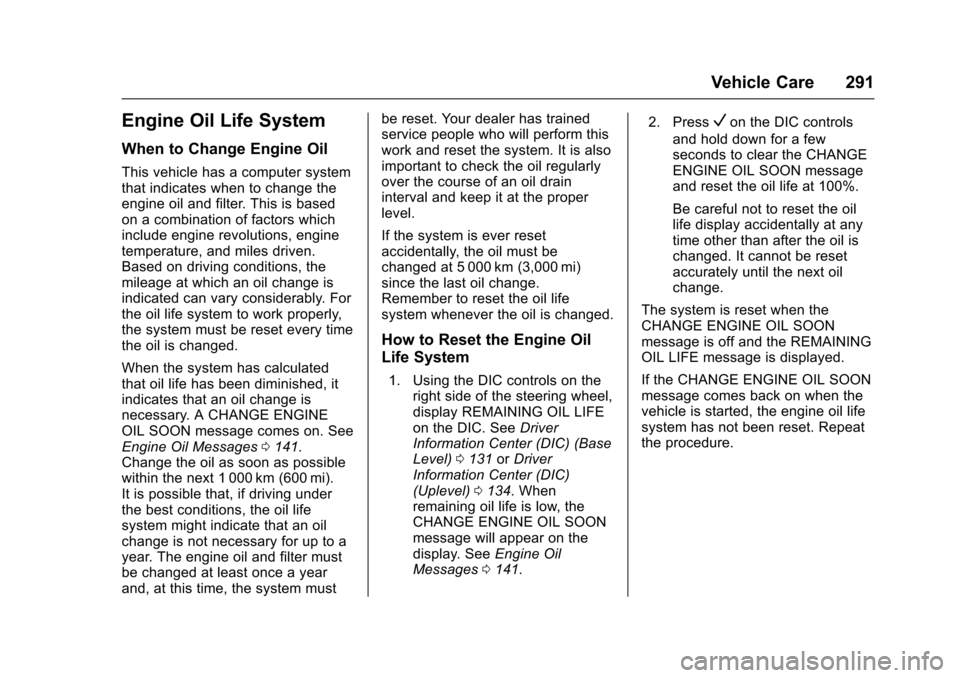
1. Using the DIC controls on theright side of the steering wheel,display REMAINING OIL LIFEon the DIC. SeeDriverInformation Center (DIC) (BaseLevel)0131orDriverInformation Center (DIC)(Uplevel)0134.Whenremaining oil life is low, theCHANGE ENGINE OIL SOONmessage will appear on thedisplay. SeeEngine OilMessages0141.
2. PressVon the DIC controls
and hold down for a fewseconds to clear the CHANGEENGINE OIL SOON messageand reset the oil life at 100%.
Be careful not to reset the oillife display accidentally at anytime other than after the oil ischanged. It cannot be resetaccurately until the next oilchange.
The system is reset when theCHANGE ENGINE OIL SOONmessage is off and the REMAININGOIL LIFE message is displayed.
If the CHANGE ENGINE OIL SOONmessage comes back on when thevehicle is started, the engine oil lifesystem has not been reset. Repeatthe procedure.
Page 306 of 419
Chevrolet Malibu Owner Manual (GMNA-Localizing-U.S./Canada/Mexico-10122664) - 2017 - crc - 5/23/16
Vehicle Care 305
Headlamp Aiming
Headlamp aim has been preset andshould need no further adjustment.
If the vehicle is damaged in a crash,the headlamp aim may be affected.If adjustment to the headlamps isnecessary, see your dealer.
Bulb Replacement
For the proper type of replacementbulbs, seeReplacementBulbs0309.
For any bulb-changing procedurenot listed in this section, contactyour dealer.
Halogen Bulbs
{Warning
Halogen bulbs have pressurized
gas inside and can burst if you
drop or scratch the bulb. You or
others could be injured. Be sure
to read and follow the instructions
on the bulb package.
LED Lighting
This vehicle has several LED lamps.For replacement of any LED lightingassembly, contact your dealer.
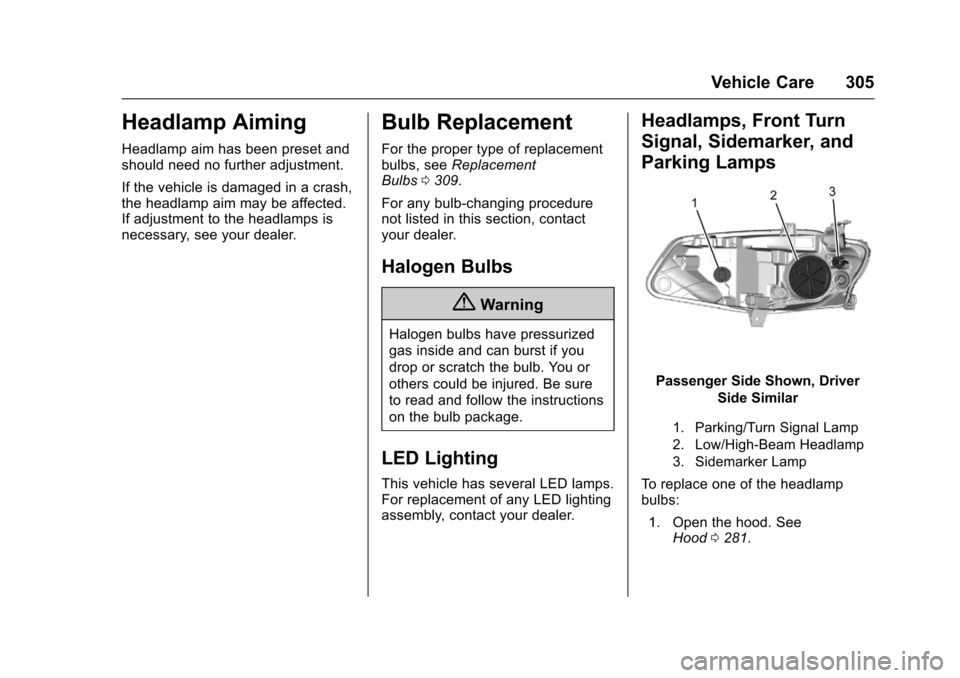
Headlamps, Front Turn
Signal, Sidemarker, and
Parking Lamps
Passenger Side Shown, Driver
Side Similar
1. Parking/Turn Signal Lamp
2. Low/High-Beam Headlamp
3. Sidemarker Lamp
To r e p l a c e o n e o f t h e h e a d l a m pbulbs:
1. Open the hood. SeeHood0281.
Page 332 of 419
Chevrolet Malibu Owner Manual (GMNA-Localizing-U.S./Canada/Mexico-10122664) - 2017 - crc - 5/23/16
Vehicle Care 331
Tire Inspection
We recommend that the tires,
including the spare tire, if the
vehicle has one, be inspected
for signs of wear or damage at
least once a month.
Replace the tire if:
.The indicators at three or
more places around the tire
can be seen.
.There is cord or fabric
showing through the tire's
rubber.
.The tread or sidewall is
cracked, cut, or snagged
deep enough to show cord or
fabric.
.The tire has a bump, bulge,
or split.
.The tire has a puncture, cut,
or other damage that cannot
be repaired well because of
the size or location of the
damage.
Tire Rotation
Tires should be rotated every
12 000 km (7,500 mi). See
Maintenance Schedule0369.
Tires are rotated to achieve a
more uniform wear for all tires.
The first rotation is the most
important.
Anytime unusual wear is
noticed, rotate the tires as soon
as possible, check for proper tire
inflation pressure, and check for
damaged tires or wheels. If the
unusual wear continues after the
rotation, check the wheel
alignment. SeeWhen It Is Time
for New Tires0332andWheel
Replacement0336.
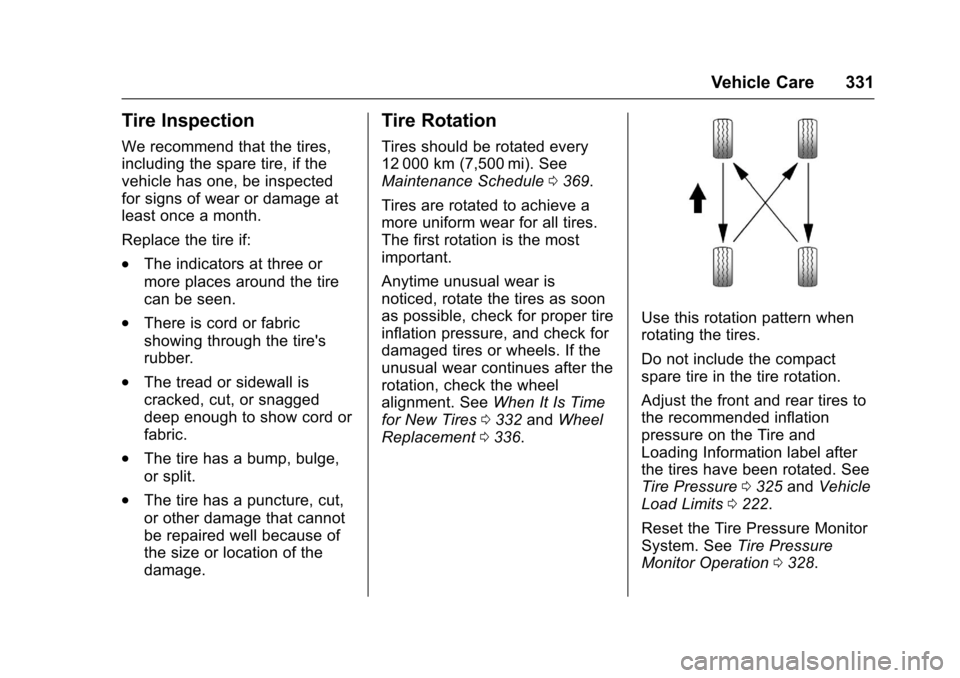
Use this rotation pattern when
rotating the tires.
Do not include the compact
spare tire in the tire rotation.
Adjust the front and rear tires to
the recommended inflation
pressure on the Tire and
Loading Information label after
the tires have been rotated. See
Tire Pressure0325andVehicle
Load Limits0222.
Reset the Tire Pressure Monitor
System. SeeTire Pressure
Monitor Operation0328.
Page 371 of 419
Chevrolet Malibu Owner Manual (GMNA-Localizing-U.S./Canada/Mexico-10122664) - 2017 - crc - 5/23/16
370 Service and Maintenance
ayearandtheoillifesystemmustbe reset. Your trained dealertechnician can perform this work.If the engine oil life system is resetaccidentally, service the vehiclewithin 5 000 km/3,000 mi since thelast service. Reset the oil lifesystem when the oil is changed.SeeEngine Oil Life System0291.
Tire Rotation and Required
Services Every 12 000 km/
7,500 mi
Rotate the tires, if recommended forthe vehicle, and perform thefollowing services. SeeTireRotation0331.
.Check engine oil level and oillife percentage. If needed,change engine oil and filter, andreset oil life system. SeeEngineOil0288andEngine Oil LifeSystem0291.
.Check engine coolant level. SeeEngine Coolant0295.
.Check windshield washer fluidlevel. SeeWasher Fluid0299.
.Visually inspect windshield wiperblades for wear, cracking,or contamination. SeeExteriorCare0358.Replacewornordamaged wiper blades. SeeWiper BladeReplacement0304.
.Check tire inflation pressures.SeeTire Pressure0325.
.Inspect tire wear. SeeTireInspection0331.
.Visually check for fluid leaks.
.Inspect engine air cleaner filter.SeeEngine Air Cleaner/Filter0292.
.Inspect brake system. SeeExterior Care0358.
.Visually inspect steering,suspension, and chassiscomponents for damaged, loose,or missing parts or signs ofwear. SeeExterior Care0358.
.Check restraint systemcomponents. SeeSafety SystemCheck069.
.Visually inspect fuel system fordamage or leaks.
.Visually inspect exhaust systemand nearby heat shields forloose or damaged parts.
.Lubricate body components. SeeExterior Care0358.
.Check starter switch. SeeStarterSwitch Check0303.
.Check automatic transmissionshift lock control function. SeeAutomatic Transmission ShiftLock Control FunctionCheck0303.
.Check parking brake andautomatic transmission parkmechanism. SeePark Brake andP(Park)MechanismCheck0303.
.Check accelerator pedal fordamage, high effort, or binding.Replace if needed.
.Visually inspect gas strut forsigns of wear, cracks, or otherdamage. Check the hold openability of the strut. See yourdealer if service is required.
.Inspect sunroof track and seal,if equipped. SeeSunroof052.
Page 395 of 419
Chevrolet Malibu Owner Manual (GMNA-Localizing-U.S./Canada/Mexico-10122664) - 2017 - crc - 5/23/16
394 Customer Information
To c o n t a c t N H T S A , y o u m a y c a l l
the Vehicle Safety Hotline
toll-free at 1-888-327-4236 (TTY:
1-800-424-9153); go tohttp://www.safercar.gov;or write to:
Administrator, NHTSA
1200 New Jersey Avenue, S.E.
Washington, D.C. 20590
Yo u c a n a l s o o b t a i n o t h e r
information about motor vehicle
safety fromhttp://www.safercar.gov.
Reporting Safety Defects
to the Canadian
Government
If you live in Canada, and you
believe that the vehicle has a
safety defect, notify Transport
Canada immediately, and notify
General Motors of Canada
Company. Call Transport
Canada at 1-800-333-0510 or
write to:
Transport Canada
Road Safety Branch
80 rue Noel
Gatineau,QC J8Z 0A1
Reporting Safety Defects
to General Motors
In addition to notifying NHTSA (orTransport Canada) in a situation likethis, notify General Motors.
Call 1-800-222-1020, or write:
Chevrolet Motor DivisionChevrolet Customer AssistanceCenterP. O . B o x 3 3 1 7 0Detroit, MI 48232-5170
In Canada, call 1-800-263-3777(English) or 1-800-263-7854(French), or write:
General Motors of CanadaCompanyCustomer Care Centre, Mail Code:CA1-163-0051908 Colonel Sam DriveOshawa, Ontario L1H 8P7
Vehicle Data
Recording and
Privacy
The vehicle has a number ofcomputers that record informationabout the vehicle’sperformanceandhow it is driven. For example, thevehicle uses computer modules tomonitor and control engine andtransmission performance, tomonitor the conditions for airbagdeployment and deploy them in acrash, and, if equipped, to provideantilock braking to help the drivercontrol the vehicle. These modulesmay store data to help the dealertechnician service the vehicle.Some modules may also store dataabout how the vehicle is operated,such as rate of fuel consumption oraverage speed. These modules mayretain personal preferences, such asradio presets, seat positions, andtemperature settings.