warning CHEVROLET MALIBU 2017 9.G User Guide
[x] Cancel search | Manufacturer: CHEVROLET, Model Year: 2017, Model line: MALIBU, Model: CHEVROLET MALIBU 2017 9.GPages: 419, PDF Size: 7.81 MB
Page 40 of 419
Chevrolet Malibu Owner Manual (GMNA-Localizing-U.S./Canada/Mexico-10122664) - 2017 - crc - 5/23/16
Keys, Doors, and Windows 39
conditions. The rear defog indicatorlight does not come on during aremote start.
If the vehicle has heated seats, theymay come on during a remote start.SeeHeated and Ventilated FrontSeats060.
Laws in some local communitiesmay restrict the use of remotestarters. For example, some lawsrequire a person using remote startto have the vehicle in view. Checklocal regulations for anyrequirements.
Other conditions can affect theperformance of the transmitter. SeeRemote Keyless Entry (RKE)System032.
Do not use remote start if thevehicle is low on fuel.
Starting the Engine Using RemoteStart
To s t a r t t h e e n g i n e u s i n g t h e r e m o t estart feature:
1. Press and releaseQ.
2. Immediately after completing
Step 1, press and hold/for at
least four seconds or until theturn signal lamps flash. Theturn signal lamps flashingconfirms the request to remotestart the vehicle has beenreceived.
When the engine starts, the parkinglamps will turn on and remain on aslong as the engine is running. Thedoors will be locked and the climatecontrol system may come on.
The engine will continue to run for10 minutes. After 30 seconds,repeat the steps if a 10-minuteextension is desired. Remote startcan be extended only once.
Start the vehicle before driving.
Extending Engine Run Time
The engine run time can beextended by another 10 minutes,if during the first 10 minutesSteps 1 and 2 are repeated whilethe engine is still running. Anextension can be requested30 seconds after starting. When theremote start is extended, the
second 10-minute period is addedon to the first 10 minutes for a totalof 20 minutes.
The remote start can only beextended once.
Amaximumoftworemotestarts,or a single start with an extension,is allowed between ignition cycles.
The vehicle's ignition must beturned on and then back off beforethe remote start procedure can beused again.
Canceling a Remote Start
To c a n c e l a r e m o t e s t a r t , d o o n e o fthe following:
.Aim the RKE transmitter at the
vehicle and press and hold/
until the parking lamps turn off.
.Turn on the hazard warningflashers.
.Turn the vehicle on and then off.
Page 41 of 419
Chevrolet Malibu Owner Manual (GMNA-Localizing-U.S./Canada/Mexico-10122664) - 2017 - crc - 5/23/16
40 Keys, Doors, and Windows
Conditions in Which Remote StartWill Not Work
The remote vehicle start feature willnot operate if:
.Atransmitterisinthevehicle.
.The hood is not closed.
.The hazard warning flashersare on.
.The malfunction indicator lampis on.
.The engine coolant temperatureis too high.
.The oil pressure is low.
.Tw o r e m o t e v e h i c l e s t a r t s , o r asingle remote start with anextension, have alreadybeen used.
.The vehicle is not in P (Park).
Door Locks
{Warning
Unlocked doors can be
dangerous.
.Passengers, especiallychildren, can easily openthe doors and fall out of amoving vehicle. The doorscan be unlocked andopened while the vehicle ismoving. The chance ofbeing thrown out of thevehicle in a crash isincreased if the doors arenot locked. So, allpassengers should wearsafety belts properly and thedoors should be lockedwhenever the vehicle isdriven.
.Yo u n g c h i l d r e n w h o g e t i n t ounlocked vehicles may beunable to get out. A childcan be overcome byextreme heat and can sufferpermanent injuries or even
(Continued)
Warning (Continued)
death from heat stroke.Always lock the vehiclewhenever leaving it.
.Outsiders can easily enterthrough an unlocked doorwhen you slow down or stopthe vehicle. Locking thedoors can help prevent thisfrom happening.
To l o c k o r u n l o c k t h e d o o r s f r o m t h eoutside:
.PressQorKon the Remote
Keyless Entry (RKE) transmitter.SeeRemote Keyless Entry(RKE) System Operation032.
.Use the key in the driver door.The key lock cylinder is coveredwith a cap.
Page 45 of 419
Chevrolet Malibu Owner Manual (GMNA-Localizing-U.S./Canada/Mexico-10122664) - 2017 - crc - 5/23/16
44 Keys, Doors, and Windows
To o p e n a r e a r d o o r w h e n t h e s a f e t ylock is on:
1. Unlock the door by activatingthe inside handle, by pressingthe power door lock switch,or by using the RemoteKeyless Entry (RKE)transmitter.
2. Open the door from theoutside.
When the safety lock is enabled,adults and older children will not beable to open the rear door from theinside. Cancel the safety locks toenable the doors to open from theinside.
To c a n c e l t h e s a f e t y l o c k :
1. Unlock the door and open itfrom the outside.
2. Move the lever rearward tounlock. Do the same for theother door.
Doors
Trunk
{Warning
Exhaust gases can enter the
vehicle if it is driven with the
liftgate, hatch/trunk open, or with
any objects that pass through the
seal between the body and the
hatch/trunk or liftgate. Engine
exhaust contains carbon
monoxide (CO) which cannot be
seen or smelled. It can cause
unconsciousness and even death.
If the vehicle must be driven with
the liftgate or hatch/trunk open:
.Close all of the windows.
.Fully open the air outlets onor under the instrumentpanel.
.Adjust the climate controlsystem to a setting thatbrings in only outside airand set the fan speed to the
(Continued)
Warning (Continued)
highest setting. See“Climate Control Systems”in the Index.
.If the vehicle is equippedwith a power liftgate, disablethe power liftgate function.
For more information about
carbon monoxide, seeEngine
Exhaust0232.
Trunk Release
To o p e n t h e t r u n k t h e v e h i c l e m u s tbe off or the shift lever must be inP(Park).
.PressXtwice quickly on the
RKE transmitter.
Page 49 of 419
Chevrolet Malibu Owner Manual (GMNA-Localizing-U.S./Canada/Mexico-10122664) - 2017 - crc - 5/23/16
48 Keys, Doors, and Windows
Vehicle with a Low TransmitterBattery”underRemote KeylessEntry (RKE) System Operation032.
If the vehicle does not start with theother transmitter or when thetransmitter is in the transmitterpocket, the vehicle needs service.See your dealer who can servicethe theft-deterrent system and haveanewtransmitterprogrammedtothe vehicle.
Do not leave the transmitter ordevice that disarms or deactivatesthe theft-deterrent system in thevehicle.
Exterior Mirrors
Convex Mirrors
{Warning
Aconvexmirrorcanmakethings,
like other vehicles, look farther
away than they really are. If you
cut too sharply into the right lane,
you could hit a vehicle on the
right. Check the inside mirror or
glance over your shoulder before
changing lanes.
The passenger side mirror is convexshaped. A convex mirror's surface iscurved so more can be seen fromthe driver seat.
Power Mirrors
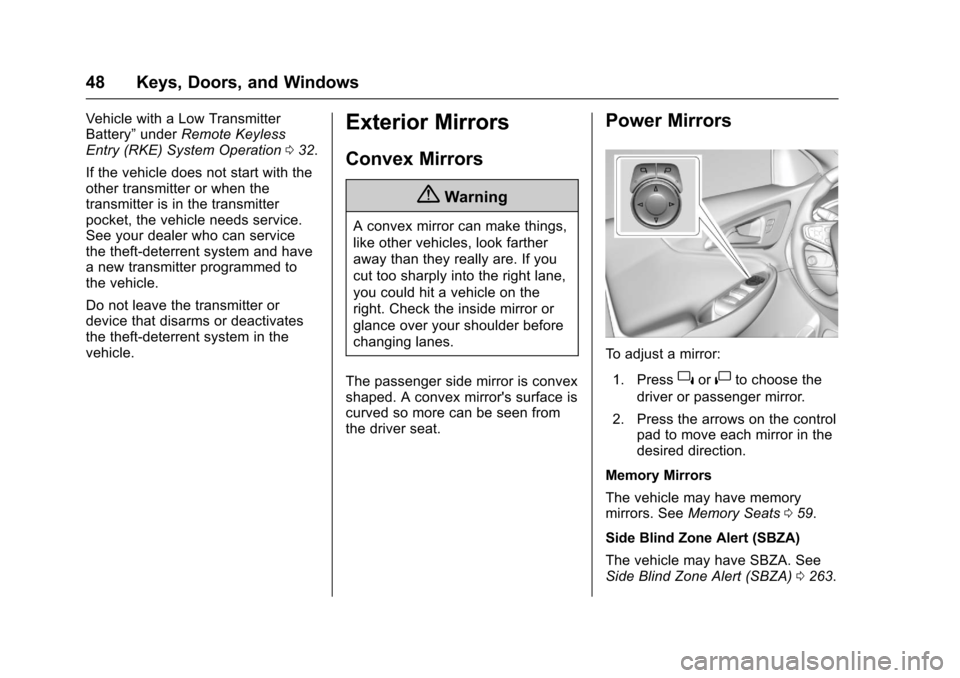
To a d j u s t a m i r r o r :
1. Press}or|to choose the
driver or passenger mirror.
2. Press the arrows on the controlpad to move each mirror in thedesired direction.
Memory Mirrors
The vehicle may have memorymirrors. SeeMemory Seats059.
Side Blind Zone Alert (SBZA)
The vehicle may have SBZA. SeeSide Blind Zone Alert (SBZA)0263.
Page 50 of 419
Chevrolet Malibu Owner Manual (GMNA-Localizing-U.S./Canada/Mexico-10122664) - 2017 - crc - 5/23/16
Keys, Doors, and Windows 49
Lane Change Alert (LCA)
The vehicle may have LCA. SeeLane Change Alert (LCA)0264.
Turn Signal Indicator
The vehicle may have a turn signalindicator on the mirror housings.The indicator will flash when a turnsignal or the hazard warningflashers are used.
Folding Mirrors
Manual Folding Mirrors
The mirrors can be folded inwardtoward the vehicle to preventdamage when going through anautomatic car wash. Push the mirroroutward to return it to the originalposition.
Heated Mirrors
If equipped with heated mirrors:
K:The rear window defogger alsoheats the outside mirrors.
SeeDual Automatic Climate ControlSystem0208.
Reverse Tilt Mirrors
If equipped with memory seats, thepassenger and/or driver mirror tiltsto a preselected position when thevehicle is in R (Reverse). Thisallows the curb to be seen whenparallel parking.
The mirror(s) return to the originalposition when:
.The vehicle is shifted out ofR(Reverse),orremainsinR(Reverse)forabout30 seconds.
.The ignition is turned off.
.The vehicle is driven inR(Reverse)aboveasetspeed.
To t u r n t h i s f e a t u r e o n o r o f f , s e eVehicle Personalization0147.
Interior Mirrors
Interior Rearview Mirrors
Adjust the rearview mirror for a clearview of the area behind the vehicle.
Do not spray glass cleaner directlyon the mirror. Use a soft toweldampened with water.
Manual Rearview Mirror
If equipped, push the tab forward fordaytime use and pull it rearward fornighttime use to avoid glare of theheadlamps from behind.
Automatic Dimming
Rearview Mirror
If equipped, automatic dimmingreduces the glare of headlampsfrom behind. The dimming featurecomes on when the vehicle isstarted.
Page 51 of 419
Chevrolet Malibu Owner Manual (GMNA-Localizing-U.S./Canada/Mexico-10122664) - 2017 - crc - 5/23/16
50 Keys, Doors, and Windows
Windows
{Warning
Never leave a child, a helpless
adult, or a pet alone in a vehicle,
especially with the windows
closed in warm or hot weather.
They can be overcome by the
extreme heat and suffer
permanent injuries or even death
from heat stroke.
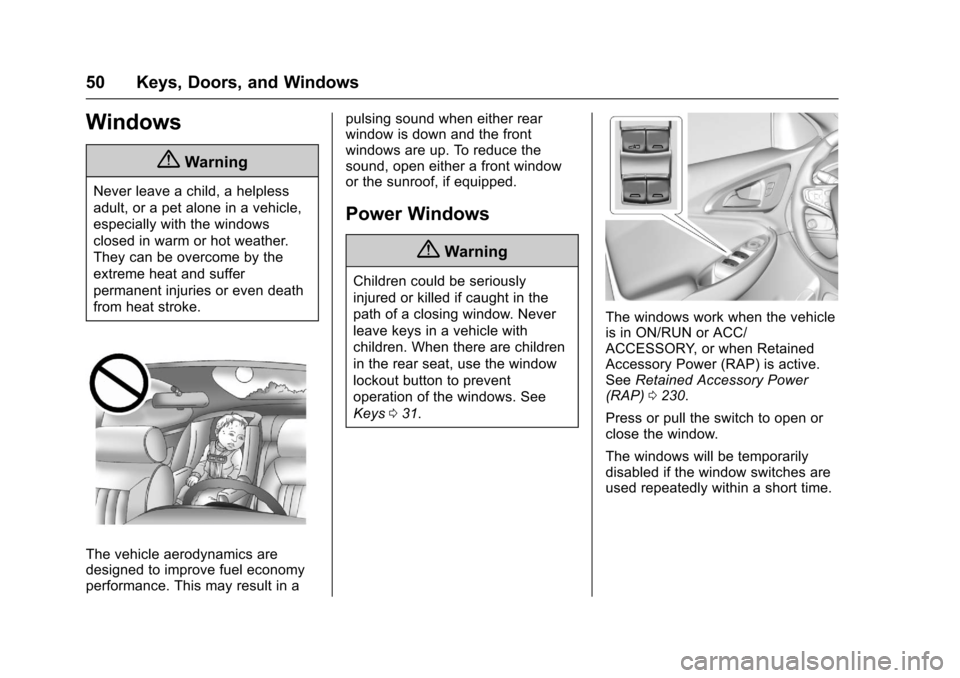
The vehicle aerodynamics aredesigned to improve fuel economyperformance. This may result in a
pulsing sound when either rearwindow is down and the frontwindows are up. To reduce thesound, open either a front windowor the sunroof, if equipped.
Power Windows
{Warning
Children could be seriously
injured or killed if caught in the
path of a closing window. Never
leave keys in a vehicle with
children. When there are children
in the rear seat, use the window
lockout button to prevent
operation of the windows. See
Keys031.
The windows work when the vehicleis in ON/RUN or ACC/ACCESSORY, or when RetainedAccessory Power (RAP) is active.SeeRetained Accessory Power(RAP)0230.
Press or pull the switch to open orclose the window.
The windows will be temporarilydisabled if the window switches areused repeatedly within a short time.
Page 52 of 419
Chevrolet Malibu Owner Manual (GMNA-Localizing-U.S./Canada/Mexico-10122664) - 2017 - crc - 5/23/16
Keys, Doors, and Windows 51
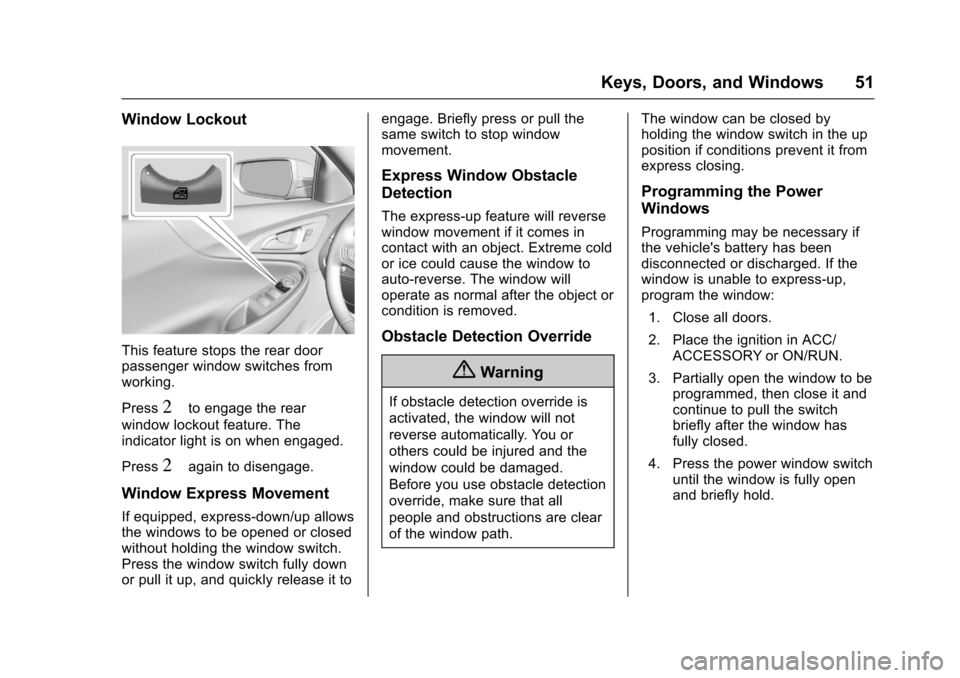
Window Lockout
This feature stops the rear doorpassenger window switches fromworking.
Press2to engage the rear
window lockout feature. Theindicator light is on when engaged.
Press2again to disengage.
Window Express Movement
If equipped, express-down/up allowsthe windows to be opened or closedwithout holding the window switch.Press the window switch fully downor pull it up, and quickly release it to
engage. Briefly press or pull thesame switch to stop windowmovement.
Express Window Obstacle
Detection
The express-up feature will reversewindow movement if it comes incontact with an object. Extreme coldor ice could cause the window toauto-reverse. The window willoperate as normal after the object orcondition is removed.
Obstacle Detection Override
{Warning
If obstacle detection override is
activated, the window will not
reverse automatically. You or
others could be injured and the
window could be damaged.
Before you use obstacle detection
override, make sure that all
people and obstructions are clear
of the window path.
The window can be closed byholding the window switch in the upposition if conditions prevent it fromexpress closing.
Programming the Power
Windows
Programming may be necessary ifthe vehicle's battery has beendisconnected or discharged. If thewindow is unable to express-up,program the window:
1. Close all doors.
2. Place the ignition in ACC/ACCESSORY or ON/RUN.
3. Partially open the window to beprogrammed, then close it andcontinue to pull the switchbriefly after the window hasfully closed.
4. Press the power window switchuntil the window is fully openand briefly hold.
Page 56 of 419
Chevrolet Malibu Owner Manual (GMNA-Localizing-U.S./Canada/Mexico-10122664) - 2017 - crc - 5/23/16
Seats and Restraints 55
Head Restraints
{Warning
With head restraints that are not
installed and adjusted properly,
there is a greater chance that
occupants will suffer a neck/
spinal injury in a crash. Do not
drive until the head restraints for
all occupants are installed and
adjusted properly.
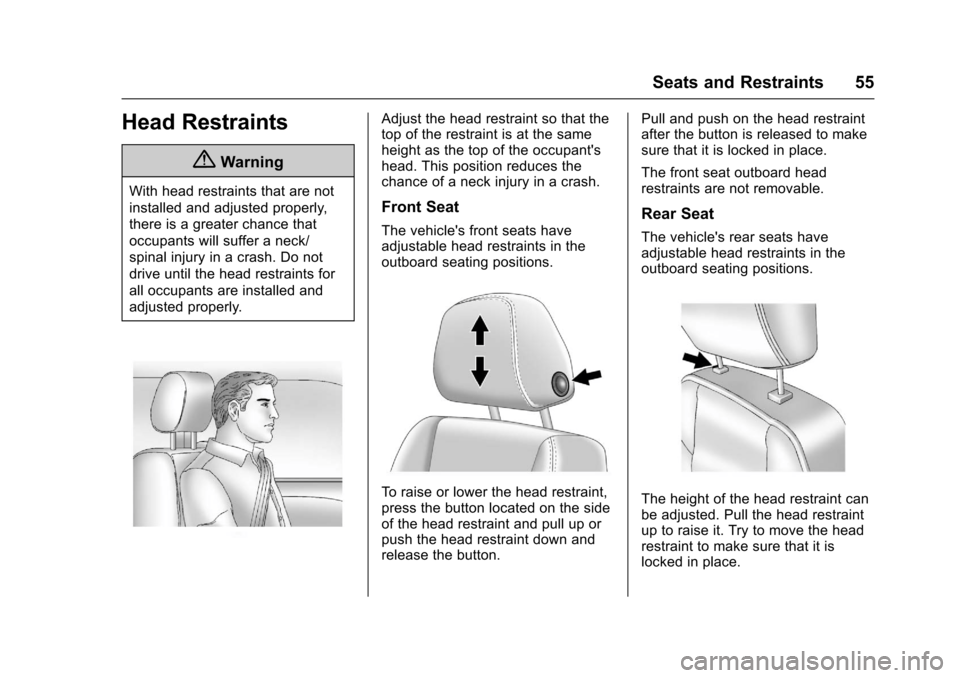
Adjust the head restraint so that thetop of the restraint is at the sameheight as the top of the occupant'shead. This position reduces thechance of a neck injury in a crash.
Front Seat
The vehicle's front seats haveadjustable head restraints in theoutboard seating positions.
To r a i s e o r l o w e r t h e h e a d r e s t r a i n t ,press the button located on the sideof the head restraint and pull up orpush the head restraint down andrelease the button.
Pull and push on the head restraintafter the button is released to makesure that it is locked in place.
The front seat outboard headrestraints are not removable.
Rear Seat
The vehicle's rear seats haveadjustable head restraints in theoutboard seating positions.
The height of the head restraint canbe adjusted. Pull the head restraintup to raise it. Try to move the headrestraint to make sure that it islocked in place.
Page 57 of 419
Chevrolet Malibu Owner Manual (GMNA-Localizing-U.S./Canada/Mexico-10122664) - 2017 - crc - 5/23/16
56 Seats and Restraints
To l o w e r t h e h e a d r e s t r a i n t , p r e s sthe button, located on the top of theseatback, and push the headrestraint down. Try to move thehead restraint after the button isreleased to make sure that it islocked in place.
Rear outboard head restraints arenot removable.
Front Seats
Seat Adjustment
{Warning
Yo u c a n l o s e c o n t r o l o f t h e
vehicle if you try to adjust a driver
seat while the vehicle is moving.
Adjust the driver seat only when
the vehicle is not moving.
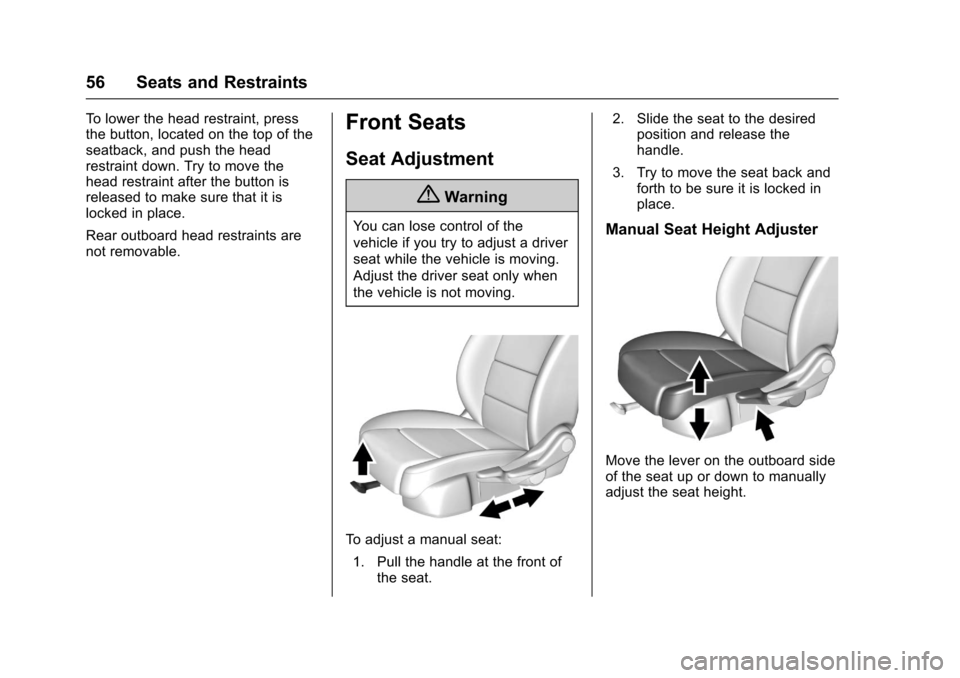
To a d j u s t a m a n u a l s e a t :
1. Pull the handle at the front ofthe seat.
2. Slide the seat to the desiredposition and release thehandle.
3. Try to move the seat back andforth to be sure it is locked inplace.
Manual Seat Height Adjuster
Move the lever on the outboard sideof the seat up or down to manuallyadjust the seat height.
Page 58 of 419
Chevrolet Malibu Owner Manual (GMNA-Localizing-U.S./Canada/Mexico-10122664) - 2017 - crc - 5/23/16
Seats and Restraints 57
Power Seat Adjustment
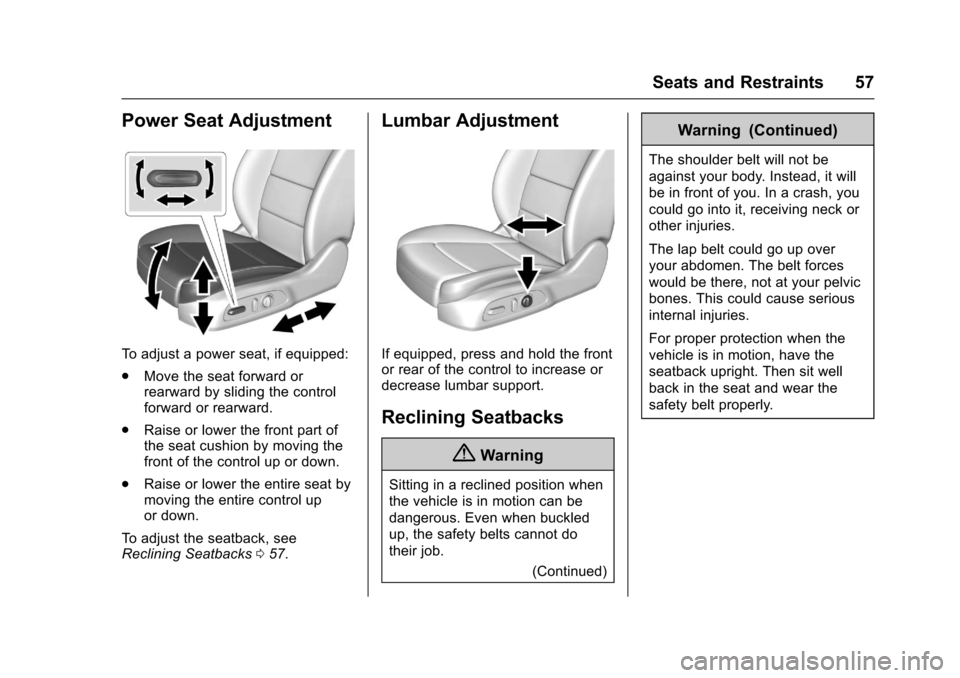
To a d j u s t a p o w e r s e a t , i f e q u i p p e d :
.Move the seat forward orrearward by sliding the controlforward or rearward.
.Raise or lower the front part ofthe seat cushion by moving thefront of the control up or down.
.Raise or lower the entire seat bymoving the entire control upor down.
To a d j u s t t h e s e a t b a c k , s e eReclining Seatbacks057.
Lumbar Adjustment
If equipped, press and hold the frontor rear of the control to increase ordecrease lumbar support.
Reclining Seatbacks
{Warning
Sitting in a reclined position when
the vehicle is in motion can be
dangerous. Even when buckled
up, the safety belts cannot do
their job.
(Continued)
Warning (Continued)
The shoulder belt will not be
against your body. Instead, it will
be in front of you. In a crash, you
could go into it, receiving neck or
other injuries.
The lap belt could go up over
your abdomen. The belt forces
would be there, not at your pelvic
bones. This could cause serious
internal injuries.
For proper protection when the
vehicle is in motion, have the
seatback upright. Then sit well
back in the seat and wear the
safety belt properly.