ECO mode CHEVROLET MALIBU 2017 9.G Owner's Manual
[x] Cancel search | Manufacturer: CHEVROLET, Model Year: 2017, Model line: MALIBU, Model: CHEVROLET MALIBU 2017 9.GPages: 419, PDF Size: 7.81 MB
Page 200 of 419
Chevrolet Malibu Owner Manual (GMNA-Localizing-U.S./Canada/Mexico-10122664) - 2017 - crc - 5/23/16
Infotainment System 199
Playing Bluetooth Music
1. Press{.
2. Touch AUDIO.
3. Touch Source.
4. Touch Bluetooth.
Pause
To u c hjto pause.
To u c hrto resume.
Playing the Next Song
To u c hl.
Playing the Previous Song
To u c hgwithin two seconds of
playback time to play theprevious song.
Returning to the Beginning of theCurrent Song
To u c hgafter two seconds of
playback time.
Search
To u c h a n d h o l dgorlto rewind
or fast forward.
Playing Music Randomly
To u c hZduring playback. Touch
again to return to normal play.
This function may not be supporteddepending on the Bluetooth device.
Do not change the track too quicklywhen playing Bluetooth music.
Conditions that may occur whenplaying Bluetooth music:
.It takes time to transmit datafrom the Bluetooth device to theinfotainment system.
.If the cell phone or Bluetoothdevice is not in the waitingscreen mode, it may notautomatically play.
.The infotainment systemtransmits the order to play fromthe Bluetooth device in theBluetooth music play mode.If this is done in a differentmode, then the device transmitsthe order to stop. Depending onthe Bluetooth device options,this order to play/stop may taketime to activate.
.If the Bluetooth music playbackis not functioning, then check tosee if the Bluetooth device is inthe waiting screen mode.
.Sounds may be cut off duringthe Bluetooth music playback.
.The infotainment system outputsthe audio from the cell phone orBluetooth device as it istransmitted.
Apple CarPlay and
Android Auto
If equipped, Android Auto™and/orApple CarPlay™capability may beavailable through a compatiblesmartphone. If available, aPROJECTION icon will appear asAndroid Auto or Car Play on theHome Page of the infotainmentdisplay.
To u s e A n d r o i d A u t o a n d / o r A p p l eCarPlay:
1. Download the Android Autoapp to your phone from theGoogle™Play store. There is
Page 206 of 419
Chevrolet Malibu Owner Manual (GMNA-Localizing-U.S./Canada/Mexico-10122664) - 2017 - crc - 5/23/16
Climate Controls 205
Climate Controls
Climate Control Systems
Climate Control Systems . . . . . 205Dual Automatic ClimateControl System . . . . . . . . . . . . . 208
Air Vents
Air Vents . . . . . . . . . . . . . . . . . . . . . . 211
Maintenance
Passenger Compartment AirFilter . . . . . . . . . . . . . . . . . . . . . . . . 212Service . . . . . . . . . . . . . . . . . . . . . . . 213
Climate Control Systems
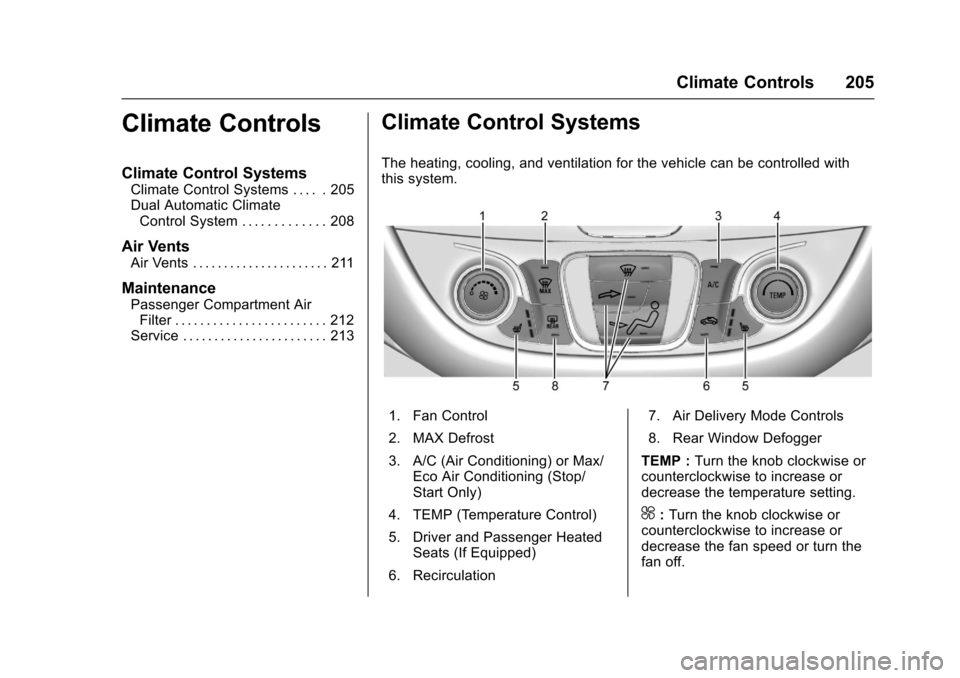
The heating, cooling, and ventilation for the vehicle can be controlled withthis system.
1. Fan Control
2. MAX Defrost
3. A/C (Air Conditioning) or Max/Eco Air Conditioning (Stop/Start Only)
4. TEMP (Temperature Control)
5. Driver and Passenger HeatedSeats (If Equipped)
6. Recirculation
7. Air Delivery Mode Controls
8. Rear Window Defogger
TEMP :Turn the knob clockwise orcounterclockwise to increase ordecrease the temperature setting.
^:Turn the knob clockwise orcounterclockwise to increase ordecrease the fan speed or turn thefan off.
Page 207 of 419
Chevrolet Malibu Owner Manual (GMNA-Localizing-U.S./Canada/Mexico-10122664) - 2017 - crc - 5/23/16
206 Climate Controls
Air Delivery Mode Controls :Press the air delivery mode buttonsto change the direction of theairflow. The indicator light in theselected button will turn on. Thecurrent mode appears in the displayscreen.
To c h a n g e t h e c u r r e n t m o d e , s e l e c tone or more of the following modes:
0:Clears the windows of fog ormoisture. Air is directed to thewindshield.
{:Air is directed to theinstrument panel outlets.
z:Air is directed to the flooroutlets.
0MAX :Air is directed to thewindshield and the fan runs at ahigher speed. This mode overridesthe previous mode selected andclears fog or frost from thewindshield more quickly. When thebutton is pressed again, the systemreturns to the previous mode settingand fan speed.
For best results, clear all snow andice from the windshield beforedefrosting.
A/C :Press to turn the airconditioning system on or off. If thefan control is turned off or theoutside temperature falls belowfreezing, the air conditioner willnot run.
A/C (Max/Eco A/C For Stop/StartVehicles) :Press to cycle betweenthe max, eco, and off airconditioning modes. The indicatorwill be lit in max and eco modes andturns off when there is no A/Cfunction. If the fan is turned off, theair conditioner will not run and theindicator light will turn off.
For max a/c, press A/C. Theindicator will turn amber. Auto stopswill occur less frequently, be shorter,and will not occur in extremely warmweather.
For eco a/c, press A/C again. Theindicator will turn green. This settingbalances fuel economy and airconditioning comfort. In warmweather conditions, auto stops mayoccur more frequently, last longer,and the vehicle interior may bewarmer during auto stops ascompared to the max a/c setting.
This setting allows higher humidityinside the vehicle and windowfogging may occur before theengine restarts.
@:Press to turn on recirculation.An indicator light comes on. Air isrecirculated to quickly cool theinside of the vehicle or to reduce theentry of outside air and odors.
Auto Defog :The climate controlsystem may have a sensor toautomatically detect high humidityinside the vehicle. When highhumidity is detected, the climatecontrol system may adjust tooutside air supply and turn on theair conditioner. If the climate controlsystem does not detect possiblewindow fogging, it returns to normaloperation.
To t u r n A u t o D e f o g o f f o r o n , s e e“Climate and Air Quality”underVehicle Personalization0147.
Page 211 of 419
Chevrolet Malibu Owner Manual (GMNA-Localizing-U.S./Canada/Mexico-10122664) - 2017 - crc - 5/23/16
210 Climate Controls
A/C (Max/Eco A/C For Stop/StartVehicles) :Press to cycle betweenthe max, eco, and off airconditioning modes. The indicatorwill be lit in max and eco modes andturns off when there is no A/Cfunction. If the fan is turned off, theair conditioner will not run and theindicator light will turn off.
Press AUTO to return to automaticoperation and the air conditionerruns automatically as needed. WithStop/Start vehicles, the A/C willreturn to eco a/c operation.
For max a/c, press A/C. Theindicator will turn amber. Auto stopswill occur less frequently, be shorter,and will not occur in extremely warmweather.
For eco a/c, press A/C again. Theindicator will turn green. This settingbalances fuel economy and airconditioning comfort. In warmweather conditions, auto stops mayoccur more frequently, last longer,and the vehicle interior may bewarmer during auto stops ascompared to the max a/c setting.This setting allows higher humidity
inside the vehicle and windowfogging may occur before theengine restarts.
@:Press to turn on recirculation.An indicator light comes on. Air isrecirculated to quickly cool theinside of the vehicle or to reduce theentry of outside air and odors.
If selected during cool or coldweather, the windshield andwindows may fog. Turn offrecirculation to help clear thewindshield and windows.
Auto Defog :The climate controlsystem may have a sensor toautomatically detect high humidityinside the vehicle. When highhumidity is detected, the climatecontrol system may adjust tooutside air supply and turn on theair conditioner. The fan speed mayslightly increase to help preventfogging. If the climate controlsystem does not detect possiblewindow fogging, it returns to normaloperation.
To t u r n A u t o D e f o g o f f o r o n , s e e“Climate and Air Quality”underVehicle Personalization0147.
Rear Window Defogger
K:Press to turn the rear windowdefogger on or off. An indicator lighton the button comes on to show thatthe rear window defogger is on. Therear window defogger only workswhen the ignition is in ON/RUN. Thedefogger turns off when the ignitionis placed in the ACC/ACCESSORYor LOCK/OFF position.
The upper lines on the rear windoware antenna grids and are notintended to defrost the glass.
The rear window defogger can beset to automatic operation. See“Climate and Air Quality”underVehicle Personalization0147.When Auto Rear Defog is selected,the rear window defogger turns onautomatically when the interiortemperature is cold and the outsidetemperature is about 7 °C (44 °F)and below. The auto rear defoggerturns off automatically.
If the vehicle is equipped withheated outside rearview mirrors,they turn on when the rear window
Page 215 of 419
Chevrolet Malibu Owner Manual (GMNA-Localizing-U.S./Canada/Mexico-10122664) - 2017 - crc - 5/23/16
214 Driving and Operating
Driving and
Operating
Driving Information
Distracted Driving . . . . . . . . . . . . 215Defensive Driving . . . . . . . . . . . . . 216Drunk Driving . . . . . . . . . . . . . . . . . 216Control of a Vehicle . . . . . . . . . . . 216Braking . . . . . . . . . . . . . . . . . . . . . . . 216Steering . . . . . . . . . . . . . . . . . . . . . . 217Off-Road Recovery . . . . . . . . . . . 217Loss of Control . . . . . . . . . . . . . . . 218Driving on Wet Roads . . . . . . . . 218Hill and Mountain Roads . . . . . 219Winter Driving . . . . . . . . . . . . . . . . 220If the Vehicle Is Stuck . . . . . . . . 221Vehicle Load Limits . . . . . . . . . . . 222
Starting and Operating
New Vehicle Break-In . . . . . . . . . 225Ignition Positions . . . . . . . . . . . . . 225Starting the Engine . . . . . . . . . . . 227Engine Heater . . . . . . . . . . . . . . . . 229Retained AccessoryPower (RAP) . . . . . . . . . . . . . . . . 230Shifting Into Park . . . . . . . . . . . . . 230Shifting out of Park . . . . . . . . . . . 231Parking over ThingsThat Burn . . . . . . . . . . . . . . . . . . . 232
Extended Parking . . . . . . . . . . . . 232
Engine Exhaust
Engine Exhaust . . . . . . . . . . . . . . 232Running the Vehicle WhileParked . . . . . . . . . . . . . . . . . . . . . . 233
Automatic Transmission
Automatic Transmission . . . . . . 233Manual Mode . . . . . . . . . . . . . . . . . 235
Brakes
Antilock BrakeSystem (ABS) . . . . . . . . . . . . . . . 236Parking Brake . . . . . . . . . . . . . . . . 237Electric Parking Brake . . . . . . . . 238Brake Assist . . . . . . . . . . . . . . . . . . 239Hill Start Assist (HSA) . . . . . . . . 240Regenerative Braking(Hybrid Only) . . . . . . . . . . . . . . . . 240
Ride Control Systems
Traction Control/ElectronicStability Control . . . . . . . . . . . . . 241
Cruise Control
Cruise Control . . . . . . . . . . . . . . . . 243Adaptive Cruise Control . . . . . . 245
Driver Assistance Systems
Driver Assistance Systems . . . 252Assistance Systems forParking or Backing . . . . . . . . . . 253
Assistance Systems forDriving . . . . . . . . . . . . . . . . . . . . . . 257Forward Collision Alert (FCA)System . . . . . . . . . . . . . . . . . . . . . . 258Forward AutomaticBraking (FAB) . . . . . . . . . . . . . . . 260Front Pedestrian Braking(FPB) System . . . . . . . . . . . . . . . 261Side Blind ZoneAlert (SBZA) . . . . . . . . . . . . . . . . 263Lane Change Alert (LCA) . . . . . 264Lane DepartureWarning (LDW) . . . . . . . . . . . . . 266Lane Keep Assist (LKA) . . . . . . 266
Fuel
Fuel . . . . . . . . . . . . . . . . . . . . . . . . . . 268California FuelRequirements . . . . . . . . . . . . . . . 269Fuels in Foreign Countries . . . 269Fuel Additives . . . . . . . . . . . . . . . . 269Filling the Tank . . . . . . . . . . . . . . . 269Filling a Portable FuelContainer . . . . . . . . . . . . . . . . . . . 271
Page 227 of 419
Chevrolet Malibu Owner Manual (GMNA-Localizing-U.S./Canada/Mexico-10122664) - 2017 - crc - 5/23/16
226 Driving and Operating
Pressing the button cycles it throughthree modes: ACC/ACCESSORY,ON/RUN/START, and Stopping theEngine/LOCK/OFF.
The RKE transmitter must be in thevehicle for the system to operate.If the pushbutton start is notworking, the vehicle may be near astrong radio antenna signal causinginterference to the Keyless Accesssystem. SeeRemote Keyless Entry(RKE) System Operation032.
To s h i f t o u t o f P ( P a r k ) , t h e v e h i c l emust be in ACC/ACCESSORY orON/RUN and the brake pedal mustbe applied.
Stopping the Engine/LOCK/OFF (No Indicator Lights) :Whenthe vehicle is stopped, pressENGINE START/STOP once to turnthe engine off.
If the vehicle is in P (Park), theignition will turn off, and RetainedAccessory Power (RAP) will remainactive. SeeRetained AccessoryPower (RAP)0230.
If the vehicle is not in P (Park), theignition will return to ACC/ACCESSORY and display themessage SHIFT TO PARK in theDriver Information Center (DIC).SeeTr a n s m i s s i o n M e s s a g e s0146.When the vehicle is shifted intoP(Park), the ignition system willswitch to OFF.
Do not turn the engine off when thevehicle is moving. This will cause aloss of power assist in the brakeand steering systems and disablethe airbags.
If the vehicle must be shut off in anemergency:
1. Brake using a firm and steadypressure. Do not pump thebrakes repeatedly. This maydeplete power assist, requiringincreased brake pedal force.
2. Shift the vehicle to N (Neutral).This can be done while thevehicle is moving. After shiftingto N (Neutral), firmly apply thebrakes and steer the vehicle toasafelocation.
3. Come to a complete stop, shiftto P (Park), and turn theignition to OFF. On vehicleswith an automatic transmission,the shift lever must be inP(Park) to turn the ignitionswitch to the OFF position.
4. Set the parking brake. SeeParking Brake0237.
{Warning
Turning off the vehicle while
moving may cause loss of power
assist in the brake and steering
systems and disable the airbags.
While driving, only shut the
vehicle off in an emergency.
If the vehicle cannot be pulled overand must be shut off while driving,press and hold ENGINE START/STOP for longer than two seconds,or press twice in five seconds.
ACC/ACCESSORY (AmberIndicator Light) :This mode allowsyou to use some electricalaccessories when the engine is off.
Page 228 of 419
Chevrolet Malibu Owner Manual (GMNA-Localizing-U.S./Canada/Mexico-10122664) - 2017 - crc - 5/23/16
Driving and Operating 227
With the ignition off, pressing thebutton one time without the brakepedal applied will place the ignitionsystem in ACC/ACCESSORY.
The ignition will switch from ACC/ACCESSORY to OFF afterfive minutes to prevent batteryrun down.
ON/RUN/START (Green IndicatorLight) :This mode is for driving andstarting. With the ignition off, andthe brake pedal applied, pressingthe button once will place theignition system in ON/RUN/START.Once engine cranking begins,release the button. Engine crankingwill continue until the engine starts.SeeStarting the Engine0227.Theignition will then remain in ON/RUN.
Service Only Mode
This power mode is available forservice and diagnostics, and toverify the proper operation of themalfunction indicator lamp as maybe required for emission inspectionpurposes. With the vehicle off, andthe brake pedal not applied,pressing and holding the button formore than five seconds will place
the vehicle in Service Only Mode.The instruments and audio systemswill operate as they do in ON/RUN,but the vehicle will not be able to bedriven. The engine will not start inService Only Mode. Press thebutton again to turn the vehicle off.
Starting the Engine
Move the shift lever to P (Park) orN(Neutral). The engine will not startin any other position. To restart theengine when the vehicle is alreadymoving, use N (Neutral) only.
For hybrid vehicles, the engine willonly start if required for cabinwarming or high voltage batterycharging. The vehicle ready light willbe illuminated when the vehicle isready to be driven.
Caution
Do not try to shift to P (Park) if the
vehicle is moving. If you do, you
could damage the transmission.
Shift to P (Park) only when the
vehicle is stopped.
Caution
If you add electrical parts or
accessories, you could change
the way the engine operates. Any
resulting damage would not be
covered by the vehicle warranty.
SeeAdd-On Electrical
Equipment0277.
Starting Procedure
1. With the Keyless Accesssystem, the RKE transmittermust be in the vehicle. PressENGINE START/STOP with thebrake pedal applied. When theengine begins cranking, let goof the button.
The idle speed will go down asthe engine gets warm. Do notrace the engine immediatelyafter starting it.
Page 230 of 419
Chevrolet Malibu Owner Manual (GMNA-Localizing-U.S./Canada/Mexico-10122664) - 2017 - crc - 5/23/16
Driving and Operating 229
Warning (Continued)
however, once the brake pedal is
released, the engine will start up
again.
Shift to P (Park) and turn the
ignition to LOCK/OFF, before
exiting the vehicle.
If equipped with the 1.5L L4 engine,the vehicle has a fuel saving stop/start system to shut off the engine tohelp conserve fuel.
Auto Engine Stop/Start
When the brakes are applied andthe vehicle is at a complete stop,the engine may turn off. Whenstopped, the tachometer displaysAUTO STOP. SeeTa c h o m e t e r(Non-Hybrid)011 7.Whenthebrakepedal is released or the acceleratorpedal pushed, the engine willrestart.
Auto Stop may be deactivated if:
.Aminimumvehiclespeedisnotreached.
.The engine or transmission isnot at the required operatingtemperature.
.The outside temperature is notin the required operating range,typically below✓10 °C (14 °F) orabove 50 °C (122 °F).
.The shift lever is in any gearother than D (Drive).
.The battery has been recentlydisconnected.
.The battery charge is low.
.The interior comfort level has notreached the required level forthe climate control system ordefog settings. Use the eco(green indicator on) airconditioning mode for betterefficiency. SeeClimate ControlSystems0205andDualAutomatic Climate ControlSystem0208.
.The Auto Stop time is greaterthan two minutes.
Engine Heater
The engine coolant heater,if available, can help in cold weatherconditions at or below✓18 °C (0 °F)for easier starting and better fueleconomy during engine warm-up.Plug in the coolant heater at leastfour hours before starting thevehicle. An internal thermostat inthe plug end of the cord will preventengine coolant heater operation attemperatures above✓18 °C (0 °F).
To Use the Engine Coolant
Heater
1. Turn off the engine.
2. Open the hood and unwrap theelectrical cord.
Page 236 of 419
Chevrolet Malibu Owner Manual (GMNA-Localizing-U.S./Canada/Mexico-10122664) - 2017 - crc - 5/23/16
Driving and Operating 235
is in N (Neutral). Only useN(Neutral) when required. If thehigh voltage battery state of chargeis low, the Driver Information Center(DIC) will display a message to shiftout of N (Neutral). Shift to P (Park),R(Reverse), D(Drive), or L(Low)depending on the situation. If thehigh voltage battery is depleted toofar, the vehicle will shut down,requiring a shift to P (Park) to restartthe vehicle.
D:This position is for normaldriving. It provides the best fueleconomy. If you need more powerfor passing, and you are:
.Accelerating slowly ormaintaining a constant speed,push the accelerator pedal abouthalfway down.
.Accelerating quickly or passing,push the accelerator all theway down.
L:This position allows you tochange gears similar to a manualtransmission. If the vehicle has thisfeature, seeManual Mode0235.
Operating Modes
The transmission may operate in alower gear than normal to improvevehicle performance. The enginespeed may be higher and there maybe an increase in noise during thefollowing conditions:
.When climbing a grade.
.When driving downhill.
.When driving in hottemperatures or at high altitude.
Manual Mode
Electronic Range Select
(ERS) Mode
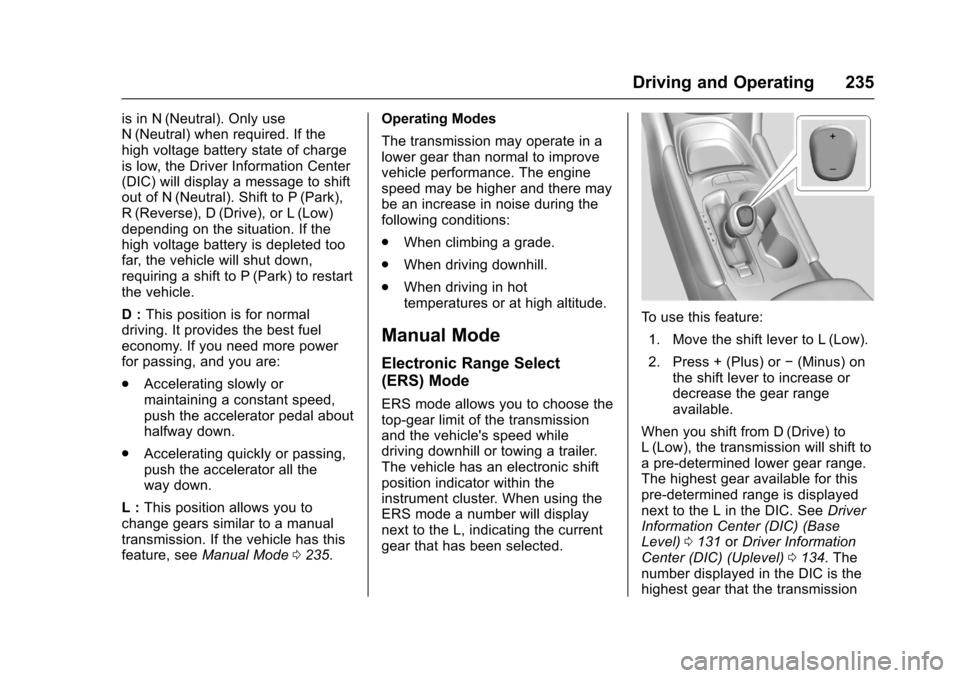
ERS mode allows you to choose thetop-gear limit of the transmissionand the vehicle's speed whiledriving downhill or towing a trailer.The vehicle has an electronic shiftposition indicator within theinstrument cluster. When using theERS mode a number will displaynext to the L, indicating the currentgear that has been selected.
To u s e t h i s f e a t u r e :
1. Move the shift lever to L (Low).
2. Press + (Plus) or✓(Minus) onthe shift lever to increase ordecrease the gear rangeavailable.
When you shift from D (Drive) toL(Low), the transmission will shift toapre-determinedlowergearrange.The highest gear available for thispre-determined range is displayednext to the L in the DIC. SeeDriverInformation Center (DIC) (BaseLevel)0131orDriver InformationCenter (DIC) (Uplevel)0134.Thenumber displayed in the DIC is thehighest gear that the transmission
Page 241 of 419
Chevrolet Malibu Owner Manual (GMNA-Localizing-U.S./Canada/Mexico-10122664) - 2017 - crc - 5/23/16
240 Driving and Operating
Hill Start Assist (HSA)
The Hill Start Assist (HSA) featurewill activate when the vehicle isstopped on a moderate to steepgrade to help prevent it from rollingin an unintended direction. After thebrake pedal has been released andbefore the accelerator pedal hasbeen pressed, HSA uses brakingpressure to hold the vehiclestationary. If HSA is holding thevehicle, a DIC message displays.HSA will not activate in a forwarddrive gear when facing downhill,or in R (Reverse) when facing uphill.
Extended Hill Start
Assist (EHSA)
Select the duration of the HSAfeature on the center stacktouchscreen by choosing thesubmenu for Hill Start Assist orExtended Hill Start Assist (EHSA).See“Extended Hill Start Assist"under“Comfort and Convenience”inVehicle Personalization0147.When Standard Hold is selected,the vehicle is held stationary for upto two seconds after the brake pedalis released. When Extended Hold is
selected, the vehicle is heldstationary for up to five minutesafter the brake pedal is released. Ineither case, override the holdfeature by pressing the acceleratorpedal and attempting to drive away.
If Hill Start Assist is selected in theSettings menu, it will hold thevehicle for two seconds unless thedriver door is opened or the driversafety belt is unbuckled afterreleasing the brake pedal.If Extended Hill Start Assist isselected, it will hold the vehicle forfive minutes unless the driver dooris opened and the driver safety beltis unbuckled prior to releasing thebrake pedal. When EHSA isdeactivated after five minutes, or if itis deactivated when the driversafety belt is unlatched or the driverdoor is opened, the Electric ParkingBrake will engage to prevent vehiclemovement.
When EHSA is active on a hill,apply enough brake pressure tokeep the vehicle stationary. If this isnot done, a pump noise may beheard.
Regenerative Braking
(Hybrid Only)
Regenerative braking takes some ofthe energy from the moving vehicleand turns it back into electricalenergy. This energy is then storedback into the high voltage batterysystem, contributing to increasedenergy efficiency.
The hydraulic disc brakes work withthe regenerative braking to ensureeffective braking, such as when ahigh braking demand is requested.
The braking system is computercontrolled and blends theregenerative braking with theconventional hydraulic disc brakesto meet any requirements fordeceleration. The controllerinterprets the braking request anduses regenerative braking,conventional hydraulic braking, or acombination of both as necessary.Because the hydraulic brakingsystem uses an electronic boosterfor boost assist on demand, undercertain conditions a motor noisemay be heard. This is normaloperation.