ECO mode CHEVROLET MALIBU 2017 9.G Owners Manual
[x] Cancel search | Manufacturer: CHEVROLET, Model Year: 2017, Model line: MALIBU, Model: CHEVROLET MALIBU 2017 9.GPages: 419, PDF Size: 7.81 MB
Page 18 of 419
Chevrolet Malibu Owner Manual (GMNA-Localizing-U.S./Canada/Mexico-10122664) - 2017 - crc - 6/1/16
In Brief 17
Climate Controls
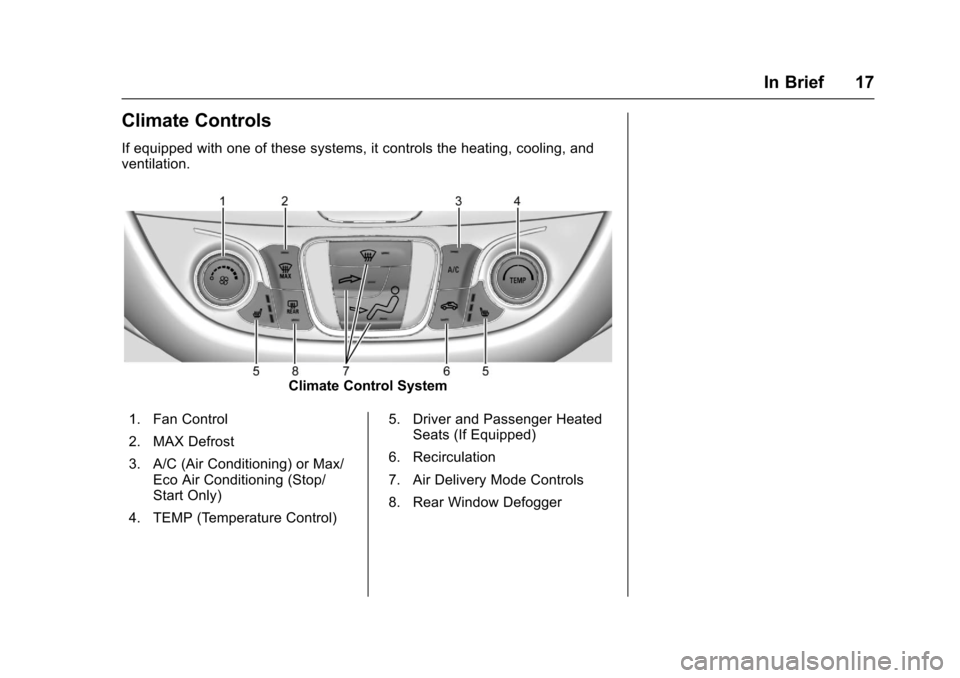
If equipped with one of these systems, it controls the heating, cooling, andventilation.
Climate Control System
1. Fan Control
2. MAX Defrost
3. A/C (Air Conditioning) or Max/Eco Air Conditioning (Stop/Start Only)
4. TEMP (Temperature Control)
5. Driver and Passenger HeatedSeats (If Equipped)
6. Recirculation
7. Air Delivery Mode Controls
8. Rear Window Defogger
Page 19 of 419
Chevrolet Malibu Owner Manual (GMNA-Localizing-U.S./Canada/Mexico-10122664) - 2017 - crc - 6/1/16
18 In Brief
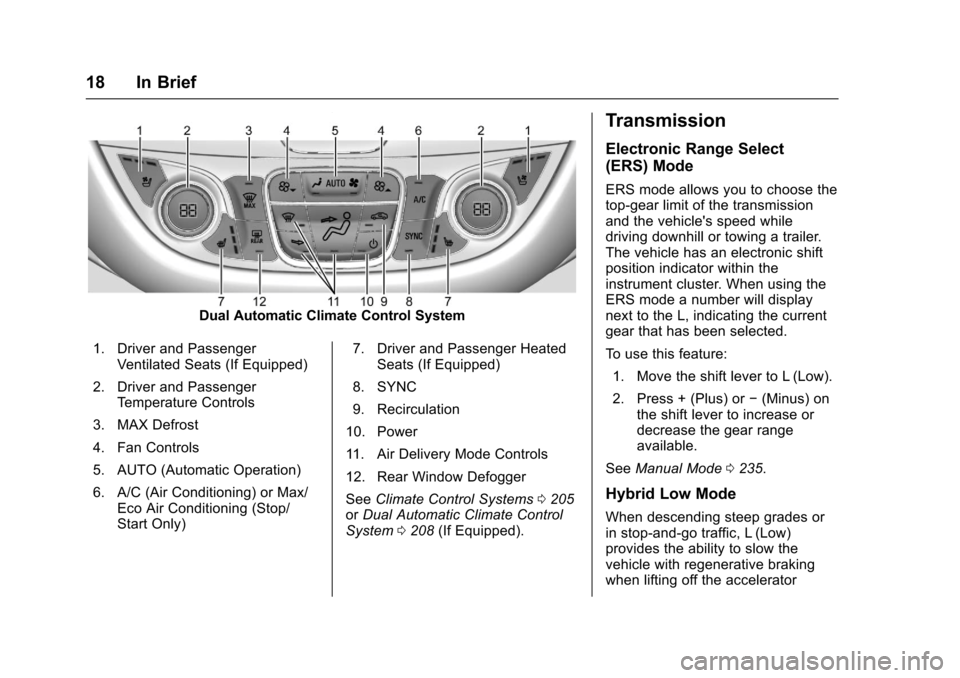
Dual Automatic Climate Control System
1. Driver and PassengerVentilated Seats (If Equipped)
2. Driver and PassengerTe m p e r a t u r e C o n t r o l s
3. MAX Defrost
4. Fan Controls
5. AUTO (Automatic Operation)
6. A/C (Air Conditioning) or Max/Eco Air Conditioning (Stop/Start Only)
7. Driver and Passenger HeatedSeats (If Equipped)
8. SYNC
9. Recirculation
10. Power
11 . A i r D e l i v e r y M o d e C o n t r o l s
12. Rear Window Defogger
SeeClimate Control Systems0205orDual Automatic Climate ControlSystem0208(If Equipped).
Transmission
Electronic Range Select
(ERS) Mode
ERS mode allows you to choose thetop-gear limit of the transmissionand the vehicle's speed whiledriving downhill or towing a trailer.The vehicle has an electronic shiftposition indicator within theinstrument cluster. When using theERS mode a number will displaynext to the L, indicating the currentgear that has been selected.
To u s e t h i s f e a t u r e :
1. Move the shift lever to L (Low).
2. Press + (Plus) or✓(Minus) onthe shift lever to increase ordecrease the gear rangeavailable.
SeeManual Mode0235.
Hybrid Low Mode
When descending steep grades orin stop-and-go traffic, L (Low)provides the ability to slow thevehicle with regenerative brakingwhen lifting off the accelerator
Page 20 of 419
Chevrolet Malibu Owner Manual (GMNA-Localizing-U.S./Canada/Mexico-10122664) - 2017 - crc - 6/1/16
In Brief 19
pedal. L2 (Low 2) provides moderatebraking and L1 (Low 1) providesmaximum braking below 80 km/h(50 mph). When the battery reachesfull charge the engine may run tomaintain braking.
To u s e t h i s f e a t u r e :
1. Move the shift lever to L (Low).The transmission will enterL2 (Low 2).
2. Press + (Plus) or✓(Minus) onthe shift lever to shift betweenL2 (Low 2) and L1 (Low 1).
SeeManual Mode0235.
Vehicle Features
Infotainment System
Base radio information is included inthis manual. See the infotainmentmanual for information on otheravailable infotainment systems.
Read the following pages tobecome familiar with these features.
{Warning
Ta k i n g y o u r e y e s o f f t h e r o a d f o r
too long or too often while using
any infotainment feature can
cause a crash. You or others
could be injured or killed. Do not
give extended attention to
infotainment tasks while driving.
Limit your glances at the vehicle
displays and focus your attention
on driving. Use voice commands
whenever possible.
The infotainment system has built-infeatures intended to help avoiddistraction by disabling somefunctions when driving. These
functions may gray out when theyare unavailable. Many infotainmentfeatures are also available throughthe instrument cluster and steeringwheel controls.
Before driving:
.Become familiar with theoperation, faceplate buttons, andscreen buttons.
.Set up the audio by presettingfavorite stations, setting thetone, and adjusting thespeakers.
.Set up phone numbers inadvance so they can be calledeasily by pressing a singlebutton or by using a single voicecommand if equipped withBluetooth phone capability.
SeeDefensive Driving0216.
To p l a y t h e i n f o t a i n m e n t s y s t e m w i t hthe ignition off, seeRetainedAccessory Power (RAP)0230.
Page 26 of 419

Chevrolet Malibu Owner Manual (GMNA-Localizing-U.S./Canada/Mexico-10122664) - 2017 - crc - 6/1/16
In Brief 25
SeePower Outlets0108.
Universal Remote System
If equipped, this system provides away to replace up to three remotecontrol transmitters used to activatedevices such as garage dooropeners, security systems, andhome automation devices.
Read the instructions completelybefore attempting to program theUniversal Remote system. Becauseof the steps involved, it may behelpful to have another personavailable to assist with programmingthe Universal Remote system.
SeeUniversal RemoteSystem0159.
Sunroof
If equipped, the ignition must be onor in ACC/ACCESSORY, or inRetained Accessory Power (RAP) tooperate the sunroof. SeeIgnitionPositions0225andRetainedAccessory Power (RAP)0230.
1. Sunroof Switch
2. Sunshade Switch
Sunroof Express Operation
Press and release~(1) to vent.
Press and release again toexpress-open. Press the switch atany time to stop movement.
Pressg(1) to express-close.
Sunroof Manual Operation
The sunroof can change to manual
mode by holding~(1) while
opening. The sunroof will now openas long as the switch is held. Pressand release again to change back toexpress operation.
Power Sunshade
PressC(2) to express-open the
power sunshade. PressQ(2) to
express-close the power sunshade.Press again at any time to stopmovement.
The sunroof cannot be opened orclosed if the vehicle has anelectrical failure.
SeeSunroof052.
Page 27 of 419
Chevrolet Malibu Owner Manual (GMNA-Localizing-U.S./Canada/Mexico-10122664) - 2017 - crc - 6/1/16
26 In Brief
Hybrid Features
Hybrid Vehicle Operation
The hybrid vehicle combinesgasoline and electric propulsion todrive the vehicle. The gas enginewill automatically start to providepower. It will shut off to save fuel.The engine may remainrunning when:
.There is aggressive accelerationor climbing hills.
.Vehicle speed is greater than88 km/h (55 mph).
.The high voltage battery ischarging.
.The heater is being used.
The engine and transmission worktogether to provide the requiredpower at the highest efficiency. Thismay result in higher engine speeds.SeeDriving for Better FuelEconomy029.
High Voltage Safety
Information
{Warning
Exposure to high voltage can
cause shock, burns, and even
death. The high voltage
components in the vehicle can
only be serviced by technicians
with special training.
High voltage components are
identified by labels. Do not
remove, open, take apart,
or modify these components.
High voltage cable or wiring has
orange covering or labels. Do not
probe, tamper with, cut, or modify
high voltage cable or wiring.
This vehicle has a high voltagebattery and a standard 12-voltbattery.
If the vehicle is in a crash, thesensing system may shut down thehigh voltage system. When thisoccurs, the high voltage battery isdisconnected and the vehicle will
not start. The SERVICE VEHICLESOON message in the DriverInformation Center (DIC) will bedisplayed. Before the vehicle can beoperated again, it must be servicedat your dealer.
{Warning
Damage to the high voltage
battery or high voltage system
can create a risk of electric shock,
overheating, or fire.
If the vehicle is damaged from a
moderate to severe crash, flood,
fire, or other event, the vehicle
should be inspected as soon as
possible. Until the vehicle has
been inspected, store it outside at
least 15 m (50 ft) from any
structure or anything that can
burn. Ventilate the vehicle by
opening a window or a door.
Contact Customer Assistance as
soon as possible to determine
whether an inspection is needed.
SeeCustomer Assistance
Offices0385.
Page 37 of 419
Chevrolet Malibu Owner Manual (GMNA-Localizing-U.S./Canada/Mexico-10122664) - 2017 - crc - 5/23/16
36 Keys, Doors, and Windows
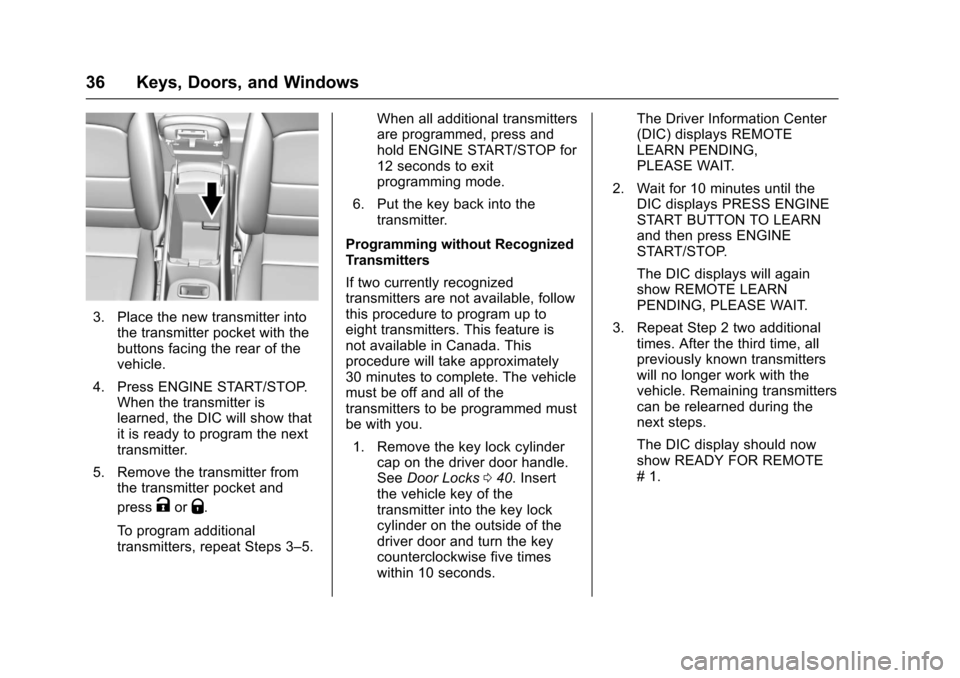
3. Place the new transmitter intothe transmitter pocket with thebuttons facing the rear of thevehicle.
4. Press ENGINE START/STOP.When the transmitter islearned, the DIC will show thatit is ready to program the nexttransmitter.
5. Remove the transmitter fromthe transmitter pocket and
pressKorQ.
To p r o g r a m a d d i t i o n a ltransmitters, repeat Steps 3–5.
When all additional transmittersare programmed, press andhold ENGINE START/STOP for12 seconds to exitprogramming mode.
6. Put the key back into thetransmitter.
Programming without RecognizedTransmitters
If two currently recognizedtransmitters are not available, followthis procedure to program up toeight transmitters. This feature isnot available in Canada. Thisprocedure will take approximately30 minutes to complete. The vehiclemust be off and all of thetransmitters to be programmed mustbe with you.
1. Remove the key lock cylindercap on the driver door handle.SeeDoor Locks040.Insertthe vehicle key of thetransmitter into the key lockcylinder on the outside of thedriver door and turn the keycounterclockwise five timeswithin 10 seconds.
The Driver Information Center(DIC) displays REMOTELEARN PENDING,PLEASE WAIT.
2. Wait for 10 minutes until theDIC displays PRESS ENGINESTART BUTTON TO LEARNand then press ENGINESTART/STOP.
The DIC displays will againshow REMOTE LEARNPENDING, PLEASE WAIT.
3. Repeat Step 2 two additionaltimes. After the third time, allpreviously known transmitterswill no longer work with thevehicle. Remaining transmitterscan be relearned during thenext steps.
The DIC display should nowshow READY FOR REMOTE#1.
Page 38 of 419
Chevrolet Malibu Owner Manual (GMNA-Localizing-U.S./Canada/Mexico-10122664) - 2017 - crc - 5/23/16
Keys, Doors, and Windows 37
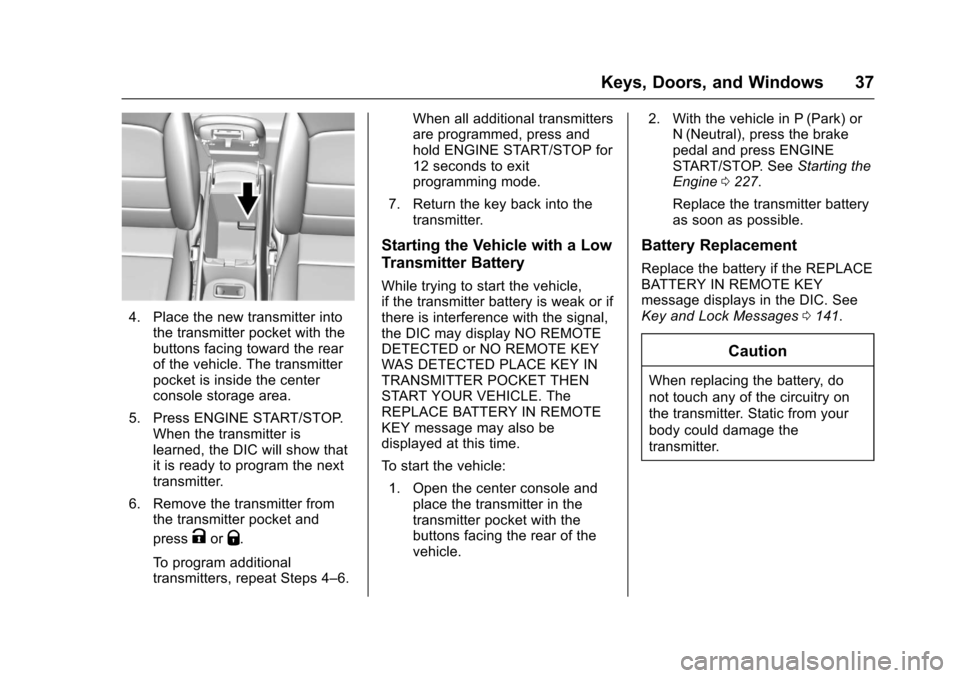
4. Place the new transmitter intothe transmitter pocket with thebuttons facing toward the rearof the vehicle. The transmitterpocket is inside the centerconsole storage area.
5. Press ENGINE START/STOP.When the transmitter islearned, the DIC will show thatit is ready to program the nexttransmitter.
6. Remove the transmitter fromthe transmitter pocket and
pressKorQ.
To p r o g r a m a d d i t i o n a ltransmitters, repeat Steps 4–6.
When all additional transmittersare programmed, press andhold ENGINE START/STOP for12 seconds to exitprogramming mode.
7. Return the key back into thetransmitter.
Starting the Vehicle with a Low
Transmitter Battery
While trying to start the vehicle,if the transmitter battery is weak or ifthere is interference with the signal,the DIC may display NO REMOTEDETECTED or NO REMOTE KEYWAS DETECTED PLACE KEY INTRANSMITTER POCKET THENSTART YOUR VEHICLE. TheREPLACE BATTERY IN REMOTEKEY message may also bedisplayed at this time.
To s t a r t t h e v e h i c l e :
1. Open the center console andplace the transmitter in thetransmitter pocket with thebuttons facing the rear of thevehicle.
2. With the vehicle in P (Park) orN(Neutral), press the brakepedal and press ENGINESTART/STOP. SeeStarting theEngine0227.
Replace the transmitter batteryas soon as possible.
Battery Replacement
Replace the battery if the REPLACEBATTERY IN REMOTE KEYmessage displays in the DIC. SeeKey and Lock Messages0141.
Caution
When replacing the battery, do
not touch any of the circuitry on
the transmitter. Static from your
body could damage the
transmitter.
Page 53 of 419

Chevrolet Malibu Owner Manual (GMNA-Localizing-U.S./Canada/Mexico-10122664) - 2017 - crc - 5/23/16
52 Keys, Doors, and Windows
Sun Visors
Pull the sun visor down to blockglare. Detach the sun visor from thecenter mount to pivot to the sidewindow, or to extend along the rod,if available.
The vehicle may have mirror lamps.The lamps turn on and off when thecover is opened and closed.
Roof
Sunroof
If equipped, the ignition must be onor in ACC/ACCESSORY, or inRetained Accessory Power (RAP) tooperate the sunroof. SeeIgnitionPositions0225andRetainedAccessory Power (RAP)0230.
1. Sunroof Switch
2. Sunshade Switch
Sunroof Express Operation
Press and release~(1) to vent.
Press and release again toexpress-open. Press the switch atany time to stop movement.
Pressg(1) to express-close.
Sunroof Manual Operation
The sunroof can change to manual
mode by holding~(1) while
opening. The sunroof will now openas long as the switch is held. Pressand release again to change back toexpress operation.
Power Sunshade
PressC(2) to express-open the
power sunshade. PressQ(2) to
express-close the power sunshade.Press again at any time to stopmovement.
The sunroof cannot be opened orclosed if the vehicle has anelectrical failure.
Page 76 of 419
Chevrolet Malibu Owner Manual (GMNA-Localizing-U.S./Canada/Mexico-10122664) - 2017 - crc - 5/23/16
Seats and Restraints 75
roof-rail airbags are designed toinflate during a rollover or in asevere frontal impact. Roof-railairbags are not designed to inflate inrear impacts. Both roof-rail airbagswill inflate when either side of thevehicle is struck or if the sensingsystem predicts that the vehicle isabout to roll over on its side, or in asevere frontal impact.
In any particular crash, no one cansay whether an airbag should haveinflated simply because of thevehicle damage or repair costs.
What Makes an Airbag
Inflate?
In a deployment event, the sensingsystem sends an electrical signaltriggering a release of gas from theinflator. Gas from the inflator fills theairbag causing the bag to break outof the cover. The inflator, the airbag,and related hardware are all part ofthe airbag module.
For airbag locations, seeWhere Arethe Airbags?072.
How Does an Airbag
Restrain?
In moderate to severe frontal ornear frontal collisions, even beltedoccupants can contact the steeringwheel or the instrument panel. Inmoderate to severe side collisions,even belted occupants can contactthe inside of the vehicle.
Airbags supplement the protectionprovided by safety belts bydistributing the force of the impactmore evenly over theoccupant's body.
Rollover capable roof-rail airbagsare designed to help contain thehead and chest of occupants in theoutboard seating positions in thefirst and second rows. The rollovercapable roof-rail airbags aredesigned to help reduce the risk offull or partial ejection in rolloverevents, although no system canprevent all such ejections.
But airbags would not help in manytypes of collisions, primarilybecause the occupant's motion isnot toward those airbags. SeeWhenShould an Airbag Inflate?074.
Airbags should never be regardedas anything more than a supplementto safety belts.
What Will You See after
an Airbag Inflates?
After the frontal, knee, andseat-mounted side impact airbagsinflate, they quickly deflate, soquickly that some people may noteven realize an airbag inflated.Roof-rail airbags may still be at leastpartially inflated for some time afterthey inflate. Some components ofthe airbag module may be hot forseveral minutes. For location of theairbags, seeWhere Are theAirbags?072.
The parts of the airbag that comeinto contact with you may be warm,but not too hot to touch. There maybe some smoke and dust comingfrom the vents in the deflatedairbags. Airbag inflation does not
Page 108 of 419
Chevrolet Malibu Owner Manual (GMNA-Localizing-U.S./Canada/Mexico-10122664) - 2017 - crc - 5/23/16
Instruments and Controls 107
aheadingagain.SeeCompassMessages0139for the messagesthat may be displayed for thecompass.
Clock
Radio without Touchscreen
The infotainment system controlsare used to access the time anddate settings through the menusystem. SeeOperation0176onhow to use the menu system.
Setting the Time and Date
1. Press MENU, then selectSettings.
2. Select Time and Date.
3. Select Set Time or Set Date.
4. Turn MENU to change thevalue.
5. Press MENU to select the nextvalue.
6. Turn MENU to change thevalue.
7. To exit without saving, pressBACK at any time; or to saveand return to the Time andDate menu, press MENUmultiple times.
Auto Set
When Auto Set is enabled, the timecannot be manually set.
From the Set Time or SetDate menu:
1. Press the preset button underAuto Set.
2. Turn MENU to select Off(Manual) or On-Cell Network,then press MENU to select itand return to the Time andDate menu.
3. To exit without saving, pressBACK at any time.
Setting the 12/24 Hour Format
From the Set Time menu:
1. Press the preset button under12-24 HR to change between12 hour and 24 hour modes.
2. To return to the Time and Datemenu, press BACK at any time.
Radio with Touchscreen
The infotainment system controlsare used to access the time anddate settings through the menusystem. SeeOperation0176onhow to use the menu system.
Setting the Time and Date
When Auto Set is enabled the timecannot be manually set.
1. Press{,thentouchSettings.
2. Touch Time and Date, then SetTime or Set Date.
3. Touch + or✓to adjust thevalue.
4. TouchRorQto adjust AM or
PM for 12 hour format.
5. Touch0to return to the
Time and Date menu.
Auto Set
1. Press{,thentouchSettings.
2. Touch Time and Date, thenAuto Set.
3. Select from the availableselections.