Onstar CHEVROLET MALIBU 2017 9.G Owners Manual
[x] Cancel search | Manufacturer: CHEVROLET, Model Year: 2017, Model line: MALIBU, Model: CHEVROLET MALIBU 2017 9.GPages: 419, PDF Size: 7.81 MB
Page 2 of 419

Chevrolet Malibu Owner Manual (GMNA-Localizing-U.S./Canada/Mexico-10122664) - 2017 - crc - 5/23/16
ContentsIntroduction . . . . . . . . . . . . . . . . . . . . . . 2
In Brief . . . . . . . . . . . . . . . . . . . . . . . . . . . 5
Keys, Doors, and Windows . . . . . 31
Seats and Restraints . . . . . . . . . . . 54
Storage . . . . . . . . . . . . . . . . . . . . . . . 101
Instruments and Controls . . . . . . 103
Lighting . . . . . . . . . . . . . . . . . . . . . . . 163
Infotainment System . . . . . . . . . . 171
Climate Controls . . . . . . . . . . . . . . 205
Driving and Operating . . . . . . . . . 214
Vehicle Care . . . . . . . . . . . . . . . . . . 278
Service and Maintenance . . . . . 368
Te c h n i c a l D a t a . . . . . . . . . . . . . . . . 3 8 0
Customer Information . . . . . . . . . 383
Reporting Safety Defects . . . . . . 393
OnStar . . . . . . . . . . . . . . . . . . . . . . . . 397
Index . . . . . . . . . . . . . . . . . . . . 407
Page 4 of 419
Chevrolet Malibu Owner Manual (GMNA-Localizing-U.S./Canada/Mexico-10122664) - 2017 - crc - 5/23/16
Introduction 3
{Danger
Danger indicates a hazard with a
high level of risk which will result
in serious injury or death.
{Warning
Warning indicates a hazard that
could result in injury or death.
Caution
Caution indicates a hazard that
could result in property or vehicle
damage.
Acirclewithaslashthroughitisasafety symbol which means“DoNot,”“Do not do this,”or“Do not letthis happen.”
Symbols
The vehicle has components andlabels that use symbols instead oftext. Symbols are shown along withthe text describing the operation orinformation relating to a specificcomponent, control, message,gauge, or indicator.
M:Shown when the ownermanual has additional instructionsor information.
*:Shown when the servicemanual has additional instructionsor information.
0:Shown when there is moreinformation on another page—“see page.”
Vehicle Symbol Chart
Here are some additional symbolsthat may be found on the vehicleand what they mean. For moreinformation on the symbol, refer tothe Index.
9:Airbag Readiness Light
#:Air Conditioning
!:Antilock Brake System (ABS)
%:Audio Steering Wheel Controlsor OnStar®(if equipped)
$:Brake System Warning Light
":Charging System
I:Cruise Control
`:Do Not Puncture
^:Do Not Service
B:Engine Coolant Temperature
O:Exterior Lamps
g:First Responder
_:Flame/Fire Prohibited
#:Fog Lamps
.:Fuel Gauge
+:Fuses
3:Headlamp High/Low-BeamChanger
j:LATCH System Child Restraints
*:Malfunction Indicator Lamp
::Oil Pressure
Page 5 of 419
Chevrolet Malibu Owner Manual (GMNA-Localizing-U.S./Canada/Mexico-10122664) - 2017 - crc - 5/23/16
4 Introduction
Q:OnStar
O:Power
9:Ready
/:Remote Vehicle Start
>:Safety Belt Reminders
7:Tire Pressure Monitor
d:Traction Control/StabiliTrak®
a:Under Pressure
M:Windshield Washer Fluid
Page 22 of 419
Chevrolet Malibu Owner Manual (GMNA-Localizing-U.S./Canada/Mexico-10122664) - 2017 - crc - 6/1/16
In Brief 21
The Bluetooth-enabled mobilephone must be paired with thein-vehicle Bluetooth system before itcan be used in the vehicle. Not allphones will support all functions.
SeeBluetooth (Overview)0190orBluetooth (Infotainment ControlsRadio with Touchscreen)0195orBluetooth (Infotainment ControlsRadio without Touchscreen)0191.
Steering Wheel Controls
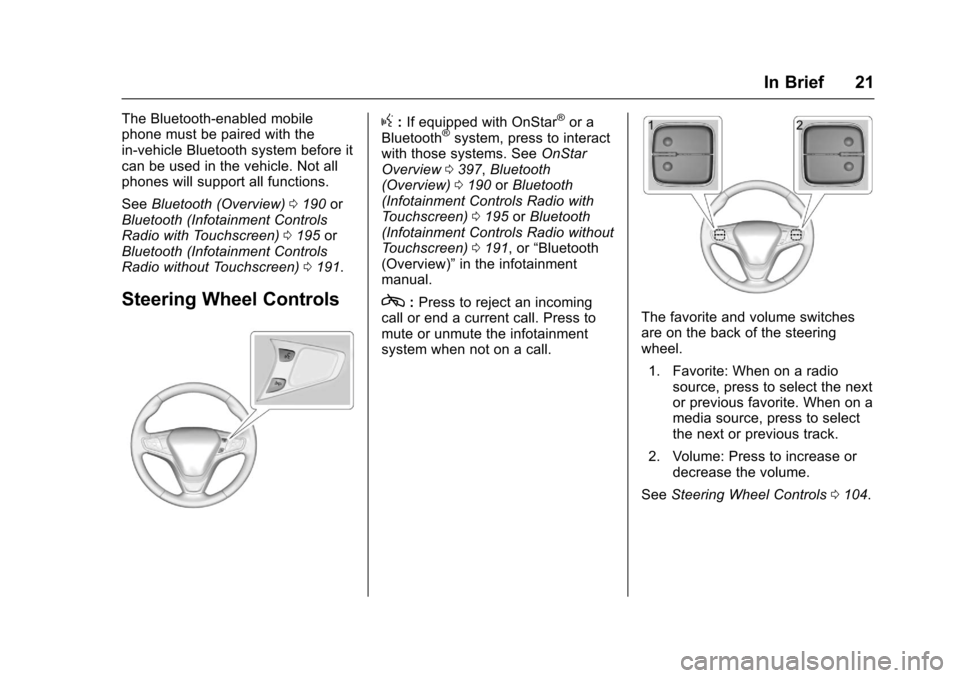
g:If equipped with OnStar®or aBluetooth®system, press to interactwith those systems. SeeOnStarOverview0397,Bluetooth(Overview)0190orBluetooth(Infotainment Controls Radio withTo u c h s c r e e n )0195orBluetooth(Infotainment Controls Radio withoutTo u c h s c r e e n )0191,or“Bluetooth(Overview)”in the infotainmentmanual.
c:Press to reject an incomingcall or end a current call. Press tomute or unmute the infotainmentsystem when not on a call.
The favorite and volume switchesare on the back of the steeringwheel.
1. Favorite: When on a radiosource, press to select the nextor previous favorite. When on amedia source, press to selectthe next or previous track.
2. Volume: Press to increase ordecrease the volume.
SeeSteering Wheel Controls0104.
Page 33 of 419
Chevrolet Malibu Owner Manual (GMNA-Localizing-U.S./Canada/Mexico-10122664) - 2017 - crc - 5/23/16
32 Keys, Doors, and Windows
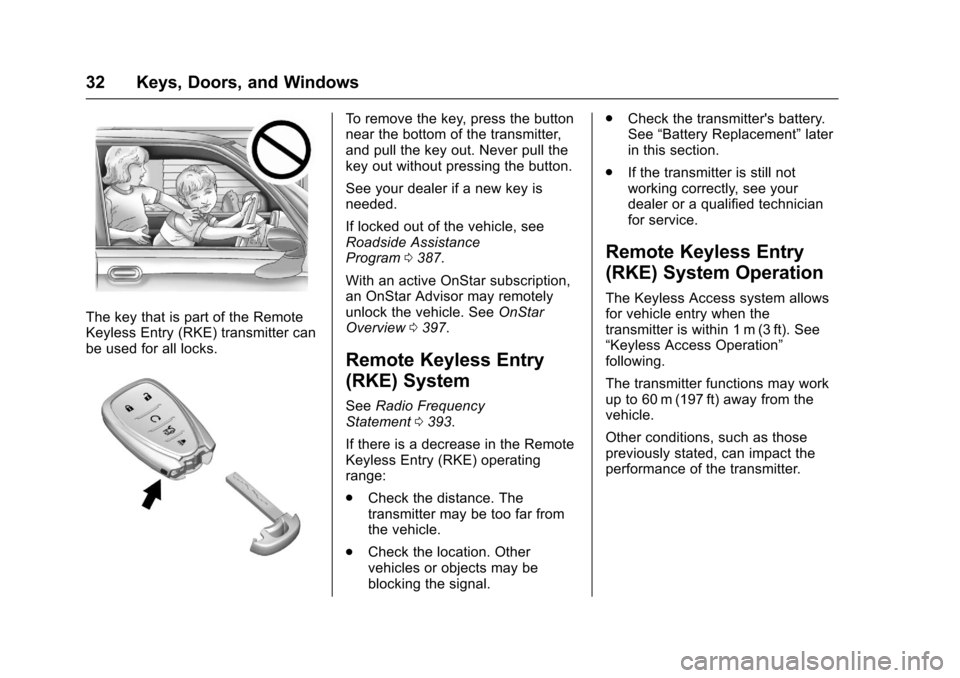
The key that is part of the RemoteKeyless Entry (RKE) transmitter canbe used for all locks.
To r e m o v e t h e k e y, p r e s s t h e b u t t o nnear the bottom of the transmitter,and pull the key out. Never pull thekey out without pressing the button.
See your dealer if a new key isneeded.
If locked out of the vehicle, seeRoadside AssistanceProgram0387.
With an active OnStar subscription,an OnStar Advisor may remotelyunlock the vehicle. SeeOnStarOverview0397.
Remote Keyless Entry
(RKE) System
SeeRadio FrequencyStatement0393.
If there is a decrease in the RemoteKeyless Entry (RKE) operatingrange:
.Check the distance. Thetransmitter may be too far fromthe vehicle.
.Check the location. Othervehicles or objects may beblocking the signal.
.Check the transmitter's battery.See“Battery Replacement”laterin this section.
.If the transmitter is still notworking correctly, see yourdealer or a qualified technicianfor service.
Remote Keyless Entry
(RKE) System Operation
The Keyless Access system allowsfor vehicle entry when thetransmitter is within 1 m (3 ft). See“Keyless Access Operation”following.
The transmitter functions may workup to 60 m (197 ft) away from thevehicle.
Other conditions, such as thosepreviously stated, can impact theperformance of the transmitter.
Page 105 of 419
Chevrolet Malibu Owner Manual (GMNA-Localizing-U.S./Canada/Mexico-10122664) - 2017 - crc - 5/23/16
104 Instruments and Controls
Lamp Messages . . . . . . . . . . . . . . 142Object Detection SystemMessages . . . . . . . . . . . . . . . . . . . 142Propulsion PowerMessages . . . . . . . . . . . . . . . . . . . 144Ride Control SystemMessages . . . . . . . . . . . . . . . . . . . 145Airbag System Messages . . . . 145Security Messages . . . . . . . . . . . 145Service Vehicle Messages . . . . 145Steering SystemMessages . . . . . . . . . . . . . . . . . . . 145Starting the VehicleMessages . . . . . . . . . . . . . . . . . . . 146Tire Messages . . . . . . . . . . . . . . . . 146Transmission Messages . . . . . . 146Vehicle ReminderMessages . . . . . . . . . . . . . . . . . . . 147Window Messages . . . . . . . . . . . 147
Vehicle Personalization
Vehicle Personalization . . . . . . . 147
Universal Remote System
Universal Remote System . . . . 159Universal Remote SystemProgramming . . . . . . . . . . . . . . . 159Universal Remote SystemOperation . . . . . . . . . . . . . . . . . . . 162
Controls
Steering Wheel
Adjustment
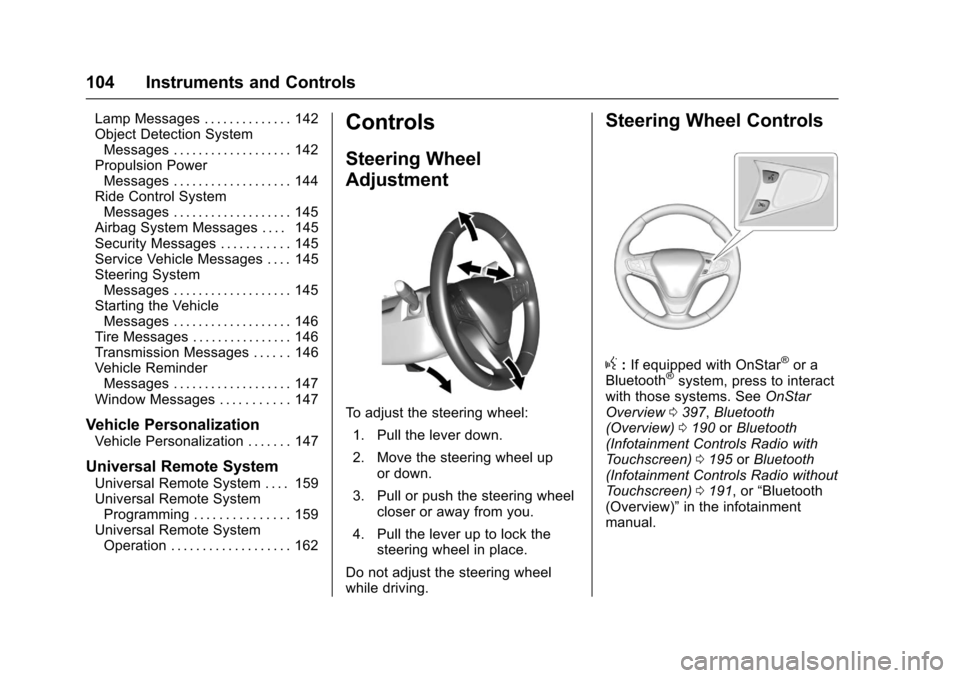
To a d j u s t t h e s t e e r i n g w h e e l :
1. Pull the lever down.
2. Move the steering wheel upor down.
3. Pull or push the steering wheelcloser or away from you.
4. Pull the lever up to lock thesteering wheel in place.
Do not adjust the steering wheelwhile driving.
Steering Wheel Controls
g:If equipped with OnStar®or aBluetooth®system, press to interactwith those systems. SeeOnStarOverview0397,Bluetooth(Overview)0190orBluetooth(Infotainment Controls Radio withTo u c h s c r e e n )0195orBluetooth(Infotainment Controls Radio withoutTo u c h s c r e e n )0191,or“Bluetooth(Overview)”in the infotainmentmanual.
Page 133 of 419
Chevrolet Malibu Owner Manual (GMNA-Localizing-U.S./Canada/Mexico-10122664) - 2017 - crc - 5/23/16
132 Instruments and Controls
V:Press to open a menu or selectamenuitem.Pressandholdtoreset values on certain screens.
Trip/Fuel Menu (TRIP) Items
Usewxto scroll through the
menu items. Not all items areavailable on every vehicle. Thefollowing is a list of all possiblemenu items:
Digital Speed :Displays how fastthe vehicle is moving in eitherkilometers per hour (km/h) or milesper hour (mph). The speedometercannot be reset.
Tr i p 1 o r Tr i p 2 , Av e r a g e F u e lEconomy :Displays the currentdistance traveled, in eitherkilometers (km) or miles (mi), fromthe last reset for the trip odometer.The trip odometer can be reset to
zero by pressing and holdingV
while the trip odometer display isshowing.
Also displays the approximateaverage liters per 100 kilometers(L/100 km) or miles per gallon(mpg). This number is based on the
number of L/100 km (mpg) recordedsince the last time this menu itemwas reset. This number reflects onlythe approximate average fueleconomy that the vehicle has rightnow, and will change as drivingconditions change. Reset the
average consumption by pressingV
when it is displayed.
Fuel Range :Displays theapproximate distance the vehiclecan be driven without refueling. Thefuel range estimate is based on anaverage of the vehicle's fueleconomy over recent driving historyand the amount of fuel remaining inthe fuel tank. Fuel range cannot bereset.
Average Vehicle Speed :Displaysthe average vehicle speed of thevehicle in kilometers per hour (km/h)or miles per hour (mph). Thisaverage is based on the variousvehicle speeds recorded since thelast reset. Reset the average speed
by pressingVwhen it is displayed.
Timer :To s t a r t t h e t i m e r , p r e s sV
while Timer is displayed. Thedisplay will show the amount of timethat has passed since the timer waslast reset, not including time theignition is off. Time will continue tobe counted as long as the ignition ison, even if another display is beingshown on the DIC. The timer willrecord up to 99 hours, 59 minutes,and 59 seconds (99:59:59) afterwhich the display will return to zero.
To s t o p t h e t i m e r, p r e s sVbriefly
while Timer is displayed. To reset
the timer to zero, press and holdV.
Navigation :Used for the OnStarTurn-by-Turn guidance. SeeOnStarOverview0397.
Vehicle Information Menu
(VEHICLE) Items
Usewxto scroll through the
menu items. Not all items areavailable on every vehicle. Thefollowing is a list of all possiblemenu items:
Page 146 of 419
Chevrolet Malibu Owner Manual (GMNA-Localizing-U.S./Canada/Mexico-10122664) - 2017 - crc - 5/23/16
Instruments and Controls 145
stays on when the malfunctionindicator lamp is on, the vehicleshould be taken to your dealer forservice as soon as possible.
Ride Control System
Messages
SERVICE TRACTION
CONTROL
This message displays when thereis a problem with the TractionControl System (TCS). When thismessage is displayed, the systemwill not limit wheel spin. Adjust yourdriving accordingly. See your dealerfor service.
SERVICE STABILITRAK
This message displays if there is aproblem with the StabiliTrak system.If this message appears, try to resetthe system. Stop; turn off the enginefor at least 15 seconds; then startthe engine again. If this messagestill comes on, it means there is aproblem. See your dealer forservice. The vehicle is safe to drive;
however, you do not have thebenefit of StabiliTrak, so reduceyour speed and drive accordingly.
Airbag System Messages
SERVICE AIRBAG
This message displays if there is aproblem with the airbag system. Seeyour dealer for service.
Security Messages
THEFT ATTEMPTED
This message displays if the vehicledetects a tamper condition.
Service Vehicle Messages
SERVICE AC SYSTEM
This message displays if there is aproblem with the air conditioningsystem. Take the vehicle to yourdealer for service.
SERVICE KEYLESS START
SYSTEM
This message is displayed if there isaproblemwiththepushbuttonstartsystem. Take the vehicle to yourdealer for service.
SERVICE VEHICLE SOON
This message displays if there is aproblem with the vehicle. Take thevehicle to your dealer for service.
Steering System
Messages
SERVICE POWER STEERING
This message displays and a chimemay sound when there may be aproblem with the power steeringsystem. If this message displaysand a reduction in steeringperformance or loss of powersteering assistance is noticed, seeyour dealer.
Page 174 of 419
Chevrolet Malibu Owner Manual (GMNA-Localizing-U.S./Canada/Mexico-10122664) - 2017 - crc - 5/23/16
Infotainment System 173
Overview
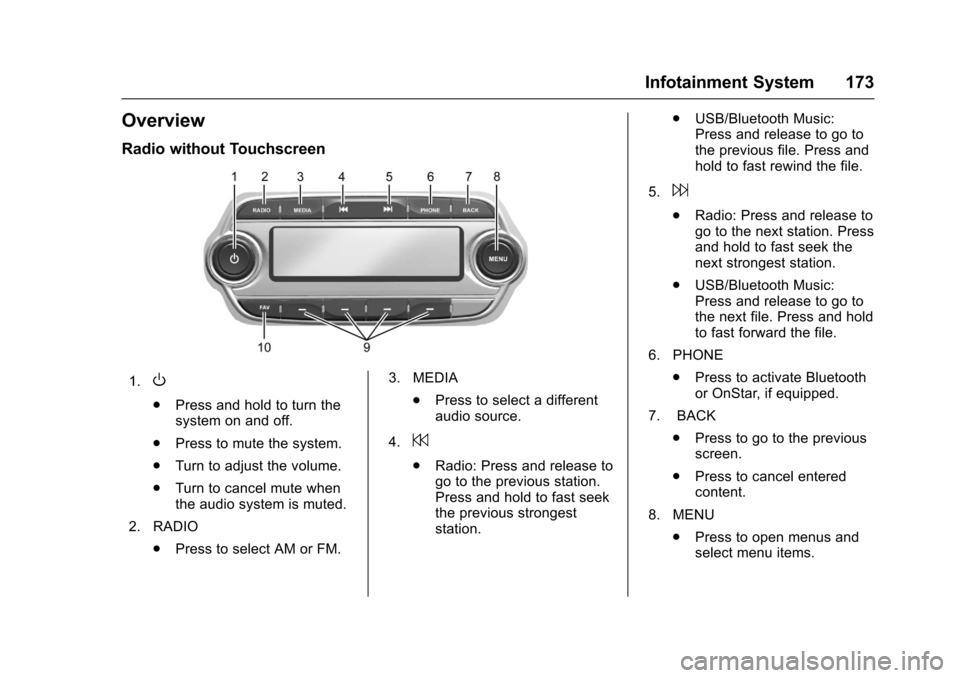
Radio without Touchscreen
1.O
.Press and hold to turn thesystem on and off.
.Press to mute the system.
.Turn to adjust the volume.
.Turn to cancel mute whenthe audio system is muted.
2. RADIO
.Press to select AM or FM.
3. MEDIA
.Press to select a differentaudio source.
4.7
.Radio: Press and release togo to the previous station.Press and hold to fast seekthe previous strongeststation.
.USB/Bluetooth Music:Press and release to go tothe previous file. Press andhold to fast rewind the file.
5.6
.Radio: Press and release togo to the next station. Pressand hold to fast seek thenext strongest station.
.USB/Bluetooth Music:Press and release to go tothe next file. Press and holdto fast forward the file.
6. PHONE
.Press to activate Bluetoothor OnStar, if equipped.
7. BACK
.Press to go to the previousscreen.
.Press to cancel enteredcontent.
8. MENU
.Press to open menus andselect menu items.
Page 177 of 419
Chevrolet Malibu Owner Manual (GMNA-Localizing-U.S./Canada/Mexico-10122664) - 2017 - crc - 5/23/16
176 Infotainment System
Settings :To u c h t o a c c e s s t h ePersonalization menu. SeeVehiclePersonalization0147.
Climate :If equipped, touch toaccess the Climate menu. SeeClimate Control Systems0205orDual Automatic Climate ControlSystem0208.
OnStar :If equipped, touch toaccess the OnStar menu. SeeOnStar Overview0397.
Energy :If equipped, touch toaccess the Energy menu.
Drive Mode :If equipped, touch toaccess the Drive Mode menu.
Operation
Radio Controls without
Touchscreen
The infotainment system is operatedby using the pushbuttons,multifunction knobs, and menusshown on the display.
Turning the System On or Off
O:Press and hold to turn thesystem on and off.
Automatic Switch-Off
If the infotainment system has beenturned on after the ignition is turnedoff, the system will turn offautomatically after 10 minutes.
Volume Control
O:Turn to adjust the volume or tocancel mute when the audio systemis muted.
PHONE :Press to activate OnStar.SeeOnStar Overview0397.
Press to mute the audio system.Press again to cancel mute.
Menu System
Controls
The MENU knob and BACK buttonare used to navigate the menusystem.
MENU Knob:
Turn to:
.Highlight a menu option.
.Select a value.
.Manually select radio stations.
Press to:
.Enter the menu system.
.Select or activate the highlightedmenu option.
.Confirm a set value.
.Turn a system setting on or off.
BACK:
Press to:
.Exit a menu.
.Go back to the previous menuscreen.
.Delete the last character in asequence.
.Press and hold to delete theentire character sequence.
Submenus
Abarontheright-handedgeofthemenu indicates that it has asubmenu with other options.
Tone Settings
The tone settings can be set foreach radio band and each audioplayer source.