horn CHEVROLET MALIBU 2017 9.G Owners Manual
[x] Cancel search | Manufacturer: CHEVROLET, Model Year: 2017, Model line: MALIBU, Model: CHEVROLET MALIBU 2017 9.GPages: 419, PDF Size: 7.81 MB
Page 8 of 419

Chevrolet Malibu Owner Manual (GMNA-Localizing-U.S./Canada/Mexico-10122664) - 2017 - crc - 6/1/16
In Brief 7
1.Air Vents0211.
2. Turn Signal Lever. SeeTu r nand Lane-ChangeSignals0167.
3.Instrument Cluster (BaseLevel)011 2orInstrumentCluster (Uplevel)011 4.
Driver Information Center (DIC)(Base Level)0131orDriverInformation Center (DIC)(Uplevel)0134.
4.Windshield Wiper/Washer0105.
5. Light Sensor. SeeAutomaticHeadlamp System0166.
6.Infotainment0171.
7.Climate ControlSystems0205.
Dual Automatic Climate ControlSystem0208(If Equipped).
8.Hazard WarningFlashers0166.
9.Power Outlets0108.
10.Tr a c t i o n C o n t r o l / E l e c t r o n i cStability Control0241.
Assistance Systems forParking or Backing0253(If Equipped).
11 . S h i f t L e v e r. S e eAutomaticTr a n s m i s s i o n0233.
12.Electric Parking Brake0238.
13.USB Port0184.
14. ENGINE START/STOP Button.SeeIgnition Positions0225.
15.Steering Wheel Controls0104.
Driver Information CenterButtons. SeeDriver InformationCenter (DIC) (Base Level)0131orDriver InformationCenter (DIC) (Uplevel)0134.
16.Horn0105.
17.Steering WheelAdjustment0104.
18.Cruise Control0243.
Adaptive Cruise Control0245(If Equipped).
Heated Steering Wheel0105(If Equipped).
Forward Collision Alert (FCA)System0258(If Equipped).
Lane Keep Assist (LKA)0266(If Equipped).
19. Hood Release. SeeHood0281.
20. Data Link Connector (Out ofView). SeeMalfunctionIndicator Lamp (Check EngineLight)0122.
21.Exterior Lamp Controls0163.
22.Instrument Panel IlluminationControl0167.
Page 34 of 419
Chevrolet Malibu Owner Manual (GMNA-Localizing-U.S./Canada/Mexico-10122664) - 2017 - crc - 5/23/16
Keys, Doors, and Windows 33
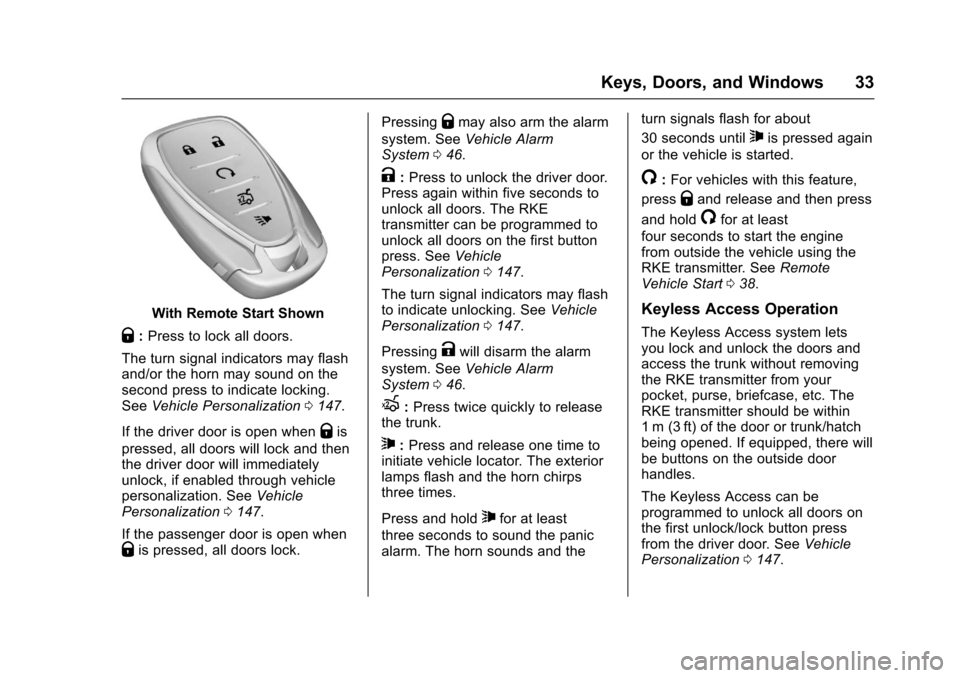
With Remote Start Shown
Q:Press to lock all doors.
The turn signal indicators may flashand/or the horn may sound on thesecond press to indicate locking.SeeVehicle Personalization0147.
If the driver door is open whenQis
pressed, all doors will lock and thenthe driver door will immediatelyunlock, if enabled through vehiclepersonalization. SeeVehiclePersonalization0147.
If the passenger door is open whenQis pressed, all doors lock.
PressingQmay also arm the alarm
system. SeeVehicle AlarmSystem046.
K:Press to unlock the driver door.Press again within five seconds tounlock all doors. The RKEtransmitter can be programmed tounlock all doors on the first buttonpress. SeeVehiclePersonalization0147.
The turn signal indicators may flashto indicate unlocking. SeeVehiclePersonalization0147.
PressingKwill disarm the alarm
system. SeeVehicle AlarmSystem046.
X:Press twice quickly to releasethe trunk.
7:Press and release one time toinitiate vehicle locator. The exteriorlamps flash and the horn chirpsthree times.
Press and hold7for at least
three seconds to sound the panicalarm. The horn sounds and the
turn signals flash for about
30 seconds until7is pressed again
or the vehicle is started.
/:For vehicles with this feature,
pressQand release and then press
and hold/for at least
four seconds to start the enginefrom outside the vehicle using theRKE transmitter. SeeRemoteVehicle Start038.
Keyless Access Operation
The Keyless Access system letsyou lock and unlock the doors andaccess the trunk without removingthe RKE transmitter from yourpocket, purse, briefcase, etc. TheRKE transmitter should be within1m (3ft) of the door or trunk/hatchbeing opened. If equipped, there willbe buttons on the outside doorhandles.
The Keyless Access can beprogrammed to unlock all doors onthe first unlock/lock button pressfrom the driver door. SeeVehiclePersonalization0147.
Page 36 of 419
Chevrolet Malibu Owner Manual (GMNA-Localizing-U.S./Canada/Mexico-10122664) - 2017 - crc - 5/23/16
Keys, Doors, and Windows 35
untilQon the interior door is
pressed, or until the vehicle isturned on.
Remote Left In Vehicle Alert
When the vehicle is turned off and aremote is left in the vehicle, the hornwill chirp three times after all doorsare closed. To turn on or off seeVehicle Personalization0147.
Remote No Longer In Vehicle Alert
If the vehicle is on, with a dooropen, and then all doors are closed,the vehicle will check for an RKEtransmitter(s) inside. If an RKEtransmitter is not detected, the DICwill display NO REMOTEDETECTED and the horn will chirpthree times.
This occurs only once each time thevehicle is driven. SeeVehiclePersonalization0147
Keyless Trunk Opening
Press the touch pad on the rear ofthe trunk to open it if the RKEtransmitter is within 1 m (3 ft) of thetrunk.
Keyed Access
To a c c e s s a v e h i c l e w i t h a d e a dtransmitter battery, seeDoorLocks040.
Programming Transmitters to
the Vehicle
Only RKE transmitters programmedto the vehicle will work. If atransmitter is lost or stolen, areplacement can be purchased andprogrammed through your dealer.The vehicle can be reprogrammedso that lost or stolen transmitters nolonger work. Any remainingtransmitters will need to bereprogrammed. Each vehicle canhave up to eight transmittersmatched to it.
Programming with RecognizedTransmitters
Anewtransmittercanbeprogrammed to the vehicle whenthere are two recognizedtransmitters. To program, the vehiclemust be off and all of thetransmitters, both currentlyrecognized and new, must bewith you.
1. Place the two recognizedtransmitter(s) in the transmitterpocket with the buttons facingthe rear of the vehicle. Thetransmitter pocket is inside thecenter console storage area.
2. Remove the key lock cylindercap on the driver door handle.SeeDoor Locks040.Insertthe vehicle key of the newtransmitter into the key lockcylinder on the outside of thedriver door and turn the keycounterclockwise five timeswithin 10 seconds.
The Driver Information Center(DIC) displays READY FORREMOTE #2, 3, 4 or 5.
Page 44 of 419
Chevrolet Malibu Owner Manual (GMNA-Localizing-U.S./Canada/Mexico-10122664) - 2017 - crc - 5/23/16
Keys, Doors, and Windows 43
Automatic Door Locks
The doors will lock automaticallywhen all doors are closed, theignition is on, and the vehicle isshifted out of P (Park).
To u n l o c k t h e d o o r s :
.PressKon the power door lock
switch.
.Shift the transmission intoP(Park).
Automatic door locking cannot bedisabled. Automatic door unlockingcan be programmed. SeeVehiclePersonalization0147.
Lockout Protection
If the vehicle is in ACC/ACCESSORY or ON/RUN/STARTand the power door lock switch ispressed with the driver door open,all the doors will lock and only thedriver door will unlock.
If the vehicle is off and locking isrequested while a door is open,when all doors are closed thevehicle will check for RKEtransmitters inside. If an RKE
transmitter is detected and thenumber of RKE transmitters insidehas not reduced, the driver door willunlock and the horn will chirp threetimes.
Lockout Protection can be manuallyoverridden with the driver door open
by pressing and holdingQon the
power door lock switch.
Unlocked Door Anti-Lockout
If Unlocked Door Anti-Lockout isturned on and the vehicle is off, thedriver door is open, and locking isrequested, all the doors will lock andonly the driver door will unlock. TheUnlocked Door Anti-Lockout featurecan be turned on or off using thevehicle personalization menus. SeeVehicle Personalization0147.
Safety Locks
The rear door safety locks preventpassengers from opening the reardoors from inside the vehicle.
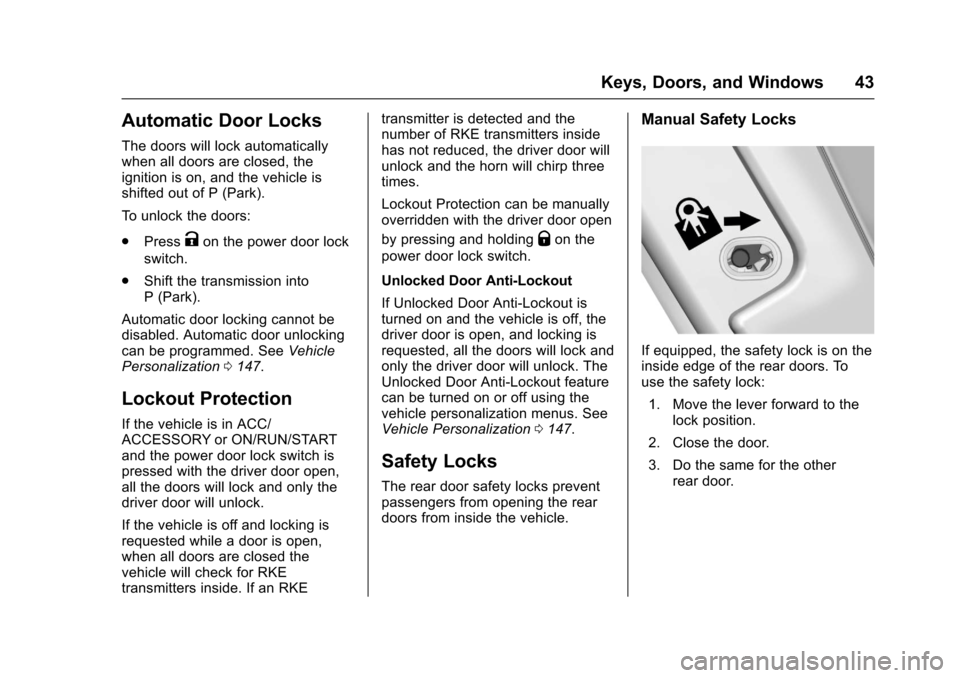
Manual Safety Locks
If equipped, the safety lock is on theinside edge of the rear doors. Touse the safety lock:
1. Move the lever forward to thelock position.
2. Close the door.
3. Do the same for the otherrear door.
Page 47 of 419
Chevrolet Malibu Owner Manual (GMNA-Localizing-U.S./Canada/Mexico-10122664) - 2017 - crc - 5/23/16
46 Keys, Doors, and Windows
Vehicle Security
This vehicle has theft-deterrentfeatures; however, they do not makethe vehicle impossible to steal.
Vehicle Alarm System
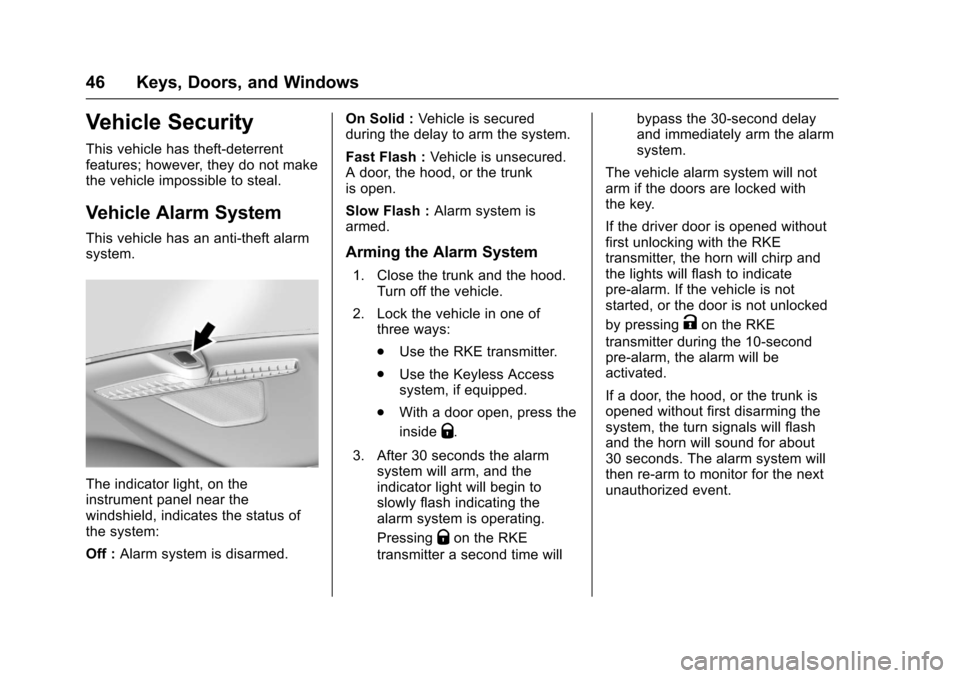
This vehicle has an anti-theft alarmsystem.
The indicator light, on theinstrument panel near thewindshield, indicates the status ofthe system:
Off :Alarm system is disarmed.
On Solid :Ve h i c l e i s s e c u r e dduring the delay to arm the system.
Fast Flash :Vehicle is unsecured.Adoor,thehood,orthetrunkis open.
Slow Flash :Alarm system isarmed.
Arming the Alarm System
1. Close the trunk and the hood.Turn off the vehicle.
2. Lock the vehicle in one ofthree ways:
.Use the RKE transmitter.
.Use the Keyless Accesssystem, if equipped.
.With a door open, press the
insideQ.
3. After 30 seconds the alarmsystem will arm, and theindicator light will begin toslowly flash indicating thealarm system is operating.
PressingQon the RKE
transmitter a second time will
bypass the 30-second delayand immediately arm the alarmsystem.
The vehicle alarm system will notarm if the doors are locked withthe key.
If the driver door is opened withoutfirst unlocking with the RKEtransmitter, the horn will chirp andthe lights will flash to indicatepre-alarm. If the vehicle is notstarted, or the door is not unlocked
by pressingKon the RKE
transmitter during the 10-secondpre-alarm, the alarm will beactivated.
If a door, the hood, or the trunk isopened without first disarming thesystem, the turn signals will flashand the horn will sound for about30 seconds. The alarm system willthen re-arm to monitor for the nextunauthorized event.
Page 48 of 419
Chevrolet Malibu Owner Manual (GMNA-Localizing-U.S./Canada/Mexico-10122664) - 2017 - crc - 5/23/16
Keys, Doors, and Windows 47
Disarming the Alarm System
Do one of the following to disarmthe alarm system or turn off thealarm if it has been activated:
.PressKon the RKE transmitter.
.Unlock the vehicle using theKeyless Access system,if equipped.
.Start the vehicle.
To a v o i d s e t t i n g o f f t h e a l a r m b yaccident:
.Lock the vehicle after alloccupants have left the vehicleand all doors are closed.
.Always unlock a door with theRKE transmitter or use theKeyless Access system,if equipped.
Unlocking the driver door with thekey will not disarm the system orturn off the alarm.
How to Detect a Tamper
Condition
IfKis pressed on the RKE
transmitter and the horn chirps andthe lights flash three times, an alarmoccurred previously while the alarmsystem was armed.
If the alarm has been activated, amessage will appear on the DIC.SeeSecurity Messages0145.
Immobilizer
SeeRadio FrequencyStatement0393.
Immobilizer Operation
This vehicle has a passivetheft-deterrent system.
The system does not have to bemanually armed or disarmed.
The vehicle is automaticallyimmobilized when the transmitterleaves the vehicle.
The immobilization system isdisarmed when the ignition button ispushed in and a valid transmitter isin the vehicle.
The security light on the instrumentcluster comes on when there is aproblem with arming or disarmingthe theft-deterrent system.
The system has one or moretransmitters matched to animmobilizer control unit in thevehicle. Only a correctly matchedtransmitter will start the vehicle.If the transmitter is ever damaged,you may not be able to start yourvehicle.
When trying to start the vehicle, thesecurity light comes on briefly whenthe ignition is turned on.
If the vehicle does not start and thesecurity light stays on, there is aproblem with the system. Turn thevehicle off and try again.
If the RKE transmitter appears to beundamaged, try another transmitter,or place the transmitter in thetransmitter pocket. See“Starting the
Page 104 of 419
Chevrolet Malibu Owner Manual (GMNA-Localizing-U.S./Canada/Mexico-10122664) - 2017 - crc - 5/23/16
Instruments and Controls 103
Instruments and
Controls
Controls
Steering Wheel Adjustment . . . 104Steering Wheel Controls . . . . . . 104Heated Steering Wheel . . . . . . . 105Horn . . . . . . . . . . . . . . . . . . . . . . . . . . 105Windshield Wiper/Washer . . . . 105Compass . . . . . . . . . . . . . . . . . . . . . 106Clock . . . . . . . . . . . . . . . . . . . . . . . . . 107Power Outlets . . . . . . . . . . . . . . . . 108Wireless Charging . . . . . . . . . . . . 109
Warning Lights, Gauges, and
Indicators
Warning Lights, Gauges, andIndicators . . . . . . . . . . . . . . . . . . . . 111Instrument Cluster (BaseLevel) . . . . . . . . . . . . . . . . . . . . . . . 112Instrument Cluster(Uplevel) . . . . . . . . . . . . . . . . . . . . 114Speedometer . . . . . . . . . . . . . . . . . 117Odometer . . . . . . . . . . . . . . . . . . . . . 117Trip Odometer . . . . . . . . . . . . . . . . 117Ta c h o m e t e r ( N o n - H y b r i d ) . . . . . 11 7Fuel Gauge . . . . . . . . . . . . . . . . . . . 118Power Indicator Gauge(Hybrid) . . . . . . . . . . . . . . . . . . . . . 119
Engine Coolant TemperatureGauge . . . . . . . . . . . . . . . . . . . . . . 119Safety Belt Reminders . . . . . . . . 120Airbag Readiness Light . . . . . . . 120Passenger Airbag StatusIndicator . . . . . . . . . . . . . . . . . . . . 121Charging System Light . . . . . . . 122Malfunction Indicator Lamp(Check Engine Light) . . . . . . . . 122Brake System WarningLight . . . . . . . . . . . . . . . . . . . . . . . . 124Electric Parking BrakeLight . . . . . . . . . . . . . . . . . . . . . . . . 124Service Electric Parking BrakeLight . . . . . . . . . . . . . . . . . . . . . . . . 125Antilock Brake System (ABS)Warning Light . . . . . . . . . . . . . . . 125Lane Keep Assist (LKA)Light . . . . . . . . . . . . . . . . . . . . . . . . 125Vehicle Ahead Indicator . . . . . . 126Pedestrian Ahead Indicator . . . 126Traction Off Light . . . . . . . . . . . . . 126StabiliTrak®OFF Light . . . . . . . . 127Traction Control System (TCS)/StabiliTrak®Light . . . . . . . . . . . 127Tire Pressure Light . . . . . . . . . . . 127Engine Oil Pressure Light . . . . 128Low Fuel Warning Light(Uplevel) . . . . . . . . . . . . . . . . . . . . 128Low Fuel Warning Light (BaseLevel) . . . . . . . . . . . . . . . . . . . . . . . 129
Security Light . . . . . . . . . . . . . . . . . 129Vehicle Ready Light(Hybrid) . . . . . . . . . . . . . . . . . . . . . 129High-Beam On Light . . . . . . . . . . 129Lamps On Reminder . . . . . . . . . 130Cruise Control Light . . . . . . . . . . 130Door Ajar Light (Uplevel) . . . . . 130
Information Displays
Power Flows (Hybrid) . . . . . . . . . 131Energy Information(Hybrid) . . . . . . . . . . . . . . . . . . . . . 131Driver Information Center (DIC)(Base Level) . . . . . . . . . . . . . . . . 131Driver Information Center (DIC)(Uplevel) . . . . . . . . . . . . . . . . . . . . 134
Vehicle Messages
Vehicle Messages . . . . . . . . . . . . 138Battery Voltage and ChargingMessages . . . . . . . . . . . . . . . . . . . 138Brake System Messages . . . . . 138Compass Messages . . . . . . . . . . 139Cruise Control Messages . . . . . 139Door Ajar Messages . . . . . . . . . . 140Engine Cooling SystemMessages . . . . . . . . . . . . . . . . . . . 140Engine Oil Messages . . . . . . . . . 141Engine Power Messages . . . . . 141Fuel System Messages . . . . . . . 141Key and Lock Messages . . . . . 141
Page 106 of 419
Chevrolet Malibu Owner Manual (GMNA-Localizing-U.S./Canada/Mexico-10122664) - 2017 - crc - 5/23/16
Instruments and Controls 105
c:Press to reject an incomingcall or end a current call. Press tomute or unmute the infotainmentsystem when not on a call.
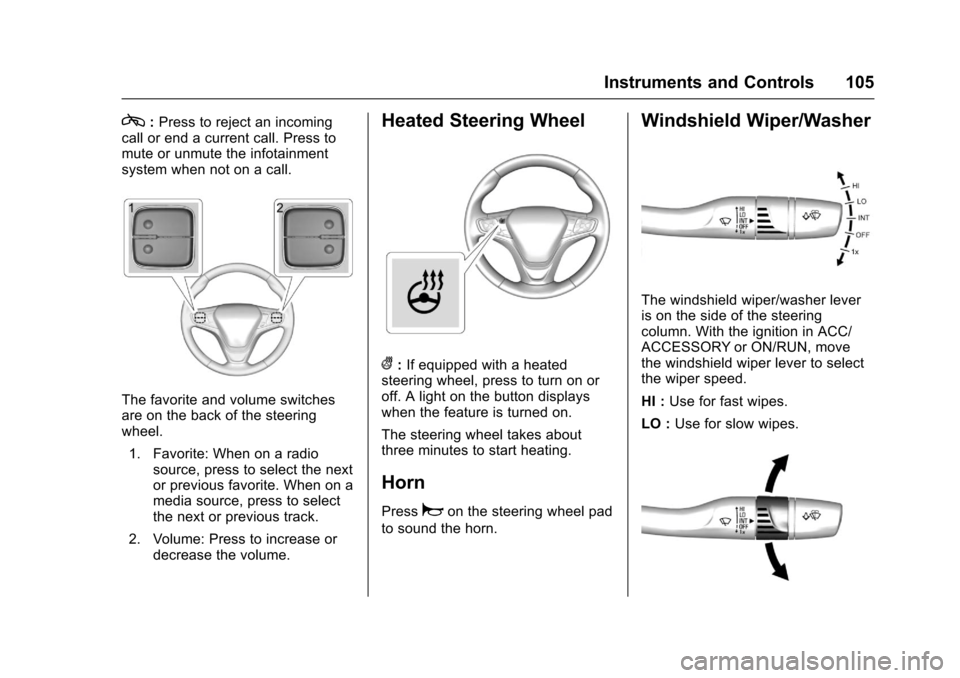
The favorite and volume switchesare on the back of the steeringwheel.
1. Favorite: When on a radiosource, press to select the nextor previous favorite. When on amedia source, press to selectthe next or previous track.
2. Volume: Press to increase ordecrease the volume.
Heated Steering Wheel
(:If equipped with a heatedsteering wheel, press to turn on oroff. A light on the button displayswhen the feature is turned on.
The steering wheel takes aboutthree minutes to start heating.
Horn
Pressaon the steering wheel pad
to sound the horn.
Windshield Wiper/Washer
The windshield wiper/washer leveris on the side of the steeringcolumn. With the ignition in ACC/ACCESSORY or ON/RUN, movethe windshield wiper lever to selectthe wiper speed.
HI :Use for fast wipes.
LO :Use for slow wipes.
Page 151 of 419
Chevrolet Malibu Owner Manual (GMNA-Localizing-U.S./Canada/Mexico-10122664) - 2017 - crc - 5/23/16
150 Instruments and Controls
Extended Hill Start Assist
This allows the duration of the HillStart Assist to be changed. See“Extended Hill Start Assist (EHSA)”inHill Start Assist (HSA)0240.
Select Extended Hold orStandard Hold.
Languages
Select, then select from theavailable language(s).
Lighting
Select the Lighting menu and thefollowing may be displayed:
.Exit Lighting
Exit Lighting
Select to set how long the exteriorlamps stay on when leaving thevehicle and it is dark outside. SeeExit Lighting0169.
Select the desired time.
Power Door Locks
Select and the following maydisplay:
.Unlocked Door Anti Lock Out
.Auto Door Unlock
.Delayed Door Lock
Unlocked Door Anti Lock Out
When on, this feature will keep thedriver door from locking when thedoor is open. If this feature is turnedon, the Delayed Door Lock menuwill not be available.
Select Off or On.
Auto Door Unlock
This allows selection of which of thedoors will automatically unlock whenthe vehicle is shifted into P (Park).
Select Off, All Doors, or Driver Door.
Delayed Door Lock
When on, this feature will delay thelocking of the doors. To override thedelay, press the power door lockswitch on the door.
Select Off or On.
Remote Lock, Unlock, Start
Select and the following maydisplay:
.Remote Unlock Light Feedback
.Remote Lock Feedback
.Remote Door Unlock
.Remote Start Auto Cool Seats
.Remote Start Auto Heat Seats
.Passive Door Unlock
.Passive Door Lock
.Remote Left in Vehicle Reminder
Remote Unlock Light Feedback
When on, the exterior lamps willflash when unlocking the vehiclewith the Remote Keyless Entry(RKE) transmitter. SeeRemoteKeyless Entry (RKE) SystemOperation032.
Select Off or Flash Lights.
Remote Lock Feedback
Select to set which type of feedback
is given when pressingQon the
RKE transmitter. SeeRemoteKeyless Entry (RKE) SystemOperation032.
Select Off, Lights and Horn, LightsOnly, or Horn Only.
Page 152 of 419
Chevrolet Malibu Owner Manual (GMNA-Localizing-U.S./Canada/Mexico-10122664) - 2017 - crc - 5/23/16
Instruments and Controls 151
Remote Door Unlock
Select to set which doors will unlock
when pressingKon the RKE
transmitter. SeeRemote KeylessEntry (RKE) System Operation032.
Select Driver Door or All Doors.
Remote Start Auto Cool Seats
If equipped and turned on, thisfeature will turn the ventilated seatson when using remote start onwarm days.
Select Off, On-Driver andPassenger, or On-Driver.
Remote Start Auto Heat Seats
Select to enable or disable whichseat will come on when remote startis used. SeeHeated and VentilatedFront Seats060.
Select Off, On-Driver andPassenger, or On-Driver.
Passive Door Unlock
Select to set which doors will unlockwhen the RKE transmitter is withinrange and using the button on the
outside driver door handle to unlockthe vehicle. SeeRemote KeylessEntry (RKE) System Operation032.
Select Driver Door Only or AllDoors.
Passive Door Lock
This allows passive locking to beturned on or off and selectsfeedback. SeeRemote KeylessEntry (RKE) System Operation032.
Select Off, On, or On With HornChirp.
Remote Left in Vehicle Reminder
This feature sounds an alert whenthe RKE transmitter is left in thevehicle. This menu also enablesRemote No Longer Left in Vehiclealert.
Select Off or On.
Return to Factory Settings
Select to return all vehiclepersonalizations to the defaultsettings.
Select Yes or No.
Software Information
Select to view the radio softwareinformation.
Valet Mode (If Equipped)
This will lock the infotainmentsystem and steering wheel controls.It may also limit access to vehiclestorage locations (if equipped).
To e n a b l e v a l e t m o d e :
1. Enter a four-digit code on thekeypad.
2. Select Enter to go to theconfirmation screen.
3. Re-enter the four-digit code.
Select LOCK or UNLOCK to lock orunlock the system. Press BACK togo back to the previous menu.
Personalization Menu (Radio
with Touchscreen)
Settings can be made with theignition on and the vehicle notmoving.