parking brake CHEVROLET MALIBU 2018 Owner's Manual
[x] Cancel search | Manufacturer: CHEVROLET, Model Year: 2018, Model line: MALIBU, Model: CHEVROLET MALIBU 2018Pages: 413, PDF Size: 5.92 MB
Page 8 of 413

Chevrolet Malibu Owner Manual (GMNA-Localizing-U.S./Canada/Mexico-
11348460) - 2018 - crc - 5/3/17
In Brief 7
1.Air Vents 0203.
2. Turn Signal Lever. See Turn
and Lane-Change Signals
0 158.
IntelliBeam System Button
(If Equipped). See Exterior
Lamp Controls 0154.
3. Instrument Cluster (Base
Level) 0112 orInstrument
Cluster (Uplevel) 0114.
Driver Information Center (DIC)
(Uplevel) 0134 orDriver
Information Center (DIC) (Base
Level) 0131.
4. Windshield Wiper/Washer
0106.
5. Light Sensor. See Automatic
Headlamp System 0157.
6. Infotainment 0162.
7. Climate Control Systems
0196.
Dual Automatic Climate Control
System 0199 (If Equipped).
8. Hazard Warning Flashers
0157.
9. Power Outlets 0109. 10.
Traction Control/Electronic
Stability Control 0231.
Assistance Systems for
Parking or Backing 0243
(If Equipped).
11. Shift Lever. See Automatic
Transmission 0224.
12. Electric Parking Brake 0228.
13. USB Port 0176.
14. ENGINE START/STOP Button. SeeIgnition Positions 0216.
15. Steering Wheel Controls 0105.
Driver Information Center
Buttons.
See Driver Information Center
(DIC) (Uplevel) 0134 orDriver
Information Center (DIC) (Base
Level) 0131.
16. Horn 0106.
17. Steering Wheel Adjustment
0105.
18. Cruise Control 0233.
Adaptive Cruise Control 0235
(If Equipped). Heated Steering Wheel
0106
(If Equipped).
Forward Collision Alert (FCA)
System 0247 (If Equipped).
Lane Keep Assist (LKA) 0255
(If Equipped).
19. Hood Release. See Hood
0 271.
20. Data Link Connector (Out of View). See Malfunction
Indicator Lamp (Check Engine
Light) 0122.
21. Exterior Lamp Controls 0154.
22. Instrument Panel Illumination
Control 0158.
Page 9 of 413
Chevrolet Malibu Owner Manual (GMNA-Localizing-U.S./Canada/Mexico-
11348460) - 2018 - crc - 5/3/17
8 In Brief
Initial Drive
Information
This section provides a brief
overview about some of the
important features that may or may
not be on your specific vehicle.
For more detailed information, refer
to each of the features which can be
found later in this owner’s manual.
Stop/Start System
The vehicle may have a fuel saving
STOP/START system to shut off the
engine and help conserve fuel.
When the brakes are applied and
the vehicle is at a complete stop,
the engine may turn off. When the
brake pedal is released or the
accelerator pedal is pushed, the
engine will restart. The engine may
restart even while the brake is
applied. SeeStarting the Engine
0 218.
Remote Keyless Entry
(RKE) System
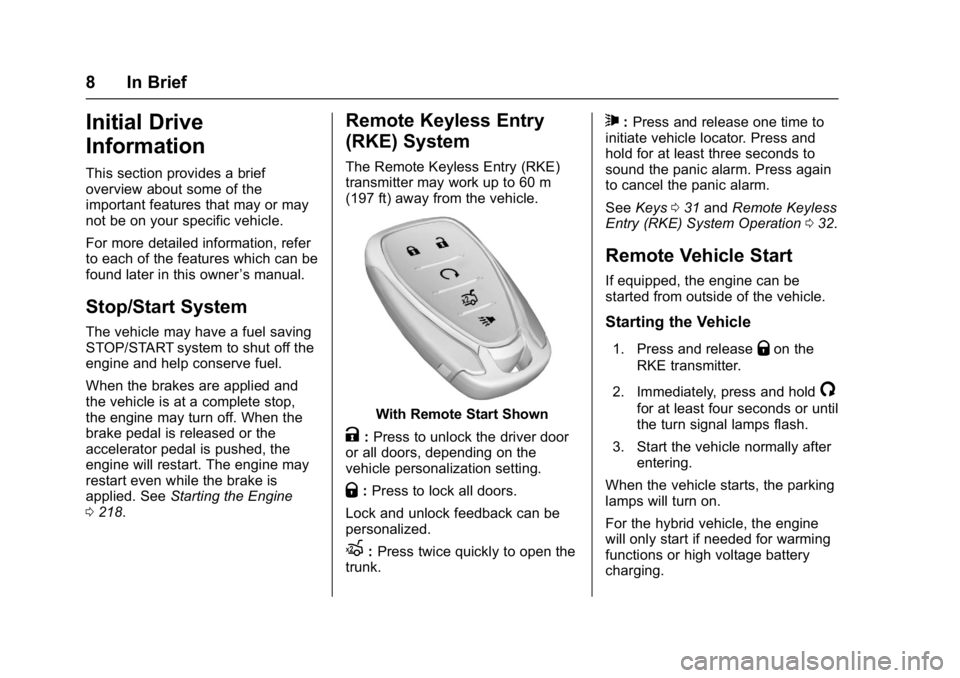
The Remote Keyless Entry (RKE)
transmitter may work up to 60 m
(197 ft) away from the vehicle.
With Remote Start Shown
K:Press to unlock the driver door
or all doors, depending on the
vehicle personalization setting.
Q: Press to lock all doors.
Lock and unlock feedback can be
personalized.
X: Press twice quickly to open the
trunk.
7: Press and release one time to
initiate vehicle locator. Press and
hold for at least three seconds to
sound the panic alarm. Press again
to cancel the panic alarm.
See Keys 031 and Remote Keyless
Entry (RKE) System Operation 032.
Remote Vehicle Start
If equipped, the engine can be
started from outside of the vehicle.
Starting the Vehicle
1. Press and releaseQon the
RKE transmitter.
2. Immediately, press and hold
/
for at least four seconds or until
the turn signal lamps flash.
3. Start the vehicle normally after entering.
When the vehicle starts, the parking
lamps will turn on.
For the hybrid vehicle, the engine
will only start if needed for warming
functions or high voltage battery
charging.
Page 105 of 413
Chevrolet Malibu Owner Manual (GMNA-Localizing-U.S./Canada/Mexico-
11348460) - 2018 - crc - 5/3/17
104 Instruments and Controls
Instruments and
Controls
Controls
Steering Wheel Adjustment . . . 105
Steering Wheel Controls . . . . . . 105
Heated Steering Wheel . . . . . . . 106
Horn . . . . . . . . . . . . . . . . . . . . . . . . . . 106
Windshield Wiper/Washer . . . . 106
Compass . . . . . . . . . . . . . . . . . . . . . 107
Clock . . . . . . . . . . . . . . . . . . . . . . . . . 107
Power Outlets . . . . . . . . . . . . . . . . 109
Wireless Charging . . . . . . . . . . . . 110
Warning Lights, Gauges, and
Indicators
Warning Lights, Gauges, andIndicators . . . . . . . . . . . . . . . . . . . . 111
Instrument Cluster (Base Level) . . . . . . . . . . . . . . . . . . . . . . . 112
Instrument Cluster
(Uplevel) . . . . . . . . . . . . . . . . . . . . 114
Speedometer . . . . . . . . . . . . . . . . . 117
Odometer . . . . . . . . . . . . . . . . . . . . . 117
Trip Odometer . . . . . . . . . . . . . . . . 117
Tachometer (Non-Hybrid) . . . . . 117
Fuel Gauge . . . . . . . . . . . . . . . . . . . 118
Power Indicator Gauge (Hybrid) . . . . . . . . . . . . . . . . . . . . . 119 Engine Coolant Temperature
Gauge . . . . . . . . . . . . . . . . . . . . . . 119
Seat Belt Reminders . . . . . . . . . 120
Airbag Readiness Light . . . . . . . 120
Passenger Airbag Status Indicator . . . . . . . . . . . . . . . . . . . . 121
Charging System Light . . . . . . . 122
Malfunction Indicator Lamp (Check Engine Light) . . . . . . . . 122
Brake System Warning Light . . . . . . . . . . . . . . . . . . . . . . . . 124
Electric Parking Brake Light . . . . . . . . . . . . . . . . . . . . . . . . 124
Service Electric Parking Brake Light . . . . . . . . . . . . . . . . . . . . . . . . 125
Antilock Brake System (ABS) Warning Light . . . . . . . . . . . . . . . 125
Lane Keep Assist (LKA) Light . . . . . . . . . . . . . . . . . . . . . . . . 125
Vehicle Ahead Indicator . . . . . . 126
Pedestrian Ahead Indicator . . . 126
Traction Off Light . . . . . . . . . . . . . 126
StabiliTrak OFF Light . . . . . . . . . 127
Traction Control System (TCS)/ StabiliTrak Light . . . . . . . . . . . . . 127
Tire Pressure Light . . . . . . . . . . . 127
Engine Oil Pressure Light . . . . 128
Low Fuel Warning Light (Uplevel) . . . . . . . . . . . . . . . . . . . . 128
Low Fuel Warning Light (Base Level) . . . . . . . . . . . . . . . . . . . . . . . 129 Security Light . . . . . . . . . . . . . . . . . 129
Vehicle Ready Light
(Hybrid) . . . . . . . . . . . . . . . . . . . . . 129
High-Beam On Light . . . . . . . . . . 129
Lamps On Reminder . . . . . . . . . 130
Cruise Control Light . . . . . . . . . . 130
Door Ajar Light (Uplevel) . . . . . 130
Information Displays
Power Flows (Hybrid) . . . . . . . . . 130
Energy Information (Hybrid) . . . . . . . . . . . . . . . . . . . . . 131
Driver Information Center (DIC) (Base Level) . . . . . . . . . . . . . . . . 131
Driver Information Center (DIC) (Uplevel) . . . . . . . . . . . . . . . . . . . . 134
Vehicle Messages
Vehicle Messages . . . . . . . . . . . . 137
Engine Power Messages . . . . . 138
Vehicle Speed Messages . . . . . 138
Vehicle Personalization
Vehicle Personalization . . . . . . . 138
Universal Remote System
Universal Remote System . . . . 150
Universal Remote SystemProgramming . . . . . . . . . . . . . . . 150
Universal Remote System Operation . . . . . . . . . . . . . . . . . . . 153
Page 125 of 413
Chevrolet Malibu Owner Manual (GMNA-Localizing-U.S./Canada/Mexico-
11348460) - 2018 - crc - 5/3/17
124 Instruments and Controls
before the system is ready for
inspection. This can happen if
the 12-volt battery has recently
been replaced or run down, or if
the vehicle has been recently
serviced.
See your dealer if the vehicle will
not pass or cannot be made ready
for the test.
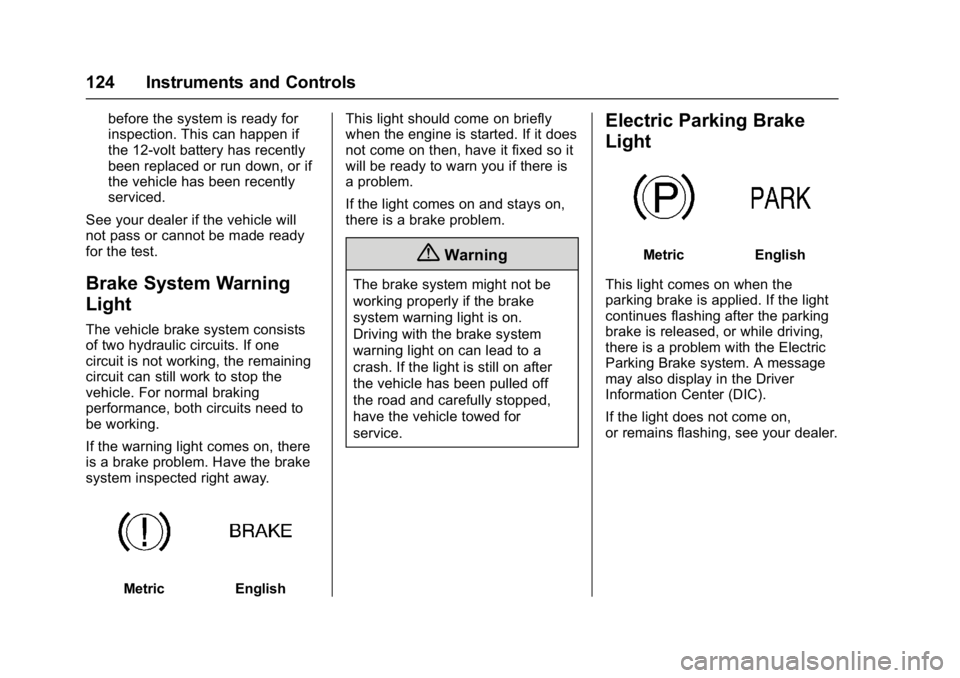
Brake System Warning
Light
The vehicle brake system consists
of two hydraulic circuits. If one
circuit is not working, the remaining
circuit can still work to stop the
vehicle. For normal braking
performance, both circuits need to
be working.
If the warning light comes on, there
is a brake problem. Have the brake
system inspected right away.
MetricEnglish This light should come on briefly
when the engine is started. If it does
not come on then, have it fixed so it
will be ready to warn you if there is
a problem.
If the light comes on and stays on,
there is a brake problem.
{Warning
The brake system might not be
working properly if the brake
system warning light is on.
Driving with the brake system
warning light on can lead to a
crash. If the light is still on after
the vehicle has been pulled off
the road and carefully stopped,
have the vehicle towed for
service.
Electric Parking Brake
Light
MetricEnglish
This light comes on when the
parking brake is applied. If the light
continues flashing after the parking
brake is released, or while driving,
there is a problem with the Electric
Parking Brake system. A message
may also display in the Driver
Information Center (DIC).
If the light does not come on,
or remains flashing, see your dealer.
Page 126 of 413
Chevrolet Malibu Owner Manual (GMNA-Localizing-U.S./Canada/Mexico-
11348460) - 2018 - crc - 5/3/17
Instruments and Controls 125
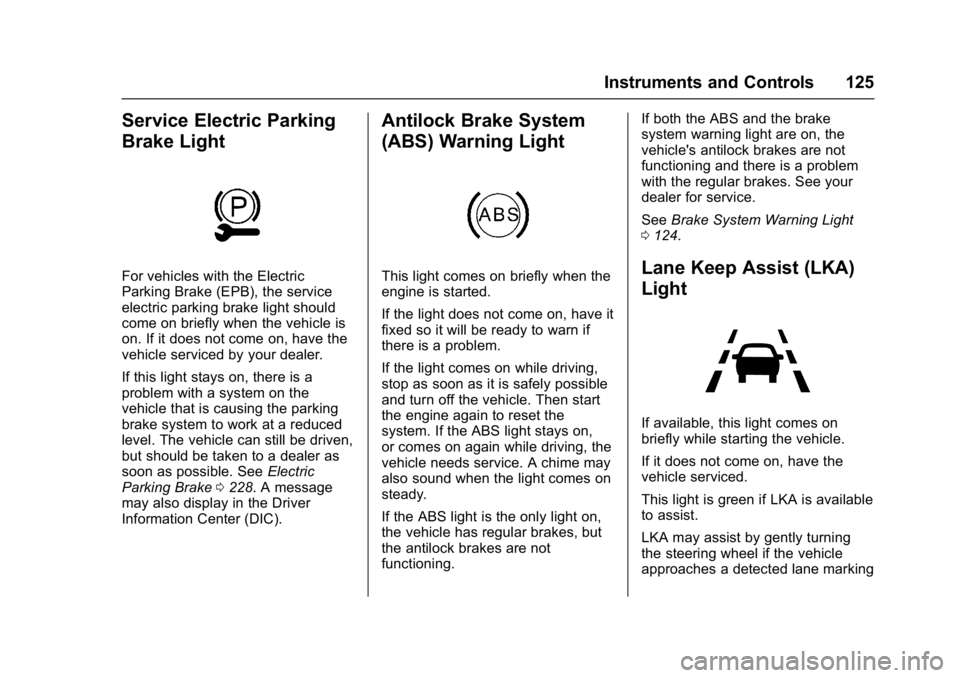
Service Electric Parking
Brake Light
For vehicles with the Electric
Parking Brake (EPB), the service
electric parking brake light should
come on briefly when the vehicle is
on. If it does not come on, have the
vehicle serviced by your dealer.
If this light stays on, there is a
problem with a system on the
vehicle that is causing the parking
brake system to work at a reduced
level. The vehicle can still be driven,
but should be taken to a dealer as
soon as possible. SeeElectric
Parking Brake 0228. A message
may also display in the Driver
Information Center (DIC).
Antilock Brake System
(ABS) Warning Light
This light comes on briefly when the
engine is started.
If the light does not come on, have it
fixed so it will be ready to warn if
there is a problem.
If the light comes on while driving,
stop as soon as it is safely possible
and turn off the vehicle. Then start
the engine again to reset the
system. If the ABS light stays on,
or comes on again while driving, the
vehicle needs service. A chime may
also sound when the light comes on
steady.
If the ABS light is the only light on,
the vehicle has regular brakes, but
the antilock brakes are not
functioning. If both the ABS and the brake
system warning light are on, the
vehicle's antilock brakes are not
functioning and there is a problem
with the regular brakes. See your
dealer for service.
See
Brake System Warning Light
0 124.Lane Keep Assist (LKA)
Light
If available, this light comes on
briefly while starting the vehicle.
If it does not come on, have the
vehicle serviced.
This light is green if LKA is available
to assist.
LKA may assist by gently turning
the steering wheel if the vehicle
approaches a detected lane marking
Page 146 of 413
Chevrolet Malibu Owner Manual (GMNA-Localizing-U.S./Canada/Mexico-
11348460) - 2018 - crc - 5/3/17
Instruments and Controls 145
Select Low, Medium, or High.
Auto Defog
This allows the climate control
system to prevent fog on the inside
of the windows. See“Auto Defog”in
Dual Automatic Climate Control
System 0199.
Select Off or On.
Auto Rear Defog
This allows the rear window
defogger to turn on automatically
when the interior temperature is cold
and the outside temperature is
about 7 °C (44 °F) and below. See
“Rear Window Defogger” inDual
Automatic Climate Control System
0 199.
Select Off or On.
Collision/Detection Systems
Select and the following may
display:
. Forward Collision System
. Front Pedestrian Detection
. Rear Cross Traffic Alert
. Adaptive Cruise Go Notifier .
Lane Change Alert
Forward Collision System
This feature will turn on or off the
Forward Collision Alert (FCA) and
Forward Automatic Braking (FAB).
The Off setting disables all FCA and
FAB functions. With the Alert and
Brake setting, both FCA and FAB
are available. The Alert setting
disables FAB. See Forward
Automatic Braking (FAB) 0249.
Select Off, Alert, or Alert and Brake.
Front Pedestrian Detection
This feature may help avoid or
reduce the harm caused by
front-end crashes with nearby
pedestrians.
See Front Pedestrian Braking (FPB)
System 0251.
Select Off, Alert, or Alert and Brake.
Rear Cross Traffic Alert
This allows the feature to be turned
on or off. See Assistance Systems
for Parking or Backing 0243.
Select Off or On. Adaptive Cruise Go Notifier
This feature will give a reminder that
Adaptive Cruise Control provides
when it has brought the vehicle to a
complete stop behind another
stopping vehicle, and then that
vehicle drives on. See
Adaptive
Cruise Control 0235.
Select Off or On.
Lane Change Alert
This allows the feature to be turned
on or off. See Lane Change Alert
(LCA) 0253.
Select Off or On.
Comfort and Convenience
Select and the following may
display:
. Auto Memory Recall
. Easy Exit Options
. Chime Volume
. Reverse Tilt Mirror
. Extended Hill Start Assist
Page 206 of 413
Chevrolet Malibu Owner Manual (GMNA-Localizing-U.S./Canada/Mexico-
11348460) - 2018 - crc - 5/3/17
Driving and Operating 205
Driving and
Operating
Driving Information
Distracted Driving . . . . . . . . . . . . 206
Defensive Driving . . . . . . . . . . . . . 207
Drunk Driving . . . . . . . . . . . . . . . . . 207
Control of a Vehicle . . . . . . . . . . . 207
Braking . . . . . . . . . . . . . . . . . . . . . . . 207
Steering . . . . . . . . . . . . . . . . . . . . . . 208
Off-Road Recovery . . . . . . . . . . . 208
Loss of Control . . . . . . . . . . . . . . . 209
Driving on Wet Roads . . . . . . . . 209
Hill and Mountain Roads . . . . . 210
Winter Driving . . . . . . . . . . . . . . . . 211
If the Vehicle Is Stuck . . . . . . . . 212
Vehicle Load Limits . . . . . . . . . . . 212
Starting and Operating
New Vehicle Break-In . . . . . . . . . 216
Ignition Positions . . . . . . . . . . . . . 216
Starting the Engine . . . . . . . . . . . 218
Engine Heater . . . . . . . . . . . . . . . . 220
Retained AccessoryPower (RAP) . . . . . . . . . . . . . . . . 221
Shifting Into Park . . . . . . . . . . . . . 221
Shifting out of Park . . . . . . . . . . . 222
Parking over Things That Burn . . . . . . . . . . . . . . . . . . . 222 Extended Parking . . . . . . . . . . . . 222
Engine Exhaust
Engine Exhaust . . . . . . . . . . . . . . 223
Running the Vehicle While
Parked . . . . . . . . . . . . . . . . . . . . . . 223
Automatic Transmission
Automatic Transmission . . . . . . 224
Manual Mode . . . . . . . . . . . . . . . . . 225
Brakes
Antilock BrakeSystem (ABS) . . . . . . . . . . . . . . . 227
Parking Brake . . . . . . . . . . . . . . . . 227
Electric Parking Brake . . . . . . . . 228
Brake Assist . . . . . . . . . . . . . . . . . . 229
Hill Start Assist (HSA) . . . . . . . . 230
Regenerative Braking (Hybrid Only) . . . . . . . . . . . . . . . . 230
Ride Control Systems
Traction Control/ElectronicStability Control . . . . . . . . . . . . . 231
Cruise Control
Cruise Control . . . . . . . . . . . . . . . . 233
Adaptive Cruise Control . . . . . . 235
Driver Assistance Systems
Driver Assistance Systems . . . 242
Assistance Systems forParking or Backing . . . . . . . . . . 243 Assistance Systems for
Driving . . . . . . . . . . . . . . . . . . . . . . 247
Forward Collision Alert (FCA) System . . . . . . . . . . . . . . . . . . . . . . 247
Forward Automatic
Braking (FAB) . . . . . . . . . . . . . . . 249
Front Pedestrian Braking (FPB) System . . . . . . . . . . . . . . . 251
Side Blind Zone Alert (SBZA) . . . . . . . . . . . . . . . . 253
Lane Change Alert (LCA) . . . . . 253
Lane Departure Warning (LDW) . . . . . . . . . . . . . 255
Lane Keep Assist (LKA) . . . . . . 255
Fuel
Fuel . . . . . . . . . . . . . . . . . . . . . . . . . . 257
California Fuel Requirements . . . . . . . . . . . . . . . 258
Fuels in Foreign Countries . . . 259
Fuel Additives . . . . . . . . . . . . . . . . 259
Filling the Tank . . . . . . . . . . . . . . . 259
Filling a Portable Fuel Container . . . . . . . . . . . . . . . . . . . 261
Trailer Towing
General TowingInformation . . . . . . . . . . . . . . . . . . 261
Driving Characteristics and
Towing Tips . . . . . . . . . . . . . . . . . 262
Trailer Towing . . . . . . . . . . . . . . . . 265
Page 218 of 413
Chevrolet Malibu Owner Manual (GMNA-Localizing-U.S./Canada/Mexico-
11348460) - 2018 - crc - 5/3/17
Driving and Operating 217
Do not turn the engine off when the
vehicle is moving. This will cause a
loss of power assist in the brake
and steering systems and disable
the airbags.
If the vehicle must be shut off in an
emergency:1. Brake using a firm and steady pressure. Do not pump the
brakes repeatedly. This may
deplete power assist, requiring
increased brake pedal force.
2. Shift the vehicle to N (Neutral). This can be done while the
vehicle is moving. After shifting
to N (Neutral), firmly apply the
brakes and steer the vehicle to
a safe location.
3. Come to a complete stop, shift to P (Park), and turn the
ignition off. On vehicles with an
automatic transmission, the
shift lever must be in P (Park)
to turn the ignition off.
4. Set the parking brake. See Parking Brake 0227 and
Electric Parking Brake 0228.{Warning
Turning off the vehicle while
moving may cause loss of power
assist in the brake and steering
systems and disable the airbags.
While driving, only shut the
vehicle off in an emergency.
If the vehicle cannot be pulled over
and must be shut off while driving,
press and hold ENGINE START/
STOP for longer than two seconds,
or press twice in five seconds.
ACC/ACCESSORY (Amber
Indicator Light) : This mode allows
you to use some electrical
accessories when the engine is off.
With the ignition off, pressing the
button one time without the brake
pedal applied will place the ignition
system in ACC/ACCESSORY.
The ignition will switch from ACC/
ACCESSORY to off after
five minutes to prevent battery
run down. ON/RUN/START (Green Indicator
Light) :
This mode is for driving and
starting. With the ignition off, and
the brake pedal applied, pressing
the button once will turn the ignition
on. Once engine cranking begins,
release the button. Engine cranking
will continue until the engine starts.
See Starting the Engine 0218. The
ignition will then remain on.
Service Mode
This power mode is available for
service and diagnostics, and to
verify the proper operation of the
malfunction indicator lamp as may
be required for emission inspection
purposes. With the vehicle off, and
the brake pedal not applied,
pressing and holding the button for
more than five seconds will place
the vehicle in Service Mode. The
instruments and audio systems will
operate as they do with the ignition
on, but the vehicle will not be able
to be driven. The engine will not
start in Service Mode. Press the
button again to turn the vehicle off.
Page 222 of 413
Chevrolet Malibu Owner Manual (GMNA-Localizing-U.S./Canada/Mexico-
11348460) - 2018 - crc - 5/3/17
Driving and Operating 221
Retained Accessory
Power (RAP)
Some vehicle accessories may be
used after the ignition is turned off.
The power windows and sunroof,
if equipped, will continue to work for
up to 10 minutes or until any door is
opened.
The infotainment system will
continue to work for 10 minutes,
until the driver door is opened,
or until the ignition is turned on or
placed in ACC/ACCESSORY.
Shifting Into Park
1. Hold the brake pedal down andset the parking brake. See
Parking Brake 0227 and
Electric Parking Brake 0228.
2. Move the shift lever into P (Park) by holding in the
button on the shift lever and
pushing the shift lever all the
way toward the front of the
vehicle.
3. Turn the ignition off.
Leaving the Vehicle with the
Engine Running
{Warning
It can be dangerous to leave the
vehicle with the engine running.
It could overheat and catch fire.
It is dangerous to get out of the
vehicle if the shift lever is not fully
in P (Park) with the parking brake
firmly set. The vehicle can roll.
Do not leave the vehicle when the
engine is running. If you have left
the engine running, the vehicle
can move suddenly. You or others
could be injured. To be sure the
vehicle will not move, even when
you are on fairly level ground,
always set the parking brake and
move the shift lever to P (Park).
See Shifting Into Park 0221.
If you have to leave the vehicle with
the engine running, be sure the
vehicle is in P (Park) and the
parking brake is firmly set before
you leave it. After you have moved the shift lever into P (Park), hold the
regular brake pedal down. Then,
see if you can move the shift lever
away from P (Park) without first
pressing the button.
If you can, it means that the shift
lever was not fully locked in
P (Park).
Torque Lock
Torque lock is when the weight of
the vehicle puts too much force on
the parking pawl in the
transmission. This happens when
parking on a hill and shifting the
transmission into P (Park) is not
done properly, then it is difficult to
shift out of P (Park). To prevent
torque lock, set the parking brake
and then shift into P (Park). To find
out how, see
“Shifting Into Park”
listed previously.
If torque lock does occur, your
vehicle may need to be pushed
uphill by another vehicle to relieve
the parking pawl pressure, so you
can shift out of P (Park).
Page 223 of 413
Chevrolet Malibu Owner Manual (GMNA-Localizing-U.S./Canada/Mexico-
11348460) - 2018 - crc - 5/3/17
222 Driving and Operating
If you are towing a trailer and
parking on a hill, seeDriving
Characteristics and Towing Tips
0 262.
Shifting out of Park
This vehicle is equipped with an
electronic shift lock release system.
The shift lock release is designed to
prevent movement of the shift lever
out of P (Park), unless the ignition is
on and the brake pedal is applied.
The shift lock release is always
functional except in the case of an
uncharged or low voltage (less than
9-volt) battery.
If the vehicle has an uncharged
battery or a battery with low voltage,
try charging or jump starting the
battery. See Jump Starting - North
America 0343.
To shift out of P (Park): 1. Apply the brake pedal.
2. Turn the ignition on.
3. Press the shift lever button.
4. Move the shift lever to the desired position. If still unable to shift out of P (Park):
1. Fully release the shift lever button.
2. Hold the brake pedal down and press the shift lever button
again.
3. Move the shift lever to the desired position.
If you are still having a problem
shifting, see your dealer.
Parking over Things
That Burn
{Warning
Things that can burn could touch
hot exhaust parts under the
vehicle and ignite. Do not park
over papers, leaves, dry grass,
or other things that can burn.
Extended Parking
It is better not to park with the
vehicle running. If the vehicle is left
while running, follow the proper
steps to be sure the vehicle will not move and there is adequate
ventilation.
See
Shifting Into Park 0221 and
Engine Exhaust 0223.
If the vehicle is left parked while
running and the Remote Keyless
Entry (RKE) transmitter is outside
the vehicle, the vehicle will turn off
after one hour. If the vehicle is left
parked while running and the RKE
transmitter is inside, the vehicle will
turn off after two hours.
The timer will reset if the vehicle is
taken out of P (Park) while it is
running.