battery CHEVROLET MALIBU 2019 Owner's Guide
[x] Cancel search | Manufacturer: CHEVROLET, Model Year: 2019, Model line: MALIBU, Model: CHEVROLET MALIBU 2019Pages: 382, PDF Size: 37.7 MB
Page 133 of 382
Chevrolet Malibu Owner Manual (GMNA-Localizing-U.S./Canada/Mexico-
12461813) - 2019 - crc - 12/11/18
Instruments and Controls 133
Cruise Control Light
The cruise control light is white
when the cruise control is on and
ready, and turns green when the
cruise control is set and active. See
Cruise Control0194.
Adaptive Cruise Control Light
This light comes on when Adaptive
Cruise Control (if equipped) is
active. SeeAdaptive Cruise Control
0196.
Door Ajar Light (Uplevel)
This light comes on when a door is
open or not securely latched. Before
driving, check that all doors are
properly closed.
Information Displays
Power Flows (Hybrid)
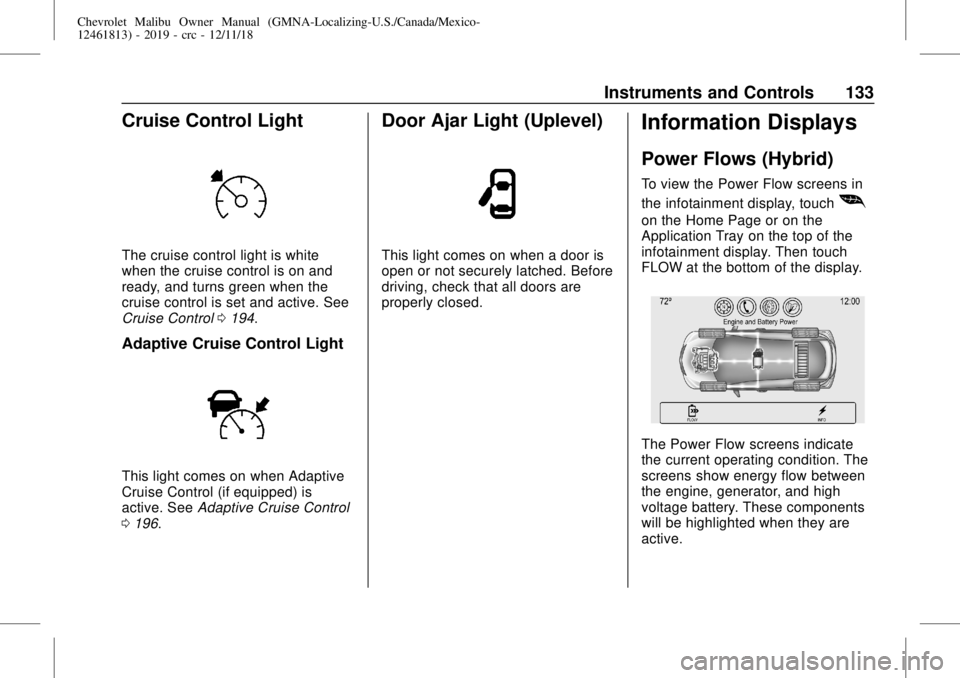
To view the Power Flow screens in
the infotainment display, touch
[
on the Home Page or on the
Application Tray on the top of the
infotainment display. Then touch
FLOW at the bottom of the display.
The Power Flow screens indicate
the current operating condition. The
screens show energy flow between
the engine, generator, and high
voltage battery. These components
will be highlighted when they are
active.
Page 136 of 382
Chevrolet Malibu Owner Manual (GMNA-Localizing-U.S./Canada/Mexico-
12461813) - 2019 - crc - 12/11/18
136 Instruments and Controls
Oil pressure can vary with engine
speed, outside temperature, and oil
viscosity. On some models, the oil
pump will vary engine oil pressure
according to engine needs. Oil
pressure may change quickly as the
engine speed or load varies. This is
normal. If the oil pressure warning
light or Driver Information Center
(DIC) message indicates oil
pressure outside the normal
operating range, check the vehicle's
oil as soon as possible.
Air Filter Life :Shows an estimate
of the engine air filter’s remaining
useful life and the state of the
system. Engine Air Filter Life 95%
means 95% of the current air filter
life remains. Messages will display
based on the engine air filter life and
the state of the system. When the
REPLACE AT NEXT OIL CHANGE
message displays, the engine air
filter should be replaced at the time
of the next oil change. When the
REPLACE NOW message displays,
the engine air filter should be
replaced as soon as possible.The Air Filter Life display must be
reset after the engine air filter
replacement. To reset, seeEngine
Air Filter Life System0246.
Tire Pressure :Displays a vehicle
with the approximate pressures of
all four tires. Tire pressure is
displayed in either kilopascal (kPa)
or in pounds per square inch (psi).
SeeTire Pressure Monitor System
0285and
Tire Pressure Monitor Operation
0286.
Battery Voltage :Displays the
current battery voltage, if equipped.
Battery voltage changes are normal
while driving. SeeCharging System
Light0124. If there is a problem
with the battery charging system,
the DIC will display a message.
Coolant Temperature :Shows the
engine coolant temperature in either
degrees Celsius (°C) or degrees
Fahrenheit (°F).
Speed Warning :This display is
used to set the vehicle speed at
which the speed warning chime
sounds and the alert is displayed.The speed can be set by pressing
Vwhile the speed warning display
is showing.
Units :Move
worxto change
between Metric or US when the Unit
display is active. Press
Vto confirm
the setting. This will change the
displays on the DIC to the type of
measurements you select.
ECO Drive Assist Menu (ECO)
Items
Useworxto scroll through the
menu items. Not all items are
available on every vehicle.
Best Average Fuel Economy :The
bottom displays the best average
fuel economy (AFE) that is achieved
for a selected distance. The top
displays a running average of fuel
economy for the most recently
traveled selected distance. The
center bar graph displays the
instantaneous fuel economy.
Quickly press
Vto change the
settings for the distance options.
Page 140 of 382
Chevrolet Malibu Owner Manual (GMNA-Localizing-U.S./Canada/Mexico-
12461813) - 2019 - crc - 12/11/18
140 Instruments and Controls
Speed Limit :Shows the current
speed limit on vehicles with the
navigation system. The information
for this page comes from a roadway
database.
Follow Distance :When Adaptive
Cruise Control (ACC) is not
engaged, the current follow time to
the vehicle ahead is displayed as a
time value on this page. When ACC
has been engaged, the display
switches to the gap setting page.
This page shows the current gap
setting along with the vehicle ahead
indicator.
Battery Voltage :Displays the
current battery voltage, if equipped.
Battery voltage changes are normal
while driving. SeeCharging System
Light0124. If there is a problem
with the battery charging system,
the DIC will display a message.
Coolant Temperature :Shows the
engine coolant temperature in either
degrees Celsius (°C) or degrees
Fahrenheit (°F).Oil Pressure :Oil pressure is
displayed in either kilopascal (kPa)
or in pounds per square inch (psi).
Oil pressure can vary with engine
speed, outside temperature, and oil
viscosity. On some models, the oil
pump will vary engine oil pressure
according to engine needs. Oil
pressure may change quickly as the
engine speed or load varies. This is
normal. If the oil pressure warning
light or Driver Information Center
(DIC) message indicates oil
pressure outside the normal
operating range, check the vehicle's
oil as soon as possible.
Drive Cycle Info (Hybrid) :This
screen displays the distance
traveled and average fuel economy
for the current trip. The screen will
also be shown when the vehicle is
turned off displaying the previous
trip’s information.
Efficiency Gauge (Hybrid) :This
gauge is a guide to driving in an
efficient manner by keeping the
indicator in the center of the gauge..
Accel: If the indicator moves to
the right of the gauge,
acceleration is too aggressive to
optimize efficiency.
.
Brake: If the indicator moves to
the left side of the gauge,
braking is too aggressive to
optimize efficiency.
Total Power Display (Hybrid) :
Provides a numeric display of the
total power being used to propel or
stop the vehicle. The display shows
the power being provided by the
battery or charging the battery as
well as the power provided by the
engine.
EV Operation (Hybrid) :The bar
moves from left to right as the driver
requests more power from the
propulsion system. While in EV
mode, maintaining the bar in the
green zone will allow the driver to
maximize EV operation.
Blank Page :Shows no
information.
Page 141 of 382
Chevrolet Malibu Owner Manual (GMNA-Localizing-U.S./Canada/Mexico-
12461813) - 2019 - crc - 12/11/18
Instruments and Controls 141
Vehicle Messages
Messages displayed on the DIC
indicate the status of the vehicle or
some action that may be needed to
correct a condition. Multiple
messages may appear one after
another.
The messages that do not require
immediate action can be
acknowledged and cleared by
pressing
V. The messages that
require immediate action cannot be
cleared until that action is
performed.
All messages should be taken
seriously; clearing the message
does not correct the problem.
If a SERVICE message appears,
see your dealer.
Follow the instructions given in the
messages. The system displays
messages regarding the following
topics:
.
Service Messages
.
Fluid Levels
.
Vehicle Security.
Brakes
.
Steering
.
Ride Control Systems
.
Driver Assistance Systems
.
Cruise Control
.
Lighting and Bulb Replacement
.
Wiper/Washer Systems
.
Doors and Windows
.
Seat Belts
.
Airbag Systems
.
Engine and Transmission
.
Tire Pressure
.
Battery
Engine Power Messages
ENGINE POWER IS REDUCED
This message displays when the
vehicle's propulsion power is
reduced. A reduction in propulsion
power can affect the vehicle's ability
to accelerate. If this message is on,
but there is no observed reduction
in performance, proceed to your
destination. The performance maybe reduced the next time the vehicle
is driven. The vehicle may be driven
while this message is on, but
maximum acceleration and speed
may be reduced. Anytime this
message stays on, or displays
repeatedly, the vehicle should be
taken to your dealer for service as
soon as possible.
Vehicle Speed Messages
SPEED LIMITED TO XXX
KM/H (MPH)
This message shows that the
vehicle speed has been limited to
the speed displayed. The limited
speed is a protection for various
propulsion and vehicle systems,
such as lubrication, thermal,
suspension, Teen Driver if
equipped, or tires.
Page 147 of 382
Chevrolet Malibu Owner Manual (GMNA-Localizing-U.S./Canada/Mexico-
12461813) - 2019 - crc - 12/11/18
Lighting 147
Lighting
Exterior Lighting
Exterior Lamp Controls . . . . . . . 147
Exterior Lamps Off
Reminder . . . . . . . . . . . . . . . . . . . 149
Headlamp High/Low-Beam
Changer . . . . . . . . . . . . . . . . . . . . 149
Flash-to-Pass . . . . . . . . . . . . . . . . 149
Daytime Running
Lamps (DRL) . . . . . . . . . . . . . . . 149
Automatic Headlamp
System . . . . . . . . . . . . . . . . . . . . . . 150
Hazard Warning Flashers . . . . . 150
Turn and Lane-Change
Signals . . . . . . . . . . . . . . . . . . . . . . 151
Interior Lighting
Instrument Panel Illumination
Control . . . . . . . . . . . . . . . . . . . . . . 151
Courtesy Lamps . . . . . . . . . . . . . . 152
Dome Lamps . . . . . . . . . . . . . . . . . 152
Reading Lamps . . . . . . . . . . . . . . 152
Lighting Features
Entry Lighting . . . . . . . . . . . . . . . . 153
Exit Lighting . . . . . . . . . . . . . . . . . . 153
Battery Load Management . . . 153
Battery Power Protection . . . . . 154
Exterior Lighting Battery
Saver . . . . . . . . . . . . . . . . . . . . . . . 154Exterior Lighting
Exterior Lamp Controls
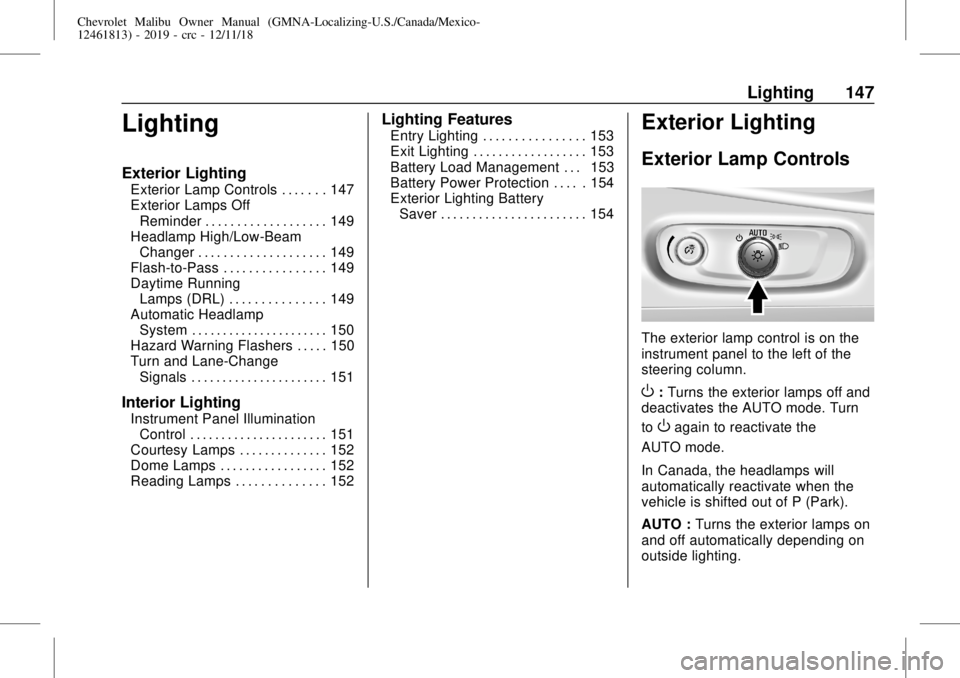
The exterior lamp control is on the
instrument panel to the left of the
steering column.
O:Turns the exterior lamps off and
deactivates the AUTO mode. Turn
to
Oagain to reactivate the
AUTO mode.
In Canada, the headlamps will
automatically reactivate when the
vehicle is shifted out of P (Park).
AUTO :Turns the exterior lamps on
and off automatically depending on
outside lighting.
Page 153 of 382
Chevrolet Malibu Owner Manual (GMNA-Localizing-U.S./Canada/Mexico-
12461813) - 2019 - crc - 12/11/18
Lighting 153
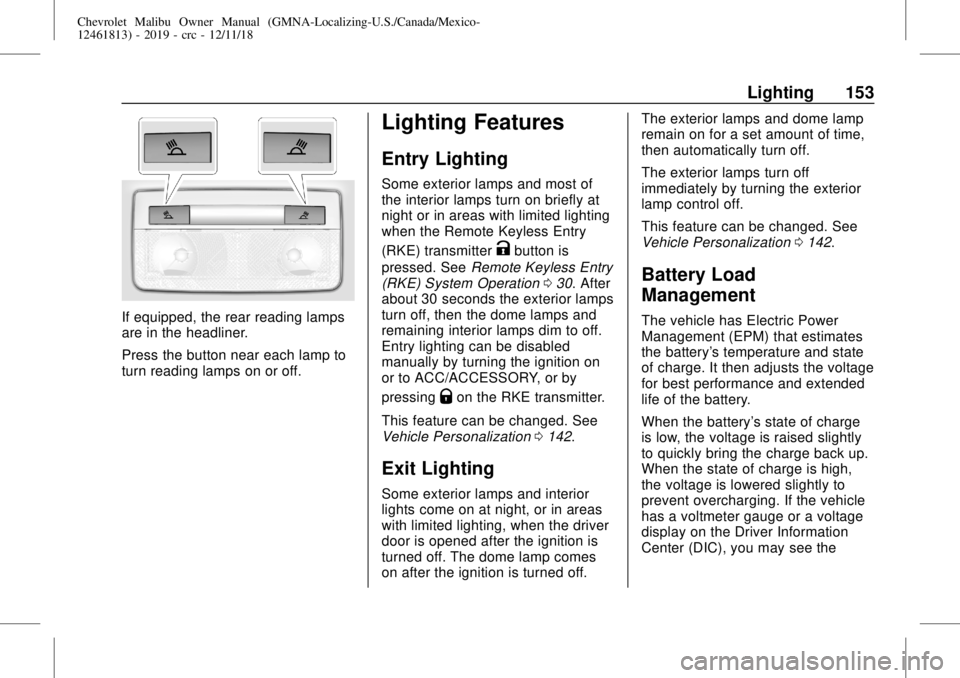
If equipped, the rear reading lamps
are in the headliner.
Press the button near each lamp to
turn reading lamps on or off.
Lighting Features
Entry Lighting
Some exterior lamps and most of
the interior lamps turn on briefly at
night or in areas with limited lighting
when the Remote Keyless Entry
(RKE) transmitter
Kbutton is
pressed. SeeRemote Keyless Entry
(RKE) System Operation030. After
about 30 seconds the exterior lamps
turn off, then the dome lamps and
remaining interior lamps dim to off.
Entry lighting can be disabled
manually by turning the ignition on
or to ACC/ACCESSORY, or by
pressing
Qon the RKE transmitter.
This feature can be changed. See
Vehicle Personalization0142.
Exit Lighting
Some exterior lamps and interior
lights come on at night, or in areas
with limited lighting, when the driver
door is opened after the ignition is
turned off. The dome lamp comes
on after the ignition is turned off.The exterior lamps and dome lamp
remain on for a set amount of time,
then automatically turn off.
The exterior lamps turn off
immediately by turning the exterior
lamp control off.
This feature can be changed. See
Vehicle Personalization0142.
Battery Load
Management
The vehicle has Electric Power
Management (EPM) that estimates
the battery's temperature and state
of charge. It then adjusts the voltage
for best performance and extended
life of the battery.
When the battery's state of charge
is low, the voltage is raised slightly
to quickly bring the charge back up.
When the state of charge is high,
the voltage is lowered slightly to
prevent overcharging. If the vehicle
has a voltmeter gauge or a voltage
display on the Driver Information
Center (DIC), you may see the
Page 154 of 382
Chevrolet Malibu Owner Manual (GMNA-Localizing-U.S./Canada/Mexico-
12461813) - 2019 - crc - 12/11/18
154 Lighting
voltage move up or down. This is
normal. If there is a problem, an
alert will be displayed.
The battery can be discharged at
idle if the electrical loads are very
high. This is true for all vehicles.
This is because the generator
(alternator) may not be spinning fast
enough at idle to produce all of the
power needed for very high
electrical loads.
A high electrical load occurs when
several of the following are on, such
as: headlamps, high beams, rear
window defogger, climate control fan
at high speed, heated seats, engine
cooling fans, trailer loads, and loads
plugged into accessory power
outlets.
EPM works to prevent excessive
discharge of the battery. It does this
by balancing the generator's output
and the vehicle's electrical needs.
It can increase engine idle speed to
generate more power whenever
needed. It can temporarily reduce
the power demands of some
accessories.Normally, these actions occur in
steps or levels, without being
noticeable. In rare cases at the
highest levels of corrective action,
this action may be noticeable to the
driver. If so, a DIC message might
be displayed and it is recommended
that the driver reduce the electrical
loads as much as possible.
Battery Power Protection
The battery saver feature is
designed to protect the vehicle's
battery.
If some interior lamps are left on
and the ignition is turned off, the
battery rundown protection system
automatically turns the lamp off after
some time.
Exterior Lighting Battery
Saver
The exterior lamps turn off about
10 minutes after the ignition is
turned off, if the parking lamps or
headlamps have been manually left
on. This protects against draining
the battery. To restart the 10-minutetimer, turn the exterior lamp control
to the off position and then back to
the parking lamp or headlamp
position.
To keep the lamps on for more than
10 minutes, the ignition must be on
or in ACC/ACCESSORY.
Page 172 of 382
Chevrolet Malibu Owner Manual (GMNA-Localizing-U.S./Canada/Mexico-
12461813) - 2019 - crc - 12/11/18
172 Driving and Operating
Warning (Continued)
the fan speed to the highest
setting. See“Climate
Control Systems.”
For more information about CO,
seeEngine Exhaust0184.
To save fuel, run the engine for
short periods to warm the vehicle
and then shut the engine off and
partially close the window. Moving
about to keep warm also helps.
If it takes time for help to arrive,
when running the engine, push the
accelerator pedal slightly so the
engine runs faster than the idle
speed. This keeps the battery
charged to restart the vehicle and to
signal for help with the headlamps.
Do this as little as possible, to
save fuel.
If the Vehicle Is Stuck
Slowly and cautiously spin the
wheels to free the vehicle when
stuck in sand, mud, ice, or snow.If stuck too severely for the traction
system to free the vehicle, turn the
traction system off and use the
rocking method. SeeTraction
Control/Electronic Stability Control
0192.
{Warning
If the vehicle's tires spin at high
speed, they can explode, and you
or others could be injured. The
vehicle can overheat, causing an
engine compartment fire or other
damage. Spin the wheels as little
as possible and avoid going
above 56 km/h (35 mph).
Rocking the Vehicle to Get
it Out
Turn the steering wheel left and
right to clear the area around the
front wheels. Turn off any traction
system. Shift back and forth
between R (Reverse) and a low
forward gear, spinning the wheels
as little as possible. To prevent
transmission wear, wait until thewheels stop spinning before shifting
gears. Release the accelerator
pedal while shifting, and press
lightly on the accelerator pedal
when the transmission is in gear.
Slowly spinning the wheels in the
forward and reverse directions
causes a rocking motion that could
free the vehicle. If that does not get
the vehicle out after a few tries, it
might need to be towed out. If the
vehicle does need to be towed out,
seeTowing the Vehicle0315.
Vehicle Load Limits
It is very important to know how
much weight the vehicle can
carry. This weight is called the
vehicle capacity weight and
includes the weight of all
occupants, cargo, and all
nonfactory-installed options.
Two labels on the vehicle may
show how much weight it may
properly carry: the Tire and
Loading Information label and
the Certification label.
Page 177 of 382
Chevrolet Malibu Owner Manual (GMNA-Localizing-U.S./Canada/Mexico-
12461813) - 2019 - crc - 12/11/18
Driving and Operating 177
The RKE transmitter must be in the
vehicle for the system to operate.
If the pushbutton start is not
working, the vehicle may be near a
strong radio antenna signal causing
interference to the Keyless Access
system. SeeRemote Keyless Entry
(RKE) System Operation030.
To shift out of P (Park), the ignition
must be on or in Service Mode, and
the brake pedal must be applied.
Stopping the Engine/LOCK/
OFF (No Indicator Lights) :When
the vehicle is stopped, press
ENGINE START/STOP once to turn
the engine off.
If the vehicle is in P (Park), the
ignition will turn off, and Retained
Accessory Power (RAP) will remain
active. SeeRetained Accessory
Power (RAP)0181.
If the vehicle is not in P (Park), the
ignition will return to ACC/
ACCESSORY and display the
message SHIFT TO PARK in the
Driver Information Center (DIC).
When the vehicle is shifted into
P (Park), the ignition will turn off.Do not turn the engine off when the
vehicle is moving. This will cause a
loss of power assist in the brake
and steering systems and disable
the airbags.
If the vehicle must be shut off in an
emergency:
1. Brake using a firm and steady
pressure. Do not pump the
brakes repeatedly. This may
deplete power assist, requiring
increased brake pedal force.
2. Shift the vehicle to N (Neutral).
This can be done while the
vehicle is moving. After shifting
to N (Neutral), firmly apply the
brakes and steer the vehicle to
a safe location.
3. Come to a complete stop, shift
to P (Park), and turn the
ignition off. The shift lever must
be in P (Park) to turn the
ignition off.
4. Set the parking brake. See
Electric Parking Brake0189.{Warning
Turning off the vehicle while
moving may cause loss of power
assist in the brake and steering
systems and disable the airbags.
While driving, only shut the
vehicle off in an emergency.
If the vehicle cannot be pulled over
and must be shut off while driving,
press and hold ENGINE START/
STOP for longer than two seconds,
or press twice in five seconds.
ACC/ACCESSORY (Amber
Indicator Light) :This mode allows
you to use some electrical
accessories when the engine is off.
With the ignition off, pressing the
button one time without the brake
pedal applied will place the ignition
system in ACC/ACCESSORY.
The ignition will switch from ACC/
ACCESSORY to off after
five minutes to prevent battery
run down.
Page 178 of 382
Chevrolet Malibu Owner Manual (GMNA-Localizing-U.S./Canada/Mexico-
12461813) - 2019 - crc - 12/11/18
178 Driving and Operating
ON/RUN/START (Green Indicator
Light) :This mode is for driving and
starting. With the ignition off, and
the brake pedal applied, pressing
the button once will turn the ignition
on. Once engine cranking begins,
release the button. Engine cranking
will continue until the engine starts.
SeeStarting the Engine0178. The
ignition will then remain on.
Service Mode
This power mode is available for
service and diagnostics, and to
verify the proper operation of the
malfunction indicator lamp as may
be required for emission inspection
purposes. With the vehicle off, and
the brake pedal not applied,
pressing and holding the button for
more than five seconds will place
the vehicle in Service Mode. The
instruments and audio systems will
operate as they do with the ignition
on, but the vehicle will not be able
to be driven. The engine will not
start in Service Mode. Press the
button again to turn the vehicle off.Starting the Engine
Move the shift lever to P (Park) or
N (Neutral). The engine will not start
in any other position. To restart the
engine when the vehicle is already
moving, use N (Neutral) only.
For hybrid vehicles, the engine will
only start if required for cabin
warming or high voltage battery
charging. The vehicle ready light will
be illuminated when the vehicle is
ready to be driven.
Caution
Do not try to shift to P (Park) if the
vehicle is moving. If you do, you
could damage the transmission.
Shift to P (Park) only when the
vehicle is stopped.
Caution
If you add electrical parts or
accessories, you could change
the way the engine operates. Any
resulting damage would not be
covered by the vehicle warranty.
SeeAdd-On Electrical Equipment
0231.
Starting Procedure
1. With the Keyless Access
system, the RKE transmitter
must be in the vehicle. Press
ENGINE START/STOP with the
brake pedal applied. When the
engine begins cranking, let go
of the button.
The idle speed will go down as
the engine gets warm. Do not
race the engine immediately
after starting it.
If the RKE transmitter is not in
the vehicle, if there is
interference, or if the RKE
transmitter battery is low, the