heat CHEVROLET MALIBU 2020 Owner's Manual
[x] Cancel search | Manufacturer: CHEVROLET, Model Year: 2020, Model line: MALIBU, Model: CHEVROLET MALIBU 2020Pages: 358, PDF Size: 3.27 MB
Page 7 of 358
Chevrolet Malibu Owner Manual (GMNA-Localizing-U.S./Canada/Mexico-
13555849) - 2020 - CRC - 8/16/19
6 Introduction
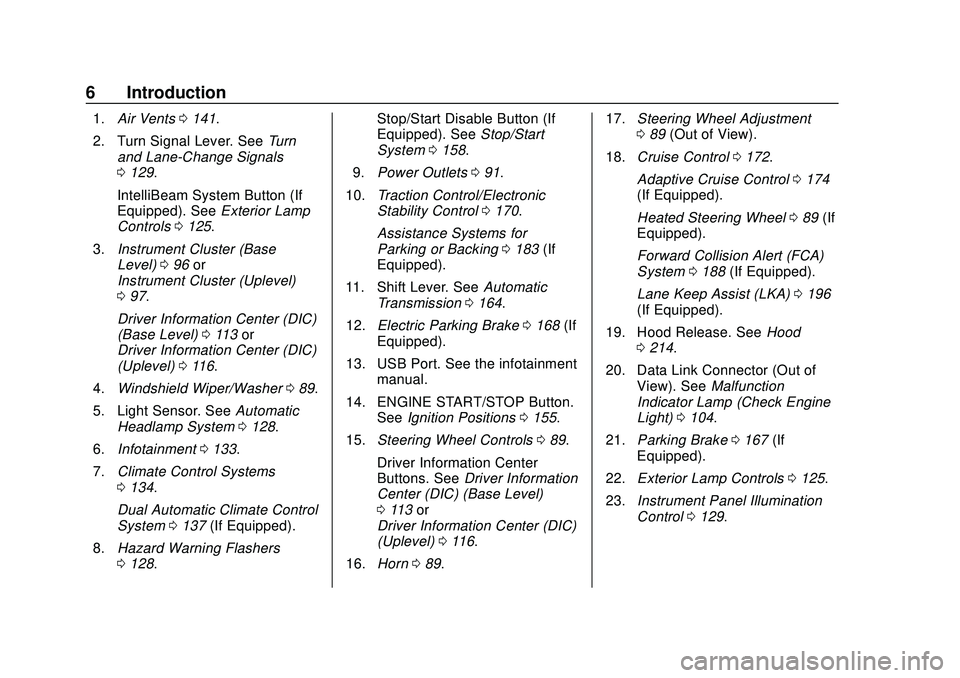
1.Air Vents 0141.
2. Turn Signal Lever. See Turn
and Lane-Change Signals
0 129.
IntelliBeam System Button (If
Equipped). See Exterior Lamp
Controls 0125.
3. Instrument Cluster (Base
Level) 096 or
Instrument Cluster (Uplevel)
0 97.
Driver Information Center (DIC)
(Base Level) 0113 or
Driver Information Center (DIC)
(Uplevel) 0116.
4. Windshield Wiper/Washer 089.
5. Light Sensor. See Automatic
Headlamp System 0128.
6. Infotainment 0133.
7. Climate Control Systems
0134.
Dual Automatic Climate Control
System 0137 (If Equipped).
8. Hazard Warning Flashers
0128. Stop/Start Disable Button (If
Equipped). See
Stop/Start
System 0158.
9. Power Outlets 091.
10. Traction Control/Electronic
Stability Control 0170.
Assistance Systems for
Parking or Backing 0183 (If
Equipped).
11. Shift Lever. See Automatic
Transmission 0164.
12. Electric Parking Brake 0168 (If
Equipped).
13. USB Port. See the infotainment manual.
14. ENGINE START/STOP Button. SeeIgnition Positions 0155.
15. Steering Wheel Controls 089.
Driver Information Center
Buttons. See Driver Information
Center (DIC) (Base Level)
0 113 or
Driver Information Center (DIC)
(Uplevel) 0116.
16. Horn 089. 17.
Steering Wheel Adjustment
089 (Out of View).
18. Cruise Control 0172.
Adaptive Cruise Control 0174
(If Equipped).
Heated Steering Wheel 089 (If
Equipped).
Forward Collision Alert (FCA)
System 0188 (If Equipped).
Lane Keep Assist (LKA) 0196
(If Equipped).
19. Hood Release. See Hood
0 214.
20. Data Link Connector (Out of View). See Malfunction
Indicator Lamp (Check Engine
Light) 0104.
21. Parking Brake 0167 (If
Equipped).
22. Exterior Lamp Controls 0125.
23. Instrument Panel Illumination
Control 0129.
Page 8 of 358
Chevrolet Malibu Owner Manual (GMNA-Localizing-U.S./Canada/Mexico-
13555849) - 2020 - CRC - 8/16/19
Keys, Doors, and Windows 7
Keys, Doors, and
Windows
Keys and Locks
Keys . . . . . . . . . . . . . . . . . . . . . . . . . . . . 7
Remote Keyless Entry (RKE)System . . . . . . . . . . . . . . . . . . . . . . . . 8
Remote Keyless Entry (RKE) System Operation . . . . . . . . . . . . . 8
Remote Vehicle Start . . . . . . . . . . 16
Door Locks . . . . . . . . . . . . . . . . . . . . 17
Power Door Locks . . . . . . . . . . . . . 20
Delayed Locking . . . . . . . . . . . . . . . 20
Automatic Door Locks . . . . . . . . . 21
Lockout Protection . . . . . . . . . . . . . 21
Safety Locks . . . . . . . . . . . . . . . . . . . 21
Doors
Trunk . . . . . . . . . . . . . . . . . . . . . . . . . . 22
Vehicle Security
Vehicle Security . . . . . . . . . . . . . . . . 24
Vehicle Alarm System . . . . . . . . . 24
Immobilizer . . . . . . . . . . . . . . . . . . . . 25
Immobilizer Operation . . . . . . . . . 25
Exterior Mirrors
Convex Mirrors . . . . . . . . . . . . . . . . 26
Power Mirrors . . . . . . . . . . . . . . . . . . 27 Folding Mirrors . . . . . . . . . . . . . . . . . 27
Heated Mirrors . . . . . . . . . . . . . . . . . 27
Reverse Tilt Mirrors . . . . . . . . . . . . 27
Interior Mirrors
Interior Rearview Mirrors . . . . . . . 28
Manual Rearview Mirror . . . . . . . . 28
Automatic Dimming Rearview
Mirror . . . . . . . . . . . . . . . . . . . . . . . . . 28
Windows
Windows . . . . . . . . . . . . . . . . . . . . . . . 28
Power Windows . . . . . . . . . . . . . . . 28
Sun Visors . . . . . . . . . . . . . . . . . . . . . 30
Roof
Sunroof . . . . . . . . . . . . . . . . . . . . . . . . 30
Keys and Locks
Keys
{Warning
Leaving children in a vehicle with
a Remote Keyless Entry (RKE)
transmitter is dangerous and
children or others could be
seriously injured or killed. They
could operate the power windows
or other controls or make the
vehicle move. The windows will
function with the RKE transmitter
in the vehicle, and children or
others could be caught in the path
of a closing window. Do not leave
children in a vehicle with an RKE
transmitter.
Page 15 of 358
Chevrolet Malibu Owner Manual (GMNA-Localizing-U.S./Canada/Mexico-
13555849) - 2020 - CRC - 8/16/19
14 Keys, Doors, and Windows
When all additional transmitters
are programmed, press and
hold ENGINE START/STOP for
12 seconds to exit
programming mode.
7. Return the key back into the transmitter.
8. Replace the key lock cylinder cap. See Door Locks 017.
Starting the Vehicle with a Low
Transmitter Battery
While trying to start the vehicle,
if the transmitter battery is weak or if
there is interference with the signal,
the DIC may display NO REMOTE
DETECTED or NO REMOTE KEY
WAS DETECTED PLACE KEY IN
TRANSMITTER POCKET THEN
START YOUR VEHICLE. The DIC
may also display REPLACE
BATTERY IN REMOTE KEY.
To start the vehicle:
1. Open the center console and place the transmitter in the
transmitter pocket with the
buttons facing the rear of the
vehicle. 2. With the vehicle in P (Park) or
N (Neutral), press the brake
pedal and press ENGINE
START/STOP. See Starting the
Engine 0157.
Replace the transmitter battery
as soon as possible.
Battery Replacement
{Warning
Never allow children to play with
the RKE transmitter. The
transmitter contains a small
battery, which can be a choking
hazard. If swallowed, internal
burns can occur, resulting in
severe injury or death. Seek
medical attention immediately if a
battery is swallowed.
{Warning
To avoid personal injury, do not
touch metal surfaces on the RKE
transmitter when it has been
exposed to extreme heat. These
surfaces can be hot to the touch
at temperatures above 59 °C (138
°F).
Caution
When replacing the battery, do
not touch any of the circuitry on
the transmitter. Static from your
body could damage the
transmitter.
Caution
Always replace the battery with
the correct type. Replacing the
battery with an incorrect type
could potentially create a risk of (Continued)
Page 17 of 358
Chevrolet Malibu Owner Manual (GMNA-Localizing-U.S./Canada/Mexico-
13555849) - 2020 - CRC - 8/16/19
16 Keys, Doors, and Windows
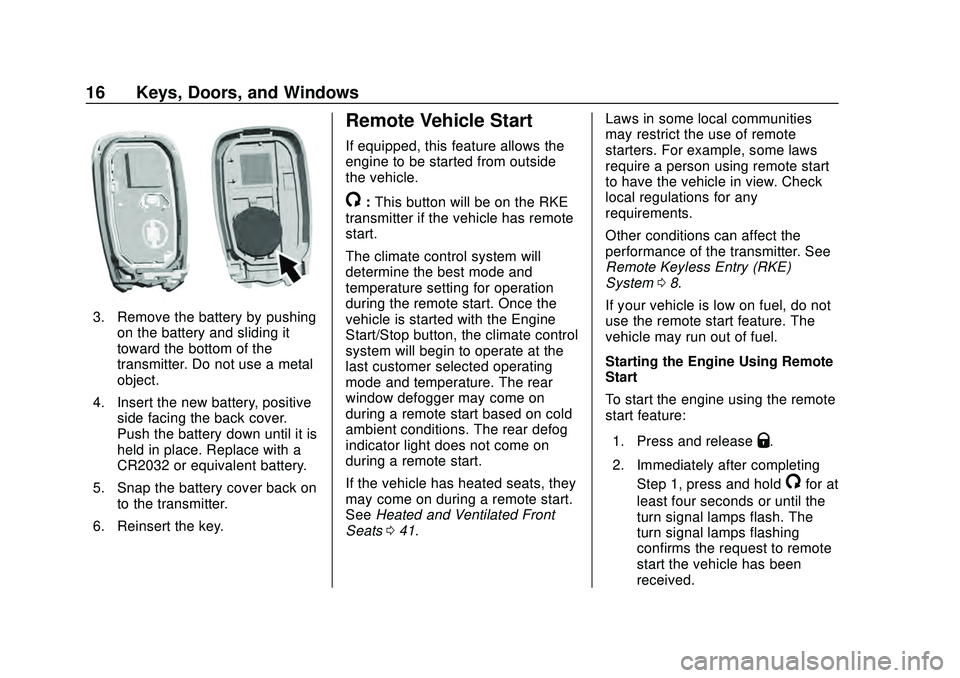
3. Remove the battery by pushingon the battery and sliding it
toward the bottom of the
transmitter. Do not use a metal
object.
4. Insert the new battery, positive side facing the back cover.
Push the battery down until it is
held in place. Replace with a
CR2032 or equivalent battery.
5. Snap the battery cover back on to the transmitter.
6. Reinsert the key.
Remote Vehicle Start
If equipped, this feature allows the
engine to be started from outside
the vehicle.
/: This button will be on the RKE
transmitter if the vehicle has remote
start.
The climate control system will
determine the best mode and
temperature setting for operation
during the remote start. Once the
vehicle is started with the Engine
Start/Stop button, the climate control
system will begin to operate at the
last customer selected operating
mode and temperature. The rear
window defogger may come on
during a remote start based on cold
ambient conditions. The rear defog
indicator light does not come on
during a remote start.
If the vehicle has heated seats, they
may come on during a remote start.
See Heated and Ventilated Front
Seats 041. Laws in some local communities
may restrict the use of remote
starters. For example, some laws
require a person using remote start
to have the vehicle in view. Check
local regulations for any
requirements.
Other conditions can affect the
performance of the transmitter. See
Remote Keyless Entry (RKE)
System
08.
If your vehicle is low on fuel, do not
use the remote start feature. The
vehicle may run out of fuel.
Starting the Engine Using Remote
Start
To start the engine using the remote
start feature:
1. Press and release
Q.
2. Immediately after completing Step 1, press and hold
/for at
least four seconds or until the
turn signal lamps flash. The
turn signal lamps flashing
confirms the request to remote
start the vehicle has been
received.
Page 19 of 358
Chevrolet Malibu Owner Manual (GMNA-Localizing-U.S./Canada/Mexico-
13555849) - 2020 - CRC - 8/16/19
18 Keys, Doors, and Windows
Warning (Continued)
moving. The chance of
being thrown out of the
vehicle in a crash is
increased if the doors are
not locked. So, all
passengers should wear
seat belts properly and the
doors should be locked
whenever the vehicle is
driven.
. Young children who get into
unlocked vehicles may be
unable to get out. A child
can be overcome by
extreme heat and can suffer
permanent injuries or even
death from heat stroke.
Always lock the vehicle
whenever leaving it.
. Outsiders can easily enter
through an unlocked door
when you slow down or stop
the vehicle. Locking the
doors can help prevent this
from happening. To lock or unlock the doors from the
outside:
.
PressQorKon the Remote
Keyless Entry (RKE) transmitter.
See Remote Keyless Entry
(RKE) System Operation 08.
. In the case of a dead battery,
use the key in the driver door.
The key lock cylinder is covered
with a cap.
To lock or unlock the doors from the
inside:
. Press
QorKon the power door
lock switch.
. Pull the door handle once to
unlock the door. Pull the handle
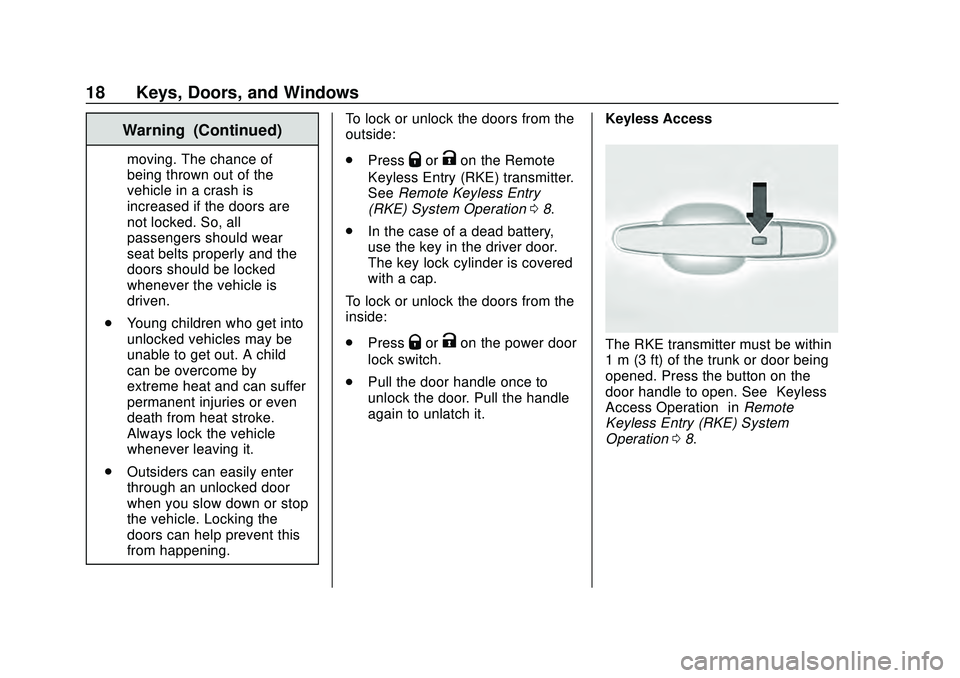
again to unlatch it. Keyless AccessThe RKE transmitter must be within
1 m (3 ft) of the trunk or door being
opened. Press the button on the
door handle to open. See
“Keyless
Access Operation” inRemote
Keyless Entry (RKE) System
Operation 08.
Page 28 of 358
Chevrolet Malibu Owner Manual (GMNA-Localizing-U.S./Canada/Mexico-
13555849) - 2020 - CRC - 8/16/19
Keys, Doors, and Windows 27
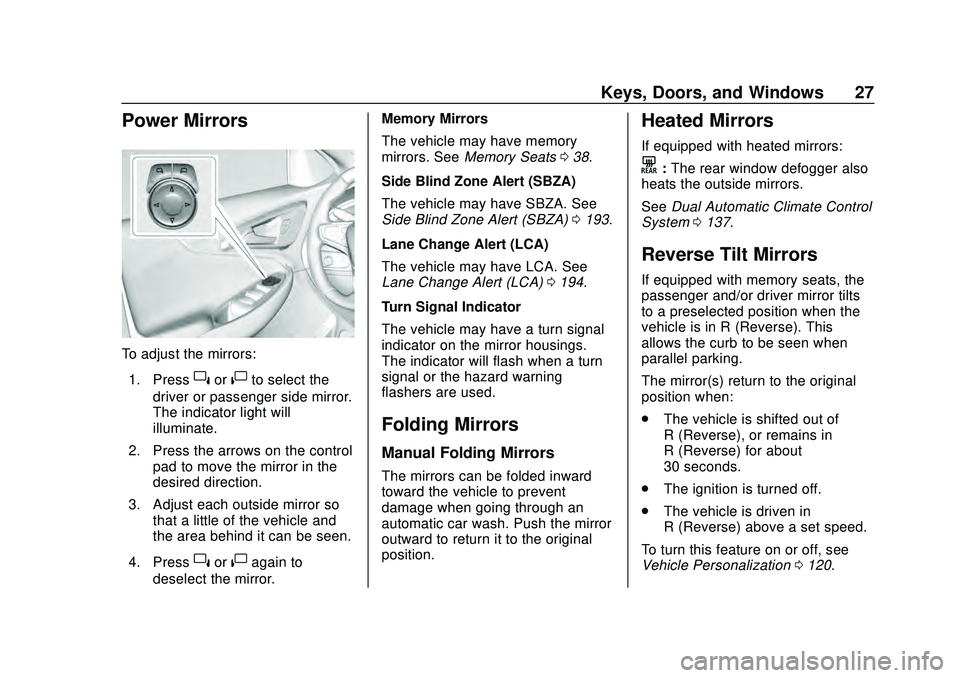
Power Mirrors
To adjust the mirrors:1. Press
}or|to select the
driver or passenger side mirror.
The indicator light will
illuminate.
2. Press the arrows on the control pad to move the mirror in the
desired direction.
3. Adjust each outside mirror so that a little of the vehicle and
the area behind it can be seen.
4. Press
}or|again to
deselect the mirror. Memory Mirrors
The vehicle may have memory
mirrors. See
Memory Seats 038.
Side Blind Zone Alert (SBZA)
The vehicle may have SBZA. See
Side Blind Zone Alert (SBZA) 0193.
Lane Change Alert (LCA)
The vehicle may have LCA. See
Lane Change Alert (LCA) 0194.
Turn Signal Indicator
The vehicle may have a turn signal
indicator on the mirror housings.
The indicator will flash when a turn
signal or the hazard warning
flashers are used.
Folding Mirrors
Manual Folding Mirrors
The mirrors can be folded inward
toward the vehicle to prevent
damage when going through an
automatic car wash. Push the mirror
outward to return it to the original
position.
Heated Mirrors
If equipped with heated mirrors:
K: The rear window defogger also
heats the outside mirrors.
See Dual Automatic Climate Control
System 0137.
Reverse Tilt Mirrors
If equipped with memory seats, the
passenger and/or driver mirror tilts
to a preselected position when the
vehicle is in R (Reverse). This
allows the curb to be seen when
parallel parking.
The mirror(s) return to the original
position when:
.
The vehicle is shifted out of
R (Reverse), or remains in
R (Reverse) for about
30 seconds.
. The ignition is turned off.
. The vehicle is driven in
R (Reverse) above a set speed.
To turn this feature on or off, see
Vehicle Personalization 0120.
Page 29 of 358
Chevrolet Malibu Owner Manual (GMNA-Localizing-U.S./Canada/Mexico-
13555849) - 2020 - CRC - 8/16/19
28 Keys, Doors, and Windows
Interior Mirrors
Interior Rearview Mirrors
Adjust the rearview mirror for a clear
view of the area behind the vehicle.
Do not spray glass cleaner directly
on the mirror. Use a soft towel
dampened with water.
Manual Rearview Mirror
If equipped, push the tab forward for
daytime use and pull it rearward for
nighttime use to avoid glare of the
headlamps from behind.
Automatic Dimming
Rearview Mirror
If equipped, automatic dimming
reduces the glare of headlamps
from behind. The dimming feature
comes on when the vehicle is
started.
Windows
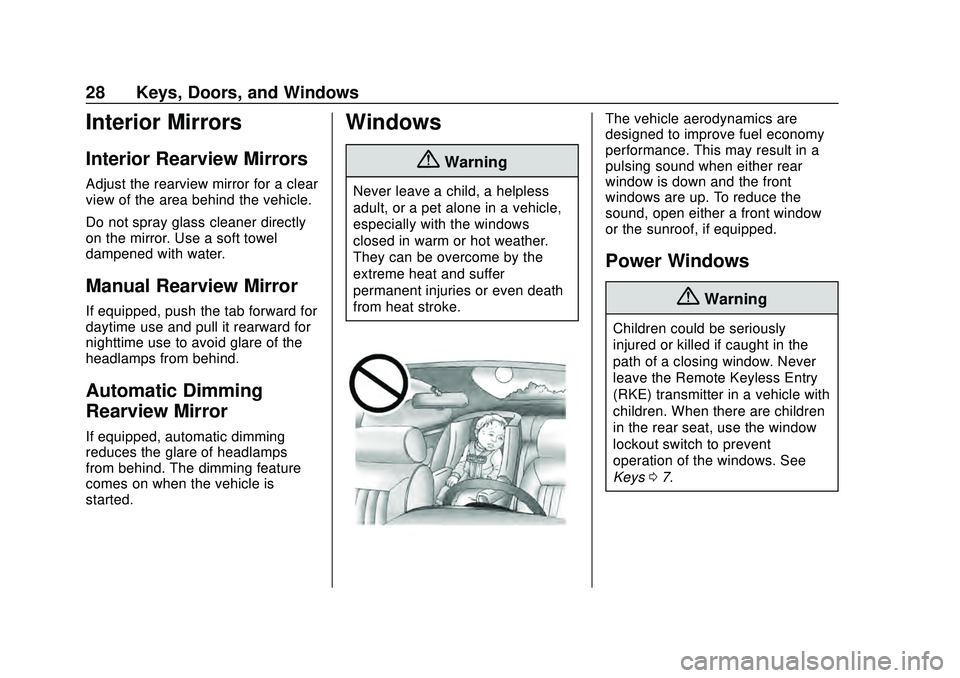
{Warning
Never leave a child, a helpless
adult, or a pet alone in a vehicle,
especially with the windows
closed in warm or hot weather.
They can be overcome by the
extreme heat and suffer
permanent injuries or even death
from heat stroke.
The vehicle aerodynamics are
designed to improve fuel economy
performance. This may result in a
pulsing sound when either rear
window is down and the front
windows are up. To reduce the
sound, open either a front window
or the sunroof, if equipped.
Power Windows
{Warning
Children could be seriously
injured or killed if caught in the
path of a closing window. Never
leave the Remote Keyless Entry
(RKE) transmitter in a vehicle with
children. When there are children
in the rear seat, use the window
lockout switch to prevent
operation of the windows. See
Keys07.
Page 33 of 358
Chevrolet Malibu Owner Manual (GMNA-Localizing-U.S./Canada/Mexico-
13555849) - 2020 - CRC - 8/16/19
32 Seats and Restraints
Seats and
Restraints
Head Restraints
Head Restraints . . . . . . . . . . . . . . . 33
Front Seats
Seat Adjustment . . . . . . . . . . . . . . . 35
Power Seat Adjustment . . . . . . . . 36
Lumbar Adjustment . . . . . . . . . . . . 36
Reclining Seatbacks . . . . . . . . . . . 36
Memory Seats . . . . . . . . . . . . . . . . . 38
Heated and Ventilated FrontSeats . . . . . . . . . . . . . . . . . . . . . . . . . 41
Rear Seats
Rear Seats . . . . . . . . . . . . . . . . . . . . 42
Rear Seat Armrest . . . . . . . . . . . . . 45
Heated Rear Seats . . . . . . . . . . . . 45
Seat Belts
Seat Belts . . . . . . . . . . . . . . . . . . . . . 45
How to Wear Seat BeltsProperly . . . . . . . . . . . . . . . . . . . . . . 47
Lap-Shoulder Belt . . . . . . . . . . . . . 49
Seat Belt Use During Pregnancy . . . . . . . . . . . . . . . . . . . . 51
Seat Belt Extender . . . . . . . . . . . . . 52
Safety System Check . . . . . . . . . . 52 Seat Belt Care . . . . . . . . . . . . . . . . . 52
Replacing Seat Belt System
Parts after a Crash . . . . . . . . . . . 53
Airbag System
Airbag System . . . . . . . . . . . . . . . . . 53
Where Are the Airbags? . . . . . . . 55
When Should an AirbagInflate? . . . . . . . . . . . . . . . . . . . . . . . 56
What Makes an Airbag Inflate? . . . . . . . . . . . . . . . . . . . . . . . 57
How Does an Airbag Restrain? . . . . . . . . . . . . . . . . . . . . . 58
What Will You See after an Airbag Inflates? . . . . . . . . . . . . . . 58
Passenger Sensing System . . . 59
Servicing the Airbag-Equipped Vehicle . . . . . . . . . . . . . . . . . . . . . . . 64
Adding Equipment to the Airbag-Equipped Vehicle . . . . . 64
Airbag System Check . . . . . . . . . . 65
Replacing Airbag System Parts after a Crash . . . . . . . . . . . . . . . . . 65
Child Restraints
Older Children . . . . . . . . . . . . . . . . . 66
Infants and Young Children . . . . 67
Child Restraint Systems . . . . . . . 70
Where to Put the Restraint . . . . . 71
Lower Anchors and Tethers forChildren (LATCH System) . . . . 72 Replacing LATCH System Parts
After a Crash . . . . . . . . . . . . . . . . . 79
Securing Child Restraints (With the Seat Belt in the
Rear Seat) . . . . . . . . . . . . . . . . . . . 80
Securing Child Restraints (With the Seat Belt in the
Front Seat) . . . . . . . . . . . . . . . . . . . 82
Page 42 of 358
Chevrolet Malibu Owner Manual (GMNA-Localizing-U.S./Canada/Mexico-
13555849) - 2020 - CRC - 8/16/19
Seats and Restraints 41
To stop Seat Exit Memory
movement, press any of the
following memory controls:
.Power seat
. Memory SET, 1, 2, or
B
.Power mirror, with the driver or
passenger side mirror selected
. Power steering wheel,
if equipped
Obstructions
If something has blocked the driver
seat and/or power steering wheel
while recalling a memory position,
the recall may stop. Remove the
obstruction and try the recall again.
If the memory position still does not
recall, see your dealer.
Heated and Ventilated
Front Seats
{Warning
If temperature change or pain to
the skin cannot be felt, the seat
heater may cause burns. To
reduce the risk of burns, use care
when using the seat heater,
especially for long periods of
time. Do not place anything on
the seat that insulates against
heat, such as a blanket, cushion,
cover, or similar item. This may
cause the seat heater to
overheat. An overheated seat
heater may cause a burn or may
damage the seat.
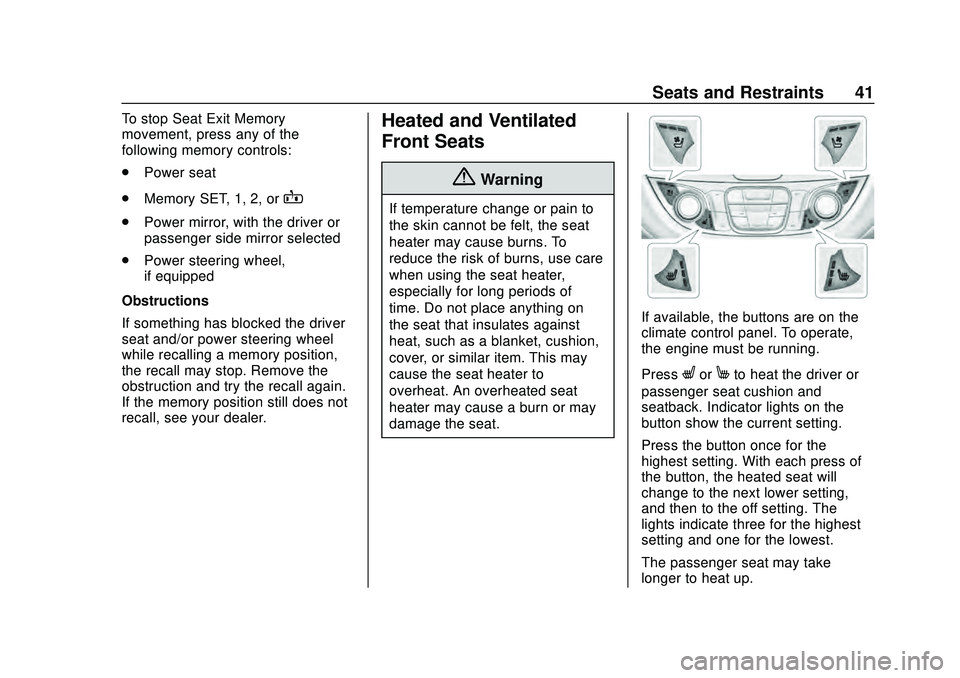
If available, the buttons are on the
climate control panel. To operate,
the engine must be running.
Press
LorMto heat the driver or
passenger seat cushion and
seatback. Indicator lights on the
button show the current setting.
Press the button once for the
highest setting. With each press of
the button, the heated seat will
change to the next lower setting,
and then to the off setting. The
lights indicate three for the highest
setting and one for the lowest.
The passenger seat may take
longer to heat up.
Page 43 of 358
Chevrolet Malibu Owner Manual (GMNA-Localizing-U.S./Canada/Mexico-
13555849) - 2020 - CRC - 8/16/19
42 Seats and Restraints
Press{orCto ventilate the driver
or passenger seat. Indicator lights
on the button show the current
setting.
Press the button once for the
highest setting. With each press of
the button, the ventilated seat will
change to the next lower setting,
and then to the off setting. The
lights indicate three for the highest
setting and one for the lowest.
Auto Heated Seats
When the vehicle is on, this feature
will automatically activate the
heated seats at the level required by
the vehicle’ s interior temperature.
The active high, medium, low, or off
heated seat level will be indicated
by the manual heated seat buttons
on the center stack. Use the manual
heated seat buttons on the center
stack to turn auto heated seats off.
If the passenger seat is unoccupied,
the auto heated seats feature will
not activate that seat. The auto
heated seats feature can be
programmed to always be enabled
when the vehicle is on. See
Vehicle Personalization 0120.
Remote Start Auto Heated and
Ventilated Seats
During a remote start, the heated or
ventilated seats, if equipped, can be
turned on automatically. When it is
cold outside, the heated seats turn
on, and when it is hot outside the
ventilated seats turn on. The heated
or ventilated seats may be canceled
when the ignition is turned on. Press
the button to use the heated or
ventilated seats after the vehicle is
started.
The heated or ventilated seat
indicator lights on the button may
not turn on during a remote start.
The heated seat temperature
performance of an unoccupied seat
may be reduced. This is normal.
The heated or ventilated seats will
not turn on during a remote start
unless they are enabled in the
vehicle personalization menu. See
Remote Vehicle Start 016 and
Vehicle Personalization 0120.Rear Seats
Rear Seat Reminder
If equipped, the message REAR
SEAT REMINDER LOOK IN REAR
SEAT displays under certain
conditions indicating there may be
an item or passenger in the rear
seat. Check before exiting the
vehicle.
This feature will activate when a
second row door is opened while
the vehicle is on or up to 10 minutes
before the vehicle is turned on.
There will be an alert when the
vehicle is turned off. The alert does
not directly detect objects in the rear
seat; instead, under certain
conditions, it detects when a rear
door is opened and closed,
indicating that there may be
something in the rear seat.
The feature is active only once each
time the vehicle is turned on and off,
and will require reactivation by
opening and closing the second row
doors. There may be an alert even
when there is nothing in the rear
seat; for example, if a child entered