seats CHEVROLET MALIBU 2023 Workshop Manual
[x] Cancel search | Manufacturer: CHEVROLET, Model Year: 2023, Model line: MALIBU, Model: CHEVROLET MALIBU 2023Pages: 332, PDF Size: 6.2 MB
Page 119 of 332
Chevrolet Malibu Owner Manual (GMNA-Localizing-U.S./Canada-
16273584) - 2023 - CRC - 9/28/22
118 Infotainment System
Mobile Device Usage
Mobile device usage, such as making or
receiving calls, charging, or just having the
mobile device on may cause static
interference in the radio. Unplug the mobile
device or turn it off if this happens.
Backglass Antenna
The AM-FM antenna is integrated with the
rear window defogger in the rear window.
Do not scratch the inside surface or damage
the lines in the glass. If the inside surface is
damaged, it could interfere with radio
reception. For proper radio reception, the
antenna connector needs to be properly
attached to the post on the glass.
Caution
Using a razor blade or sharp object to
clear the inside rear window can damage
the rear window antenna and/or the rear
window defogger. Repairs would not be
covered by the vehicle warranty. Do not
clear the inside rear window with sharp
objects.
Caution
Do not apply aftermarket glass tinting
with metallic film. The metallic film in
some tinting materials will interfere with
or distort the incoming radio reception.
Any damage caused to the backglass
antenna due to metallic tinting materials
will not be covered by the vehicle
warranty.
Multi-Band Antenna
The multi-band roof antenna may be used
for radio, navigation, and other
communication systems, depending on the
equipped options. To ensure clear reception,
keep the antenna clear of obstructions, such
as snow and ice. If the vehicle has a
sunroof, and it is open, or a roof loaded
with cargo, reception may be affected.
Audio Players
Avoiding Untrusted Media Devices
When using media devices such as USB and
mobile devices, consider the source.
Untrusted media devices could contain files
that affect system operation or performance
and should be avoided.
USB Port
Audio stored on a USB device may be
listened to.
Depending on your vehicle, it may be
equipped with two USB ports in the center
console under the armrest and another two
on the center stack. These ports are for data
and charging. There may also be two USB
ports at the rear of the center console and a
USB port on each side of the third row seats
for charging only.
Caution
To avoid vehicle damage, unplug all
accessories and disconnect all accessory
cables from the vehicle when not in use.
Accessory cables left plugged into the
vehicle, unconnected to a device, could be
(Continued)
Page 159 of 332
Chevrolet Malibu Owner Manual (GMNA-Localizing-U.S./Canada-
16273584) - 2023 - CRC - 9/28/22
158 Climate Controls
To change the current mode, select one or
more of the following modes:
0:Clears the windows of fog or moisture.
Air is directed to the windshield.
{: Air is directed to the instrument
panel outlets.
z: Air is directed to the floor outlets.
0MAX : Air is directed to the windshield
and the fan runs at a higher speed. This
mode overrides the previous mode selected
and clears fog or frost from the windshield
more quickly. When the button is pressed
again, the system returns to the previous
mode setting and fan speed. The current
mode setting and fan speed appear in the
display screen.
For best results, clear all snow and ice from
the windshield before defrosting.
A/C : Press to turn the air conditioning
system on or off. This status appears in the
display screen. If the fan control is turned
off or the outside temperature falls below
freezing, the air conditioner will not run.
@: Press to turn on recirculation. An
indicator light comes on and the status
appears in the display screen. Air is recirculated to quickly cool the inside of the
vehicle or to reduce the entry of outside air
and odors.
Rear Window Defogger
K:
Press to turn the rear window defogger
on or off. An indicator light on the button
comes on to show that the rear window
defogger is on. The defogger turns off when
the vehicle is turned to off or to
accessory mode.
The upper lines on the rear window are
antenna grids and are not intended to
defrost the glass.
The rear window defogger can be set to
automatic operation. To turn Auto Defog off
or on, select Settings > Climate and Air
Quality > Auto Rear Defog > Select ON or
OFF. When Auto Rear Defog is selected, the
rear window defogger turns on
automatically when the interior temperature
is cold and the outside temperature is about
7 °C (44 °F) and below. The auto rear
defogger turns off automatically.
If the vehicle is equipped with heated
outside mirrors, they turn on when the rear
window defogger button is on and help to
clear fog or frost from the surface of the
mirror. See Heated Mirrors 022.
Caution
Do not try to clear frost or other material
from the inside of the front windshield
and rear window with a razor blade or
anything else that is sharp. This may
damage the rear window defogger grid
and affect the radio's ability to pick up
stations clearly. The repairs would not be
covered by the vehicle warranty.
Remote Start Climate Control Operation :
If equipped with remote start, the climate
control system may run when the vehicle is
started remotely. The system will determine
the best mode and temperature setting for
operation. Once the vehicle is started with
the Engine Start/Stop button, the climate
control system will begin to operate at the
last customer selected operating mode and
temperature. If equipped with heated or
ventilated seats, they may come on during a
remote start. See Remote Vehicle Start 013
and
Heated and Ventilated Front Seats 034.
Page 160 of 332
Chevrolet Malibu Owner Manual (GMNA-Localizing-U.S./Canada-
16273584) - 2023 - CRC - 9/28/22
Climate Controls 159
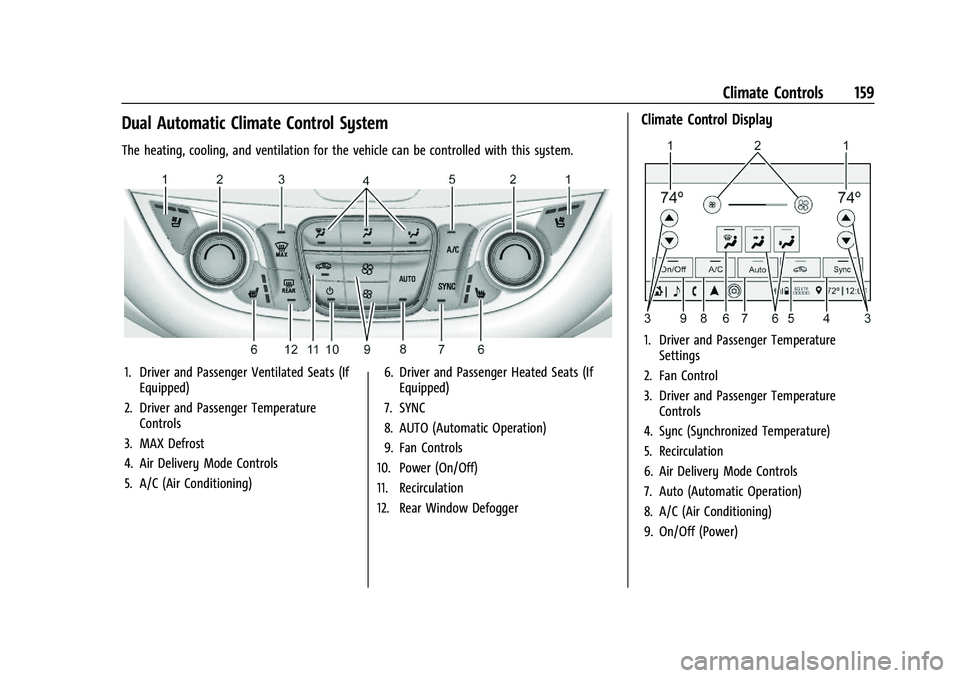
Dual Automatic Climate Control System
The heating, cooling, and ventilation for the vehicle can be controlled with this system.
1. Driver and Passenger Ventilated Seats (IfEquipped)
2. Driver and Passenger Temperature Controls
3. MAX Defrost
4. Air Delivery Mode Controls
5. A/C (Air Conditioning) 6. Driver and Passenger Heated Seats (If
Equipped)
7. SYNC
8. AUTO (Automatic Operation)
9. Fan Controls
10. Power (On/Off)
11. Recirculation
12. Rear Window Defogger
Climate Control Display
1. Driver and Passenger Temperature Settings
2. Fan Control
3. Driver and Passenger Temperature Controls
4. Sync (Synchronized Temperature)
5. Recirculation
6. Air Delivery Mode Controls
7. Auto (Automatic Operation)
8. A/C (Air Conditioning)
9. On/Off (Power)
Page 163 of 332
Chevrolet Malibu Owner Manual (GMNA-Localizing-U.S./Canada-
16273584) - 2023 - CRC - 9/28/22
162 Climate Controls
The rear window defogger can be set to
automatic operation. To turn Auto Defog off
or on, select Settings > Climate and Air
Quality > Auto Rear Defog > Select ON or
OFF. When Auto Rear Defog is selected, the
rear window defogger turns on
automatically when the interior temperature
is cold and the outside temperature is about
7 °C (45 °F) and below. The auto rear
defogger turns off automatically.
If equipped with heated outside mirrors,
they turn on when the rear window
defogger button is on and help to clear fog
or frost from the surface of the mirror. See
Heated Mirrors022.
Caution
Do not try to clear frost or other material
from the inside of the front windshield
and rear window with a razor blade or
anything else that is sharp. This may
damage the rear window defogger grid
and affect the radio's ability to pick up
stations clearly. The repairs would not be
covered by the vehicle warranty. Driver and Passenger Heated and Ventilated
Seats :
If equipped, press
LorMto heat
the driver or passenger seat.
If equipped, press
{orCto ventilate the
driver or passenger seat. See Heated and
Ventilated Front Seats 034.
Remote Start Climate Control Operation :
If equipped with remote start, the climate
control system may run when the vehicle is
started remotely. The system will determine
the best mode and temperature setting for
operation. Once the vehicle is started with
the Engine Start/Stop button, the climate
control system will begin to operate at the
last customer selected operating mode and
temperature. If equipped with heated or
ventilated seats, they may come on during a
remote start. See Remote Vehicle Start 013
and
Heated and Ventilated Front Seats 034.
Sensor
The solar sensor, on top of the instrument
panel near the windshield, monitors the
solar heat. The climate control system uses the sensor
information to adjust the temperature, fan
speed, recirculation, and air delivery mode
for best comfort.
Do not cover the sensor; otherwise the
automatic climate control system may not
work properly.
Afterblow Feature
If equipped, under certain conditions, the
fan may stay on or may turn on and off
several times after you turn off and lock the
vehicle. This is normal.
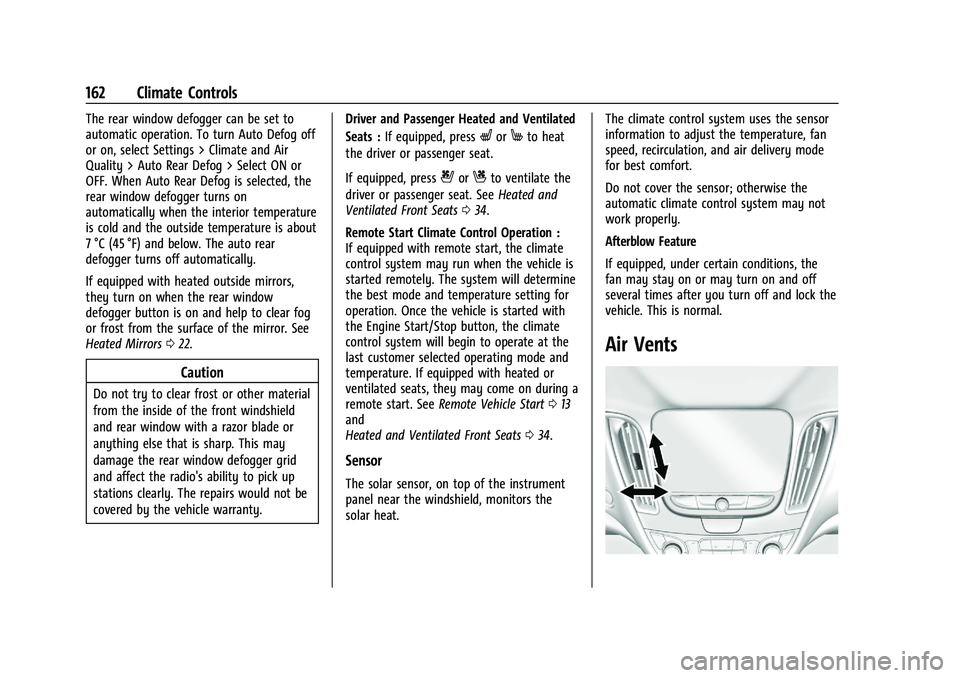
Air Vents
Page 164 of 332
Chevrolet Malibu Owner Manual (GMNA-Localizing-U.S./Canada-
16273584) - 2023 - CRC - 9/28/22
Climate Controls 163
Use the louvers on the air vents to change
the direction of the airflow.
On the center air vents, move the sliding
knob down to close off airflow.
On the side air vents, move the sliding knob
to the outboard side of the vehicle to close
off the airflow.
Operation Tips
.Keep all outlets open whenever possible
for best system performance.
.Keep the path under all seats clear of
objects to help circulate the air inside the
vehicle more effectively.
.Clear snow off the hood to improve
visibility and help decrease moisture
drawn into the vehicle, which may
improve long term system performance.
.Use of non-GM approved hood deflectors
can adversely affect the performance of
the system.
.Do not attach any devices to the air vent
slats; this restricts airflow and may cause
damage to the air vents.
Maintenance
Passenger Compartment Air Filter
The filter removes dust, pollen, and other
airborne irritants from outside air that is
pulled into the vehicle.
The filter should be replaced as part of
routine scheduled maintenance; see
Maintenance Schedule0290. To find out
what type of filter to use, see Maintenance
Replacement Parts 0295.
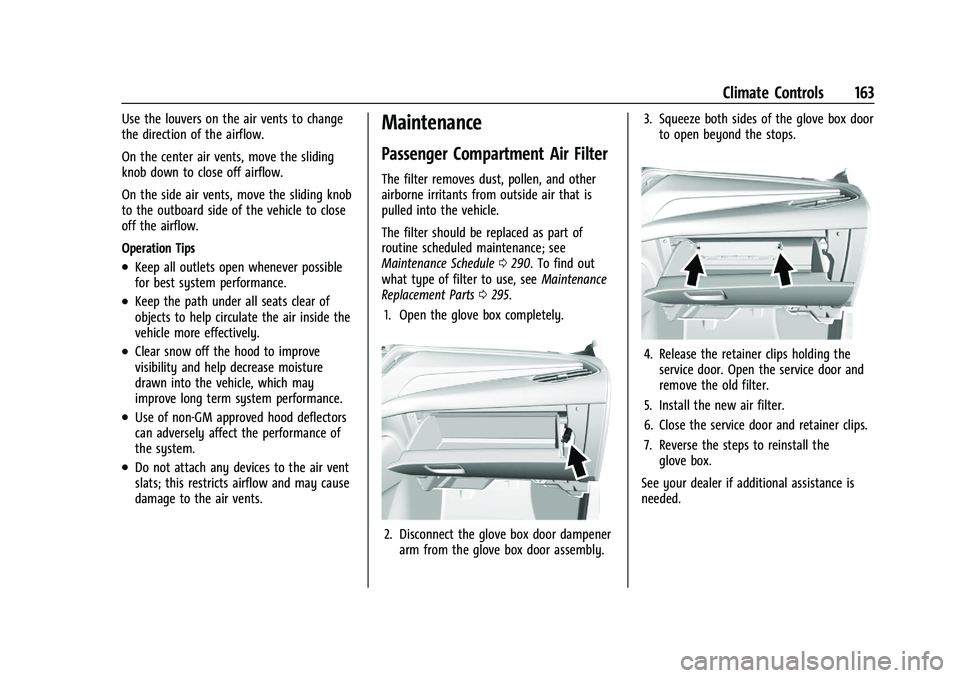
1. Open the glove box completely.
2. Disconnect the glove box door dampener arm from the glove box door assembly. 3. Squeeze both sides of the glove box door
to open beyond the stops.
4. Release the retainer clips holding theservice door. Open the service door and
remove the old filter.
5. Install the new air filter.
6. Close the service door and retainer clips.
7. Reverse the steps to reinstall the glove box.
See your dealer if additional assistance is
needed.
Page 175 of 332
Chevrolet Malibu Owner Manual (GMNA-Localizing-U.S./Canada-
16273584) - 2023 - CRC - 9/28/22
174 Driving and Operating
3.Available Cargo Weight = 113 kg
(250 lbs).
Example 3
1.Vehicle Capacity Weight for
Example 3 = 453 kg (1,000 lbs).
2.Subtract Occupant Weight @ 91 kg
(200 lbs) × 5 = 453 kg (1,000 lbs).
3.Available Cargo Weight =
0 kg (0 lbs).
Refer to the vehicle's Tire and Loading
Information label for specific
information about the vehicle's capacity
weight and seating positions. The combined weight of the driver,
passengers, and cargo should never
exceed the vehicle's capacity weight.
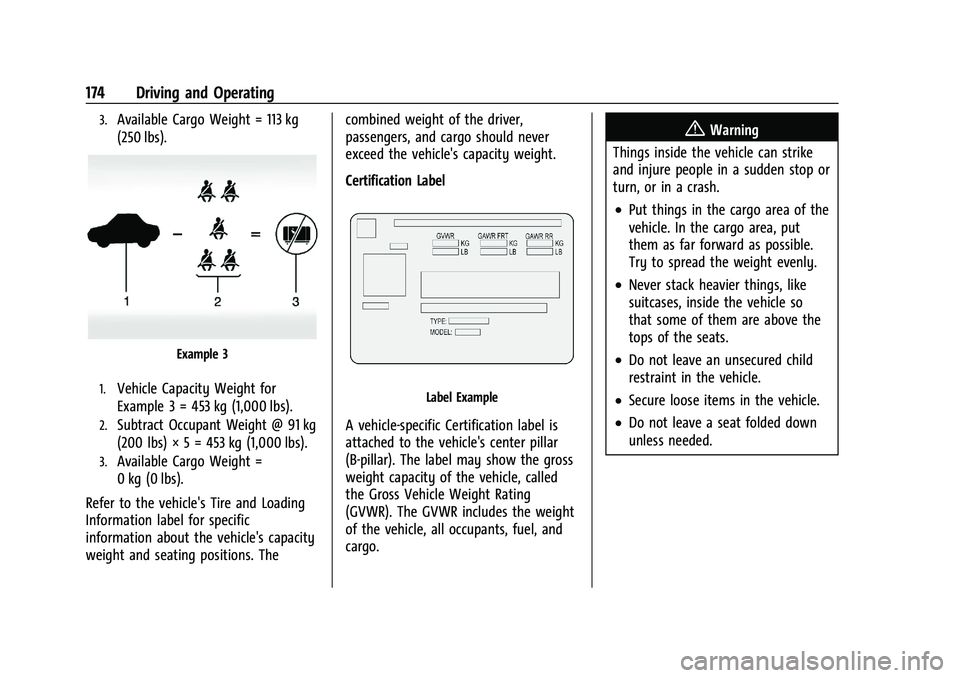
Certification Label
Label Example
A vehicle-specific Certification label is
attached to the vehicle's center pillar
(B-pillar). The label may show the gross
weight capacity of the vehicle, called
the Gross Vehicle Weight Rating
(GVWR). The GVWR includes the weight
of the vehicle, all occupants, fuel, and
cargo.
{Warning
Things inside the vehicle can strike
and injure people in a sudden stop or
turn, or in a crash.
.Put things in the cargo area of the
vehicle. In the cargo area, put
them as far forward as possible.
Try to spread the weight evenly.
.Never stack heavier things, like
suitcases, inside the vehicle so
that some of them are above the
tops of the seats.
.Do not leave an unsecured child
restraint in the vehicle.
.Secure loose items in the vehicle.
.Do not leave a seat folded down
unless needed.
Page 248 of 332
Chevrolet Malibu Owner Manual (GMNA-Localizing-U.S./Canada-
16273584) - 2023 - CRC - 9/28/22
Vehicle Care 247
The vehicle may not be equipped with all of
the fuses, relays, and features shown.Fuses Usage
1 –
2 –
3 Antilock Brake System Pump/Electric Brake
Booster
5 –
6 Rear Closure 7 –
8 Memory Seat Module
9 –
10 –
11 DC DC Converter 1
12 Rear Window Defogger
13 Heated Mirrors
14 –
15 Passive Entry/Passive Start
16 Front Wiper 17 Passenger Power Seat Fuses
Usage
18 Antilock Brake System Valve
19 Driver Power Seat 21 Sunroof
22 Parking Lamp
23 Automatic Headlamp Leveling/Adaptive Forward
Lighting
24 –
26 Transmission Control Module/Ignition
27 Instrument Panel/Body/ Ignition
28 –
29 Rear Vision Camera/ Ventilated Seats
30 Malfunction Indicator Lamp/Ignition
32 Canister Vent Solenoid/ Evap Leak Check Module
33 Front Heated Seat
34 – Fuses
Usage
35 Body Control Module 6/ Body Control Module 7
36 Fuel Module
38 –
39 –
40 Steering Column Lock 41 –
43 Heated Steering Wheel
44 Headlamp Leveling 45 –
46 Engine Control Module/ Ignition
47 –
48 –
49 DC DC Converter 2 50 –
51 –
52 –
53 –
54 –
Page 265 of 332
Chevrolet Malibu Owner Manual (GMNA-Localizing-U.S./Canada-
16273584) - 2023 - CRC - 9/28/22
264 Vehicle Care
Reset the Tire Pressure Monitor System.
SeeTire Pressure Monitor Operation
0 260.
Check that all wheel nuts are properly
tightened. See “Wheel Nut Torque”
under Capacities and Specifications
0 298, and “Removing the Flat Tire and
Installing the Spare Tire” underTire
Changing 0270.
{Warning
Rust or dirt on a wheel, or on the
parts to which it is fastened, can
cause wheel nuts to become loose
over time. The wheel could come off
and cause a crash. When changing a
wheel, remove any rust or dirt from
places where the wheel attaches to
the vehicle. In an emergency, a cloth
or paper towel can be used; however,
use a scraper or wire brush later to
remove all rust or dirt. Lightly coat the inner diameter of the
wheel hub opening with wheel bearing
grease after a wheel change or tire
rotation to prevent corrosion or rust
buildup.
{Warning
Do not apply grease to the wheel
mounting surface, wheel conical
seats, or the wheel nuts or bolts.
Grease applied to these areas could
cause a wheel to become loose or
come off, resulting in a crash.
When It Is Time for New Tires
Factors, such as maintenance, temperatures,
driving speeds, vehicle loading, and road
conditions affect the wear rate of the tires.
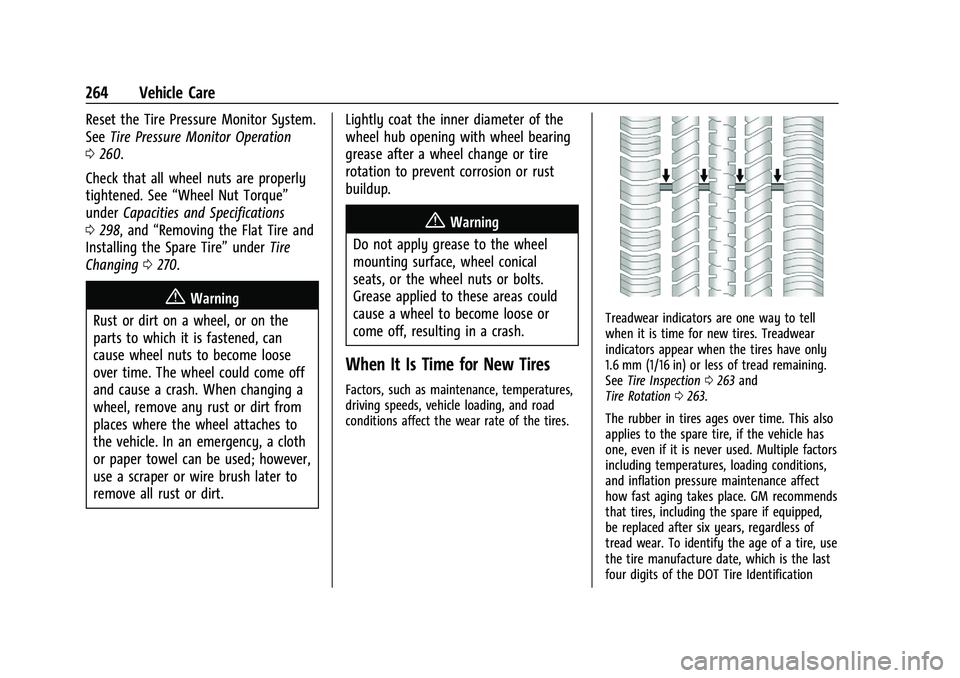
Treadwear indicators are one way to tell
when it is time for new tires. Treadwear
indicators appear when the tires have only
1.6 mm (1/16 in) or less of tread remaining.
See Tire Inspection 0263 and
Tire Rotation 0263.
The rubber in tires ages over time. This also
applies to the spare tire, if the vehicle has
one, even if it is never used. Multiple factors
including temperatures, loading conditions,
and inflation pressure maintenance affect
how fast aging takes place. GM recommends
that tires, including the spare if equipped,
be replaced after six years, regardless of
tread wear. To identify the age of a tire, use
the tire manufacture date, which is the last
four digits of the DOT Tire Identification
Page 287 of 332
Chevrolet Malibu Owner Manual (GMNA-Localizing-U.S./Canada-
16273584) - 2023 - CRC - 9/28/22
286 Vehicle Care
.For solid soils, remove as much as
possible prior to vacuuming.
To clean: 1. Saturate a clean, lint-free colorfast cloth with water. Microfiber cloth is
recommended to prevent lint transfer to
the fabric or carpet.
2. Remove excess moisture by gently wringing until water does not drip from
the cleaning cloth.
3. Start on the outside edge of the soil and gently rub toward the center. Fold the
cleaning cloth to a clean area frequently
to prevent forcing the soil into the
fabric.
4. Continue gently rubbing the soiled area until there is no longer any color
transfer from the soil to the cleaning
cloth.
5. If the soil is not completely removed, use a mild soap solution followed only
by plain water.
If the soil is not completely removed, it may
be necessary to use a commercial upholstery
cleaner or spot lifter. Test a small hidden
area for colorfastness before using a commercial upholstery cleaner or spot lifter.
If ring formation occurs, clean the entire
fabric or carpet.
After cleaning, use a paper towel to blot
excess moisture.
Cleaning High Gloss Surfaces and Vehicle
Information and Radio Displays
Use a microfiber cloth on high gloss surfaces
or vehicle displays. First, use a soft bristle
brush to remove dirt that can scratch the
surface. Then gently clean by rubbing with a
microfiber cloth. Never use window cleaners
or solvents. Periodically hand wash the
microfiber cloth separately, using mild soap.
Do not use bleach or fabric softener. Rinse
thoroughly and air dry before next use.
Caution
Do not attach a device with a suction cup
to the display. This may cause damage
and would not be covered by the vehicle
warranty.
Instrument Panel, Leather, Vinyl, Other
Plastic Surfaces, Low Gloss Paint
Surfaces, and Natural Open Pore Wood
Surfaces
Use a soft bristle brush to remove dust from
knobs and crevices on the instrument
cluster. Use a soft microfiber cloth
dampened with water to remove dust and
loose dirt. For a more thorough cleaning,
use a soft microfiber cloth dampened with a
mild soap and water solution.
Caution
Soaking or saturating leather, especially
perforated leather, as well as other
interior surfaces, may cause permanent
damage. Wipe excess moisture from
these surfaces after cleaning and allow
them to dry naturally. Never use heat,
steam, or spot removers. Do not use
liquids that contain alcohol or solvents on
leather seats. Do not use cleaners that
contain silicone or wax-based products.
Cleaners containing these solvents can
permanently change the appearance and
feel of leather or soft trim, and are not
recommended.
Page 321 of 332
Chevrolet Malibu Owner Manual (GMNA-Localizing-U.S./Canada-
16273584) - 2023 - CRC - 9/28/22
320 Index
IndexA
Accessories and Modifications . . . . . . . . . . . . 221
Accessory Power . . . . . . . . . . . . . . . . . . . . . . . . . 179
AdaptiveCruise Control . . . . . . . . . . . . . . . . . . . . . . . . . 190
Add-On Electrical Equipment . . . . . . . . . . . . . 219
Additional OnStar Information . . . . . . . . . . . . . . . . . . . . 314
Adjustments Lumbar, Front Seats . . . . . . . . . . . . . . . . . . . . 32
Agreements Trademarks and License . . . . . . . . . . . . . . . 150
Air Cleaner/Filter, Engine . . . . . . . . . . . . . . . . . . 228
Conditioning . . . . . . . . . . . . . . . . . . . . . . . . . . . 159
Filter Life System . . . . . . . . . . . . . . . . . . . . . . 228
Filter, Passenger Compartment . . . . . . . . 163
Vents . . . . . . . . . . . . . . . . . . . . . . . . . . . . . . . . . . 162
Air Conditioning . . . . . . . . . . . . . . . . . . . . . . . . . . 157
Airbag System . . . . . . . . . . . . . . . . . . . . . . . . . . . . 44
Check . . . . . . . . . . . . . . . . . . . . . . . . . . . . . . . . . . . 54
How Does an Airbag Restrain? . . . . . . . . . . 48
Passenger Sensing System . . . . . . . . . . . . . . 50
What Makes an Airbag Inflate? . . . . . . . . . 48
What Will You See after an AirbagInflates? . . . . . . . . . . . . . . . . . . . . . . . . . . . . . . 48
When Should an Airbag Inflate? . . . . . . . . 47
Where Are the Airbags? . . . . . . . . . . . . . . . . 46 Airbags
Adding Equipment to the Vehicle . . . . . . . 53
Passenger Status Indicator . . . . . . . . . . . . . . 87
Readiness Light . . . . . . . . . . . . . . . . . . . . . . . . . 86
Replacing System Parts after a
Crash . . . . . . . . . . . . . . . . . . . . . . . . . . . . . . . . . 54
Servicing Airbag-Equipped Vehicles . . . . . . 53
Alarm Vehicle Security . . . . . . . . . . . . . . . . . . . . . . . . 20
Alert Lane Change . . . . . . . . . . . . . . . . . . . . . . . . . . . 207
Rear Cross Traffic . . . . . . . . . . . . . . . . . . . . . . 202
Side Blind Zone (SBZA) . . . . . . . . . . . . . . . . . 207
All-Season Tires . . . . . . . . . . . . . . . . . . . . . . . . . . . 251
AM-FM Radio . . . . . . . . . . . . . . . . . . . . . . . . . . . . . 115
Antenna Backglass . . . . . . . . . . . . . . . . . . . . . . . . . . . . . . . 118
Multi-band . . . . . . . . . . . . . . . . . . . . . . . . . . . . . . 118
Antilock Brake System (ABS) . . . . . . . . . . . . . 184 Warning Light . . . . . . . . . . . . . . . . . . . . . . . . . . 90
Appearance Care
Exterior . . . . . . . . . . . . . . . . . . . . . . . . . . . . . . . . 280
Interior . . . . . . . . . . . . . . . . . . . . . . . . . . . . . . . . 284
Apple CarPlay and Android Auto . . . . . . . . . .142
Armrest Rear Seat . . . . . . . . . . . . . . . . . . . . . . . . . . . . . . . 37
Assistance Program, Roadside . . . . . . . . . . . . 303