Set time CHEVROLET MALIBU MAXX 2007 6.G Owner's Manual
[x] Cancel search | Manufacturer: CHEVROLET, Model Year: 2007, Model line: MALIBU MAXX, Model: CHEVROLET MALIBU MAXX 2007 6.GPages: 510, PDF Size: 2.8 MB
Page 225 of 510
DIC Vehicle Personalization
The following personalization options may appear
on your vehicle’s audio display by pressing the
MENU button:
OIL LIFE RESET:When this option is displayed,
you can reset the engine oil life system.
To reset the system, seeEngine Oil Life
System on page 362.
UNITS:When UNITS appears on the display,
press the enter button to move between METRIC
or ENGLISH. When you have made your choice,
press the MENU button to record your selection.
The initial setting from the factory is English for
the United States and metric for Canada.
If you choose English, all information will be
displayed in English units.
If you choose metric, all information will be
displayed in metric units.The unit measurement will also change the trip
odometer, temperature, and average fuel
economy displays.
REMOTE START:If your vehicle has this
feature, the remote start option can be enabled
or disabled. When REMOTE START appears
on the display, press the enter button to move
between OFF and ON. When you have made
your choice, press the MENU button to record
your selection. The initial setting from the
factory is ON.
LOCK HORN:If your vehicle has Remote
Keyless Entry (RKE), this option which allows
the vehicle’s horn to chirp every time the
lock button on the RKE transmitter is pressed,
can be enabled or disabled. When LOCK HORN
appears on the display, press the enter button
to move between ON and OFF. When you have
made your choice, press the MENU button to
record your selection. The initial setting from
the factory is OFF.
225
Page 226 of 510
UNLOCK HORN:If your vehicle has Remote
Keyless Entry (RKE), this option which allows
the vehicle’s horn to chirp every time the unlock
button on the RKE transmitter is pressed, can
be enabled or disabled. When UNLOCK HORN
appears on the display, press the enter button
to move between ON and OFF. When you have
made your choice, press the MENU button to
record your selection. The initial setting from
the factory is OFF.
LIGHT FLASH:If your vehicle has Remote
Keyless Entry (RKE), this option which allows
the vehicle’s exterior perimeter lighting to
ash every time the lock, unlock, or trunk release
buttons on the RKE transmitter are pressed,
can be enabled or disabled. When LIGHT FLASH
appears on the display, press the enter button
to move between OFF and ON. When you have
made your choice, press the MENU button to
record your selection. The initial setting from
the factory is ON.DELAY LOCK:The delayed locking option, which
delays the actual locking of the vehicle, can be
enabled or disabled. When DELAY LOCK appears
on the display, press the enter button to move
between OFF and ON. When you have made your
choice, press the MENU button to record your
selection. The initial setting from the factory is ON.
AUTO UNLK (Unlock):The automatic door
unlocking option, which allows the vehicle
to automatically unlock certain doors can
be enabled or disabled. When AUTO UNLK
appears on the display, press the enter button
to move between ALL, DRIVER, or NONE.
When you have made your choice, press and
the MENU button to record your selection.
The initial setting from the factory is ALL.
SeeProgrammable Automatic Door Locks
on page 106for more information.
226
Page 227 of 510
UNLK (Unlock):This screen displays only if
DRIVER or ALL is selected for the AUTO UNLK
option. This option determines when the automatic
door unlocking will occur, when either the key is
turned to OFF or the vehicle is shifted into
PARK (P). When UNLK appears on the display,
press the enter button to move between KEY OFF
and SHIFT TO P (Park). When you have made
your choice, press the MENU button to record your
selection. The initial setting from the factory is
SHIFT TO P (Park). SeeProgrammable Automatic
Door Locks on page 106for more information.
EXT (Exterior) LIGHTS:If your vehicle has
Remote Keyless Entry (RKE), this option, which
allows the vehicle’s exterior perimeter lighting
to turn on each time the unlock button on the RKE
transmitter is pressed, can be enabled or disabled.
When EXT LIGHTS appears on the display, press
the enter button to move between ON and OFF.When you have made your choice, press the MENU
button to record your selection. The initial setting
from the factory is ON.
LANGUAGE:To select your choice of language,
press the enter button to move between the
optional languages.
The languages are ENGLISH, FRENCH,
SPANISH, and GERMAN.
Choosing a language will display all of the
information on the DIC in the desired language.
When you have made your choice, press the
MENU button for at least one second to record
your selection. The initial setting from the factory
is ENGLISH.
227
Page 229 of 510
Then, when driving conditions permit, you
can tune to your favorite radio stations using
the presets and steering wheel controls if
the vehicle has them.
Notice:Before adding any sound equipment
to your vehicle, such as an audio system,
CD player, CB radio, mobile telephone,
or two-way radio, make sure that it can be
added by checking with your dealer/retailer.
Also, check federal rules covering mobile
radio and telephone units. If sound equipment
can be added, it is very important to do it
properly. Added sound equipment can interfere
with the operation of your vehicle’s engine,
radio, or other systems, and even damage
them. Your vehicle’s systems can interfere
with the operation of sound equipment that
has been added.
Your vehicle has a feature called Retained
Accessory Power (RAP). With RAP, the audio
system can be played even after the ignition is
turned off. SeeRetained Accessory Power (RAP)
on page 119for more information.Setting the Time for Radios without
Radio Data Systems (RDS)
To set the hour, press the clock button.
The clock symbol displays and the hour ashes.
Turn the ADJ (adjust) knob to increase or to
decrease the hours. To set the minutes, press
the clock button again. The minutes ash.
Turn the ADJ knob to increase or to decrease
the minutes. The time can be set with the
ignition on or off.
229
Page 230 of 510
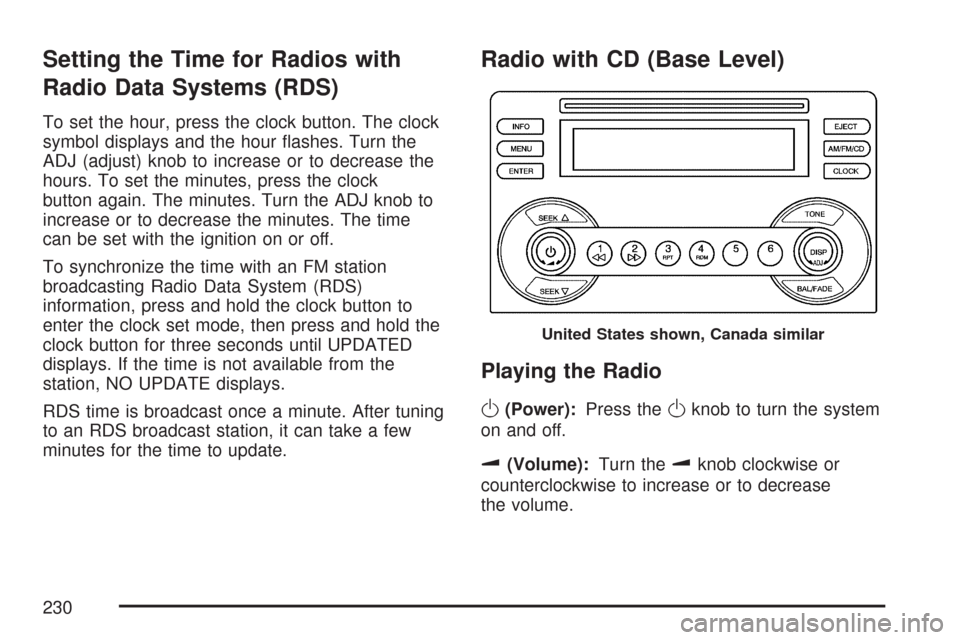
Setting the Time for Radios with
Radio Data Systems (RDS)
To set the hour, press the clock button. The clock
symbol displays and the hour ashes. Turn the
ADJ (adjust) knob to increase or to decrease the
hours. To set the minutes, press the clock
button again. The minutes. Turn the ADJ knob to
increase or to decrease the minutes. The time
can be set with the ignition on or off.
To synchronize the time with an FM station
broadcasting Radio Data System (RDS)
information, press and hold the clock button to
enter the clock set mode, then press and hold the
clock button for three seconds until UPDATED
displays. If the time is not available from the
station, NO UPDATE displays.
RDS time is broadcast once a minute. After tuning
to an RDS broadcast station, it can take a few
minutes for the time to update.
Radio with CD (Base Level)
Playing the Radio
O
(Power):Press theOknob to turn the system
on and off.
u(Volume):Turn theuknob clockwise or
counterclockwise to increase or to decrease
the volume.
United States shown, Canada similar
230
Page 231 of 510
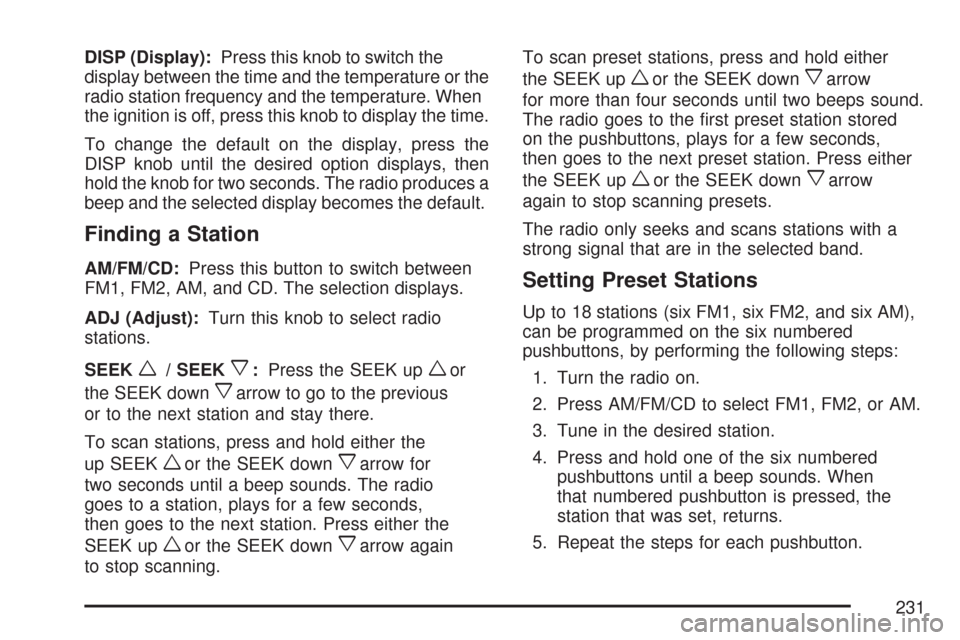
DISP (Display):Press this knob to switch the
display between the time and the temperature or the
radio station frequency and the temperature. When
the ignition is off, press this knob to display the time.
To change the default on the display, press the
DISP knob until the desired option displays, then
hold the knob for two seconds. The radio produces a
beep and the selected display becomes the default.
Finding a Station
AM/FM/CD:Press this button to switch between
FM1, FM2, AM, and CD. The selection displays.
ADJ (Adjust):Turn this knob to select radio
stations.
SEEK
w/ SEEKx:Press the SEEK upwor
the SEEK down
xarrow to go to the previous
or to the next station and stay there.
To scan stations, press and hold either the
up SEEK
wor the SEEK downxarrow for
two seconds until a beep sounds. The radio
goes to a station, plays for a few seconds,
then goes to the next station. Press either the
SEEK up
wor the SEEK downxarrow again
to stop scanning.To scan preset stations, press and hold either
the SEEK up
wor the SEEK downxarrow
for more than four seconds until two beeps sound.
The radio goes to the rst preset station stored
on the pushbuttons, plays for a few seconds,
then goes to the next preset station. Press either
the SEEK up
wor the SEEK downxarrow
again to stop scanning presets.
The radio only seeks and scans stations with a
strong signal that are in the selected band.
Setting Preset Stations
Up to 18 stations (six FM1, six FM2, and six AM),
can be programmed on the six numbered
pushbuttons, by performing the following steps:
1. Turn the radio on.
2. Press AM/FM/CD to select FM1, FM2, or AM.
3. Tune in the desired station.
4. Press and hold one of the six numbered
pushbuttons until a beep sounds. When
that numbered pushbutton is pressed, the
station that was set, returns.
5. Repeat the steps for each pushbutton.
231
Page 249 of 510
Setting Preset Stations
Up to 30 stations (six FM1, six FM2, and six AM,
six XM1 and six XM2 (if equipped)), can be
programmed on the six numbered pushbuttons,
by performing the following steps:
1. Turn the radio on.
2. Press BAND to select FM1, FM2, AM,
or XM1 or XM2.
3. Tune in the desired station.
4. Press AUTO TONE (automatic tone) or
AUTO EQ (automatic equalization) to
select the equalization.
5. Press and hold one of the six numbered
pushbuttons until a beep sounds. When
that numbered pushbutton is pressed,
the station that was set, returns and the
equalization that was selected is stored
for that pushbutton.
6. Repeat the steps for each pushbutton.
Setting the Tone (Bass/Midrange/Treble)
TONE /P/Q(Bass / Treble):Press and release
this button until BASS, MID (midrange), or TREB
(treble) displays. Turn the ADJ knob to increase orto decrease the tone. The display shows the bass,
mid, or treble level. If a station is weak or has static,
decrease the treble.
To adjust bass, midrange, or treble to the
middle position, select BASS, MID, or TREB.
Then press and hold the tone button for more
than two seconds. The display level adjusts to
the middle position and a beep sounds.
To adjust all tone controls to the middle position,
press and hold the tone button when no tone
control displays. ALL CENTERED displays and
a beep sounds.
AUTO TONE/AUTO EQ (Automatic
Equalization):Press this button to select
customized equalization settings designed for
country, jazz, talk, pop, rock, and classical.
The equalization setting last chosen displays when
you rst press this button. Each time you press
this button, another equalization setting displays
and automatic tone or automatic equalization
switches to that preset equalization settings.
To return to the manual mode, press the
AUTO TONE or AUTO EQ button until
CUSTOM displays. Then manually adjust the
bass, midrange, and treble using the tone button.
249
Page 255 of 510
If an error displays, see “CD Messages” later in
this section.
s(Reverse):Press and hold thesbutton to
reverse quickly within a track. You will hear sound
at a reduced volume. Release the
sbutton to
play the passage. T#, the elapsed time, and
REV (reverse) displays.
\(Fast Forward):Press and hold the\button
to advance quickly within a track. You will hear
sound at a reduced volume. Release the
\button
to play the passage. T#, the elapsed time, and
FWD (forward) displays.
RPT (Repeat):With the repeat setting, one track
or an entire CD can be repeated.
To use repeat, do the following:
To repeat the track you are listening to,
press and release the RPT button. REPEAT
ON and RPT displays. Press RPT again to
turn off repeat play. REPEAT OFF displays
and RPT disappears.
To repeat the CD you are listening to, press
and hold the RPT button for more than
two seconds. REPEAT ON and RPT displays.
Press RPT again to turn off repeat play.
REPEAT OFF displays and RPT disappears.RDM (Random):With the random setting, the
tracks can be played in random, rather than
sequential, order, on one CD or on all of the CDs.
To use random, do one of the following:
To play the tracks in random order on the
CD this is currently playing, press the RDM
button. RANDOM TRACKS and RDM displays.
Press RDM again to turn off random play.
RANDOM OFF displays and RDM disappears.
To play the tracks on all of the CDs that are
loaded, in random order, press and hold the
RDM button for more than two seconds.
A beep sounds, RANDOM ALL CDS, and
RDM displays. Press RDM again to turn off
random play. RANDOM OFF displays and
RDM disappears.
xSEEKw:Press the downxSEEK arrow to
go to the start of the current track, if more than
eight seconds have played. Press the up
wSEEK
arrow to go to the beginning of the next track.
If either the down
xor upwSEEK arrow is held
or pressed more than once, the player continues
moving backward or forward through the CD.
255
Page 256 of 510
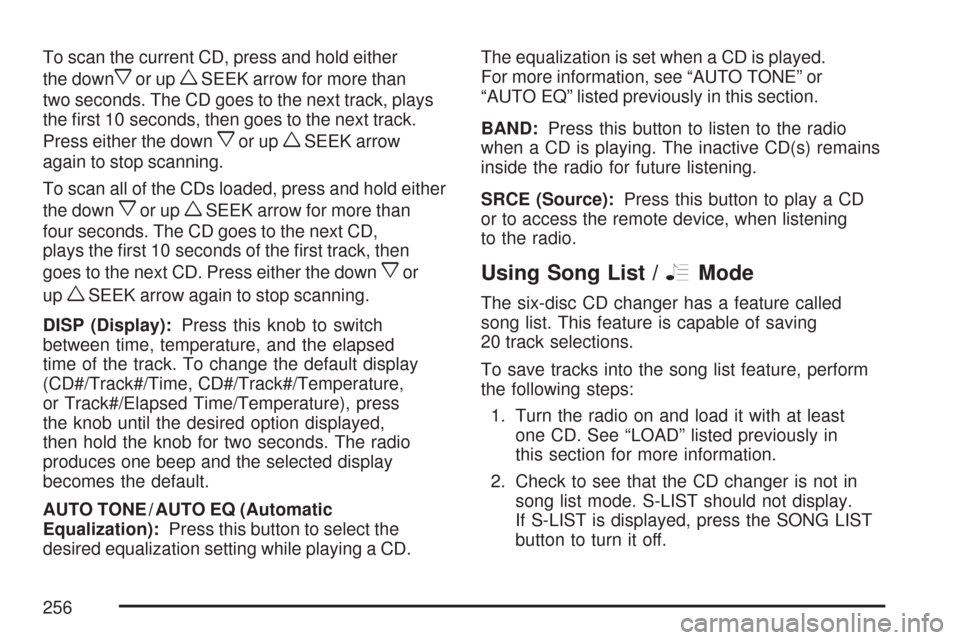
To scan the current CD, press and hold either
the down
xor upwSEEK arrow for more than
two seconds. The CD goes to the next track, plays
the rst 10 seconds, then goes to the next track.
Press either the down
xor upwSEEK arrow
again to stop scanning.
To scan all of the CDs loaded, press and hold either
the down
xor upwSEEK arrow for more than
four seconds. The CD goes to the next CD,
plays the rst 10 seconds of the rst track, then
goes to the next CD. Press either the down
xor
up
wSEEK arrow again to stop scanning.
DISP (Display):Press this knob to switch
between time, temperature, and the elapsed
time of the track. To change the default display
(CD#/Track#/Time, CD#/Track#/Temperature,
or Track#/Elapsed Time/Temperature), press
the knob until the desired option displayed,
then hold the knob for two seconds. The radio
produces one beep and the selected display
becomes the default.
AUTO TONE / AUTO EQ (Automatic
Equalization):Press this button to select the
desired equalization setting while playing a CD.The equalization is set when a CD is played.
For more information, see “AUTO TONE” or
“AUTO EQ” listed previously in this section.
BAND:Press this button to listen to the radio
when a CD is playing. The inactive CD(s) remains
inside the radio for future listening.
SRCE (Source):Press this button to play a CD
or to access the remote device, when listening
to the radio.
Using Song List /RMode
The six-disc CD changer has a feature called
song list. This feature is capable of saving
20 track selections.
To save tracks into the song list feature, perform
the following steps:
1. Turn the radio on and load it with at least
one CD. See “LOAD” listed previously in
this section for more information.
2. Check to see that the CD changer is not in
song list mode. S-LIST should not display.
If S-LIST is displayed, press the SONG LIST
button to turn it off.
256
Page 259 of 510
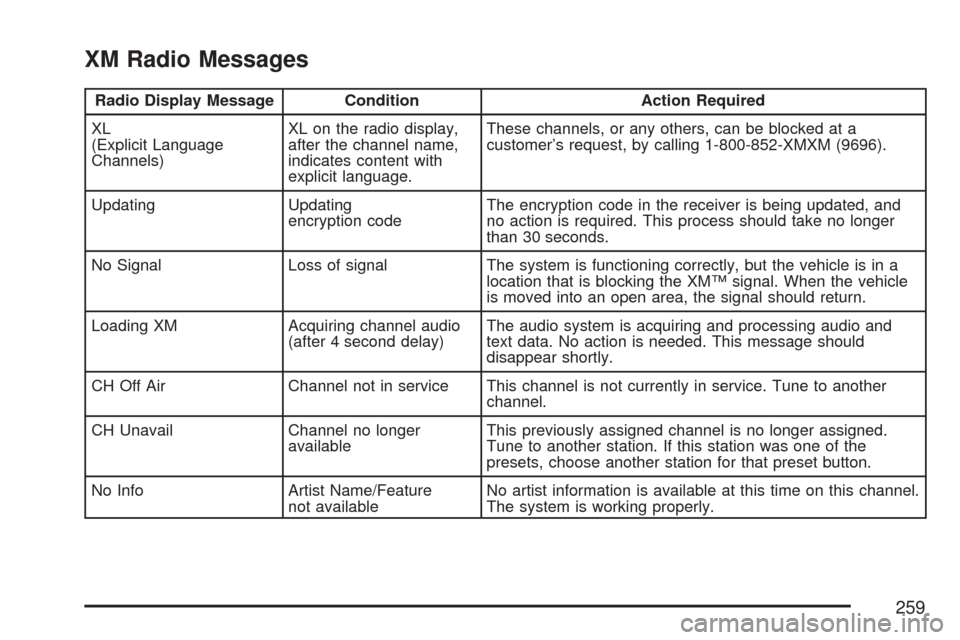
XM Radio Messages
Radio Display Message Condition Action Required
XL
(Explicit Language
Channels)XL on the radio display,
after the channel name,
indicates content with
explicit language.These channels, or any others, can be blocked at a
customer’s request, by calling 1-800-852-XMXM (9696).
Updating Updating
encryption codeThe encryption code in the receiver is being updated, and
no action is required. This process should take no longer
than 30 seconds.
No Signal Loss of signal The system is functioning correctly, but the vehicle is in a
location that is blocking the XM™ signal. When the vehicle
is moved into an open area, the signal should return.
Loading XM Acquiring channel audio
(after 4 second delay)The audio system is acquiring and processing audio and
text data. No action is needed. This message should
disappear shortly.
CH Off Air Channel not in service This channel is not currently in service. Tune to another
channel.
CH Unavail Channel no longer
availableThis previously assigned channel is no longer assigned.
Tune to another station. If this station was one of the
presets, choose another station for that preset button.
No Info Artist Name/Feature
not availableNo artist information is available at this time on this channel.
The system is working properly.
259