ECO mode CHEVROLET MONTE CARLO 2004 User Guide
[x] Cancel search | Manufacturer: CHEVROLET, Model Year: 2004, Model line: MONTE CARLO, Model: CHEVROLET MONTE CARLO 2004Pages: 416, PDF Size: 4.56 MB
Page 113 of 416
Your vehicle was originally programmed to Mode 1. The
mode may have been changed since then. To determine
the current mode, or to change the mode, do the
following:
1. Scroll, using the SEEK PSCAN up or down arrows,
until CHIRP appears on the display.
2. Press the 1 PREV or 2 NEXT button to enter the
submenu. The current selection will have an
asterisk (*) next to it. If you do not wish to change
the current mode, you can either exit the
programming mode by following the directions later
in this section or program the next feature
available on your vehicle.
3. Scroll, using the 1 PREV or 2 NEXT buttons,
through the modes to change the current mode.
4. With your preference displayed, press the TUNE
DISP button to select. A chime will be heard to
verify the new setting. The new selection will
be displayed with an asterisk (*) for one second.
The mode you selected is now set. You can either exit
the programming mode by following the instructions
later in this section or program the next feature available
on your vehicle.ORIG. SET (Return to the Original
Settings)
This feature allows you to return all customization
feature settings back to their original factory settings.
To reset do the following:
1. Scroll, using the SEEK PSCAN up or down arrows,
until ORIG. SET appears on the display.
2. Press the 1 PREV or 2 NEXT button to enter the
submenu. SET ALL will appear.
3. With your preference displayed, press the TUNE
DISP button to select. A chime will be heard to
verify the new setting. The new selection will
be displayed with an asterisk (*) for one second.
The original factory settings are now reset. You can
either exit the programming mode by following the
instructions later in this section or program the next
feature available on your vehicle.
2-49
Page 114 of 416
FOB PROG (Remote Keyless Entry
Transmitter Programming)
This feature allows you to match the remote keyless
entry transmitter to your vehicle. To match the
transmitter do the following:
1. Scroll, using the SEEK PSCAN up or down arrows,
until FOB PROG appears on the display.
2. Press the 1 PREV or 2 NEXT button to enter the
submenu. BEGIN will be displayed.
3. Press the TUNE DISP button to start programming.
When the message PUSH FOB ashes, press and
hold the LOCK and UNLOCK buttons on the
rst transmitter at the same time for 15 seconds.
A chime will be heard to verify the transmitter
is learned.
4. Repeat Step 3 for each additional transmitter.
The transmitter is programmed now. You can either exit
the programming mode by following the instructions
later in this section or program the next feature available
on your vehicle.
EXIT (Exit Feature
Customization Mode)
This feature allows you to exit the vehicle customization
programming. To exit do the following:
Scroll until EXIT appears on the display.
Press the TUNE DISP button to exit programming.
A chime will be heard to verify the exit.
2-50
Page 137 of 416
Heating
Adjust the air temperature by using the following levers:
D (Driver):Slide this lever up or down to raise or
lower the temperature on the driver’s side of the vehicle.
P (Passenger):Slide this lever up or down to raise
or lower the temperature on the passenger’s side of the
vehicle.
To warm your vehicle on cold days, do the following:
1. Select the oor mode.
2. Select the warmest temperature.
3. Select the fan speed.
4. Select outside air mode, after the air has warmed,
to prevent it from becoming too stale.
When it’s cold outside 0°F (−18°C) or lower, use the
engine coolant heater, if equipped, to provide warmer air
faster to your vehicle. An engine coolant heater warms
the coolant that the engine uses to provide heat to
warm the inside of your vehicle. For more information,
seeEngine Coolant Heater on page 2-20.
Cooling
On hot days, open the windows to let hot air escape;
then close them. This helps to reduce the time it takes
for your vehicle to cool down. It also helps the system
to operate more efficiently.
#(Air Conditioning):Press this button to turn the
air-conditioning system on or off. When the system is on,
an indicator light will come on and the system will
begin to cool and dehumidify the air inside of your
vehicle. During daylight hours, you may have to adjust
the instrument panel brightness control to the highest
setting in order to see the indicator light. SeeInterior
Lamps on page 3-16for more information.
You may notice a slight change in engine performance
when the air-conditioning compressor shuts off and
turns on again. This is normal. The system is designed
to make adjustments to help with fuel economy while
still maintaining the selected temperature.
The Air Conditioning System removes moisture from
the air, so you may notice a small amount of water
dripping underneath your vehicle when idling or after
turning off the engine.
3-23
Page 138 of 416
For quicker cool down on hot days, do the following:
1. Select the vent mode.
2. Select A/C.
3. Select the recirculation mode.
4. Select the coolest temperature for both zones.
5. Select the highest fan speeds.
Using these settings together for long periods of time
may cause the air inside of your vehicle to become too
dry. To prevent this, after the air inside of your vehicle
has cooled, switch to Outside Air.
On cool, but sunny days, the sun may warm the upper
part of your body, but the lower part may not be
warm enough. To remedy this, do the following:
1. Select the bi-level mode.
2. Select A/C.
3. Select the temperature.
4. Select the fan speed.
The air-conditioning system removes moisture from the
air, so you may sometimes notice a small amount of
water dripping underneath your vehicle while idling
or after turning off the engine. This is normal.Defogging and Defrosting
Fog on the inside of your windows is a result of high
humidity (moisture) condensing on the cool window
glass. This can be minimized if the climate control
system is used properly.
There are two modes to choose from to clear fog or
frost from your windshield. Use the defog mode to
clear fog or moisture from the windows and warm the
passengers. Use the defrost mode to quickly remove fog
or frost from the windshield.
Turn the right knob clockwise or counterclockwise to
select one of the following modes:
/(Defog):This mode directs half of the air to the
windshield and side window vents and half to the oor
vents. In this mode, the system will automatically
force outside air into your vehicle. The recirculation
mode cannot be selected while in the defog mode.
The air conditioning compressor will run automatically in
this setting, unless the outside temperature is below
40°F (4°C).
Do not drive the vehicle until all the windows are clear.
3-24
Page 146 of 416
Speedometer and Odometer
Your speedometer lets you see your speed in both
miles per hour (mph) and kilometers per hour (km/h).
Your odometer shows how far your vehicle has
been driven in either miles (used in the United States)
or in kilometers (used in Canada).
Your vehicle has a tamper-resistant odometer. If you
see ERROR, you’ll know someone has probably
tampered with it and the numbers may not be accurate.
You may wonder what happens if your vehicle needs
a new odometer installed. If the new one can be set to
the mileage total of the old odometer, then that will
be done. But if it can’t, then it will be set at zero and a
label must be put on the driver’s door to show the
old mileage reading when the new odometer was
installed.
Trip Odometer
Your trip odometer tells how far you have driven since
you last reset it.
Your trip/select reset switch will go back and forth
between the odometer and the trip odometer if the
button is pressed and released within 1.5 seconds.
If the button is pressed and held for longer than
1.5 seconds while in the trip odometer mode, it will be
reset to zero. If the button is pressed and held for longer
than 1.5 seconds while in the odometer mode, it will
have no effect.
Your trip odometer will work no matter what position
your key is in, and even if the key isn’t in.
3-32
Page 166 of 416
Driver Information Center (DIC)
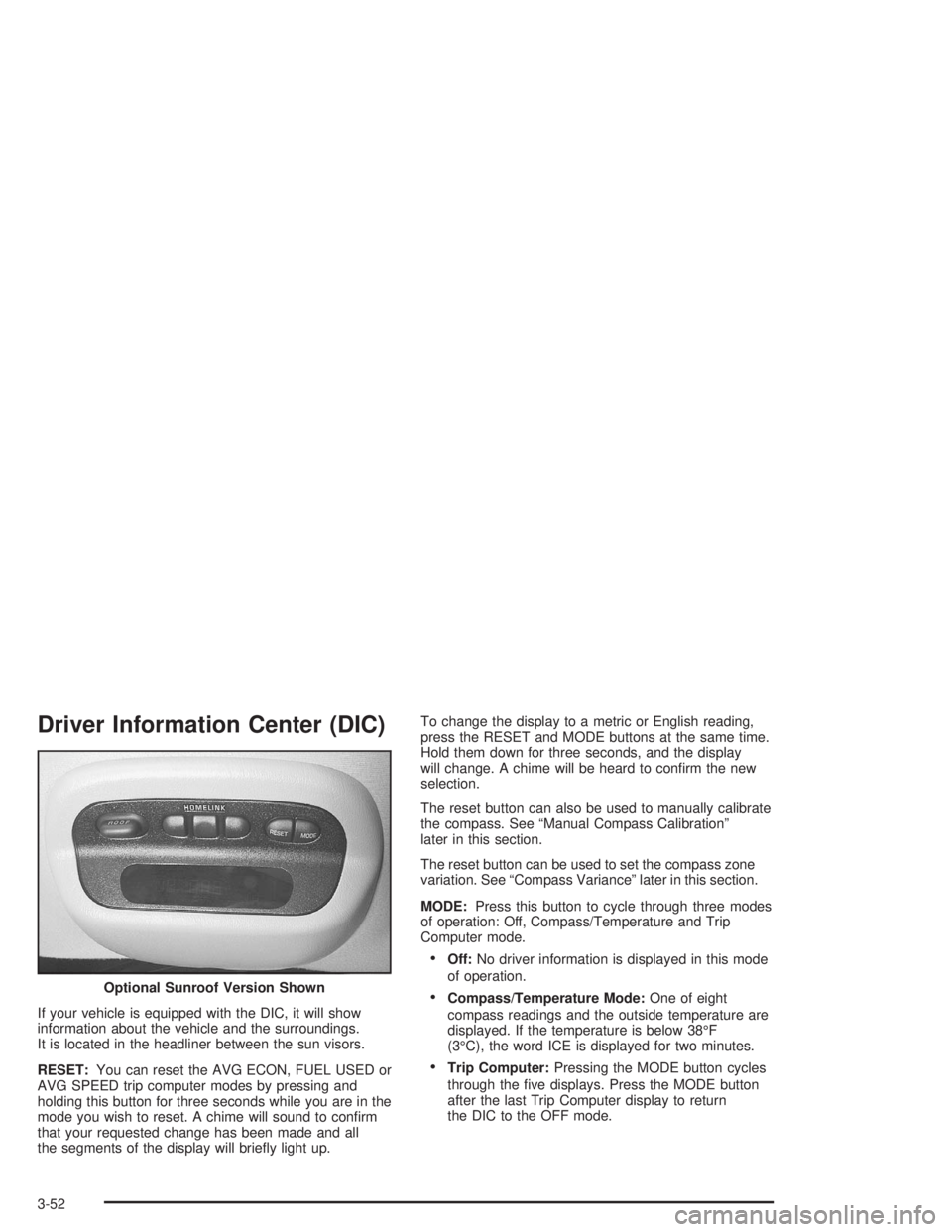
If your vehicle is equipped with the DIC, it will show
information about the vehicle and the surroundings.
It is located in the headliner between the sun visors.
RESET:You can reset the AVG ECON, FUEL USED or
AVG SPEED trip computer modes by pressing and
holding this button for three seconds while you are in the
mode you wish to reset. A chime will sound to conrm
that your requested change has been made and all
the segments of the display will briey light up.To change the display to a metric or English reading,
press the RESET and MODE buttons at the same time.
Hold them down for three seconds, and the display
will change. A chime will be heard to conrm the new
selection.
The reset button can also be used to manually calibrate
the compass. See “Manual Compass Calibration”
later in this section.
The reset button can be used to set the compass zone
variation. See “Compass Variance” later in this section.
MODE:Press this button to cycle through three modes
of operation: Off, Compass/Temperature and Trip
Computer mode.
Off:No driver information is displayed in this mode
of operation.
Compass/Temperature Mode:One of eight
compass readings and the outside temperature are
displayed. If the temperature is below 38°F
(3°C), the word ICE is displayed for two minutes.
Trip Computer:Pressing the MODE button cycles
through the ve displays. Press the MODE button
after the last Trip Computer display to return
the DIC to the OFF mode. Optional Sunroof Version Shown
3-52
Page 167 of 416
Compass Variance
Compass variance is the difference between magnetic
north and geographic north. In some areas of the country,
the difference is great enough to cause the compass to
give false readings. If this occurs, the compass variance
must be set.
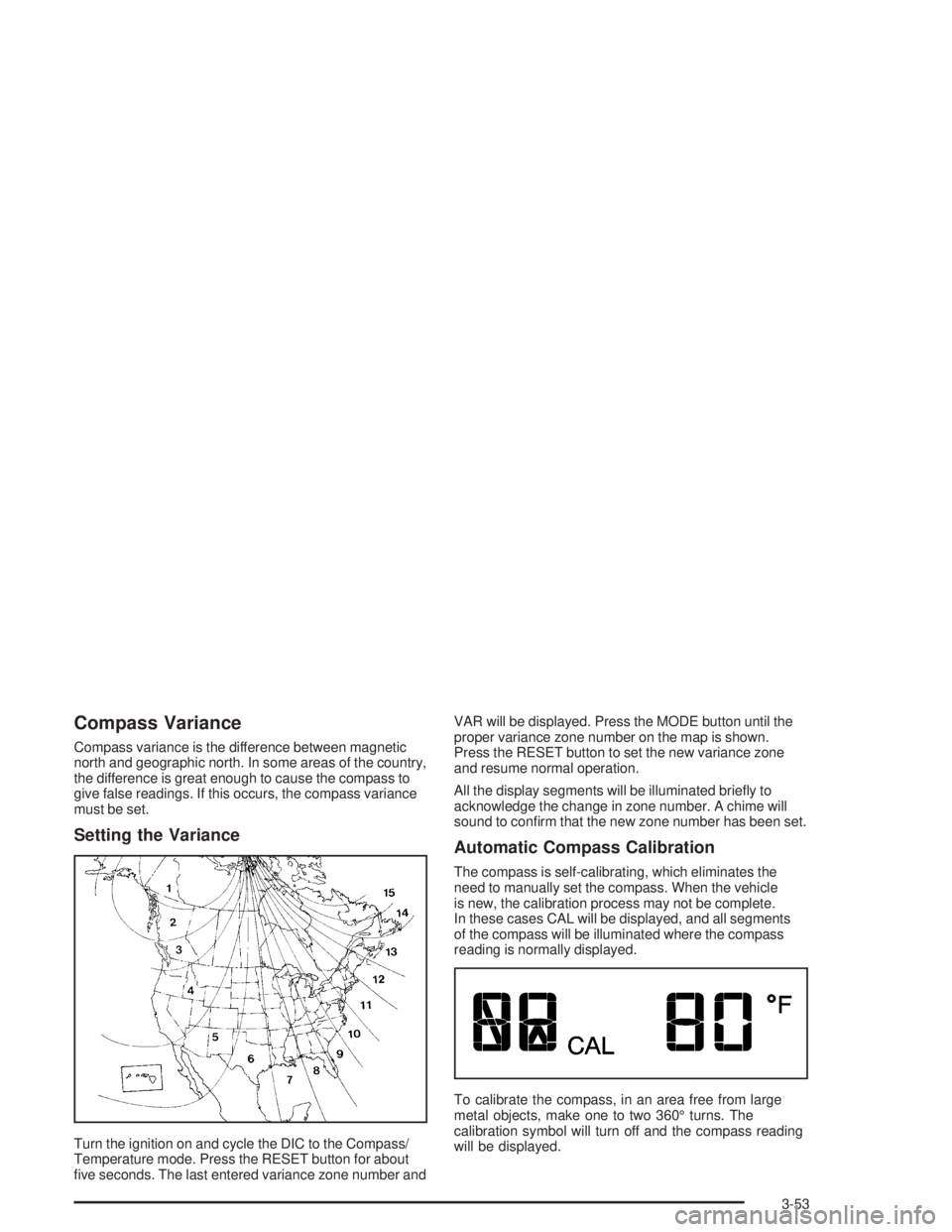
Setting the Variance
Turn the ignition on and cycle the DIC to the Compass/
Temperature mode. Press the RESET button for about
ve seconds. The last entered variance zone number andVAR will be displayed. Press the MODE button until the
proper variance zone number on the map is shown.
Press the RESET button to set the new variance zone
and resume normal operation.
All the display segments will be illuminated briey to
acknowledge the change in zone number. A chime will
sound to conrm that the new zone number has been set.
Automatic Compass Calibration
The compass is self-calibrating, which eliminates the
need to manually set the compass. When the vehicle
is new, the calibration process may not be complete.
In these cases CAL will be displayed, and all segments
of the compass will be illuminated where the compass
reading is normally displayed.
To calibrate the compass, in an area free from large
metal objects, make one to two 360° turns. The
calibration symbol will turn off and the compass reading
will be displayed.
3-53
Page 168 of 416

Manual Compass Calibration
If the compass appears erratic and the calibration
symbol does not appear, you must manually put the
compass into the calibration mode.
Turn the ignition on and cycle the DIC to the
Compass/Temperature mode. Press the RESET button
for at least 10 seconds until the calibration symbol
appears and all segments of the compass display are
illuminated. A chime will sound to conrm that the
calibration mode is active. Release the button and
complete two or three 360° turns in an area free from
large metal objects. The calibration symbol will turn
off and the compass reading will be displayed. A chime
will sound to verify that the calibration is complete.
Error Displays
An error of the speed sensor or fuel sender will
cause -E- to be displayed.
In the absence of vehicle communications,
adash--isdisplayed.
If one of these error messages appear, see your dealer.
Trip Computer
There are ve trip computer displays which may be
stepped through by pushing the MODE button.
The information will appear in the following order:
AVG ECON (Average Fuel Economy):This shows
the average fuel economy since the last reset.
INST ECON (Instantaneous Fuel Economy):
This shows fuel economy for the most recent second
of driving.
RANGE (Trip Range):This shows the estimated
distance that can be traveled with the remaining fuel.
The fuel economy used to calculate range is based
on the last few hours of driving. When in a low
fuel condition, LO is displayed.
FUEL USED (Trip Fuel Used):This shows the
accumulated fuel used since the last reset.
AVG SPEED (Average Speed):This shows the
average speed since the last reset.
Resetting the Trip Computer
Press and hold the RESET button for at least three
seconds. The reset is acknowledged with all segments
of the display lit briey and a chime. A reset can
only be done in AVG ECON, FUEL USED and AVG
SPEED displays. Each setting must be reset individually.
3-54
Page 169 of 416
Audio System(s)
Notice:Before you add any sound equipment to
your vehicle – like a tape player, CB radio, mobile
telephone or two-way radio – be sure you can
add what you want. If you can, it’s very important to
do it properly. Added sound equipment may
interfere with the operation of your vehicle’s engine,
radio or other systems, and even damage them.
Your vehicle’s systems may interfere with the
operation of sound equipment that has been added
improperly.
So, before adding sound equipment, check with
your dealer and be sure to check federal rules
covering mobile radio and telephone units.
Your audio system has been designed to operate easily
and to give years of listening pleasure. You will get
the most enjoyment out of it if you acquaint yourself with
it rst. Figure out which radio you have in your vehicle,
nd out what your audio system can do and how to
operate all of its controls to be sure you’re getting the
most out of the advanced engineering that went into it.
Your vehicle has a feature called Retained Accessory
Power (RAP). With RAP, you can play your audio
system even after the ignition is turned off. See
“Retained Accessory Power (RAP)” underIgnition
Positions on page 2-17.
Setting the Time
Press and hold the HR or MN buttons for two seconds.
Then press and hold HR until the correct hour
appears on the display. AM or PM will appear for
morning or evening hours. Press and hold MN until the
correct minute appears on the display. The time
may be set with the ignition on or off. The clock symbol
will appear on the display in time-set mode.
To synchronize the time with an FM station broadcasting
Radio Data System (RDS) information, press and
hold HR and MN at the same time for two seconds until
UPDATED and the clock symbol appear on the
display. If the time is not available from the station,
NO UPDAT will appear on the display.
RDS time is broadcast once a minute. Once you have
tuned to an RDS broadcast station, it may take a
few minutes for your time to update.
3-55
Page 171 of 416
Playing the Radio
PWR (Power):Press this knob to turn the system on
and off.
VOL (Volume):Turn this knob to increase or to
decrease volume.
AUTO VOL (Automatic Volume):With automatic
volume, your audio system adjusts automatically
to make up for road and wind noise as you drive.
Set the volume at the desired level. Press this button to
select LOW, MEDIUM, or HIGH. AVOL will appear
on the display. Each higher setting will allow for more
volume compensation at faster vehicle speeds. Then as
you drive, automatic volume increases the volume,
as necessary, to overcome noise at any speed.
The volume level should always sound the same to you
as you drive. NONE will appear on the display if the
radio cannot determine the vehicle speed. If you do not
want to use automatic volume, select OFF.DISPL (Display):For RDS, press this knob to change
what appears on the display while using RDS. The
display options are station name, RDS station frequency,
PTY, and the name of the program (if available).
For XM™ (48 contiguous US states, if equipped), press
the DISPL knob while in XM mode to retrieve four
different categories of information related to the current
song or channel: Artist, Song Title, Category or PTY,
Channel Number/Channel Name.
To change the default on the display, press the DISPL
knob until you see the display you want, then hold
the knob for two seconds. The radio will produce one
beep and the selected display will now be the default.
3-57