radio controls CHEVROLET MONTE CARLO 2004 Owners Manual
[x] Cancel search | Manufacturer: CHEVROLET, Model Year: 2004, Model line: MONTE CARLO, Model: CHEVROLET MONTE CARLO 2004Pages: 416, PDF Size: 4.56 MB
Page 116 of 416
Driver Information Center (DIC).......................3-51
Trip Computer................................................3-53
Audio System(s).............................................3-54
Setting the Time...........................................3-54
Radio with Cassette......................................3-55
Radio with CD..............................................3-66
Radio with Cassette and CD..........................3-77
Theft-Deterrent Feature..................................3-90
Audio Steering Wheel Controls.......................3-91Understanding Radio Reception......................3-92
Care of Your Cassette Tape Player.................3-92
Care of Your CDs.........................................3-93
Care of Your CD Player................................3-94
Backglass Antenna.......................................3-94
XM™ Satellite Radio Antenna System
(48 Contiguous US States).........................3-95
Vehicle Customization Settings.......................3-95
Chime Level Adjustment................................3-95
Section 3 Instrument Panel
3-2
Page 169 of 416
Audio System(s)
Notice:Before you add any sound equipment to
your vehicle – like a tape player, CB radio, mobile
telephone or two-way radio – be sure you can
add what you want. If you can, it’s very important to
do it properly. Added sound equipment may
interfere with the operation of your vehicle’s engine,
radio or other systems, and even damage them.
Your vehicle’s systems may interfere with the
operation of sound equipment that has been added
improperly.
So, before adding sound equipment, check with
your dealer and be sure to check federal rules
covering mobile radio and telephone units.
Your audio system has been designed to operate easily
and to give years of listening pleasure. You will get
the most enjoyment out of it if you acquaint yourself with
it rst. Figure out which radio you have in your vehicle,
nd out what your audio system can do and how to
operate all of its controls to be sure you’re getting the
most out of the advanced engineering that went into it.
Your vehicle has a feature called Retained Accessory
Power (RAP). With RAP, you can play your audio
system even after the ignition is turned off. See
“Retained Accessory Power (RAP)” underIgnition
Positions on page 2-17.
Setting the Time
Press and hold the HR or MN buttons for two seconds.
Then press and hold HR until the correct hour
appears on the display. AM or PM will appear for
morning or evening hours. Press and hold MN until the
correct minute appears on the display. The time
may be set with the ignition on or off. The clock symbol
will appear on the display in time-set mode.
To synchronize the time with an FM station broadcasting
Radio Data System (RDS) information, press and
hold HR and MN at the same time for two seconds until
UPDATED and the clock symbol appear on the
display. If the time is not available from the station,
NO UPDAT will appear on the display.
RDS time is broadcast once a minute. Once you have
tuned to an RDS broadcast station, it may take a
few minutes for your time to update.
3-55
Page 173 of 416
Setting the Tone (Bass/Treble)
AUDIO:Push and release the AUDIO knob until BASS
or TREB appears on the display. Then turn the knob
to increase or to decrease. The display will show
the bass or the treble level. If a station is weak or noisy,
you may want to decrease the treble.
To adjust the bass and the treble to the middle position,
push and hold the AUDIO knob. The radio will produce
one beep and adjust the display level to the middle
position.
To adjust all tone and speaker controls to the middle
position, push and hold the AUDIO knob when no tone
or speaker control is displayed. ALL will appear on
the display and you will hear a beep.
AUTO TONE (Automatic Tone):Press this button to
select customized equalization settings designed
for country/western, jazz, talk, pop, rock, and classical.
To return the bass and treble to the manual mode,
push and release the AUDIO knob until MANUAL
appears on the display.
Adjusting the Speakers (Balance/Fade)
AUDIO:To adjust the balance between the right
and the left speakers, push and release the AUDIO
knob until BAL appears on the display. Turn the knob to
move the sound toward the right or the left speakers.
To adjust the fade between the front and the rear
speakers, push and release the AUDIO knob until FADE
appears on the display. Turn the knob to move the
sound toward the front or the rear speakers.
To adjust the balance and the fade to the middle
position, push the AUDIO knob, then push it again and
hold it until you hear one beep. The balance and the
fade will be adjusted to the middle position and the
display will show the speaker balance.
To adjust all tone and speaker controls to the middle
position, push and hold the AUDIO knob when no tone
or speaker control is displayed. ALL will appear on
the display and you will hear a beep.
3-59
Page 178 of 416
Playing a Cassette Tape
Your tape player is built to work best with tapes that
are up to 30 to 45 minutes long on each side.
Tapes longer than that are so thin they may not work
well in this player. The longer side with the tape visible
should face to the right. If the ignition is on and the
radio is off, the tape can be inserted and will begin
playing. A tape symbol is shown on the display
whenever a tape is inserted. If you hear nothing but
a garbled sound, the tape may not be in squarely.
Press EJT to remove the tape and start over.
If you want to insert a tape while the ignition is off,
rst press the EJT button or the DISPL knob.
While the tape is playing, use VOL, TUNE, SEEK, and
PSCAN controls just as you do for the radio. The
radio will display TAPE and an arrow showing which
side of the tape is playing.
Your tape bias is set automatically when a metal or
chrome tape is inserted.
If an error appears on the display, see “Cassette Tape
Messages” later in this section.1 PREV (Previous):Your tape must have at least three
seconds of silence between each selection for previous
to work. Press this pushbutton to go to the previous
selection on the tape if the current selection has been
playing for less than three seconds. If pressed when the
current selection has been playing from 3 to 13 seconds,
it will go to the beginning of the previous selection or
the beginning of the current selection, depending upon
the position on the tape. If pressed when the current
selection has been playing for more than 13 seconds,
it will go to the beginning of the current selection.
SEEK and a negative number will appear on the display
while the cassette player is in the previous mode.
Pressing this pushbutton multiple times will increase the
number of selections to be searched back, up to -9.
2 NEXT:Your tape must have at least three seconds
of silence between each selection for next to work.
Press this pushbutton to go to the next selection on the
tape. If you press this pushbutton more than once,
the player will continue moving forward through the tape.
SEEK and a positive number will appear on the
display. To forward through each selection press the
right SEEK arrow.
3-64
Page 184 of 416
Setting the Tone (Bass/Treble)
AUDIO:Push and release the AUDIO knob until BASS
or TREB appears on the display. Then turn the knob
to increase or to decrease. The display will show
the bass or the treble level. If a station is weak or noisy,
you may want to decrease the treble.
To adjust the bass and the treble to the middle position,
push and hold the AUDIO knob. The radio will produce
one beep and adjust the display level to the middle
position.
To adjust all tone and speaker controls to the middle
position, push and hold the AUDIO knob when no tone
or speaker control is displayed. ALL will appear on
the display and you will hear a beep.
AUTO TONE (Automatic Tone):Press this button to
select customized equalization settings designed
for country/western, jazz, talk, pop, rock, and classical.
To return the bass and treble to the manual mode,
push and release the AUDIO knob until MANUAL
appears on the display.
Adjusting the Speakers (Balance/Fade)
AUDIO:To adjust the balance between the right
and the left speakers, push and release the AUDIO
knob until BAL appears on the display. Turn the knob to
move the sound toward the right or the left speakers.
To adjust the fade between the front and the rear
speakers, push and release the AUDIO knob until FADE
appears on the display. Turn the knob to move the
sound toward the front or the rear speakers.
To adjust the balance and the fade to the middle
position, push the AUDIO knob, then push it again and
hold it until you hear one beep. The balance and the
fade will be adjusted to the middle position and the
display will show the speaker balance.
To adjust all tone and speaker controls to the middle
position, push and hold the AUDIO knob when no tone
or speaker control is displayed. ALL will appear on
the display and you will hear a beep.
3-70
Page 195 of 416
Setting the Tone (Bass/Treble)
AUDIO:Push and release the AUDIO knob until BASS
or TREB appears on the display. Then turn the knob
to increase or to decrease. The display will show
the bass or the treble level. If a station is weak or noisy,
you may want to decrease the treble.
To adjust the bass and the treble to the middle position,
push and hold the AUDIO knob. The radio will produce
one beep and adjust the display level to the middle
position.
To adjust all tone and speaker controls to the middle
position, push and hold the AUDIO knob when no tone
or speaker control is displayed. ALL will appear on
the display and you will hear a beep.
AUTO TONE (Automatic Tone):Press this button to
select customized equalization settings designed
for country/western, jazz, talk, pop, rock, and classical.
To return the bass and treble to the manual mode,
push and release the AUDIO knob until MANUAL
appears on the display.
Adjusting the Speakers (Balance/Fade)
AUDIO:To adjust the balance between the right
and the left speakers, push and release the AUDIO
knob until BAL appears on the display. Turn the knob to
move the sound toward the right or the left speakers.
To adjust the fade between the front and the rear
speakers, push and release the AUDIO knob until FADE
appears on the display. Turn the knob to move the
sound toward the front or the rear speakers.
To adjust the balance and the fade to the middle
position, push the AUDIO knob, then push it again and
hold it until you hear one beep. The balance and the
fade will be adjusted to the middle position and the
display will show the speaker balance.
To adjust all tone and speaker controls to the middle
position, push and hold the AUDIO knob when no tone
or speaker control is displayed. ALL will appear on
the display and you will hear a beep.
3-81
Page 200 of 416
Playing a Cassette Tape
Your tape player is built to work best with tapes that
are up to 30 to 45 minutes long on each side.
Tapes longer than that are so thin they may not work
well in this player. The longer side with the tape visible
should face to the right. If the ignition is on and the
radio is off, the tape can be inserted and will begin
playing. A tape symbol is shown on the display
whenever a tape is inserted. If you hear nothing but a
garbled sound, the tape may not be in squarely.
Press EJT to remove the tape and start over. If you
want to insert a tape while the ignition is off, rst press
the EJT button or the DISPL knob.
While the tape is playing, use VOL, TUNE, SEEK,
and PSCAN controls just as you do for the radio.
The radio will display TAPE and an arrow showing
which side of the tape is playing.
Your tape bias is set automatically when a metal or
chrome tape is inserted.
If an error appears on the display, see “Cassette Tape
Messages” later in this section.1 PREV (Previous):Your tape must have at least three
seconds of silence between each selection for previous
to work. Press this pushbutton to go to the previous
selection on the tape if the current selection has been
playing for less than three seconds. If pressed when the
current selection has been playing from 3 to 13 seconds,
it will go to the beginning of the previous selection or
the beginning of the current selection, depending upon
the position on the tape. If pressed when the current
selection has been playing for more than 13 seconds,
it will go to the beginning of the current selection.
SEEK and a negative number will appear on the display
while the cassette player is in the previous mode.
Pressing this pushbutton multiple times will increase the
number of selections to be searched back, up to -9.
2 NEXT:Your tape must have at least three seconds
of silence between each selection for next to work.
Press this pushbutton to go to the next selection on
the tape. If you press this pushbutton more than once,
the player will continue moving forward through the
tape. SEEK and a positive number will appear on the
display. To forward through each selection press
the right SEEK arrow.
3-86
Page 206 of 416
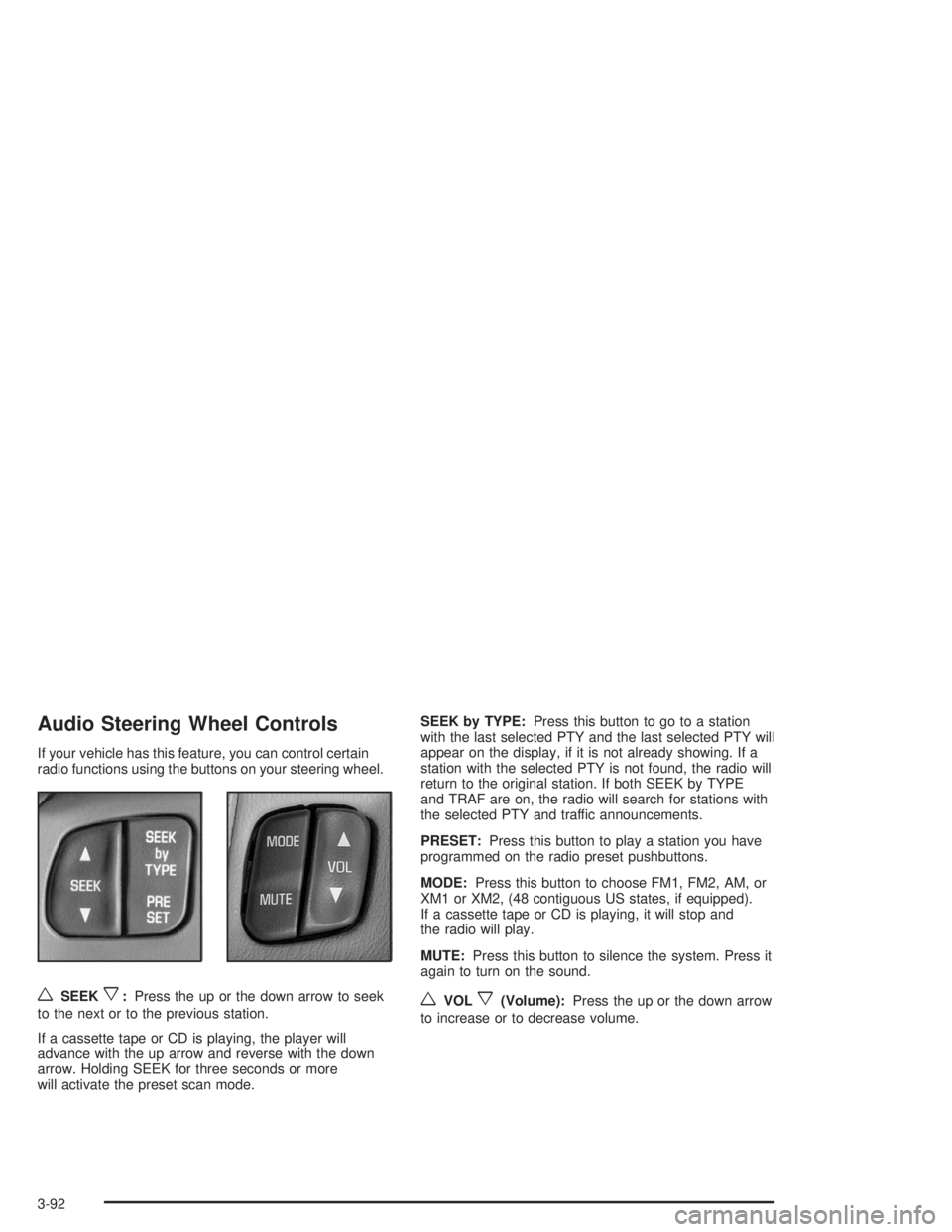
Audio Steering Wheel Controls
If your vehicle has this feature, you can control certain
radio functions using the buttons on your steering wheel.
wSEEKx:Press the up or the down arrow to seek
to the next or to the previous station.
If a cassette tape or CD is playing, the player will
advance with the up arrow and reverse with the down
arrow. Holding SEEK for three seconds or more
will activate the preset scan mode.SEEK by TYPE:Press this button to go to a station
with the last selected PTY and the last selected PTY will
appear on the display, if it is not already showing. If a
station with the selected PTY is not found, the radio will
return to the original station. If both SEEK by TYPE
and TRAF are on, the radio will search for stations with
the selected PTY and traffic announcements.
PRESET:Press this button to play a station you have
programmed on the radio preset pushbuttons.
MODE:Press this button to choose FM1, FM2, AM, or
XM1 or XM2, (48 contiguous US states, if equipped).
If a cassette tape or CD is playing, it will stop and
the radio will play.
MUTE:Press this button to silence the system. Press it
again to turn on the sound.wVOLx(Volume):Press the up or the down arrow
to increase or to decrease volume.
3-92
Page 401 of 416
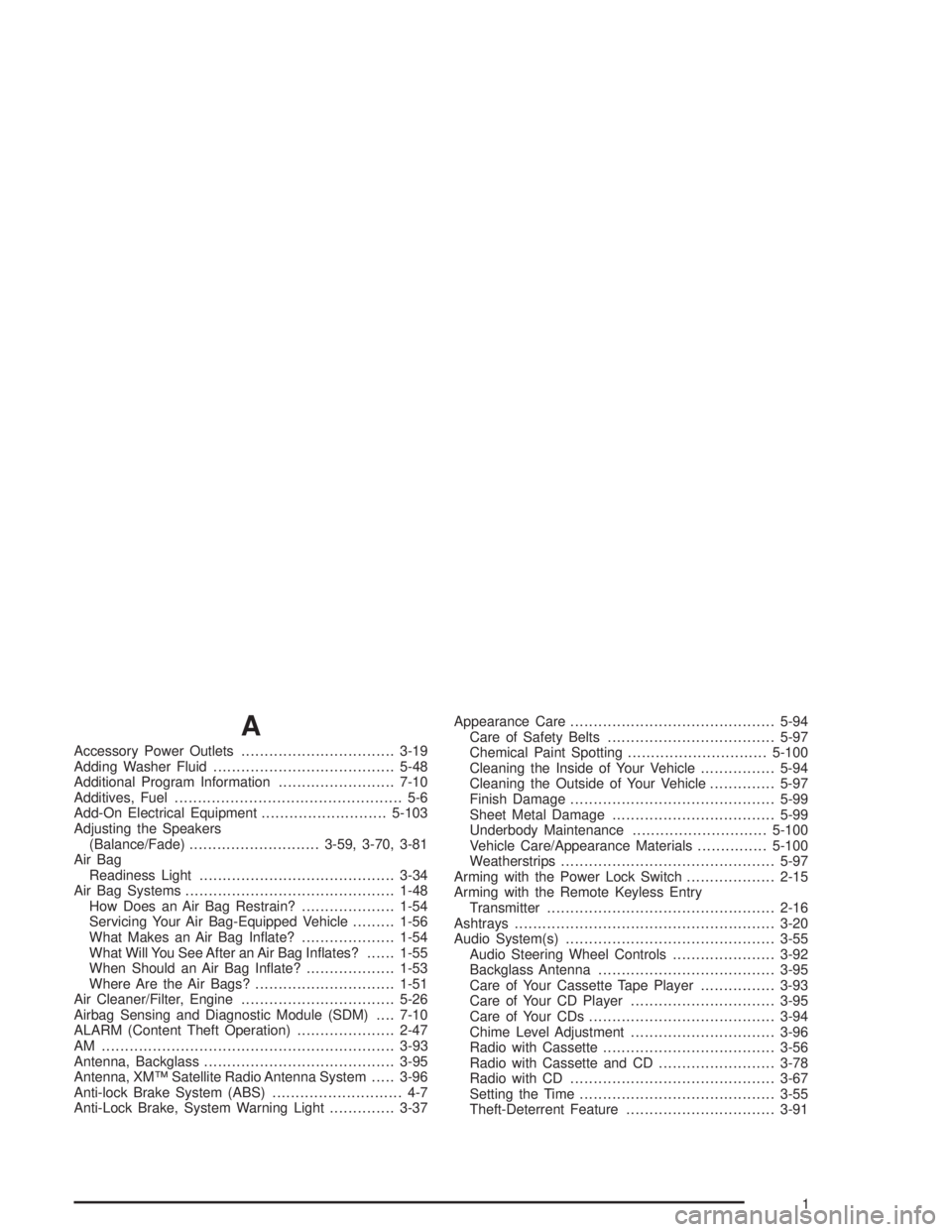
A
Accessory Power Outlets.................................3-19
Adding Washer Fluid.......................................5-48
Additional Program Information.........................7-10
Additives, Fuel................................................. 5-6
Add-On Electrical Equipment...........................5-103
Adjusting the Speakers
(Balance/Fade)............................3-59, 3-70, 3-81
Air Bag
Readiness Light..........................................3-34
Air Bag Systems.............................................1-48
How Does an Air Bag Restrain?....................1-54
Servicing Your Air Bag-Equipped Vehicle.........1-56
What Makes an Air Bag Inate?....................1-54
What Will You See After an Air Bag Inates?......1-55
When Should an Air Bag Inate?...................1-53
Where Are the Air Bags?..............................1-51
Air Cleaner/Filter, Engine.................................5-26
Airbag Sensing and Diagnostic Module (SDM)....7-10
ALARM (Content Theft Operation).....................2-47
AM ...............................................................3-93
Antenna, Backglass.........................................3-95
Antenna, XM™ Satellite Radio Antenna System.....3-96
Anti-lock Brake System (ABS)............................ 4-7
Anti-Lock Brake, System Warning Light..............3-37Appearance Care............................................5-94
Care of Safety Belts....................................5-97
Chemical Paint Spotting..............................5-100
Cleaning the Inside of Your Vehicle................5-94
Cleaning the Outside of Your Vehicle..............5-97
Finish Damage............................................5-99
Sheet Metal Damage...................................5-99
Underbody Maintenance.............................5-100
Vehicle Care/Appearance Materials...............5-100
Weatherstrips..............................................5-97
Arming with the Power Lock Switch...................2-15
Arming with the Remote Keyless Entry
Transmitter.................................................2-16
Ashtrays........................................................3-20
Audio System(s).............................................3-55
Audio Steering Wheel Controls......................3-92
Backglass Antenna......................................3-95
Care of Your Cassette Tape Player................3-93
Care of Your CD Player...............................3-95
Care of Your CDs........................................3-94
Chime Level Adjustment...............................3-96
Radio with Cassette.....................................3-56
Radio with Cassette and CD.........................3-78
Radio with CD............................................3-67
Setting the Time..........................................3-55
Theft-Deterrent Feature................................3-91
1