reset CHEVROLET MONTE CARLO 2007 6.G User Guide
[x] Cancel search | Manufacturer: CHEVROLET, Model Year: 2007, Model line: MONTE CARLO, Model: CHEVROLET MONTE CARLO 2007 6.GPages: 456, PDF Size: 2.43 MB
Page 194 of 456
To adjust for compass variance, use the following
procedure:
Compass Variance Procedure
1. Press the vehicle information button until
PRESS
VTO CHANGE COMPASS ZONE
displays.
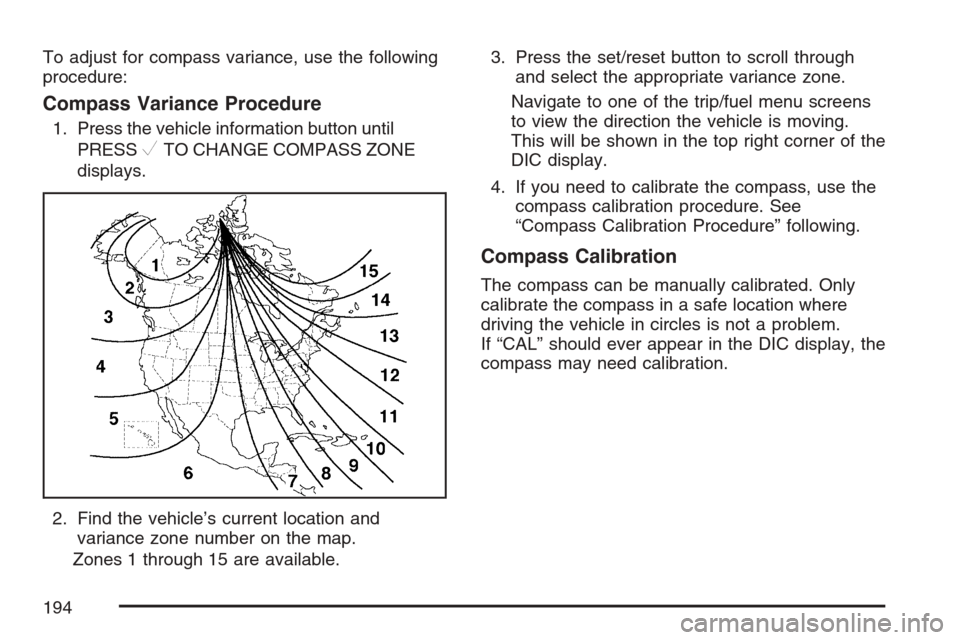
2. Find the vehicle’s current location and
variance zone number on the map.
Zones 1 through 15 are available.3. Press the set/reset button to scroll through
and select the appropriate variance zone.
Navigate to one of the trip/fuel menu screens
to view the direction the vehicle is moving.
This will be shown in the top right corner of the
DIC display.
4. If you need to calibrate the compass, use the
compass calibration procedure. See
“Compass Calibration Procedure” following.
Compass Calibration
The compass can be manually calibrated. Only
calibrate the compass in a safe location where
driving the vehicle in circles is not a problem.
If “CAL” should ever appear in the DIC display, the
compass may need calibration.
194
Page 195 of 456
To calibrate the compass, use the following
procedure:
Compass Calibration Procedure
1. Before calibrating the compass, make sure
the compass zone is set to the variance
zone in which the vehicle is traveling. See
“Compass Variance Procedure” earlier in
this section.
2. Press the vehicle information button until the
PRESS
VTO CALIBRATE COMPASS
screen is displayed.
3. Press the set/reset button to start the
compass calibration.
4. The DIC will display CALIBRATING: DRIVE
IN CIRCLES. Drive the vehicle in circles at
less than 5 mph (8 km/h) to complete
the calibration. The DIC will display
CALIBRATION COMPLETE when the
calibration is complete.
DIC Warnings and Messages
Messages are displayed on the DIC to notify the
driver that the status of the vehicle has changed
and that some action may be needed by the driver
to correct the condition. Multiple messages may
appear one after another. Some messages
may not require immediate action, but you can
press the set/reset button to acknowledge that you
received the message and clear it from the DIC
display. Pressing any of the DIC buttons also
acknowledges and clears any messages. Some
messages cannot be cleared from the DIC display
because they are more urgent. These messages
require action before they can be cleared.
You should take any messages that appear on the
display seriously and remember that clearing
the messages will only make the messages
disappear, not correct the problem. The following
are the possible messages that can be displayed
and some information about them.
195
Page 196 of 456
AUTOMATIC LIGHT CONTROL OFF
This message displays when the automatic
headlamps are turned off. SeeExterior Lamps on
page 156for more information.
AUTOMATIC LIGHT CONTROL ON
This message displays when the automatic
headlamps are turned on. SeeExterior Lamps on
page 156for more information.
BATTERY SAVER ACTIVE
This message displays when the system detects
that the battery voltage is dropping beyond a
reasonable level. The battery saver system starts
reducing certain features of the vehicle that
you may be able to notice. At the point that the
features are disabled, this message is displayed.
It means that the vehicle is trying to save the
charge in the battery.
Turn off all unnecessary accessories to allow the
battery to recharge.
The normal battery voltage range is
11.5 to 15.5 volts.
CHANGE ENGINE OIL SOON
This message displays when service is required
for the vehicle. See your dealer. SeeEngine Oil on
page 311andScheduled Maintenance on
page 406for more information.
Acknowledging the CHANGE ENGINE OIL SOON
message will not reset the OIL LIFE REMAINING.
That must be done at the OIL LIFE screen
under the vehicle information menu. See “Oil Life”
underDIC Operation and Displays on page 187
andEngine Oil Life System on page 314.
CHECK TIRE PRESSURE
This message displays when the tire pressure in
one of the tires needs to be checked. This message
also displays LEFT FRONT, RIGHT FRONT, LEFT
REAR, or RIGHT REAR to indicate which tire needs
to be checked. You can receive more than one tire
pressure message at a time. To read the other
messages that may have been sent at the same
time, press the set/reset button. If a tire pressure
message appears on the DIC, stop as soon as you
can. Have the tire pressures checked and set to
those shown on the Tire Loading Information Label.
196
Page 204 of 456
Entering the Feature Settings Menu
1. Turn the ignition on and place the vehicle in
PARK (P).
To avoid excessive drain on the battery, it is
recommended that the headlamps are
turned off.
2. Press the customization button to enter the
feature settings menu.
If the menu is not available, FEATURE
SETTINGS AVAILABLE IN PARK will display.
Before entering the menu, make sure the
vehicle is in PARK (P).
Feature Settings Menu Items
The following are customization features that allow
you to program settings to the vehicle:
DISPLAY IN ENGLISH
This feature will only display if a language other
than English has been set. This feature allows you
to change the language in which the DIC
messages appear to English.
Press the customization button until the PRESS
V
TO DISPLAY IN ENGLISH screen appears on
the DIC display. Press the set/reset button
to display all DIC messages in English.
DISPLAY LANGUAGE
This feature allows you to select the language in
which the DIC messages will appear.
Press the customization button until the DISPLAY
LANGUAGE screen appears on the DIC display.
Press the set/reset button to access the settings
for this feature. Then press the customization
button to scroll through the following choices:
ENGLISH (default):All messages will appear
in English.
FRANCAIS (French):All messages will appear
in French.
ESPANOL (Spanish):All messages will appear
in Spanish.
NO CHANGE:No change will be made to this
feature. The current setting will remain.
Select one of the available choices and press the
set/reset button while it is displayed on the
DIC to select it.
204
Page 205 of 456
AUTO DOOR UNLOCK
This feature allows you to select whether or not to
turn off the automatic door unlocking feature.
It also allows you to select which doors and when
the doors will automatically unlock. See
Programmable Automatic Door Unlock on
page 100for more information.
Press the customization button until AUTO DOOR
UNLOCK appears on the DIC display. Press
the set/reset button to access the settings for this
feature. Then press the customization button
to scroll through the following choices:
OFF:None of the doors will automatically unlock.
DRIVER AT KEY OUT:Only the driver’s door
will unlock when the key is taken out of the
ignition.
DRIVER IN PARK:Only the driver’s door will
unlock when the vehicle is shifted into PARK (P).
ALL AT KEY OUT:All of the doors will unlock
when the key is taken out of the ignition.
ALL IN PARK (default):All of the doors will
unlock when the vehicle is shifted into PARK (P).NO CHANGE:No change will be made to this
feature. The current setting will remain.
Select one of the available choices and press the
set/reset button while it is displayed on the
DIC to select it.
REMOTE DOOR LOCK
This feature allows you to select the type of
feedback you will receive when locking the vehicle
with the Remote Keyless Entry (RKE) transmitter.
You will not receive feedback when locking the
vehicle with the RKE transmitter if any of the doors
are open. SeeRemote Keyless Entry (RKE)
System Operation on page 91for more information.
Press the customization button until REMOTE
DOOR LOCK appears on the DIC display. Press
the set/reset button to access the settings for
this feature. Then press the customization button
to scroll through the following choices:
HORN & LIGHTS OFF:There will be no
feedback when you press the lock button on the
RKE transmitter.
LIGHTS ONLY:The exterior lamps will ash
when you press the lock button on the
RKE transmitter.
205
Page 206 of 456
HORN ONLY:The horn will sound on the second
press of the lock button on the RKE transmitter.
HORN & LIGHTS ON (default):The exterior
lamps will ash when you press the lock button on
the RKE transmitter, and the horn will sound
when the lock button is pressed again within
ve seconds of the previous command.
NO CHANGE:No change will be made to this
feature. The current setting will remain.
Select one of the available choices and press the
set/reset button while it is displayed on the
DIC to select it.
REMOTE DOOR UNLOCK
This feature allows you to select the type of
feedback you will receive when unlocking the
vehicle with the Remote Keyless Entry (RKE)
transmitter. You will not receive feedback when
unlocking the vehicle with the RKE transmitter
if the doors are open. SeeRemote Keyless
Entry (RKE) System Operation on page 91for
more information.Press the customization button until REMOTE
DOOR UNLOCK appears on the DIC display.
Press the set/reset button to access the settings
for this feature. Then press the customization
button to scroll through the following choices:
LIGHTS OFF:The exterior lamps will not ash
when you press the unlock button on the
RKE transmitter.
LIGHTS ON (default):The exterior lamps will
ash when you press the unlock button on
the RKE transmitter.
NO CHANGE:No change will be made to this
feature. The current setting will remain.
Select one of the available choices and press the
set/reset button while it is displayed on the
DIC to select it.
EXIT LIGHTING
If it is dark enough outside, this feature allows you
to select the amount of time you want the
exterior lamps to remain on. This happens after
the key is turned from RUN to OFF.
206
Page 207 of 456
Press the customization button until EXIT
LIGHTING appears on the DIC display. Press the
set/reset button to access the settings for this
feature. Then press the customization button to
scroll through the following choices:
OFF:The exterior lamps will not turn on.
30 SECONDS (default):The exterior lamps will
stay on for 30 seconds.
1 MINUTE:The exterior lamps will stay on for
one minute.
2 MINUTES:The exterior lamps will stay on for
two minutes.
NO CHANGE:No change will be made to this
feature. The current setting will remain.
Select one of the available choices and press the
set/reset button while it is displayed on the
DIC to select it.APPROACH LIGHTING
This feature allows you to select whether or not to
have the exterior lights turn on briey during
low light periods after unlocking the vehicle using
the Remote Keyless Entry (RKE) transmitter.
Press the customization button until APPROACH
LIGHTING appears on the DIC display. Press
the set/reset button to access the settings for this
feature. Then press the customization button
to scroll through the following choices:
OFF:The exterior lights will not turn on when you
unlock the vehicle with the RKE transmitter.
ON (default):If it is dark enough outside, the
exterior lights will turn on briey when you unlock
the vehicle with the RKE transmitter.
The lights will remain on for 20 seconds or until
the lock button on the RKE transmitter is pressed,
or the vehicle is no longer off. SeeRemote
Keyless Entry (RKE) System Operation on page 91
for more information.
207
Page 208 of 456
NO CHANGE:No change will be made to this
feature. The current setting will remain.
Select one of the available choices and press the
set/reset button while it is displayed on the
DIC to select it.
CHIME VOLUME
This feature allows you to select the volume level
of the chime.
Press the customization button until CHIME
VOLUME appears on the DIC display. Press the
set/reset button to access the settings for this
feature. Then press the customization button to
scroll through the following choices:
NORMAL (default):The chime volume will be set
to a normal level.
LOUD:The chime volume will be set to a
loud level.
NO CHANGE:No change will be made to this
feature. The current setting will remain.
Select one of the available choices and press the
set/reset button while it is displayed on the
DIC to select it.
REMOTE START
If your vehicle has this feature, it allows you to
turn the remote start off or on. The remote
start feature allows you to start the engine from
outside of the vehicle using your Remote Keyless
Entry (RKE) transmitter. See “Remote Vehicle
Start” underRemote Keyless Entry (RKE) System
Operation on page 91for more information.
Press the customization button until REMOTE
START appears on the DIC display. Press
the set/reset button to access the settings for this
feature. Then press the customization button
to scroll through the following choices:
OFF:The remote start feature will be disabled.
ON (default):The remote start feature will
be enabled.
NO CHANGE:No change will be made to this
feature. The current setting will remain.
Select one of the available choices and press the
set/reset button while it is displayed on the
DIC to select it.
208
Page 209 of 456
FACTORY SETTINGS
This feature allows you to set all of the
customization features back to their factory
default settings.
Press the customization button until FACTORY
SETTINGS appears on the DIC display. Press the
set/reset button to access the settings for this
feature. Then press the customization button to
scroll through the following choices:
RESTORE ALL (default):The customization
features will be set to their factory default settings.
DO NOT RESTORE:The customization features
will not be set to their factory default settings.
Select one of the available choices and press the
set/reset button while it is displayed on the
DIC to select it.
EXIT FEATURE SETTINGS
This feature allows you to exit the FEATURE
SETTINGS menu.
Press the customization button until FEATURE
SETTINGS PRESS
VTO EXIT appears in
the DIC display. Press the set/reset button to exit
the menu.
If you do not exit, pressing the customization
button again will return you to the beginning of the
FEATURE SETTINGS menu.
Exiting the Feature Settings Menu
The feature settings menu will be exited when any
of the following occurs:
The vehicle is shifted out of PARK (P).
The vehicle is no longer in RUN.
The trip/fuel or vehicle information DIC buttons
are pressed.
The end of the feature settings menu is
reached and exited.
A 40 second time period has elapsed with no
selection made.
209
Page 210 of 456
Audio System(s)
Determine which radio your vehicle has and then
read the pages following to familiarize yourself
with its features.
Driving without distraction is a necessity for a
safer driving experience. SeeDefensive Driving on
page 246. By taking a few moments to read this
manual and get familiar with your vehicle’s
audio system, you can use it with less effort, as
well as take advantage of its features. While your
vehicle is parked, set up your audio system by
presetting your favorite radio stations, setting the
tone and adjusting the speakers. Then, when
driving conditions permit, you can tune to
your favorite stations using the presets and
steering wheel controls if the vehicle has them.{CAUTION:
This system provides you with a far greater
access to audio stations and song listings.
Giving extended attention to entertainment
tasks while driving can cause a crash and
you or others can be injured or killed.
Always keep your eyes on the road and
your mind on the drive — avoid engaging
in extended searching while driving.
Keeping your mind on the drive is important for
safe driving. For more information, seeDefensive
Driving on page 246.
Here are some ways in which you can help avoid
distraction while driving.
210