Light CHEVROLET OPTRA 5 2006 1.G User Guide
[x] Cancel search | Manufacturer: CHEVROLET, Model Year: 2006, Model line: OPTRA 5, Model: CHEVROLET OPTRA 5 2006 1.GPages: 370, PDF Size: 2.32 MB
Page 69 of 370
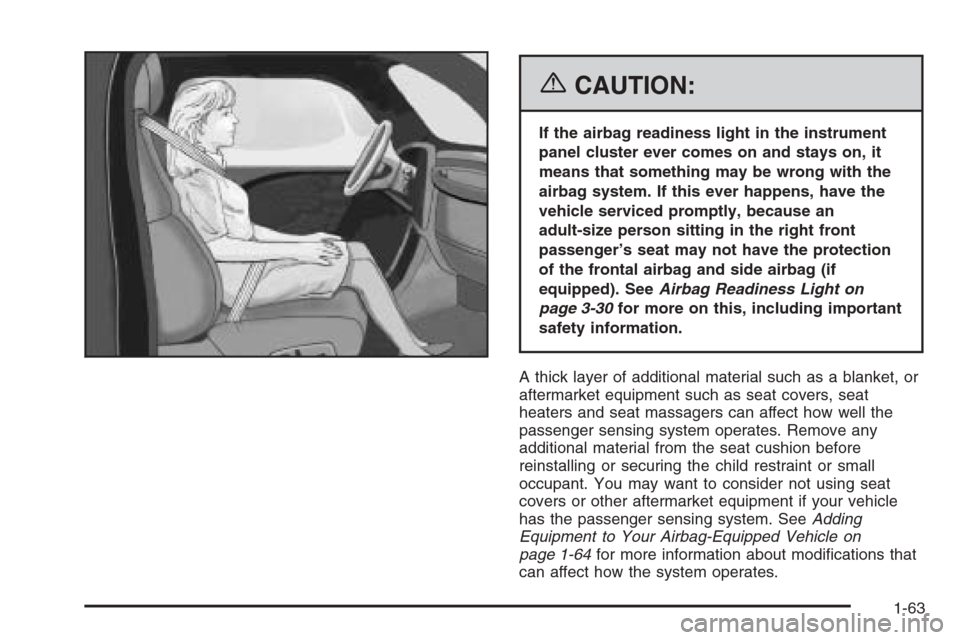
{CAUTION:
If the airbag readiness light in the instrument
panel cluster ever comes on and stays on, it
means that something may be wrong with the
airbag system. If this ever happens, have the
vehicle serviced promptly, because an
adult-size person sitting in the right front
passenger’s seat may not have the protection
of the frontal airbag and side airbag (if
equipped). SeeAirbag Readiness Light on
page 3-30for more on this, including important
safety information.
A thick layer of additional material such as a blanket, or
aftermarket equipment such as seat covers, seat
heaters and seat massagers can affect how well the
passenger sensing system operates. Remove any
additional material from the seat cushion before
reinstalling or securing the child restraint or small
occupant. You may want to consider not using seat
covers or other aftermarket equipment if your vehicle
has the passenger sensing system. SeeAdding
Equipment to Your Airbag-Equipped Vehicle on
page 1-64for more information about modifications that
can affect how the system operates.
1-63
Page 71 of 370
Q:Because I have a disability, I have to get my
vehicle modied. How can I nd out whether
this will affect my airbag system?
A:Changing or moving any parts of the front seats,
safety belts, the airbag sensing and diagnostic
module (located under the right front passenger’s
seat), or the instrument panel can affect the
operation of the airbag system. If you have
questions, call Customer Assistance. The phone
numbers and addresses for Customer Assistance
are in Step Two of the Customer Satisfaction
Procedure in this manual. SeeCustomer
Satisfaction Procedure on page 7-2.
Restraint System Check
Checking the Restraint Systems
Now and then, make sure the safety belt reminder light
and all your belts, buckles, latch plates, retractors
and anchorages are working properly. Look for any other
loose or damaged safety belt system parts. If you see
anything that might keep a safety belt system from doing
its job, have it repaired.
Torn or frayed safety belts may not protect you in a
crash. They can rip apart under impact forces. If a belt
is torn or frayed, get a new one right away.
Also look for any opened or broken airbag covers, and
have them repaired or replaced. (The airbag system
does not need regular maintenance.)
Notice:If you damage the covering for the driver’s
or the right front passenger’s frontal airbag, or
an airbag covering (if equipped) on a seatback, the
airbag may not work properly. You may have to
replace the airbag module in the steering wheel,
both the airbag module and the instrument panel for
the right front passenger’s frontal airbag, or both
the airbag module and the seatback for seating
positions with a side impact airbag (if equipped.) Do
not open or break the airbag coverings.
1-65
Page 72 of 370
Replacing Restraint System Parts
After a Crash
{CAUTION:
A crash can damage the restraint systems in
your vehicle. A damaged restraint system may
not properly protect the person using it,
resulting in serious injury or even death in a
crash. To help make sure your restraint
systems are working properly after a crash,
have them inspected and any necessary
replacements made as soon as possible.
If you have had a crash, do you need new belts or
LATCH system parts?
After a very minor collision, nothing may be necessary.
But if the belts were stretched, as they would be if
worn during a more severe crash, then you need new
parts.
If the LATCH system was being used during a more
severe crash, you may need new LATCH system parts.If belts are cut or damaged, replace them. Collision
damage also may mean you will need to have LATCH
system, safety belt or seat parts repaired or replaced.
New parts and repairs may be necessary even if the belt
or LATCH system wasn’t being used at the time of
the collision.
If the frontal airbags inflate, you will also need to
replace the driver’s and right front passenger’s safety
belt pretentioners and safety belt. Be sure to do
so. Then the new pretensioner and safety belt will be
there to help protect you in a collision.
After a crash you may need to replace the driver and
right front passenger’s safety belt retractor assemblies,
even if the frontal airbags have not deployed. The
driver and right front passenger’s safety belt retractor
assemblies contain the safety belt pretensioners.
Have your safety belt pretensioners checked if your
vehicle has been in a collision, or if your airbag
readiness light stays on after you start your vehicle or
while you are driving. SeeAirbag Readiness Light
on page 3-30.
If your vehicle is equipped with side airbags, the front
seat assembly must be replaced after the side
airbag has been deployed.
If an airbag inflates, you will need to replace airbag
system parts. See the part on the airbag system earlier
in this section.
1-66
Page 76 of 370
At times you may notice a decrease in range. This is
normal for any remote keyless entry system. If the
transmitter does not work or if you have to stand closer
to your vehicle for the transmitter to work, try this:
•Check the distance. You may be too far from your
vehicle. You may need to stand closer during
rainy or snowy weather.
•Check the location. Other vehicles or objects may
be blocking the signal. Take a few steps to the
left or right, hold the transmitter higher, and
try again.
•Check to determine if battery replacement is
necessary. See “Battery Replacement” under
Remote Keyless Entry System Operation on
page 2-4.
•If you are still having trouble, see your dealer or a
qualified technician for service.
Remote Keyless Entry System
Operation
The following functions may be available if your vehicle
has the remote keyless entry system.
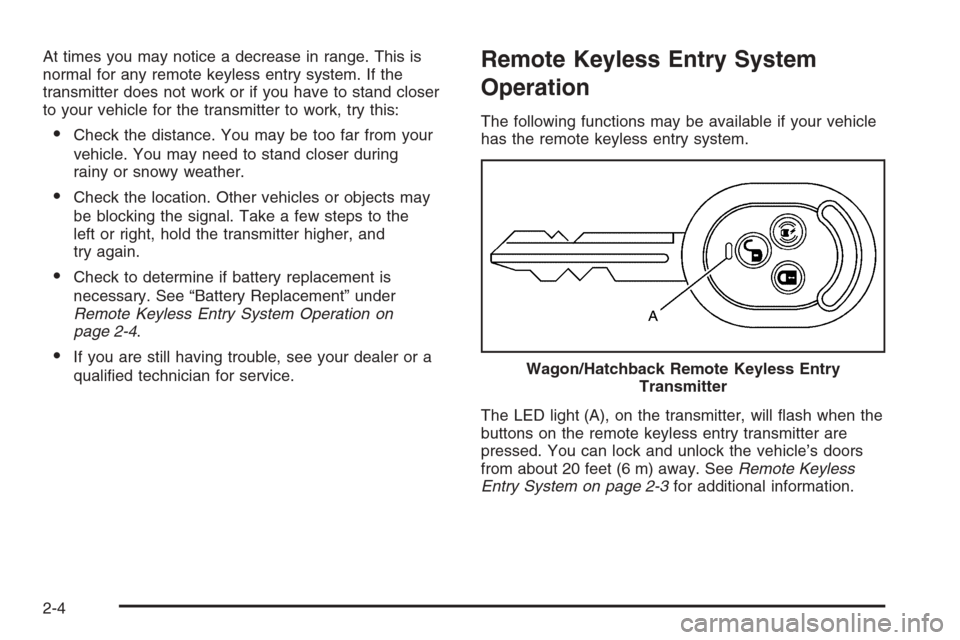
The LED light (A), on the transmitter, will flash when the
buttons on the remote keyless entry transmitter are
pressed. You can lock and unlock the vehicle’s doors
from about 20 feet (6 m) away. SeeRemote Keyless
Entry System on page 2-3for additional information. Wagon/Hatchback Remote Keyless Entry
Transmitter
2-4
Page 77 of 370
W(Unlock):Press this button to unlock all of the
doors and the liftgate, if equipped. If all of the doors and
the trunk or liftgate are closed, the hazard lamps will
flash twice to indicate that unlocking has occurred. The
theft-deterrent system will deactivate and the security
light will turn off. The security light is located on the base
of the driver’s door lock.
If a door is not opened or if the engine is not started
within 30 seconds after pressing unlock on the
remote keyless entry transmitter, all of the doors will
automatically lock and the theft-deterrent system
will reactivate.
Q(Lock):Press this button to lock all of the doors
and the liftgate, if equipped. If all of the doors and
the trunk or liftgate are closed, the hazard lamps will
flash once and the horn will chirp to indicate that locking
has occurred. The theft-deterrent system will activate
and the security light will flash.
If the driver’s door is open while pressing lock, all of the
doors, except for the driver’s door will lock. If any
door other than the driver’s door is open while
pressing lock, all of the doors, including the driver’s
door, will lock.
S(Panic):If your vehicle has this feature, press this
button to turn on the hazard warning flashers. The
hazard warning lamps will flash for about 28 seconds.
Press this button again to turn off the hazard warning
lamps.
The lock, unlock, trunk, and panic buttons, on the
remote keyless entry transmitter, will not operate while
the key is in the ignition. The theft-deterrent system
will not activate while the key is in the ignition.
Matching Transmitter(s) to Your
Vehicle
Each remote keyless entry transmitter is coded to
prevent another transmitter from unlocking your vehicle.
If a transmitter is lost or stolen, a replacement can
be purchased through your dealer. Remember to bring
any remaining transmitters with you when you go to
your dealer. When the dealer matches the replacement
transmitter to your vehicle, any remaining transmitters
must also be matched. Once your dealer has coded the
new transmitter, the lost transmitter will not unlock
your vehicle. Each vehicle can have a maximum of
four transmitters matched to it.
2-5
Page 78 of 370
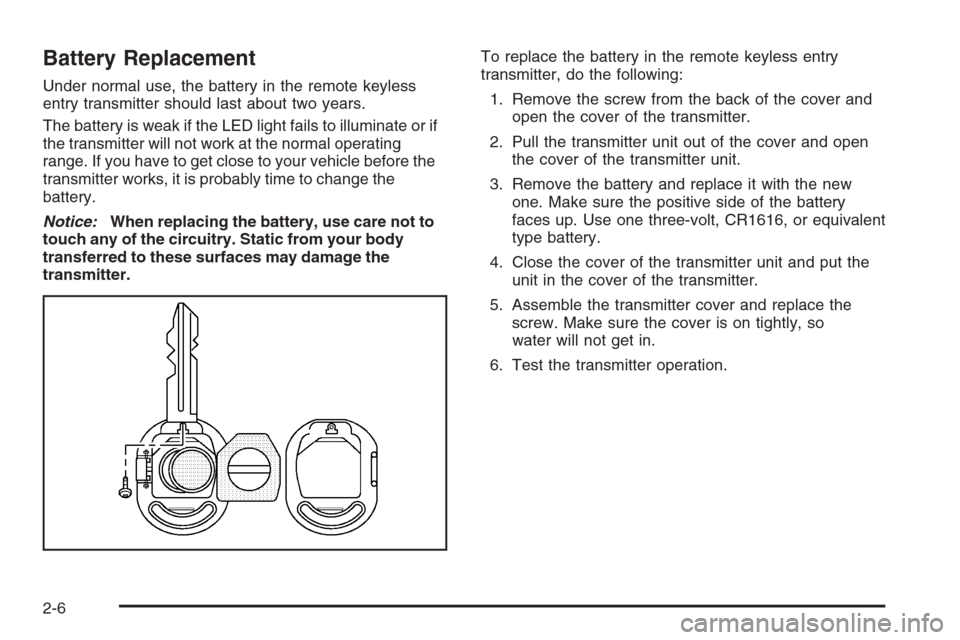
Battery Replacement
Under normal use, the battery in the remote keyless
entry transmitter should last about two years.
The battery is weak if the LED light fails to illuminate or if
the transmitter will not work at the normal operating
range. If you have to get close to your vehicle before the
transmitter works, it is probably time to change the
battery.
Notice:When replacing the battery, use care not to
touch any of the circuitry. Static from your body
transferred to these surfaces may damage the
transmitter.To replace the battery in the remote keyless entry
transmitter, do the following:
1. Remove the screw from the back of the cover and
open the cover of the transmitter.
2. Pull the transmitter unit out of the cover and open
the cover of the transmitter unit.
3. Remove the battery and replace it with the new
one. Make sure the positive side of the battery
faces up. Use one three-volt, CR1616, or equivalent
type battery.
4. Close the cover of the transmitter unit and put the
unit in the cover of the transmitter.
5. Assemble the transmitter cover and replace the
screw. Make sure the cover is on tightly, so
water will not get in.
6. Test the transmitter operation.
2-6
Page 80 of 370
If your vehicle has a security light, the light will turn off
when you unlock the door using the key or the
optional keyless entry transmitter. The light will turn on
when you lock the door using the key or the keyless
entry transmitter. The security light is located on
the base of the driver’s door lock.
From the inside, you can lock and unlock all of the
doors by pushing or pulling the manual door lock located
on the window sill on each door. You can also lock
and unlock the doors with the optional power door lock
switches located on the driver’s door.
Central Door Unlocking System
Your vehicle may have a central door unlocking system.
The central door unlocking system is activated from
the driver’s door.
From the outside, you can lock or unlock all of the
doors on your vehicle from the driver’s door by using
either the key or the optional keyless entry transmitter.
From the inside, you can lock or unlock all of the
doors using the driver’s door lock.
Power Door Locks
Your vehicle may have power door locks.
With the power door locks,
you can unlock or lock the
doors on your vehicle
using the driver’s door lock
switch.
Push down the front part of the switch to unlock the
doors. Push down on the back part of the switch to lock
the doors.
Door Ajar Reminder
If one of the doors on your
vehicle is not closed
properly while the ignition is
on, the door ajar light on
the instrument panel cluster
will come on and stay on
until the doors are closed.
SeeDoor Ajar Light on
page 3-42for additional
information.
2-8
Page 86 of 370
3. Lock the door using the remote keyless entry
transmitter. The transmitter must be used to activate
the theft-deterrent system.
•The LED light on the transmitter will flash once.
•All of the doors will lock.
•The hazard warning lamps will flash once and
the horn will chirp.
•The theft-deterrent mode will activate.
•The security light will flash once every second to
indicate that the theft-deterrent system is armed.
The security light is located on the base of
the driver’s door lock.
To avoid activating the alarm by accident, use one of
the following methods:
•Unlock the driver’s or passenger’s door using
the key.
•Press the unlock button on the remote keyless
entry transmitter.
Unlocking a door any other way will activate the alarm
when a door, the trunk or liftgate is opened.
If you do not want to arm the theft-deterrent system,
lock the vehicle using the key or the manual door locks.
Disarming the System
To disarm the system, use one of the following methods:
•Unlock the driver’s or passenger’s door using
the key.
•Press the unlock button on the transmitter.
- The LED light on the transmitter will
flash once.
- All of the doors will unlock.
- The hazard warning lamps will flash twice.
- The theft-deterrent mode will deactivate.
If the door is not opened or if the engine is not started
within 30 seconds after disarming the system with
the transmitter, all of the doors will automatically lock
and the theft-deterrent mode will reactivate.
2-14
Page 89 of 370
LOCK:This position locks your steering wheel, ignition,
shift lever and transaxle. This is the only position in
which you can insert or remove the key. For easier key
operation when unlocking the steering wheel, move
the steering wheel from right to left and turn the key
to ACC.
ACC (Accessory):This position operates some of your
electrical accessories, such as the radio, but not the
climate control system.
ON:This is the position to which the switch returns
after you start your engine and release the key.
The switch stays in ON when the engine is running. But
even when the engine is not running, you can use
ON to operate your electrical accessories, and to display
some instrument panel warning lights.
START:This position starts the engine. When the
engine starts, release the key. The switch will return to
ON for normal driving. Do not turn the key to START
if the engine is running.
Even if the engine is not running, ACC and ON allow
you to operate electrical accessories, such as the radio.Starting the Engine
Automatic Transaxle
Move your shift lever to PARK (P) or NEUTRAL (N).
Your engine will not start in any other position — that is
a safety feature. To restart when you are already
moving, use NEUTRAL (N) only.
Notice:Shifting into PARK (P) with the vehicle
moving could damage the transaxle. Shift into
PARK (P) only when your vehicle is stopped.
Manual Transaxle
The gear selector should be in neutral and the parking
brake engaged. Hold the clutch pedal to the floor
and start the engine. Your vehicle will not start if the
clutch pedal is not all the way down — that is a safety
feature.
2-17
Page 94 of 370
THIRD (3):This position is also used for normal driving,
however, it offers more power and lower fuel economy
than AUTOMATIC OVERDRIVE (D). Here are some
times you might choose THIRD (3) instead of
AUTOMATIC OVERDRIVE (D):
•When driving on hilly, winding roads.
•When going down a steep hill.
SECOND (2):This position gives you more power but
lower fuel economy. You can use SECOND (2) on
hills. It can help control your speed as you go down
steep mountain roads, but then you would also want to
use your brakes off and on.
Notice:Do not drive in SECOND (2) at speeds over
65 mph (105 km/h), or you can damage the
transaxle. Use THIRD (3) or AUTOMATIC
OVERDRIVE (D) as much as possible. Do not shift
into SECOND (2) unless you are going slower
than 65 mph (105 km/h) or you can damage your
engine.FIRST (1):This position gives you even more power
but lower fuel economy than SECOND (2). You can use
it on very steep hills, or in deep snow or mud. If the
shift lever is put in FIRST (1), the transaxle will not shift
into first gear until the vehicle is going slowly enough.
Notice:Spinning the tires or holding the vehicle in
one place on a hill using only the accelerator
pedal may damage the transaxle. If you are stuck,
do not spin the tires. When stopping on a hill,
use the brakes, or parking brake to hold the vehicle
in place.
If there is a malfunction with the automatic transaxle,
the Check Engine Light or the HOLD indicator light will
turn on or flash. SeeMalfunction Indicator Lamp on
page 3-37orHold Mode Light on page 3-36.
Have your vehicle fixed as soon as possible.
2-22