Light CHEVROLET OPTRA 5 2006 1.G Owner's Manual
[x] Cancel search | Manufacturer: CHEVROLET, Model Year: 2006, Model line: OPTRA 5, Model: CHEVROLET OPTRA 5 2006 1.GPages: 370, PDF Size: 2.32 MB
Page 95 of 370
Hold Mode
If your vehicle’s transaxle has hold mode, you can
select this mode to drive with some characteristics of a
manual transaxle. With hold mode turned on, the
automatic transaxle will stay in a specific gear range.
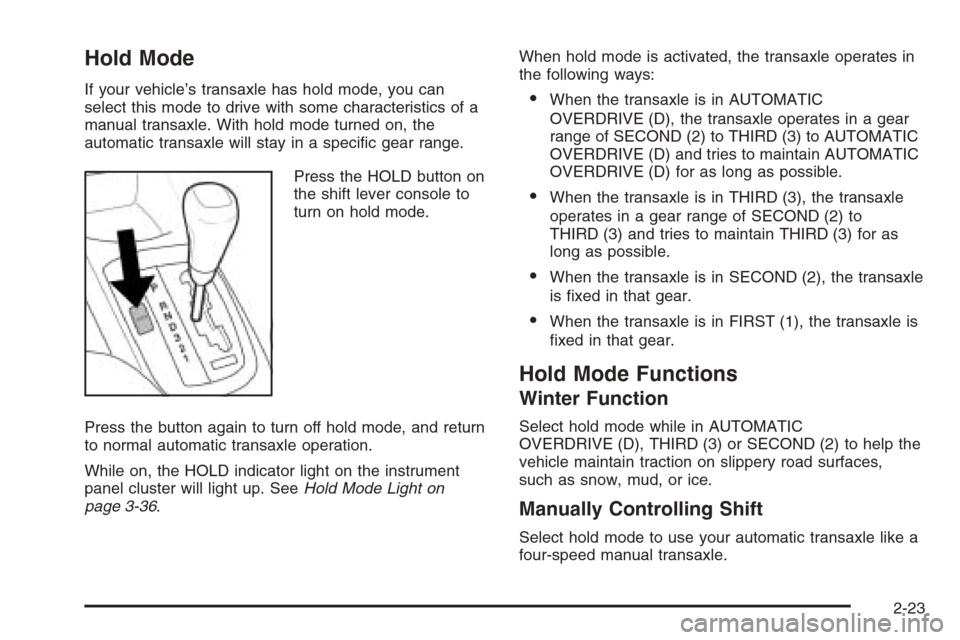
Press the HOLD button on
the shift lever console to
turn on hold mode.
Press the button again to turn off hold mode, and return
to normal automatic transaxle operation.
While on, the HOLD indicator light on the instrument
panel cluster will light up. SeeHold Mode Light on
page 3-36.When hold mode is activated, the transaxle operates in
the following ways:•When the transaxle is in AUTOMATIC
OVERDRIVE (D), the transaxle operates in a gear
range of SECOND (2) to THIRD (3) to AUTOMATIC
OVERDRIVE (D) and tries to maintain AUTOMATIC
OVERDRIVE (D) for as long as possible.
•When the transaxle is in THIRD (3), the transaxle
operates in a gear range of SECOND (2) to
THIRD (3) and tries to maintain THIRD (3) for as
long as possible.
•When the transaxle is in SECOND (2), the transaxle
is fixed in that gear.
•When the transaxle is in FIRST (1), the transaxle is
fixed in that gear.
Hold Mode Functions
Winter Function
Select hold mode while in AUTOMATIC
OVERDRIVE (D), THIRD (3) or SECOND (2) to help the
vehicle maintain traction on slippery road surfaces,
such as snow, mud, or ice.
Manually Controlling Shift
Select hold mode to use your automatic transaxle like a
four-speed manual transaxle.
2-23
Page 97 of 370
Shift Speeds
{CAUTION:
If you skip a gear when you downshift, you
could lose control of your vehicle. You could
injure yourself or others. Do not shift down
more than one gear at a time when you
downshift.
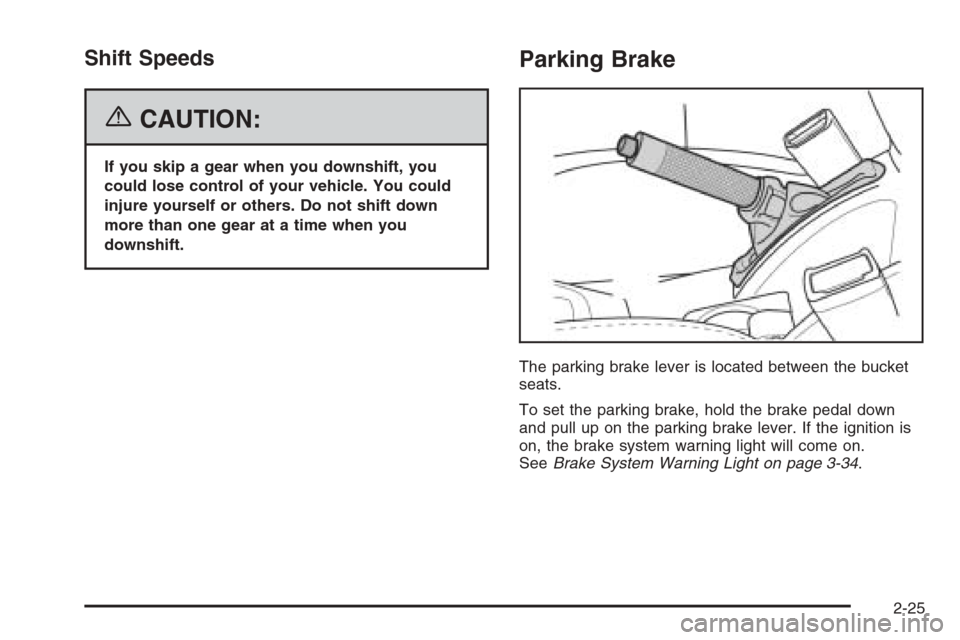
Parking Brake
The parking brake lever is located between the bucket
seats.
To set the parking brake, hold the brake pedal down
and pull up on the parking brake lever. If the ignition is
on, the brake system warning light will come on.
SeeBrake System Warning Light on page 3-34.
2-25
Page 98 of 370
To release the parking brake, hold the brake pedal
down. Pull the parking brake lever up until you can press
the release button. Hold the release button in as you
move the brake lever all the way down.
Notice:Driving with the parking brake on can
overheat the brake system and cause premature
wear or damage to brake system parts. Verify that
the parking brake is fully released and the brake
warning light is off before driving.Shifting Into Park (P)
(Automatic Transaxle)
{CAUTION:
It can be dangerous to get out of your vehicle
if the shift lever is not fully in PARK (P) with
the parking brake rmly set. Your vehicle can
roll. If you have left the engine running, the
vehicle can move suddenly. You or others
could be injured. To be sure your vehicle will
not move, even when you are on fairly level
ground, use the steps that follow.
1. Hold the brake pedal down and set the parking
brake.
2. Move the shift lever into PARK (P) by pushing the
lever toward the passenger side of the vehicle and
then up.
3. Turn the ignition to LOCK.
4. Remove the key and take it with you. If you can
leave your vehicle with the ignition key in your
hand, your vehicle is in PARK (P).
2-26
Page 111 of 370

Instrument Panel Overview...............................3-4
Hazard Warning Flashers................................3-8
Other Warning Devices...................................3-8
Horn .............................................................3-8
Tilt Wheel.....................................................3-9
Turn Signal/Multifunction Lever.........................3-9
Turn and Lane-Change Signals.......................3-10
Headlamp High/Low-Beam Changer.................3-10
Flash-to-Pass...............................................3-10
Windshield Wipers........................................3-11
Windshield Washer.......................................3-12
Rear Window Wiper/Washer (Hatchback and
Wagon only).............................................3-13
Cruise Control..............................................3-13
Exterior Lamps.............................................3-16
Headlamps on Reminder................................3-16
Daytime Running Lamps (DRL).......................3-16
Fog Lamps ..................................................3-17
Instrument Panel Brightness...........................3-18
Dome Lamp .................................................3-18
Map Lamps .................................................3-19
Accessory Power Outlet(s).............................3-19
Ashtray(s) and Cigarette Lighter......................3-20
Clock..........................................................3-21Climate Controls............................................3-22
Climate Control System.................................3-22
Outlet Adjustment.........................................3-25
Passenger Compartment Air Filter...................3-26
Warning Lights, Gages, and Indicators............3-27
Instrument Panel Cluster................................3-27
Speedometer and Odometer...........................3-29
Trip Odometer..............................................3-29
Tachometer.................................................3-29
Safety Belt Reminder Light.............................3-30
Safety Belt Reminder Tone............................3-30
Airbag Readiness Light..................................3-30
Passenger Airbag Status Indicator...................3-31
Charging System Light..................................3-33
Brake System Warning Light..........................3-34
Anti-Lock Brake System Warning Light.............3-35
Speed Sensitive Power Steering (SSPS)
Warning Light...........................................3-35
Traction Control System (TCS) Warning Light . . .3-36
Hold Mode Light...........................................3-36
Engine Coolant Temperature Gage..................3-36
Malfunction Indicator Lamp.............................3-37
Oil Pressure Light.........................................3-39
Section 3 Instrument Panel
3-1
Page 112 of 370
Fog Lamp Light............................................3-41
Cruise Control Light......................................3-41
Highbeam On Light.......................................3-41
Daytime Running Lamps (DRL) Indicator Light.....3-41
Door Ajar Light.............................................3-42
Trunk Ajar Light............................................3-42
Fuel Gage...................................................3-42
Low Fuel Warning Light.................................3-43Audio System(s).............................................3-44
Radio with CD (Single Display, Base Level)......3-45
Radio with CD (Single Display, MP3)...............3-49
Radio with CD (Double Display, MP3/WMA).....3-57
Radio with Six-Disc CD (Double Display,
MP3/WMA) ...............................................3-65
Audio Steering Wheel Controls.......................3-73
Radio Reception...........................................3-74
Care of Your CDs.........................................3-75
Care of the CD Player...................................3-75
Integrated Windshield Antenna........................3-75
Section 3 Instrument Panel
3-2
Page 115 of 370
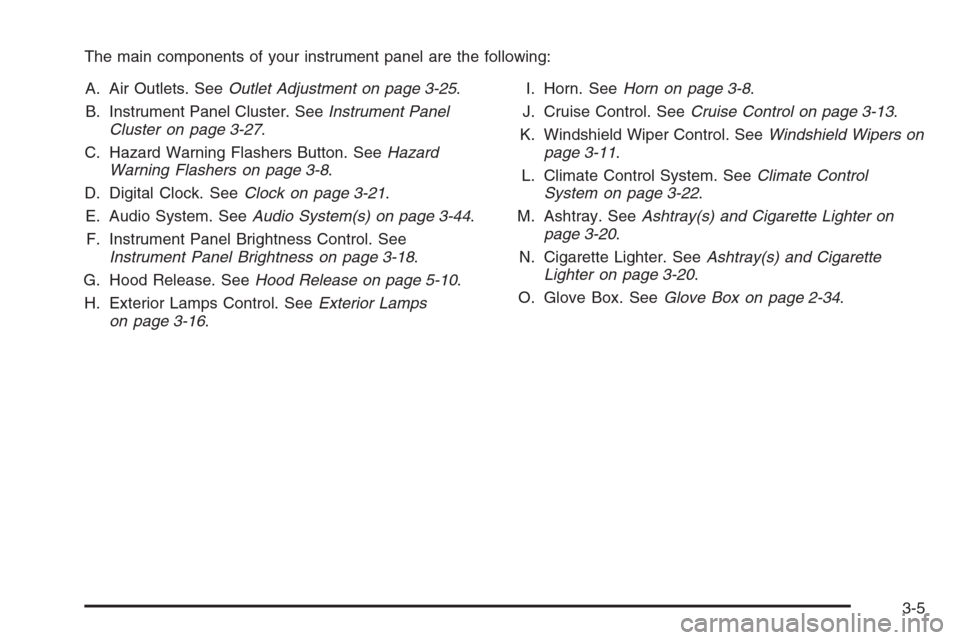
The main components of your instrument panel are the following:
A. Air Outlets. SeeOutlet Adjustment on page 3-25.
B. Instrument Panel Cluster. SeeInstrument Panel
Cluster on page 3-27.
C. Hazard Warning Flashers Button. SeeHazard
Warning Flashers on page 3-8.
D. Digital Clock. SeeClock on page 3-21.
E. Audio System. SeeAudio System(s) on page 3-44.
F. Instrument Panel Brightness Control. See
Instrument Panel Brightness on page 3-18.
G. Hood Release. SeeHood Release on page 5-10.
H. Exterior Lamps Control. SeeExterior Lamps
on page 3-16.I. Horn. SeeHorn on page 3-8.
J. Cruise Control. SeeCruise Control on page 3-13.
K. Windshield Wiper Control. SeeWindshield Wipers on
page 3-11.
L. Climate Control System. SeeClimate Control
System on page 3-22.
M. Ashtray. SeeAshtray(s) and Cigarette Lighter on
page 3-20.
N. Cigarette Lighter. SeeAshtray(s) and Cigarette
Lighter on page 3-20.
O. Glove Box. SeeGlove Box on page 2-34.
3-5
Page 117 of 370
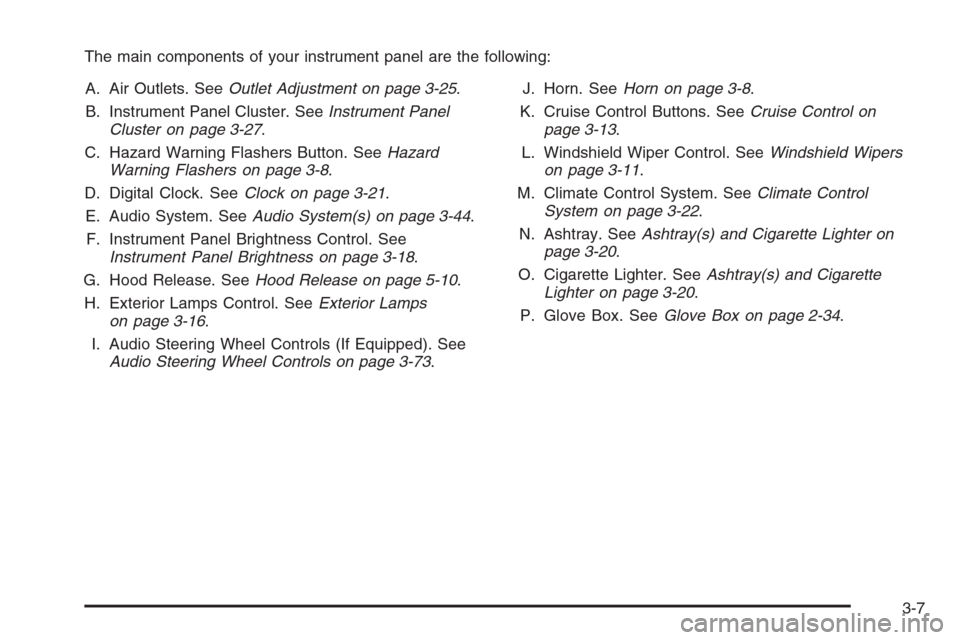
The main components of your instrument panel are the following:
A. Air Outlets. SeeOutlet Adjustment on page 3-25.
B. Instrument Panel Cluster. SeeInstrument Panel
Cluster on page 3-27.
C. Hazard Warning Flashers Button. SeeHazard
Warning Flashers on page 3-8.
D. Digital Clock. SeeClock on page 3-21.
E. Audio System. SeeAudio System(s) on page 3-44.
F. Instrument Panel Brightness Control. See
Instrument Panel Brightness on page 3-18.
G. Hood Release. SeeHood Release on page 5-10.
H. Exterior Lamps Control. SeeExterior Lamps
on page 3-16.
I. Audio Steering Wheel Controls (If Equipped). See
Audio Steering Wheel Controls on page 3-73.J. Horn. SeeHorn on page 3-8.
K. Cruise Control Buttons. SeeCruise Control on
page 3-13.
L. Windshield Wiper Control. SeeWindshield Wipers
on page 3-11.
M. Climate Control System. SeeClimate Control
System on page 3-22.
N. Ashtray. SeeAshtray(s) and Cigarette Lighter on
page 3-20.
O. Cigarette Lighter. SeeAshtray(s) and Cigarette
Lighter on page 3-20.
P. Glove Box. SeeGlove Box on page 2-34.
3-7
Page 119 of 370
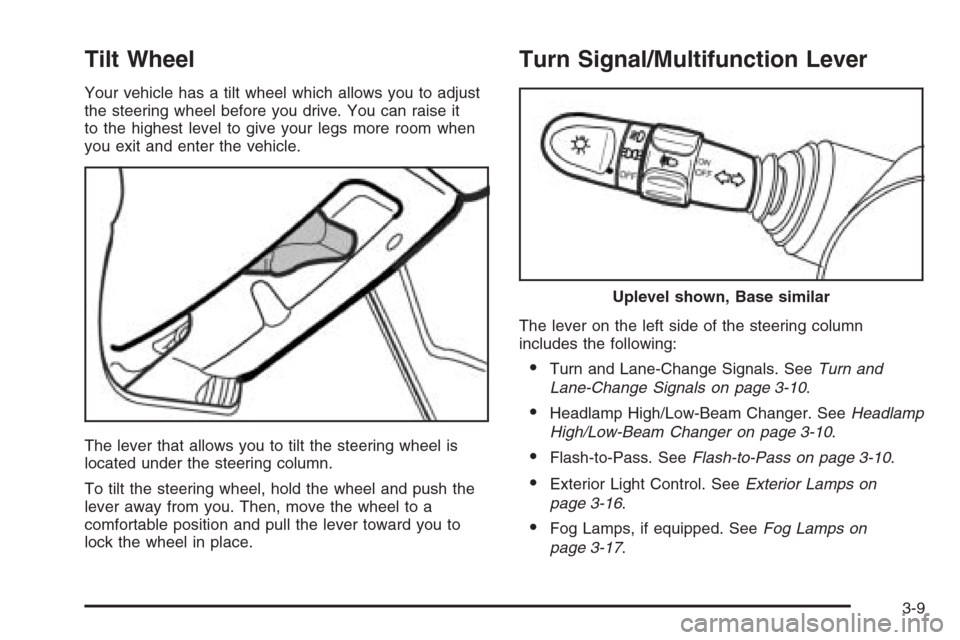
Tilt Wheel
Your vehicle has a tilt wheel which allows you to adjust
the steering wheel before you drive. You can raise it
to the highest level to give your legs more room when
you exit and enter the vehicle.
The lever that allows you to tilt the steering wheel is
located under the steering column.
To tilt the steering wheel, hold the wheel and push the
lever away from you. Then, move the wheel to a
comfortable position and pull the lever toward you to
lock the wheel in place.
Turn Signal/Multifunction Lever
The lever on the left side of the steering column
includes the following:
•Turn and Lane-Change Signals. SeeTurn and
Lane-Change Signals on page 3-10.
•Headlamp High/Low-Beam Changer. SeeHeadlamp
High/Low-Beam Changer on page 3-10.
•Flash-to-Pass. SeeFlash-to-Pass on page 3-10.
•Exterior Light Control. SeeExterior Lamps on
page 3-16.
•Fog Lamps, if equipped. SeeFog Lamps on
page 3-17.
Uplevel shown, Base similar
3-9
Page 120 of 370

Turn and Lane-Change Signals
The turn signal has two upward (for right) and
two downward (for left) positions. These positions
allow you to signal a turn or a lane change.
To signal a turn, move the lever all the way up or down.
When the turn is finished, the lever will return
automatically.
An arrow on the instrument
panel cluster will flash in
the direction of the
turn or lane change.
To signal a lane change, just raise or lower the lever until
the arrow starts to flash. Hold it there until you complete
your lane change. The lever will return by itself when you
release it.
As you signal a turn or a lane change, if the arrows flash
rapidly, a signal bulb may be burned out and other drivers
will not see your turn signal.
If a bulb is burned out, replace it to help avoid an
accident. If the arrows do not go on at all when you signal
a turn, check for burned-out bulbs. If the arrow still does
not work, check the fuse. SeeFuses and Circuit Breakers
on page 5-82.
Headlamp High/Low-Beam Changer
To change the headlamps from low beam to high
beam, push the turn signal/multifunction lever away
from you.
When the high beams are
on, a light on the
instrument panel cluster
also will be on if the
ignition is turned to ON.
To change the headlamps from high beam to low beam,
pull the turn signal lever toward you.
Flash-to-Pass
This feature lets you use your high-beam headlamps to
signal a driver in front of you that you want to pass.
To use it, pull the turn signal/multifunction lever toward
you until the high-beam headlamps come on, then
release the lever to turn them off.
3-10
Page 124 of 370
Setting Cruise Control
{CAUTION:
If you leave your cruise control on when you
are not using cruise, you might hit a button
and go into cruise when you do not want to.
You could be startled and even lose control.
Keep the cruise control switch off until you
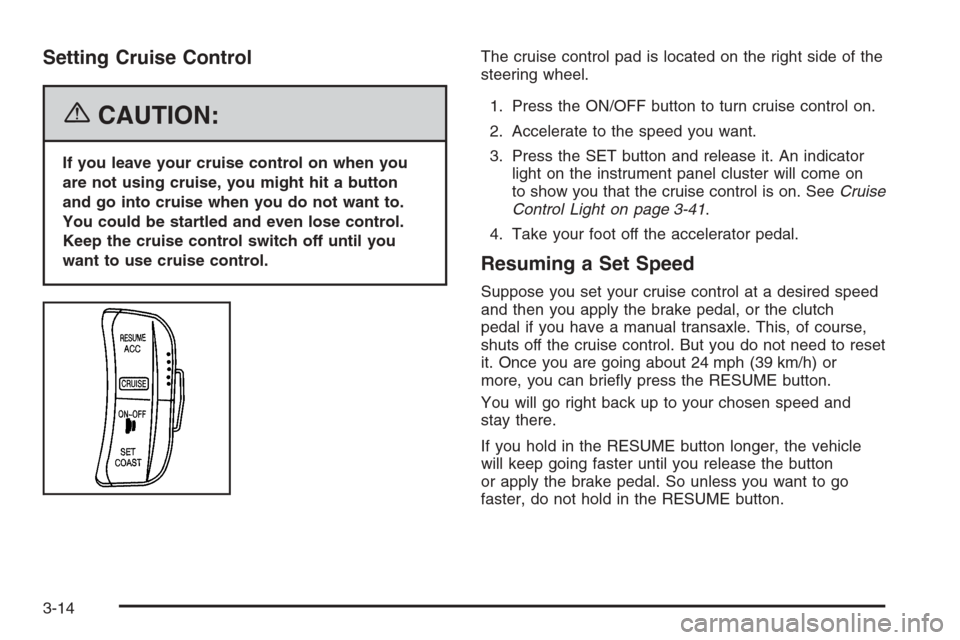
want to use cruise control.The cruise control pad is located on the right side of the
steering wheel.
1. Press the ON/OFF button to turn cruise control on.
2. Accelerate to the speed you want.
3. Press the SET button and release it. An indicator
light on the instrument panel cluster will come on
to show you that the cruise control is on. SeeCruise
Control Light on page 3-41.
4. Take your foot off the accelerator pedal.
Resuming a Set Speed
Suppose you set your cruise control at a desired speed
and then you apply the brake pedal, or the clutch
pedal if you have a manual transaxle. This, of course,
shuts off the cruise control. But you do not need to reset
it. Once you are going about 24 mph (39 km/h) or
more, you can briefly press the RESUME button.
You will go right back up to your chosen speed and
stay there.
If you hold in the RESUME button longer, the vehicle
will keep going faster until you release the button
or apply the brake pedal. So unless you want to go
faster, do not hold in the RESUME button.
3-14