Lamp CHEVROLET ORLANDO 2012 1.G Owners Manual
[x] Cancel search | Manufacturer: CHEVROLET, Model Year: 2012, Model line: ORLANDO, Model: CHEVROLET ORLANDO 2012 1.GPages: 378, PDF Size: 6.68 MB
Page 2 of 378

Black plate (2,1)Chevrolet Orlando Owner Manual - 2012
2012 Chevrolet Orlando Owner ManualM
Vehicle Care. . . . . . . . . . . . . . . . . 10-1
General Information . . . . . . . . . . 10-2
Vehicle Checks . . . . . . . . . . . . . . . 10-3
Headlamp Aiming . . . . . . . . . . . 10-25
Bulb Replacement . . . . . . . . . . 10-25
Electrical System . . . . . . . . . . . . 10-31
Wheels and Tires . . . . . . . . . . . 10-38
Jump Starting . . . . . . . . . . . . . . . 10-73
Towing . . . . . . . . . . . . . . . . . . . . . . 10-76
Appearance Care . . . . . . . . . . . 10-79 Service and Maintenance
. . . 11-1
General Information . . . . . . . . . . 11-1
Maintenance Schedule . . . . . . . 11-3
Special Application
Services . . . . . . . . . . . . . . . . . . . . 11-9
Additional Maintenance and Care . . . . . . . . . . . . . . . . . . . . 11-9
Recommended Fluids,
Lubricants, and Parts . . . . . . 11-13
Maintenance Records . . . . . . . 11-16
Technical Data . . . . . . . . . . . . . . . 12-1
Vehicle Identification . . . . . . . . . 12-1
Vehicle Data . . . . . . . . . . . . . . . . . . 12-2 Customer Information
. . . . . . . 13-1
Customer Information . . . . . . . . 13-1
Reporting Safety Defects . . . . 13-12
Vehicle Data Recording and
Privacy . . . . . . . . . . . . . . . . . . . . 13-14
OnStar . . . . . . . . . . . . . . . . . . . . . . . 14-1
OnStar Overview . . . . . . . . . . . . . 14-1
OnStar Services . . . . . . . . . . . . . . 14-2
OnStar Additional
Information . . . . . . . . . . . . . . . . . . 14-5
Index . . . . . . . . . . . . . . . . . . . . . i-1
Page 5 of 378

Black plate (5,1)Chevrolet Orlando Owner Manual - 2012
Introduction v
Vehicle Symbol Chart
Here are some additional symbols
that may be found on the vehicle
and what they mean. For more
information on the symbol, refer to
the Index.
9:Airbag Readiness Light
#:Air Conditioning
!:Antilock Brake System (ABS)
%:Audio Steering Wheel Controls
or OnStar®
$: Brake System Warning Light
":Charging System
I:Cruise Control
B: Engine Coolant Temperature
O:Exterior Lamps
#:Fog Lamps
.: Fuel Gauge
+:Fuses
3: Headlamp High/Low-Beam
Changer
j: LATCH System Child
Restraints
*: Malfunction Indicator Lamp
::Oil Pressure
}:Power
/:Remote Vehicle Start
>:Safety Belt Reminders
7:Tire Pressure Monitor
d:Traction Control/StabiliTrak®
M:Windshield Washer Fluid
Page 9 of 378

Black plate (3,1)Chevrolet Orlando Owner Manual - 2012
In Brief 1-3
A.Air Vents on page 8‑6.
B. Turn and Lane-Change Lever. See Turn and Lane-Change
Signals on page 6‑4.
Headlamp High/Low-Beam
Changer on page 6‑2.
C. Instrument Cluster on page 5‑9.
D. Windshield Wiper/Washer on
page 5‑3.
Rear Window Wiper/Washer on
page 5‑5.
E. Infotainment on page 7‑1.
F. Infotainment Display.
G. Light Sensor. See Automatic
Headlamp System on page 6‑3.
H. Instrument Panel Storage on
page 4‑1.
USB Port and Auxiliary Input
Jack (Inside Instrument Panel
Storage). See Auxiliary Devices
on page 7‑18. I.
CD Player on page 7‑16.
J. TCS/StabiliTrak Button. See StabiliTrak
®System on
page 9‑31.
K. Exterior Lamp Controls on
page 6‑1.
Instrument Panel Illumination
Control on page 6‑5.
Front Fog Lamps on page 6‑4.
L. Front Storage on page 4‑1.
M. Data Link Connector (DLC) (Out of View). See Malfunction
Indicator Lamp on page 5‑13.
N. Cruise Control on page 9‑32.
O. Steering Wheel Adjustment on
page 5‑2.
P. Horn on page 5‑3.
Q. Steering Wheel Controls on
page 5‑3. R.
Power Door Locks on page 2‑7.
S. Heated Front Seats on page 3‑7
(If Equipped).
T. Climate Control Systems on
page 8‑1.
Automatic Climate Control
System on page 8‑3.
U. Shift Lever. See Automatic
Transmission on page 9‑23 or
Manual Transmission on
page 9‑25.
V. Parking Brake on page 9‑28.
W. Power Outlets on page 5‑6.
X. Hazard Warning Flashers on
page 6‑3.
Y. Passenger Safety Belt Reminder Light. See Safety Belt
Reminders on page 5‑11.
Page 10 of 378
Black plate (4,1)Chevrolet Orlando Owner Manual - 2012
1-4 In Brief
Initial Drive
Information
This section provides a brief
overview about some of the
important features that may or may
not be on your specific vehicle.
For more detailed information, refer
to each of the features which can be
found later in this owner manual.
Remote Keyless Entry
(RKE) System
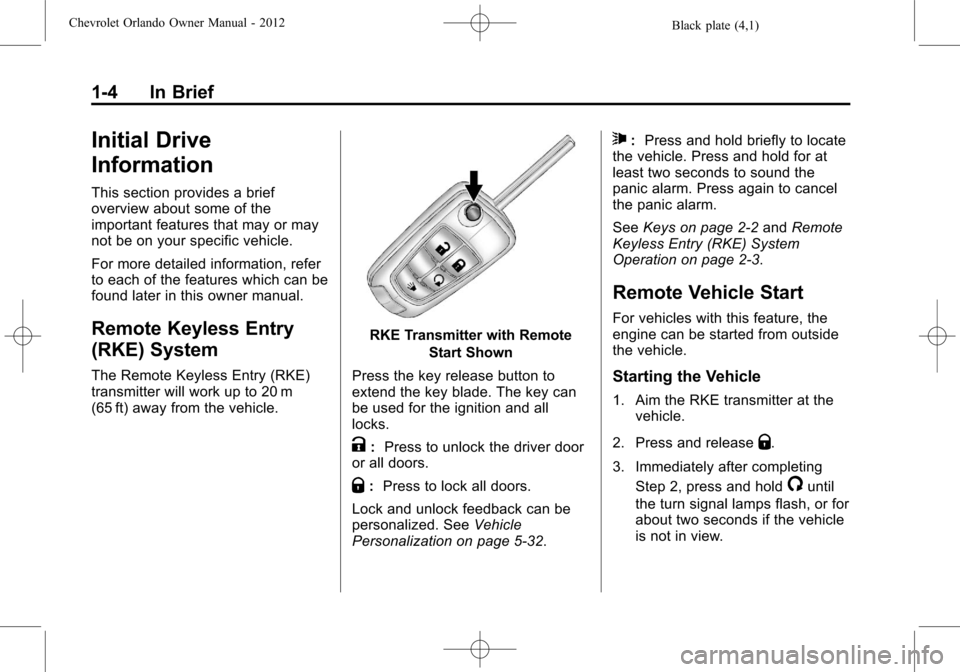
The Remote Keyless Entry (RKE)
transmitter will work up to 20 m
(65 ft) away from the vehicle.
RKE Transmitter with RemoteStart Shown
Press the key release button to
extend the key blade. The key can
be used for the ignition and all
locks.
K: Press to unlock the driver door
or all doors.
Q: Press to lock all doors.
Lock and unlock feedback can be
personalized. See Vehicle
Personalization on page 5‑32.
7: Press and hold briefly to locate
the vehicle. Press and hold for at
least two seconds to sound the
panic alarm. Press again to cancel
the panic alarm.
See Keys on page 2‑2 andRemote
Keyless Entry (RKE) System
Operation on page 2‑3.
Remote Vehicle Start
For vehicles with this feature, the
engine can be started from outside
the vehicle.
Starting the Vehicle
1. Aim the RKE transmitter at the vehicle.
2. Press and release
Q.
3. Immediately after completing Step 2, press and hold
/until
the turn signal lamps flash, or for
about two seconds if the vehicle
is not in view.
Page 11 of 378
Black plate (5,1)Chevrolet Orlando Owner Manual - 2012
In Brief 1-5
When the engine starts, the parking
lamps will turn on and remain on as
long as the engine is running. The
doors will be locked and the climate
control system may come on.
The engine will continue to run for
10 minutes. Repeat the steps for a
10-minute time extension. Remote
start can be extended only once.
Canceling a Remote Start
To cancel a remote start, do one of
the following:
.Aim the RKE transmitter at the
vehicle and press and hold
/
until the parking lamps turn off.
.Turn on the hazard warning
flashers.
.Turn the vehicle on and then off.
See Remote Vehicle Start on
page 2‑5.
Door Locks
To lock or unlock the vehicle from
outside, use the Remote Keyless
Entry (RKE) transmitter or the key.
From inside the vehicle, use the
power door lock switch.
See Door Locks on page 2‑6.
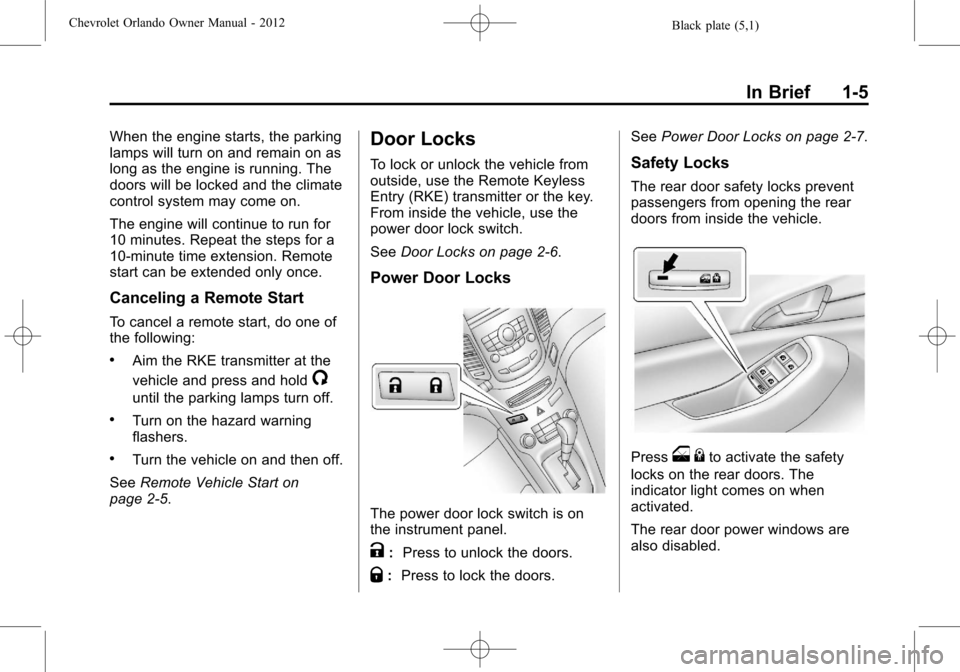
Power Door Locks
The power door lock switch is on
the instrument panel.
K:Press to unlock the doors.
Q:Press to lock the doors. See
Power Door Locks on page 2‑7.
Safety Locks
The rear door safety locks prevent
passengers from opening the rear
doors from inside the vehicle.
Presso{to activate the safety
locks on the rear doors. The
indicator light comes on when
activated.
The rear door power windows are
also disabled.
Page 16 of 378
Black plate (10,1)Chevrolet Orlando Owner Manual - 2012
1-10 In Brief
Interior Mirror
Hold the inside rearview mirror in
the center to move it for a clearer
view of behind your vehicle. Adjust
the inside rearview mirror by moving
it up and down or side to side.
Adjust the mirror to avoid glare from
the headlamps behind you. Push
the tab forward for daytime use and
pull it for nighttime use. SeeManual
Rearview Mirror on page 2‑12.
On vehicles with an automatic
dimming inside rearview mirror, the
mirror reduces glare from the
headlamps of the vehicle behind
you. The dimming feature and
indicator light come on each time
the vehicle is started. See
Automatic Dimming Rearview Mirror
on page 2‑12.
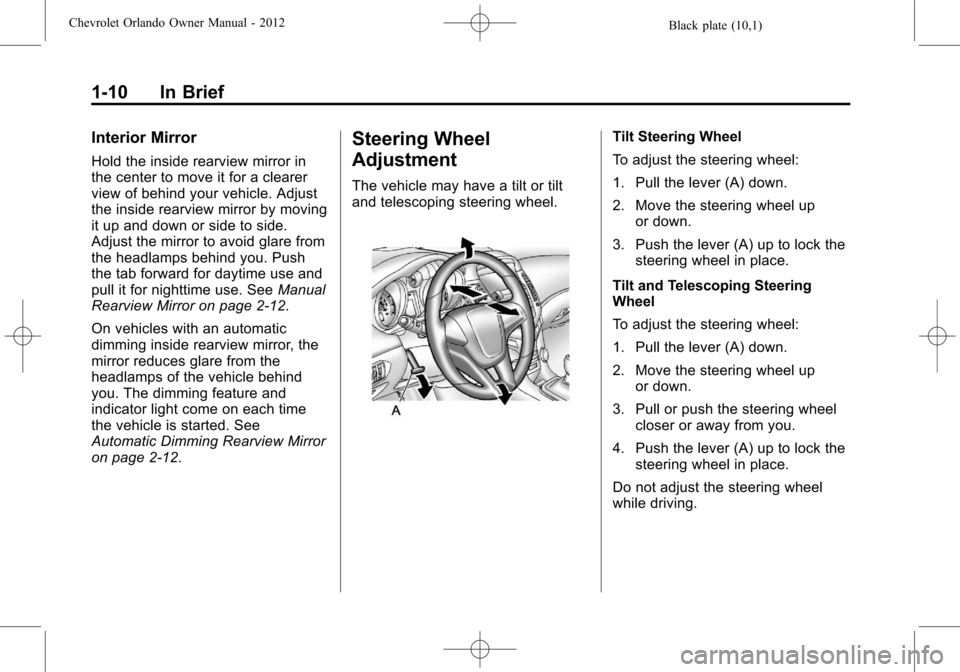
Steering Wheel
Adjustment
The vehicle may have a tilt or tilt
and telescoping steering wheel.
Tilt Steering Wheel
To adjust the steering wheel:
1. Pull the lever (A) down.
2. Move the steering wheel up
or down.
3. Push the lever (A) up to lock the steering wheel in place.
Tilt and Telescoping Steering
Wheel
To adjust the steering wheel:
1. Pull the lever (A) down.
2. Move the steering wheel up or down.
3. Pull or push the steering wheel closer or away from you.
4. Push the lever (A) up to lock the steering wheel in place.
Do not adjust the steering wheel
while driving.
Page 17 of 378
Black plate (11,1)Chevrolet Orlando Owner Manual - 2012
In Brief 1-11
Interior Lighting
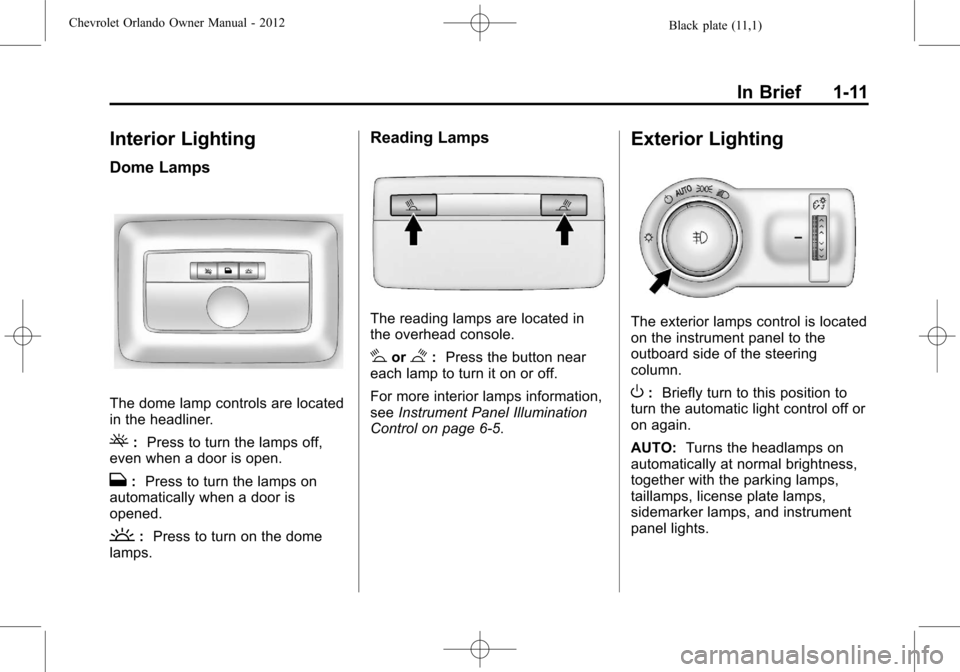
Dome Lamps
The dome lamp controls are located
in the headliner.
(:Press to turn the lamps off,
even when a door is open.
H: Press to turn the lamps on
automatically when a door is
opened.
': Press to turn on the dome
lamps.
Reading Lamps
The reading lamps are located in
the overhead console.
#or$: Press the button near
each lamp to turn it on or off.
For more interior lamps information,
see Instrument Panel Illumination
Control on page 6‑5.
Exterior Lighting
The exterior lamps control is located
on the instrument panel to the
outboard side of the steering
column.
O: Briefly turn to this position to
turn the automatic light control off or
on again.
AUTO: Turns the headlamps on
automatically at normal brightness,
together with the parking lamps,
taillamps, license plate lamps,
sidemarker lamps, and instrument
panel lights.
Page 18 of 378
Black plate (12,1)Chevrolet Orlando Owner Manual - 2012
1-12 In Brief
;:Turns on the parking lamps,
taillamps, license plate lamps,
sidemarker lamps, and instrument
panel lights.
5: Turns on the headlamps,
parking lamps, taillamps, license
plate lamps, sidemarker lamps, and
instrument panel lights. A warning
chime sounds if the driver door is
opened when the ignition switch is
off and the headlamps are on.
#: For vehicles with fog lamps,
press to turn the lamps on or off.
For more information, see:
.Exterior Lamp Controls on
page 6‑1.
.Daytime Running Lamps (DRL)
on page 6‑2.
.Front Fog Lamps on page 6‑4.
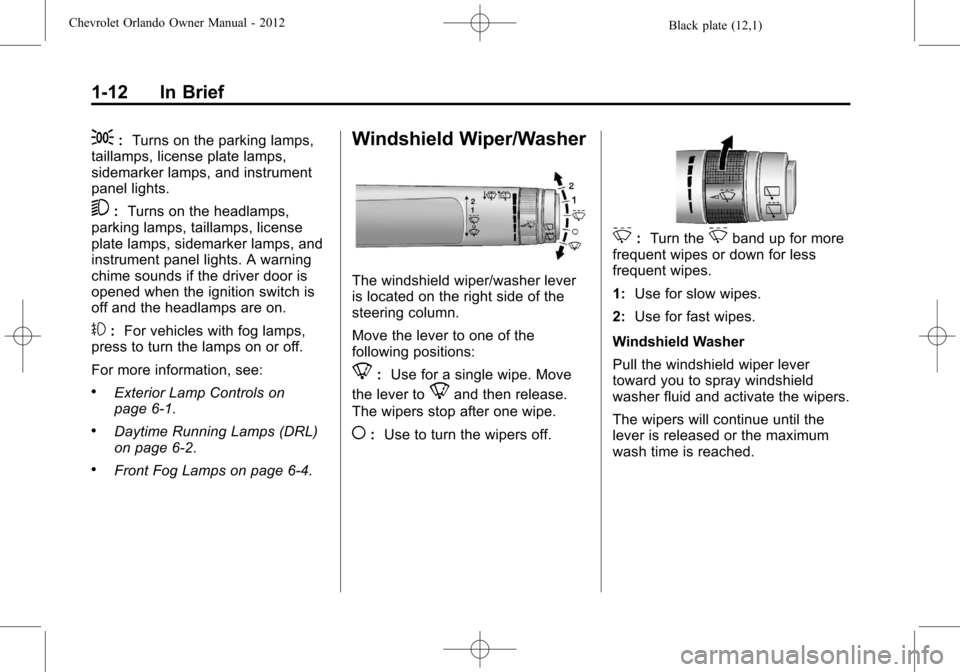
Windshield Wiper/Washer
The windshield wiper/washer lever
is located on the right side of the
steering column.
Move the lever to one of the
following positions:
8: Use for a single wipe. Move
the lever to
8and then release.
The wipers stop after one wipe.
(: Use to turn the wipers off.
3:Turn the3band up for more
frequent wipes or down for less
frequent wipes.
1: Use for slow wipes.
2: Use for fast wipes.
Windshield Washer
Pull the windshield wiper lever
toward you to spray windshield
washer fluid and activate the wipers.
The wipers will continue until the
lever is released or the maximum
wash time is reached.
Page 32 of 378
Black plate (4,1)Chevrolet Orlando Owner Manual - 2012
2-4 Keys, Doors, and Windows
The following may be available:
Q(Lock):Press to lock all doors.
The turn signal indicators may flash
and/or the horn may sound to
indicate locking. See “Locking
Feedback” underVehicle
Personalization on page 5‑32.
If the driver door is open when
Qis
pressed and Unlocked Door Anti
Lock Out is enabled through vehicle
personalization, all doors will lock
and then the driver door will unlock.
See “Unlocked Door Anti Lock Out”
under Vehicle Personalization on
page 5‑32.
Pressing
Qmay also arm the
theft-deterrent system. See Vehicle
Alarm System on page 2‑9.
K(Unlock): Press to unlock the
driver door or all doors. See “Door
Unlock Options” underVehicle
Personalization on page 5‑32. The turn signal indicators may flash
and/or the horn may sound to
indicate unlocking. See
“Unlock
Feedback” underVehicle
Personalization on page 5‑32.
Pressing
Kwill disarm the
theft-deterrent system. See Vehicle
Alarm System on page 2‑9.
7(Vehicle Locator/Panic
Alarm): Press and hold briefly to
locate the vehicle. The exterior
lamps flash and the horn chirps.
Press and hold
7for at least
two seconds to sound the panic
alarm. The horn sounds and the
turn signals flash for 30 seconds,
or until
7is pressed again or the
key is placed in the ignition and
turned to ON/RUN.
/(Remote Vehicle Start): For
vehicles with this feature, press
Q
and then press and hold/to start
the engine from outside the vehicle using the RKE transmitter. See
Remote Vehicle Start on page 2‑5
for additional information.
The buttons on the keys are
disabled when there is a key in the
ignition.
Programming Transmitters to
the Vehicle
Only RKE transmitters programmed
to this vehicle will work. If a
transmitter is lost or stolen, a
replacement can be purchased and
programmed through your dealer.
When the replacement transmitter is
programmed to this vehicle, all
remaining transmitters must also be
reprogrammed. Any lost or stolen
transmitters will no longer work
once the new transmitter is
programmed.
Page 33 of 378
Black plate (5,1)Chevrolet Orlando Owner Manual - 2012
Keys, Doors, and Windows 2-5
Battery Replacement
The battery is not rechargeable. To
replace the battery:
1. Extend the key blade and openthe battery cover on the back of
the transmitter by prying with a
finger.
2. Remove the used battery by pushing on the battery and
sliding it toward the key blade.
3. Insert the new battery, positive side facing up. Push the battery
down until it is held in place.
Replace with a CR2032 or
equivalent battery.
4. Snap the battery cover back on to the transmitter.
Remote Vehicle Start
The vehicle may have this feature
that allows you to start the engine
from outside the vehicle.
/(Remote Vehicle Start): This
button will be on the RKE
transmitter if the vehicle has remote
start.
Vehicles with an automatic climate
control system will default to a
heating or cooling mode depending
on the outside temperature during a
remote start. A vehicle without
automatic climate control will default
to the last used heating or cooling
mode. Once the key is turned to
ON/RUN, the climate control system
will turn on at the setting the vehicle
was last set to. If the vehicle has
heated seats, they may come on
during a remote start. See Heated
Front Seats on page 3‑7 for more
information.
Laws in some local communities
may restrict the use of remote
starters. For example, some laws
require a person using remote start to have the vehicle in view. Check
local regulations for any
requirements.
Other conditions can affect the
performance of the transmitter. See
Remote Keyless Entry (RKE)
System on page 2‑3
for additional
information.
Starting the Vehicle
To start the engine using the remote
start feature:
1. Aim the RKE transmitter at the vehicle.
2. Press and release
Q.
3. Immediately after completing Step 2, press and hold
/until
the turn signal lamps flash, or for
about two seconds if the vehicle
is not in view.
When the engine starts, the parking
lamps will turn on and remain on as
long as the engine is running. The
doors will be locked and the climate
control system may come on.