instrument panel CHEVROLET SILVERADO 1500 2020 User Guide
[x] Cancel search | Manufacturer: CHEVROLET, Model Year: 2020, Model line: SILVERADO 1500, Model: CHEVROLET SILVERADO 1500 2020Pages: 500, PDF Size: 9.71 MB
Page 166 of 500
Chevrolet Silverado Owner Manual (GMNA-Localizing-U.S./Canada/Mexico-
13337620) - 2020 - CRC - 4/2/19
Lighting 165
Lighting
Exterior Lighting
Exterior Lamp Controls . . . . . . . 165
Exterior Lamps OffReminder . . . . . . . . . . . . . . . . . . . 167
Headlamp High/Low-Beam Changer . . . . . . . . . . . . . . . . . . . . 167
Flash-to-Pass . . . . . . . . . . . . . . . . 168
Daytime Running Lamps (DRL) . . . . . . . . . . . . . . . 168
Automatic Headlamp System . . . . . . . . . . . . . . . . . . . . . . 168
Hazard Warning Flashers . . . . . 169
Turn and Lane-Change Signals . . . . . . . . . . . . . . . . . . . . . . 170
Fog Lamps . . . . . . . . . . . . . . . . . . . 170
Task Lighting . . . . . . . . . . . . . . . . . 171
Auxiliary Roof-Mounted Lamp . . . . . . . . 171
Exterior Cargo Lamps . . . . . . . . 172
Interior Lighting
Instrument Panel Illumination Control . . . . . . . . . . . . . . . . . . . . . . 173
Dome Lamps . . . . . . . . . . . . . . . . . 173
Reading Lamps . . . . . . . . . . . . . . 173
Lighting Features
Entry Lighting . . . . . . . . . . . . . . . . 174
Exit Lighting . . . . . . . . . . . . . . . . . . 174
Battery Load Management . . . 174
Battery Power Protection . . . . . 175
Exterior Lighting Battery Saver . . . . . . . . . . . . . . . . . . . . . . . 175Exterior Lighting
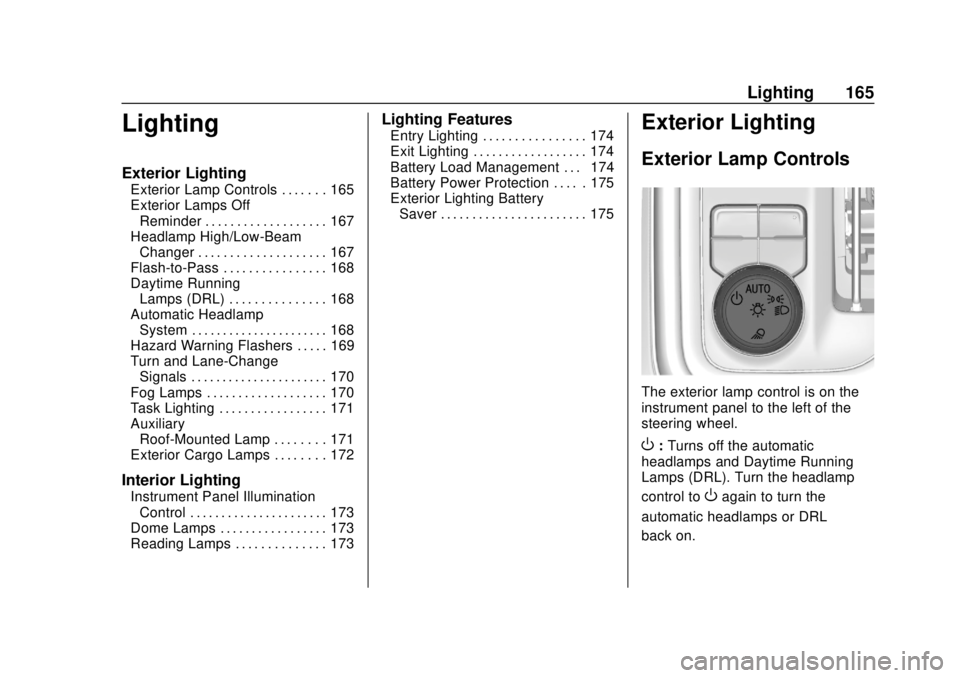
Exterior Lamp Controls
The exterior lamp control is on the
instrument panel to the left of the
steering wheel.
O: Turns off the automatic
headlamps and Daytime Running
Lamps (DRL). Turn the headlamp
control to
Oagain to turn the
automatic headlamps or DRL
back on.
Page 167 of 500
Chevrolet Silverado Owner Manual (GMNA-Localizing-U.S./Canada/Mexico-
13337620) - 2020 - CRC - 4/2/19
166 Lighting
For vehicles first sold in Canada, off
will only work when the vehicle is in
P (Park).
AUTO :Automatically turns on the
headlamps, parking lamps,
taillamps, instrument panel lights,
roof marker lamps (if equipped),
front/rear sidemarker lamps, and
license plate lamps.
;: Turns on the parking lamps
including all lamps, except the
headlamps and fog lamps,
if equipped.
For some trim levels and series of
trucks first sold in Canada, the
headlamps may turn on with the
parking lamps.
2: Turns on the headlamps
together with the parking lamps,
taillamps, instrument panel lights,
roof marker lamps (if equipped),
front/rear sidemarker lamps, and
license plate lamps.
When the headlamps are turned on
while the vehicle is on, the
headlamps turn off automatically
10 minutes after the ignition is
turned off. When the headlamps are turned on while the vehicle is off,
the headlamps will stay on for
10 minutes before turning off to
prevent the battery from being
drained. Turn the headlamp control
off and then back to the headlamp
on position to make the headlamps
stay on for an additional 10 minutes.
To keep the lamps on for more than
10 minutes, the ignition must be on
or in ACC/ACCESSORY.
K:
If equipped, turns on the task
lighting. See Task Lighting 0171.
IntelliBeam System
If equipped, this system turns the
vehicle's high-beam headlamps on
and off according to surrounding
traffic conditions.
The system turns the high-beam
headlamps on when it is dark
enough and there is no other traffic
present.
This light
bcomes on in the
instrument cluster when the
IntelliBeam system is enabled. Turning On and Enabling
IntelliBeam
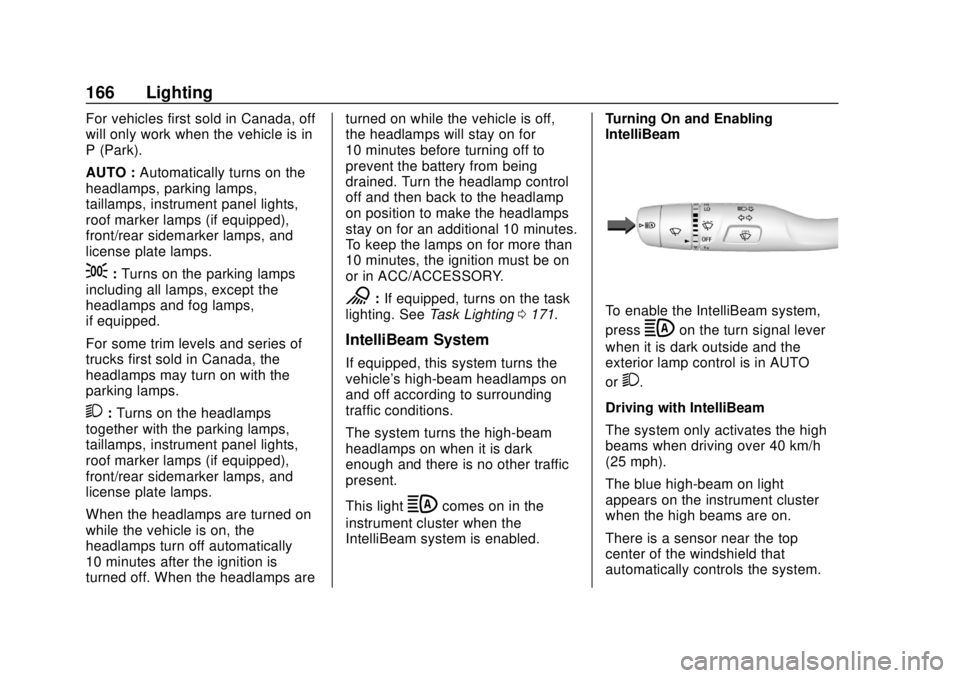
To enable the IntelliBeam system,
press
bon the turn signal lever
when it is dark outside and the
exterior lamp control is in AUTO
or
2.
Driving with IntelliBeam
The system only activates the high
beams when driving over 40 km/h
(25 mph).
The blue high-beam on light
appears on the instrument cluster
when the high beams are on.
There is a sensor near the top
center of the windshield that
automatically controls the system.
Page 168 of 500
Chevrolet Silverado Owner Manual (GMNA-Localizing-U.S./Canada/Mexico-
13337620) - 2020 - CRC - 4/2/19
Lighting 167
Keep this area of the windshield
clear of debris to allow for best
system performance.
The high-beam headlamps remain
on, under the automatic control,
until one of the following situations
occurs:
.The system detects an
approaching vehicle's
headlamps.
. The system detects a preceding
vehicle's taillamps.
. The outside light is bright
enough that high-beam
headlamps are not required.
. The vehicle's speed drops below
20 km/h (12 mph).
. The IntelliBeam system is
disabled by the button on the
turn signal lever. If this happens,
press
bon the turn signal
lever when the exterior lamp
control is in the AUTO or
2
position to reactivate the
IntelliBeam system. The instrument cluster light will come
on to indicate the IntelliBeam
system is reactivated.
The high beams may not turn off
automatically if the system cannot
detect another vehicle's lamps
because of any of the following:
. The other vehicle's lamps are
missing, damaged, obstructed
from view, or otherwise
undetected.
. The other vehicle's lamps are
covered with dirt, snow, and/or
road spray.
. The other vehicle's lamps cannot
be detected due to dense
exhaust, smoke, fog, snow, road
spray, mist, or other airborne
obstructions.
. The vehicle's windshield is dirty,
cracked, or obstructed by
something that blocks the view
of the light sensor. .
The vehicle is loaded such that
the front end points upward,
causing the light sensor to aim
high and not detect headlamps
and taillamps.
. Driving on winding or hilly roads.
The automatic high-beam
headlamps may need to be disabled
if any of the above conditions exist.
Exterior Lamps Off
Reminder
A reminder chime sounds when the
headlamps or parking lamps are
manually turned on, the ignition is
off, and a door is open. To disable
the chime, turn the lamps off.
Headlamp High/
Low-Beam Changer
Push the turn signal lever toward
the instrument panel to change the
headlamps from low to high beam.
Pull or push the turn signal lever to
return to low-beam headlamps.
Page 169 of 500
Chevrolet Silverado Owner Manual (GMNA-Localizing-U.S./Canada/Mexico-
13337620) - 2020 - CRC - 4/2/19
168 Lighting
When the high-beam headlamps are
on, this indicator light on the
instrument cluster will also be on.
Flash-to-Pass
This feature lets you use the
high-beam headlamps to signal a
driver in front of you that you want
to pass. It works even if the
headlamps are in the automatic
position.
To use it, pull the turn signal lever
toward you, then release it.
If the headlamps are in the
automatic position or on low beam,
the high-beam headlamps will turn
on. Depending on the type of
headlamp, they will either turn off
after a short duration or stay on as
long as you hold the lever toward
you. The high-beam indicator on theinstrument cluster will come on.
Release the lever to return to
normal operation.
Daytime Running
Lamps (DRL)
DRL can make it easier for others to
see the front of the vehicle during
the day. Fully functional DRL are
required on all vehicles first sold in
Canada.
The DRL system comes on when
the following conditions are met:
.
The ignition is on.
. The exterior lamp control is
in AUTO.
. The transmission is not in
P (Park).
. The light sensor determines it is
daytime.
When the DRL system is on, only
the DRL are on. The taillamps,
sidemarker lamps, instrument panel
lights, and other lamps will not
be on. When it begins to get dark, the
automatic headlamp system
switches from DRL to the
headlamps.
To turn off the DRL, turn the exterior
lamp control to
Oand then release.
For vehicles first sold in Canada, off
will only work when the vehicle is
parked.
Automatic Headlamp
System
When the exterior lamp control is
set to AUTO and it is dark enough
outside, the headlamps come on
automatically.
Page 170 of 500
Chevrolet Silverado Owner Manual (GMNA-Localizing-U.S./Canada/Mexico-
13337620) - 2020 - CRC - 4/2/19
Lighting 169
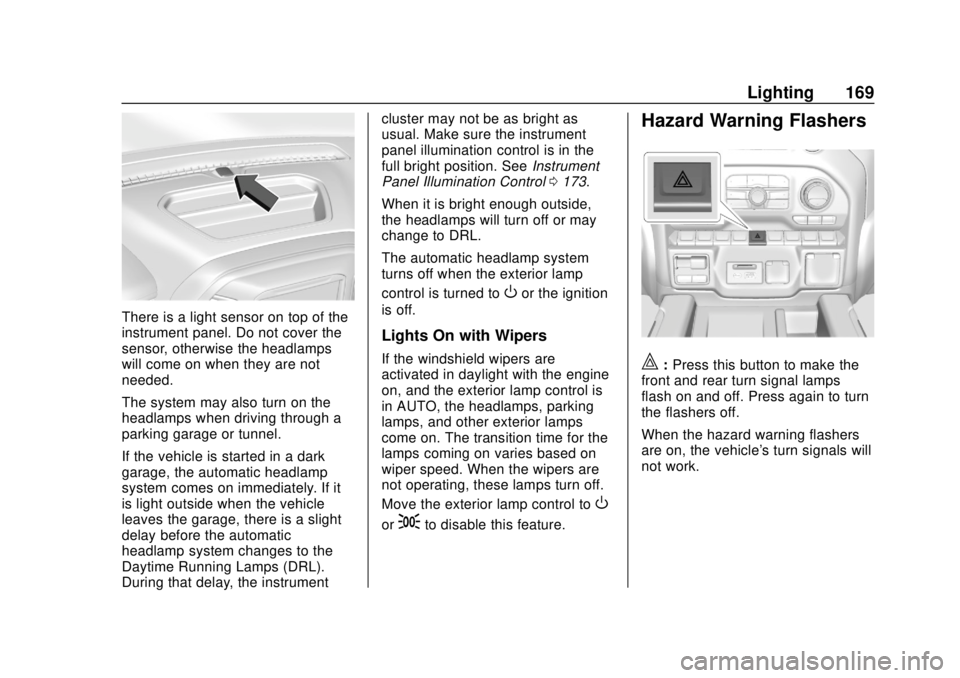
There is a light sensor on top of the
instrument panel. Do not cover the
sensor, otherwise the headlamps
will come on when they are not
needed.
The system may also turn on the
headlamps when driving through a
parking garage or tunnel.
If the vehicle is started in a dark
garage, the automatic headlamp
system comes on immediately. If it
is light outside when the vehicle
leaves the garage, there is a slight
delay before the automatic
headlamp system changes to the
Daytime Running Lamps (DRL).
During that delay, the instrumentcluster may not be as bright as
usual. Make sure the instrument
panel illumination control is in the
full bright position. See
Instrument
Panel Illumination Control 0173.
When it is bright enough outside,
the headlamps will turn off or may
change to DRL.
The automatic headlamp system
turns off when the exterior lamp
control is turned to
Oor the ignition
is off.
Lights On with Wipers
If the windshield wipers are
activated in daylight with the engine
on, and the exterior lamp control is
in AUTO, the headlamps, parking
lamps, and other exterior lamps
come on. The transition time for the
lamps coming on varies based on
wiper speed. When the wipers are
not operating, these lamps turn off.
Move the exterior lamp control to
O
or;to disable this feature.
Hazard Warning Flashers
|: Press this button to make the
front and rear turn signal lamps
flash on and off. Press again to turn
the flashers off.
When the hazard warning flashers
are on, the vehicle's turn signals will
not work.
Page 174 of 500
Chevrolet Silverado Owner Manual (GMNA-Localizing-U.S./Canada/Mexico-
13337620) - 2020 - CRC - 4/2/19
Lighting 173
Interior Lighting
Instrument Panel
Illumination Control
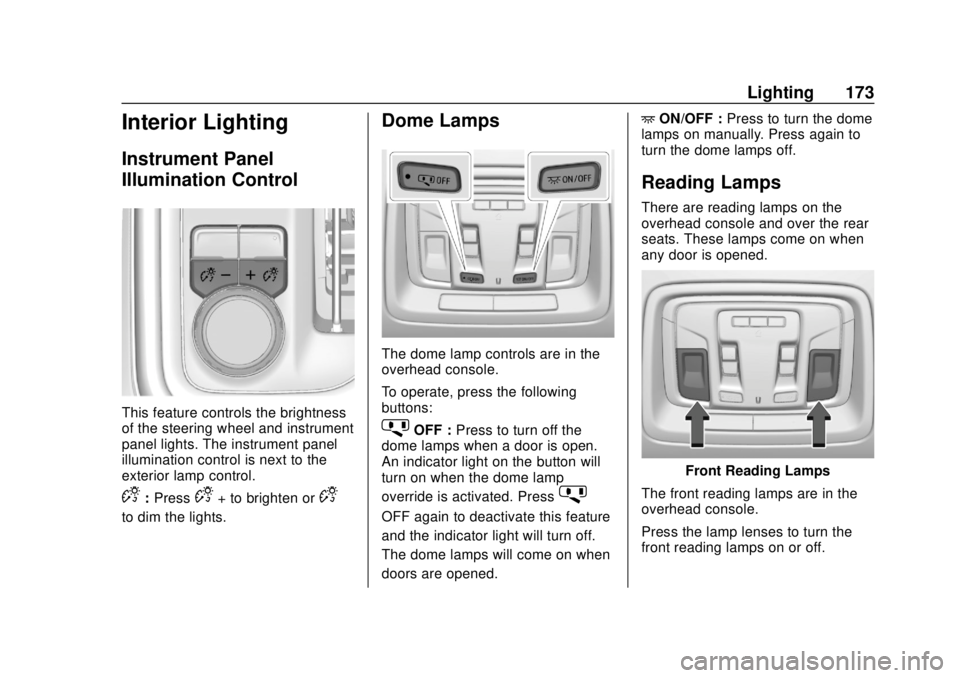
This feature controls the brightness
of the steering wheel and instrument
panel lights. The instrument panel
illumination control is next to the
exterior lamp control.
D:PressD+ to brighten orD−
to dim the lights.
Dome Lamps
The dome lamp controls are in the
overhead console.
To operate, press the following
buttons:
jOFF : Press to turn off the
dome lamps when a door is open.
An indicator light on the button will
turn on when the dome lamp
override is activated. Press
j
OFF again to deactivate this feature
and the indicator light will turn off.
The dome lamps will come on when
doors are opened. +
ON/OFF : Press to turn the dome
lamps on manually. Press again to
turn the dome lamps off.
Reading Lamps
There are reading lamps on the
overhead console and over the rear
seats. These lamps come on when
any door is opened.
Front Reading Lamps
The front reading lamps are in the
overhead console.
Press the lamp lenses to turn the
front reading lamps on or off.
Page 183 of 500
Chevrolet Silverado Owner Manual (GMNA-Localizing-U.S./Canada/Mexico-
13337620) - 2020 - CRC - 4/2/19
182 Climate Controls
If equipped with heated outside
mirrors, press
fto turn them on or
off. See Heated Mirrors 044.
Caution
Using a razor blade or sharp
object to clear the inside rear
window can damage the rear
window defogger. Repairs would
not be covered by the vehicle
warranty. Do not clear the inside
rear window with sharp objects.
Remote Start Climate Control
Operation : If equipped with remote
start, the climate control system
may run when the vehicle is started
remotely. If equipped with heated or
ventilated seats or a heated steering
wheel, these features may come on
during a remote start. See Remote
Vehicle Start 024, Heated and
Ventilated Front Seats 061, and
Heated Steering Wheel 0120.
Sensors
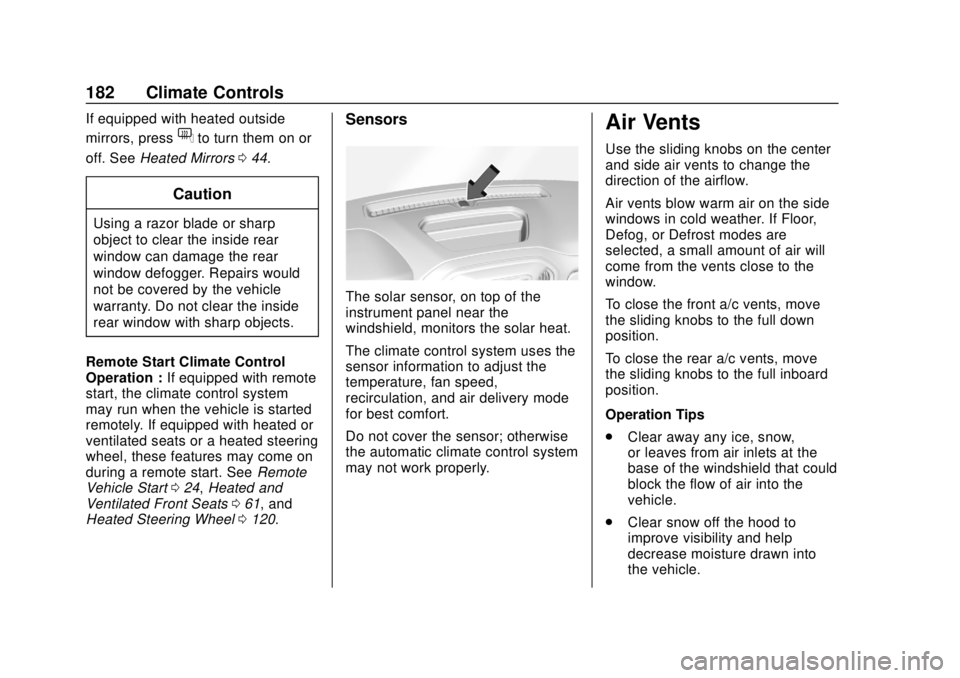
The solar sensor, on top of the
instrument panel near the
windshield, monitors the solar heat.
The climate control system uses the
sensor information to adjust the
temperature, fan speed,
recirculation, and air delivery mode
for best comfort.
Do not cover the sensor; otherwise
the automatic climate control system
may not work properly.
Air Vents
Use the sliding knobs on the center
and side air vents to change the
direction of the airflow.
Air vents blow warm air on the side
windows in cold weather. If Floor,
Defog, or Defrost modes are
selected, a small amount of air will
come from the vents close to the
window.
To close the front a/c vents, move
the sliding knobs to the full down
position.
To close the rear a/c vents, move
the sliding knobs to the full inboard
position.
Operation Tips
.
Clear away any ice, snow,
or leaves from air inlets at the
base of the windshield that could
block the flow of air into the
vehicle.
. Clear snow off the hood to
improve visibility and help
decrease moisture drawn into
the vehicle.
Page 199 of 500
Chevrolet Silverado Owner Manual (GMNA-Localizing-U.S./Canada/Mexico-
13337620) - 2020 - CRC - 4/11/19
198 Driving and Operating
freezing rain begins to fall. Avoid
driving on wet ice or in freezing rain
until roads can be treated.
For Slippery Road Driving:
.Accelerate gently. Accelerating
too quickly causes the wheels to
spin and makes the surface
under the tires slick.
. Turn on Traction Control. See
Traction Control/Electronic
Stability Control 0235.
. The Antilock Brake System
(ABS) improves vehicle stability
during hard stops, but the
brakes should be applied sooner
than when on dry pavement.
See Antilock Brake System
(ABS) 0232.
. Allow greater following distance
and watch for slippery spots. Icy
patches can occur on otherwise
clear roads in shaded areas.
The surface of a curve or an
overpass can remain icy when
the surrounding roads are clear.
Avoid sudden steering
maneuvers and braking while
on ice. .
Turn off cruise control.
Blizzard Conditions
Stop the vehicle in a safe place and
signal for help. Stay with the vehicle
unless there is help nearby.
If possible, use Roadside
Assistance. See Roadside
Assistance Program 0465. To get
help and keep everyone in the
vehicle safe:
. Turn on the hazard warning
flashers.
. Tie a red cloth to an outside
mirror.
{Warning
Snow can trap engine exhaust
under the vehicle. This may
cause exhaust gases to get
inside. Engine exhaust contains
carbon monoxide (CO), which
cannot be seen or smelled. It can
cause unconsciousness and even
death.
(Continued)
Warning (Continued)
If the vehicle is stuck in snow:
. Clear snow from the base of
the vehicle, especially any
blocking the exhaust pipe.
. Open a window about 5 cm
(2 in) on the vehicle side
that is away from the wind,
to bring in fresh air.
. Fully open the air outlets on
or under the instrument
panel.
. Adjust the climate control
system to circulate the air
inside the vehicle and set
the fan speed to the highest
setting. See “Climate
Control Systems.”
For more information about CO,
see Engine Exhaust 0220.
To save fuel, run the engine for
short periods to warm the vehicle
and then shut the engine off and
partially close the window. Moving
about to keep warm also helps.
Page 278 of 500
Chevrolet Silverado Owner Manual (GMNA-Localizing-U.S./Canada/Mexico-
13337620) - 2020 - CRC - 4/11/19
Driving and Operating 277
system is clean, the system may
need service. Take the vehicle to
your dealer.
Radio Frequency Information
SeeRadio Frequency Statement
0 471.
Lane Departure Warning
(LDW) (2500/3500 Series)
If equipped, LDW may help avoid
crashes due to unintentional lane
departures. LDW uses a camera
sensor to detect the lane markings
at speeds of 56 km/h (35 mph) or
greater. It may provide an alert if the
vehicle is crossing a lane without
using a turn signal in that direction.
LDW light will not alert if the turn
signal is active in the direction of
lane departure, or if LDW detects
that you are accelerating, braking or
actively steering.
{Warning
The LDW system does not steer
the vehicle. The LDW system
may not:
. Provide enough time to
avoid a crash.
. Detect lane markings under
poor weather or visibility
conditions. This can occur if
the windshield or
headlamps are blocked by
dirt, snow, or ice; if they are
not in proper condition; or if
the sun shines directly into
the camera.
. Detect road edges.
. Detect lanes on winding or
hilly roads.
If LDW only detects lane
markings on one side of the road,
it will only warn you when
departing the lane on the side
where it has detected a lane
marking. Always keep your (Continued)
Warning (Continued)
attention on the road and
maintain proper vehicle position
within the lane, or vehicle
damage, injury, or death could
occur. Always keep the
windshield, headlamps, and
camera sensors clean and in
good repair. Do not use LDW in
bad weather conditions.
How the System Works
LDW utilizes camera sensor
installed on the windshield ahead of
the rearview mirror to detect lane
markings.
To turn LDW on and off, press
@on
the instrument panel to the left of
the steering wheel. The control
indicator will light when LDW is on.
Page 290 of 500
Chevrolet Silverado Owner Manual (GMNA-Localizing-U.S./Canada/Mexico-
13337620) - 2020 - CRC - 4/11/19
Driving and Operating 289
Warning (Continued)
.Fully open the air outlets on
or under the instrument
panel.
. Adjust the climate control
system to a setting that
brings in only outside air.
See “Climate Control
Systems” in the Index.
For more information about
carbon monoxide, see Engine
Exhaust 0220.
Towing a trailer requires experience.
The combination of the vehicle and
trailer is longer and not as
responsive as the vehicle itself. Get
used to the handling and braking of
the combination by driving on a
level road surface before driving on
public roads.
The trailer structure, the tires, and
the brakes must all be rated to carry
the intended cargo. Inadequate
trailer equipment can cause the
combination to operate in an unexpected or unsafe manner.
Before driving, inspect all trailer
hitch parts and attachments, safety
chains, electrical connectors, lamps,
tires, and mirrors. See
Towing
Equipment 0297. If the trailer has
electric brakes, start the
combination moving and then
manually apply the trailer brake
controller to check that the trailer
brakes work. During the trip,
occasionally check that the cargo
and trailer are secure and that the
lamps and any trailer brakes are
working.
Towing with a Stability Control
System
When towing, the stability control
system might be heard. The system
reacts to vehicle movement caused
by the trailer, which mainly occurs
during cornering. This is normal
when towing heavier trailers.
Following Distance
Stay at least twice as far behind the
vehicle ahead as you would when
driving without a trailer. This can
help to avoid heavy braking and
sudden turns.
Passing
More passing distance is needed
when towing a trailer. The
combination of the vehicle and
trailer will not accelerate as quickly
and is much longer than the vehicle
alone. It is necessary to go much
farther beyond the passed vehicle
before returning to the lane. Pass
on level roadways. Avoid passing
on hills if possible.
Backing Up
Hold the bottom of the steering
wheel with one hand. To move the
trailer to the left, move that hand to
the left. To move the trailer to the
right, move that hand to the right.
Always back up slowly and,
if possible, have someone
guide you.