power CHEVROLET SILVERADO 1500 2021 User Guide
[x] Cancel search | Manufacturer: CHEVROLET, Model Year: 2021, Model line: SILVERADO 1500, Model: CHEVROLET SILVERADO 1500 2021Pages: 463, PDF Size: 9.65 MB
Page 29 of 463
Chevrolet Silverado 1500 Owner Manual (GMNA-Localizing-U.S./Canada/
Mexico/Paraguay-14632303) - 2021 - CRC - 11/9/20
26 Keys, Doors, and Windows
.Press and hold5on the center stack
until the tailgate is fully closed. If
5
is released prior to the tailgate being
fully closed, it will reopen. A chime will
sound when the tailgate is fully closed.
.Press the touch pad on the tailgate
handle.
A chime sounds and the taillamps flash
during the closing operation. If the warning
chime is not functioning, the tailgate will
not power close. Power opening is still
enabled. See your dealer for service.
The power tailgate may be temporarily
disabled after repeated power cycling over a
short period of time. If this occurs, the
tailgate can still be operated manually.
The vehicle must be in P (Park) to operate
the power tailgate. If the vehicle is shifted
out of P (Park) while the power function is
in progress, the tailgate will continue to
completion. If the vehicle is accelerated
while the tailgate is still closing, the tailgate
may stop and reverse direction. Make sure
the tailgate is closed and latched before
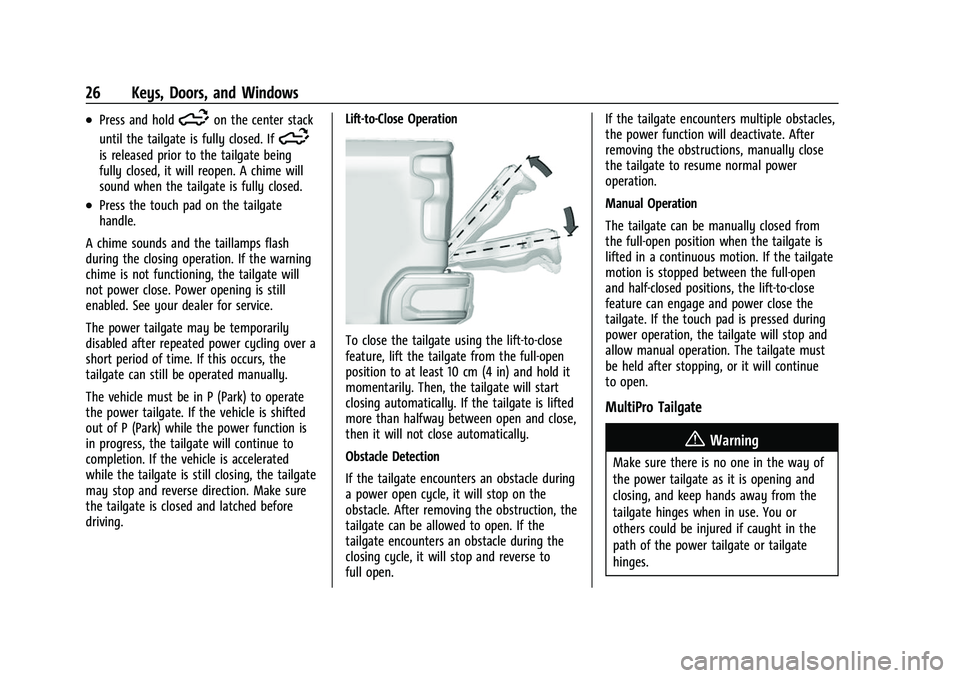
driving. Lift-to-Close Operation
To close the tailgate using the lift-to-close
feature, lift the tailgate from the full-open
position to at least 10 cm (4 in) and hold it
momentarily. Then, the tailgate will start
closing automatically. If the tailgate is lifted
more than halfway between open and close,
then it will not close automatically.
Obstacle Detection
If the tailgate encounters an obstacle during
a power open cycle, it will stop on the
obstacle. After removing the obstruction, the
tailgate can be allowed to open. If the
tailgate encounters an obstacle during the
closing cycle, it will stop and reverse to
full open.If the tailgate encounters multiple obstacles,
the power function will deactivate. After
removing the obstructions, manually close
the tailgate to resume normal power
operation.
Manual Operation
The tailgate can be manually closed from
the full-open position when the tailgate is
lifted in a continuous motion. If the tailgate
motion is stopped between the full-open
and half-closed positions, the lift-to-close
feature can engage and power close the
tailgate. If the touch pad is pressed during
power operation, the tailgate will stop and
allow manual operation. The tailgate must
be held after stopping, or it will continue
to open.
MultiPro Tailgate
{Warning
Make sure there is no one in the way of
the power tailgate as it is opening and
closing, and keep hands away from the
tailgate hinges when in use. You or
others could be injured if caught in the
path of the power tailgate or tailgate
hinges.
Page 33 of 463
Chevrolet Silverado 1500 Owner Manual (GMNA-Localizing-U.S./Canada/
Mexico/Paraguay-14632303) - 2021 - CRC - 11/9/20
30 Keys, Doors, and Windows
When applying any load to the tailgate,
distribute the weight evenly across the
width of the tailgate. This applies to all
tailgate types.
.Use a load-distributing member (1).
.Secure the ramp to the bumper (2).
Power Assist Steps
{Warning
To avoid personal injury or property
damage, before entering or exiting the
vehicle, be sure the power assist step is
fully extended. Do not step on the power
assist step while it is moving. Never place
hands or other body parts between the
extended power assist step and the
vehicle.
If equipped, the power assist steps, when
enabled, will extend when the door is
opened. They will retract three seconds after
the door is closed or immediately if the
vehicle starts moving.
Keep hands, children, pets, objects, and
clothing clear of the power assist steps
when in motion. The steps will reverse direction if there is an
obstruction. If possible, carefully remove the
obstruction, then open and close the door
on the same side to complete the motion.
If the obstruction is not cleared, the assist
steps remain extended.
Slight movement of the steps while
extended is normal.
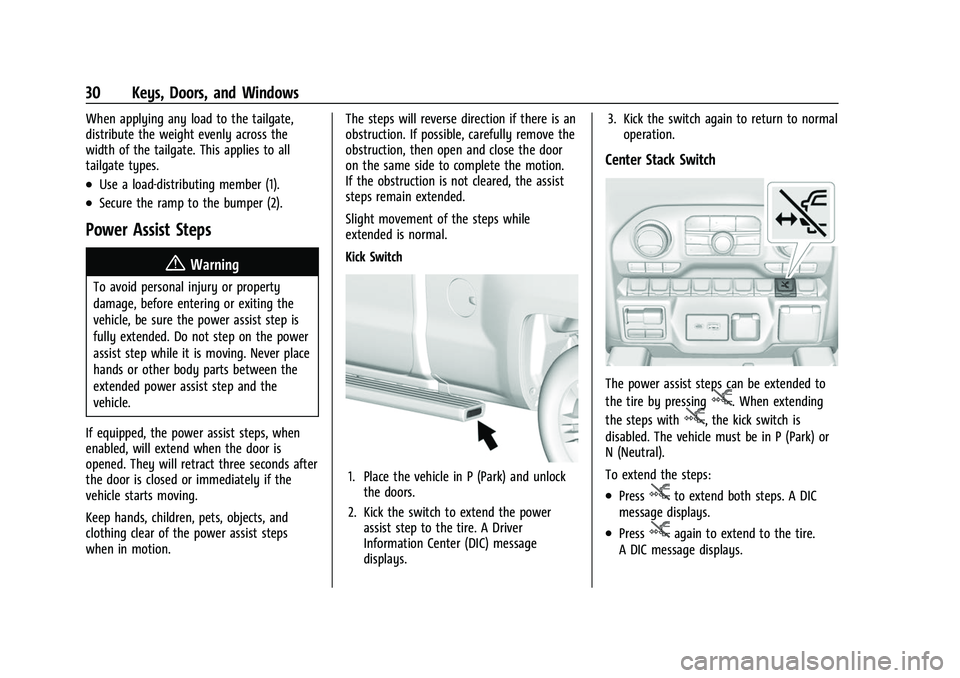
Kick Switch
1. Place the vehicle in P (Park) and unlock
the doors.
2. Kick the switch to extend the power assist step to the tire. A Driver
Information Center (DIC) message
displays. 3. Kick the switch again to return to normal
operation.
Center Stack Switch
The power assist steps can be extended to
the tire by pressing
j. When extending
the steps with
j, the kick switch is
disabled. The vehicle must be in P (Park) or
N (Neutral).
To extend the steps:
.Pressjto extend both steps. A DIC
message displays.
.Pressjagain to extend to the tire.
A DIC message displays.
Page 34 of 463
Chevrolet Silverado 1500 Owner Manual (GMNA-Localizing-U.S./Canada/
Mexico/Paraguay-14632303) - 2021 - CRC - 11/9/20
Keys, Doors, and Windows 31
.Pressjagain to return to normal
operation.
Enable/Disable
To enable or disable the power assist steps,
press and hold
jfor four seconds. A DIC
message displays.
Cleaning
Clean the power assist steps regularly. For
an automatic car wash, extend the steps
while in N (Neutral) using the center stack
switch. The steps will stow when shifting
into D (Drive).
Vehicle Security
This vehicle has theft-deterrent features;
however, they do not make the vehicle
impossible to steal.
Vehicle Alarm System
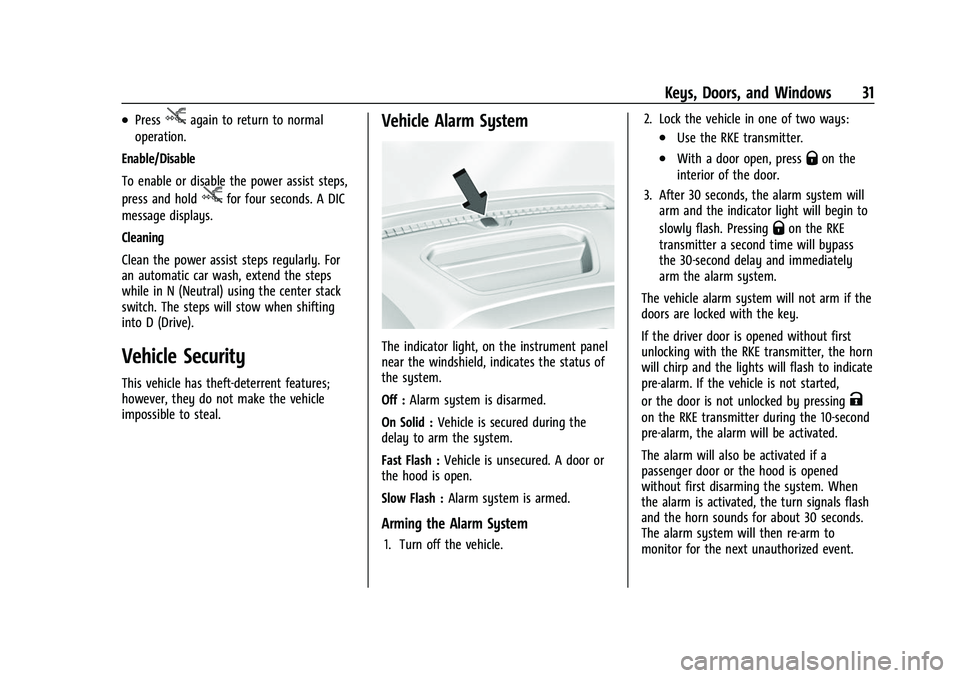
The indicator light, on the instrument panel
near the windshield, indicates the status of
the system.
Off : Alarm system is disarmed.
On Solid : Vehicle is secured during the
delay to arm the system.
Fast Flash : Vehicle is unsecured. A door or
the hood is open.
Slow Flash : Alarm system is armed.
Arming the Alarm System
1. Turn off the vehicle. 2. Lock the vehicle in one of two ways:
.Use the RKE transmitter.
.With a door open, pressQon the
interior of the door.
3. After 30 seconds, the alarm system will arm and the indicator light will begin to
slowly flash. Pressing
Qon the RKE
transmitter a second time will bypass
the 30-second delay and immediately
arm the alarm system.
The vehicle alarm system will not arm if the
doors are locked with the key.
If the driver door is opened without first
unlocking with the RKE transmitter, the horn
will chirp and the lights will flash to indicate
pre-alarm. If the vehicle is not started,
or the door is not unlocked by pressing
K
on the RKE transmitter during the 10-second
pre-alarm, the alarm will be activated.
The alarm will also be activated if a
passenger door or the hood is opened
without first disarming the system. When
the alarm is activated, the turn signals flash
and the horn sounds for about 30 seconds.
The alarm system will then re-arm to
monitor for the next unauthorized event.
Page 38 of 463
Chevrolet Silverado 1500 Owner Manual (GMNA-Localizing-U.S./Canada/
Mexico/Paraguay-14632303) - 2021 - CRC - 11/9/20
Keys, Doors, and Windows 35
To return the mirror to its original position,
reverse the motion.
Power Extend :If equipped, press the power
extend button to fully extend the mirror.
Press again to retract.
Resetting the Power Extend Mirrors
Reset the power extend mirrors if:
.The mirrors are accidentally obstructed
while extending/retracting.
.The mirrors are accidentally manually
extended/retracted.
.The mirrors vibrate at normal driving
speeds. If a popping noise from the mirror is heard,
this sound is normal as the manual detents
are aligning after a manual extend/retract
operation has occurred.
Auxiliary Cargo Mirror Lamps
If equipped, cargo mirror lamps face
rearward to provide more light on the sides
of the vehicle, if needed. See
Exterior Cargo
Lamps 0144.
Advanced Trailering Vision System Side
Cameras
If equipped, the Advanced Trailering Vision
System side cameras are on the bottom of
the outside mirrors. See “Surround Vision
(360 Degrees)” underAssistance Systems for
Parking or Backing 0266.
Power Mirrors
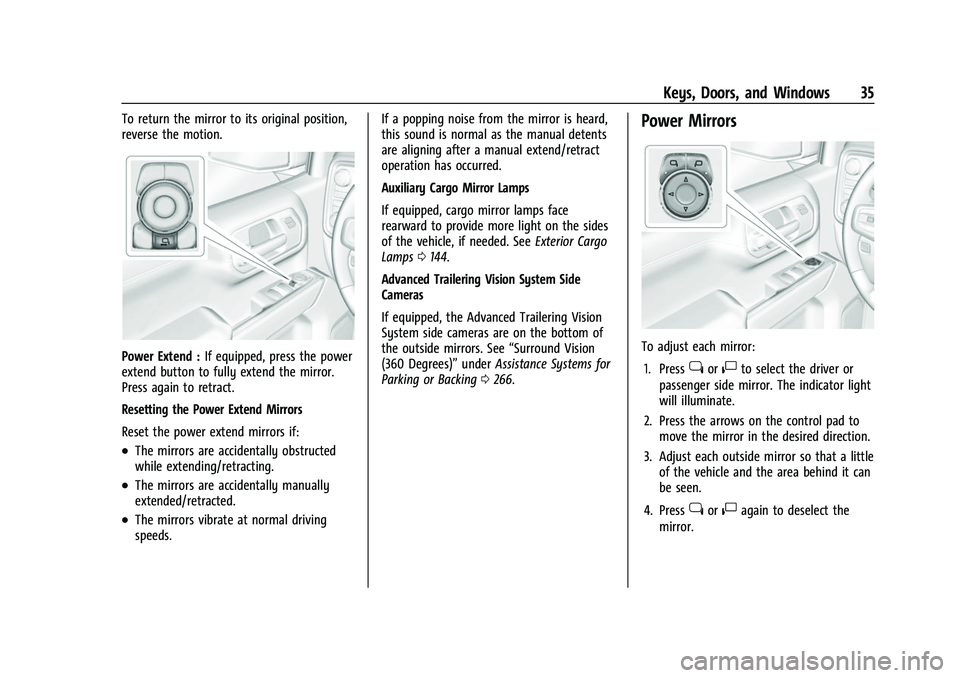
To adjust each mirror:
1. Press
jor|to select the driver or
passenger side mirror. The indicator light
will illuminate.
2. Press the arrows on the control pad to move the mirror in the desired direction.
3. Adjust each outside mirror so that a little of the vehicle and the area behind it can
be seen.
4. Press
jor|again to deselect the
mirror.
Page 39 of 463
Chevrolet Silverado 1500 Owner Manual (GMNA-Localizing-U.S./Canada/
Mexico/Paraguay-14632303) - 2021 - CRC - 11/9/20
36 Keys, Doors, and Windows
Turn Signal Indicator
If equipped, the mirror has turn signal
indicator lights, which flash in the direction
of the turn or lane change.
Task Lighting
If equipped, task lighting projects light from
the outside mirrors to the sides of the
vehicle. SeeTask Lighting 0144.
Puddle Lamps
If equipped, puddle lamps project light from
the bottom of the mirror to the area of
ground below the driver and passenger
doors. See Entry Lighting 0146 and
Exit Lighting 0146.
Memory Mirrors
The vehicle may have memory mirrors. See
Memory Seats 049.
Lane Change Alert (LCA)
The vehicle may have LCA. See Lane Change
Alert (LCA) 0279.Folding Mirrors
Manual Folding Mirrors
If equipped, push the mirror toward the
vehicle to fold. Push the mirror outward to
return to its original position.
Manually fold the mirrors inward to prevent
damage when going through an automatic
car wash.
Power Folding Mirrors
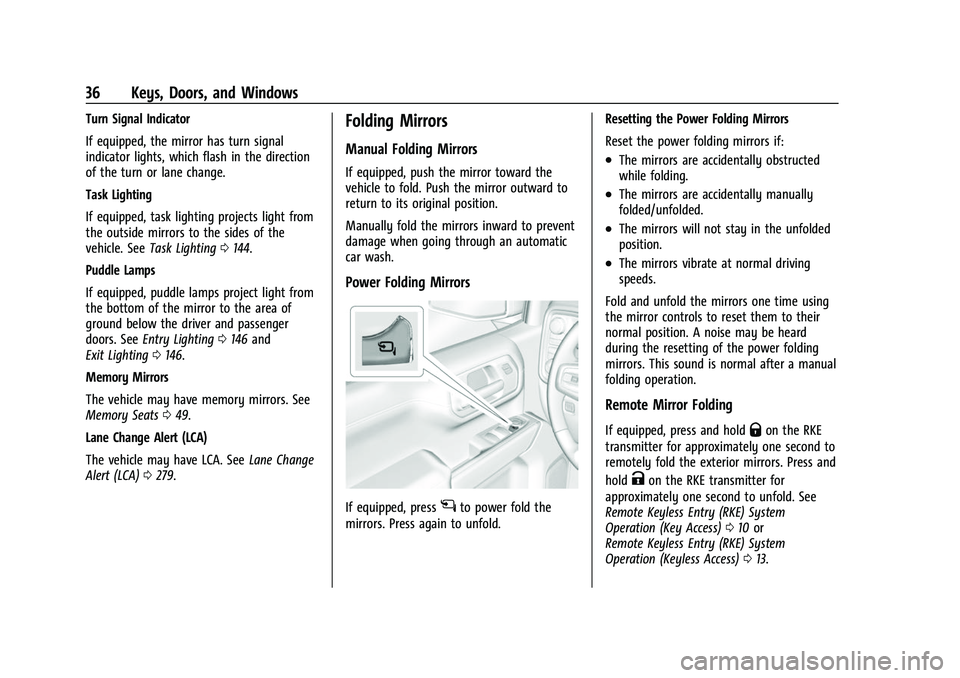
If equipped, pressgto power fold the
mirrors. Press again to unfold. Resetting the Power Folding Mirrors
Reset the power folding mirrors if:
.The mirrors are accidentally obstructed
while folding.
.The mirrors are accidentally manually
folded/unfolded.
.The mirrors will not stay in the unfolded
position.
.The mirrors vibrate at normal driving
speeds.
Fold and unfold the mirrors one time using
the mirror controls to reset them to their
normal position. A noise may be heard
during the resetting of the power folding
mirrors. This sound is normal after a manual
folding operation.
Remote Mirror Folding
If equipped, press and holdQon the RKE
transmitter for approximately one second to
remotely fold the exterior mirrors. Press and
hold
Kon the RKE transmitter for
approximately one second to unfold. See
Remote Keyless Entry (RKE) System
Operation (Key Access) 010 or
Remote Keyless Entry (RKE) System
Operation (Keyless Access) 013.
Page 44 of 463
Chevrolet Silverado 1500 Owner Manual (GMNA-Localizing-U.S./Canada/
Mexico/Paraguay-14632303) - 2021 - CRC - 11/9/20
Keys, Doors, and Windows 41
The vehicle aerodynamics are designed to
improve fuel economy performance. This
may result in a pulsing sound when either
rear window is down and the front windows
are up. To reduce the sound, open either a
front window or the sunroof, if equipped.
Manual Windows
If equipped, turn the hand crank on each
door to manually raise or lower the manual
windows.
Power Windows
{Warning
Children could be seriously injured or
killed if caught in the path of a closing
window. Never leave the Remote Keyless
Entry (RKE) transmitter or keys in a
vehicle with children. When there are
children in the rear seat, use the window
lockout button to prevent operation of
the windows. SeeKeys (Key Access)07
or
Keys (Keyless Access) 09.
The power windows work when the ignition
is on, in ACC/ACCESSORY, or when Retained
Accessory Power (RAP) is active. See
Retained Accessory Power (RAP) 0235.
Using the window switch, press to open or
pull to close the window.
The windows may be temporarily disabled if
they are used repeatedly within a
short time.
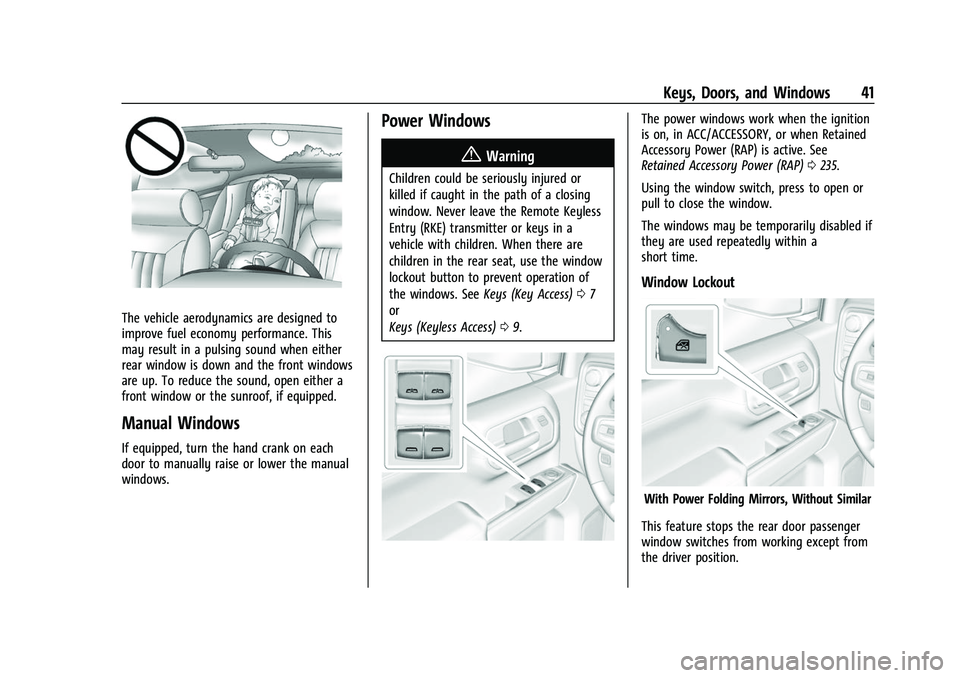
Window Lockout
With Power Folding Mirrors, Without Similar
This feature stops the rear door passenger
window switches from working except from
the driver position.
Page 45 of 463
Chevrolet Silverado 1500 Owner Manual (GMNA-Localizing-U.S./Canada/
Mexico/Paraguay-14632303) - 2021 - CRC - 11/9/20
42 Keys, Doors, and Windows
Press2to engage the rear window
lockout feature. The indicator light is on
when engaged.
Press
2again to disengage.
Windows Express Movement
All windows can be opened without holding
the window switch. Press the switch down
fully and quickly release to express open the
window.
If equipped, pull the window switch up fully
and quickly release to express close the
window.
Briefly press or pull the window switch in
the same direction to stop that window’s
express movement.
Express Window Down
L: If equipped, this button will be on the
center stack.
Press and hold
Lto open all windows.
Release
Lto stop all movement.
Use the power window switches to close
each window.
Window Automatic Reversal System
The express-close feature will reverse
window movement if it comes in contact
with an object. Extreme cold or ice could
cause the window to auto-reverse. The
window will operate normally after the
object or condition is removed.
Automatic Reversal System Override
{Warning
If automatic reversal system override is
active, the window will not reverse
automatically. You or others could be
injured and the window could be
damaged. Before using automatic reversal
system override, make sure that all
people and obstructions are clear of the
window path.
When the engine is on, override the
automatic reversal system by pulling and
holding the window switch if conditions
prevent it from closing.
Programming the Power Windows
Programming may be necessary if the
vehicle battery has been disconnected or
discharged. If the window is unable to
express-up, program each express-close
window: 1. Close all doors.
2. Turn the ignition on or to ACC/ ACCESSORY.
3. Partially open the window to be programmed. Then close it and continue
to pull the switch briefly after the
window has fully closed.
4. Open the window and continue to press the switch briefly after the window has
fully opened.
Remote Window Operation
If equipped, this feature allows the windows
to be opened remotely. If enabled in vehicle
personalization, press and hold
Kon the
RKE transmitter. See Vehicle Personalization
0 131.
Page 46 of 463
Chevrolet Silverado 1500 Owner Manual (GMNA-Localizing-U.S./Canada/
Mexico/Paraguay-14632303) - 2021 - CRC - 11/9/20
Keys, Doors, and Windows 43
Rear Windows
Power Sliding Rear Window
If equipped, the power sliding rear window
works when the ignition has been turned on
or to ACC/ACCESSORY, or Retained Accessory
Power (RAP) must be active. SeeRetained
Accessory Power (RAP) 0235.
.Press the switch to open the window.
.Pull the switch to close the window.
The power sliding rear window cannot be
operated manually.
Sun Visors
Pull the sun visor down to block glare.
If equipped, detach the sun visor from the
center mount to pivot to the side window
or to extend along the rod.
If equipped, there is a lighted mirror on the
sun visor. Lift the cover to open.
Roof
Sunroof
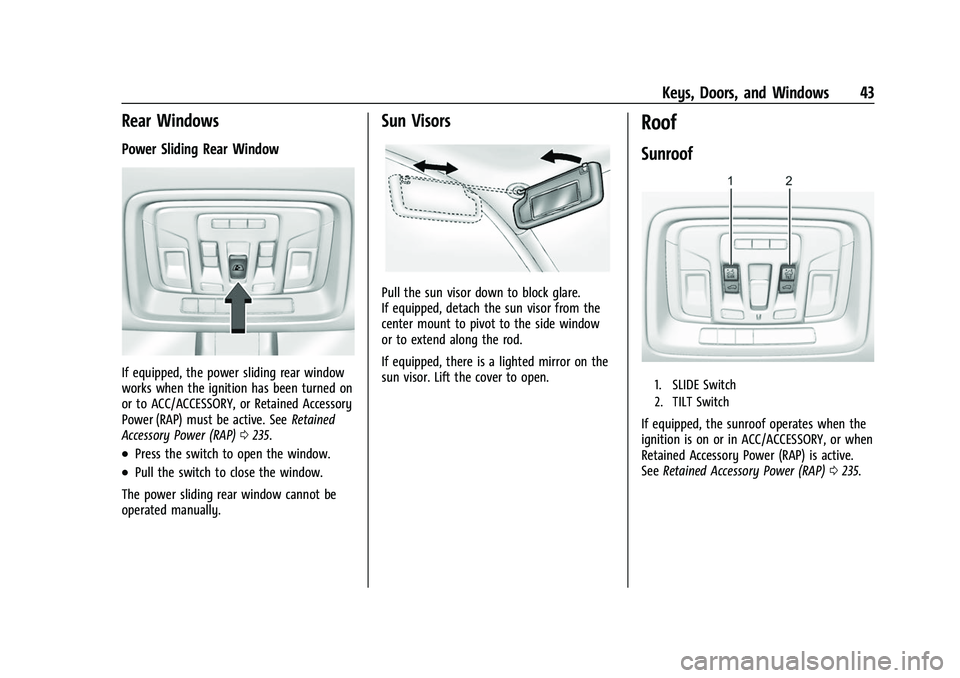
1. SLIDE Switch
2. TILT Switch
If equipped, the sunroof operates when the
ignition is on or in ACC/ACCESSORY, or when
Retained Accessory Power (RAP) is active.
See Retained Accessory Power (RAP) 0235.
Page 48 of 463
Chevrolet Silverado 1500 Owner Manual (GMNA-Localizing-U.S./Canada/
Mexico/Paraguay-14632303) - 2021 - CRC - 11/9/20
Seats and Restraints 45
Seats and Restraints
Head Restraints
Head Restraints . . . . . . . . . . . . . . . . . . . . . . . . 45
Front Seats
Seat Adjustment . . . . . . . . . . . . . . . . . . . . . . . 46
Center Seat . . . . . . . . . . . . . . . . . . . . . . . . . . . . . 47
Power Seat Adjustment . . . . . . . . . . . . . . . . 47
Lumbar Adjustment . . . . . . . . . . . . . . . . . . . . 48
Reclining Seatbacks . . . . . . . . . . . . . . . . . . . . . 48
Memory Seats . . . . . . . . . . . . . . . . . . . . . . . . . 49
Heated and Ventilated Front Seats . . . . . 52
Rear Seats
Rear Seats . . . . . . . . . . . . . . . . . . . . . . . . . . . . . . 53
Heated Rear Seats . . . . . . . . . . . . . . . . . . . . . . 54
Seat Belts
Seat Belts . . . . . . . . . . . . . . . . . . . . . . . . . . . . . . 54
How to Wear Seat Belts Properly . . . . . . . 55
Lap-Shoulder Belt . . . . . . . . . . . . . . . . . . . . . . . 57
Seat Belt Use During Pregnancy . . . . . . . . 59
Seat Belt Extender . . . . . . . . . . . . . . . . . . . . . . 59
Safety System Check . . . . . . . . . . . . . . . . . . . 60
Seat Belt Care . . . . . . . . . . . . . . . . . . . . . . . . . . 60
Replacing Seat Belt System Parts after aCrash . . . . . . . . . . . . . . . . . . . . . . . . . . . . . . . . . 60
Airbag System
Airbag System . . . . . . . . . . . . . . . . . . . . . . . . . . 61 Where Are the Airbags? . . . . . . . . . . . . . . . . 62
When Should an Airbag Inflate? . . . . . . . . 63
What Makes an Airbag Inflate? . . . . . . . . 64
How Does an Airbag Restrain? . . . . . . . . . 64
What Will You See after an Airbag
Inflates? . . . . . . . . . . . . . . . . . . . . . . . . . . . . . . 65
Passenger Sensing System . . . . . . . . . . . . . 66
Servicing the Airbag-Equipped Vehicle . . . . . . . . . . . . . . . . . . . . . . . . . . . . . . . 69
Adding Equipment to the Airbag-Equipped Vehicle . . . . . . . . . . . . . . 69
Airbag System Check . . . . . . . . . . . . . . . . . . . 70
Replacing Airbag System Parts after a Crash . . . . . . . . . . . . . . . . . . . . . . . . . . . . . . . . . . 71
Child Restraints
Older Children . . . . . . . . . . . . . . . . . . . . . . . . . . 71
Infants and Young Children . . . . . . . . . . . . . 72
Child Restraint Systems . . . . . . . . . . . . . . . . 74
Where to Put the Restraint . . . . . . . . . . . . . 76
Lower Anchors and Tethers for Children(LATCH System) . . . . . . . . . . . . . . . . . . . . . . . 77
Replacing LATCH System Parts After a Crash . . . . . . . . . . . . . . . . . . . . . . . . . . . . . . . . . 88
Securing Child Restraints (With the Seat Belt in the Rear Seat) . . . . . . . . . . . . . . . . 88
Securing Child Restraints (With the Seat Belt in the Center Front Seat) . . . . . . . . 92
Securing Child Restraints (With the Seat Belt in the Front Passenger Seat) . . . . . 92
Head Restraints
{
Warning
With head restraints that are not
installed and adjusted properly, there is a
greater chance that occupants will suffer
a neck/spinal injury in a crash. Do not
drive until the head restraints for all
occupants are installed and adjusted
properly.
Front Seats
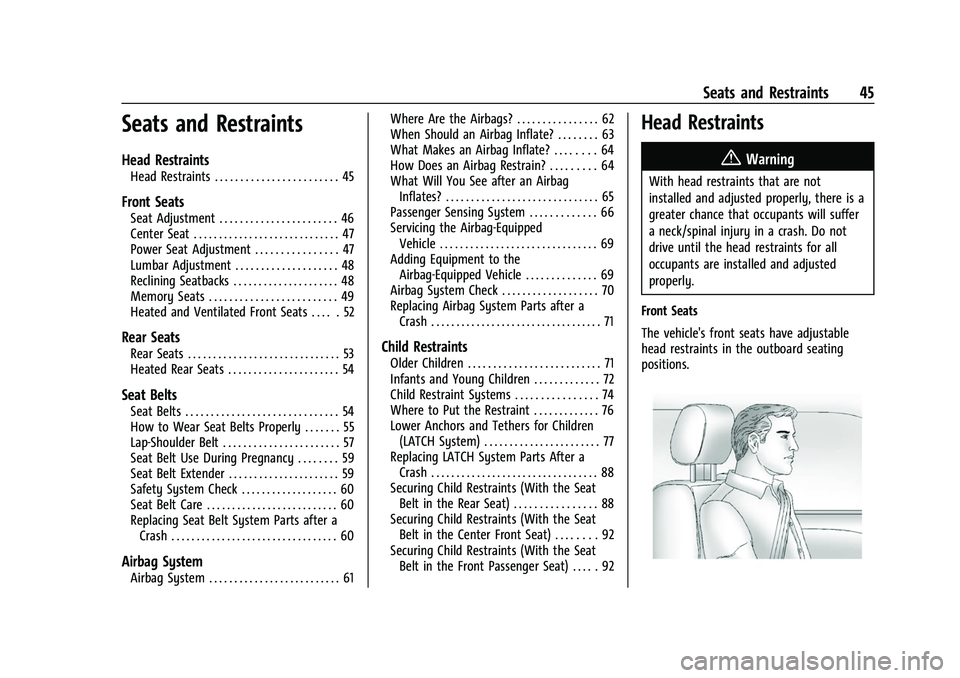
The vehicle's front seats have adjustable
head restraints in the outboard seating
positions.
Page 50 of 463
Chevrolet Silverado 1500 Owner Manual (GMNA-Localizing-U.S./Canada/
Mexico/Paraguay-14632303) - 2021 - CRC - 11/9/20
Seats and Restraints 47
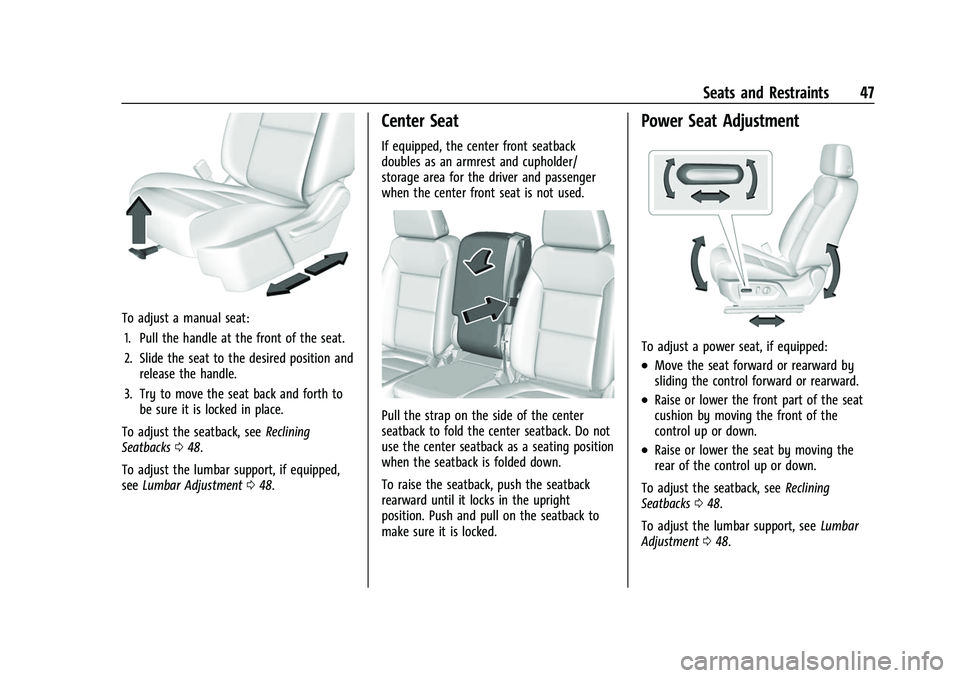
To adjust a manual seat:1. Pull the handle at the front of the seat.
2. Slide the seat to the desired position and release the handle.
3. Try to move the seat back and forth to be sure it is locked in place.
To adjust the seatback, see Reclining
Seatbacks 048.
To adjust the lumbar support, if equipped,
see Lumbar Adjustment 048.
Center Seat
If equipped, the center front seatback
doubles as an armrest and cupholder/
storage area for the driver and passenger
when the center front seat is not used.
Pull the strap on the side of the center
seatback to fold the center seatback. Do not
use the center seatback as a seating position
when the seatback is folded down.
To raise the seatback, push the seatback
rearward until it locks in the upright
position. Push and pull on the seatback to
make sure it is locked.
Power Seat Adjustment
To adjust a power seat, if equipped:
.Move the seat forward or rearward by
sliding the control forward or rearward.
.Raise or lower the front part of the seat
cushion by moving the front of the
control up or down.
.Raise or lower the seat by moving the
rear of the control up or down.
To adjust the seatback, see Reclining
Seatbacks 048.
To adjust the lumbar support, see Lumbar
Adjustment 048.