rear view mirror CHEVROLET SILVERADO 1500 2022 Owners Manual
[x] Cancel search | Manufacturer: CHEVROLET, Model Year: 2022, Model line: SILVERADO 1500, Model: CHEVROLET SILVERADO 1500 2022Pages: 461, PDF Size: 11.09 MB
Page 8 of 461
Chevrolet Silverado 1500 Owner Manual (GMNA-Localizing-U.S./Canada/
Mexico/Paraguay-14632303) - 2021 - CRC - 11/9/20
Keys, Doors, and Windows 7
Keys, Doors, and
Windows
Keys and Locks
Keys (Key Access) . . . . . . . . . . . . . . . . . . . . . . . . 7
Keys (Keyless Access) . . . . . . . . . . . . . . . . . . . . 9
Remote Keyless Entry (RKE) System . . . . 10
Remote Keyless Entry (RKE) SystemOperation (Key Access) . . . . . . . . . . . . . . . 10
Remote Keyless Entry (RKE) System Operation (Keyless Access) . . . . . . . . . . . . 13
Remote Vehicle Start . . . . . . . . . . . . . . . . . . . 20
Door Locks . . . . . . . . . . . . . . . . . . . . . . . . . . . . . . 21
Power Door Locks . . . . . . . . . . . . . . . . . . . . . . . 22
Delayed Locking . . . . . . . . . . . . . . . . . . . . . . . . 22
Automatic Door Locks . . . . . . . . . . . . . . . . . . 22
Lockout Protection . . . . . . . . . . . . . . . . . . . . . . 22
Safety Locks . . . . . . . . . . . . . . . . . . . . . . . . . . . . 23
Doors
Tailgate . . . . . . . . . . . . . . . . . . . . . . . . . . . . . . . . . 23
Power Assist Steps . . . . . . . . . . . . . . . . . . . . . 30
Vehicle Security
Vehicle Security . . . . . . . . . . . . . . . . . . . . . . . . . 31
Vehicle Alarm System . . . . . . . . . . . . . . . . . . . 31
Steering Column Lock . . . . . . . . . . . . . . . . . . . 32
Immobilizer . . . . . . . . . . . . . . . . . . . . . . . . . . . . . 32
Immobilizer Operation . . . . . . . . . . . . . . . . . . 32
Exterior Mirrors
Convex Mirrors . . . . . . . . . . . . . . . . . . . . . . . . . 33
Manual Mirrors . . . . . . . . . . . . . . . . . . . . . . . . . 34
Trailer-Tow Mirrors . . . . . . . . . . . . . . . . . . . . . 34
Power Mirrors . . . . . . . . . . . . . . . . . . . . . . . . . . 35
Folding Mirrors . . . . . . . . . . . . . . . . . . . . . . . . . 36
Heated Mirrors . . . . . . . . . . . . . . . . . . . . . . . . . 37
Automatic Dimming Mirror . . . . . . . . . . . . . 37
Blind Spot Mirrors . . . . . . . . . . . . . . . . . . . . . . 37
Reverse Tilt Mirrors . . . . . . . . . . . . . . . . . . . . . 38
Interior Mirrors
Interior Rearview Mirrors . . . . . . . . . . . . . . . 38
Manual Rearview Mirror . . . . . . . . . . . . . . . . 38
Automatic Dimming Rearview Mirror . . . 38
Rear Camera Mirror . . . . . . . . . . . . . . . . . . . . 38
Windows
Windows . . . . . . . . . . . . . . . . . . . . . . . . . . . . . . . 40
Manual Windows . . . . . . . . . . . . . . . . . . . . . . . 41
Power Windows . . . . . . . . . . . . . . . . . . . . . . . . 41
Rear Windows . . . . . . . . . . . . . . . . . . . . . . . . . . 43
Sun Visors . . . . . . . . . . . . . . . . . . . . . . . . . . . . . . 43
Roof
Sunroof . . . . . . . . . . . . . . . . . . . . . . . . . . . . . . . . . 43
Keys and Locks
Keys (Key Access)
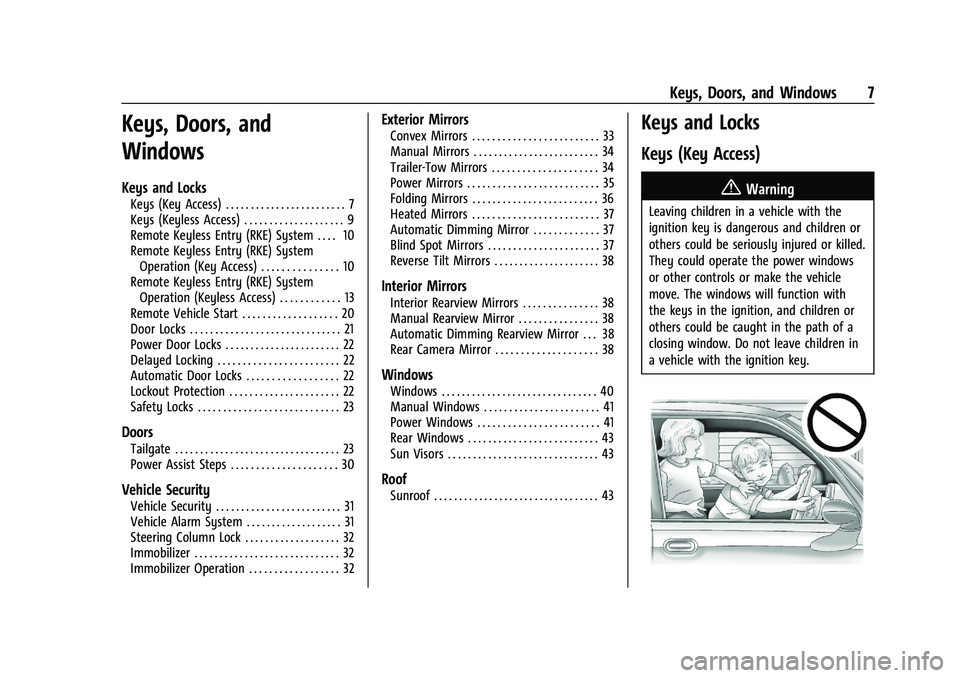
{Warning
Leaving children in a vehicle with the
ignition key is dangerous and children or
others could be seriously injured or killed.
They could operate the power windows
or other controls or make the vehicle
move. The windows will function with
the keys in the ignition, and children or
others could be caught in the path of a
closing window. Do not leave children in
a vehicle with the ignition key.
Page 35 of 461
Chevrolet Silverado 1500 Owner Manual (GMNA-Localizing-U.S./Canada/
Mexico/Paraguay-14632303) - 2021 - CRC - 11/9/20
34 Keys, Doors, and Windows
Trailer-Tow Mirrors
The upper portion of both the driver and
passenger mirrors is flat.
The lower portion of both the driver and
passenger mirrors is convex. A convex
mirror’s surface is curved so more can be
seen from the driver seat. The lower portion
is adjusted manually.
Manual Mirrors
If equipped, adjust manual mirrors by
moving the mirror up and down or left to
right to see a little of the side of the vehicle
and to have a clear view behind the vehicle.
Using hood-mounted air deflectors and
add-on convex mirror attachments could
decrease mirror performance.
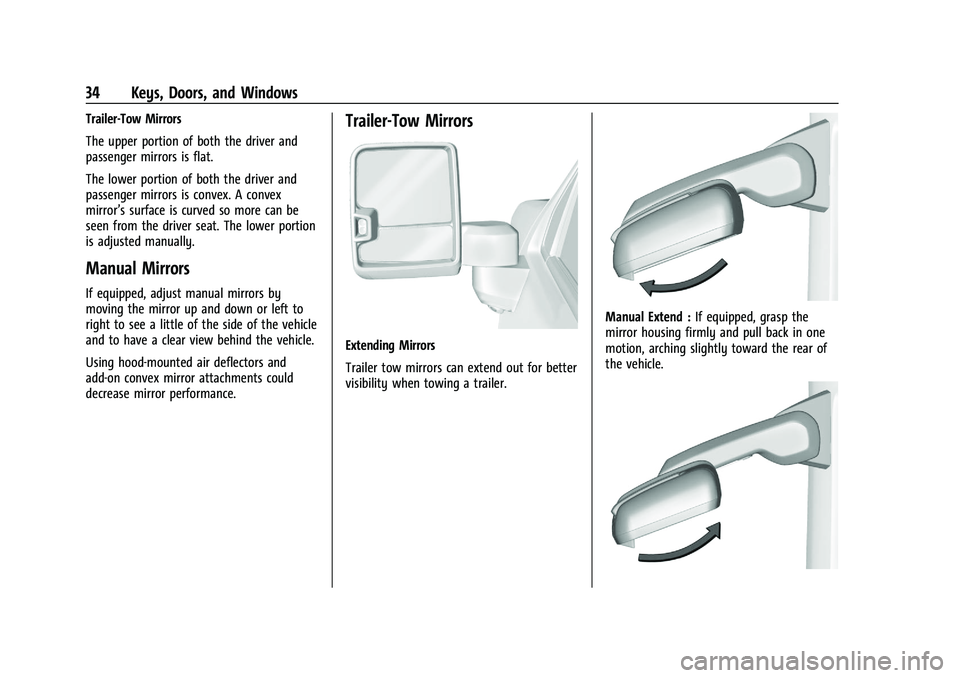
Trailer-Tow Mirrors
Extending Mirrors
Trailer tow mirrors can extend out for better
visibility when towing a trailer.
Manual Extend :If equipped, grasp the
mirror housing firmly and pull back in one
motion, arching slightly toward the rear of
the vehicle.
Page 38 of 461
Chevrolet Silverado 1500 Owner Manual (GMNA-Localizing-U.S./Canada/
Mexico/Paraguay-14632303) - 2021 - CRC - 11/9/20
Keys, Doors, and Windows 37
This feature can be turned on or off. See
Vehicle Personalization0131.
Heated Mirrors
1REAR : If equipped, the rear window
defogger also heats the outside mirrors.
W: If equipped, press to turn the heated
outside mirrors on or off.
See “Rear Window Defogger” underClimate
Control Systems 0204 or
Dual Automatic Climate Control System
0 206.
Automatic Dimming Mirror
If equipped, the driver outside mirror
automatically adjusts for the glare of the
headlamps from behind. This feature comes
on when the vehicle is started.
Blind Spot Mirrors
If equipped, there is a small convex mirror
built into the upper and outer corner of the
driver outside mirror. It can show objects
that may be in the vehicle's blind zone.
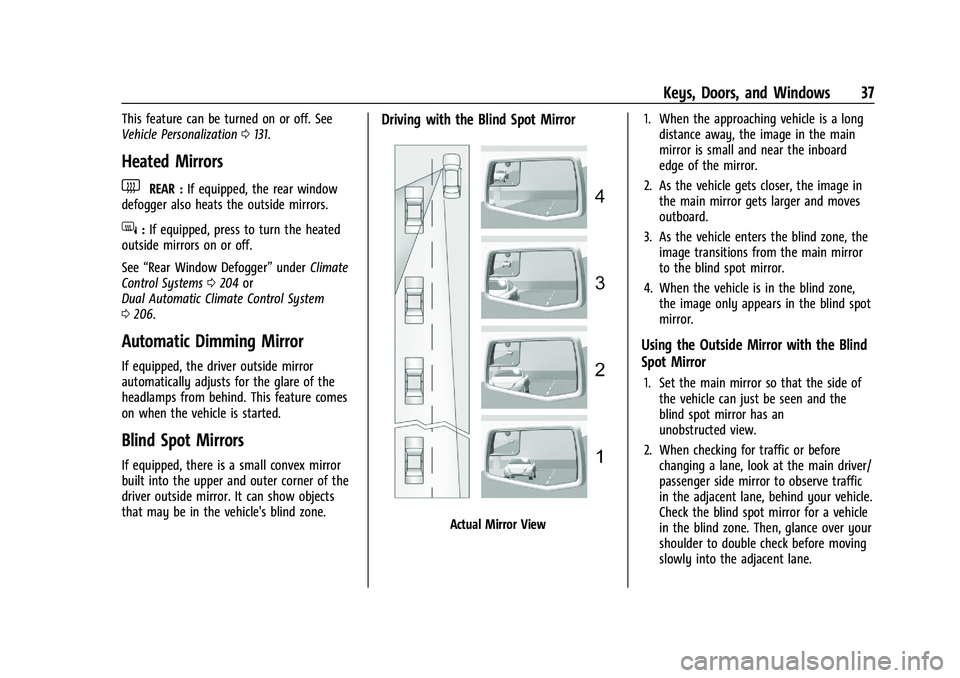
Driving with the Blind Spot Mirror
Actual Mirror View 1. When the approaching vehicle is a long
distance away, the image in the main
mirror is small and near the inboard
edge of the mirror.
2. As the vehicle gets closer, the image in the main mirror gets larger and moves
outboard.
3. As the vehicle enters the blind zone, the image transitions from the main mirror
to the blind spot mirror.
4. When the vehicle is in the blind zone, the image only appears in the blind spot
mirror.
Using the Outside Mirror with the Blind
Spot Mirror
1. Set the main mirror so that the side ofthe vehicle can just be seen and the
blind spot mirror has an
unobstructed view.
2. When checking for traffic or before changing a lane, look at the main driver/
passenger side mirror to observe traffic
in the adjacent lane, behind your vehicle.
Check the blind spot mirror for a vehicle
in the blind zone. Then, glance over your
shoulder to double check before moving
slowly into the adjacent lane.
Page 39 of 461
Chevrolet Silverado 1500 Owner Manual (GMNA-Localizing-U.S./Canada/
Mexico/Paraguay-14632303) - 2021 - CRC - 11/9/20
38 Keys, Doors, and Windows
Reverse Tilt Mirrors
If equipped with reverse tilt mirrors and
memory seats, the passenger and/or driver
mirror tilts to a preselected position when
the vehicle is in R (Reverse). This allows the
curb to be seen when parallel parking.
The mirror(s) may move from their tilted
position when:
.The vehicle is shifted out of R (Reverse),
or remains in R (Reverse) for about
30 seconds.
.The vehicle is turned off.
.The vehicle is driven in R (Reverse) above
a set speed.
To turn this feature on or off, see Vehicle
Personalization 0131.
Interior Mirrors
Interior Rearview Mirrors
Adjust the rearview mirror for a clear view
of the area behind your vehicle.
Do not spray glass cleaner directly on the
mirror. Use a soft towel dampened with
water.
Manual Rearview Mirror
If equipped, push the tab forward for
daytime use and pull it rearward for
nighttime use to avoid glare from the
headlamps from behind.
Automatic Dimming Rearview
Mirror
If equipped, the mirror will automatically
reduce the glare of the headlamps from
behind. The dimming feature comes on each
time the vehicle is started.
Rear Camera Mirror
If equipped, this automatic dimming mirror
provides a wide angle camera view of the
area behind the vehicle.
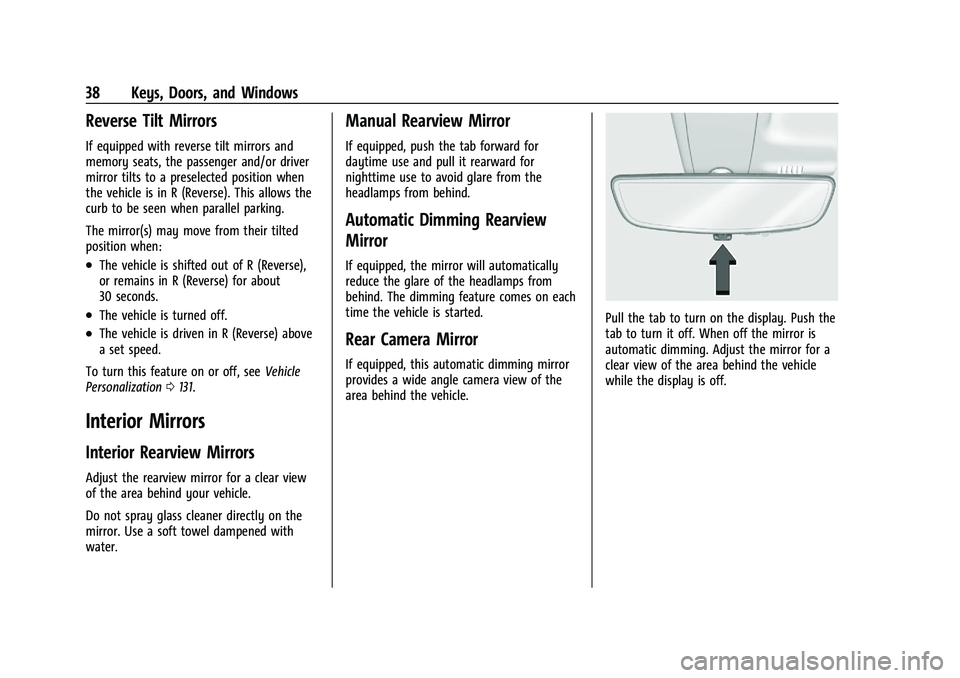
Pull the tab to turn on the display. Push the
tab to turn it off. When off the mirror is
automatic dimming. Adjust the mirror for a
clear view of the area behind the vehicle
while the display is off.
Page 41 of 461
Chevrolet Silverado 1500 Owner Manual (GMNA-Localizing-U.S./Canada/
Mexico/Paraguay-14632303) - 2021 - CRC - 11/9/20
40 Keys, Doors, and Windows
{Warning
The Rear Camera Mirror (RCM) has a
limited view. Portions of the road,
vehicles, and other objects may not be
seen. Do not drive or park the vehicle
using only this camera. Objects may
appear closer than they are. Check the
outside mirrors or glance over your
shoulder when making lane changes or
merging. Failure to use proper care may
result in injury, death, or vehicle damage.
Troubleshooting
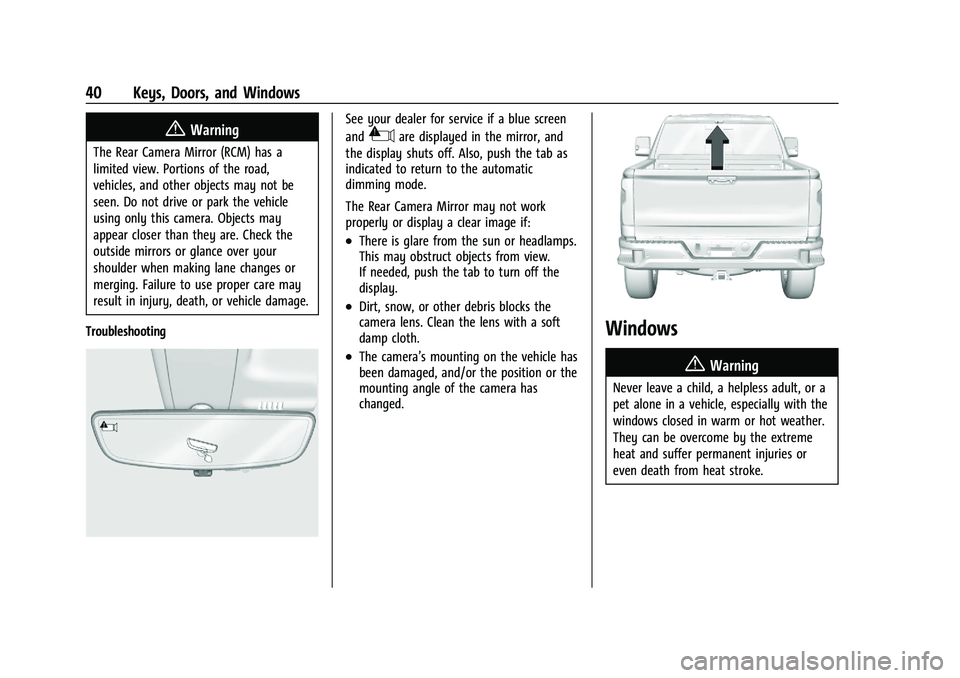
See your dealer for service if a blue screen
and
3are displayed in the mirror, and
the display shuts off. Also, push the tab as
indicated to return to the automatic
dimming mode.
The Rear Camera Mirror may not work
properly or display a clear image if:
.There is glare from the sun or headlamps.
This may obstruct objects from view.
If needed, push the tab to turn off the
display.
.Dirt, snow, or other debris blocks the
camera lens. Clean the lens with a soft
damp cloth.
.The camera’s mounting on the vehicle has
been damaged, and/or the position or the
mounting angle of the camera has
changed.
Windows
{
Warning
Never leave a child, a helpless adult, or a
pet alone in a vehicle, especially with the
windows closed in warm or hot weather.
They can be overcome by the extreme
heat and suffer permanent injuries or
even death from heat stroke.
Page 265 of 461
Chevrolet Silverado 1500 Owner Manual (GMNA-Localizing-U.S./Canada/
Mexico/Paraguay-14632303) - 2021 - CRC - 11/9/20
264 Driving and Operating
Lighting Conditions Affecting ACC
The ACC front camera can be affected by
poor lighting conditions, and ACC may have
limited performance when:
.There are changes in brightness, such as
entering and exiting tunnels, bridges, and
overpasses.
.Low sun angles cause the camera to not
detect objects, or it is more difficult to
detect objects in the same traffic lane.
.Lighting is poor in the evening or early
morning
.There are multiple changes in brightness
or shadows along the vehicle roadway.
.In a tunnel without the headlamps on,
or in a tunnel when there is a vehicle in
front that does not have its taillamps on.
.Subjected to strong light from opposing
lane traffic in the front of the vehicle,
such as high-beam headlamps from
oncoming traffic.
Accessory Installations and Vehicle
Modifications
Do not install or place any object around
the front camera windshield area that would
obstruct the front camera view. Do not install objects on top of the vehicle
that overhang and obstruct the front
camera, such as a canoe, kayak, or other
items that can be transported on the
vehicle roof.
Do not modify the hood, headlamps, or fog
lamps, as this may limit the camera’s ability
to detect an object.
Cleaning the Sensing System
The camera sensor on the windshield behind
the rearview mirror can become blocked by
snow, ice, dirt, mud, or debris. This area
needs to be cleaned for ACC to operate
properly.
The vehicle headlamps may need to be
cleaned due to dirt, snow, or ice. Objects
that are not illuminated correctly may be
difficult to detect.
If ACC will not operate, regular cruise control
may be available. See
“Switching Between
ACC and Regular Cruise Control” previously
in this section. Always consider driving
conditions before using either cruise control
system.
For cleaning instructions, see “Washing the
Vehicle” underExterior Care 0398.
Driver Assistance Systems
This vehicle may have features that work
together to help avoid crashes or reduce
crash damage while driving, backing, and
parking. Read this entire section before
using these systems.
{Warning
Do not rely on the Driver Assistance
Systems. These systems do not replace
the need for paying attention and driving
safely. You may not hear or feel alerts or
warnings provided by these systems.
Failure to use proper care when driving
may result in injury, death, or vehicle
damage. See Defensive Driving 0213.
Under many conditions, these systems
will not:
.Detect children, pedestrians, bicyclists,
or animals.
.Detect vehicles or objects outside the
area monitored by the system.
.Work at all driving speeds.
.Warn you or provide you with enough
time to avoid a crash. (Continued)
Page 266 of 461
Chevrolet Silverado 1500 Owner Manual (GMNA-Localizing-U.S./Canada/
Mexico/Paraguay-14632303) - 2021 - CRC - 11/9/20
Driving and Operating 265
Warning (Continued)
.Work under poor visibility or bad
weather conditions.
.Work if the detection sensor is not
cleaned or is covered by ice, snow,
mud, or dirt.
.Work if the detection sensor is
covered up, such as with a sticker,
magnet, or metal plate.
.Work if the area surrounding the
detection sensor is damaged or not
properly repaired.
Complete attention is always required
while driving, and you should be ready to
take action and apply the brakes and/or
steer the vehicle to avoid crashes.
Audible or Safety Alert Seat
Some driver assistance features alert the
driver of obstacles by beeping. To change
the volume of the warning chime, see
“Comfort and Convenience” underVehicle
Personalization 0131. If equipped with the Safety Alert Seat, the
driver seat cushion may provide a vibrating
pulse alert instead of beeping. To change
this, see
“Collision/Detection Systems” under
Vehicle Personalization 0131.
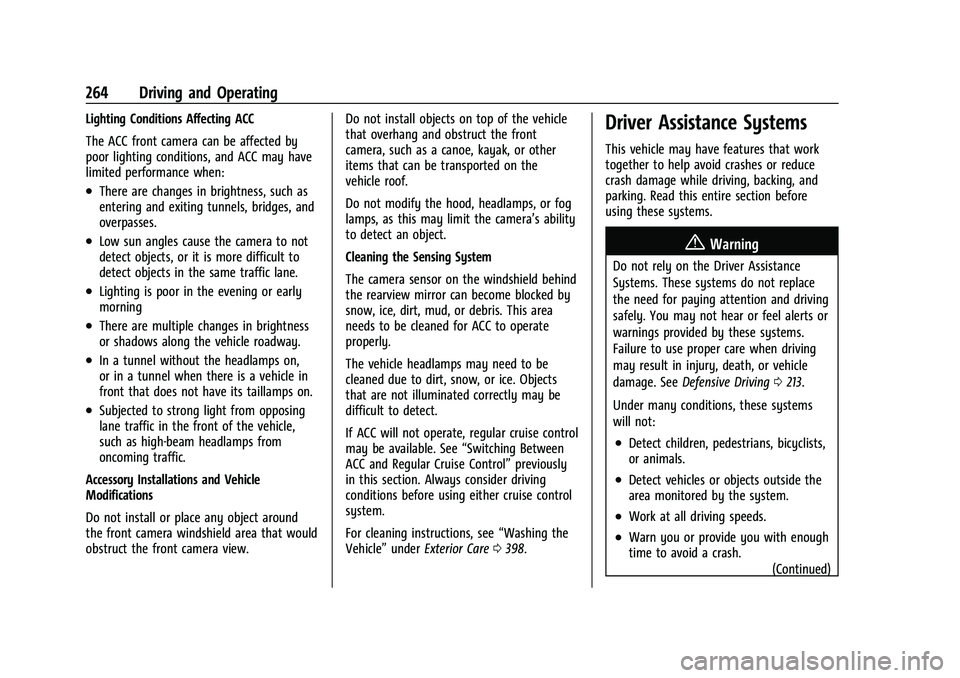
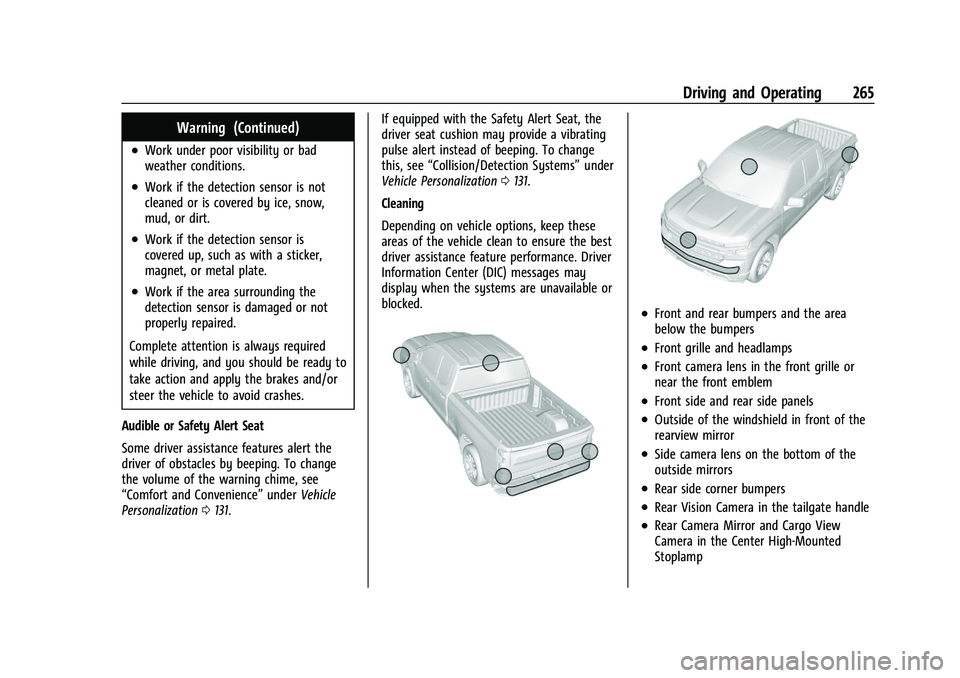
Cleaning
Depending on vehicle options, keep these
areas of the vehicle clean to ensure the best
driver assistance feature performance. Driver
Information Center (DIC) messages may
display when the systems are unavailable or
blocked.
.Front and rear bumpers and the area
below the bumpers
.Front grille and headlamps
.Front camera lens in the front grille or
near the front emblem
.Front side and rear side panels
.Outside of the windshield in front of the
rearview mirror
.Side camera lens on the bottom of the
outside mirrors
.Rear side corner bumpers
.Rear Vision Camera in the tailgate handle
.Rear Camera Mirror and Cargo View
Camera in the Center High-Mounted
Stoplamp
Page 268 of 461
Chevrolet Silverado 1500 Owner Manual (GMNA-Localizing-U.S./Canada/
Mexico/Paraguay-14632303) - 2021 - CRC - 11/9/20
Driving and Operating 267
Warning (Continued)
mirrors that are out of position may not
display surround view correctly. Always
check around the vehicle when parking or
backing.
1. Views Displayed by the SurroundVision Cameras
2. Area Not Shown
1. Views Displayed by the Surround Vision Cameras
2. Area Not Shown
{Warning
The camera(s) do not display children,
pedestrians, bicyclists, crossing traffic,
animals, or any other object outside of
the cameras’ field of view, below the
bumper, or under the vehicle. Shown
distances may be different from actual
distances. Do not drive or park the
vehicle using only these camera(s).
Always check behind and around the
vehicle before driving. Failure to use
proper care may result in injury, death,
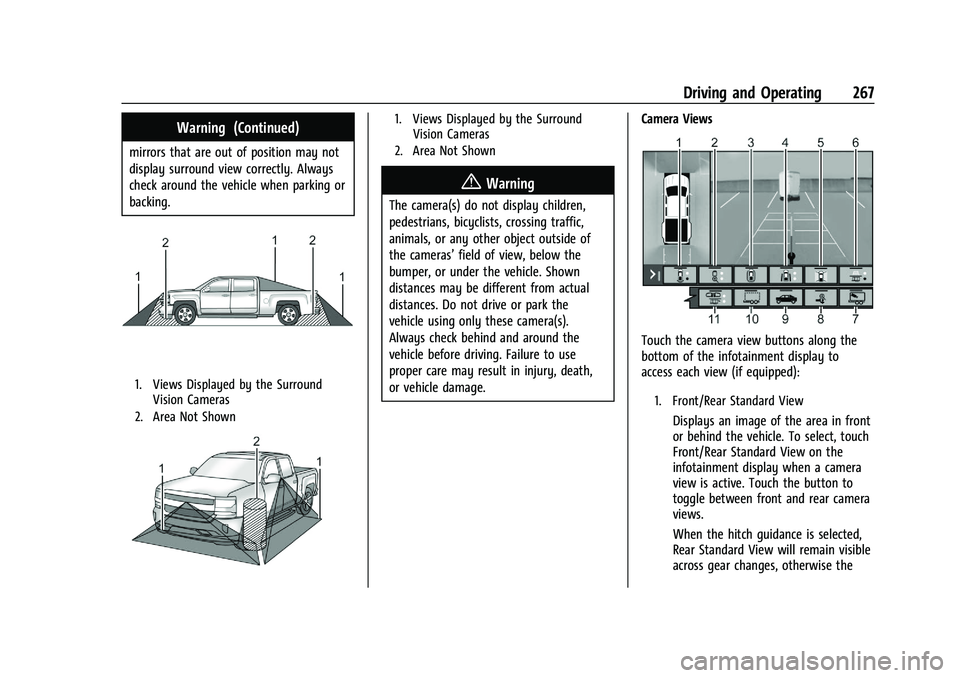
or vehicle damage. Camera Views
Touch the camera view buttons along the
bottom of the infotainment display to
access each view (if equipped):
1. Front/Rear Standard View
Displays an image of the area in front
or behind the vehicle. To select, touch
Front/Rear Standard View on the
infotainment display when a camera
view is active. Touch the button to
toggle between front and rear camera
views.
When the hitch guidance is selected,
Rear Standard View will remain visible
across gear changes, otherwise the
Page 270 of 461
Chevrolet Silverado 1500 Owner Manual (GMNA-Localizing-U.S./Canada/
Mexico/Paraguay-14632303) - 2021 - CRC - 11/9/20
Driving and Operating 269
{Warning
Use Hitch Guidance only to help back the
vehicle to a trailer hitch or, when
traveling above 12 km/h (8 mph), to
briefly check the status of your trailer. Do
not use for any other purpose, such as
making lane change decisions. Before
making a lane change, always check the
mirrors and glance over your shoulder.
Improper use could result in serious
injury to you or others.
7. Interior Trailer View
Provides a view of the interior of the
trailer. The feature is available when a
trailer is connected. The feature
requires user installation of an
accessory trailer camera on the
interior of the trailer per the accessory
trailer camera installation instructions
(see your dealer for accessory trailer
camera(s) and information). To select,
touch Interior Trailer View on the
infotainment display when a camera
view is active. To access this view
when in a forward gear above
12 km/h (8 mph), touch CAMERA on
the infotainment display and touchthe Interior Trailer View icon. The view
will close after 8 seconds and can be
closed early by touching X.
8. Hitch View
Assists with connecting to a trailer by
providing a zoomed-in view of the
hitch to help align the vehicle’s hitch
ball with the trailer coupler, or to
monitor the trailer connection. To
select, touch Hitch View on the
infotainment display when a camera
view is active. To access this view
when in a forward gear above
12 km/h (8 mph), touch CAMERA on
the infotainment display and touch
the Cargo Bed View icon. The view
will close after 8 seconds and can be
closed early by touching X. Shifting
into P (Park) while in this view will
automatically engage the Electric
Parking Brake (EPB).
9. Bed View
Provides a view of the truck bed and
the area behind the vehicle to assist
in cargo or hitch monitoring or
hitching to a fifth wheel or gooseneck
trailer. To select, touch Bed View on
the infotainment display when a
camera view is active. To access this
view when in a forward gear above12 km/h (8 mph), touch CAMERA on
the infotainment display and touch
the Bed View icon. The view will close
after 8 seconds and can be closed
early by touching X.
10. Transparent Trailer View
Provides a view that allows the driver
to virtually
“see through” the trailer.
The feature is available when a
compatible trailer is connected and a
profile is configured and selected via
the Trailering App. See Trailering App
0 306. The feature requires user
installation of an accessory trailer
camera on the rear exterior surface of
the trailer per the accessory trailer
camera installation instructions (see
your dealer for accessory trailer
camera(s) and information). To select,
touch Transparent Trailer View on the
infotainment display when a camera
view is active. To access this view
when in a forward gear above
12 km/h (8 mph), touch CAMERA on
the infotainment display and touch
the Transparent Trailer View icon.
Touch X to exit.
When the system is calibrated and the
trailer position is known, one of three
views will be shown; Transparent
Page 271 of 461
Chevrolet Silverado 1500 Owner Manual (GMNA-Localizing-U.S./Canada/
Mexico/Paraguay-14632303) - 2021 - CRC - 11/9/20
270 Driving and Operating
Trailer View, Left Transparent Trailer
View or Right Transparent Trailer
View. The Transparent Trailer View is
shown when the position of the trailer
is relatively straight behind the
vehicle. The Left or Right Transparent
Trailer View is shown when the
position of the trailer is too far to the
left or right. When the system is not
calibrated or trailer position is not
known the Transparent Trailer
Picture-in-Picture View will be shown.
11. Rear Trailer View/Rear Side View withAvailable Articulation Functionality/
Picture-in-Picture Side View
.Rear Trailer View provides a view
of the area behind the trailer. the
feature is available when a trailer
is connected. The feature requires
user installation of an accessory
trailer camera on the rear exterior
surface of the trailer per the
accessory trailer camera
installation instructions (see your
dealer for accessory trailer
camera(s) and information). To
select, touch Rear Trailer View/Rear
Side View with Available
Articulation Functionality/
Picture-in-Pictue Side View on the infotainment display when a
camera view is active. Each touch
will toggle through the Rear Trailer
View, Trailer Tow Mirror View and
Combo View. To access this view
when in a forward gear above
12 km/h (8 mph), touch CAMERA
on the infotainment display and
touch the Interior Rear Trailer
View/Rear Side View with Available
Articulation Functionality/
Picture-in-Picture Side View icon.
Touch X to exit.
.Rear Side View with Available
Articulation Functionality provides
a rearward split view of the left
and right sides of the vehicle and
trailer. When in a forward gear the
view well automatically pan to
show more of the left or right side
based on the position of the
trailer. The feature is available
when a trailer is connected. To
select, touch Rear trailer View/Rear
Side View with Available
Articulation Functionality/
Picture-in-Picture Side View on the
infotainment display when a
camera view is active. Each touch
will toggle through the Rear Trailer
View, trailer tow Mirror view and
Combo View. To access this view
when in a forward gear above
12 km/h (8 mph), Touch CAMERA
on the infotainment display and
touch the Rear Trailer View/Rear
Side View with Available
Articulation Functionality/
Picture-in-Picture Side icon. Touch X
to exit.
.Provides a rearward split view of
the left and right sides of the
vehicle and trailer with an overlay
view of the area behind the trailer.
The feature is available when a
trailer is connected. the feature
requires user installation of an
accessory trailer camera on the
rear exterior surface of the trailer
per the accessory trailer camera
installation instructions (see your
dealer for accessory trailer
camera(s) and information). To
select, touch Rear Trailer View/Rear
Side View with Available
Articulation Functionality/
Picture-in-Picture Side view on the
infotainment display when a
camera view is active. Each press
of the button will toggle through