clock CHEVROLET SILVERADO 2003 1.G User Guide
[x] Cancel search | Manufacturer: CHEVROLET, Model Year: 2003, Model line: SILVERADO, Model: CHEVROLET SILVERADO 2003 1.GPages: 556, PDF Size: 3.56 MB
Page 419 of 556
CAUTION: (Continued)
proper coolant mixture. With plain water or the
wrong mixture, your engine could get too hot
but you wouldn't get the overheat warning.
Your engine could catch ®re and you or others
could be burned. Use a 50/50 mixture of clean,
drinkable water and a proper coolant.
Notice:In cold weather, water can freeze and crack
the engine, radiator, heater core and other parts.
Use the recommended coolant and the proper
coolant mixture.
{CAUTION:
You can be burned if you spill coolant on hot
engine parts. Coolant contains ethylene glycol
and it will burn if the engine parts are hot
enough. Do not spill coolant on a hot engine.1. Park the vehicle on a
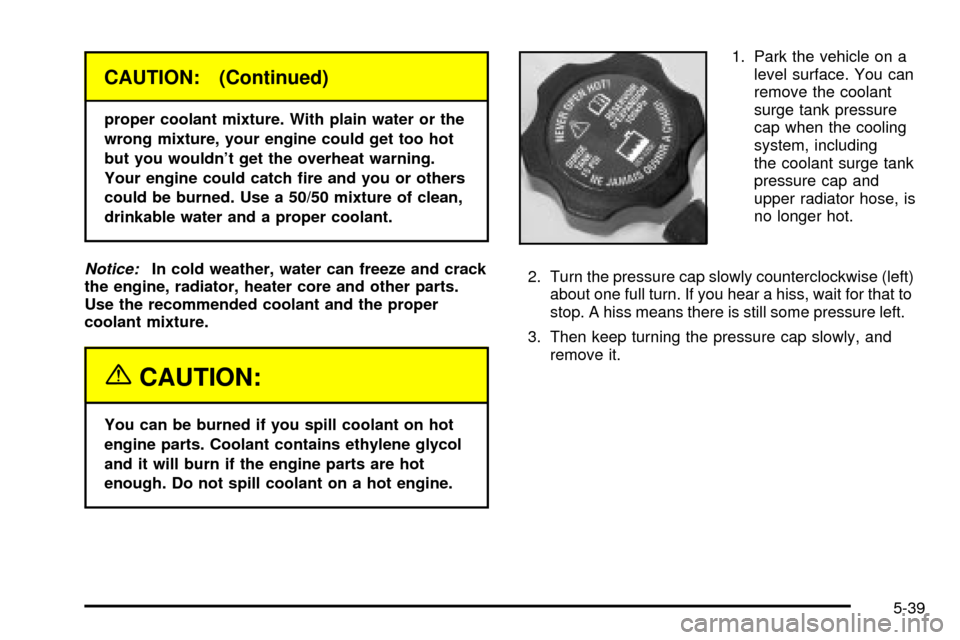
level surface. You can
remove the coolant
surge tank pressure
cap when the cooling
system, including
the coolant surge tank
pressure cap and
upper radiator hose, is
no longer hot.
2. Turn the pressure cap slowly counterclockwise (left)
about one full turn. If you hear a hiss, wait for that to
stop. A hiss means there is still some pressure left.
3. Then keep turning the pressure cap slowly, and
remove it.
5-39
Page 440 of 556
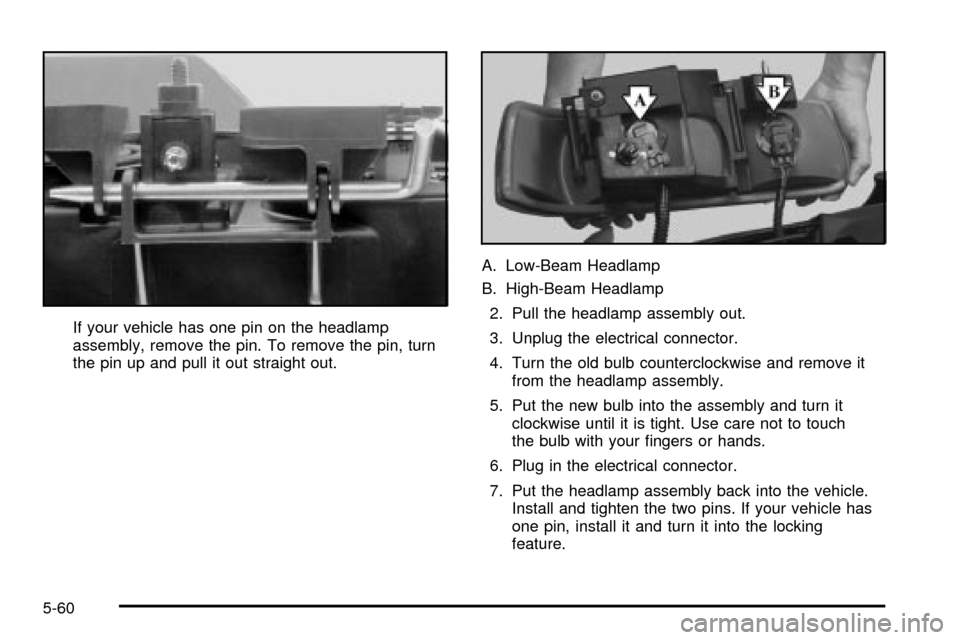
If your vehicle has one pin on the headlamp
assembly, remove the pin. To remove the pin, turn
the pin up and pull it out straight out.A. Low-Beam Headlamp
B. High-Beam Headlamp
2. Pull the headlamp assembly out.
3. Unplug the electrical connector.
4. Turn the old bulb counterclockwise and remove it
from the headlamp assembly.
5. Put the new bulb into the assembly and turn it
clockwise until it is tight. Use care not to touch
the bulb with your ®ngers or hands.
6. Plug in the electrical connector.
7. Put the headlamp assembly back into the vehicle.
Install and tighten the two pins. If your vehicle has
one pin, install it and turn it into the locking
feature.
5-60
Page 441 of 556
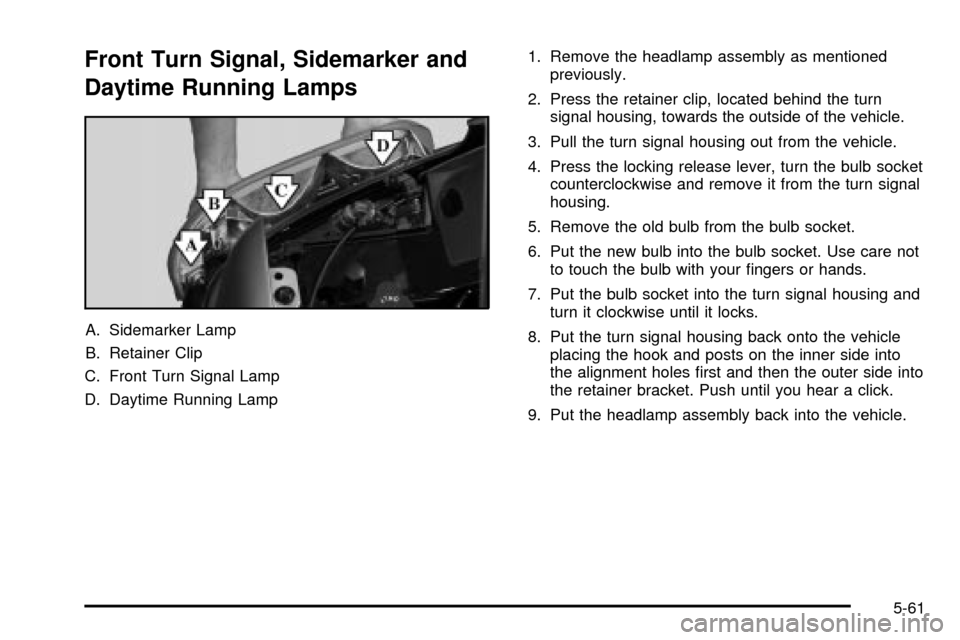
Front Turn Signal, Sidemarker and
Daytime Running Lamps
A. Sidemarker Lamp
B. Retainer Clip
C. Front Turn Signal Lamp
D. Daytime Running Lamp1. Remove the headlamp assembly as mentioned
previously.
2. Press the retainer clip, located behind the turn
signal housing, towards the outside of the vehicle.
3. Pull the turn signal housing out from the vehicle.
4. Press the locking release lever, turn the bulb socket
counterclockwise and remove it from the turn signal
housing.
5. Remove the old bulb from the bulb socket.
6. Put the new bulb into the bulb socket. Use care not
to touch the bulb with your ®ngers or hands.
7. Put the bulb socket into the turn signal housing and
turn it clockwise until it locks.
8. Put the turn signal housing back onto the vehicle
placing the hook and posts on the inner side into
the alignment holes ®rst and then the outer side into
the retainer bracket. Push until you hear a click.
9. Put the headlamp assembly back into the vehicle.
5-61
Page 442 of 556
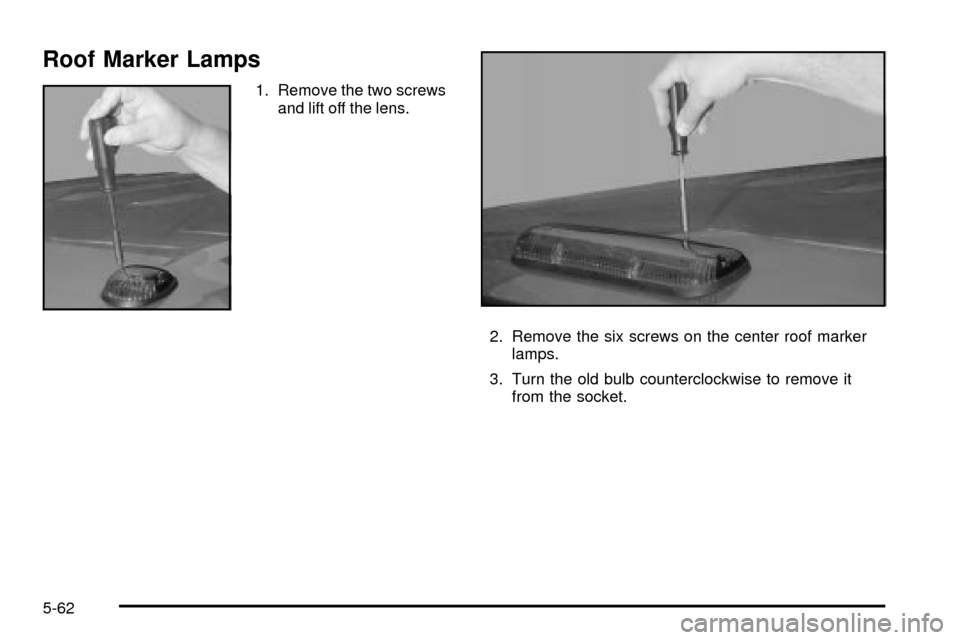
Roof Marker Lamps
1. Remove the two screws
and lift off the lens.
2. Remove the six screws on the center roof marker
lamps.
3. Turn the old bulb counterclockwise to remove it
from the socket.
5-62
Page 443 of 556
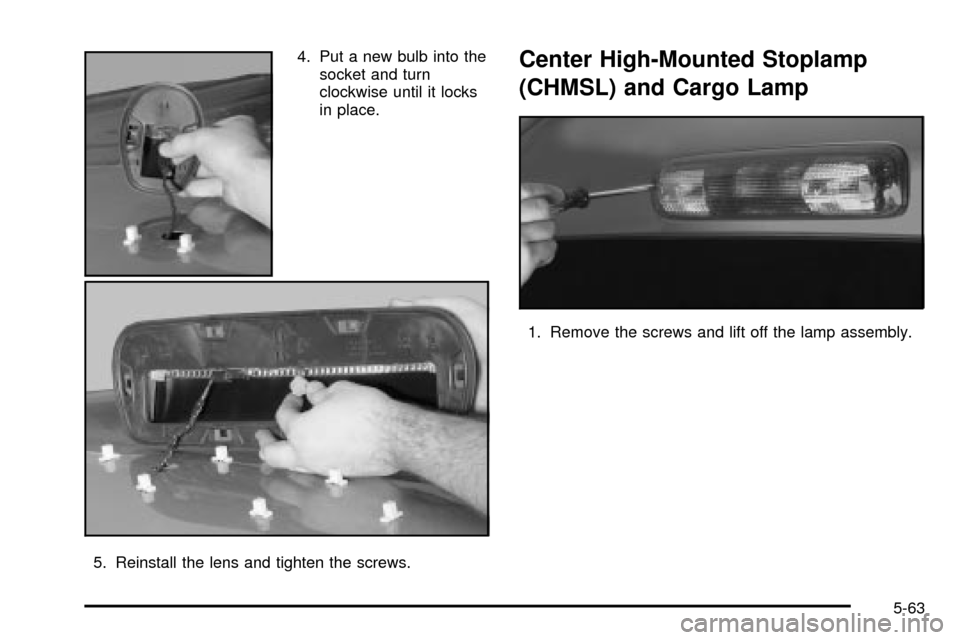
4. Put a new bulb into the
socket and turn
clockwise until it locks
in place.
5. Reinstall the lens and tighten the screws.Center High-Mounted Stoplamp
(CHMSL) and Cargo Lamp
1. Remove the screws and lift off the lamp assembly.
5-63
Page 444 of 556
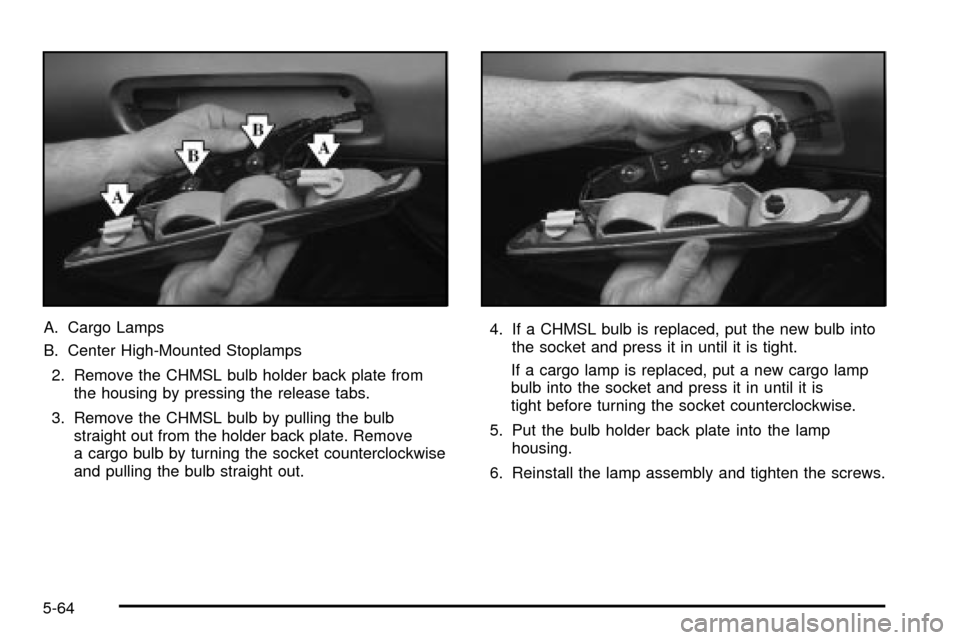
A. Cargo Lamps
B. Center High-Mounted Stoplamps
2. Remove the CHMSL bulb holder back plate from
the housing by pressing the release tabs.
3. Remove the CHMSL bulb by pulling the bulb
straight out from the holder back plate. Remove
a cargo bulb by turning the socket counterclockwise
and pulling the bulb straight out.4. If a CHMSL bulb is replaced, put the new bulb into
the socket and press it in until it is tight.
If a cargo lamp is replaced, put a new cargo lamp
bulb into the socket and press it in until it is
tight before turning the socket counterclockwise.
5. Put the bulb holder back plate into the lamp
housing.
6. Reinstall the lamp assembly and tighten the screws.
5-64
Page 446 of 556
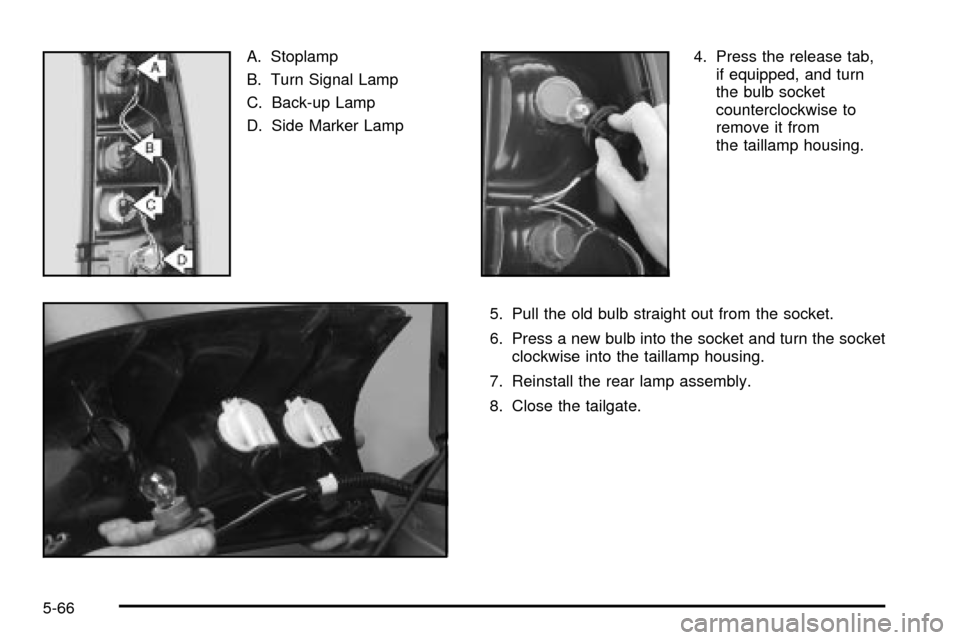
A. Stoplamp
B. Turn Signal Lamp
C. Back-up Lamp
D. Side Marker Lamp4. Press the release tab,
if equipped, and turn
the bulb socket
counterclockwise to
remove it from
the taillamp housing.
5. Pull the old bulb straight out from the socket.
6. Press a new bulb into the socket and turn the socket
clockwise into the taillamp housing.
7. Reinstall the rear lamp assembly.
8. Close the tailgate.
5-66
Page 462 of 556

The equipment you'll need is behind the passenger's
seat. For Extended and Crew Cabžmodels, the
equipment is under the passenger's side second
row seat.1. If there is a cover, move the seats forward and turn
the wing nut on the cover counterclockwise to
remove it. For Crew Cab
žmodels, pull up
the second row seat with the loop at the base of
the seat cushion to access the tools.
2. To release the bottle jack from its holder, turn the
knob on the bottle jack counterclockwise to lower
the jack head.
3. The wheel blocks and the wheel block retainer can
be removed by turning the wing nut
counterclockwise.
4. There is also a wing nut used to retain the storage
bag and tools. To remove it, turn the wing nut
counterclockwise.
Short Short Box Crew Cab
5-82
Page 464 of 556
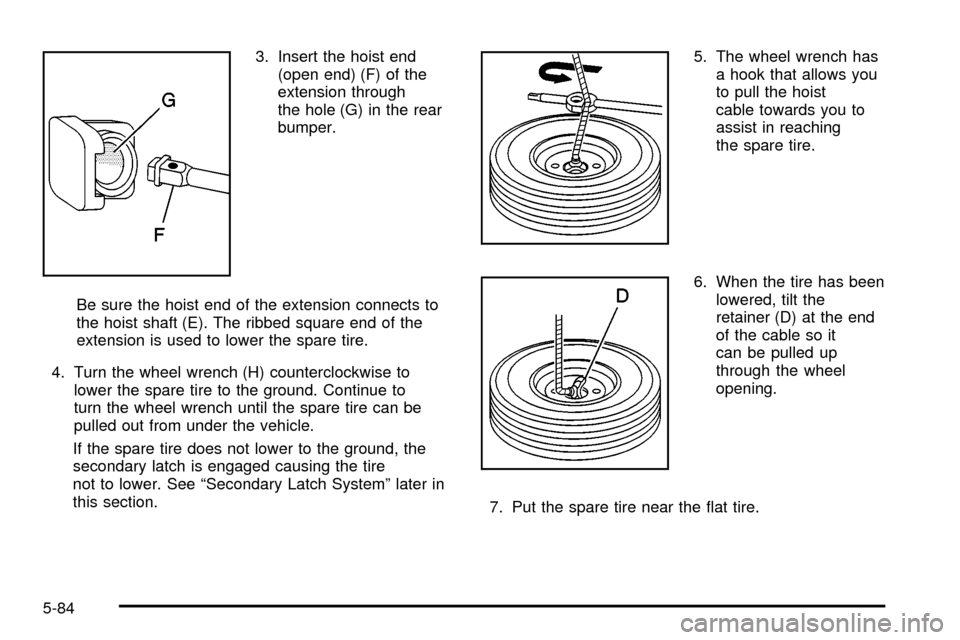
3. Insert the hoist end
(open end) (F) of the
extension through
the hole (G) in the rear
bumper.
Be sure the hoist end of the extension connects to
the hoist shaft (E). The ribbed square end of the
extension is used to lower the spare tire.
4. Turn the wheel wrench (H) counterclockwise to
lower the spare tire to the ground. Continue to
turn the wheel wrench until the spare tire can be
pulled out from under the vehicle.
If the spare tire does not lower to the ground, the
secondary latch is engaged causing the tire
not to lower. See ªSecondary Latch Systemº later in
this section.5. The wheel wrench has
a hook that allows you
to pull the hoist
cable towards you to
assist in reaching
the spare tire.
6. When the tire has been
lowered, tilt the
retainer (D) at the end
of the cable so it
can be pulled up
through the wheel
opening.
7. Put the spare tire near the ¯at tire.
5-84
Page 466 of 556
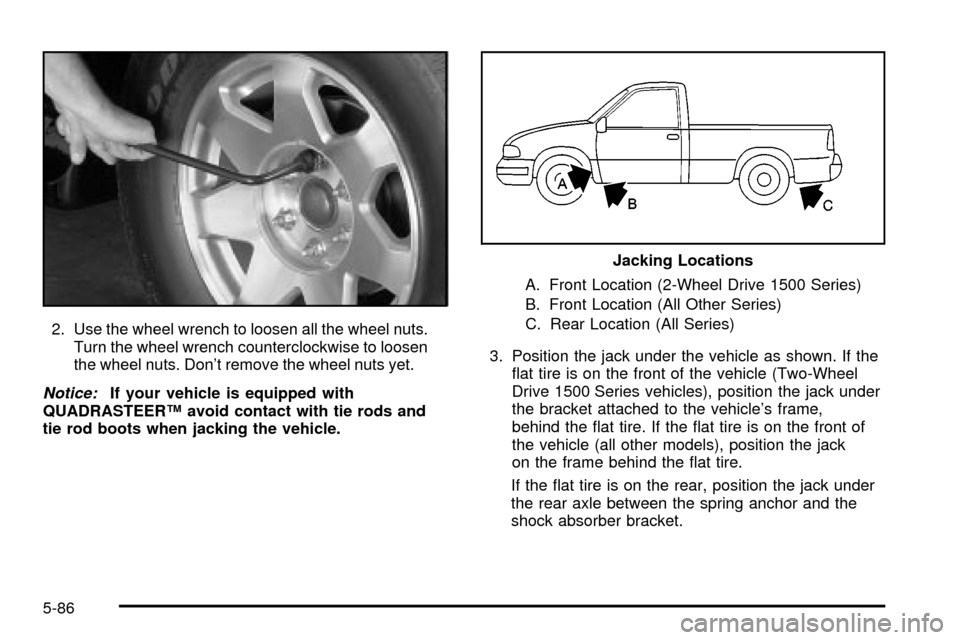
2. Use the wheel wrench to loosen all the wheel nuts.
Turn the wheel wrench counterclockwise to loosen
the wheel nuts. Don't remove the wheel nuts yet.
Notice:If your vehicle is equipped with
QUADRASTEERŸ avoid contact with tie rods and
tie rod boots when jacking the vehicle.A. Front Location (2-Wheel Drive 1500 Series)
B. Front Location (All Other Series)
C. Rear Location (All Series)
3. Position the jack under the vehicle as shown. If the
¯at tire is on the front of the vehicle (Two-Wheel
Drive 1500 Series vehicles), position the jack under
the bracket attached to the vehicle's frame,
behind the ¯at tire. If the ¯at tire is on the front of
the vehicle (all other models), position the jack
on the frame behind the ¯at tire.
If the ¯at tire is on the rear, position the jack under
the rear axle between the spring anchor and the
shock absorber bracket.
Jacking Locations
5-86