remote control CHEVROLET SILVERADO 2003 1.G User Guide
[x] Cancel search | Manufacturer: CHEVROLET, Model Year: 2003, Model line: SILVERADO, Model: CHEVROLET SILVERADO 2003 1.GPages: 556, PDF Size: 3.56 MB
Page 275 of 556

Problem Recommended Action
In auxiliary mode, the
picture moves or scrolls.Check the signal coming
from the auxiliary device
and make sure that the
connection and the signal
is good.
Change the Video
Format to PAL or NTSC.
See ªStereo RCA Jacksº
previously for how to
change the video format.
The language in the
audio or on the screen is
wrong.Press the Menu button
on the DVD player or on
the remote control and
change the audio or
language selection on the
DVD menu.
The remote control does
not work.Point the remote control
directly at the infrared
window below the video
screen while using.
Check that the batteries
are not dead or put in
wrong.
The parental control
button might have been
pressed. (The power
indicator light will ¯ash.)Problem Recommended Action
After stopping the player, I
push Play but sometimes
the DVD starts where I
left off and sometimes at
the beginning.If the stop button was
pressed one time, the
DVD player will resume
playing where the DVD
was stopped. If the stop
button was pressed two
times the DVD player will
begin to play from the
beginning of the DVD.
The auxiliary source is
running but there is no
picture or sound.Press the SRCE button to
change from the DVD
player mode to the
auxiliary source mode.
Check to make sure that
the auxiliary source is
connected to the inputs
properly.
My disc is stuck in the
player. The Load/Eject
button does not work.Press the Load/Eject
button on the DVD
player.
Turn the power off, then
on again, then press the
Load/Eject button on the
DVD player.
Do not attempt to forcibly
remove the disc from the
DVD player. This could
permanently damage the
DVD player.
3-119
Page 276 of 556
Problem Recommended Action
Sometimes the wireless
headphone audio cuts out
or buzzes.This could be caused by
interference from cellular
telephone towers or by
using your cellular
telephone in the vehicle.
I lost the remote and/or
the headphones.See your dealer for
assistance.
What is the best way to
clean the video screen?Wipe the video screen
with a soft cloth that is
damp with water.
Rear Seat Audio (RSA)
This feature allows rear seat passengers to listen to any
of the audio sources: radio, cassette tapes, CDs, or
DVDs, depending on your vehicles options. However,
the rear seat passengers can only control the music
sources that the front seat passengers are not listening
to. For example, rear seat passengers may listen to
a cassette tape through headphones while the driver
listens to the radio through the front speakers. The rear
seat passengers have control of the volume for each
set of headphones. The front seat audio controls always
override the RSA controls.
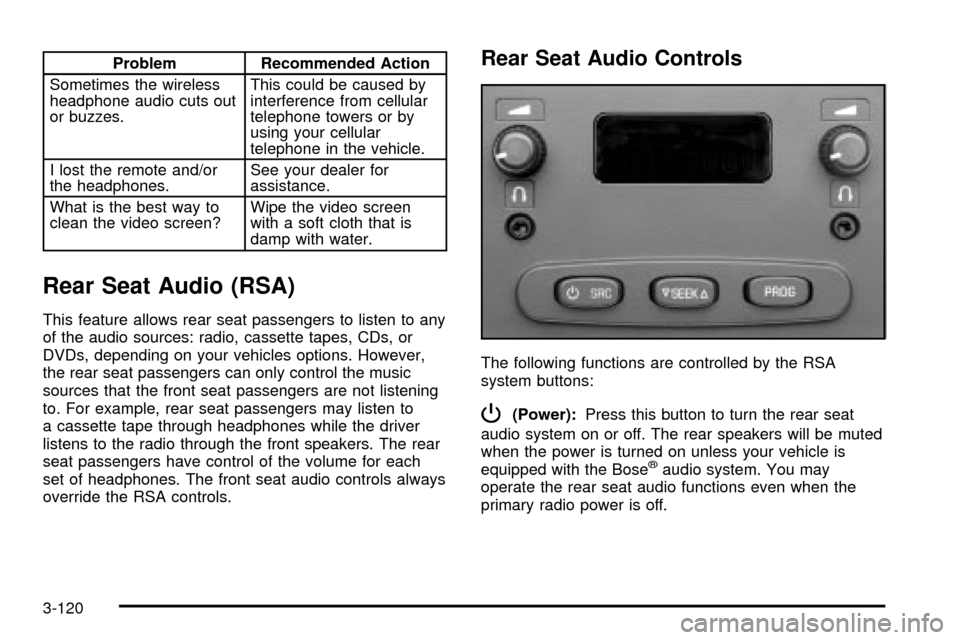
Rear Seat Audio Controls
The following functions are controlled by the RSA
system buttons:
P(Power):Press this button to turn the rear seat
audio system on or off. The rear speakers will be muted
when the power is turned on unless your vehicle is
equipped with the Bose
žaudio system. You may
operate the rear seat audio functions even when the
primary radio power is off.
3-120
Page 308 of 556
Traveling to Remote Areas
It makes sense to plan your trip, especially when going
to a remote area. Know the terrain and plan your
route. You are much less likely to get bad surprises.
Get accurate maps of trails and terrain. Try to learn of
any blocked or closed roads.
It's also a good idea to travel with at least one other
vehicle. If something happens to one of them, the other
can help quickly.
Does your vehicle have a winch? If so, be sure to read
the winch instructions. In a remote area, a winch
can be handy if you get stuck. But you'll want to know
how to use it properly.
Getting Familiar with Off-Road Driving
It's a good idea to practice in an area that's safe
and close to home before you go into the wilderness.
Off-road driving does require some new and different
driving skills. Here's what we mean.
Tune your senses to different kinds of signals. Your
eyes, for example, need to constantly sweep the terrain
for unexpected obstacles. Your ears need to listen
for unusual tire or engine sounds. With your arms,
hands, feet and body, you'll need to respond to
vibrations and vehicle bounce.Controlling your vehicle is the key to successful off-road
driving. One of the best ways to control your vehicle
is to control your speed. Here are some things to keep
in mind. At higher speeds:
·you approach things faster and you have less time
to scan the terrain for obstacles.
·you have less time to react.
·you have more vehicle bounce when you drive over
obstacles.
·you'll need more distance for braking, especially
since you're on an unpaved surface.
{CAUTION:
When you are driving off-road, bouncing and
quick changes in direction can easily throw
you out of position. This could cause you to
lose control and crash. So, whether you're
driving on or off the road, you and your
passengers should wear safety belts.
4-26
Page 550 of 556

Rear Seat Top Strap Anchors (Extended Cab
Models)......................................................1-45
Rear Seat Top Strap Anchors
(Crew Cab Models)......................................1-46
Rear Window Defogger............................3-24, 3-31
Rearview Mirror, Automatic Dimming with
Compass and Temperature Display................2-56
Rearview Mirror, Automatic Dimming with
OnStar
ž, Compass and Temperature Display . . . 2-53
Rearview Mirrors.............................................2-53
Reclining Seatbacks.......................................... 1-5
Recreational Vehicle Towing.............................4-55
REDUCED ENGINE POWER...........................3-68
Regular Cab and Extended Cab Models.............1-71
Remote Alarm.................................................. 2-5
Remote Control.............................................3-114
Remote Keyless Entry System, Operation............ 2-5
Remote Keyless Entry System............................ 2-4
Removing the Flat Tire and Installing the
Spare Tire..................................................5-85
Removing the Spare Tire and Tools...................5-81
Replacement Bulbs.........................................5-67
Replacing Brake System Parts..........................5-47
Replacing Restraint System Parts After a Crash.....1-82
Reporting Safety Defects................................... 7-9
Canadian Government................................... 7-9
General Motors............................................. 7-9
United States Government.............................. 7-8
Restraint System Check...................................6-13
Checking Your Restraint Systems...................1-81Restraint System Check (cont.)
Replacing Restraint System Parts After a
Crash.....................................................1-82
Restraint Systems...........................................1-81
Checking....................................................1-81
Replacing Parts...........................................1-82
Resynchronization............................................. 2-7
Retained Accessory Power (RAP)......................2-22
Right Front Passenger Position, Safety Belts......1-24
Right Front Passenger Position Top Strap Anchor
(All Models)................................................1-44
RIGHT REAR DOOR AJAR (Crew Cab).............3-68
Roadside......................................................... 7-5
Assistance Program....................................... 7-5
Rocking Your Vehicle To Get It Out...................4-53
Running Your Engine While You Are Parked.......2-52
S
Safety Belt.....................................................3-36
Reminder Light............................................3-36
Safety Belts..................................................5-103
Care of....................................................5-103
Center Passenger Position............................1-24
Driver Position............................................1-16
How to Wear Safety Belts Properly................1-15
Questions and Answers About Safety Belts.....1-14
Rear Safety Belt Comfort Guides for Children
and Small Adults......................................1-29
14