audio CHEVROLET SILVERADO 2003 1.G Owner's Guide
[x] Cancel search | Manufacturer: CHEVROLET, Model Year: 2003, Model line: SILVERADO, Model: CHEVROLET SILVERADO 2003 1.GPages: 556, PDF Size: 3.56 MB
Page 277 of 556

u(Volume):Turn the knob to increase or to decrease
volume. The left knob controls the left headphone and
the right knob controls the right headphone.
SRC (Source):Press this button to select an audio
source: radio, cassette tapes, CDs, or DVDs, depending
on your vehicles options.
xSEEKw:While listening to FM1, FM2, or AM,
press the up or the down arrow to tune to the next or to
the previous station and stay there. If the front radio
is in use, you cannot seek through different stations.
While listening to a cassette tape, press the up or the
down arrow to hear the next or the previous selection. If
the cassette tape on the front radio is in use, you cannot
seek through different selections on a tape.
While listening to a CD, press the up arrow to hear the
next track on the CD. Press the down arrow to go back to
the start of the current track if more than eight seconds
have played. If the CD player on the front radio is in use,
you cannot seek through different tracks.PROG (Program):The front passengers must be
listening to something different for each of these
functions to work:
·Press this button to go to the preset radio stations
set on the pushbuttons on the main radio.
·When a cassette tape is playing, press this button
to go to the other side of the tape.
·When a CD is playing in the radio, press this button
to go back to the beginning of the CD.
·When a CD is playing in the CD changer, press this
button to select a disc.
Theft-Deterrent Feature
THEFTLOCKžis designed to discourage theft of your
radio. The feature works automatically by learning
a portion of the Vehicle Identi®cation Number (VIN). If
the radio is moved to a different vehicle, it will not
operate and LOCKED will be displayed.
When the radio and vehicle are turned off, the blinking
red light indicates that THEFTLOCK
žis armed.
With THEFTLOCK
žactivated, your radio will not operate
if stolen.
3-121
Page 278 of 556

Audio Steering Wheel Controls
You can control certain radio functions using the buttons
on your steering wheel.
g(OnStar/Voice Recognition):If your vehicle has
OnStarž, you can press this button to interact with
the OnStaržsystem. See the OnStaržmanual provided
with your vehicle for more information.
IF your vehicle does not have OnStar
ž, pressing this
button will mute the audio system.
PROG (Program):Press this button to play a station
you have programmed on the radio preset pushbuttons
on the selected band. If a cassette tape is playing, press
this button to play the other side of the tape. If a CD is
playing, press this button to go to the next available CD.
QSOURCER:Press this button to select AM, FM1,
FM2, or XM1 or XM2, (USA only, if equipped), or a
cassette tape or CD. The cassette or CD must be loaded
to play. Available loaded sources are shown on the
display as a tape or a CD symbol.
QSEEKR:Press the up or the down arrow to seek
to the next or to the previous radio station and stay
there.
QVOLR:Press the up or the down arrow to increase
or to decrease volume.
DVD Distortion
You may experience audio distortion in the
IR headphones when operating cellular phones,
scanners, CB radios, Global Positioning Systems
(GPS)*, two-way radios, mobile fax, or walkie talkies.
It may be necessary to turn off the DVD player when
operating one of these devices in or near the vehicle.
* Excludes the OnStar
žSystem.
3-122
Page 428 of 556
Vehicle Storage
If you're not going to drive your vehicle for 25 days or
more, remove the black, negative (-) cable from
the battery. This will help keep your battery from
running down.
{CAUTION:
Batteries have acid that can burn you and gas
that can explode. You can be badly hurt if you
are not careful. See
Jump Starting on
page 5-48
for tips on working around a battery
without getting hurt.
Contact your dealer to learn how to prepare your
vehicle for longer storage periods.
Also, for your audio system, see
Theft-Deterrent
Feature on page 3-121.
Jump Starting
If your battery (or batteries) has run down, you may
want to use another vehicle and some jumper cables to
start your vehicle. Be sure to follow the steps below
to do it safely.
{CAUTION:
Batteries can hurt you. They can be dangerous
because:
·They contain acid that can burn you.·They contain gas that can explode or
ignite.
·They contain enough electricity to
burn you.
If you do not follow these steps exactly, some
or all of these things can hurt you.
Notice:Ignoring these steps could result in costly
damage to your vehicle that wouldn't be covered
by your warranty.
Trying to start your vehicle by pushing or pulling it
won't work, and it could damage your vehicle.
1. Check the other vehicle. It must have a 12-volt
battery with a negative ground system.
5-48
Page 497 of 556
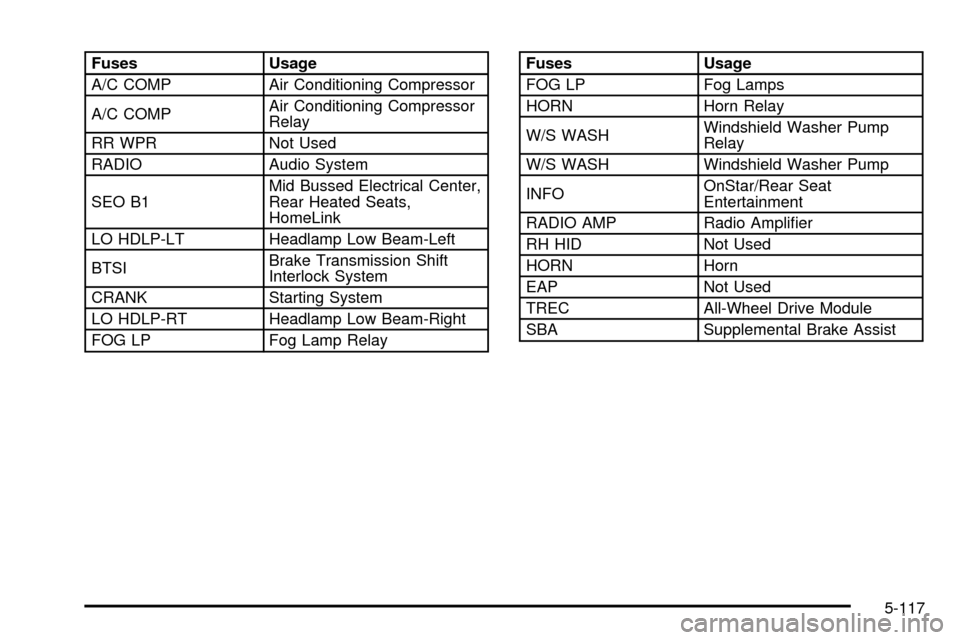
Fuses Usage
A/C COMP Air Conditioning Compressor
A/C COMPAir Conditioning Compressor
Relay
RR WPR Not Used
RADIO Audio System
SEO B1Mid Bussed Electrical Center,
Rear Heated Seats,
HomeLink
LO HDLP-LT Headlamp Low Beam-Left
BTSIBrake Transmission Shift
Interlock System
CRANK Starting System
LO HDLP-RT Headlamp Low Beam-Right
FOG LP Fog Lamp RelayFuses Usage
FOG LP Fog Lamps
HORN Horn Relay
W/S WASHWindshield Washer Pump
Relay
W/S WASH Windshield Washer Pump
INFOOnStar/Rear Seat
Entertainment
RADIO AMP Radio Ampli®er
RH HID Not Used
HORN Horn
EAP Not Used
TREC All-Wheel Drive Module
SBA Supplemental Brake Assist
5-117
Page 514 of 556

Part B: Owner Checks and Services
Listed in this part are owner checks and services
which should be performed at the intervals speci®ed to
help ensure the safety, dependability and emission
control performance of your vehicle.
Be sure any necessary repairs are completed at once.
Whenever any ¯uids or lubricants are added to your
vehicle, make sure they are the proper ones, as shown
in Part D.
At the First 100, 1,000 and 6,000
Miles (160, 1 600 and 10 000km)
Check dual wheel nut torque. For proper torque, seeCapacities and Speci®cations on page 5-118.
At Each Fuel Fill
It is important for you or a service station attendant to
perform these underhood checks at each fuel ®ll.
Engine Oil Level Check
Check the engine oil level and add the proper oil if
necessary. SeeEngine Oil on page 5-16for further
details.
Engine Coolant Level Check
Check the engine coolant level and add DEX-COOLž
coolant mixture if necessary. SeeEngine Coolant
on page 5-30for further details.
Windshield Washer Fluid Level Check
Check the windshield washer ¯uid level in the windshield
washer tank and add the proper ¯uid if necessary.
See
Windshield Washer Fluid on page 5-43for further
details.
At Least Once a Month
Tire In¯ation Check
Visually inspect your tires and make sure tires are
in¯ated to the correct pressures. Don't forget to check
your spare tire. See
Tires on page 5-69for further
details.
Cassette Tape Player Service
Clean cassette tape player. Cleaning should be done
every 50 hours of tape play. SeeAudio System(s)
on page 3-71for further details.
6-12
Page 537 of 556

A
Accessory Power Outlets.................................3-19
Adding a Snow Plow or Similar Equipment.........4-61
Adding Washer Fluid.......................................5-43
Additional Program Information........................... 7-8
Additives, Fuel................................................. 5-5
Add-On Electrical Equipment...........................5-109
Add-On Equipment..........................................4-60
Adjusting the Speakers
(Balance/Fade)..................3-74, 3-78, 3-88, 3-101
After Off-Road Driving.....................................4-37
Air Bag Systems.............................................1-64
Adding Equipment to Your Air Bag-Equipped
Vehicle...................................................1-80
Air Bag Off Switch.......................................1-71
How Does an Air Bag Restrain?....................1-69
Passenger Sensing System...........................1-76
Servicing Your Air Bag-Equipped Vehicle.........1-80
What Makes an Air Bag In¯ate?....................1-69
What Will You See After an Air Bag In¯ates?......1-70
When Should an Air Bag In¯ate?...................1-68
Where Are the Air Bags?..............................1-66
Air Bag .........................................................3-37
Off Light.....................................................3-37
Passenger Status Indicator...........................3-40
Readiness Light..........................................3-36
Air Cleaner/Filter, Engine.................................5-21
Air Conditioning..............................................3-30
All-Wheel Drive (AWD) System.........................2-44All-Wheel Drive...............................................5-54
AM-FM Radio.................................................3-72
AM .............................................................3-123
Antenna, Fixed Mast......................................3-125
Antenna, XMŸ Satellite Radio Antenna
System.....................................................3-125
Anti-Lock Brake, System Warning Light..............3-45
Anti-lock Brake System..................................... 4-6
Appearance Care..........................................5-100
Care of Safety Belts...................................5-103
Chemical Paint Spotting..............................5-106
Cleaning the Inside of Your Vehicle..............5-100
Cleaning the Outside of Your Vehicle............5-103
Finish Damage..........................................5-106
Sheet Metal Damage..................................5-105
Underbody Maintenance.............................5-106
Vehicle Care/Appearance Materials...............5-107
Weatherstrips............................................5-103
Approaching a Hill..........................................4-28
Ashtrays........................................................3-20
Audio Output................................................3-117
Audio System(s).............................................3-71
AM-FM Radio.............................................3-72
Audio Steering Wheel Controls....................3-122
Care of Your Cassette Tape Player...............3-123
Care of Your CD and DVD Player................3-124
Care of Your CDs and DVDs.......................3-124
Chime Level Adjustment.............................3-125
Fixed Mast Antenna...................................3-125
Radio with Cassette and CD.........................3-85
1
Page 538 of 556

Audio System(s) (cont.)
Radio with CD............................................3-75
Radio with Six-Disc CD................................3-98
Rear Seat Audio (RSA)...............................3-120
Setting the Time for Radios with Radio Data
Systems (RDS)........................................3-72
Setting the Time for Radios without Radio
Data Systems (RDS)................................3-72
Theft-Deterrent Feature...............................3-121
Understanding Radio Reception...................3-123
XMŸ Satellite Radio Antenna System...........3-125
Automatic Headlamp System............................3-15
Automatic Transfer Case..................................2-37
Automatic Transmission Check..........................6-13
Automatic Transmission Shift Lock Control
System Check.............................................6-15
Automatic Transmission...................................2-22
Fluid..................................................5-23, 5-26
Operation...................................................2-25
Auxiliary Battery..............................................4-94
Auxiliary Roof Mounted Lamp Switch.................3-17
B
Backing Up....................................................4-86
BATTERY NOT CHARGING.............................3-65
Battery Replacement......................................... 2-6
Battery Run-Down Protection............................3-19
Battery Warning Light......................................3-42Battery..........................................................5-47
Before Leaving on a Long Trip.........................4-44
Before You Drive...........................................3-111
Before You Go Off-Roading..............................4-24
Body Lubrication Service..................................6-14
Brake Adjustment............................................5-47
Brake Fluid....................................................5-44
Brake Pedal Travel.........................................5-47
Brake Wear...................................................5-46
Brake............................................................2-44
Parking......................................................2-44
System Inspection.......................................6-18
System Warning Light..................................3-44
Brakes..........................................................5-44
Braking in Emergencies..................................... 4-8
Braking........................................................... 4-6
Break-In, New Vehicle.....................................2-20
BUCKLE PASSENGER....................................3-65
BUCKLE SEATBELT.......................................3-65
Bulb Replacement...........................................5-59
Center High-Mounted Stoplamp (CHMSL) and
Cargo Lamp............................................5-63
Front Turn Signal, Sidemarker and Daytime
Running Lamps........................................5-61
Halogen Bulbs............................................5-59
Headlamps.................................................5-59
Pickup Box Identi®cation and Fender Marker
Lamps....................................................5-65
Replacement Bulbs......................................5-67
Roof Marker Lamps.....................................5-62
2
Page 549 of 556

Pickup Conversion to Chassis Cab....................4-67
Plan Ahead When Possible................................ 7-7
Playing a Cassette Tape..................................3-93
Playing a Compact Disc.................3-83, 3-95, 3-105
Playing a Speci®c Loaded
Compact Disc............................................3-107
Playing the Radio...................3-72, 3-76, 3-86, 3-99
Power Steering...............................................4-13
Power Winches..............................................4-94
Power...........................................................3-19
Accessory Outlets........................................3-19
Door Locks.................................................. 2-8
Electrical System.......................................5-109
Lumbar Controls........................................... 1-4
Seat............................................................ 1-4
Steering Fluid.............................................5-42
Windows....................................................2-16
Programmable Automatic Door Locks.................2-10
Q
QUADRASTEERŸ..........................................4-15
Questions and Answers About Safety Belts.........1-14
R
Radio Data System (RDS)...............3-75, 3-85, 3-98
Radio Messages.............................3-74, 3-80, 3-90
Radios..........................................................3-71AM-FM Radio.............................................3-72
Care of Your Cassette Tape Player...............3-123
Care of Your CD and DVD Player................3-124
Care of Your CDs and DVDs.......................3-124
Radio with Cassette and CD.........................3-85
Radio with CD............................................3-75
Radio with Six-Disc CD................................3-98
Rear Seat Audio........................................3-120
Setting the Time for Radios with Radio Data
Systems (RDS)........................................3-72
Setting the Time for Radios without Radio
Data Systems (RDS)................................3-72
Theft-Deterrent..........................................3-121
Understanding Reception............................3-123
RANGE SHIFT INHIBITED (Allison
Transmission
žOnly).....................................3-67
RDS Messages.............................3-79, 3-89, 3-102
Rear Axle......................................................5-55
Locking......................................................4-13
Rear Door Security Locks................................2-12
Rear Doors....................................................2-13
Rear Safety Belt Comfort Guides......................1-29
Rear Seat Audio Controls...............................3-120
Rear Seat Audio (RSA)..................................3-120
Rear Seat Entertainment System.....................3-111
Rear Seat Operation...................................1-8, 1-9
Rear Seat Outside Passenger Positions
(Extended Cab and Crew Cab)......................1-26
Rear Seat Passengers, Safety Belts..................1-26
13
Page 552 of 556

Six-Speed (VORTECŸ 8100 V8 and
DURAMAXŸ 6600 V8 Engines)...................2-31
Skidding........................................................4-21
Snow Plow....................................................4-61
Some Other Rainy Weather Tips.......................4-42
Spare Tire Check............................................6-13
Special Fabric Cleaning Problems....................5-101
Speci®cations, Capacities...............................5-118
Speedometer..................................................3-35
Stalling on an Incline.......................................4-35
Starter Switch Check.......................................6-14
Starting Your Engine.......................................2-22
Starting Your V8 Engine..................................2-23
Steering and Suspension Inspection..................6-17
Steering in Emergencies..................................4-14
Steering Tips..................................................4-13
Steering Wheel Controls, Audio.......................3-122
Steering........................................................4-13
Step-Bumper Pad...........................................4-97
Stereo RCA Jacks.........................................3-117
Storage Areas................................................2-64
Center Console Storage Area........................2-65
Cupholder(s)...............................................2-64
Front Storage Area......................................2-65
Glove Box..................................................2-64
Storing a Flat or Spare Tire, Jack
and Tools...................................................5-93Stuck in Sand, Mud, Ice or Snow......................4-52
Sun Visors.....................................................2-17
Supplemental Brake Assist System...................... 4-9
Swing-Out Windows........................................2-17
T
Tachometer....................................................3-35
Tailgate Removal............................................2-14
Tailgate.........................................................2-13
Taillamps (Chassis Cab Models)........................5-67
Taillamps.......................................................5-65
Temperature and Compass Display....................2-54
Temperature Display........................................2-56
Testing the Alarm............................................2-19
Theft-Deterrent, Radio....................................3-121
Theft-Deterrent Systems...................................2-18
Content Theft-Deterrent................................2-18
Passlock
ž...................................................2-19
Throttle System Inspection...............................6-18
TIGHTEN FUEL CAP......................................3-70
Tilt Wheel........................................................ 3-7
Tire In¯ation Check.........................................6-12
Tires.............................................................5-69
Buying New Tires........................................5-74
Chains.......................................................5-78
16