light CHEVROLET SILVERADO 2007 1.G Workshop Manual
[x] Cancel search | Manufacturer: CHEVROLET, Model Year: 2007, Model line: SILVERADO, Model: CHEVROLET SILVERADO 2007 1.GPages: 684, PDF Size: 3.4 MB
Page 191 of 684
Reprogramming a Single Universal
Home Remote Button
To program a device to Universal Home Remote
using a Universal Home Remote button
previously trained, follow these steps:
1. Press and hold the desired Universal Home
Remote button. Do not release the button.
2. The indicator light will begin to ash after
20 seconds. While still holding the Universal
Home Remote button, proceed with Step
2 under “Programming Universal Home
Remote” shown earlier in this section.
For help or information on the Universal Home
Remote System, call the customer assistance
phone number underCustomer Assistance Offices
on page 652.
Universal Home Remote System
Operation (With Three Round LED)
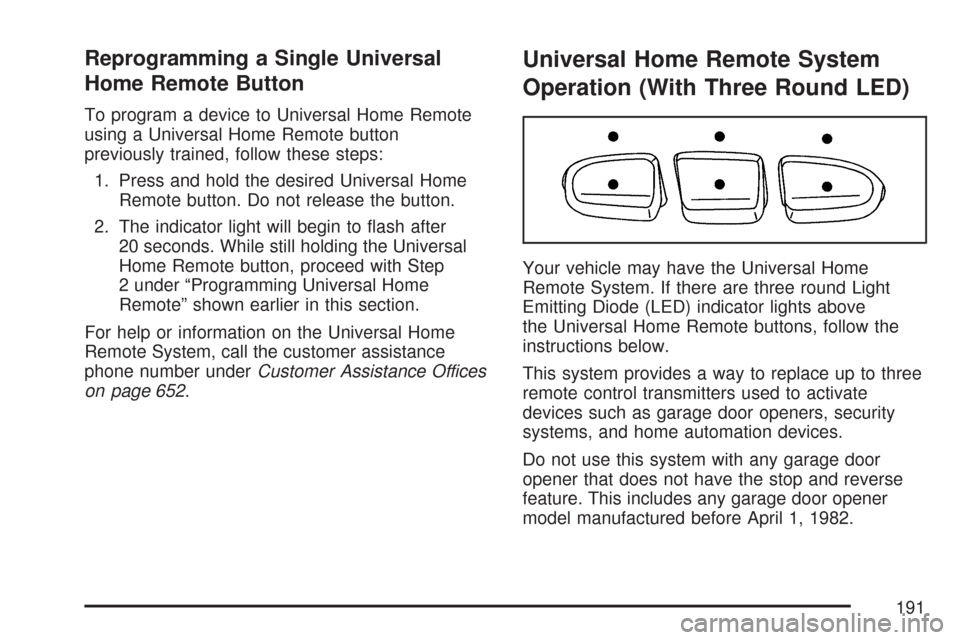
Your vehicle may have the Universal Home
Remote System. If there are three round Light
Emitting Diode (LED) indicator lights above
the Universal Home Remote buttons, follow the
instructions below.
This system provides a way to replace up to three
remote control transmitters used to activate
devices such as garage door openers, security
systems, and home automation devices.
Do not use this system with any garage door
opener that does not have the stop and reverse
feature. This includes any garage door opener
model manufactured before April 1, 1982.
191
Page 193 of 684
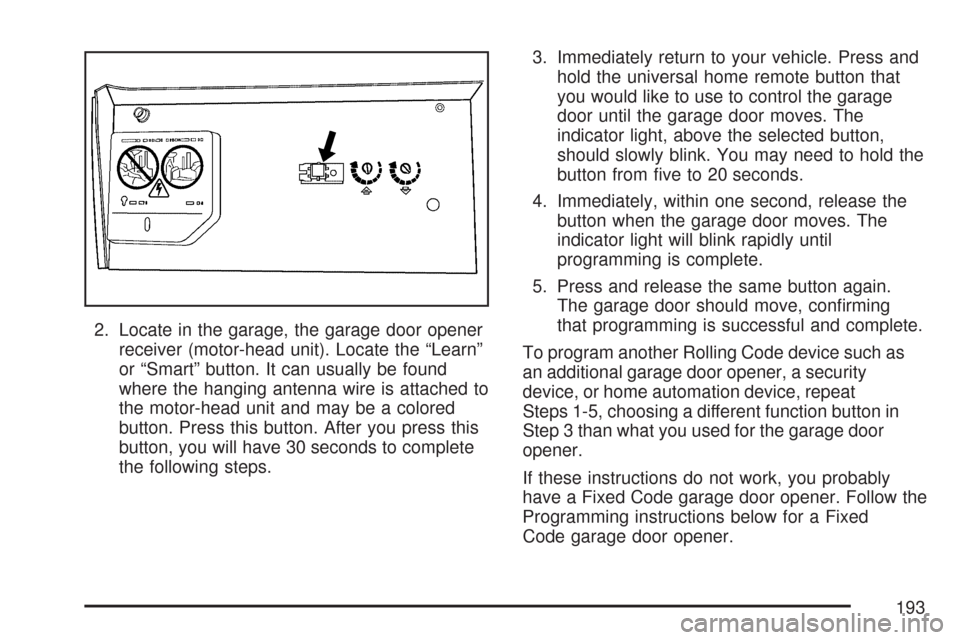
2. Locate in the garage, the garage door opener
receiver (motor-head unit). Locate the “Learn”
or “Smart” button. It can usually be found
where the hanging antenna wire is attached to
the motor-head unit and may be a colored
button. Press this button. After you press this
button, you will have 30 seconds to complete
the following steps.3. Immediately return to your vehicle. Press and
hold the universal home remote button that
you would like to use to control the garage
door until the garage door moves. The
indicator light, above the selected button,
should slowly blink. You may need to hold the
button from ve to 20 seconds.
4. Immediately, within one second, release the
button when the garage door moves. The
indicator light will blink rapidly until
programming is complete.
5. Press and release the same button again.
The garage door should move, conrming
that programming is successful and complete.
To program another Rolling Code device such as
an additional garage door opener, a security
device, or home automation device, repeat
Steps 1-5, choosing a different function button in
Step 3 than what you used for the garage door
opener.
If these instructions do not work, you probably
have a Fixed Code garage door opener. Follow the
Programming instructions below for a Fixed
Code garage door opener.
193
Page 196 of 684
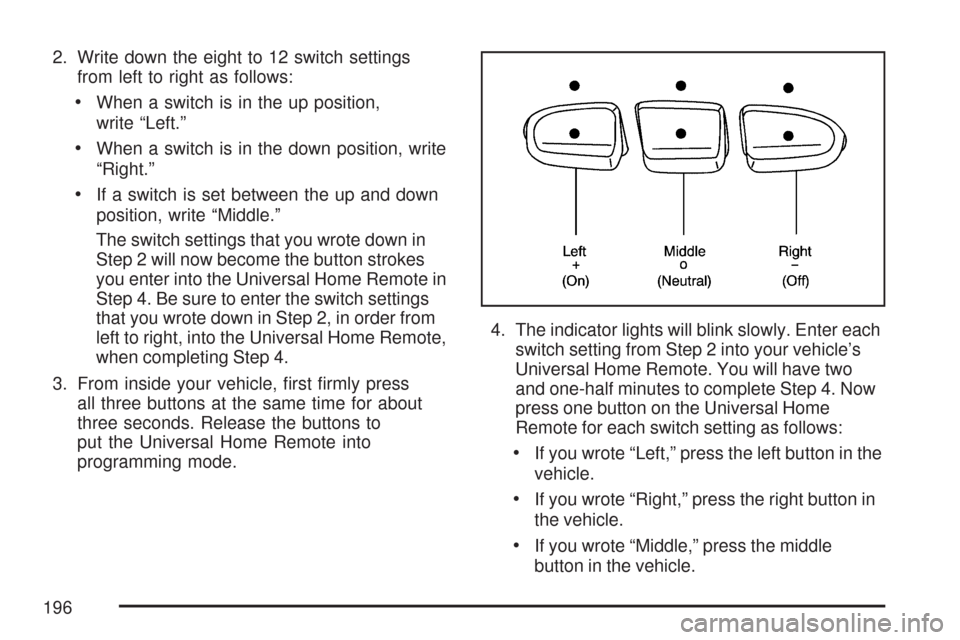
2. Write down the eight to 12 switch settings
from left to right as follows:
When a switch is in the up position,
write “Left.”
When a switch is in the down position, write
“Right.”
If a switch is set between the up and down
position, write “Middle.”
The switch settings that you wrote down in
Step 2 will now become the button strokes
you enter into the Universal Home Remote in
Step 4. Be sure to enter the switch settings
that you wrote down in Step 2, in order from
left to right, into the Universal Home Remote,
when completing Step 4.
3. From inside your vehicle, rst rmly press
all three buttons at the same time for about
three seconds. Release the buttons to
put the Universal Home Remote into
programming mode.4. The indicator lights will blink slowly. Enter each
switch setting from Step 2 into your vehicle’s
Universal Home Remote. You will have two
and one-half minutes to complete Step 4. Now
press one button on the Universal Home
Remote for each switch setting as follows:
If you wrote “Left,” press the left button in the
vehicle.
If you wrote “Right,” press the right button in
the vehicle.
If you wrote “Middle,” press the middle
button in the vehicle.
196
Page 197 of 684
5. After entering all of the switch positions, again,
rmly press and release all three buttons at the
same time. The indicator lights will turn on.
6. Press and hold the button you would like to use
to control the garage door until the garage door
moves. The indicator light above the selected
button should slowly blink. You may need to
hold the button from ve to 55 seconds.
7. Immediately release the button when the
garage door moves. The indicator light will
blink rapidly until programming is complete.
8. Press and release the same button again. The
garage door should move, conrming that
programming is successful and complete.
To program another Fixed Code device such as an
additional garage door opener, a security device, or
home automation device, repeat Steps 1-8,
choosing a different button in Step 6 than what you
used for the garage door opener.
Using Universal Home Remote
Press and hold the appropriate button for at least
half of a second. The indicator light will come
on while the signal is being transmitted.
Reprogramming Universal Home
Remote Buttons
You can reprogram any of the three buttons by
repeating the instructions.
Erasing Universal Home Remote
Buttons
You should erase the programmed buttons when
you sell or terminate your lease.
To erase either Rolling Code or Fixed Code on
the Universal Home Remote device, do the
following:
1. Press and hold the two outside buttons at the
same time for approximately 20 seconds, until
the indicator lights, located directly above
the buttons, begin to blink rapidly.
2. Once the indicator lights begin to blink,
release both buttons. The codes from all
buttons will be erased.
For help or information on the Universal Home
Remote System, call the customer assistance
phone number underCustomer Assistance Offices
on page 652.
197
Page 200 of 684
Luggage Carrier
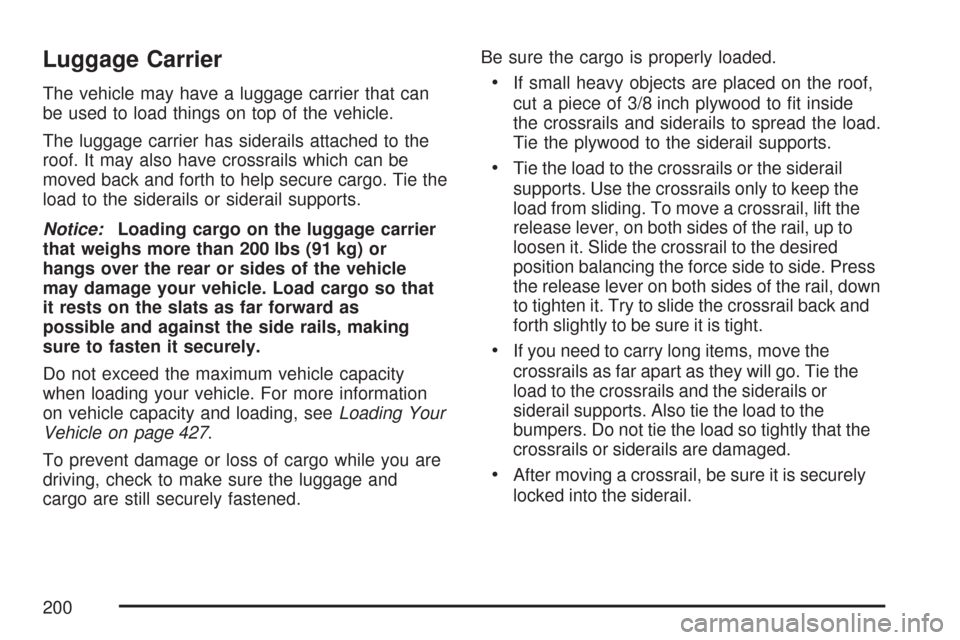
The vehicle may have a luggage carrier that can
be used to load things on top of the vehicle.
The luggage carrier has siderails attached to the
roof. It may also have crossrails which can be
moved back and forth to help secure cargo. Tie the
load to the siderails or siderail supports.
Notice:Loading cargo on the luggage carrier
that weighs more than 200 lbs (91 kg) or
hangs over the rear or sides of the vehicle
may damage your vehicle. Load cargo so that
it rests on the slats as far forward as
possible and against the side rails, making
sure to fasten it securely.
Do not exceed the maximum vehicle capacity
when loading your vehicle. For more information
on vehicle capacity and loading, seeLoading Your
Vehicle on page 427.
To prevent damage or loss of cargo while you are
driving, check to make sure the luggage and
cargo are still securely fastened.Be sure the cargo is properly loaded.If small heavy objects are placed on the roof,
cut a piece of 3/8 inch plywood to t inside
the crossrails and siderails to spread the load.
Tie the plywood to the siderail supports.
Tie the load to the crossrails or the siderail
supports. Use the crossrails only to keep the
load from sliding. To move a crossrail, lift the
release lever, on both sides of the rail, up to
loosen it. Slide the crossrail to the desired
position balancing the force side to side. Press
the release lever on both sides of the rail, down
to tighten it. Try to slide the crossrail back and
forth slightly to be sure it is tight.
If you need to carry long items, move the
crossrails as far apart as they will go. Tie the
load to the crossrails and the siderails or
siderail supports. Also tie the load to the
bumpers. Do not tie the load so tightly that the
crossrails or siderails are damaged.
After moving a crossrail, be sure it is securely
locked into the siderail.
200
Page 205 of 684
Instrument Panel Overview........................ 208
Instrument Panel Overview
(Base/Uplevel version)............................ 208
Instrument Panel Overview
(Premium version).................................. 211
Hazard Warning Flashers.......................... 213
Other Warning Devices............................. 213
Horn.......................................................... 213
Tilt Wheel.................................................. 214
Turn Signal/Multifunction Lever.................. 214
Turn and Lane-Change Signals................. 215
Headlamp High/Low-Beam Changer.......... 216
Flash-to-Pass............................................ 216
Windshield Wipers..................................... 217
Rainsense™ II Wipers............................... 218
Windshield Washer.................................... 219
Cruise Control........................................... 220
Exterior Lamps.......................................... 223
Headlamps on Reminder........................... 224
Daytime Running Lamps (DRL)................. 224
Automatic Headlamp System..................... 225Puddle Lamps........................................... 226
Fog Lamps................................................ 226
Auxiliary Roof Mounted Lamp.................... 227
Instrument Panel Brightness...................... 227
Dome Lamps............................................. 228
Dome Lamp Override................................ 228
Entry Lighting............................................ 228
Exit Lighting.............................................. 228
Reading Lamps......................................... 228
Cargo Lamp.............................................. 229
Electric Power Management...................... 229
Battery Run-Down Protection..................... 230
Ultrasonic Rear Parking Assist (URPA)...... 230
Accessory Power Outlet(s)........................ 234
Ashtray(s) and Cigarette Lighter................ 235
Climate Controls......................................... 236
Climate Control System
(With Air Conditioning)........................... 236
Climate Control System (Heater Only)....... 239
Dual Automatic Climate Control System.... 240
Outlet Adjustment...................................... 247
Section 3 Instrument Panel
205
Page 206 of 684
Warning Lights, Gages, and Indicators..... 248
Instrument Panel Cluster........................... 249
Speedometer and Odometer...................... 250
Trip Odometer........................................... 250
Tachometer............................................... 250
Safety Belt Reminder Light........................ 251
Passenger Safety Belt Reminder Light
(1500 Series)......................................... 251
Airbag Readiness Light............................. 252
Airbag Off Light......................................... 252
Passenger Airbag Status Indicator............. 254
Charging System Light.............................. 256
Voltmeter Gage......................................... 257
Brake System Warning Light..................... 258
Anti-Lock Brake System Warning Light...... 259
StabiliTrak
®Indicator Light......................... 260
Engine Coolant Temperature Gage............ 260
Tire Pressure Light.................................... 261
Malfunction Indicator Lamp........................ 262Oil Pressure Gage..................................... 265
Oil Pressure Light..................................... 266
Security Light............................................ 266
Fog Lamp Light......................................... 267
Cruise Control Light.................................. 267
Highbeam On Light................................... 267
Four-Wheel-Drive Light.............................. 267
Tow/Haul Mode Light................................ 268
Fuel Gage................................................. 268
Low Fuel Warning Light............................ 269
Driver Information Center (DIC).................. 269
DIC Operation and Displays
(With DIC Buttons)................................. 270
DIC Operation and Displays
(Without DIC Buttons)............................ 277
DIC Warnings and Messages.................... 281
DIC Vehicle Customization
(With DIC Buttons)................................. 291
Section 3 Instrument Panel
206
Page 210 of 684
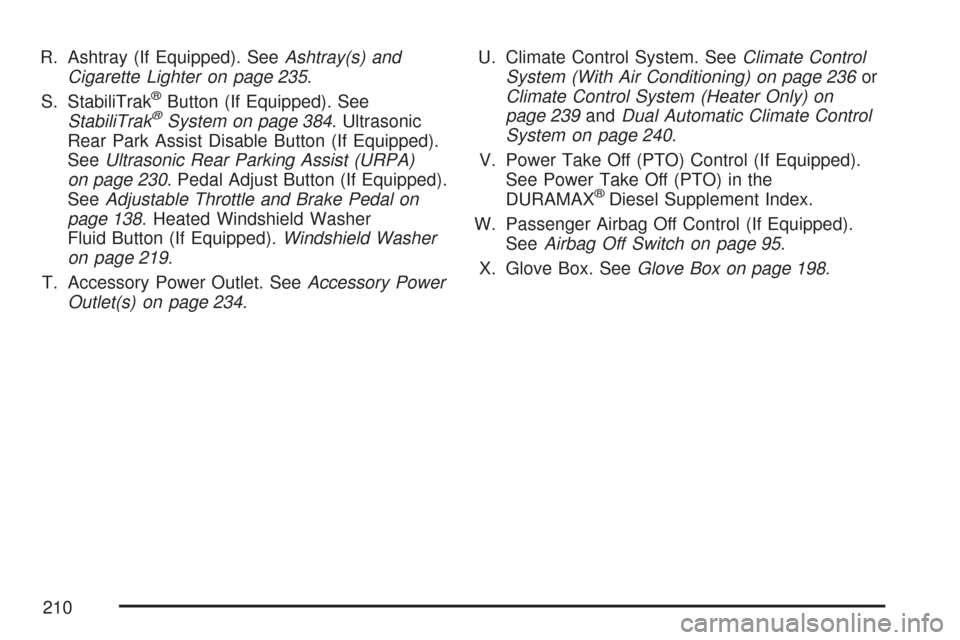
R. Ashtray (If Equipped). SeeAshtray(s) and
Cigarette Lighter on page 235.
S. StabiliTrak
®Button (If Equipped). See
StabiliTrak®System on page 384. Ultrasonic
Rear Park Assist Disable Button (If Equipped).
SeeUltrasonic Rear Parking Assist (URPA)
on page 230. Pedal Adjust Button (If Equipped).
SeeAdjustable Throttle and Brake Pedal on
page 138. Heated Windshield Washer
Fluid Button (If Equipped).Windshield Washer
on page 219.
T. Accessory Power Outlet. SeeAccessory Power
Outlet(s) on page 234.U. Climate Control System. SeeClimate Control
System (With Air Conditioning) on page 236or
Climate Control System (Heater Only) on
page 239andDual Automatic Climate Control
System on page 240.
V. Power Take Off (PTO) Control (If Equipped).
See Power Take Off (PTO) in the
DURAMAX
®Diesel Supplement Index.
W. Passenger Airbag Off Control (If Equipped).
SeeAirbag Off Switch on page 95.
X. Glove Box. SeeGlove Box on page 198.
210
Page 212 of 684
E. Shift Lever. SeeAutomatic Transmission
Operation on page 140.
F. Tow/Haul Selector Button (If Equipped). See
Tow/Haul Mode on page 146.
G. Driver Information Center (DIC) Controls. See
Driver Information Center (DIC) on page 269.
H. Audio System. SeeAudio System(s) on
page 302.
I. Exterior Lamps Control. SeeExterior Lamps on
page 223.
J. Integrated Trailer Brake Controller (If
Equipped). SeeTowing a Trailer on page 447.
K. Dome Lamp Override Button. SeeDome
Lamp Override on page 228. Dome Lamp
Knob. SeeDome Lamps on page 228.
L. Automatic Transfer Case Control. (If Equipped).
SeeFour-Wheel Drive on page 149.
M. Hood Release. SeeHood Release on
page 498.
N. Parking Brake. SeeParking Brake on
page 164.
O. Cruise Control Buttons. SeeCruise Control on
page 220.
P. Tilt Wheel Lever. SeeTilt Wheel on page 214.Q. Horn. SeeHorn on page 213.
R. Audio Steering Wheel Controls. SeeAudio
Steering Wheel Controls on page 370.
S. Climate Controls. SeeClimate Control System
(With Air Conditioning ) on page 236or
Climate Control System (Heater Only) on
page 239or Dual Automatic Climate Controls
(If Equipped). SeeDual Automatic Climate
Control System on page 240.
T. Accessory Power Outlets. SeeAccessory
Power Outlet(s) on page 234. Cigarette Lighter
(If Equipped). SeeAshtray(s) and Cigarette
Lighter on page 235.
U. StabiliTrak
®Button (If Equipped). See
StabiliTrak®System on page 384. Pedal Adjust
Button (If Equipped). SeeAdjustable Throttle
and Brake Pedal on page 138. Rear Park Assist
Disable Button (If Equipped). SeeUltrasonic
Rear Parking Assist (URPA) on page 230.
Heated Windshield Washer Fluid Button
(If Equipped). SeeWindshield Washer on
page 219.
V. Passenger Airbag Off Control (If Equipped).
SeeAirbag Off Switch on page 95.
W. Glove Box. SeeGlove Box on page 198.
212
Page 216 of 684
Turn Signal On Chime
If your turn signal is left on for more than 3/4 of a
mile (1.2 km), a chime will sound at each ash
of the turn signal and the message TURN SIGNAL
ON will also appear in the Driver Information
Control (DIC). To turn the chime and message off,
move the turn signal lever to the off position.
Headlamp High/Low-Beam Changer
53(Headlamp High/Low Beam Changer):
To change the headlamps from low to high beam,
push the lever toward the instrument panel. To
return to low-beam headlamps, pull the
multifunction lever toward you. Then release it.
When the high beams
are on, this indicator light
on the instrument panel
cluster will also be on.
Flash-to-Pass
This feature lets you use your high-beam
headlamps to signal a driver in front of you that
you want to pass. It works even if your headlamps
are in the automatic position.
To use it, pull the turn signal lever toward you,
then release it.
If your headlamps are in the automatic position or
on low beam, your high-beam headlamps will
turn on. They will stay on as long as you hold the
lever toward you. The high-beam indicator on
the instrument panel cluster will come on. Release
the lever to return to normal operation.
216