service CHEVROLET SILVERADO 2007 1.G Workshop Manual
[x] Cancel search | Manufacturer: CHEVROLET, Model Year: 2007, Model line: SILVERADO, Model: CHEVROLET SILVERADO 2007 1.GPages: 684, PDF Size: 3.4 MB
Page 325 of 684
Radio Data System (RDS)
The audio system has a Radio Data System
(RDS). The RDS feature is available for use only
on FM stations that broadcast RDS information.
This system relies upon receiving specic
information from these stations and only works
when the information is available. While the radio
is tuned to an FM-RDS station, the station
name or call letters display. In rare cases, a radio
station could broadcast incorrect information
that causes the radio features to work improperly.
If this happens, contact the radio station.
XM™ Satellite Radio Service
XM™ is a satellite radio service that is based in
the 48 contiguous United States and Canada.
XM™ offers a large variety of coast-to-coast
channels including music, news, sports, talk,
traffic/weather (U.S. subscribers), and children’s
programming. XM™ provides digital quality
audio and text information that includes song title
and artist name. A service fee is required in
order to receive the XM™ service. For more
information, contact XM™; In the U.S. at
www.xmradio.com or call 1-800-852-XMXM (9696)
or in Canada at www.xmradio.ca or call
1-877-GET-XMSR (438-9677).
Playing the Radio
O
(Power/Volume):Press this knob to turn the
system on and off.
Turn this knob clockwise or counterclockwise to
increase or decrease the volume.
Speed Compensated Volume (SCV):The radio
has Speed Compensated Volume (SCV). While
SCV is on, the radio volume automatically adjusts
to compensate for road and wind noise as
driving speed changes. That way, the volume level
should sound about the same as you drive. To
activate SCV:
1. Set the radio volume to the desired level.
2. Press the MENU button to display the radio
setup menu.
3. Press the pushbutton under the AUTO
VOLUM (volume) label on the radio display.
4. Press the pushbutton under the desired SCV
setting (OFF, Low, Med (medium), or High) to
select the level of radio volume compensation.
The display times out after approximately
10 seconds. Each higher setting allows
for more radio volume compensation at faster
vehicle speeds.
325
Page 326 of 684
Finding a Station
BAND:Press this button to switch between AM,
FM, or XM™ (if equipped). The display shows
the selection.
f(Tune):Turn this knob to select radio stations.
©SEEK¨:Press the left or right SEEK
arrow to go to the next or to the previous station
and stay there.
To scan stations, press and hold either SEEK
arrow for a few seconds until a beep sounds. The
radio goes to a station, plays for a few seconds,
then goes to the next station. Press either
SEEK arrow again to stop scanning.
The radio seeks and scans stations only with a
strong signal that are in the selected band.
4(Information) (XM™ Satellite Radio Service,
MP3, and RDS Features):Press the information
button to display additional text information related
to the current FM-RDS or XM™ station, or MP3
song. A choice of additional information such as:
Channel, Song, Artist, and CAT (category) could
appear. Continue pressing the information button to
highlight the desired label, or press the pushbutton
positioned under any one of the labels and the
information about that label is displayed.
When information is not available, No Info displays.
Storing a Radio Station as a Favorite
Drivers are encouraged to set up their radio station
favorites while the vehicle is parked. Tune to your
favorite stations using the presets, favorites button,
and steering wheel controls, if the vehicle has them.
SeeDefensive Driving on page 376.
326
Page 330 of 684
Radio Messages
Calibration Error:The audio system has been
calibrated for your vehicle from the factory. If
Calibration Error displays, it means that the radio
has not been congured properly for your vehicle
and it must be returned to your dealer for service.
Locked:This message displays when the
THEFTLOCK
®system has locked up the radio.
Take the vehicle to your dealer for service.
If any error occurs repeatedly or if an error cannot
be corrected, contact your dealer.
Radio Messages for XM™ Only
SeeXM Radio Messages on page 355later in this
section for further detail.
Playing a CD (In Either the DVD or
CD Slot)
Insert a CD partway into the slot, label side up.
The player pulls it in and the CD should begin
playing (loading a disc into the system, depending
on media type and format ranges from
5 to 20 seconds for a CD, and up to 30 seconds
for a DVD to begin playing).If the ignition or radio is turned off, with a CD in
the player, it stays in the player. When the ignition
or radio is turned on, the CD starts playing
where it stopped, if it was the last selected audio
source. The CD is controlled by the buttons
on the radio faceplate. The DVD/CD decks, (upper
slot is the DVD deck and the lower slot is the
CD deck) of the radio are compatible with most
audio CDs, CD-R, CD-RW, and MP3s.
When a CD is inserted, the text label DVD or CD
symbol appears on the left side of the radio
display. As each new track starts to play, the track
number appears on the display.
The CD player can play the smaller 3 inch (8 cm)
single CDs with an adapter ring. Full-size CDs and
the smaller CDs are loaded in the same manner.
If playing a CD-R, the sound quality can be
reduced due to CD-R quality, the method of
recording, the quality of the music that has been
recorded, and the way the CD-R has been
handled. There can be an increase in skipping,
difficulty in nding tracks, and/or difficulty in loading
and ejecting. If these problems occur, check the
bottom surface of the CD.
330
Page 355 of 684
XM Radio Messages
Radio Display Message Condition Action Required
XL (Explicit Language
Channels)XL on the radio display,
after the channel name,
indicates content with
explicit language.These channels, or any others, can be blocked at a
customer’s request, by calling 1-800-852-XMXM (9696).
XM Updating Updating encryption code The encryption code in the receiver is being updated, and
no action is required. This process should take no longer
than 30 seconds.
No XM Signal Loss of signal The system is functioning correctly, but the vehicle is in a
location that is blocking the XM™ signal. When you move
into an open area, the signal should return.
Loading XM Acquiring channel audio
(after four second delay)The audio system is acquiring and processing audio and
text data. No action is needed. This message should
disappear shortly.
Channel Off Air Channel not in service This channel is not currently in service. Tune to another
channel.
Channel Unavail Channel no longer
availableThis previously assigned channel is no longer assigned.
Tune to another station. If this station was one of the
presets, choose another station for that preset button.
No Artist Info Artist Name/Feature not
availableNo artist information is available at this time on this channel.
The system is working properly.
No Title Info Song/Program Title not
availableNo song title information is available at this time on this
channel. The system is working properly.
355
Page 356 of 684
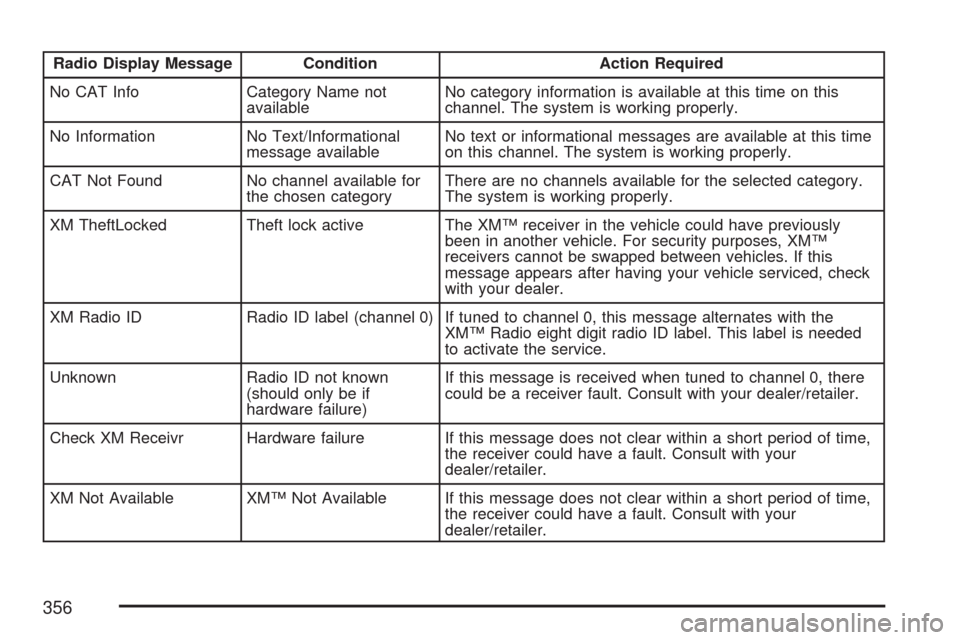
Radio Display Message Condition Action Required
No CAT Info Category Name not
availableNo category information is available at this time on this
channel. The system is working properly.
No Information No Text/Informational
message availableNo text or informational messages are available at this time
on this channel. The system is working properly.
CAT Not Found No channel available for
the chosen categoryThere are no channels available for the selected category.
The system is working properly.
XM TheftLocked Theft lock active The XM™ receiver in the vehicle could have previously
been in another vehicle. For security purposes, XM™
receivers cannot be swapped between vehicles. If this
message appears after having your vehicle serviced, check
with your dealer.
XM Radio ID Radio ID label (channel 0) If tuned to channel 0, this message alternates with the
XM™ Radio eight digit radio ID label. This label is needed
to activate the service.
Unknown Radio ID not known
(should only be if
hardware failure)If this message is received when tuned to channel 0, there
could be a receiver fault. Consult with your dealer/retailer.
Check XM Receivr Hardware failure If this message does not clear within a short period of time,
the receiver could have a fault. Consult with your
dealer/retailer.
XM Not Available XM™ Not Available If this message does not clear within a short period of time,
the receiver could have a fault. Consult with your
dealer/retailer.
356
Page 372 of 684
AM
The range for most AM stations is greater than for
FM, especially at night. The longer range can cause
station frequencies to interfere with each other. For
better radio reception, most AM radio stations
boosts the power levels during the day, and then
reduce these levels during the night. Static can also
occur when things like storms and power lines
interfere with radio reception. When this happens,
try reducing the treble on your radio.
FM Stereo
FM stereo gives the best sound, but FM signals
only reach about 10 to 40 miles (16 to 65 km). Tall
buildings or hills can interfere with FM signals,
causing the sound to fade in and out.
XM™ Satellite Radio Service
XM™ Satellite Radio Service gives digital radio
reception from coast-to-coast in the 48 contiguous
United States, and in Canada. Just as with FM,
tall buildings or hills can interfere with satellite
radio signals, causing the sound to fade in and out.In addition, traveling or standing under heavy
foliage, bridges, garages, or tunnels could cause
loss of the XM™ signal for a period of time.
The radio might display NO XM SIGNAL to
indicate interference.
Care of Your CDs and DVDs
Handle CDs carefully. Store them in their original
cases or other protective cases and away from
direct sunlight and dust. The CD player scans the
bottom surface of the disc. If the surface of a
CD is damaged, such as cracked, broken,
or scratched, the CD does not play properly or not
at all. If the surface of a CD is soiled, take a
soft, lint free cloth or dampen a clean, soft cloth in
a mild, neutral detergent solution mixed with
water, and clean it. Make sure the wiping process
starts from the center to the edge.
Do not touch the bottom side of a CD while
handling it; this could damage the surface. Pick up
CDs by grasping the outer edges or the edge of
the hole and the outer edge.
372
Page 381 of 684
Avoid needless heavy braking. Some people drive
in spurts — heavy acceleration followed by
heavy braking — rather than keeping pace with
traffic. This is a mistake. The brakes may not have
time to cool between hard stops. The brakes
will wear out much faster if you do a lot of
heavy braking. If you keep pace with the traffic
and allow realistic following distances, you
will eliminate a lot of unnecessary braking.
That means better braking and longer brake life.
If your vehicle’s engine ever stops while you
are driving, brake normally but do not pump the
brakes. If you do, the pedal may get harder
to push down. If the engine stops, you will still
have some power brake assist. But you will use it
when you brake. Once the power assist is used
up, it may take longer to stop and the brake pedal
will be harder to push.
Adding non-GM accessories can affect your
vehicle’s performance. SeeAccessories and
Modications on page 488.Anti-Lock Brake System (ABS)
Your vehicle has the Anti-Lock Brake System
(ABS), an advanced electronic braking system that
will help prevent a braking skid.
When you start your engine and begin to drive
away, ABS will check itself. You may hear a
momentary motor or clicking noise while this test
is going on. This is normal.
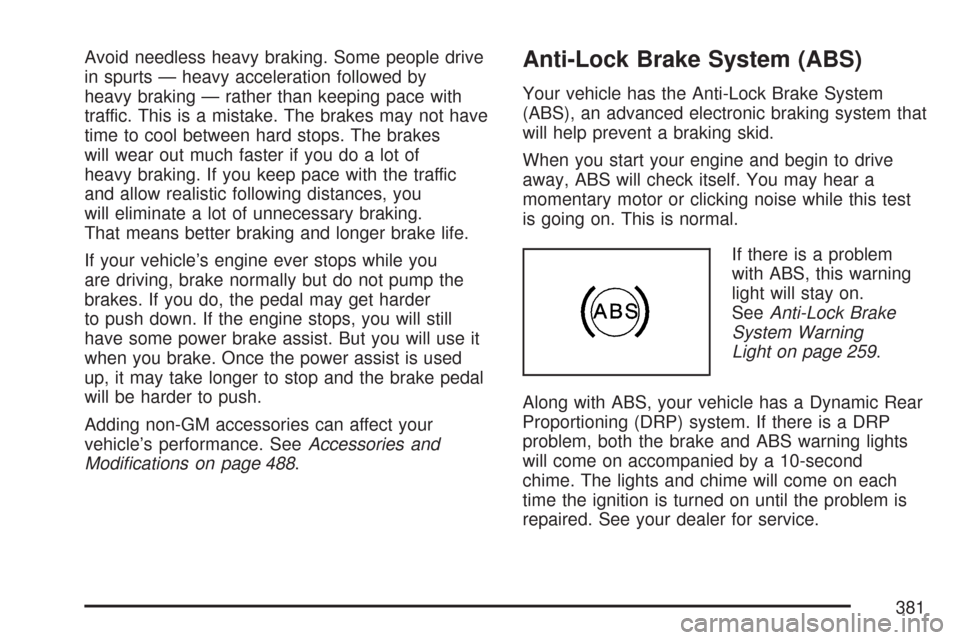
If there is a problem
with ABS, this warning
light will stay on.
SeeAnti-Lock Brake
System Warning
Light on page 259.
Along with ABS, your vehicle has a Dynamic Rear
Proportioning (DRP) system. If there is a DRP
problem, both the brake and ABS warning lights
will come on accompanied by a 10-second
chime. The lights and chime will come on each
time the ignition is turned on until the problem is
repaired. See your dealer for service.
381
Page 384 of 684
StabiliTrak®System
Your vehicle may be equipped with the StabiliTrak®
system which combines antilock brake, traction and
stability control systems and helps the driver
maintain directional control of the vehicle in most
driving conditions.
When you rst start your vehicle and begin to drive
away, the system performs several diagnostic
checks to ensure there are no problems. You may
hear or feel the system working. This is normal and
does not mean there is a problem with your vehicle.
The system should initialize before the vehicle
reaches 20 mph (32 km/h). In some cases, it may
take approximately two miles of driving before the
system initializes.
If the system fails to turn on or activate, the
StabiliTrak
®light along with one of the following
messages will be displayed on the Driver
Information Center (DIC): TRACTION CONTROL
OFF, SERVICE TRACTION CONTROL,
STABILITRAK OFF, SERVICE STABILITRAK.If these DIC messages appear, make sure the
StabiliTrak
®system has not been turned off using
the StabiliTrak®on/off button. Then turn the
steering wheel clockwise from the nine o’clock
position to the three o’clock position. If this clears
the message(s), your vehicle does not need
servicing. If this does not clear the message(s),
then turn the vehicle off, wait 15 seconds, and then
turn it back on again to reset the system. If any
of these messages still appear on the Driver
Information Center (DIC), your vehicle should be
taken in for service. For more information on
the DIC messages, seeDriver Information
Center (DIC) on page 269.
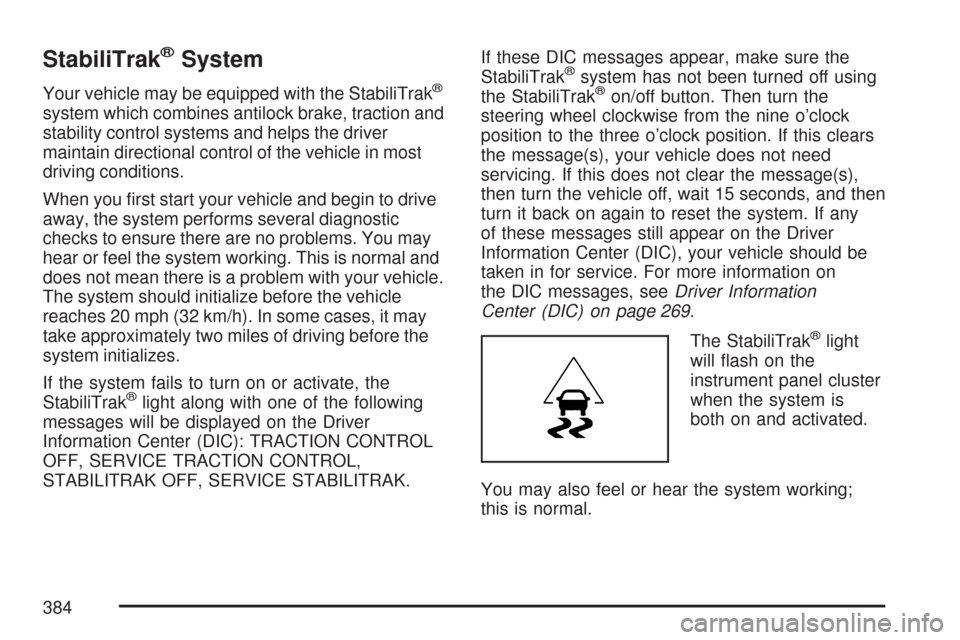
The StabiliTrak
®light
will ash on the
instrument panel cluster
when the system is
both on and activated.
You may also feel or hear the system working;
this is normal.
384
Page 386 of 684
Traction Control Operation
The traction control system is part of the
StabiliTrak®system. Traction control limits wheel
spin by reducing engine power to the wheels
(engine speed management) and by applying
brakes to each individual wheel (brake-traction
control) as necessary.
The traction control system is enabled
automatically when you start your vehicle. It will
activate and the StabiliTrak
®light will ash if
it senses that any of the wheels are spinning or
beginning to lose traction while driving. If you
turn off traction control, only the brake-traction
control portion of traction control will work.
The engine speed management will be disabled.
In this mode, engine power is not reduced
automatically and the driven wheels can spin more
freely. This can cause the brake-traction control
to activate constantly.
Notice:If you allow the wheel(s) of one axle
to spin excessively while the StabiliTrak
®, ABS
and brake warning lights and the SERVICE
STABILITRAK message are displayed,
you could damage the transfer case.The repairs would not be covered by your
warranty. Reduce engine power and do
not spin the wheel(s) excessively while these
lights and this message are displayed.
The traction control system may activate on
dry or rough roads or under conditions such as
heavy acceleration while turning or abrupt
upshifts/downshifts of the transmission. When this
happens, you may notice a reduction in
acceleration, or may hear a noise or vibration.
This is normal.
If your vehicle is in cruise control when the system
activates, the StabiliTrak
®light will ash and the
cruise control will automatically disengage.
When road conditions allow you to use cruise
again, you may re-engage the cruise control.
SeeCruise Control on page 220.
StabiliTrak
®may also turn off automatically if it
determines that a problem exists with the system.
If the problem does not clear itself after restarting
the vehicle, you should see your dealer for service.
386
Page 394 of 684
Before You Go Off-Roading
There are some things to do before you go out.
For example, be sure to have all necessary
maintenance and service work done. Check to
make sure all underbody shields, if the vehicle has
them, are properly attached. Be sure you read
all the information about your four-wheel-drive
vehicle in this manual. Is there enough fuel? Is the
spare tire fully inated? Are the uid levels up
where they should be? What are the local laws
that apply to off-roading where you will be driving?
If you do not know, you should check with law
enforcement people in the area. Will you be
on someone’s private land? If so, be sure to get
the necessary permission.
Loading Your Vehicle for Off-Road
Driving
{CAUTION:
Cargo on the load oor piled higher
than the seatbacks can be thrown
forward during a sudden stop. You or
your passengers could be injured.
Keep cargo below the top of the
seatbacks.
Unsecured cargo on the load oor can
be tossed about when driving over
rough terrain. You or your passengers
can be struck by ying objects.
Secure the cargo properly.
Heavy loads on the roof raise the
vehicle’s center of gravity, making it
more likely to roll over. You can be
seriously or fatally injured if the
vehicle rolls over. Put heavy loads
inside the cargo area, not on the roof.
Keep cargo in the cargo area as far
forward and low as possible.
394