tow CHEVROLET SILVERADO 2008 2.G Manual Online
[x] Cancel search | Manufacturer: CHEVROLET, Model Year: 2008, Model line: SILVERADO, Model: CHEVROLET SILVERADO 2008 2.GPages: 596, PDF Size: 3.12 MB
Page 403 of 596
Heavy-Duty Trailer Wiring Harness
Package
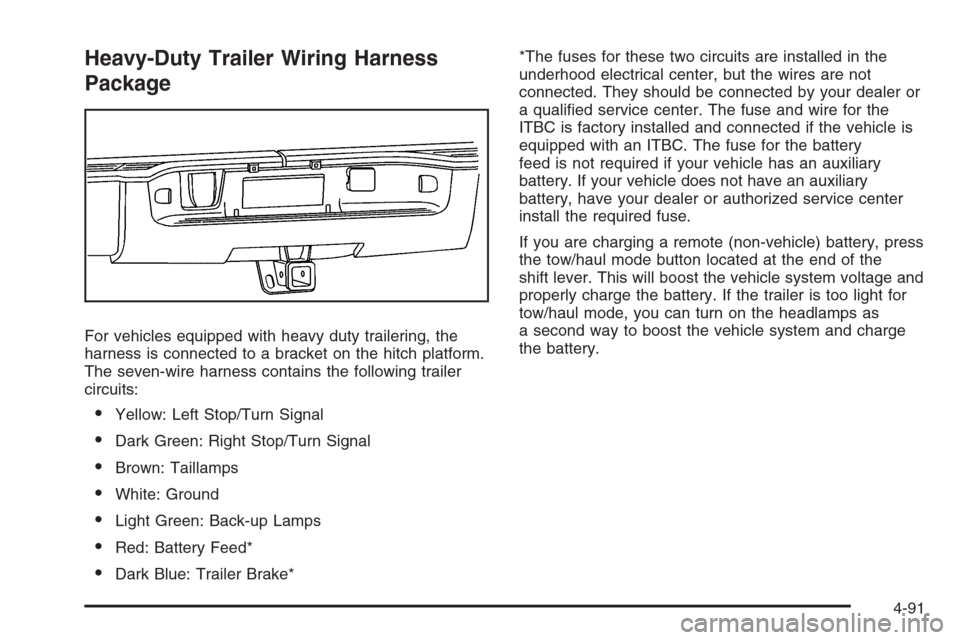
For vehicles equipped with heavy duty trailering, the
harness is connected to a bracket on the hitch platform.
The seven-wire harness contains the following trailer
circuits:
Yellow: Left Stop/Turn Signal
Dark Green: Right Stop/Turn Signal
Brown: Taillamps
White: Ground
Light Green: Back-up Lamps
Red: Battery Feed*
Dark Blue: Trailer Brake**The fuses for these two circuits are installed in the
underhood electrical center, but the wires are not
connected. They should be connected by your dealer or
a qualied service center. The fuse and wire for the
ITBC is factory installed and connected if the vehicle is
equipped with an ITBC. The fuse for the battery
feed is not required if your vehicle has an auxiliary
battery. If your vehicle does not have an auxiliary
battery, have your dealer or authorized service center
install the required fuse.
If you are charging a remote (non-vehicle) battery, press
the tow/haul mode button located at the end of the
shift lever. This will boost the vehicle system voltage and
properly charge the battery. If the trailer is too light for
tow/haul mode, you can turn on the headlamps as
a second way to boost the vehicle system and charge
the battery.
4-91
Page 405 of 596
Electric Brake Control Wiring
Provisions
These wiring provisions are included with your vehicle
as part of the trailer wiring package. These provisions
are for an electric brake controller. The instrument panel
contains blunt cut wires near the data link connector
for the trailer brake controller. The harness contains the
following wires:
Dark Blue: Brake Signal to Trailer Connector
Red/Black: Battery
Light Blue/White: Brake Switch
White: Ground
It should be installed by your dealer or a qualied
service center.
If your vehicle is equipped with an ITBC, the blunt cuts
exist, but are not connected further in the harness. If
you install an aftermarket trailer brake controller,
the ITBC must be disconnected. Do not power both
ITBC and aftermarket controllers to control the trailer
brakes at the same time.
Auxiliary Battery
The auxiliary battery provision can be used to supply
electrical power to additional equipment that you may
choose to add, such as a slide-in camper. If your vehicle
has this provision, this relay will be located on the driver’s
side of the vehicle, next to the underhood electrical
center.
Be sure to follow the proper installation instructions that
are included with any electrical equipment that you install.
Notice:Leaving electrical equipment on for
extended periods will drain the battery. Always turn
off electrical equipment when not in use and do
not use equipment that exceeds the maximum
amperage rating for the auxiliary battery provision.
Trailer Recommendations
You must subtract your hitch loads from the CWR for
your vehicle. Weigh your vehicle with the trailer
attached, so that you won’t go over the GVWR or
GAWR. If you are using a weight-distributing hitch,
weigh the vehicle without the spring bars in place.
You’ll get the best performance if you spread out the
weight of your load the right way, and if you choose the
correct hitch and trailer brakes.
For more information, seeTowing a Trailer on
page 4-55.
4-93
Page 421 of 596
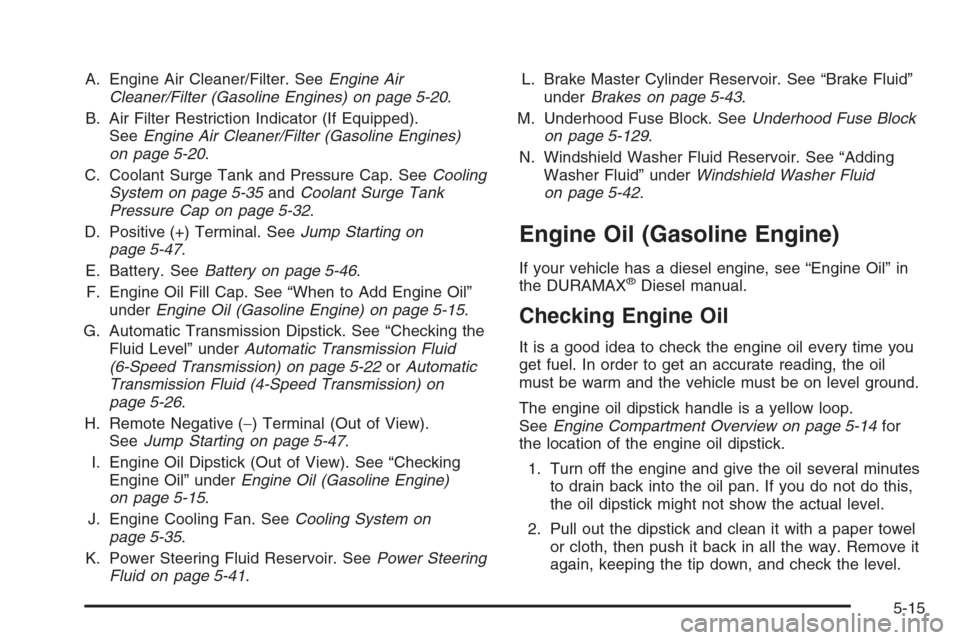
A. Engine Air Cleaner/Filter. SeeEngine Air
Cleaner/Filter (Gasoline Engines) on page 5-20.
B. Air Filter Restriction Indicator (If Equipped).
SeeEngine Air Cleaner/Filter (Gasoline Engines)
on page 5-20.
C. Coolant Surge Tank and Pressure Cap. SeeCooling
System on page 5-35andCoolant Surge Tank
Pressure Cap on page 5-32.
D. Positive (+) Terminal. SeeJump Starting on
page 5-47.
E. Battery. SeeBattery on page 5-46.
F. Engine Oil Fill Cap. See “When to Add Engine Oil”
underEngine Oil (Gasoline Engine) on page 5-15.
G. Automatic Transmission Dipstick. See “Checking the
Fluid Level” underAutomatic Transmission Fluid
(6-Speed Transmission) on page 5-22orAutomatic
Transmission Fluid (4-Speed Transmission) on
page 5-26.
H. Remote Negative (−) Terminal (Out of View).
SeeJump Starting on page 5-47.
I. Engine Oil Dipstick (Out of View). See “Checking
Engine Oil” underEngine Oil (Gasoline Engine)
on page 5-15.
J. Engine Cooling Fan. SeeCooling System on
page 5-35.
K. Power Steering Fluid Reservoir. SeePower Steering
Fluid on page 5-41.L. Brake Master Cylinder Reservoir. See “Brake Fluid”
underBrakes on page 5-43.
M. Underhood Fuse Block. SeeUnderhood Fuse Block
on page 5-129.
N. Windshield Washer Fluid Reservoir. See “Adding
Washer Fluid” underWindshield Washer Fluid
on page 5-42.
Engine Oil (Gasoline Engine)
If your vehicle has a diesel engine, see “Engine Oil” in
the DURAMAX®Diesel manual.
Checking Engine Oil
It is a good idea to check the engine oil every time you
get fuel. In order to get an accurate reading, the oil
must be warm and the vehicle must be on level ground.
The engine oil dipstick handle is a yellow loop.
SeeEngine Compartment Overview on page 5-14for
the location of the engine oil dipstick.
1. Turn off the engine and give the oil several minutes
to drain back into the oil pan. If you do not do this,
the oil dipstick might not show the actual level.
2. Pull out the dipstick and clean it with a paper towel
or cloth, then push it back in all the way. Remove it
again, keeping the tip down, and check the level.
5-15
Page 429 of 596
However, if there is a large leak, then it may be
necessary to have the vehicle towed to a dealer/retailer
service department and have it repaired before driving
the vehicle further.
Notice:Use of the incorrect automatic transmission
uid may damage your vehicle, and the damages
may not be covered by your warranty. Always
use the automatic transmission uid listed in
Recommended Fluids and Lubricants on page 6-14.
Change the uid and lter at the intervals listed in
the Maintenance Schedule. SeeScheduled Maintenance
(Gasoline Engine) on page 6-4. Be sure to use the
transmission uid listed inRecommended Fluids and
Lubricants on page 6-14.
How to Check Automatic
Transmission Fluid
Notice:Too much or too little uid can damage
your transmission. Too much can mean that some
of the uid could come out and fall on hot engine
parts or exhaust system parts, starting a re.
Too little uid could cause the transmission to
overheat. Be sure to get an accurate reading if you
check your transmission uid.Before checking the uid level, prepare your vehicle
as follows:
1. Start the engine and park your vehicle on a level
surface. Keep the engine running.
2. Apply the parking brake and place the shift lever
in P (PARK).
3. With your foot on the brake pedal, move the shift
lever through each gear range, pausing for about
three seconds in each range. Then, move the
shift lever back to P (PARK).
4. Allow the engine to idle (500 – 800 rpm) for at least
one minute. Slowly release the brake pedal.
5. Keep the engine running and press the Trip/Fuel
button or trip odometer reset stem until TRANS
TEMP (Transmission Temperature) displays on the
Driver Information Center (DIC).
6. Using the TRANS TEMP reading, determine and
perform the appropriate check procedure. If the
TRANS TEMP reading is not within the required
temperature ranges, allow the vehicle to cool,
or operate the vehicle until the appropriate
transmission uid temperature is reached.
5-23
Page 430 of 596
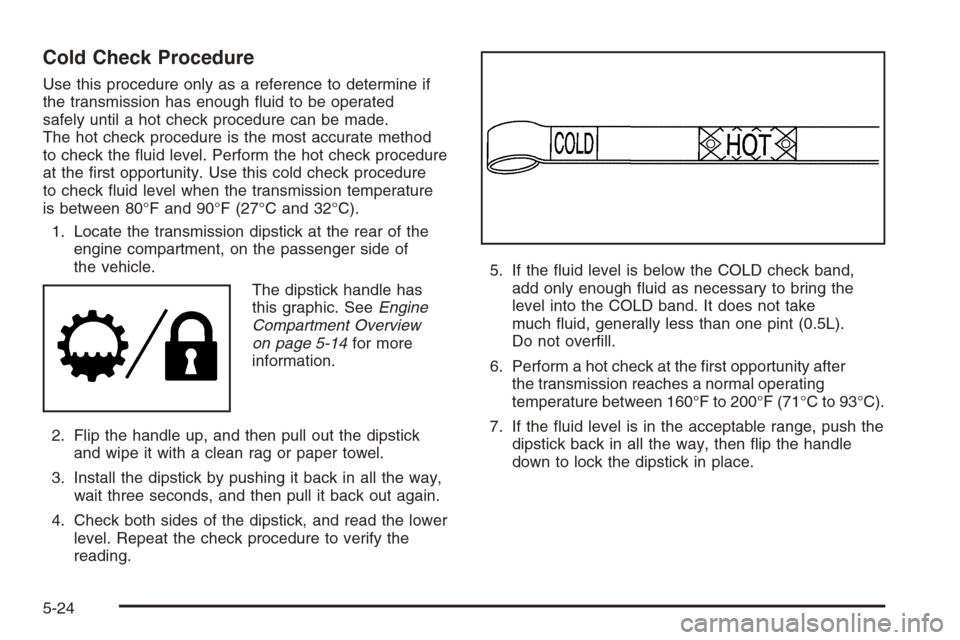
Cold Check Procedure
Use this procedure only as a reference to determine if
the transmission has enough uid to be operated
safely until a hot check procedure can be made.
The hot check procedure is the most accurate method
to check the uid level. Perform the hot check procedure
at the rst opportunity. Use this cold check procedure
to check uid level when the transmission temperature
is between 80°F and 90°F (27°C and 32°C).
1. Locate the transmission dipstick at the rear of the
engine compartment, on the passenger side of
the vehicle.
The dipstick handle has
this graphic. SeeEngine
Compartment Overview
on page 5-14for more
information.
2. Flip the handle up, and then pull out the dipstick
and wipe it with a clean rag or paper towel.
3. Install the dipstick by pushing it back in all the way,
wait three seconds, and then pull it back out again.
4. Check both sides of the dipstick, and read the lower
level. Repeat the check procedure to verify the
reading.5. If the uid level is below the COLD check band,
add only enough uid as necessary to bring the
level into the COLD band. It does not take
much uid, generally less than one pint (0.5L).
Do not overll.
6. Perform a hot check at the rst opportunity after
the transmission reaches a normal operating
temperature between 160°F to 200°F (71°C to 93°C).
7. If the uid level is in the acceptable range, push the
dipstick back in all the way, then ip the handle
down to lock the dipstick in place.
5-24
Page 431 of 596
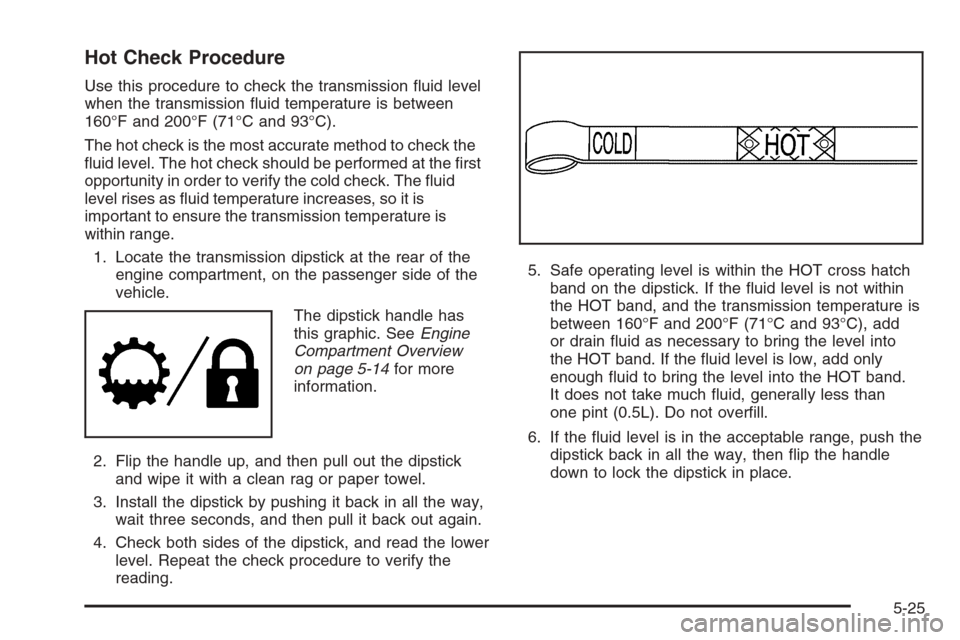
Hot Check Procedure
Use this procedure to check the transmission uid level
when the transmission uid temperature is between
160°F and 200°F (71°C and 93°C).
The hot check is the most accurate method to check the
uid level. The hot check should be performed at the rst
opportunity in order to verify the cold check. The uid
level rises as uid temperature increases, so it is
important to ensure the transmission temperature is
within range.
1. Locate the transmission dipstick at the rear of the
engine compartment, on the passenger side of the
vehicle.
The dipstick handle has
this graphic. SeeEngine
Compartment Overview
on page 5-14for more
information.
2. Flip the handle up, and then pull out the dipstick
and wipe it with a clean rag or paper towel.
3. Install the dipstick by pushing it back in all the way,
wait three seconds, and then pull it back out again.
4. Check both sides of the dipstick, and read the lower
level. Repeat the check procedure to verify the
reading.5. Safe operating level is within the HOT cross hatch
band on the dipstick. If the uid level is not within
the HOT band, and the transmission temperature is
between 160°F and 200°F (71°C and 93°C), add
or drain uid as necessary to bring the level into
the HOT band. If the uid level is low, add only
enough uid to bring the level into the HOT band.
It does not take much uid, generally less than
one pint (0.5L). Do not overll.
6. If the uid level is in the acceptable range, push the
dipstick back in all the way, then ip the handle
down to lock the dipstick in place.
5-25
Page 433 of 596
Get the vehicle warmed up by driving about 15 miles
(24 km) when outside temperatures are above 50°F
(10°C). If it is colder than 50°F (10°C), drive the vehicle
in 3 (Third) until the engine temperature gage moves
and then remains steady for 10 minutes.
A cold uid check can be made after the vehicle has
been sitting for eight hours or more with the engine off,
but this is used only as a reference. Let the engine
run at idle for ve minutes if outside temperatures are
50°F (10°C) or more. If it is colder than 50°F (10°C), you
may have to idle the engine longer. Should the uid
level be low during this cold check, you must check the
uid hot before adding uid. Checking the uid hot
will give you a more accurate reading of the uid level.
Checking the Fluid Level
Prepare your vehicle as follows:
1. Park your vehicle on a level place. Keep the engine
running.
2. With the parking brake applied, place the shift lever
in P (Park).
3. With your foot on the brake pedal, move the shift
lever through each gear range, pausing for about
three seconds in each range. Then, position
the shift lever in P (Park).
4. Let the engine run at idle for three minutes or more.Then, without shutting off the engine, follow these steps:
The transmission dipstick
handle with this graphic is
located at the rear of
the engine compartment,
on the passenger’s
side of the vehicle.
SeeEngine Compartment Overview on page 5-14for
more information on location.
1. Flip the handle up and then pull out the dipstick
and wipe it with a clean rag or paper towel.
2. Push it back in all the way, wait three seconds and
then pull it back out again.
5-27
Page 439 of 596
Notice:If your engine catches re because you
keep driving with no coolant, your vehicle can
be badly damaged. The costly repairs would not be
covered by your warranty. SeeOverheated Engine
Protection Operating Mode (V8 Engines Only)
on page 5-34for information on driving to a safe
place in an emergency.
If No Steam Is Coming From
Your Engine
The ENGINE OVERHEATED STOP ENGINE or the
ENGINE OVERHEATED IDLE ENGINE message,
along with a low coolant condition, can indicate a
serious problem.
If you get an engine overheat warning, but see or hear
no steam, the problem may not be too serious.
Sometimes the engine can get a little too hot when you:
Climb a long hill on a hot day.
Stop after high-speed driving.
Idle for long periods in traffic.
Tow a trailer. SeeTowing a Trailer on page 4-55.If you get the ENGINE OVERHEATED STOP ENGINE or
the ENGINE OVERHEATED IDLE ENGINE message
with no sign of steam, try this for a minute or so:
1. If you have an air conditioner and it is on, turn it off.
2. Turn on your heater to full hot at the highest fan
speed and open the windows as necessary.
3. If you are stopped in a traffic jam, apply the brake,
shift to N (NEUTRAL); otherwise, shift to the highest
gear while driving — D (DRIVE) or 3 (THIRD).
If you no longer have the overheat warning, you can
drive. Just to be safe, drive slower for about 10 minutes.
If the warning does not come back on, you can drive
normally.
5-33
Page 440 of 596
If the warning continues, pull over, stop, and park your
vehicle immediately.
If there is still no sign of steam and your vehicle has an
engine-driven cooling fan, push down the accelerator
until the engine speed is about twice as fast as normal
idle speed for at least ve minutes while you are parked.
If there is still no sign of steam and your vehicle has an
electric cooling fan, idle the engine for ve minutes
while you are parked.
If you still have the warning, turn off the engine and
get everyone out of the vehicle until it cools down.
Also, see “Overheated Engine Protection Operating
Mode” later in this section.
You may decide not to lift the hood but to get service
help right away.Overheated Engine Protection
Operating Mode (V8 Engines Only)
If an overheated engine condition exists and the
REDUCED ENGINE POWER message is displayed,
an overheat protection mode which alternates ring
groups of cylinders helps prevent engine damage.
In this mode, you will notice a loss in power and engine
performance. This operating mode allows your vehicle
to be driven to a safe place in an emergency. Driving
extended miles (km) and/or towing a trailer in the
overheat protection mode should be avoided.
Notice:After driving in the overheated engine
protection operating mode, to avoid engine damage,
allow the engine to cool before attempting any
repair. The engine oil will be severely degraded.
Repair the cause of coolant loss, change the oil and
reset the oil life system. SeeEngine Oil (Gasoline
Engine) on page 5-15.
5-34
Page 446 of 596
Engine Fan Noise
If your vehicle has a clutched engine cooling fan, when
the clutch is engaged, the fan spins faster to provide
more air to cool the engine. In most everyday driving
conditions, the fan is spinning slower and the clutch is
not fully engaged. This improves fuel economy and
reduces fan noise. Under heavy vehicle loading, trailer
towing, and/or high outside temperatures, the fan
speed increases as the clutch more fully engages, so
you may hear an increase in fan noise. This is normal
and should not be mistaken as the transmission slipping
or making extra shifts. It is merely the cooling system
functioning properly. The fan will slow down when
additional cooling is not required and the clutch
disengages.You may also hear this fan noise when you start the
engine. It will go away as the fan clutch partially
disengages.
If your vehicle has electric cooling fans, you may hear
the fans spinning at low speed during most everyday
driving. The fans may turn off if no cooling is required.
Under heavy vehicle loading, trailer towing, and/or
high outside temperatures, or if you are operating your
air conditioning system, the fans may change to
high speed and you may hear an increase in fan noise.
This is normal and indicates that the cooling system
is functioning properly. The fans will change to low
speed when additional cooling is no longer required.
5-40