instrument panel CHEVROLET SILVERADO 2009 2.G Workshop Manual
[x] Cancel search | Manufacturer: CHEVROLET, Model Year: 2009, Model line: SILVERADO, Model: CHEVROLET SILVERADO 2009 2.GPages: 600, PDF Size: 3.24 MB
Page 396 of 600
Tow/Haul Mode
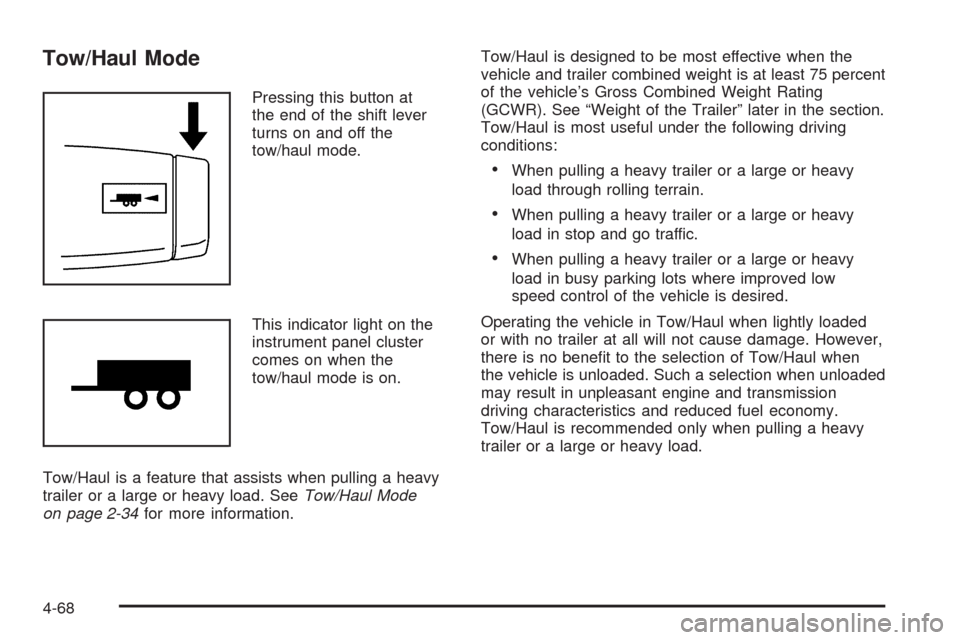
Pressing this button at
the end of the shift lever
turns on and off the
tow/haul mode.
This indicator light on the
instrument panel cluster
comes on when the
tow/haul mode is on.
Tow/Haul is a feature that assists when pulling a heavy
trailer or a large or heavy load. SeeTow/Haul Mode
on page 2-34for more information.Tow/Haul is designed to be most effective when the
vehicle and trailer combined weight is at least 75 percent
of the vehicle’s Gross Combined Weight Rating
(GCWR). See “Weight of the Trailer” later in the section.
Tow/Haul is most useful under the following driving
conditions:
When pulling a heavy trailer or a large or heavy
load through rolling terrain.
When pulling a heavy trailer or a large or heavy
load in stop and go traffic.
When pulling a heavy trailer or a large or heavy
load in busy parking lots where improved low
speed control of the vehicle is desired.
Operating the vehicle in Tow/Haul when lightly loaded
or with no trailer at all will not cause damage. However,
there is no benet to the selection of Tow/Haul when
the vehicle is unloaded. Such a selection when unloaded
may result in unpleasant engine and transmission
driving characteristics and reduced fuel economy.
Tow/Haul is recommended only when pulling a heavy
trailer or a large or heavy load.
4-68
Page 399 of 600
The ITBC system is a factory installed item.
Out-of-factory installation of this system should not be
attempted. GM is not responsible for warranty or
performance of the system resulting from out-of-factory
installation.
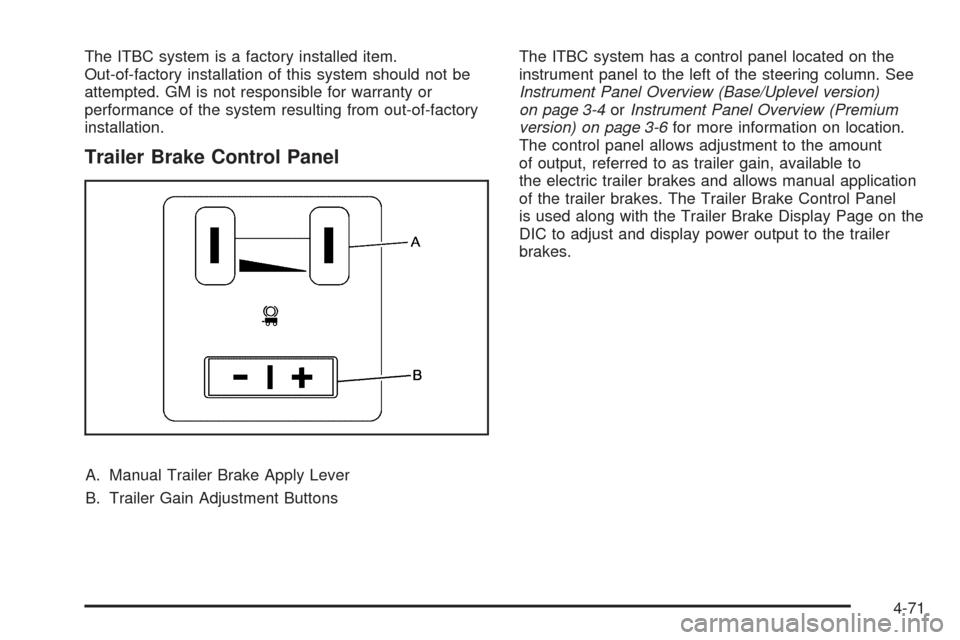
Trailer Brake Control Panel
A. Manual Trailer Brake Apply Lever
B. Trailer Gain Adjustment ButtonsThe ITBC system has a control panel located on the
instrument panel to the left of the steering column. See
Instrument Panel Overview (Base/Uplevel version)
on page 3-4orInstrument Panel Overview (Premium
version) on page 3-6for more information on location.
The control panel allows adjustment to the amount
of output, referred to as trailer gain, available to
the electric trailer brakes and allows manual application
of the trailer brakes. The Trailer Brake Control Panel
is used along with the Trailer Brake Display Page on the
DIC to adjust and display power output to the trailer
brakes.
4-71
Page 404 of 600
If either the CHECK TRAILER WIRING or SERVICE
TRAILER BRAKE SYSTEM message is displayed while
driving the vehicle, power is no longer available to
the trailer brakes. When traffic conditions allow, carefully
pull the vehicle over to the side of the road and turn
the ignition off. Check the wiring connection to the trailer
and turn the ignition back on. If either of these
messages continues, either the vehicle or trailer needs
service.
An authorized GM dealer may be able to diagnose and
repair problems with the trailer. However, any
diagnosis and repair of the trailer is not covered under
the vehicle warranty. Please contact your trailer
dealer for assistance with trailer repairs and trailer
warranty information.Driving with a Trailer
{CAUTION:
When towing a trailer, exhaust gases may collect
at the rear of the vehicle and enter if the liftgate,
trunk/hatch, or rear-most window is open.
Engine exhaust contains carbon monoxide (CO)
which cannot be seen or smelled. It can cause
unconsciousness and even death.
To maximize safety when towing a trailer:
Have the exhaust system inspected for
leaks and make necessary repairs before
starting a trip.
Never drive with the liftgate, trunk/hatch, or
rear-most window open.
Fully open the air outlets on or under the
instrument panel.
Adjust the Climate Control system to a setting
that brings in only outside air and set the fan
speed to the highest setting. See Climate
Control System in the Index.
For more information about carbon monoxide, see
Engine Exhaust on page 2-55.
4-76
Page 406 of 600
Turn Signals When Towing a Trailer
The arrows on the instrument panel ash whenever
signaling a turn or lane change. Properly hooked up, the
trailer lamps also ash, telling other drivers the vehicle
is turning, changing lanes or stopping.
When towing a trailer, the arrows on the instrument
panel ash for turns even if the bulbs on the trailer are
burned out. For this reason you may think other
drivers are seeing the signal when they are not. It is
important to check occasionally to be sure the
trailer bulbs are still working.
Driving On Grades
Reduce speed and shift to a lower gearbeforestarting
down a long or steep downgrade. If the transmission is
not shifted down, the brakes might have to be used so
much that they would get hot and no longer work well.
Vehicles can tow in D (Drive). Shift the transmission to
a lower gear if the transmission shifts too often under
heavy loads and/or hilly conditions.The tow/haul mode may be used if the transmission
shifts too often. SeeTow/Haul Mode Light on page 3-51.
When towing at high altitude on steep uphill grades,
consider the following: Engine coolant will boil at a lower
temperature than at normal altitudes. If the engine is
turned off immediately after towing at high altitude on
steep uphill grades, the vehicle may show signs similar to
engine overheating. To avoid this, let the engine run while
parked, preferably on level ground, with the automatic
transmission in P (Park) for a few minutes before turning
the engine off. If the overheat warning comes on, see
Engine Overheating on page 5-34.
4-78
Page 411 of 600
Electric Brake Control Wiring
Provisions
These wiring provisions are included with the vehicle
as part of the trailer wiring package. These provisions
are for an electric brake controller. The instrument panel
contains blunt cut wires behind the steering column
for the trailer brake controller. The harness contains the
following wires:
Dark Blue: Brake Signal to Trailer Connector
Red/Black: Battery
Light Blue/White: Brake Switch
White: Ground
It should be installed by your dealer/retailer or a
qualied service center.
If the vehicle is equipped with an ITBC, the blunt cuts
exist, but are not connected further in the harness.
If an aftermarket trailer brake controller is installed,
the ITBC must be disconnected. Do not power
both ITBC and aftermarket controllers to control the
trailer brakes at the same time.
Auxiliary Battery
The auxiliary battery provision can be used to supply
electrical power to additional equipment that may
be added, such as a slide-in camper. If the vehicle hasthis provision, this relay will be located on the drivers
side of the vehicle, next to the underhood electrical
center.
Be sure to follow the proper installation instructions that
are included with any electrical equipment that is installed.
Notice:Leaving electrical equipment on for
extended periods will drain the battery. Always turn
off electrical equipment when not in use and do not
use equipment that exceeds the maximum amperage
rating for the auxiliary battery provision.
Trailer Recommendations
Subtract the hitch loads from the Cargo Weight Rating
(CWR). CWR is the maximum weight of the load the
vehicle can carry. It does not include the weight of the
people inside, but you can gure about 150 lbs. (68 kg)
for each passenger. The total cargo load must not be
more than the vehicles CWR.
Weigh the vehicle with the trailer attached, so the
GVWR or GAWR are not exceeded. If using a
weight-distributing hitch, weigh the vehicle without the
spring bars in place.
The best performance is obtained by correctly spreading
out the weight of the load and choosing the correct
hitch and trailer brakes.
For more information seeTowing a Trailer on page 4-51.
4-83
Page 414 of 600
Bulb Replacement..........................................5-58
Halogen Bulbs..............................................5-58
Headlamps..................................................5-58
Center High-Mounted Stoplamp (CHMSL)
and Cargo Lamp.......................................5-59
Pickup Box Identication and Fender
Marker Lamps...........................................5-60
Taillamps, Turn Signal, Stoplamps and
Back-up Lamps.........................................5-61
License Plate Lamp......................................5-63
Replacement Bulbs.......................................5-63
Windshield Wiper Blade Replacement..............5-64
Tires..............................................................5-65
Tire Sidewall Labeling...................................5-66
Tire Terminology and Denitions.....................5-70
Ination - Tire Pressure.................................5-73
High-Speed Operation...................................5-74
Dual Tire Operation.......................................5-75
Tire Pressure Monitor System.........................5-76
Tire Pressure Monitor Operation.....................5-77
Tire Inspection and Rotation...........................5-81
When It Is Time for New Tires.......................5-83
Buying New Tires.........................................5-84
Different Size Tires and Wheels......................5-86Uniform Tire Quality Grading..........................5-86
Wheel Alignment and Tire Balance..................5-88
Wheel Replacement......................................5-89
Tire Chains..................................................5-90
If a Tire Goes Flat........................................5-92
Changing a Flat Tire.....................................5-93
Removing the Spare Tire and Tools................5-94
Removing the Flat Tire and Installing the
Spare Tire................................................5-99
Secondary Latch System..............................5-107
Storing a Flat or Spare Tire and Tools...........5-110
Spare Tire.................................................5-114
Appearance Care
..........................................5-114
Interior Cleaning.........................................5-114
Fabric/Carpet..............................................5-116
Leather......................................................5-116
Instrument Panel, Vinyl, and Other Plastic
Surfaces.................................................5-117
Care of Safety Belts....................................5-117
Weatherstrips.............................................5-117
Washing Your Vehicle..................................5-118
Cleaning Exterior Lamps/Lenses....................5-118
Finish Care................................................5-119
Windshield and Wiper Blades.......................5-119
Section 5 Service and Appearance Care
5-2
Page 415 of 600
Aluminum or Chrome-Plated Wheels
and Trim................................................5-120
Tires.........................................................5-121
Sheet Metal Damage...................................5-121
Finish Damage...........................................5-121
Underbody Maintenance...............................5-121
Chemical Paint Spotting...............................5-121
Vehicle Identication.....................................5-122
Vehicle Identication Number (VIN)................5-122
Service Parts Identication Label...................5-122Electrical System..........................................5-123
Add-On Electrical Equipment.........................5-123
Windshield Wiper Fuses...............................5-123
Power Windows and Other Power Options......5-123
Fuses and Circuit Breakers..........................5-123
Instrument Panel Fuse Block........................5-124
Center Instrument Panel Fuse Block..............5-126
Underhood Fuse Block................................5-127
Capacities and Specications........................5-130
Section 5 Service and Appearance Care
5-3
Page 418 of 600
This vehicle has an airbag system. Before attempting
to do your own service work, seeServicing Your
Airbag-Equipped Vehicle on page 1-90.
Keep a record with all parts receipts and list the
mileage and the date of any service work performed.
SeeMaintenance Record on page 6-19.
Adding Equipment to the Outside of
the Vehicle
Things added to the outside of the vehicle can affect the
airow around it. This can cause wind noise and can
affect fuel economy and windshield washer performance.
Check with your dealer/retailer before adding equipment
to the outside of the vehicle.
Fuel
For diesel engine vehicles, see “Diesel Fuel
Requirements and Fuel System” in the DURAMAX®
Diesel manual.
For vehicles with gasoline engines, please read this.
Gasoline
Use of the recommended fuel is an important part of the
proper maintenance of this vehicle. To help keep the
engine clean and maintain optimum vehicle performance,
we recommend the use of gasoline advertised as TOP
TIER Detergent Gasoline.The 8th digit of the Vehicle Identication Number (VIN)
shows the code letter or number that identies the
vehicle’s engine. The VIN is at the top left of the
instrument panel. SeeVehicle Identification Number
(VIN) on page 5-122.
If the vehicle has the 5.3L V8 engine (VIN Code 0), the
5.3L V8 engine (VIN Code 3), or the 6.2L V8 engine
(VIN Code 2), you can use either unleaded gasoline
or ethanol fuel containing up to 85% ethanol (E85). See
Fuel E85 (85% Ethanol) on page 5-8. In all other
gasoline engines, use only unleaded gasoline. See
Gasoline Octane on page 5-6.
Gasoline Octane
For all vehicles except those with the 6.2L V8 engine
(VIN Code 2), use regular unleaded gasoline with a
posted octane rating of 87 or higher. If the octane rating is
less than 87, you might notice an audible knocking noise
when you drive, commonly referred to as spark knock.
If this occurs, use a gasoline rated at 87 octane or higher
as soon as possible. If you are using gasoline rated at
87 octane or higher and you hear heavy knocking, the
engine needs service.
If the vehicle has the 6.2L V8 engine (VIN Code 2), use
premium unleaded gasoline with a posted octane rating
of 91 or higher. You can also use regular unleaded
gasoline rated at 87 octane or higher, but the vehicle’s
acceleration could be slightly reduced, and you might
5-6
Page 420 of 600
Gasolines containing oxygenates, such as ethers and
ethanol, and reformulated gasolines might be available in
your area. We recommend that you use these gasolines,
if they comply with the specications described earlier.
However, E85 (85% ethanol) and other fuels containing
more than 10% ethanol must not be used in vehicles that
were not designed for those fuels.
Notice:This vehicle was not designed for fuel
that contains methanol. Do not use fuel containing
methanol. It can corrode metal parts in the fuel
system and also damage plastic and rubber parts.
That damage would not be covered under the
vehicle warranty.
Some gasolines that are not reformulated for low
emissions can contain an octane-enhancing additive
called methylcyclopentadienyl manganese tricarbonyl
(MMT); ask the attendant where you buy gasoline
whether the fuel contains MMT. We recommend against
the use of such gasolines. Fuels containing MMT can
reduce the life of spark plugs and the performance of
the emission control system could be affected. The
malfunction indicator lamp might turn on. If this
occurs, return to your dealer/retailer for service.Fuel E85 (85% Ethanol)
The 8th digit of the Vehicle Identication Number (VIN)
shows the code letter or number that identies the
vehicle’s engine. The VIN is at the top left of the
instrument panel. SeeVehicle Identification Number
(VIN) on page 5-122.
If the vehicle has the 5.3L V8 engine (Code 0), the
5.3L V8 engine (Code 3), or the 6.2L V8 engine (Code 2),
you can use either unleaded gasoline or ethanol fuel
containing up to 85% ethanol (E85). SeeFuel on
page 5-6. In all other engines, use only the unleaded
gasoline described underGasoline Octane on page 5-6.
Only vehicles that have the 5.3L V8 engine (Code 0), the
5.3L V8 engine (Code 3), or the 6.2L V8 engine (Code 2)
can use 85% ethanol fuel (E85). We encourage the use
of E85 in vehicles that are designed to use it. The ethanol
in E85 is a “renewable” fuel, meaning it is made from
renewable sources such as corn and other crops.
Many service stations will not have an 85% ethanol
fuel (E85) pump available. The U. S. Department
of Energy has an alternative fuels website
(www.eere.energy.gov/afdc/infrastructure/locator.html)
that can help you nd E85 fuel. Those stations that
do have E85 should have a label indicating ethanol
content. Do not use the fuel if the ethanol content
is greater than 85%.
5-8
Page 446 of 600
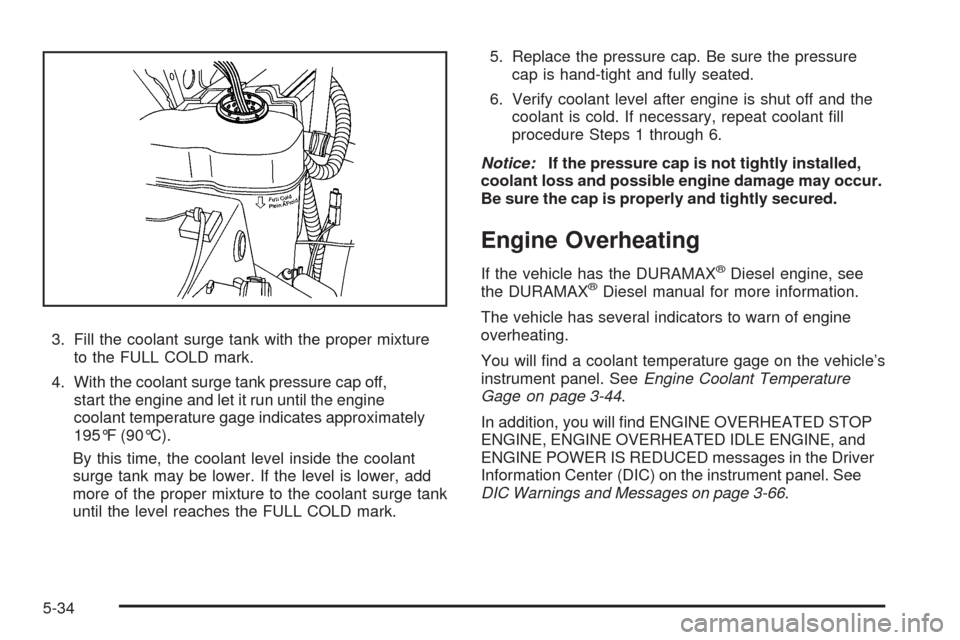
3. Fill the coolant surge tank with the proper mixture
to the FULL COLD mark.
4. With the coolant surge tank pressure cap off,
start the engine and let it run until the engine
coolant temperature gage indicates approximately
195°F (90°C).
By this time, the coolant level inside the coolant
surge tank may be lower. If the level is lower, add
more of the proper mixture to the coolant surge tank
until the level reaches the FULL COLD mark.5. Replace the pressure cap. Be sure the pressure
cap is hand-tight and fully seated.
6. Verify coolant level after engine is shut off and the
coolant is cold. If necessary, repeat coolant ll
procedure Steps 1 through 6.
Notice:If the pressure cap is not tightly installed,
coolant loss and possible engine damage may occur.
Be sure the cap is properly and tightly secured.
Engine Overheating
If the vehicle has the DURAMAX®Diesel engine, see
the DURAMAX®Diesel manual for more information.
The vehicle has several indicators to warn of engine
overheating.
You will nd a coolant temperature gage on the vehicle’s
instrument panel. SeeEngine Coolant Temperature
Gage on page 3-44.
In addition, you will nd ENGINE OVERHEATED STOP
ENGINE, ENGINE OVERHEATED IDLE ENGINE, and
ENGINE POWER IS REDUCED messages in the Driver
Information Center (DIC) on the instrument panel. See
DIC Warnings and Messages on page 3-66.
5-34