instrument panel CHEVROLET SILVERADO 2009 2.G Repair Manual
[x] Cancel search | Manufacturer: CHEVROLET, Model Year: 2009, Model line: SILVERADO, Model: CHEVROLET SILVERADO 2009 2.GPages: 600, PDF Size: 3.24 MB
Page 489 of 600
Federal Communications Commission
(FCC) and Industry and Science Canada
The Tire Pressure Monitor System (TPMS) operates
on a radio frequency and complies with Part 15 of
the FCC Rules. Operation is subject to the following
two conditions:
1. This device may not cause harmful interference.
2. This device must accept any interference received,
including interference that may cause undesired
operation.
The TPMS operates on a radio frequency and complies
with RSS-210 of Industry and Science Canada.
Operation is subject to the following two conditions:
1. This device may not cause interference.
2. This device must accept any interference received,
including interference that may cause undesired
operation of the device.
Changes or modications to this system by other than
an authorized service facility could void authorization to
use this equipment.
Tire Pressure Monitor Operation
This vehicle may have a Tire Pressure Monitor System
(TPMS). The TPMS is designed to warn the driver when
a low tire pressure condition exists. TPMS sensors are
mounted onto each tire and wheel assembly, excluding
the spare tire and wheel assembly. The TPMS sensors
monitor the air pressure in the vehicle’s tires and
transmits the tire pressure readings to a receiver
located in the vehicle.
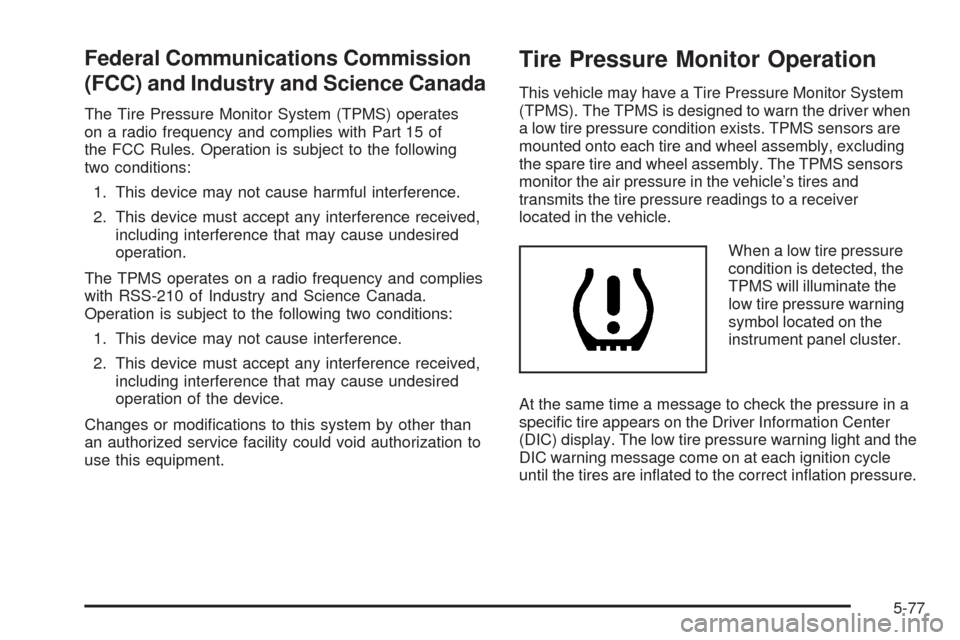
When a low tire pressure
condition is detected, the
TPMS will illuminate the
low tire pressure warning
symbol located on the
instrument panel cluster.
At the same time a message to check the pressure in a
specic tire appears on the Driver Information Center
(DIC) display. The low tire pressure warning light and the
DIC warning message come on at each ignition cycle
until the tires are inated to the correct ination pressure.
5-77
Page 492 of 600
The TPMS sensor matching process is outlined below:
1. Set the parking brake.
2. Turn the ignition switch to ON/RUN with the
engine off.
3. Press the Remote Keyless Entry (RKE) transmitter’s
LOCK and UNLOCK buttons at the same time for
approximately ve seconds. The horn sounds twice
to signal the receiver is in relearn mode and TIRE
LEARNING ACTIVE message displays on the DIC
screen.
If your vehicle does not have RKE, press the Driver
Information Center (DIC) vehicle information button
until the PRESS
VTO RELEARN TIRE POSITIONS
message displays. The horn sounds twice to signal
the receiver is in relearn mode and TIRE LEARNING
ACTIVE message displays on the DIC screen.
If your vehicle does not have RKE or DIC buttons,
press the trip odometer reset stem located on the
instrument panel cluster until the PRESS
VTO
RELEARN TIRE POSITIONS message displays.
The horn sounds twice to signal the receiver is in
relearn mode and TIRE LEARNING ACTIVE
message displays on the DIC screen.
4. Start with the driver side front tire.5. Remove the valve cap from the valve cap stem.
Activate the TPMS sensor by increasing or
decreasing the tire’s air pressure for ve seconds, or
until a horn chirp sounds. The horn chirp, which may
take up to 30 seconds to sound, conrms that the
sensor identication code has been matched to this
tire and wheel position.
6. Proceed to the passenger side front tire, and repeat
the procedure in Step 5.
7. Proceed to the passenger side rear tire, and repeat
the procedure in Step 5.
8. Proceed to the driver side rear tire, and repeat the
procedure in Step 5. The horn sounds two times to
indicate the sensor identication code has been
matched to the driver side rear tire, and that the
TPMS sensor matching process is no longer active.
The TIRE LEARNING ACTIVE message on the DIC
display screen goes off.
9. Turn the ignition switch to LOCK/OFF.
10. Set all four tires to the recommended air pressure
level as indicated on the Tire and Loading
Information label.
11. Put the valve caps back on the valve stems.
5-80
Page 529 of 600
Instrument Panel, Vinyl, and Other
Plastic Surfaces
A soft cloth dampened with water may be used to
remove dust. If a more thorough cleaning is necessary,
a clean soft cloth dampened with a mild soap solution
can be used to gently remove dust and dirt. Never
use spot lifters or removers on plastic surfaces.
Many commercial cleaners and coatings that are
sold to preserve and protect soft plastic surfaces
may permanently change the appearance and feel of
the interior and are not recommended. Do not use
silicone or wax-based products, or those containing
organic solvents to clean the vehicle’s interior because
they can alter the appearance by increasing the
gloss in a non-uniform manner.
Some commercial products may increase gloss on the
instrument panel. The increase in gloss may cause
annoying reections in the windshield and even make it
difficult to see through the windshield under certain
conditions.
Care of Safety Belts
Keep belts clean and dry.
{CAUTION:
Do not bleach or dye safety belts. It may severely
weaken them. In a crash, they might not be able
to provide adequate protection. Clean safety belts
only with mild soap and lukewarm water.
Weatherstrips
Silicone grease on weatherstrips will make them last
longer, seal better, and not stick or squeak. Apply
silicone grease with a clean cloth. During very cold,
damp weather frequent application may be required. See
Recommended Fluids and Lubricants on page 6-15.
5-117
Page 534 of 600
Vehicle Identication
Vehicle Identication Number (VIN)
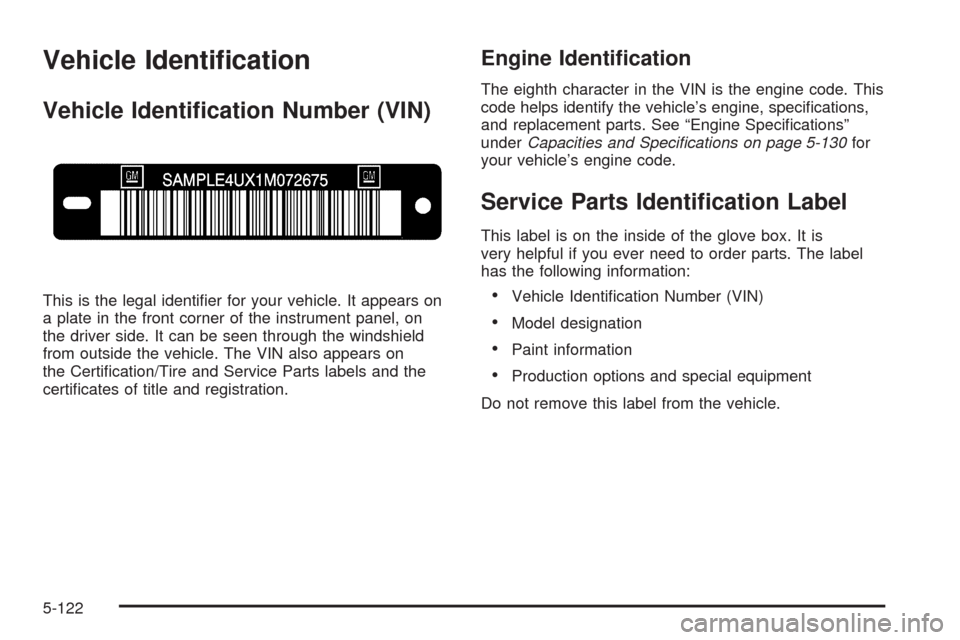
This is the legal identier for your vehicle. It appears on
a plate in the front corner of the instrument panel, on
the driver side. It can be seen through the windshield
from outside the vehicle. The VIN also appears on
the Certication/Tire and Service Parts labels and the
certicates of title and registration.
Engine Identication
The eighth character in the VIN is the engine code. This
code helps identify the vehicle’s engine, specications,
and replacement parts. See “Engine Specications”
underCapacities and Specifications on page 5-130for
your vehicle’s engine code.
Service Parts Identication Label
This label is on the inside of the glove box. It is
very helpful if you ever need to order parts. The label
has the following information:
Vehicle Identication Number (VIN)
Model designation
Paint information
Production options and special equipment
Do not remove this label from the vehicle.
5-122
Page 536 of 600
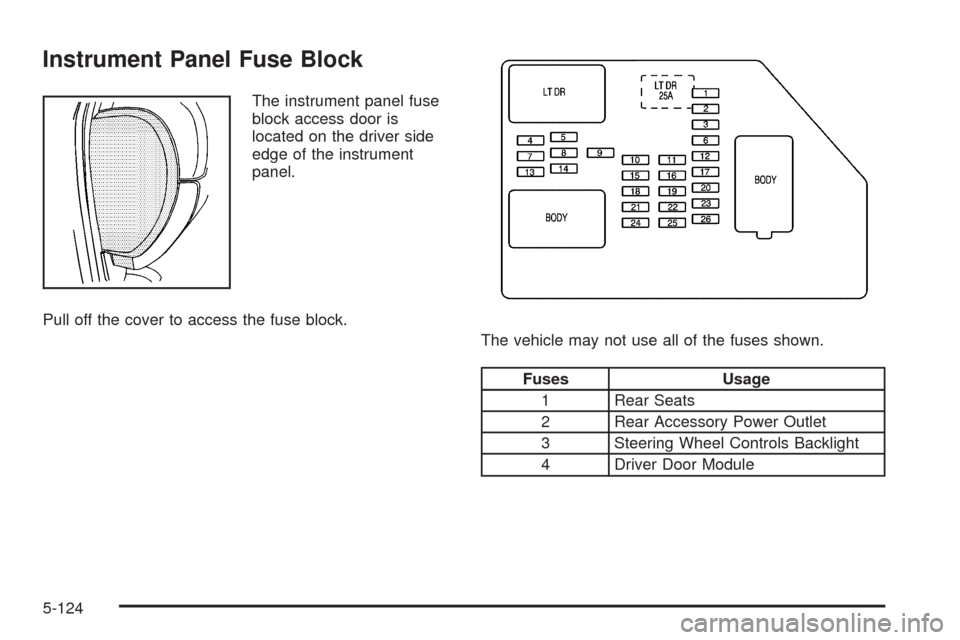
Instrument Panel Fuse Block
The instrument panel fuse
block access door is
located on the driver side
edge of the instrument
panel.
Pull off the cover to access the fuse block.
The vehicle may not use all of the fuses shown.
Fuses Usage
1 Rear Seats
2 Rear Accessory Power Outlet
3 Steering Wheel Controls Backlight
4 Driver Door Module
5-124
Page 537 of 600
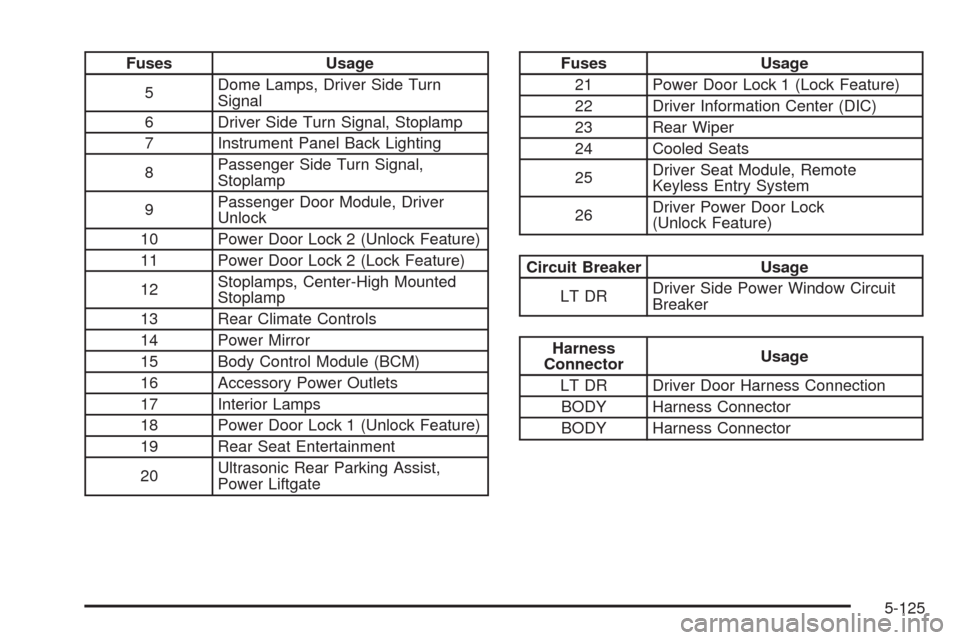
Fuses Usage
5Dome Lamps, Driver Side Turn
Signal
6 Driver Side Turn Signal, Stoplamp
7 Instrument Panel Back Lighting
8Passenger Side Turn Signal,
Stoplamp
9Passenger Door Module, Driver
Unlock
10 Power Door Lock 2 (Unlock Feature)
11 Power Door Lock 2 (Lock Feature)
12Stoplamps, Center-High Mounted
Stoplamp
13 Rear Climate Controls
14 Power Mirror
15 Body Control Module (BCM)
16 Accessory Power Outlets
17 Interior Lamps
18 Power Door Lock 1 (Unlock Feature)
19 Rear Seat Entertainment
20Ultrasonic Rear Parking Assist,
Power LiftgateFuses Usage
21 Power Door Lock 1 (Lock Feature)
22 Driver Information Center (DIC)
23 Rear Wiper
24 Cooled Seats
25Driver Seat Module, Remote
Keyless Entry System
26Driver Power Door Lock
(Unlock Feature)
Circuit Breaker Usage
LT DRDriver Side Power Window Circuit
Breaker
Harness
ConnectorUsage
LT DR Driver Door Harness Connection
BODY Harness Connector
BODY Harness Connector
5-125
Page 538 of 600
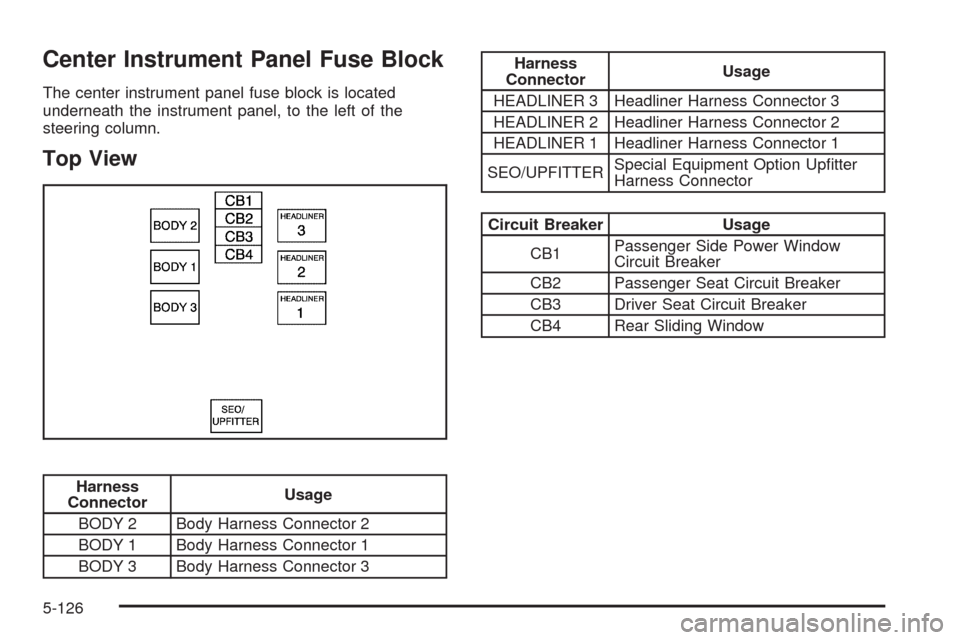
Center Instrument Panel Fuse Block
The center instrument panel fuse block is located
underneath the instrument panel, to the left of the
steering column.
Top View
Harness
ConnectorUsage
BODY 2 Body Harness Connector 2
BODY 1 Body Harness Connector 1
BODY 3 Body Harness Connector 3
Harness
ConnectorUsage
HEADLINER 3 Headliner Harness Connector 3
HEADLINER 2 Headliner Harness Connector 2
HEADLINER 1 Headliner Harness Connector 1
SEO/UPFITTERSpecial Equipment Option Uptter
Harness Connector
Circuit Breaker Usage
CB1Passenger Side Power Window
Circuit Breaker
CB2 Passenger Seat Circuit Breaker
CB3 Driver Seat Circuit Breaker
CB4 Rear Sliding Window
5-126
Page 540 of 600
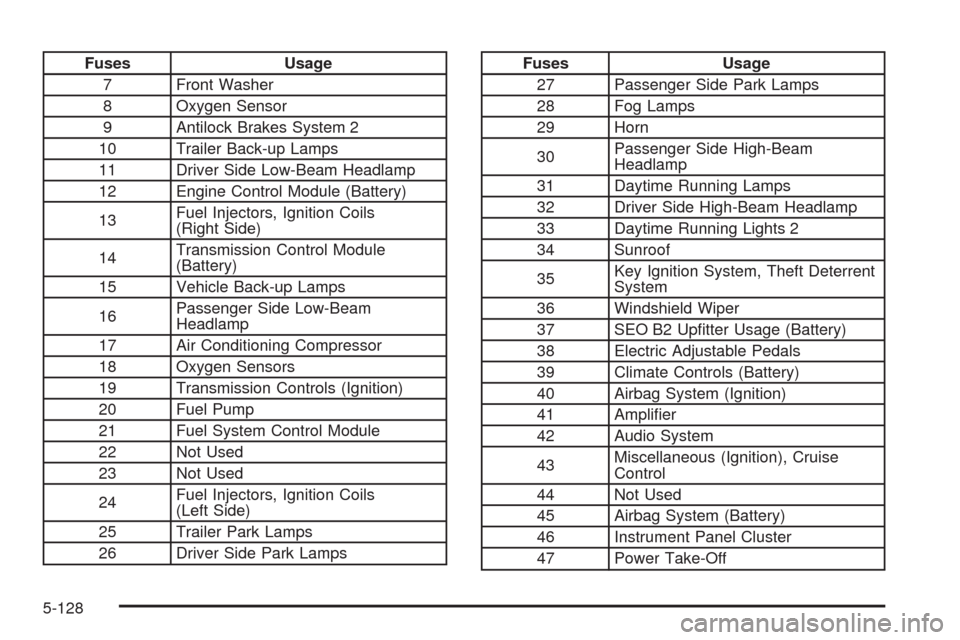
Fuses Usage
7 Front Washer
8 Oxygen Sensor
9 Antilock Brakes System 2
10 Trailer Back-up Lamps
11 Driver Side Low-Beam Headlamp
12 Engine Control Module (Battery)
13Fuel Injectors, Ignition Coils
(Right Side)
14Transmission Control Module
(Battery)
15 Vehicle Back-up Lamps
16Passenger Side Low-Beam
Headlamp
17 Air Conditioning Compressor
18 Oxygen Sensors
19 Transmission Controls (Ignition)
20 Fuel Pump
21 Fuel System Control Module
22 Not Used
23 Not Used
24Fuel Injectors, Ignition Coils
(Left Side)
25 Trailer Park Lamps
26 Driver Side Park LampsFuses Usage
27 Passenger Side Park Lamps
28 Fog Lamps
29 Horn
30Passenger Side High-Beam
Headlamp
31 Daytime Running Lamps
32 Driver Side High-Beam Headlamp
33 Daytime Running Lights 2
34 Sunroof
35Key Ignition System, Theft Deterrent
System
36 Windshield Wiper
37 SEO B2 Uptter Usage (Battery)
38 Electric Adjustable Pedals
39 Climate Controls (Battery)
40 Airbag System (Ignition)
41 Amplier
42 Audio System
43Miscellaneous (Ignition), Cruise
Control
44 Not Used
45 Airbag System (Battery)
46 Instrument Panel Cluster
47 Power Take-Off
5-128
Page 568 of 600
Customer Assistance and
Information
Customer Satisfaction Procedure
Your satisfaction and goodwill are important to your
dealer and to Chevrolet. Normally, any concerns with the
sales transaction or the operation of the vehicle will be
resolved by the dealer’s sales or service departments.
Sometimes, however, despite the best intentions of all
concerned, misunderstandings can occur. If your concern
has not been resolved to your satisfaction, the following
steps should be taken:
STEP ONE:Discuss your concern with a member of
dealership management. Normally, concerns can be
quickly resolved at that level. If the matter has already
been reviewed with the sales, service, or parts manager,
contact the owner of the dealership or the general
manager.STEP TWO:If after contacting a member of dealership
management, it appears your concern cannot be
resolved by the dealership without further help, in the
U.S., call the Chevrolet Customer Assistance Center
at 1-800-222-1020. In Canada, call General Motors
of Canada Customer Communication Centre at
1-800-263-3777 (English), or 1-800-263-7854 (French).
We encourage you to call the toll-free number in
order to give your inquiry prompt attention. Have the
following information available to give the Customer
Assistance Representative:
Vehicle Identication Number (VIN). This is
available from the vehicle registration or title, or the
plate at the top left of the instrument panel and
visible through the windshield.
Dealership name and location.
Vehicle delivery date and present mileage.
When contacting Chevrolet, remember that your
concern will likely be resolved at a dealer’s facility.
That is why we suggest following Step One rst.
7-2
Page 585 of 600
A
Accessories and Modications............................ 5-4
Accessory Power Outlets.................................3-22
Adding a Snow Plow or Similar Equipment.........4-39
Adding Equipment to Your Airbag-Equipped
Vehicle.......................................................1-90
Additives, Fuel................................................. 5-7
Add-On Electrical Equipment...........................5-123
Adjustable Throttle and Brake Pedal..................2-26
Air Cleaner/Filter, Engine.................................5-19
Air Conditioning..............................3-24, 3-26, 3-28
Airbag
Off Light.....................................................3-38
Passenger Status Indicator...........................3-40
Readiness Light..........................................3-37
Airbag System................................................1-74
Adding Equipment to Your Airbag-Equipped
Vehicle...................................................1-90
Airbag Off Switch........................................1-82
How Does an Airbag Restrain?......................1-80
Passenger Sensing System...........................1-85
Servicing Your Airbag-Equipped Vehicle..........1-90
What Makes an Airbag Inate?......................1-79
What Will You See After an Airbag Inates?....1-80
When Should an Airbag Inate?....................1-78
Where Are the Airbags?...............................1-76Antenna, Fixed Mast......................................3-142
Antenna, XM™ Satellite Radio Antenna
System.....................................................3-142
Antilock Brake System (ABS)............................. 4-5
Antilock Brake, System Warning Light................3-43
Appearance Care
Aluminum or Chrome-Plated Wheels.............5-120
Care of Safety Belts...................................5-117
Chemical Paint Spotting..............................5-121
Cleaning Exterior Lamps/Lenses..................5-118
Fabric/Carpet............................................5-116
Finish Care...............................................5-119
Finish Damage..........................................5-121
Instrument Panel, Vinyl, and Other Plastic
Surfaces...............................................5-117
Interior Cleaning........................................5-114
Leather....................................................5-116
Sheet Metal Damage..................................5-121
Tires........................................................5-121
Underbody Maintenance.............................5-121
Washing Your Vehicle.................................5-118
Weatherstrips............................................5-117
Windshield and Wiper Blades......................5-119
Appointments, Scheduling Service.....................7-10
Ashtray.........................................................3-23
1