mirror controls CHEVROLET SILVERADO 2011 2.G User Guide
[x] Cancel search | Manufacturer: CHEVROLET, Model Year: 2011, Model line: SILVERADO, Model: CHEVROLET SILVERADO 2011 2.GPages: 588, PDF Size: 7.99 MB
Page 208 of 588
Black plate (58,1)Chevrolet Silverado Owner Manual - 2011
5-58 Instruments and Controls
APPROACH LIGHTING
This feature allows you to select if
the exterior lights turn on briefly
during low light periods after
unlocking the vehicle using the
Remote Keyless Entry (RKE)
transmitter.
Press the customization button until
APPROACH LIGHTING appears on
the DIC display. Press the set/reset
button once to access the settings
for this feature. Then press the
customization button to scroll
through the following settings:
OFF:The exterior lights will not
turn on when you unlock the vehicle
with the RKE transmitter.
ON (default): If it is dark enough
outside, the exterior lights will turn
on briefly when you unlock the
vehicle with the RKE transmitter.
The lights will remain on for
20 seconds, until the lock button
on the RKE transmitter is pressed,
or until the vehicle is no longer off. See
Remote Keyless Entry (RKE)
System Operationon page 2‑3for
more information.
NO CHANGE: No change will be
made to this feature. The current
setting will remain.
To select a setting, press the
set/reset button while the desired
setting is displayed on the DIC.
CHIME VOLUME
If available, this feature allows you
to select the volume level of the
chime.
Press the customization button until
CHIME VOLUME appears on the
DIC display. Press the set/reset
button once to access the settings
for this feature. Then press the
customization button to scroll
through the following settings:
NORMAL: The chime volume will
be set to a normal level.
LOUD: The chime volume will be
set to a loud level. NO CHANGE:
No change will be
made to this feature. The current
setting will remain.
There is no default for chime
volume. The volume will stay at
the last known setting.
To select a setting, press the
set/reset button while the desired
setting is displayed on the DIC.
PARK TILT MIRRORS
If the vehicle has this feature, it
allows you to select if the outside
mirror(s) will automatically tilt down
when the vehicle is shifted into
R (Reverse). See Park Tilt Mirrors
on page 2‑19for more information.
Press the customization button until
PARK TILT MIRRORS appears on
the DIC display. Press the set/reset
button once to access the settings
for this feature. Then press the
customization button to scroll
through the following settings:
OFF (default): Neither outside
mirror will be tilted down when the
vehicle is shifted into R (Reverse).
Page 209 of 588
Black plate (59,1)Chevrolet Silverado Owner Manual - 2011
Instruments and Controls 5-59
DRIVER MIRROR:The driver
outside mirror will be tilted down
when the vehicle is shifted into
R (Reverse).
PASSENGER MIRROR: The
passenger outside mirror will be
tilted down when the vehicle is
shifted into R (Reverse).
BOTH MIRRORS: The driver and
passenger outside mirrors will be
tilted down when the vehicle is
shifted into R (Reverse).
NO CHANGE: No change will be
made to this feature. The current
setting will remain.
To select a setting, press the
set/reset button while the desired
setting is displayed on the DIC.
EASY EXIT RECALL
If the vehicle has this feature,
it allows you to select your
preference for the automatic easy
exit seat feature. See “Memory
Seat, Mirrors, and Pedals” inPower
Seat Adjustment
on page 3‑5for more information. Press the customization button until
EASY EXIT RECALL appears on
the DIC display. Press the set/reset
button once to access the settings
for this feature. Then press the
customization button to scroll
through the following settings:
DOOR BUTTON ONLY:
No
automatic seat exit recall will occur.
The recall will only occur after
pressing the easy exit seat button.
BUTTON & KEY OUT (default):
If the features are enabled through
the EASY EXIT SETUP menu, the
driver seat will move back when the
key is removed from the ignition or
the easy exit seat button is pressed.
The automatic easy exit seat
movement will only occur one time
after the key is removed from the
ignition. If the automatic movement
has already occurred, and you put
the key back in the ignition and
remove it again, the seat will stay
in the original exit position, unless
a memory recall took place prior to
removing the key again. NO CHANGE:
No change will be
made to this feature. The current
setting will remain.
To select a setting, press the
set/reset button while the desired
setting is displayed on the DIC.
EASY EXIT SETUP
If the vehicle has this feature, it
allows you to select which areas
will recall with the automatic easy
exit seat feature. It also allows
you to turn off the automatic easy
exit feature. See “Memory Seat,
Mirrors, and Pedals” inPower Seat
Adjustment
on page 3‑5and
“EASY EXIT RECALL” earlier for
more information.
Press the customization button until
EASY EXIT SETUP appears on the
DIC display. Press the set/reset
button once to access the settings
for this feature. Then press the
menu up/down button to scroll
through the following settings:
OFF: No automatic seat exit will
recall.
Page 210 of 588
Black plate (60,1)Chevrolet Silverado Owner Manual - 2011
5-60 Instruments and Controls
SEAT ONLY (default):The driver
seat will recall.
NO CHANGE: No change will be
made to this feature. The current
setting will remain.
To select a setting, press the
set/reset button while the desired
setting is displayed on the DIC.
MEMORY SEAT RECALL
If the vehicle has this feature,
it allows you to select your
preference for the remote memory
seat recall feature. See “Memory
Seat, Mirrors, and Pedals” inPower
Seat Adjustment
on page 3‑5for more information.
Press the customization button
until MEMORY SEAT RECALL
appears on the DIC display. Press
the set/reset button once to access
the settings for this feature. Then
press the customization button to
scroll through the following settings:
OFF (default): No remote memory
seat recall will occur. ON:
The driver seat and, on
some vehicles, the outside mirrors
will automatically move to the
stored driving position when the
unlock button on the Remote
Keyless Entry (RKE) transmitter
is pressed. On some vehicles with
the adjustable throttle and brake
pedal feature, the pedals will also
automatically move.
NO CHANGE: No change will be
made to this feature. The current
setting will remain.
To select a setting, press the
set/reset button while the desired
setting is displayed on the DIC.
FACTORY SETTINGS
This feature allows you to set all of
the customization features back to
their factory default settings. Press the customization button until
FACTORY SETTINGS appears on
the DIC display. Press the set/reset
button once to access the settings
for this feature. Then press the
customization button to scroll
through the following settings:
RESTORE ALL (default):
The
customization features will be set
to their factory default settings.
DO NOT RESTORE: The
customization features will not be
set to their factory default settings.
To select a setting, press the
set/reset button while the desired
setting is displayed on the DIC.
EXIT FEATURE SETTINGS
This feature allows you to exit the
feature settings menu.
Press the customization button
until PRESS
VTO EXIT FEATURE
SETTINGS appears in the DIC
display. Press the set/reset button
once to exit the menu.
Page 291 of 588
Black plate (9,1)Chevrolet Silverado Owner Manual - 2011
Climate Controls 8-9
On hot days, open the windows long
enough to let hot inside air escape.
This helps to reduce the time it
takes for the vehicle to cool down.
It also helps the system to operate
more efficiently.
The air conditioning system
removes moisture from the air,
so a small amount of water might
drip under the vehicle while idling
or after turning off the engine.
This is normal.
@(Recirculation):Press to
turn the recirculation mode on.
An indicator light comes on to
show that recirculation is on.
This mode recirculates and helps
to quickly cool the air inside the
vehicle. It can be used to help
prevent outside air and odors
from entering the vehicle.
The recirculation mode cannot be
used with floor, defog, or defrost
modes. If recirculation is selected
with one of those modes, the
indicator light flashes three times and then turns off. The air
conditioning compressor also comes
on when this mode is activated.
While in recirculation mode, the
windows may fog when the weather
is cold and damp. To clear the fog,
select either the defog or defrost
mode and increase the fan speed.
The recirculation mode can be
turned off by pressing the outside
air button, or by turning off the
ignition.;(Outside Air):
Press to turn the
outside air mode on. An indicator
light on the button comes on to
show that outside is on. When
selected, air from outside the
vehicle circulates throughout the
vehicle. The recirculation mode
cannot be used with the outside
air mode.
Rear Window Defogger
The rear window defogger uses a
warming grid to remove fog from the
rear window.
<(Rear Window Defogger):
For vehicles with this feature, press
to turn the defogger on or off.
It automatically turns off several
minutes after it has been activated.
The defogger can also be turned off
by turning the engine off. Do not
drive the vehicle until all windows
are clear.
Notice: Do not use a razor blade
or sharp object to clear the inside
rear window. Do not adhere
anything to the defogger grid
lines in the rear glass. These
actions may damage the rear
defogger. Repairs would not be
covered by your warranty.
Heated Mirror: For vehicles with
heated outside rearview mirrors, the
mirrors heat to help clear fog or frost
from the surface of the mirror when
the rear window defog button is
pressed. See Power Mirrors
on
page 2‑16.
Page 473 of 588
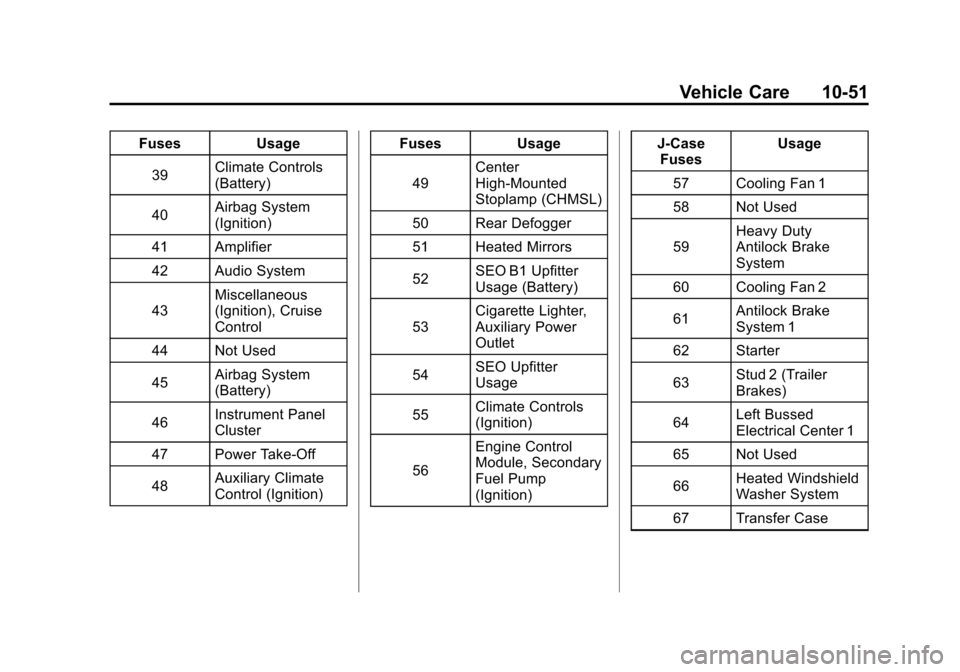
Black plate (51,1)Chevrolet Silverado Owner Manual - 2011
Vehicle Care 10-51
FusesUsage
39 Climate Controls
(Battery)
40 Airbag System
(Ignition)
41 Amplifier
42 Audio System
43 Miscellaneous
(Ignition), Cruise
Control
44 Not Used
45 Airbag System
(Battery)
46 Instrument Panel
Cluster
47 Power Take-Off
48 Auxiliary Climate
Control (Ignition) Fuses
Usage
49 Center
High-Mounted
Stoplamp (CHMSL)
50 Rear Defogger
51 Heated Mirrors
52 SEO B1 Upfitter
Usage (Battery)
53 Cigarette Lighter,
Auxiliary Power
Outlet
54 SEO Upfitter
Usage
55 Climate Controls
(Ignition)
56 Engine Control
Module, Secondary
Fuel Pump
(Ignition) J-Case
Fuses Usage
57 Cooling Fan 1
58 Not Used
59 Heavy Duty
Antilock Brake
System
60 Cooling Fan 2
61 Antilock Brake
System 1
62 Starter
63 Stud 2 (Trailer
Brakes)
64 Left Bussed
Electrical Center 1
65 Not Used
66 Heated Windshield
Washer System
67 Transfer Case
Page 475 of 588
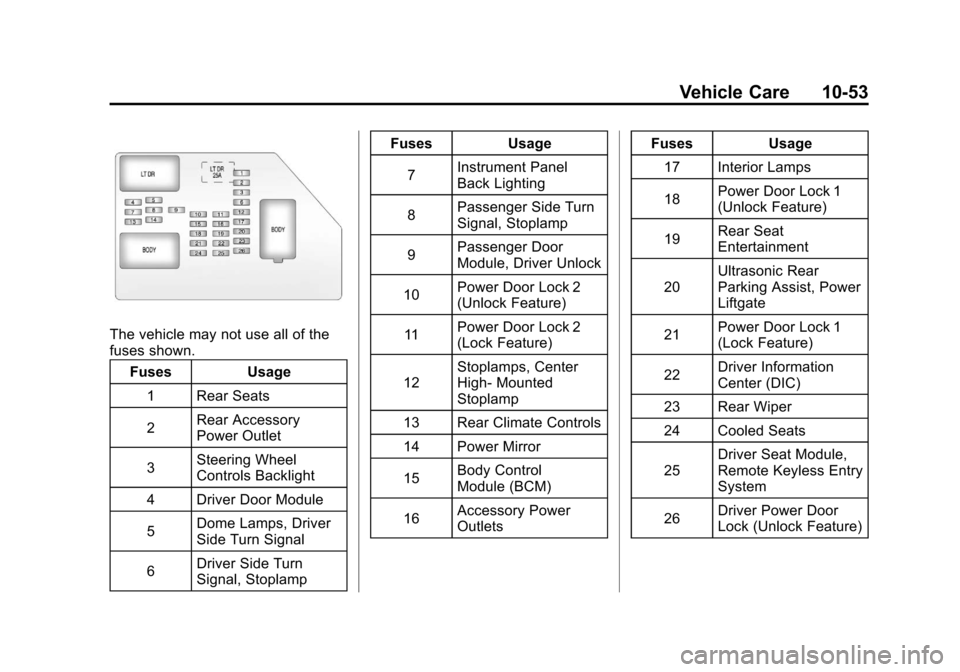
Black plate (53,1)Chevrolet Silverado Owner Manual - 2011
Vehicle Care 10-53
The vehicle may not use all of the
fuses shown.Fuses Usage
1 Rear Seats
2 Rear Accessory
Power Outlet
3 Steering Wheel
Controls Backlight
4 Driver Door Module
5 Dome Lamps, Driver
Side Turn Signal
6 Driver Side Turn
Signal, Stoplamp Fuses Usage
7 Instrument Panel
Back Lighting
8 Passenger Side Turn
Signal, Stoplamp
9 Passenger Door
Module, Driver Unlock
10 Power Door Lock 2
(Unlock Feature)
11 Power Door Lock 2
(Lock Feature)
12 Stoplamps, Center
High‐
Mounted
Stoplamp
13 Rear Climate Controls
14 Power Mirror
15 Body Control
Module (BCM)
16 Accessory Power
Outlets Fuses Usage
17 Interior Lamps
18 Power Door Lock 1
(Unlock Feature)
19 Rear Seat
Entertainment
20 Ultrasonic Rear
Parking Assist, Power
Liftgate
21 Power Door Lock 1
(Lock Feature)
22 Driver Information
Center (DIC)
23 Rear Wiper
24 Cooled Seats
25 Driver Seat Module,
Remote Keyless Entry
System
26 Driver Power Door
Lock (Unlock Feature)
Page 579 of 588

Black plate (5,1)Chevrolet Silverado Owner Manual - 2011
INDEX i-5
EngineAir Cleaner/Filter . . . . . . . . . . . 10-18
Check and Service Engine
Soon Light . . . . . . . . . . . . . . . . . . 5-27
Compartment Overview . . . . . . . 10-6
Coolant . . . . . . . . . . . . . . . . . . . . . 10-20
Coolant Heater . . . . . . . . . . . . . . . 9-37
Coolant Temperature Gauge . . . . . . . . . . . . . . . . . . . . . . 5-19
Cooling System . . . . . . . . . . . . . 10-19
Cooling System Messages . . . . . . . . . . . . . . . . . . . 5-46
Drive Belt Routing . . . . . . . . . . . . 12-6
Exhaust . . . . . . . . . . . . . . . . . . . . . . 9-42
Fan . . . . . . . . . . . . . . . . . . . . . . . . . 10-26
Oil Pressure Gauge . . . . . . . . . . 5-18
Overheated Protection Operating Mode . . . . . . . . . . . 10-26
Overheating . . . . . . . . . . . . . . . . 10-24
Power Messages . . . . . . . . . . . . . 5-47
Pressure Light . . . . . . . . . . . . . . . . 5-32
Running While Parked . . . . . . . . 9-42
Starting . . . . . . . . . . . . . . . . . . . . . . . 9-35 Engine Oil
Life System . . . . . . . . . . . . . . . . . . . 10-9
Messages . . . . . . . . . . . . . . . . . . . . 5-47
Entry Lighting . . . . . . . . . . . . . . . . . . . 6-9
Equipment, Towing . . . . . . . . . . . 9-111
Event Data Recorders . . . . . . . . 13-17
Exit Lighting . . . . . . . . . . . . . . . . . . . . 6-9
Extender, Safety Belt . . . . . . . . . . 3-29
Exterior Lamp Controls . . . . . . . . . 6-1
Exterior Lamps Off Reminder . . . . . . . . . . . . . . . . . . . . . 6-3
F
Fan
Engine . . . . . . . . . . . . . . . . . . . . . . 10-26
Fast Idle System . . . . . . . . . . . . . . . 9-37
Features Memory . . . . . . . . . . . . . . . . . . . . . . . 1-13
Filter Engine Air Cleaner . . . . . . . . . 10-18
Flash-to-Pass . . . . . . . . . . . . . . . . . . . 6-3
Flashers, Hazard Warning . . . . . . 6-5 Flat Tire . . . . . . . . . . . . . . . . . . . . . . 10-81
Flat Tire, Changing . . . . . . . . . . . 10-83
Floor Mats . . . . . . . . . . . . . . . . . . . 10-114
Fluid
AutomaticTransmission . . . . . . . 10-11, 10-14
Brakes . . . . . . . . . . . . . . . . . . . . . . 10-30
Four-Wheel Drive
Transfer Case . . . . . . . . . . . . . . . 9-53
Power Steering . . . . . . . . . . . . . 10-27
Washer . . . . . . . . . . . . . . . . . . . . . 10-28
Fog Lamps Bulb Replacement . . . . . . . . . . . . . 6-6
Folding Mirrors . . . . . . . . . . . . . . . . 2-17
Four-Wheel Drive . . . . . . . 10-32, 9-53
Four-Wheel-Drive Light . . . . . . . . 5-31
Front Axle . . . . . . . . . . . . . . . . . . . . 10-34
Front Fog Lamps Light . . . . . . . . . . . . . . . . . . . . . . . . . . 5-33
Front Seats Adjustment . . . . . . . . . . . . . . . . . . . . 3-3
Heated . . . . . . . . . . . . . . . . . . . . . . . 3-11