remote start CHEVROLET SILVERADO 2011 2.G Owners Manual
[x] Cancel search | Manufacturer: CHEVROLET, Model Year: 2011, Model line: SILVERADO, Model: CHEVROLET SILVERADO 2011 2.GPages: 588, PDF Size: 7.99 MB
Page 1 of 588

Black plate (1,1)Chevrolet Silverado Owner Manual - 2011
2011 Chevrolet Silverado Owner ManualM
In Brief. . . . . . . . . . . . . . . . . . . . . . . . 1-1
Instrument Panel . . . . . . . . . . . . . . 1-2
Initial Drive Information . . . . . . . . 1-8
Vehicle Features . . . . . . . . . . . . . 1-25
Performance and Maintenance . . . . . . . . . . . . . . . . 1-32
Keys, Doors and Windows . . . 2-1
Keys and Locks . . . . . . . . . . . . . . . 2-2
Doors . . . . . . . . . . . . . . . . . . . . . . . . 2-10
Vehicle Security . . . . . . . . . . . . . . 2-12
Exterior Mirrors . . . . . . . . . . . . . . . 2-15
Interior Mirrors . . . . . . . . . . . . . . . . 2-19
Windows . . . . . . . . . . . . . . . . . . . . . 2-20
Roof . . . . . . . . . . . . . . . . . . . . . . . . . . 2-22
Seats and Restraints . . . . . . . . . 3-1
Head Restraints . . . . . . . . . . . . . . . 3-2
Front Seats . . . . . . . . . . . . . . . . . . . . 3-3
Rear Seats . . . . . . . . . . . . . . . . . . . 3-12
Safety Belts . . . . . . . . . . . . . . . . . . 3-14
Airbag System . . . . . . . . . . . . . . . . 3-31
Child Restraints . . . . . . . . . . . . . . 3-51 Storage
. . . . . . . . . . . . . . . . . . . . . . . 4-1
Storage Compartments . . . . . . . . 4-1
Instruments and Controls . . . . 5-1
Controls . . . . . . . . . . . . . . . . . . . . . . . 5-2
Warning Lights, Gauges, and Indicators . . . . . . . . . . . . . . . . . . . 5-12
Information Displays . . . . . . . . . . 5-34
Vehicle Messages . . . . . . . . . . . . 5-43
Vehicle Personalization . . . . . . . 5-53
Universal Remote System . . . . 5-61
Lighting . . . . . . . . . . . . . . . . . . . . . . . 6-1
Exterior Lighting . . . . . . . . . . . . . . . 6-1
Interior Lighting . . . . . . . . . . . . . . . . 6-7
Lighting Features . . . . . . . . . . . . . . 6-9
Infotainment System . . . . . . . . . 7-1
Introduction . . . . . . . . . . . . . . . . . . . . 7-1
Radio . . . . . . . . . . . . . . . . . . . . . . . . . . 7-8
Audio Players . . . . . . . . . . . . . . . . 7-14
Rear Seat Infotainment . . . . . . . 7-38
Phone . . . . . . . . . . . . . . . . . . . . . . . . 7-49 Climate Controls
. . . . . . . . . . . . . 8-1
Climate Control Systems . . . . . . 8-1
Air Vents . . . . . . . . . . . . . . . . . . . . . 8-11
Driving and Operating . . . . . . . . 9-1
Driving Information . . . . . . . . . . . . . 9-2
Starting and Operating . . . . . . . 9-32
Engine Exhaust . . . . . . . . . . . . . . 9-42
Automatic Transmission . . . . . . 9-43
Manual Transmission . . . . . . . . . 9-51
Drive Systems . . . . . . . . . . . . . . . . 9-53
Brakes . . . . . . . . . . . . . . . . . . . . . . . 9-67
Ride Control Systems . . . . . . . . 9-70
Cruise Control . . . . . . . . . . . . . . . . 9-73
Object Detection Systems . . . . 9-76
Fuel . . . . . . . . . . . . . . . . . . . . . . . . . . 9-83
Towing . . . . . . . . . . . . . . . . . . . . . . . 9-90
Conversions and
Add-Ons . . . . . . . . . . . . . . . . . . . 9-123
Page 5 of 588

Black plate (5,1)Chevrolet Silverado Owner Manual - 2011
Introduction v
Vehicle Symbol Chart
Here are some additional symbols
that may be found on the vehicle
and what they mean. For more
information on the symbol, refer
to the Index.
0:Adjustable Pedals
9:Airbag Readiness Light
#:Air Conditioning
!:Antilock Brake System (ABS)
g:Audio Steering Wheel Controls
or OnStar®
$: Brake System Warning Light
":Charging System
I:Cruise Control
B: Engine Coolant Temperature
O:Exterior Lamps
#:Fog Lamps
.: Fuel Gauge
+:Fuses
3: Headlamp High/Low-Beam
Changer
j: LATCH System Child
Restraints
*: Malfunction Indicator Lamp
::Oil Pressure
g:Outside Power Foldaway
Mirrors
}: Power
/:Remote Vehicle Start
>:Safety Belt Reminders
7:Tire Pressure Monitor
_: Tow/Haul Mode
F:Traction Control
M:Windshield Washer Fluid
Page 7 of 588
Black plate (1,1)Chevrolet Silverado Owner Manual - 2011
In Brief 1-1
In Brief
Instrument Panel
Instrument Panel (Base/UplevelVersion) . . . . . . . . . . . . . . . . . . . . . 1-2
Instrument Panel (Premium Version) . . . . . . . . . . . . . . . . . . . . . 1-6
Initial Drive Information
Initial Drive Information . . . . . . . . 1-8
Remote Keyless Entry (RKE)System . . . . . . . . . . . . . . . . . . . . . . 1-8
Remote Vehicle Start . . . . . . . . . 1-9
Door Locks . . . . . . . . . . . . . . . . . . . 1-9
Windows . . . . . . . . . . . . . . . . . . . . . 1-10
Seat Adjustment . . . . . . . . . . . . . 1-11
Memory Features . . . . . . . . . . . . 1-13
Heated Seats . . . . . . . . . . . . . . . . 1-14
Head Restraint Adjustment . . . . . . . . . . . . . . . . . 1-15
Safety Belt . . . . . . . . . . . . . . . . . . . 1-15 Sensing System for
Passenger Airbag . . . . . . . . . . 1-15
Mirror Adjustment . . . . . . . . . . . . 1-16
Steering Wheel Adjustment . . . . . . . . . . . . . . . . . 1-17
Throttle and Brake Pedal Adjustment . . . . . . . . . . . . . . . . . 1-17
Interior Lighting . . . . . . . . . . . . . . 1-18
Exterior Lighting . . . . . . . . . . . . . 1-19
Windshield Wiper/Washer . . . . 1-19
Climate Controls . . . . . . . . . . . . . 1-20
Transmission . . . . . . . . . . . . . . . . 1-22
Four-Wheel Drive . . . . . . . . . . . . 1-23
Vehicle Features
Radio(s) . . . . . . . . . . . . . . . . . . . . . 1-25
Satellite Radio . . . . . . . . . . . . . . . 1-26
Portable Audio Devices . . . . . . 1-27
Bluetooth
®. . . . . . . . . . . . . . . . . . . 1-27
Steering Wheel Controls . . . . . 1-27
Navigation System . . . . . . . . . . . 1-28 Driver Information
Center (DIC) . . . . . . . . . . . . . . . 1-28
Cruise Control . . . . . . . . . . . . . . . 1-29
Rear Vision Camera (RVC) . . . . . . . . . . . . . 1-30
Ultrasonic Parking Assist . . . . 1-30
Power Outlets . . . . . . . . . . . . . . . 1-30
Universal Remote System . . . 1-31
Sunroof . . . . . . . . . . . . . . . . . . . . . . 1-31
Performance and Maintenance
StabiliTrak®System . . . . . . . . . 1-32
Tire Pressure Monitor . . . . . . . . 1-33
Engine Oil Life System . . . . . . 1-34
Fuel E85 (85% Ethanol) . . . . . 1-34
Driving for Better Fuel Economy . . . . . . . . . . . . . . . . . . . 1-34
Roadside Assistance Program . . . . . . . . . . . . . . . . . . . . 1-35
OnStar
®. . . . . . . . . . . . . . . . . . . . . 1-35
Page 15 of 588
Black plate (9,1)Chevrolet Silverado Owner Manual - 2011
In Brief 1-9
Remote Vehicle Start
With this feature the engine can be
started from outside of the vehicle.
Starting the Vehicle
1. Aim the RKE transmitter at thevehicle.
2. Press
Q.
3. Immediately after completing Step 2, press and hold
/until
the turn signal lamps flash.
When the vehicle starts, the parking
lamps will turn on and remain on
as long as the engine is running.
The doors will be locked and the
climate control system may
come on. The engine will continue to run for
10 minutes. Repeat the steps for a
10-minute time extension. Remote
start can be extended only once.
Canceling a Remote Start
To cancel a remote start:
.Aim the RKE transmitter at
the vehicle and press and
hold
/until the parking lamps
turn off.
.Turn on the hazard warning
flashers.
.Turn the ignition on and then
back off.
See Remote Vehicle Start
on
page 2‑5.
Door Locks
There are several ways to lock and
unlock the vehicle.
From outside, use the Remote
Keyless Entry (RKE) transmitter
or the key in the driver door. From
inside, use the power door locks or
the manual door locks. To lock or
unlock the door with the manual
locks, push down or pull up on
the manual lock knob.
Power Door Locks
If available, these switches are
located on the front doors.
K: Press to unlock the doors.
Q:Remove the key from the
ignition and press to lock the doors.
For more information, see:
.Automatic Door Lockson
page 2‑9.
.Safety Locks on page 2‑9.
Page 45 of 588
Black plate (1,1)Chevrolet Silverado Owner Manual - 2011
Keys, Doors and Windows 2-1
Keys, Doors and
Windows
Keys and Locks
Keys . . . . . . . . . . . . . . . . . . . . . . . . . . 2-2
Remote Keyless Entry (RKE)System . . . . . . . . . . . . . . . . . . . . . . 2-3
Remote Keyless Entry (RKE) System Operation . . . . . . . . . . . 2-3
Remote Vehicle Start . . . . . . . . . 2-5
Door Locks . . . . . . . . . . . . . . . . . . . 2-8
Power Door Locks . . . . . . . . . . . . 2-8
Delayed Locking . . . . . . . . . . . . . . 2-9
Automatic Door Locks . . . . . . . . . 2-9
Lockout Protection . . . . . . . . . . . . 2-9
Safety Locks . . . . . . . . . . . . . . . . . . 2-9
Doors
Rear Doors (Extended Cab) . . . . . . . . . . . . 2-10
Tailgate . . . . . . . . . . . . . . . . . . . . . . 2-11
Vehicle Security
Vehicle Security . . . . . . . . . . . . . . 2-12
Anti-Theft Alarm System . . . . . 2-12
Immobilizer . . . . . . . . . . . . . . . . . . 2-14
Immobilizer Operation . . . . . . . 2-14
Exterior Mirrors
Convex Mirrors . . . . . . . . . . . . . . 2-15
Manual Mirrors . . . . . . . . . . . . . . . 2-16
Trailer-Tow Mirrors . . . . . . . . . . . 2-16
Power Mirrors . . . . . . . . . . . . . . . . 2-16
Folding Mirrors . . . . . . . . . . . . . . . 2-17
Heated Mirrors . . . . . . . . . . . . . . . 2-18
Park Tilt Mirrors . . . . . . . . . . . . . . 2-19
Interior Mirrors
Manual Rearview Mirror . . . . . . 2-19
Automatic Dimming Rearview Mirror . . . . . . . . . . . . . . . . . . . . . . . 2-19
Windows
Windows . . . . . . . . . . . . . . . . . . . . . 2-20
Manual Windows . . . . . . . . . . . . 2-20
Power Windows . . . . . . . . . . . . . 2-20
Rear Windows . . . . . . . . . . . . . . . 2-21
Sun Visors . . . . . . . . . . . . . . . . . . . 2-22
Roof
Sunroof (Extended Cab) . . . . . 2-22
Sunroof (Crew Cab) . . . . . . . . . 2-23
Page 47 of 588
Black plate (3,1)Chevrolet Silverado Owner Manual - 2011
Keys, Doors and Windows 2-3
Remote Keyless Entry
(RKE) System
SeeRadio Frequency Statementon
page 13‑18for information
regarding Part 15 of the Federal
Communications Commission (FCC)
rules and Industry Canada
Standards RSS-210/220/310.
If there is a decrease in the RKE
operating range:
.Check the distance.
The transmitter may be
too far from the vehicle.
.Check the location. Other
vehicles or objects may be
blocking the signal.
.Check the transmitter's battery.
See “Battery Replacement” later
in this section.
.If the transmitter is still not
working correctly, see your
dealer or a qualified technician
for service.
Remote Keyless Entry
(RKE) System Operation
The Remote Keyless Entry (RKE)
transmitter functions work up to
60 m (195 ft) away from the vehicle.
There are other conditions which
can affect the performance of the
transmitter. See Remote Keyless
Entry (RKE) System on page 2‑3.
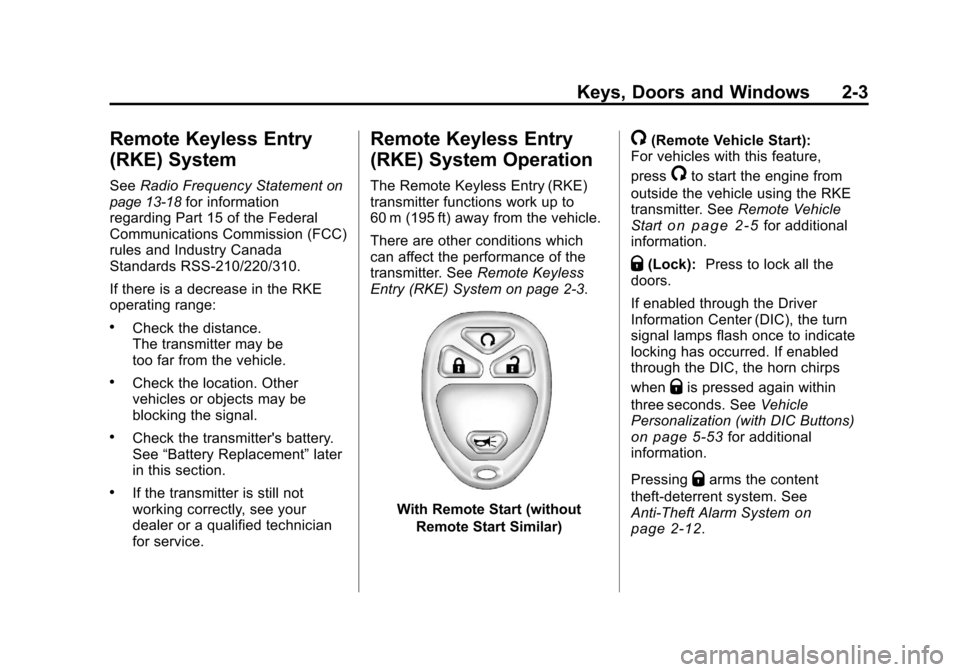
With Remote Start (without
Remote Start Similar)
/(Remote Vehicle Start):
For vehicles with this feature,
press
/to start the engine from
outside the vehicle using the RKE
transmitter. See Remote Vehicle
Start
on page 2‑5for additional
information.
Q(Lock): Press to lock all the
doors.
If enabled through the Driver
Information Center (DIC), the turn
signal lamps flash once to indicate
locking has occurred. If enabled
through the DIC, the horn chirps
when
Qis pressed again within
three seconds. See Vehicle
Personalization (with DIC Buttons)
on page 5‑53for additional
information.
Pressing
Qarms the content
theft‐deterrent system. See
Anti-Theft Alarm System
on
page 2‑12.
Page 49 of 588
Black plate (5,1)Chevrolet Silverado Owner Manual - 2011
Keys, Doors and Windows 2-5
Notice:When replacing the
battery, do not touch any of
the circuitry on the transmitter.
Static from your body could
damage the transmitter.
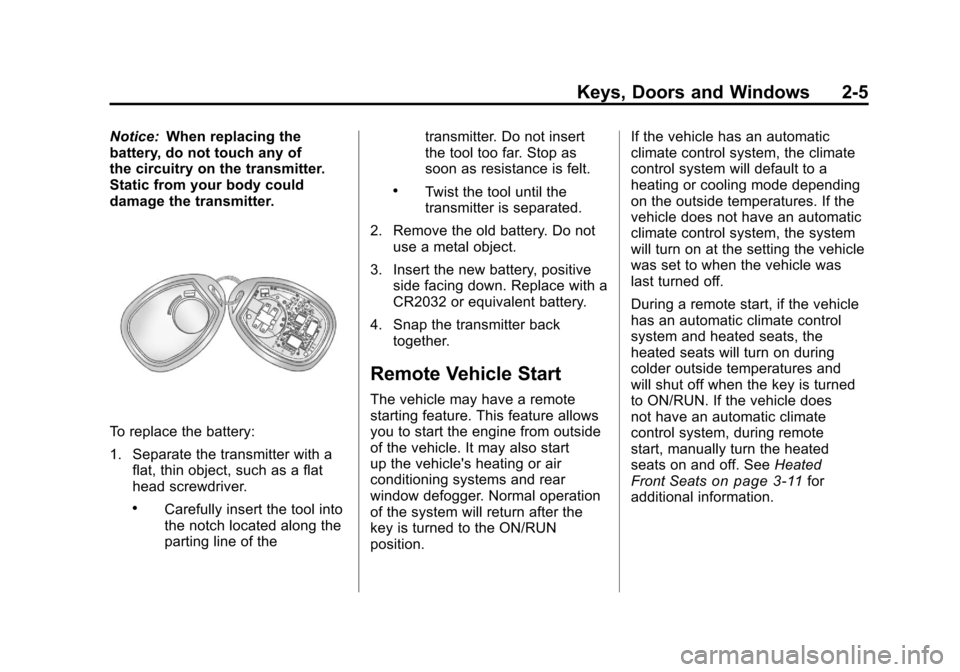
To replace the battery:
1. Separate the transmitter with a flat, thin object, such as a flat
head screwdriver.
.Carefully insert the tool into
the notch located along the
parting line of the transmitter. Do not insert
the tool too far. Stop as
soon as resistance is felt.
.Twist the tool until the
transmitter is separated.
2. Remove the old battery. Do not use a metal object.
3. Insert the new battery, positive side facing down. Replace with a
CR2032 or equivalent battery.
4. Snap the transmitter back together.
Remote Vehicle Start
The vehicle may have a remote
starting feature. This feature allows
you to start the engine from outside
of the vehicle. It may also start
up the vehicle's heating or air
conditioning systems and rear
window defogger. Normal operation
of the system will return after the
key is turned to the ON/RUN
position. If the vehicle has an automatic
climate control system, the climate
control system will default to a
heating or cooling mode depending
on the outside temperatures. If the
vehicle does not have an automatic
climate control system, the system
will turn on at the setting the vehicle
was set to when the vehicle was
last turned off.
During a remote start, if the vehicle
has an automatic climate control
system and heated seats, the
heated seats will turn on during
colder outside temperatures and
will shut off when the key is turned
to ON/RUN. If the vehicle does
not have an automatic climate
control system, during remote
start, manually turn the heated
seats on and off. See
Heated
Front Seats
on page 3‑11for
additional information.
Page 50 of 588
Black plate (6,1)Chevrolet Silverado Owner Manual - 2011
2-6 Keys, Doors and Windows
Laws in some communities may
restrict the use of remote starters.
For example, some laws may
require a person using the remote
start to have the vehicle in view
when doing so. Check local
regulations for any requirements
on remote starting of vehicles.
Do not use the remote start
feature if the vehicle is low on fuel.
The vehicle may run out of fuel.
If the vehicle has the remote
start feature, the RKE transmitter
functions will have an increased
range of operation. However, the
range may be less while the vehicle
is running.
There are other conditions which
can affect the performance of the
transmitter. SeeRemote Keyless
Entry (RKE) System
on page 2‑3for additional information.
/(Remote Start): This button will
be on the RKE transmitter if the
vehicle has remote start.
To start the vehicle using the remote
start feature:
1. Aim the transmitter at the vehicle.
2. Press and release the transmitter's lock button.
The vehicle's doors will lock.
Immediately press and hold
the transmitter's remote start
button until the turn signal lamps
flash. If you cannot see the
vehicle's lamps, press and hold
the remote start button for two
to four seconds. Pressing the
remote start button again after
the vehicle has started will turn
the engine off. When the vehicle starts, the
parking lamps will turn on and
remain on while the vehicle is
running.
If the vehicle is left running,
it will automatically shut off
after 10 minutes unless a time
extension has been done.
3. If it is the first remote start since the vehicle has been driven,
repeat these steps, while the
engine is still running, to extend
the engine running time by
10 minutes. Remote start can
be extended one time.
After entering the vehicle during a
remote start, insert and turn the key
to ON/RUN to drive the vehicle.
Page 51 of 588
Black plate (7,1)Chevrolet Silverado Owner Manual - 2011
Keys, Doors and Windows 2-7
To manually shut off a remote start,
do any of the following:
.Aim the RKE transmitter at the
vehicle and press the remote
start button until the parking
lamps turn off.
.Turn on the hazard warning
flashers.
.Turn the ignition switch on and
then off.
The vehicle can be remote started
two separate times between driving
sequences. The engine will run for
10 minutes after each remote start.
Or, you can extend the engine run
time by another 10 minutes within
the first 10 minute remote start time
frame, and before the engine stops. For example, if the lock button and
then the remote start buttons are
pressed again after the vehicle
has been running for 5 minutes,
10 minutes are added, allowing
the engine to run for 15 minutes.
The additional 10 minutes are
considered a second remote vehicle
start.
Once two remote starts, or a single
remote start with one time extension
has been done, the vehicle must be
started with the key. After the key
is removed from the ignition, the
vehicle can be remote started again.
The vehicle cannot be remote
started if the key is in the ignition,
the hood is not closed, or if there
is an emission control system
malfunction and the check engine
light comes on.Also, the engine will turn off during
a remote vehicle start if the coolant
temperature gets too high or if the
oil pressure gets low.
Remote Start Ready
If the vehicle does not have the
remote vehicle start feature, it may
have the remote start ready feature.
This feature allows your dealer to
add the manufacturer's remote
vehicle start feature.
See your dealer to add the
manufacturer's remote vehicle
start feature to the vehicle.
Page 111 of 588
Black plate (43,1)Chevrolet Silverado Owner Manual - 2011
Seats and Restraints 3-43
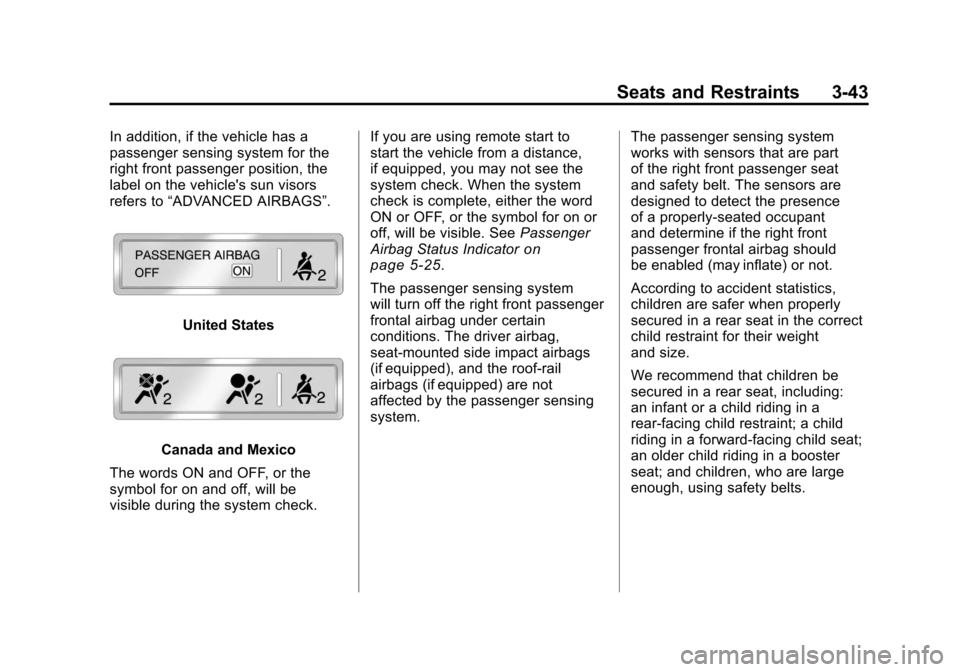
In addition, if the vehicle has a
passenger sensing system for the
right front passenger position, the
label on the vehicle's sun visors
refers to“ADVANCED AIRBAGS”.
United States
Canada and Mexico
The words ON and OFF, or the
symbol for on and off, will be
visible during the system check. If you are using remote start to
start the vehicle from a distance,
if equipped, you may not see the
system check. When the system
check is complete, either the word
ON or OFF, or the symbol for on or
off, will be visible. See
Passenger
Airbag Status Indicator
on
page 5‑25.
The passenger sensing system
will turn off the right front passenger
frontal airbag under certain
conditions. The driver airbag,
seat‐mounted side impact airbags
(if equipped), and the roof-rail
airbags (if equipped) are not
affected by the passenger sensing
system. The passenger sensing system
works with sensors that are part
of the right front passenger seat
and safety belt. The sensors are
designed to detect the presence
of a properly-seated occupant
and determine if the right front
passenger frontal airbag should
be enabled (may inflate) or not.
According to accident statistics,
children are safer when properly
secured in a rear seat in the correct
child restraint for their weight
and size.
We recommend that children be
secured in a rear seat, including:
an infant or a child riding in a
rear-facing child restraint; a child
riding in a forward-facing child seat;
an older child riding in a booster
seat; and children, who are large
enough, using safety belts.