air condition CHEVROLET SILVERADO 2011 2.G Owner's Manual
[x] Cancel search | Manufacturer: CHEVROLET, Model Year: 2011, Model line: SILVERADO, Model: CHEVROLET SILVERADO 2011 2.GPages: 588, PDF Size: 7.99 MB
Page 200 of 588
Black plate (50,1)Chevrolet Silverado Owner Manual - 2011
5-50 Instruments and Controls
There are several conditions that
can cause this message to appear.
.If the vehicle is overheating,
which could occur if StabiliTrak
activates continuously for an
extended period of time.
.If the brake system warning
light is on. SeeBrake System
Warning Light on page 5‑29.
.If the stability system takes
longer than usual to complete
its diagnostic checks due to
driving conditions.
.If an engine or vehicle related
problem has been detected
and the vehicle needs service.
See your dealer.
.If the vehicle is shifted into 4LO.
The message turns off as soon
as the conditions that caused the
message to be displayed are no
longer present.
TRACTION CONTROL OFF
If the vehicle has StabiliTrak, this
message displays when the Traction
Control System (TCS) is turned off.
Adjust your driving accordingly. See
StabiliTrak
®Systemon page 9‑70for more information.
Airbag System Messages
SERVICE AIR BAG
This message displays if there is
a problem with the airbag system.
Have your dealer inspect the
system for problems. See Airbag
Readiness Light
on page 5‑22and Airbag Systemon page 3‑31for more information.
Anti-Theft Alarm System
Messages
SERVICE THEFT DETERRENT
SYSTEM
This message displays when there
is a problem with the theft-deterrent
system. The vehicle may or may not
restart so you may want to take the
vehicle to your dealer before turning
off the engine. See Immobilizer
Operation
on page 2‑14for more
information.
Starting the Vehicle
Messages
FAST IDLE ON
If your vehicle has this feature, this
message displays when the fast idle
feature is on. See Fast Idle System
on page 9‑37for more information.
Page 201 of 588
Black plate (51,1)Chevrolet Silverado Owner Manual - 2011
Instruments and Controls 5-51
Tire Messages
SERVICE TIRE MONITOR
SYSTEM
If the vehicle has the Tire Pressure
Monitor System (TPMS), this
message displays if a part on the
system is not working properly.
The tire pressure light also flashes
and then remains on during the
same ignition cycle. SeeTire
Pressure Light
on page 5‑32.
Several conditions may cause
this message to appear. See Tire
Pressure Monitor Operation
on
page 10‑67for more information.
If the warning comes on and stays
on, there may be a problem with
the TPMS. See your dealer.
TIRE LEARNING ACTIVE
If the vehicle has the Tire Pressure
Monitor System (TPMS), this
message displays when the system
is re-learning the tire positions on
your vehicle. The tire positions must
be re-learned after rotating the tires
or after replacing a tire or sensor.
See Tire Inspection
on page 10‑71,
Tire Rotationon page 10‑71, Tire
Pressure Monitor Systemon
page 10‑65, and Tire Pressureon
page 10‑63for more information.
TIRE LOW ADD AIR TO TIRE
If the vehicle has the Tire Pressure
Monitor System (TPMS), this
message displays when the
pressure in one or more of the
vehicle's tires is low. This message
also displays LEFT FRT (left front),
RIGHT FRT (right front), LEFT RR (left rear), or RIGHT RR (right rear)
to indicate the location of the low
tire. The low tire pressure warning
light will also come on. See
Tire
Pressure Light
on page 5‑32.
You can receive more than one
tire pressure message at a time.
To read the other messages that
may have been sent at the same
time, press the set/reset button or
the trip odometer reset stem. If a
tire pressure message appears on
the DIC, stop as soon as you can.
Have the tire pressures checked
and set to those shown on the Tire
Loading Information label. See Tires
on page 10‑55,Vehicle Load Limitson page 9‑23, and Tire Pressureon
page 10‑63. The DIC also shows the
tire pressure values. See Driver
Information Center (DIC)
on
page 5‑34.
Page 202 of 588
Black plate (52,1)Chevrolet Silverado Owner Manual - 2011
5-52 Instruments and Controls
Transmission Messages
SERVICE 4 WHEEL DRIVE
If the vehicle has four-wheel
drive, this message may display
if a problem occurs with the
four-wheel-drive system. If this
message appears, stop as soon
as possible and turn off the
vehicle. Make sure the key is in
the LOCK/OFF position for at least
one minute and then restart the
vehicle and check for the message
on the DIC display. If the message
is still displayed or appears again
when you begin driving, the
four-wheel-drive system needs
service. See your dealer.
TRANSMISSION HOT IDLE
ENGINE
Notice:If you drive the vehicle
while the transmission fluid is
overheating and the transmission
temperature warning is displayed
on the instrument panel cluster
and/or DIC, you can damage the
transmission. This could lead
to costly repairs that would
not be covered by the warranty.
Do not drive your vehicle with
overheated transmission fluid
or while the transmission
temperature warning is displayed.
This message displays and a chime
may sound if the transmission fluid
in the vehicle gets hot. Driving with
the transmission fluid temperature
high can cause damage to the
vehicle. Stop the vehicle and let it
idle to allow the transmission to
cool. This message clears and
the chime stops when the fluid
temperature reaches a safe level.
Vehicle Reminder
Messages
CHECK TRAILER WIRING
On vehicles with the Integrated
Trailer Brake Control (ITBC) system,
this message may display and a
chime may sound when one of the
following conditions exists:
.A trailer with electric brakes
becomes disconnected from the
vehicle.
‐ If the disconnect occurs while
the vehicle is stopped, this
message clears itself after a
short time.
‐ If the disconnect occurs while
the vehicle is moving, this
message stays on until the
ignition is turned off.
.There is a short in the wiring to
the electric trailer brakes.
When this message displays, power
is no longer available to the trailer
brakes.
Page 247 of 588
Black plate (21,1)Chevrolet Silverado Owner Manual - 2011
Infotainment System 7-21
CD Player Messages
CHECK DISC:If this message
displays and/or the CD ejects, it
could be for one of the following
reasons:
.It is very hot. When the
temperature returns to normal,
the CD should play.
.The road is very rough. When
the road becomes smoother,
the CD should play.
.The CD is dirty, scratched, wet,
or upside down.
.The air is very humid. If so, wait
about an hour and try again.
.There was a problem while
burning the CD.
.The label is caught in the CD
player. If the CD is not playing correctly,
for any other reason, try a known
good CD.
If any error occurs repeatedly or
if an error cannot be corrected,
contact your dealer. If the radio
displays an error message, write it
down and provide it to your dealer
when reporting the problem.
CD/DVD Player
Care of the CD and DVD Player
Do not add any label to a disc.
It could get caught in the CD or
DVD player. If a disc is recorded
on a personal computer and a
description label is needed, try
labeling the top of the recorded
disc with a marking pen.
The use of CD/DVD lens cleaners
is not advised, due to the risk of
contaminating the lens of the optics
with lubricants internal to the CD
and DVD player mechanism.
Notice:
If a label is added to a
CD, or more than one CD is
inserted into the slot at a time,
or an attempt is made to play
scratched or damaged CDs, the
CD player could be damaged.
While using the CD player, use
only CDs in good condition
without any label, load one CD at
a time, and keep the CD player
and the loading slot free of
foreign materials, liquids, and
debris.
If an error displays, see “CD
Messages” later in this section.
Page 283 of 588
Black plate (1,1)Chevrolet Silverado Owner Manual - 2011
Climate Controls 8-1
Climate Controls
Climate Control Systems
Climate Control Systems (withAir Conditioning) . . . . . . . . . . . . . 8-1
Climate Control Systems (with Heater Only) . . . . . . . . . . . . . . . . . 8-4
Dual Automatic Climate Control System . . . . . . . . . . . . . . . . . . . . . . 8-5
Air Vents
Air Vents . . . . . . . . . . . . . . . . . . . . . 8-11
Climate Control Systems
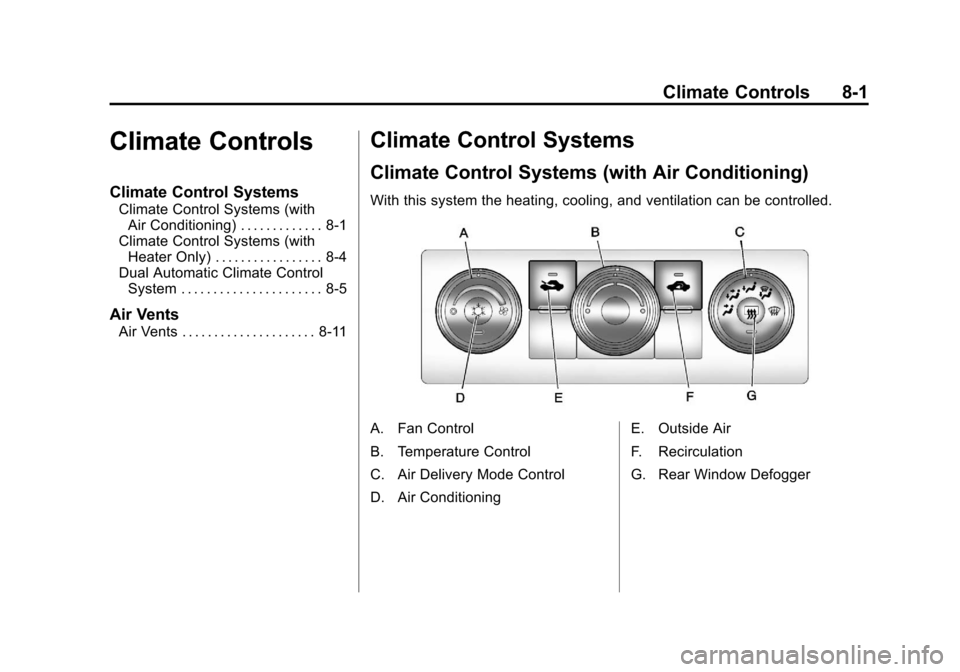
Climate Control Systems (with Air Conditioning)
With this system the heating, cooling, and ventilation can be controlled.
A. Fan Control
B. Temperature Control
C. Air Delivery Mode Control
D. Air Conditioning E. Outside Air
F. Recirculation
G. Rear Window Defogger
Page 284 of 588

Black plate (2,1)Chevrolet Silverado Owner Manual - 2011
8-2 Climate Controls
Temperature Control:Turn
clockwise or counterclockwise
to increase or decrease the
temperature inside the vehicle.
9(Fan Control): Turn clockwise
or counterclockwise to increase or
decrease the fan speed. Turn the
knob all the way counterclockwise
to turn the front system off.
Air Delivery Mode Control: Turn
clockwise or counterclockwise to
change the direction of the airflow
inside the vehicle. The knob can
be positioned between two modes
to select a combination of those
modes.
Select from the following:
H(Vent): Air is directed to the
instrument panel outlets.
)(Bi-Level): Air is divided
between the instrument panel
and floor outlets.
6(Floor): Air is directed to the
floor outlets, with some air directed
to the windshield and side window
outlets. In this mode, the system
automatically selects outside air.
Recirculation cannot be selected
in floor mode.
-(Defog): This mode clears the
windows of fog or moisture. Air is
directed to the windshield, floor
outlets, and side window vents.
0(Defrost): This mode removes
fog or frost from the windshield
more quickly. Air is directed to the
windshield and the side window
vents, with some air directed to
the floor vents. The system
automatically forces outside air
into the vehicle. The recirculation mode cannot be
selected in the defog or defrost
mode. When either mode is
selected, the system runs the air
conditioning compressor, unless
the outside temperature is close
to freezing.
Do not drive the vehicle until all the
windows are clear.
:(Outside Air):
Press to
turn the outside air mode on.
An indicator light comes on to
show that outside air is on.
In this mode outside air circulates
throughout the vehicle. The outside
air mode can be used with all
modes, but it cannot be used
with the recirculation mode.
Page 285 of 588
Black plate (3,1)Chevrolet Silverado Owner Manual - 2011
Climate Controls 8-3
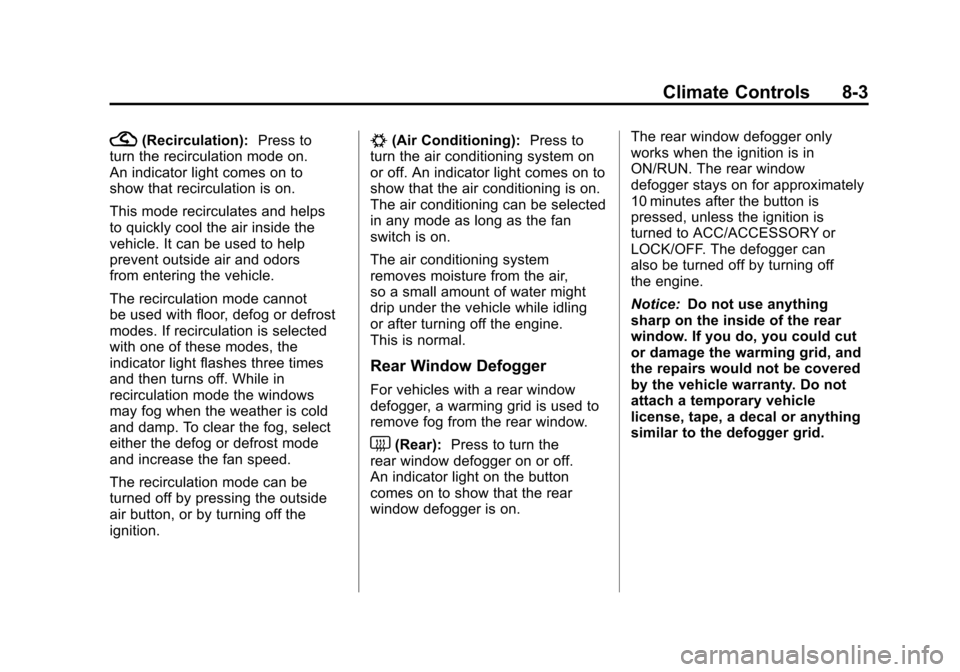
?(Recirculation):Press to
turn the recirculation mode on.
An indicator light comes on to
show that recirculation is on.
This mode recirculates and helps
to quickly cool the air inside the
vehicle. It can be used to help
prevent outside air and odors
from entering the vehicle.
The recirculation mode cannot
be used with floor, defog or defrost
modes. If recirculation is selected
with one of these modes, the
indicator light flashes three times
and then turns off. While in
recirculation mode the windows
may fog when the weather is cold
and damp. To clear the fog, select
either the defog or defrost mode
and increase the fan speed.
The recirculation mode can be
turned off by pressing the outside
air button, or by turning off the
ignition.#(Air Conditioning): Press to
turn the air conditioning system on
or off. An indicator light comes on to
show that the air conditioning is on.
The air conditioning can be selected
in any mode as long as the fan
switch is on.
The air conditioning system
removes moisture from the air,
so a small amount of water might
drip under the vehicle while idling
or after turning off the engine.
This is normal.
Rear Window Defogger
For vehicles with a rear window
defogger, a warming grid is used to
remove fog from the rear window.
<(Rear): Press to turn the
rear window defogger on or off.
An indicator light on the button
comes on to show that the rear
window defogger is on. The rear window defogger only
works when the ignition is in
ON/RUN. The rear window
defogger stays on for approximately
10 minutes after the button is
pressed, unless the ignition is
turned to ACC/ACCESSORY or
LOCK/OFF. The defogger can
also be turned off by turning off
the engine.
Notice:
Do not use anything
sharp on the inside of the rear
window. If you do, you could cut
or damage the warming grid, and
the repairs would not be covered
by the vehicle warranty. Do not
attach a temporary vehicle
license, tape, a decal or anything
similar to the defogger grid.
Page 287 of 588
Black plate (5,1)Chevrolet Silverado Owner Manual - 2011
Climate Controls 8-5
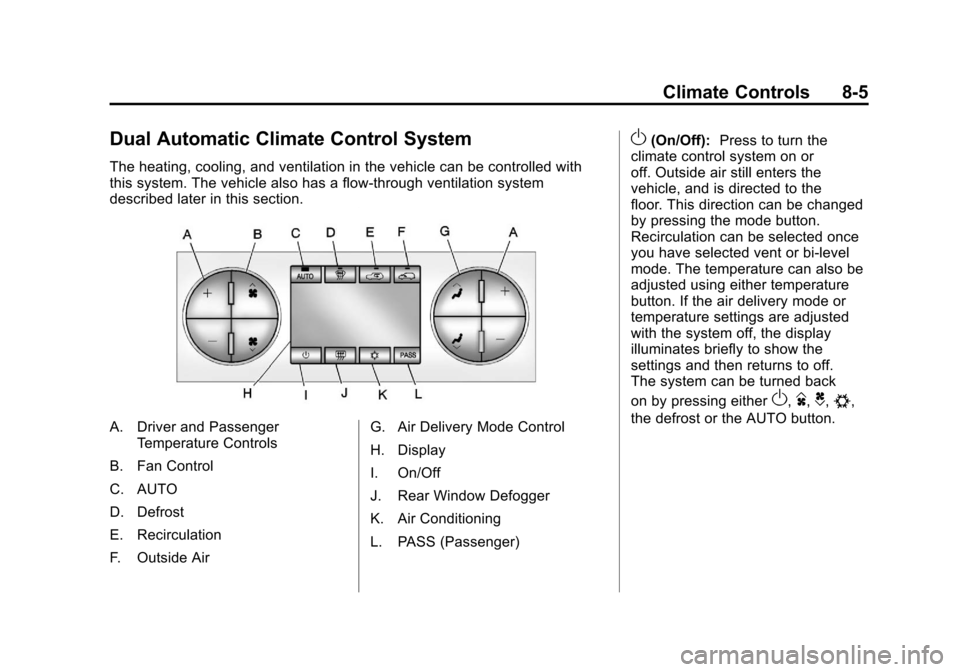
Dual Automatic Climate Control System
The heating, cooling, and ventilation in the vehicle can be controlled with
this system. The vehicle also has a flow-through ventilation system
described later in this section.
A. Driver and PassengerTemperature Controls
B. Fan Control
C. AUTO
D. Defrost
E. Recirculation
F. Outside Air G. Air Delivery Mode Control
H. Display
I. On/Off
J. Rear Window Defogger
K. Air Conditioning
L. PASS (Passenger)
O(On/Off):
Press to turn the
climate control system on or
off. Outside air still enters the
vehicle, and is directed to the
floor. This direction can be changed
by pressing the mode button.
Recirculation can be selected once
you have selected vent or bi-level
mode. The temperature can also be
adjusted using either temperature
button. If the air delivery mode or
temperature settings are adjusted
with the system off, the display
illuminates briefly to show the
settings and then returns to off.
The system can be turned back
on by pressing either
O,D,C,#,
the defrost or the AUTO button.
Page 288 of 588
Black plate (6,1)Chevrolet Silverado Owner Manual - 2011
8-6 Climate Controls
Driver and Passenger Side
Temperature Controls
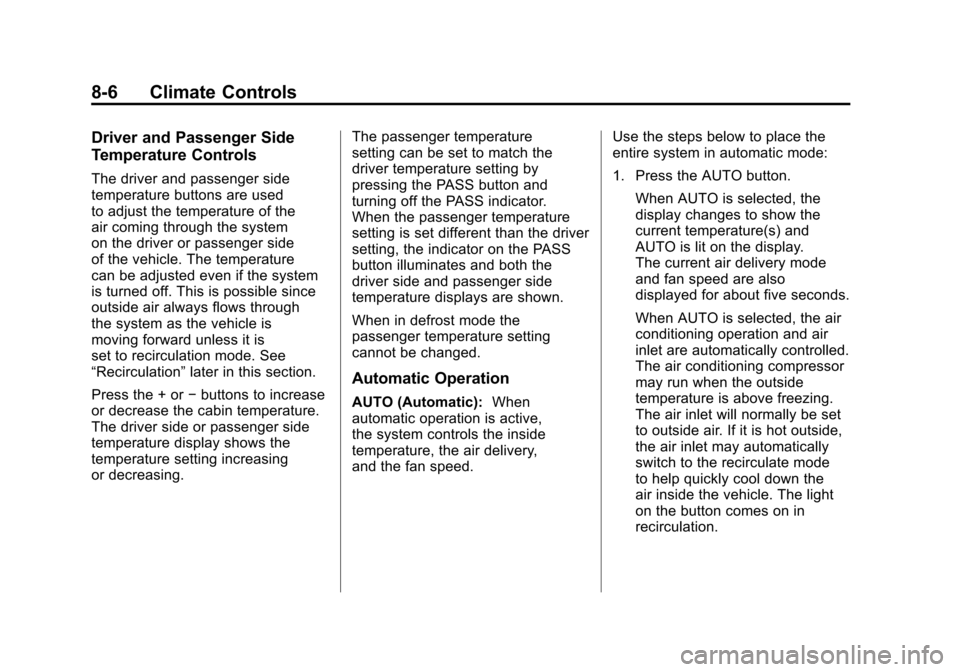
The driver and passenger side
temperature buttons are used
to adjust the temperature of the
air coming through the system
on the driver or passenger side
of the vehicle. The temperature
can be adjusted even if the system
is turned off. This is possible since
outside air always flows through
the system as the vehicle is
moving forward unless it is
set to recirculation mode. See
“Recirculation”later in this section.
Press the + or −buttons to increase
or decrease the cabin temperature.
The driver side or passenger side
temperature display shows the
temperature setting increasing
or decreasing. The passenger temperature
setting can be set to match the
driver temperature setting by
pressing the PASS button and
turning off the PASS indicator.
When the passenger temperature
setting is set different than the driver
setting, the indicator on the PASS
button illuminates and both the
driver side and passenger side
temperature displays are shown.
When in defrost mode the
passenger temperature setting
cannot be changed.
Automatic Operation
AUTO (Automatic):
When
automatic operation is active,
the system controls the inside
temperature, the air delivery,
and the fan speed. Use the steps below to place the
entire system in automatic mode:
1. Press the AUTO button.
When AUTO is selected, the
display changes to show the
current temperature(s) and
AUTO is lit on the display.
The current air delivery mode
and fan speed are also
displayed for about five seconds.
When AUTO is selected, the air
conditioning operation and air
inlet are automatically controlled.
The air conditioning compressor
may run when the outside
temperature is above freezing.
The air inlet will normally be set
to outside air. If it is hot outside,
the air inlet may automatically
switch to the recirculate mode
to help quickly cool down the
air inside the vehicle. The light
on the button comes on in
recirculation.
Page 290 of 588

Black plate (8,1)Chevrolet Silverado Owner Manual - 2011
8-8 Climate Controls
)(Bi-Level):Air is divided
between the instrument panel and
floor outlets. Some air is directed
toward the windshield and side
window outlets.
6(Floor): Air is directed to the
floor outlets, with some to the
windshield, side window outlets,
and second row floor outlets. In this
mode, the system automatically
selects outside air.
-(Defog): This mode clears the
windows of fog or moisture. Air is
directed to the windshield, floor
outlets, and side window vents.
In this mode, the system turns
off recirculation and runs the air
conditioning compressor unless
the outside temperature is close to
freezing. The recirculation mode
cannot be selected while in the
defrost mode.
0(Defrost): This mode removes
fog or frost from the windshield
more quickly. Air is directed to the
windshield and side window vents,
with some directed to the floor
vents. In this mode, the system
automatically forces outside air
into the vehicle and runs the air
conditioning compressor unless
the outside temperature is close to
freezing. The recirculation mode
cannot be selected while in the
defrost mode.
The passenger temperature
control cannot be activated while in
defrost mode. If the PASS button is
pressed, the button indicator flashes
three times and will not work. If the
passenger temperature buttons are
adjusted, the driver temperature
indicator changes. The passenger
temperature will not be displayed. If vent, bi-level, or floor mode is
selected again, the climate control
system displays the previous
temperature settings.
Do not drive the vehicle until all
windows are clear.
#(Air Conditioning):
Press to
turn the air conditioning (A/C)
compressor on and off. An indicator
light comes on to show that the air
conditioning is on.
If this button is pressed when
the air conditioning compressor
is unavailable due to outside
conditions, the indicator flashes
three times and then turns off.
If the air conditioning is on and the
outside temperature drops below a
temperature which is too cool for air
conditioning to be effective, the air
conditioning light turns off to show
that the air conditioning mode has
been canceled.