ignition CHEVROLET SILVERADO 2011 2.G Owner's Manual
[x] Cancel search | Manufacturer: CHEVROLET, Model Year: 2011, Model line: SILVERADO, Model: CHEVROLET SILVERADO 2011 2.GPages: 588, PDF Size: 7.99 MB
Page 116 of 588
Black plate (48,1)Chevrolet Silverado Owner Manual - 2011
3-48 Seats and Restraints
Servicing the
Airbag-Equipped Vehicle
Airbags affect how the vehicle
should be serviced. There are
parts of the airbag system in
several places around the vehicle.
Your dealer and the service manual
have information about servicing
the vehicle and the airbag system.
To purchase a service manual,
seeService Publications Ordering
Information on page 13‑14.
{WARNING
For up to 10 seconds after the
ignition is turned off and the
battery is disconnected, an airbag
can still inflate during improper
service. You can be injured if you
are close to an airbag when it
inflates. Avoid yellow connectors.
They are probably part of the
airbag system. Be sure to follow
(Continued)
WARNING (Continued)
proper service procedures, and
make sure the person performing
work for you is qualified to do so.
Adding Equipment to the
Airbag-Equipped Vehicle
Q: Is there anything I might addto or change about the vehicle
that could keep the airbags
from working properly?
A: Yes. If you add things that
change your vehicle's frame,
bumper system, height, front end
or side sheet metal, they may
keep the airbag system from
working properly. Changing or
moving any parts of the front
seats, safety belts, the airbag
sensing and diagnostic module,
steering wheel, instrument
panel, roof-rail airbag modules, ceiling headliner or pillar garnish
trim, overhead console, front
sensors, side impact sensors,
or airbag wiring can affect the
operation of the airbag system.
In addition, the vehicle may have
a passenger sensing system
for the right front passenger's
position, which includes sensors
that are part of the passenger's
seat. The passenger sensing
system may not operate properly
if the original seat trim is
replaced with non-GM covers,
upholstery or trim, or with
GM covers, upholstery or
trim designed for a different
vehicle. Any object, such as
an aftermarket seat heater or
a comfort enhancing pad or
device, installed under or on top
of the seat fabric, could also
interfere with the operation of
the passenger sensing system.
Page 158 of 588
Black plate (8,1)Chevrolet Silverado Owner Manual - 2011
5-8 Instruments and Controls
To calibrate the compass, use the
following procedure:
Compass Calibration Procedure
1. Before calibrating the compass,make sure the compass zone
is set to the variance zone in
which the vehicle is located.
See “Compass Variance (Zone)
Procedure” earlier in this
section.
Do not operate any switches
such as window, sunroof,
climate controls, or seats during
the calibration procedure.
2. Press the vehicle information button until PRESS
VTO
CALIBRATE COMPASS
displays. Or, if the vehicle
does not have DIC buttons,
press the trip odometer reset
stem until CALIBRATE
COMPASS displays. 3. Press the set/reset button to
start the compass calibration.
Or, if the vehicle does not have
DIC buttons, press and hold
the trip odometer reset stem
for two seconds to start the
compass calibration.
4. The DIC will display CALIBRATING: DRIVE IN
CIRCLES. Drive the vehicle
in tight circles at less than
8 km/h (5 mph) to complete the
calibration. The DIC will display
CALIBRATION COMPLETE
for a few seconds when the
calibration is complete. The DIC
display will then return to the
previous menu.
Clock
AM-FM Radio and AM‐FM
Radio with CD Player
To set the clock:
1. Turn the ignition key to
ACC/ACCESSORY or ON/RUN,
then press the
Obutton to turn
the radio on.
2. Press the
Hbutton until the hour
numbers begin to flash, then
turn the
fknob to increase or
decrease the hour.
3. Press the
Hbutton until the
minute numbers begin to flash,
then turn the
fknob to increase
or decrease the minutes.
Page 159 of 588
Black plate (9,1)Chevrolet Silverado Owner Manual - 2011
Instruments and Controls 5-9
4. Press theHbutton until the
12HR or 24HR time format
begins to flash, then turn
the
fknob to change the
time format.
5. Press the
Hbutton again until
the clock display stops flashing
to set the currently displayed
time, or wait until the flashing
stops after five seconds and
the current time displayed
automatically sets.
MP3 Radios with a Single CD
or a Single CD and DVD Player
To adjust the time and date:
1. Turn the ignition key to ACC/ACCESSORY or ON/RUN,
then press the
Obutton to turn
the radio on.
2. Press the
Hbutton to display
HR, MIN, MM, DD, YYYY (hour,
minute, month, day, and year). 3. Press the softkey located under
any one of the tabs to change
that setting.
4. To increase the time or date, do one of the following:
.Press the softkey below the
selected tab.
.Press the¨SEEK button.
.Press the\FWD button.
.Turn thefknob clockwise.
5. To decrease the time or date, do one of the following:
.Press the©SEEK button.
.Press thesREV button.
.Turn thefknob
counterclockwise. To change the time default setting
from 12 hour to 24 hour or to
change the date default setting from
month/day/year to day/month/year:
1. Press the
Hbutton and then
the softkey located below the
forward arrow tab. 12H, 24H, the
date MM/DD (month and day),
and DD/MM (day and month)
displays.
2. Press the softkey located below the desired option.
3. Press the
Hbutton again to
apply the desired option, or let
the screen time out.
Page 160 of 588
Black plate (10,1)Chevrolet Silverado Owner Manual - 2011
5-10 Instruments and Controls
MP3 Radio with a Six-Disc CD
Player
To set the time and date:
1. Turn the ignition key toACC/ACCESSORY or ON/RUN,
then press the
Obutton to turn
the radio on.
2. Press the MENU button and then the softkey under the
Htab
to display HR, MIN, MM, DD,
YYYY (hour, minute, month, day,
and year).
3. Press the softkey located under any one of the tabs to change
that setting.
4. To increase the time or date, do one of the following:
.Press the softkey below the
selected tab.
.Press the¨SEEK button.
.Press the\FWD button.
.Turn thefknob clockwise. 5. To decrease the time or date, do
one of the following:
.Press the©SEEK button.
.Press thesREV button.
.Turn thefknob
counterclockwise.
To change the time default setting
from 12 hour to 24 hour or to
change the date default setting
from month/day to day/month:
1. Press the MENU button and then the softkey under
the
Htab.
2. Press the softkey located below the forward arrow tab. 12H, 24H,
the date MM/DD (month and
day), and DD/MM (day and
month) displays.
3. Press the softkey located below the desired option.
4. Press the MENU button again to apply the desired option, or let
the screen time out.
Power Outlets
Accessory power outlets can be
used to plug in electrical equipment,
such as a cell phone, MP3
player, etc.
The vehicle may have two
accessory power outlets located
below the climate control system,
or may have one accessory power
outlet and one cigarette lighter.
The cigarette lighter is designed to
fit only in the receptacle closest to
the driver.
There may be another accessory
power outlet in the rear cargo area.
If the vehicle has a floor console,
there is an accessory power outlet
inside the storage bin and one on
the rear of the floor console.
Remove the cover to access and
replace when not in use.
Page 161 of 588
Black plate (11,1)Chevrolet Silverado Owner Manual - 2011
Instruments and Controls 5-11
The accessory power outlets are
powered, even when the ignition
is in LOCK/OFF. Continuing to use
power outlets while the ignition is in
LOCK/OFF may cause the vehicle's
battery to run down.
{WARNING
Power is always supplied to the
outlets. Do not leave electrical
equipment plugged in when the
vehicle is not in use because the
vehicle could catch fire and cause
injury or death.Notice:
Leaving electrical
equipment plugged in for an
extended period of time while
the vehicle is off will drain the
battery. Always unplug electrical
equipment when not in use and
do not plug in equipment that
exceeds the maximum 20 ampere
rating.
Certain power accessory plugs
may not be compatible to the
accessory power outlet and could
overload vehicle or adapter fuses.
If a problem is experienced, see
your dealer.
When adding electrical equipment,
be sure to follow the proper
installation instructions included
with the equipment. See Add-On
Electrical Equipment on page 9‑123. Notice:
Hanging heavy
equipment from the power
outlet can cause damage not
covered by the vehicle warranty.
The power outlets are designed
for accessory power plugs only,
such as cell phone charge cords.Cigarette Lighter
To use the cigarette lighter, push
it in all the way, and let go. When it
is ready for use, the lighter pops
back out.
Notice: Holding a cigarette lighter
in while it is heating does not let
the lighter back away from the
heating element when it is hot.
Damage from overheating can
occur to the lighter or heating
element, or a fuse could be
blown. Do not hold a cigarette
lighter in while it is heating.
Page 166 of 588
Black plate (16,1)Chevrolet Silverado Owner Manual - 2011
5-16 Instruments and Controls
If the vehicle has a diesel engine,
see the Duramax diesel supplement
for more information.
If the vehicle is a hybrid, see
the hybrid supplement for more
information.
Speedometer
The speedometer shows the vehicle
speed in both kilometers per hour
(km/h) and miles per hour (mph).
Odometer
The odometer shows how far the
vehicle has been driven, in either
kilometers or miles.
Engine Hour Meter Display
The Driver Information Center (DIC)
can also display the number of
hours the engine has run. To display
the engine hours, turn the ignition
off, then press and hold the reset
button for at least four seconds.
The hour meter displays for up to
30 seconds, or until the ignition is
turned on. SeeDriver Information
Center (DIC)
on page 5‑34for
more information.
Trip Odometer
The trip odometer shows how far
the vehicle has been driven since
the trip odometer was last set
to zero.
Press the reset button, located on
the instrument panel cluster next
to the voltmeter, to toggle between
the trip odometer and the regular
odometer. Holding the reset button
for approximately one second while
the trip odometer is displayed will
reset it.
To display the odometer reading
with the ignition off, press the reset
button.
See Driver Information Center (DIC)
on page 5‑34for more information.
Page 167 of 588
Black plate (17,1)Chevrolet Silverado Owner Manual - 2011
Instruments and Controls 5-17
Tachometer
The tachometer displays the engine
speed in revolutions per minute
(rpm). For a description of how
Grade Braking affects vehicle
speed while the Tow/Haul Mode is
activated, seeTow/Haul Mode
on
page 9‑49for more information.
If the vehicle is a hybrid, see
the hybrid supplement for more
information.
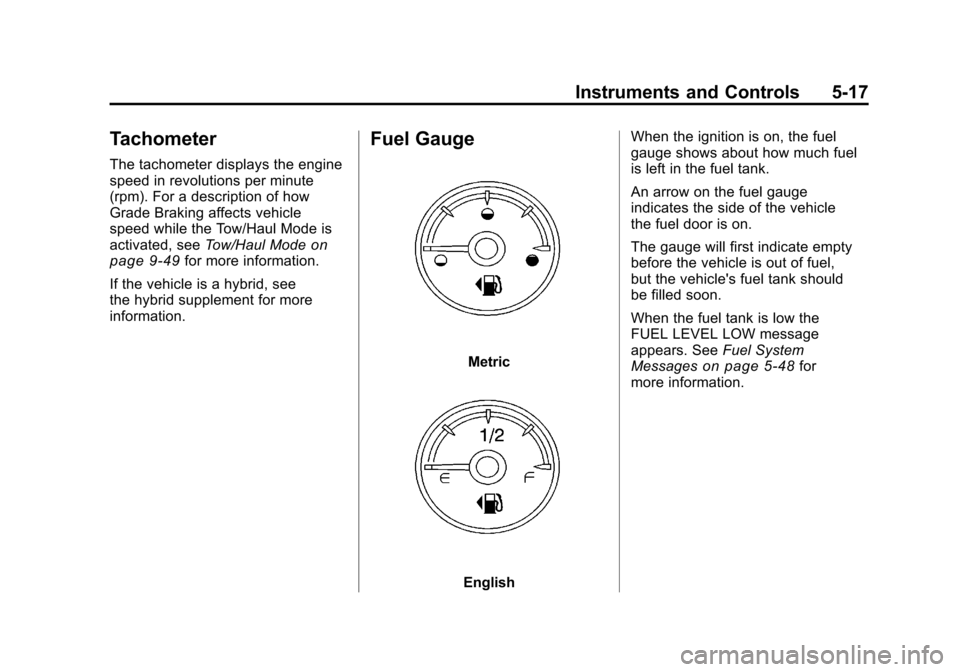
Fuel Gauge
Metric
English When the ignition is on, the fuel
gauge shows about how much fuel
is left in the fuel tank.
An arrow on the fuel gauge
indicates the side of the vehicle
the fuel door is on.
The gauge will first indicate empty
before the vehicle is out of fuel,
but the vehicle's fuel tank should
be filled soon.
When the fuel tank is low the
FUEL LEVEL LOW message
appears. See
Fuel System
Messages
on page 5‑48for
more information.
Page 168 of 588
Black plate (18,1)Chevrolet Silverado Owner Manual - 2011
5-18 Instruments and Controls
Here are some situations owners
can experience with the fuel gauge.
None of these indicate a problem
with the fuel gauge.
.At the gas station, the fuel pump
shuts off before the gauge
reads full.
.It takes a little more or less fuel
to fill up than the fuel gauge
indicated. For example, the
gauge may have indicated the
tank was half full, but it actually
took a little more or less than
half the fuel tank's capacity to
fill it.
.The gauge goes back to empty
when the ignition is turned off.
If the vehicle has a diesel engine,
see the Duramax diesel supplement
for more information.
If the vehicle is a hybrid, see
the hybrid supplement for more
information.
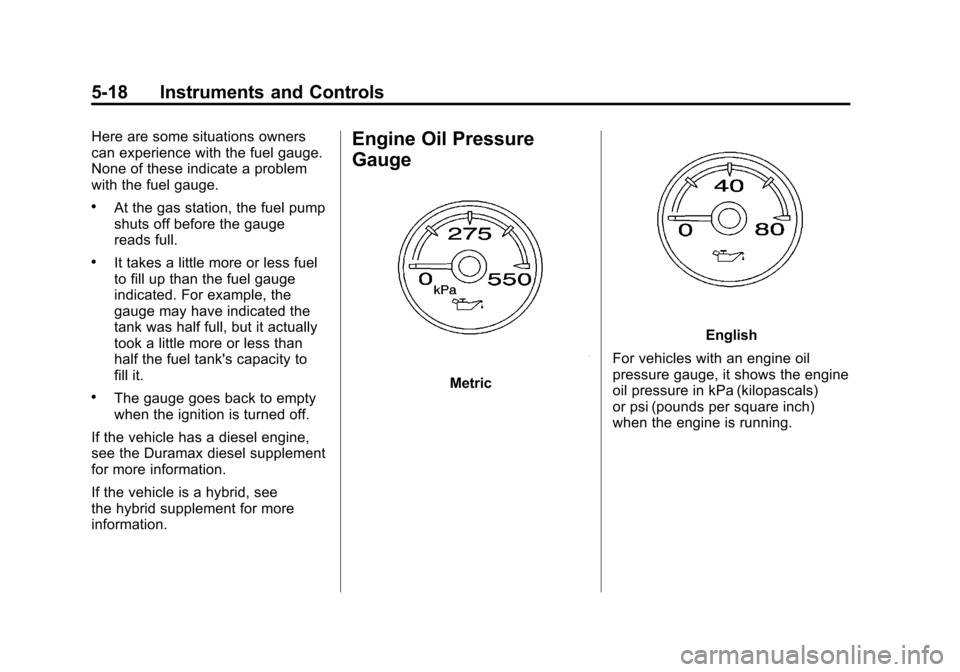
Engine Oil Pressure
Gauge
Metric
English
For vehicles with an engine oil
pressure gauge, it shows the engine
oil pressure in kPa (kilopascals)
or psi (pounds per square inch)
when the engine is running.
Page 170 of 588
Black plate (20,1)Chevrolet Silverado Owner Manual - 2011
5-20 Instruments and Controls
English
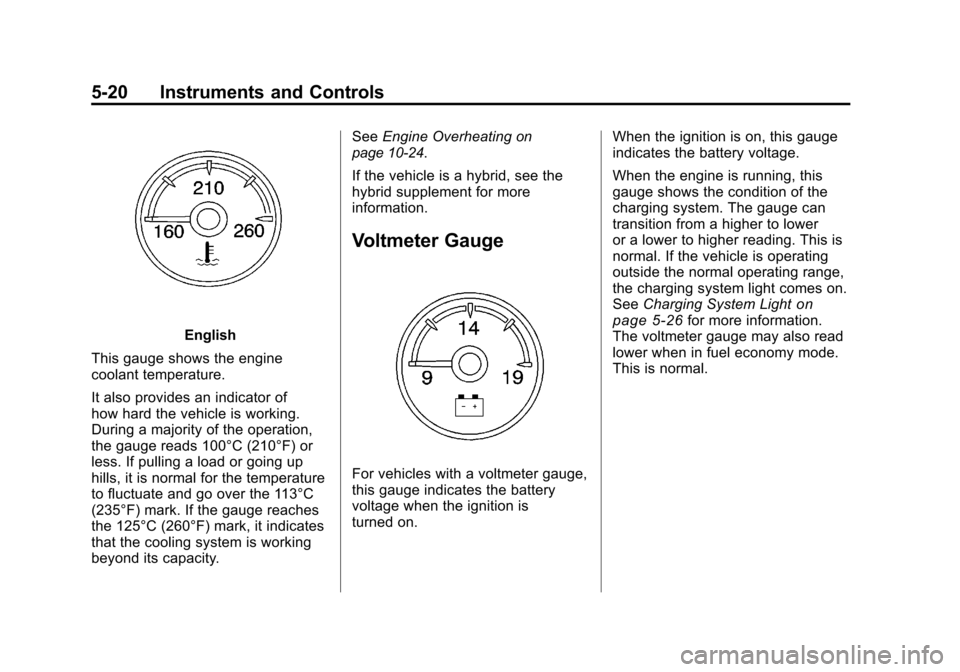
This gauge shows the engine
coolant temperature.
It also provides an indicator of
how hard the vehicle is working.
During a majority of the operation,
the gauge reads 100°C (210°F) or
less. If pulling a load or going up
hills, it is normal for the temperature
to fluctuate and go over the 113°C
(235°F) mark. If the gauge reaches
the 125°C (260°F) mark, it indicates
that the cooling system is working
beyond its capacity. See
Engine Overheating
on
page 10‑24.
If the vehicle is a hybrid, see the
hybrid supplement for more
information.
Voltmeter Gauge
For vehicles with a voltmeter gauge,
this gauge indicates the battery
voltage when the ignition is
turned on. When the ignition is on, this gauge
indicates the battery voltage.
When the engine is running, this
gauge shows the condition of the
charging system. The gauge can
transition from a higher to lower
or a lower to higher reading. This is
normal. If the vehicle is operating
outside the normal operating range,
the charging system light comes on.
See
Charging System Light
on
page 5‑26for more information.
The voltmeter gauge may also read
lower when in fuel economy mode.
This is normal.
Page 176 of 588
Black plate (26,1)Chevrolet Silverado Owner Manual - 2011
5-26 Instruments and Controls
If, after several seconds, both
status indicator lights remain on,
or if there are no lights at all, there
may be a problem with the lights
or the passenger sensing system.
See your dealer for service.
{WARNING
If the airbag readiness light ever
comes on and stays on, it means
that something may be wrong
with the airbag system. To help
avoid injury to yourself or others,
have the vehicle serviced right
away. SeeAirbag Readiness
Light
on page 5‑22for more
information, including important
safety information.
Charging System Light
This light comes on briefly when
the ignition key is turned to START,
but the engine is not running, as a
check to show it is working.
If it does not, have the vehicle
serviced by your dealer.
The light should go out once
the engine starts. If it stays on,
or comes on while driving, there
could be a problem with the charging system. A charging system
message in the Driver Information
Center (DIC) can also appear.
See
Battery Voltage and Charging
Messages
on page 5‑43for more
information. This light could indicate
that there are problems with a
generator drive belt, or that there
is an electrical problem. Have it
checked right away. If the vehicle
must be driven a short distance with
the light on, turn off accessories,
such as the radio and air
conditioner.
If the vehicle is a hybrid, see
the hybrid supplement for more
information.