steering CHEVROLET SILVERADO 2011 2.G Workshop Manual
[x] Cancel search | Manufacturer: CHEVROLET, Model Year: 2011, Model line: SILVERADO, Model: CHEVROLET SILVERADO 2011 2.GPages: 588, PDF Size: 7.99 MB
Page 347 of 588
Black plate (53,1)Chevrolet Silverado Owner Manual - 2011
Driving and Operating 9-53
Drive Systems
Four-Wheel Drive
If the vehicle has Four-Wheel
Drive, you can send the engine's
driving power to all four wheels
for extra traction. To get the most
satisfaction out of Four-Wheel
Drive, you must be familiar with
its operation. Read the following
before using Four-Wheel Drive.
See the appropriate text for the
transfer case in the vehicle.
Notice:Driving on clean, dry
pavement in Four-Wheel Drive
High or Four-Wheel Drive Low for
an extended period of time may
cause premature wear on the
vehicle's powertrain. Do not
drive on clean, dry pavement
in Four-Wheel Drive High or
Four-Wheel Drive Low for
extended periods of time. While driving on clean dry pavement
and during tight turns, you may
experience vibration in the steering
system.
If the vehicle has StabiliTrak®,
shifting into Four-Wheel Drive
Low will turn Traction Control and
StabiliTrak
®off. See StabiliTrak®
System on page 9‑70.
Front Axle
The front axle engages and
disengages automatically when you
shift the transfer case. Some delay
for the axle to engage or disengage
is normal.
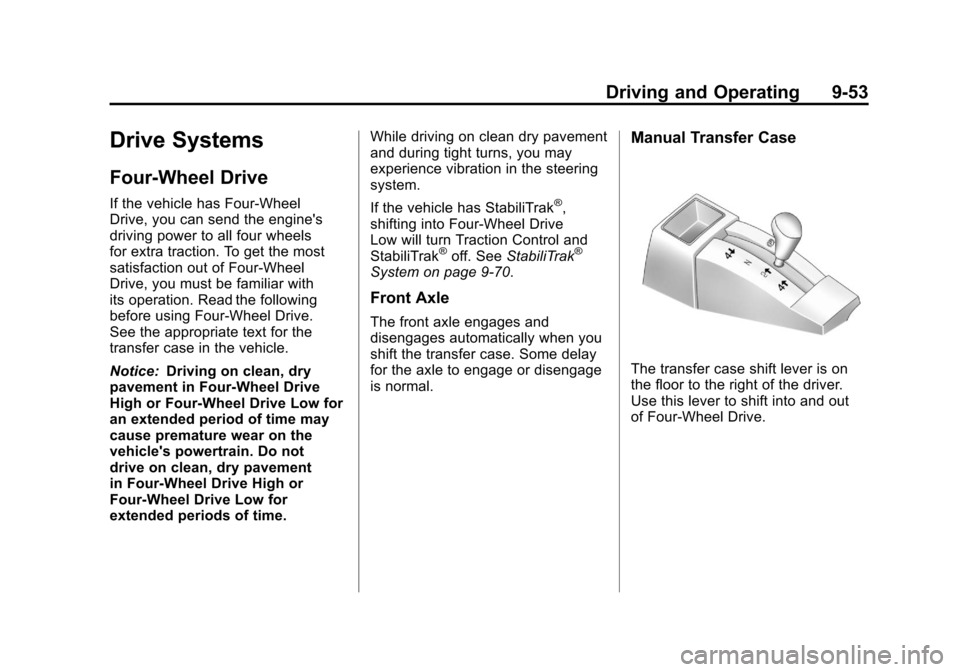
Manual Transfer Case
The transfer case shift lever is on
the floor to the right of the driver.
Use this lever to shift into and out
of Four-Wheel Drive.
Page 352 of 588
Black plate (58,1)Chevrolet Silverado Owner Manual - 2011
9-58 Driving and Operating
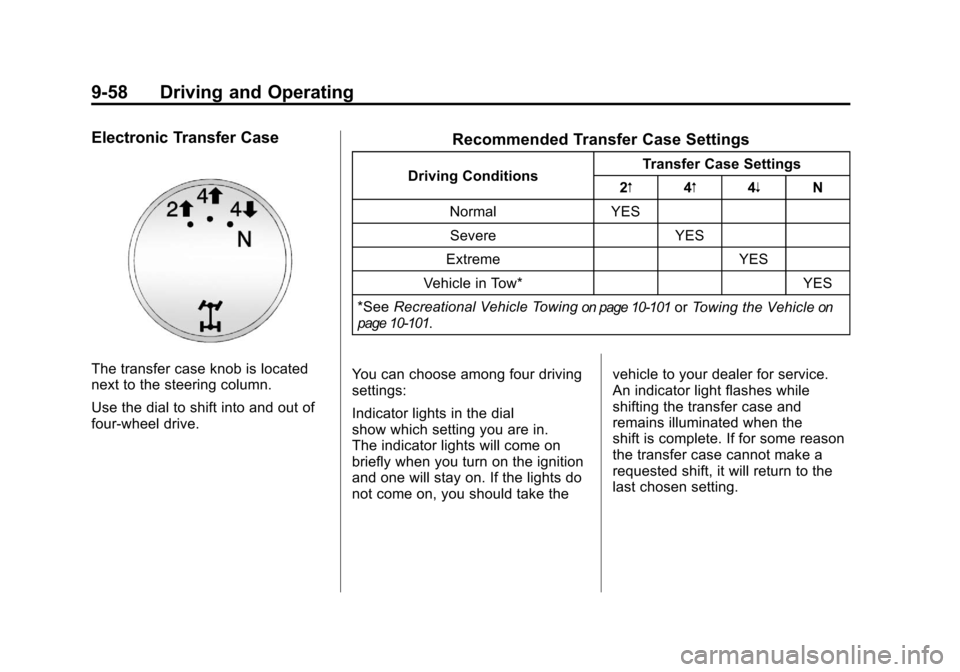
Electronic Transfer Case
The transfer case knob is located
next to the steering column.
Use the dial to shift into and out of
four-wheel drive.
Recommended Transfer Case Settings
Driving ConditionsTransfer Case Settings
2m 4m4n N
Normal YES Severe YES
Extreme YES
Vehicle in Tow* YES
*See Recreational Vehicle Towing
on page 10‑101orTowing the Vehicleon
page 10‑101.
You can choose among four driving
settings:
Indicator lights in the dial
show which setting you are in.
The indicator lights will come on
briefly when you turn on the ignition
and one will stay on. If the lights do
not come on, you should take the vehicle to your dealer for service.
An indicator light flashes while
shifting the transfer case and
remains illuminated when the
shift is complete. If for some reason
the transfer case cannot make a
requested shift, it will return to the
last chosen setting.
Page 356 of 588
Black plate (62,1)Chevrolet Silverado Owner Manual - 2011
9-62 Driving and Operating
Shifting Out of Neutral
To shift the transfer case out of
N (Neutral) do the following:
1. Set the parking brake and applythe regular brake pedal.
2. Turn the ignition to ON/RUN with the engine off, and shift the
transmission to N (Neutral).
3. Turn the transfer case dial to Two-Wheel Drive High.
After the transfer case has
shifted out of N (Neutral), the
N (Neutral) light will go out.
4. Release the parking brake prior to moving the vehicle. Notice:
Shifting the transmission
into gear before the requested
mode indicator light has stopped
flashing could damage the
transfer case. To help avoid
damaging the vehicle, always
wait for the mode indicator lights
to stop flashing before shifting
the transmission into gear.
5. Start the engine and shift the
transmission to the desired
position.
Excessively shifting the transfer
case into or out of the different
modes may cause the transfer case
to enter the shift protection mode.
This will protect the transfer case
from possible damage and will only
allow the transfer case to respond
to one shift per 10 seconds. The
transfer case may stay in this mode
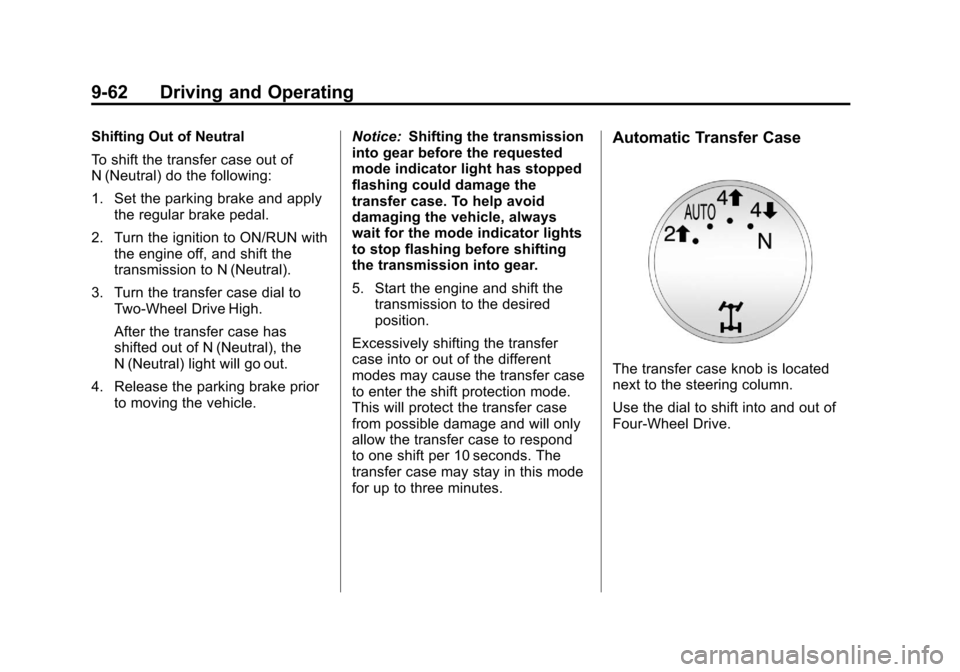
for up to three minutes.Automatic Transfer Case
The transfer case knob is located
next to the steering column.
Use the dial to shift into and out of
Four-Wheel Drive.
Page 362 of 588
Black plate (68,1)Chevrolet Silverado Owner Manual - 2011
9-68 Driving and Operating
Braking in Emergencies
If the vehicle has ABS, it allows
the driver to steer and brake at
the same time. However, if the
vehicle does not have ABS, the
first reaction, to hit the brake pedal
hard and hold it down, might be
the wrong thing to do. The wheels
can stop rolling. Once they do,
the vehicle cannot respond to the
driver's steering. Momentum will
carry it in whatever direction it was
headed when the wheels stopped
rolling. That could be off the road,
into the very thing the driver was
trying to avoid, or into traffic.
If the vehicle does not have ABS,
use a squeeze braking technique.
This gives maximum braking while
maintaining steering control. Do this
by pushing on the brake pedal with
steadily increasing pressure.
In an emergency, you will probably
want to squeeze the brakes hard
without locking the wheels. If you
hear or feel the wheels sliding, easeoff the brake pedal. This helps
retain steering control. With ABS,
it is different.
In many emergencies, steering can
help more than even the very best
braking.
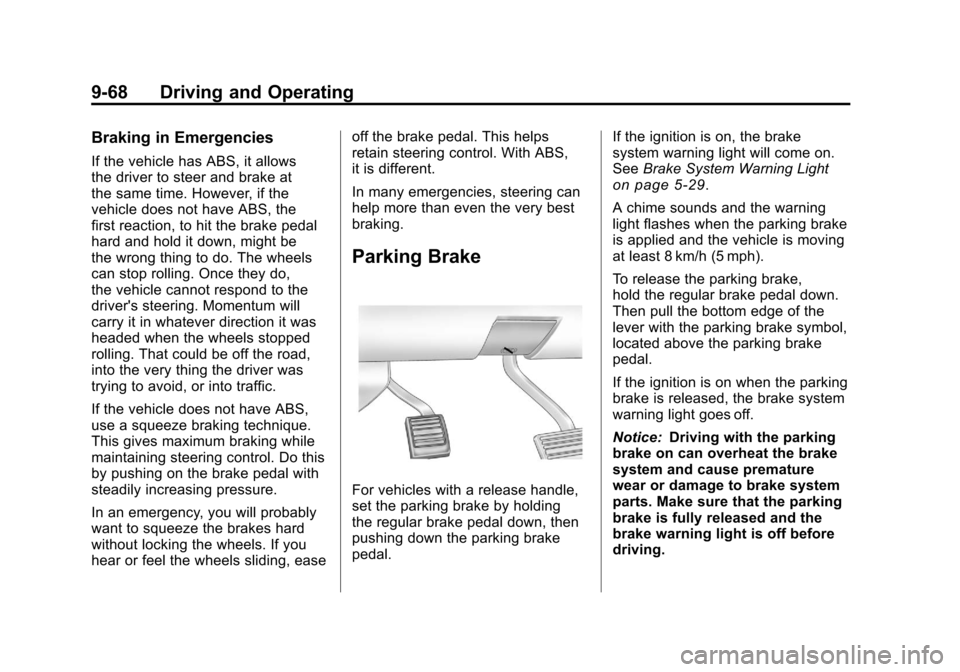
Parking Brake
For vehicles with a release handle,
set the parking brake by holding
the regular brake pedal down, then
pushing down the parking brake
pedal.
If the ignition is on, the brake
system warning light will come on.
See
Brake System Warning Light
on page 5‑29.
A chime sounds and the warning
light flashes when the parking brake
is applied and the vehicle is moving
at least 8 km/h (5 mph).
To release the parking brake,
hold the regular brake pedal down.
Then pull the bottom edge of the
lever with the parking brake symbol,
located above the parking brake
pedal.
If the ignition is on when the parking
brake is released, the brake system
warning light goes off.
Notice: Driving with the parking
brake on can overheat the brake
system and cause premature
wear or damage to brake system
parts. Make sure that the parking
brake is fully released and the
brake warning light is off before
driving.
Page 368 of 588
Black plate (74,1)Chevrolet Silverado Owner Manual - 2011
9-74 Driving and Operating
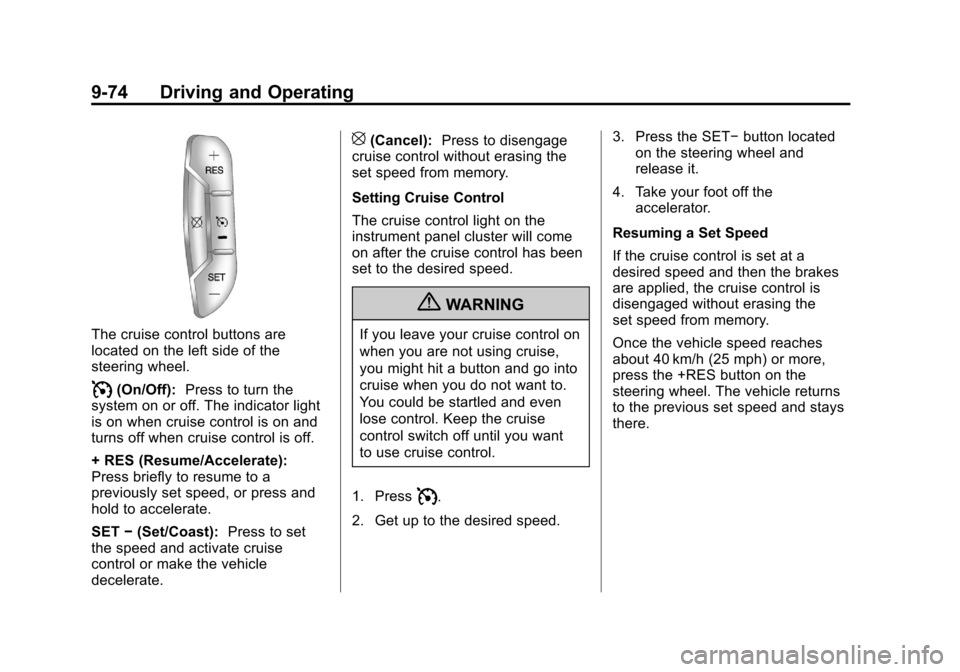
The cruise control buttons are
located on the left side of the
steering wheel.
I(On/Off):Press to turn the
system on or off. The indicator light
is on when cruise control is on and
turns off when cruise control is off.
+ RES (Resume/Accelerate):
Press briefly to resume to a
previously set speed, or press and
hold to accelerate.
SET −(Set/Coast): Press to set
the speed and activate cruise
control or make the vehicle
decelerate.
[(Cancel): Press to disengage
cruise control without erasing the
set speed from memory.
Setting Cruise Control
The cruise control light on the
instrument panel cluster will come
on after the cruise control has been
set to the desired speed.
{WARNING
If you leave your cruise control on
when you are not using cruise,
you might hit a button and go into
cruise when you do not want to.
You could be startled and even
lose control. Keep the cruise
control switch off until you want
to use cruise control.
1. Press
I.
2. Get up to the desired speed. 3. Press the SET−
button located
on the steering wheel and
release it.
4. Take your foot off the accelerator.
Resuming a Set Speed
If the cruise control is set at a
desired speed and then the brakes
are applied, the cruise control is
disengaged without erasing the
set speed from memory.
Once the vehicle speed reaches
about 40 km/h (25 mph) or more,
press the +RES button on the
steering wheel. The vehicle returns
to the previous set speed and stays
there.
Page 369 of 588
Black plate (75,1)Chevrolet Silverado Owner Manual - 2011
Driving and Operating 9-75
Increasing Speed While Using
Cruise Control
If the cruise control system is
already activated,
.Press and hold the +RES button
on the steering wheel until the
desired speed is reached, then
release it.
.To increase vehicle speed in
small amounts, press the +RES
button. Each time this is done,
the vehicle goes about 1.6 km/h
(1 mph) faster.
Reducing Speed While Using
Cruise Control
If the cruise control system is
already activated,
.Press and hold the SET– button
on the steering wheel until the
desired lower speed is reached,
then release it.
.To slow down in small amounts,
press the SET– button on the
steering wheel briefly. Each time
this is done, the vehicle goes
about 1.6 km/h (1 mph) slower.
Passing Another Vehicle While
Using Cruise Control
Use the accelerator pedal to
increase the vehicle speed.
When you take your foot off the
pedal, the vehicle will slow down
to the previous set cruise speed.
Using Cruise Control on Hills
How well the cruise control will work
on hills depends upon the vehicle
speed, load, and the steepness of
the hills. While going up steep hills,
you might have to step on the
accelerator pedal to maintain the
vehicle speed. While going downhill,
you might have to brake or shift to
a lower gear to keep the vehicle
speed down. When the brakes
are applied the cruise control is
disengaged. Ending Cruise Control
There are three ways to end cruise
control:
.To disengage cruise control;
step lightly on the brake pedal.
.Press[on the steering wheel.
.To turn off the cruise control,
press
Ion the steering wheel.
Erasing Speed Memory
The cruise control set speed is
erased from memory by pressing
the
Ibutton or if the ignition is
turned off.
Page 386 of 588
Black plate (92,1)Chevrolet Silverado Owner Manual - 2011
9-92 Driving and Operating
Passing
More passing distance is
needed when towing a trailer.
The combination will not accelerate
as quickly and is longer so it is
necessary to go much farther
beyond the passed vehicle
before returning to the lane.
Backing Up
Hold the bottom of the steering
wheel with one hand. To move
the trailer to the left, move that
hand to the left. To move the trailer
to the right, move your hand to
the right. Always back up slowly
and, if possible, have someone
guide you.
Making Turns
Notice:Making very sharp turns
while trailering could cause the
trailer to come in contact with
the vehicle. The vehicle could be
damaged. Avoid making very
sharp turns while trailering.
When turning with a trailer, make
wider turns than normal. Do this
so the trailer will not strike soft
shoulders, curbs, road signs, trees,
or other objects. Avoid jerky or
sudden maneuvers. Signal well
in advance.
If the trailer turn signal bulbs burn
out, the arrows on the instrument
panel will still flash for turns. It is
important to check occasionally to
be sure the trailer bulbs are still
working.
Driving on Grades
Reduce speed and shift to a
lower gear beforestarting down
a long or steep downgrade. If the
transmission is not shifted down,
the brakes might get hot and no
longer work well.
Vehicles can tow in D (Drive). Shift
the transmission to a lower gear if
the transmission shifts too often
under heavy loads and/or hilly
conditions.
The Tow/Haul Mode may be used
if the transmission shifts too often.
See Tow/Haul Mode on page 9‑49.
When towing at high altitude on
steep uphill grades, consider the
following: Engine coolant will boil
at a lower temperature than at
normal altitudes. If the engine is
turned off immediately after towing
at high altitude on steep uphill
grades, the vehicle may show
signs similar to engine overheating.
Page 409 of 588
Black plate (115,1)Chevrolet Silverado Owner Manual - 2011
Driving and Operating 9-115
.Red: Battery Feed
.Dark Blue: Trailer Brake
If the vehicle is equipped with the
“Heavy-Duty Trailering”option,
please refer to “Heavy-Duty Trailer
Wiring Package” earlier in this
section.
When the camper-wiring harness
is ordered without the heavy-duty
trailering package, an eight-wire
harness with a seven-pin connector
is located at the rear of the vehicle
and is tied to the vehicle's frame.
Electric Brake Control Wiring
Provisions
These wiring provisions are
included with the vehicle as part of
the trailer wiring package. These
provisions are for an electric brake
controller. The instrument panel
contains blunt cut wires behind the
steering column for the trailer brake
controller. The harness contains the
following wires:
.Dark Blue: Brake Signal to
Trailer Connector
.Red/Black: Battery
.Light Blue/White: Brake Switch
.White: Ground
The harness should be installed by
your dealer or a qualified service
center. If the vehicle is equipped with an
Integrated Trailer Brake Control
(ITBC) System, the blunt cuts exist,
but are not connected further in the
harness. If an aftermarket trailer
brake controller is installed, the
ITBC must be disconnected. Do not
power both ITBC and aftermarket
controllers to control the trailer
brakes at the same time.
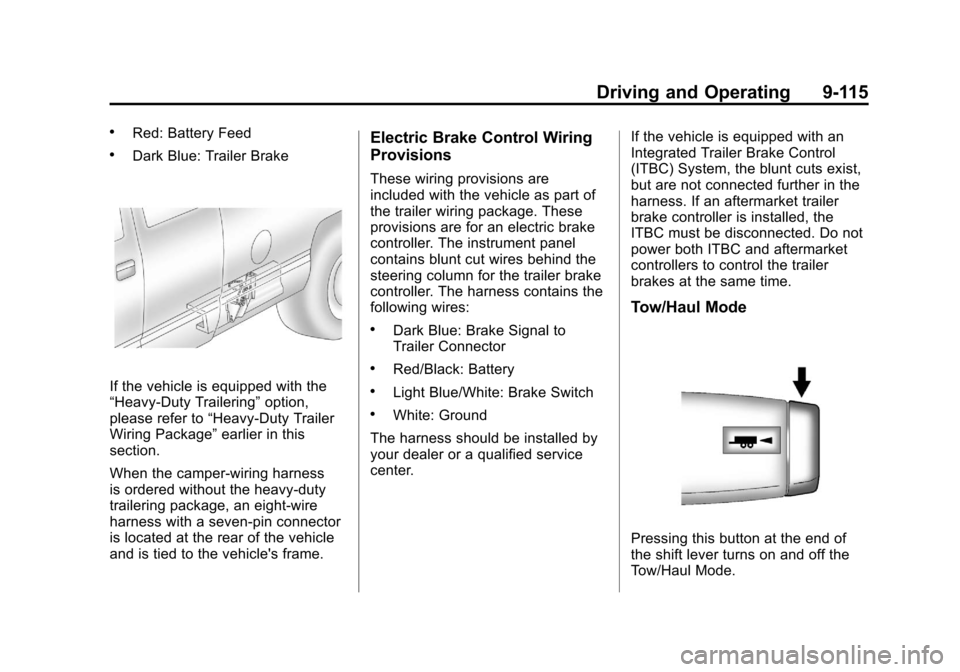
Tow/Haul Mode
Pressing this button at the end of
the shift lever turns on and off the
Tow/Haul Mode.
Page 412 of 588
Black plate (118,1)Chevrolet Silverado Owner Manual - 2011
9-118 Driving and Operating
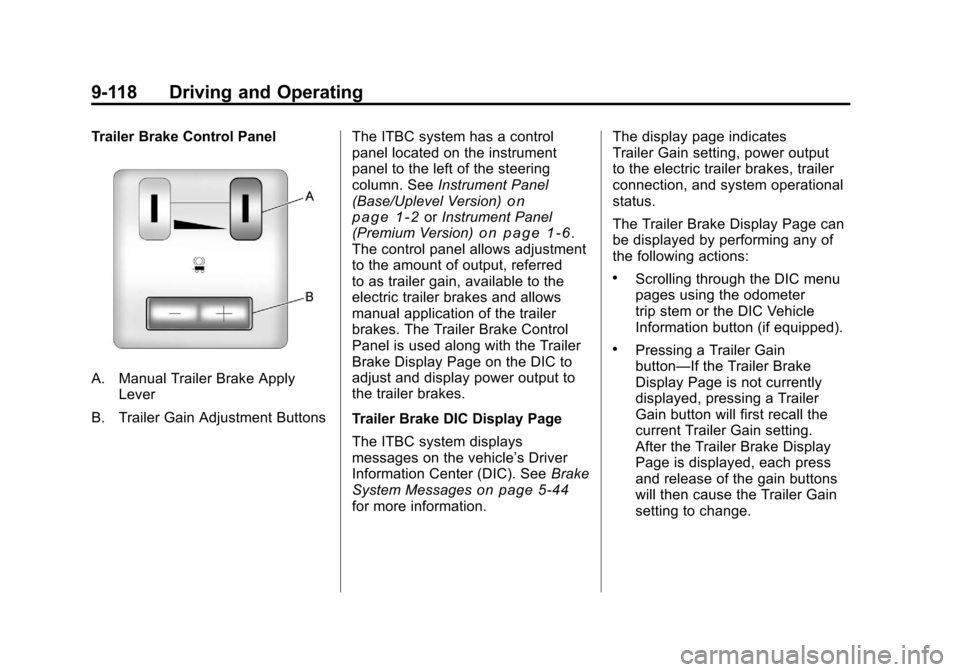
Trailer Brake Control Panel
A. Manual Trailer Brake ApplyLever
B. Trailer Gain Adjustment Buttons The ITBC system has a control
panel located on the instrument
panel to the left of the steering
column. See
Instrument Panel
(Base/Uplevel Version)
on
page 1‑2or Instrument Panel
(Premium Version)on page 1‑6.
The control panel allows adjustment
to the amount of output, referred
to as trailer gain, available to the
electric trailer brakes and allows
manual application of the trailer
brakes. The Trailer Brake Control
Panel is used along with the Trailer
Brake Display Page on the DIC to
adjust and display power output to
the trailer brakes.
Trailer Brake DIC Display Page
The ITBC system displays
messages on the vehicle’s Driver
Information Center (DIC). See Brake
System Messages
on page 5‑44for more information. The display page indicates
Trailer Gain setting, power output
to the electric trailer brakes, trailer
connection, and system operational
status.
The Trailer Brake Display Page can
be displayed by performing any of
the following actions:
.Scrolling through the DIC menu
pages using the odometer
trip stem or the DIC Vehicle
Information button (if equipped).
.Pressing a Trailer Gain
button—If the Trailer Brake
Display Page is not currently
displayed, pressing a Trailer
Gain button will first recall the
current Trailer Gain setting.
After the Trailer Brake Display
Page is displayed, each press
and release of the gain buttons
will then cause the Trailer Gain
setting to change.
Page 423 of 588
Black plate (1,1)Chevrolet Silverado Owner Manual - 2011
Vehicle Care 10-1
Vehicle Care
General Information
General Information . . . . . . . . . . 10-3
California Proposition65 Warning . . . . . . . . . . . . . . . . . 10-3
California Perchlorate Materials Requirements . . . . 10-3
Accessories and Modifications . . . . . . . . . . . . . . . 10-3
Vehicle Checks
Doing Your OwnService Work . . . . . . . . . . . . . . . 10-4
Hood . . . . . . . . . . . . . . . . . . . . . . . . 10-5
Engine Compartment Overview . . . . . . . . . . . . . . . . . . . 10-6
Engine Oil . . . . . . . . . . . . . . . . . . . 10-7
Engine Oil Life System . . . . . . 10-9
Automatic Transmission Fluid (4-Speed Transmission) . . . 10-11
Automatic Transmission Fluid (6-Speed
Transmission) . . . . . . . . . . . . . 10-14 Manual Transmission
Fluid . . . . . . . . . . . . . . . . . . . . . . 10-17
Hydraulic Clutch . . . . . . . . . . . . 10-17
Engine Air Cleaner/Filter . . . . 10-18
Cooling System . . . . . . . . . . . . 10-19
Engine Coolant . . . . . . . . . . . . . 10-20
Engine Overheating . . . . . . . . 10-24
Overheated Engine Protection
Operating Mode . . . . . . . . . . . 10-26
Engine Fan . . . . . . . . . . . . . . . . . 10-26
Power Steering Fluid . . . . . . . 10-27
Washer Fluid . . . . . . . . . . . . . . . 10-28
Brakes . . . . . . . . . . . . . . . . . . . . . 10-29
Brake Fluid . . . . . . . . . . . . . . . . . 10-30
Battery . . . . . . . . . . . . . . . . . . . . . 10-32
Four-Wheel Drive . . . . . . . . . . . 10-32
Front Axle . . . . . . . . . . . . . . . . . . 10-34
Rear Axle . . . . . . . . . . . . . . . . . . 10-35
Noise Control System . . . . . . 10-36
Starter Switch Check . . . . . . . 10-37
Automatic Transmission Shift Lock Control Function
Check . . . . . . . . . . . . . . . . . . . . . 10-38
Ignition Transmission Lock Check . . . . . . . . . . . . . . . . . . . . . 10-38 Park Brake and P (Park)
Mechanism Check . . . . . . . . 10-39
Wiper Blade Replacement . . . . . . . . . . . . . . 10-39
Glass Replacement . . . . . . . . 10-40
Headlamp Aiming
Headlamp Aiming . . . . . . . . . . 10-40
Bulb Replacement
Bulb Replacement . . . . . . . . . . 10-43
Halogen Bulbs . . . . . . . . . . . . . . 10-43
Headlamps (Silverado) . . . . . 10-43
Pick-Up Box Identification
and Fender Marker
Lamps . . . . . . . . . . . . . . . . . . . . 10-44
Taillamps (Chassis Cab Models) . . . . . . . . . . . . . . . . . . . 10-44
Taillamps, Turn Signal, Stoplamps, and Back-Up
Lamps . . . . . . . . . . . . . . . . . . . . 10-45
Center High-Mounted Stoplamp (CHMSL) and
Cargo Lamp . . . . . . . . . . . . . . 10-45
License Plate Lamp . . . . . . . . 10-46
Replacement Bulbs . . . . . . . . . 10-46