driver seat adjustment CHEVROLET SILVERADO 2011 2.G Owners Manual
[x] Cancel search | Manufacturer: CHEVROLET, Model Year: 2011, Model line: SILVERADO, Model: CHEVROLET SILVERADO 2011 2.GPages: 588, PDF Size: 7.99 MB
Page 7 of 588
Black plate (1,1)Chevrolet Silverado Owner Manual - 2011
In Brief 1-1
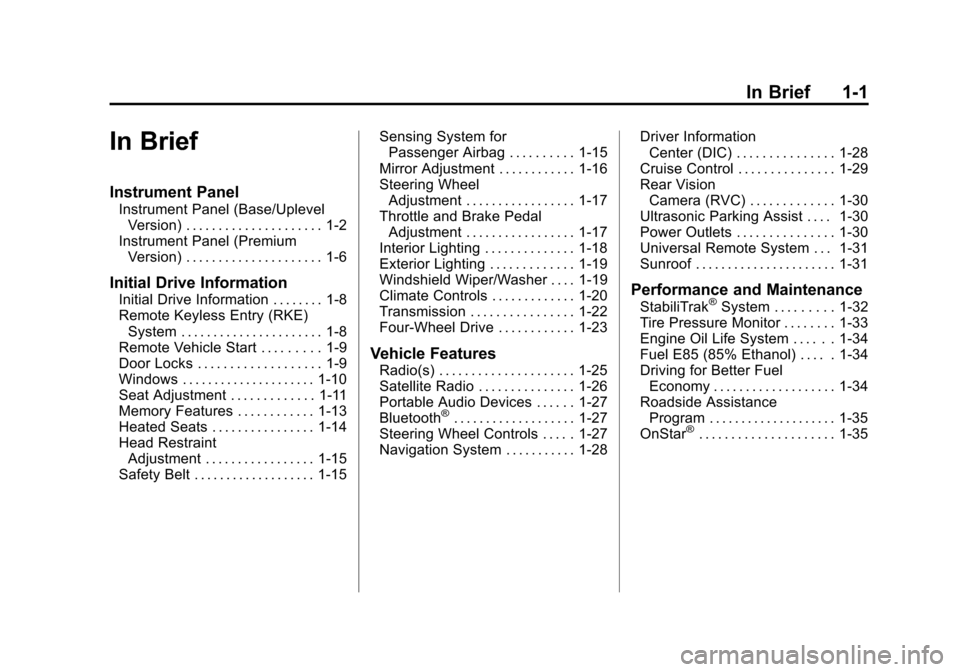
In Brief
Instrument Panel
Instrument Panel (Base/UplevelVersion) . . . . . . . . . . . . . . . . . . . . . 1-2
Instrument Panel (Premium Version) . . . . . . . . . . . . . . . . . . . . . 1-6
Initial Drive Information
Initial Drive Information . . . . . . . . 1-8
Remote Keyless Entry (RKE)System . . . . . . . . . . . . . . . . . . . . . . 1-8
Remote Vehicle Start . . . . . . . . . 1-9
Door Locks . . . . . . . . . . . . . . . . . . . 1-9
Windows . . . . . . . . . . . . . . . . . . . . . 1-10
Seat Adjustment . . . . . . . . . . . . . 1-11
Memory Features . . . . . . . . . . . . 1-13
Heated Seats . . . . . . . . . . . . . . . . 1-14
Head Restraint Adjustment . . . . . . . . . . . . . . . . . 1-15
Safety Belt . . . . . . . . . . . . . . . . . . . 1-15 Sensing System for
Passenger Airbag . . . . . . . . . . 1-15
Mirror Adjustment . . . . . . . . . . . . 1-16
Steering Wheel Adjustment . . . . . . . . . . . . . . . . . 1-17
Throttle and Brake Pedal Adjustment . . . . . . . . . . . . . . . . . 1-17
Interior Lighting . . . . . . . . . . . . . . 1-18
Exterior Lighting . . . . . . . . . . . . . 1-19
Windshield Wiper/Washer . . . . 1-19
Climate Controls . . . . . . . . . . . . . 1-20
Transmission . . . . . . . . . . . . . . . . 1-22
Four-Wheel Drive . . . . . . . . . . . . 1-23
Vehicle Features
Radio(s) . . . . . . . . . . . . . . . . . . . . . 1-25
Satellite Radio . . . . . . . . . . . . . . . 1-26
Portable Audio Devices . . . . . . 1-27
Bluetooth
®. . . . . . . . . . . . . . . . . . . 1-27
Steering Wheel Controls . . . . . 1-27
Navigation System . . . . . . . . . . . 1-28 Driver Information
Center (DIC) . . . . . . . . . . . . . . . 1-28
Cruise Control . . . . . . . . . . . . . . . 1-29
Rear Vision Camera (RVC) . . . . . . . . . . . . . 1-30
Ultrasonic Parking Assist . . . . 1-30
Power Outlets . . . . . . . . . . . . . . . 1-30
Universal Remote System . . . 1-31
Sunroof . . . . . . . . . . . . . . . . . . . . . . 1-31
Performance and Maintenance
StabiliTrak®System . . . . . . . . . 1-32
Tire Pressure Monitor . . . . . . . . 1-33
Engine Oil Life System . . . . . . 1-34
Fuel E85 (85% Ethanol) . . . . . 1-34
Driving for Better Fuel Economy . . . . . . . . . . . . . . . . . . . 1-34
Roadside Assistance Program . . . . . . . . . . . . . . . . . . . . 1-35
OnStar
®. . . . . . . . . . . . . . . . . . . . . 1-35
Page 20 of 588
Black plate (14,1)Chevrolet Silverado Owner Manual - 2011
1-14 In Brief
Storing Memory Positions
To save into memory:
1. Adjust the driver seat andseatback recliner, both outside
mirrors, and the throttle and
brake pedals, if available.
See Power Mirrors
on
page 2‑16and Adjustable
Throttle and Brake Pedalon
page 9‑32for more information.
Not all mirrors and adjustable
throttles and brake pedals will
have the ability to save and
recall their positions.
2. Press and hold “1”until
two beeps sound.
3. Repeat for a second driver position using “2.”
To recall the memory positions,
press and release “1”or“2.” The
vehicle must be in P (Park). A single
beep will sound. The seat, outside mirrors, and adjustable throttle and
brake pedals, if available, will move
to the position previously stored for
the identified driver.
See
“Memory Seat, Mirrors,
and Pedals” underPower Seat
Adjustment
on page 3‑5and
Vehicle Personalization (with DIC
Buttons)
on page 5‑53for more
information.
Easy Exit Driver Seat
The easy exit driver seat feature
can move the seat rearward to allow
extra room to exit the vehicle.
B: Press to recall the easy exit
seat position. The vehicle must be
in P (Park).
See “Memory Seat, Mirrors,
and Pedals” underPower Seat
Adjustment
on page 3‑5and
Vehicle Personalization (with DIC
Buttons)
on page 5‑53for more
information.
Heated Seats
On vehicles with heated front seats,
the controls are located on the
driver and passenger doors.
I: Press to heat the
seatback only.
J: Press to heat the seat and
seatback.
The light on the button will come
on to indicate that the feature is
working. Press the button to cycle
through the temperature settings of
high, medium, and low and to turn
the heat to the seat off. Indicator
lights will show the level of heat
selected: three for high, two for
medium, and one for low.
See Heated Front Seats
on
page 3‑11.
Page 21 of 588
Black plate (15,1)Chevrolet Silverado Owner Manual - 2011
In Brief 1-15
Head Restraint
Adjustment
Do not drive until the head restraints
for all occupants are installed and
adjusted properly.
To achieve a comfortable seating
position, change the seatback
recline angle as little as necessary
while keeping the seat and the
head restraint height in the proper
position.
For more information seeHead
Restraints
on page 3‑2and
Seat Adjustment on page 3‑3.
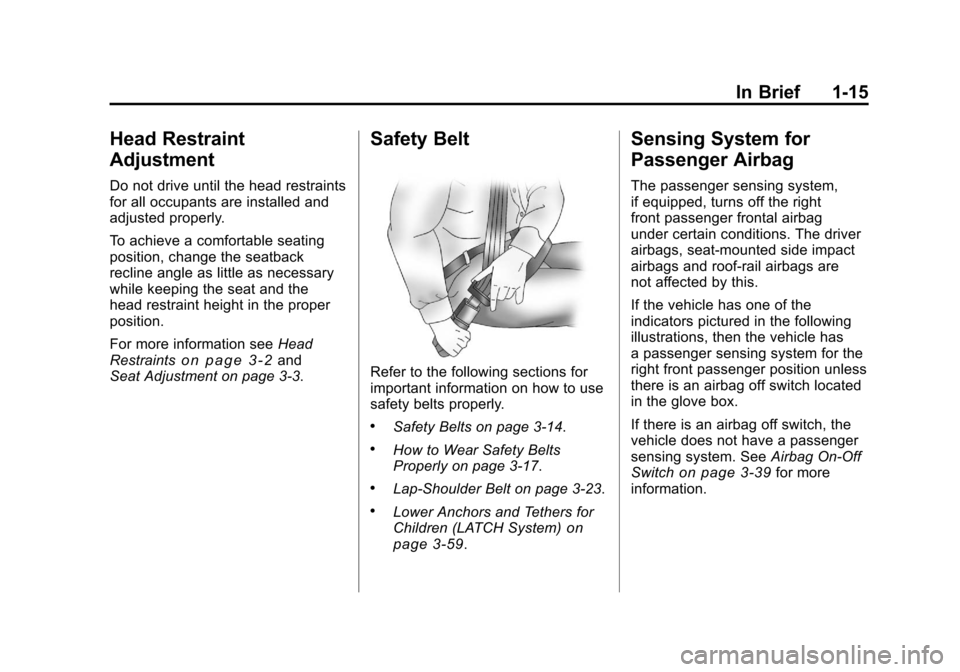
Safety Belt
Refer to the following sections for
important information on how to use
safety belts properly.
.Safety Belts on page 3‑14.
.How to Wear Safety Belts
Properly on page 3‑17.
.Lap-Shoulder Belt on page 3‑23.
.Lower Anchors and Tethers for
Children (LATCH System)on
page 3‑59.
Sensing System for
Passenger Airbag
The passenger sensing system,
if equipped, turns off the right
front passenger frontal airbag
under certain conditions. The driver
airbags, seat‐mounted side impact
airbags and roof‐rail airbags are
not affected by this.
If the vehicle has one of the
indicators pictured in the following
illustrations, then the vehicle has
a passenger sensing system for the
right front passenger position unless
there is an airbag off switch located
in the glove box.
If there is an airbag off switch, the
vehicle does not have a passenger
sensing system. See Airbag On-Off
Switch
on page 3‑39for more
information.
Page 48 of 588
Black plate (4,1)Chevrolet Silverado Owner Manual - 2011
2-4 Keys, Doors and Windows
K(Unlock):Press once to unlock
only the driver door. If
Kis pressed
again within three seconds, all
remaining doors unlock. The interior
lamps may come on and stay on for
20 seconds or until the ignition is
turned on.
If enabled through the DIC, the turn
signal lamps flash twice to indicate
unlocking has occurred. See Vehicle
Personalization (with DIC Buttons)
on page 5‑53. If enabled through
the DIC, the exterior lights may turn
on. See “Approach Lighting” under
Vehicle Personalization (with DIC
Buttons) on page 5‑53.
Pressing
Kon the RKE transmitter
disarms the content theft‐deterrent
system. See Anti-Theft Alarm
System on page 2‑12.
L(Vehicle Locator/Panic
Alarm): Press and release to
locate the vehicle. The turn signal
lamps flash and the horn sounds
three times. Press and hold
Lfor more than
two seconds to activate the panic
alarm. The turn signal lamps flash
and the horn sounds repeatedly
for 30 seconds. The alarm turns
off when the ignition is moved to
ON/RUN or
Lis pressed again.
The ignition must be in LOCK/OFF
for the panic alarm to work.
The vehicle comes with two
transmitters. Each transmitter will
have a number on it: "1" or "2."
These numbers correspond to the
driver of the vehicle. For example,
the memory seat position for
driver 1 will be recalled when
using the transmitter labeled "1",
if enabled through the DIC.
See “Memory Seat, Mirrors,
and Pedals” underPower Seat
Adjustment
on page 3‑5and
Vehicle Personalization (with DIC
Buttons)
on page 5‑53for more
information.
Programming Transmitters to
the Vehicle
Only RKE transmitters
programmed to this vehicle
will work. If a transmitter is
lost or stolen, a replacement
can be purchased and programmed
through your dealer. When the
replacement transmitter is
programmed to this vehicle,
all remaining transmitters must
also be reprogrammed. Any lost or
stolen transmitters will no longer
work once the new transmitter is
programmed. Each vehicle can
have up to eight transmitters
programmed to it. See your dealer
for transmitter programming.
Battery Replacement
Replace the battery if the REPLACE
BATTERY IN REMOTE KEY
message displays in the DIC.
Page 71 of 588
Black plate (3,1)Chevrolet Silverado Owner Manual - 2011
Seats and Restraints 3-3
Front Seats
Seat Adjustment
Manual Seats
{WARNING
You can lose control of the
vehicle if you try to adjust a
manual driver seat while the
vehicle is moving. The sudden
movement could startle and
confuse you, or make you push
a pedal when you do not want to.
Adjust the driver seat only when
the vehicle is not moving.
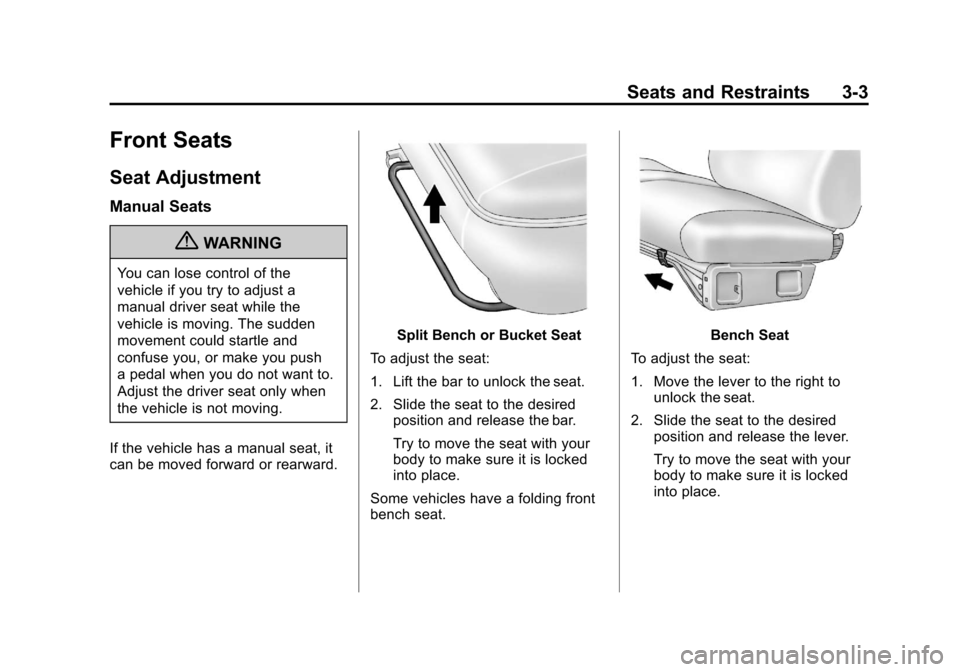
If the vehicle has a manual seat, it
can be moved forward or rearward.
Split Bench or Bucket Seat
To adjust the seat:
1. Lift the bar to unlock the seat.
2. Slide the seat to the desired position and release the bar.
Try to move the seat with your
body to make sure it is locked
into place.
Some vehicles have a folding front
bench seat.Bench Seat
To adjust the seat:
1. Move the lever to the right to unlock the seat.
2. Slide the seat to the desired position and release the lever.
Try to move the seat with your
body to make sure it is locked
into place.
Page 73 of 588
Black plate (5,1)Chevrolet Silverado Owner Manual - 2011
Seats and Restraints 3-5
Center Seat
Your vehicle may have a front
center seat. The seatback doubles
as an armrest and cupholder/
storage area for the driver and
passenger when the center seat
is not used. Do not use it as a
seating position when the seatback
is folded down.
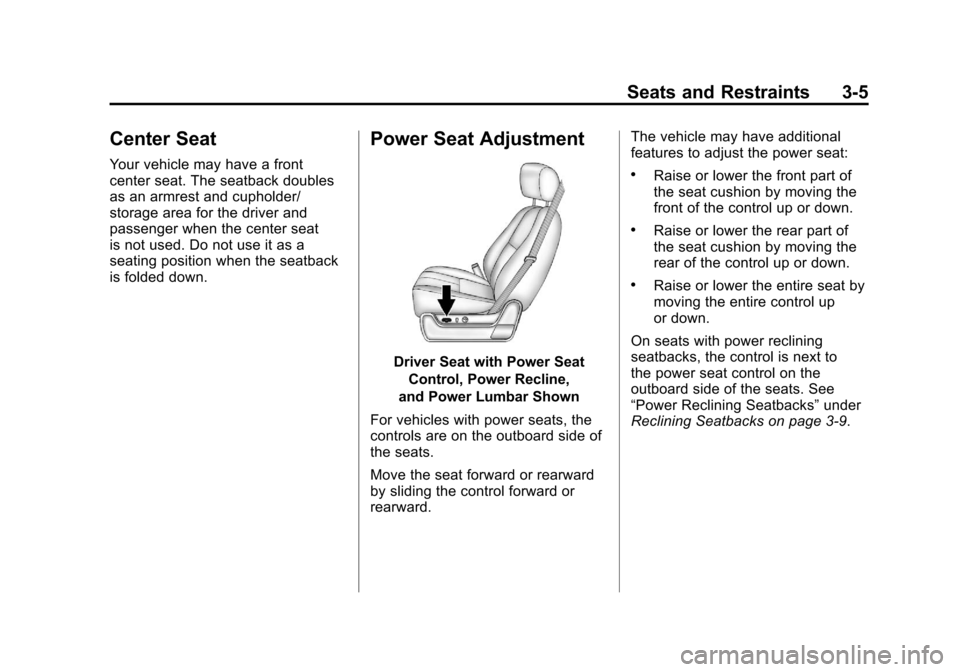
Power Seat Adjustment
Driver Seat with Power SeatControl, Power Recline,
and Power Lumbar Shown
For vehicles with power seats, the
controls are on the outboard side of
the seats.
Move the seat forward or rearward
by sliding the control forward or
rearward. The vehicle may have additional
features to adjust the power seat:
.Raise or lower the front part of
the seat cushion by moving the
front of the control up or down.
.Raise or lower the rear part of
the seat cushion by moving the
rear of the control up or down.
.Raise or lower the entire seat by
moving the entire control up
or down.
On seats with power reclining
seatbacks, the control is next to
the power seat control on the
outboard side of the seats. See
“Power Reclining Seatbacks” under
Reclining Seatbacks on page 3‑9.
Page 75 of 588
Black plate (7,1)Chevrolet Silverado Owner Manual - 2011
Seats and Restraints 3-7
If something has blocked the driver
seat and/or the adjustable pedals
while recalling a memory position,
the recall may stop. Remove the
obstruction; then press and hold the
appropriate manual control for the
memory item that is not recalling
for two seconds. Try recalling the
memory position again by pressing
the appropriate memory button.
If the memory position is still not
recalling, see your dealer for
service.
Easy Exit Driver Seat
The easy exit driver seat feature
can move the seat rearward to allow
extra room to exit the vehicle.
B(Easy Exit Driver Seat):Press
to recall the easy exit seat position.
The vehicle must be in P (Park).
If the easy exit seat feature is
programmed on in the vehicle
personalization menu, automatic
seat movement occurs when the
ignition key is removed. A single beep sounds. The driver
seat moves back approximately
8 cm (3 in). To move the seat back
farther, press the easy exit seat
button again until the seat is all the
way back.
If something has blocked the driver
seat while recalling the exit position,
the recall may stop. Remove the
obstruction; then press and hold
the power seat control rearward for
two seconds. Try recalling the exit
position again. If the exit position is
still not recalling, see your dealer for
service.
See
“Easy Exit Recall” and
“Easy Exit Setup” underVehicle
Personalization (with DIC Buttons)on page 5‑53for more information.
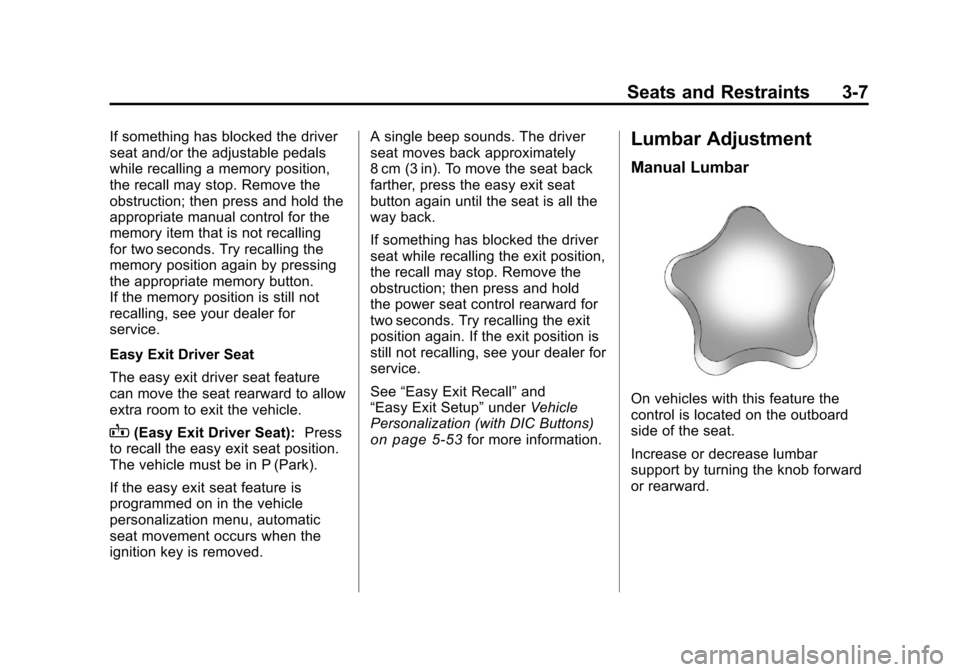
Lumbar Adjustment
Manual Lumbar
On vehicles with this feature the
control is located on the outboard
side of the seat.
Increase or decrease lumbar
support by turning the knob forward
or rearward.
Page 93 of 588
Black plate (25,1)Chevrolet Silverado Owner Manual - 2011
Seats and Restraints 3-25
To unlatch the belt, push the button
on the buckle. The belt should
return to its stowed position.
Before a door is closed, be sure the
safety belt is out of the way. If a
door is slammed against a safety
belt, damage can occur to both the
safety belt and the vehicle.
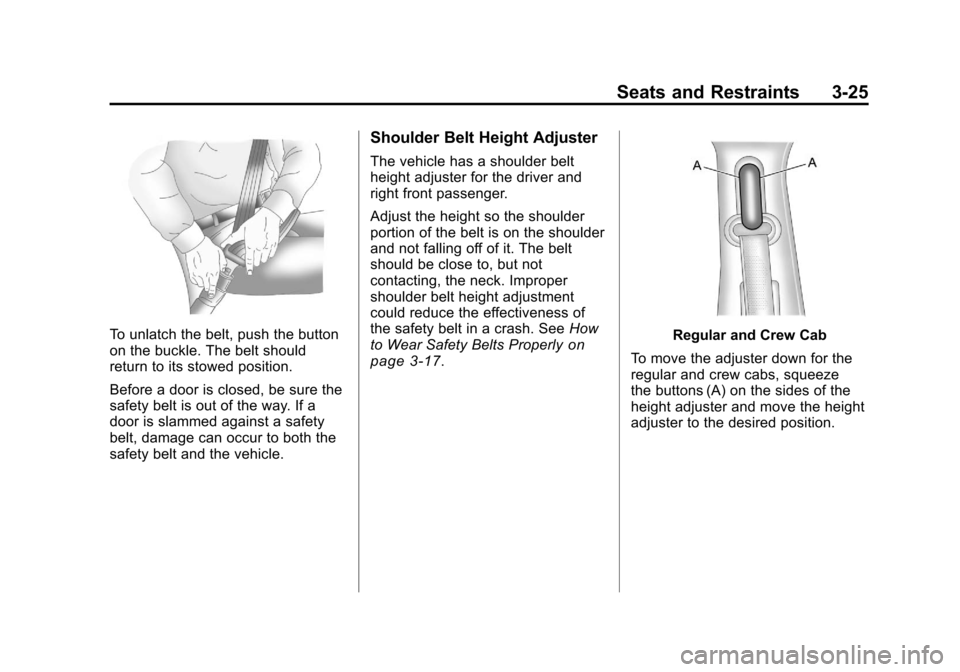
Shoulder Belt Height Adjuster
The vehicle has a shoulder belt
height adjuster for the driver and
right front passenger.
Adjust the height so the shoulder
portion of the belt is on the shoulder
and not falling off of it. The belt
should be close to, but not
contacting, the neck. Improper
shoulder belt height adjustment
could reduce the effectiveness of
the safety belt in a crash. SeeHow
to Wear Safety Belts Properly
on
page 3‑17.
Regular and Crew Cab
To move the adjuster down for the
regular and crew cabs, squeeze
the buttons (A) on the sides of the
height adjuster and move the height
adjuster to the desired position.
Page 209 of 588
Black plate (59,1)Chevrolet Silverado Owner Manual - 2011
Instruments and Controls 5-59
DRIVER MIRROR:The driver
outside mirror will be tilted down
when the vehicle is shifted into
R (Reverse).
PASSENGER MIRROR: The
passenger outside mirror will be
tilted down when the vehicle is
shifted into R (Reverse).
BOTH MIRRORS: The driver and
passenger outside mirrors will be
tilted down when the vehicle is
shifted into R (Reverse).
NO CHANGE: No change will be
made to this feature. The current
setting will remain.
To select a setting, press the
set/reset button while the desired
setting is displayed on the DIC.
EASY EXIT RECALL
If the vehicle has this feature,
it allows you to select your
preference for the automatic easy
exit seat feature. See “Memory
Seat, Mirrors, and Pedals” inPower
Seat Adjustment
on page 3‑5for more information. Press the customization button until
EASY EXIT RECALL appears on
the DIC display. Press the set/reset
button once to access the settings
for this feature. Then press the
customization button to scroll
through the following settings:
DOOR BUTTON ONLY:
No
automatic seat exit recall will occur.
The recall will only occur after
pressing the easy exit seat button.
BUTTON & KEY OUT (default):
If the features are enabled through
the EASY EXIT SETUP menu, the
driver seat will move back when the
key is removed from the ignition or
the easy exit seat button is pressed.
The automatic easy exit seat
movement will only occur one time
after the key is removed from the
ignition. If the automatic movement
has already occurred, and you put
the key back in the ignition and
remove it again, the seat will stay
in the original exit position, unless
a memory recall took place prior to
removing the key again. NO CHANGE:
No change will be
made to this feature. The current
setting will remain.
To select a setting, press the
set/reset button while the desired
setting is displayed on the DIC.
EASY EXIT SETUP
If the vehicle has this feature, it
allows you to select which areas
will recall with the automatic easy
exit seat feature. It also allows
you to turn off the automatic easy
exit feature. See “Memory Seat,
Mirrors, and Pedals” inPower Seat
Adjustment
on page 3‑5and
“EASY EXIT RECALL” earlier for
more information.
Press the customization button until
EASY EXIT SETUP appears on the
DIC display. Press the set/reset
button once to access the settings
for this feature. Then press the
menu up/down button to scroll
through the following settings:
OFF: No automatic seat exit will
recall.
Page 210 of 588
Black plate (60,1)Chevrolet Silverado Owner Manual - 2011
5-60 Instruments and Controls
SEAT ONLY (default):The driver
seat will recall.
NO CHANGE: No change will be
made to this feature. The current
setting will remain.
To select a setting, press the
set/reset button while the desired
setting is displayed on the DIC.
MEMORY SEAT RECALL
If the vehicle has this feature,
it allows you to select your
preference for the remote memory
seat recall feature. See “Memory
Seat, Mirrors, and Pedals” inPower
Seat Adjustment
on page 3‑5for more information.
Press the customization button
until MEMORY SEAT RECALL
appears on the DIC display. Press
the set/reset button once to access
the settings for this feature. Then
press the customization button to
scroll through the following settings:
OFF (default): No remote memory
seat recall will occur. ON:
The driver seat and, on
some vehicles, the outside mirrors
will automatically move to the
stored driving position when the
unlock button on the Remote
Keyless Entry (RKE) transmitter
is pressed. On some vehicles with
the adjustable throttle and brake
pedal feature, the pedals will also
automatically move.
NO CHANGE: No change will be
made to this feature. The current
setting will remain.
To select a setting, press the
set/reset button while the desired
setting is displayed on the DIC.
FACTORY SETTINGS
This feature allows you to set all of
the customization features back to
their factory default settings. Press the customization button until
FACTORY SETTINGS appears on
the DIC display. Press the set/reset
button once to access the settings
for this feature. Then press the
customization button to scroll
through the following settings:
RESTORE ALL (default):
The
customization features will be set
to their factory default settings.
DO NOT RESTORE: The
customization features will not be
set to their factory default settings.
To select a setting, press the
set/reset button while the desired
setting is displayed on the DIC.
EXIT FEATURE SETTINGS
This feature allows you to exit the
feature settings menu.
Press the customization button
until PRESS
VTO EXIT FEATURE
SETTINGS appears in the DIC
display. Press the set/reset button
once to exit the menu.