instrument panel CHEVROLET SILVERADO 2011 2.G Owners Manual
[x] Cancel search | Manufacturer: CHEVROLET, Model Year: 2011, Model line: SILVERADO, Model: CHEVROLET SILVERADO 2011 2.GPages: 588, PDF Size: 7.99 MB
Page 1 of 588

Black plate (1,1)Chevrolet Silverado Owner Manual - 2011
2011 Chevrolet Silverado Owner ManualM
In Brief. . . . . . . . . . . . . . . . . . . . . . . . 1-1
Instrument Panel . . . . . . . . . . . . . . 1-2
Initial Drive Information . . . . . . . . 1-8
Vehicle Features . . . . . . . . . . . . . 1-25
Performance and Maintenance . . . . . . . . . . . . . . . . 1-32
Keys, Doors and Windows . . . 2-1
Keys and Locks . . . . . . . . . . . . . . . 2-2
Doors . . . . . . . . . . . . . . . . . . . . . . . . 2-10
Vehicle Security . . . . . . . . . . . . . . 2-12
Exterior Mirrors . . . . . . . . . . . . . . . 2-15
Interior Mirrors . . . . . . . . . . . . . . . . 2-19
Windows . . . . . . . . . . . . . . . . . . . . . 2-20
Roof . . . . . . . . . . . . . . . . . . . . . . . . . . 2-22
Seats and Restraints . . . . . . . . . 3-1
Head Restraints . . . . . . . . . . . . . . . 3-2
Front Seats . . . . . . . . . . . . . . . . . . . . 3-3
Rear Seats . . . . . . . . . . . . . . . . . . . 3-12
Safety Belts . . . . . . . . . . . . . . . . . . 3-14
Airbag System . . . . . . . . . . . . . . . . 3-31
Child Restraints . . . . . . . . . . . . . . 3-51 Storage
. . . . . . . . . . . . . . . . . . . . . . . 4-1
Storage Compartments . . . . . . . . 4-1
Instruments and Controls . . . . 5-1
Controls . . . . . . . . . . . . . . . . . . . . . . . 5-2
Warning Lights, Gauges, and Indicators . . . . . . . . . . . . . . . . . . . 5-12
Information Displays . . . . . . . . . . 5-34
Vehicle Messages . . . . . . . . . . . . 5-43
Vehicle Personalization . . . . . . . 5-53
Universal Remote System . . . . 5-61
Lighting . . . . . . . . . . . . . . . . . . . . . . . 6-1
Exterior Lighting . . . . . . . . . . . . . . . 6-1
Interior Lighting . . . . . . . . . . . . . . . . 6-7
Lighting Features . . . . . . . . . . . . . . 6-9
Infotainment System . . . . . . . . . 7-1
Introduction . . . . . . . . . . . . . . . . . . . . 7-1
Radio . . . . . . . . . . . . . . . . . . . . . . . . . . 7-8
Audio Players . . . . . . . . . . . . . . . . 7-14
Rear Seat Infotainment . . . . . . . 7-38
Phone . . . . . . . . . . . . . . . . . . . . . . . . 7-49 Climate Controls
. . . . . . . . . . . . . 8-1
Climate Control Systems . . . . . . 8-1
Air Vents . . . . . . . . . . . . . . . . . . . . . 8-11
Driving and Operating . . . . . . . . 9-1
Driving Information . . . . . . . . . . . . . 9-2
Starting and Operating . . . . . . . 9-32
Engine Exhaust . . . . . . . . . . . . . . 9-42
Automatic Transmission . . . . . . 9-43
Manual Transmission . . . . . . . . . 9-51
Drive Systems . . . . . . . . . . . . . . . . 9-53
Brakes . . . . . . . . . . . . . . . . . . . . . . . 9-67
Ride Control Systems . . . . . . . . 9-70
Cruise Control . . . . . . . . . . . . . . . . 9-73
Object Detection Systems . . . . 9-76
Fuel . . . . . . . . . . . . . . . . . . . . . . . . . . 9-83
Towing . . . . . . . . . . . . . . . . . . . . . . . 9-90
Conversions and
Add-Ons . . . . . . . . . . . . . . . . . . . 9-123
Page 7 of 588
Black plate (1,1)Chevrolet Silverado Owner Manual - 2011
In Brief 1-1
In Brief
Instrument Panel
Instrument Panel (Base/UplevelVersion) . . . . . . . . . . . . . . . . . . . . . 1-2
Instrument Panel (Premium Version) . . . . . . . . . . . . . . . . . . . . . 1-6
Initial Drive Information
Initial Drive Information . . . . . . . . 1-8
Remote Keyless Entry (RKE)System . . . . . . . . . . . . . . . . . . . . . . 1-8
Remote Vehicle Start . . . . . . . . . 1-9
Door Locks . . . . . . . . . . . . . . . . . . . 1-9
Windows . . . . . . . . . . . . . . . . . . . . . 1-10
Seat Adjustment . . . . . . . . . . . . . 1-11
Memory Features . . . . . . . . . . . . 1-13
Heated Seats . . . . . . . . . . . . . . . . 1-14
Head Restraint Adjustment . . . . . . . . . . . . . . . . . 1-15
Safety Belt . . . . . . . . . . . . . . . . . . . 1-15 Sensing System for
Passenger Airbag . . . . . . . . . . 1-15
Mirror Adjustment . . . . . . . . . . . . 1-16
Steering Wheel Adjustment . . . . . . . . . . . . . . . . . 1-17
Throttle and Brake Pedal Adjustment . . . . . . . . . . . . . . . . . 1-17
Interior Lighting . . . . . . . . . . . . . . 1-18
Exterior Lighting . . . . . . . . . . . . . 1-19
Windshield Wiper/Washer . . . . 1-19
Climate Controls . . . . . . . . . . . . . 1-20
Transmission . . . . . . . . . . . . . . . . 1-22
Four-Wheel Drive . . . . . . . . . . . . 1-23
Vehicle Features
Radio(s) . . . . . . . . . . . . . . . . . . . . . 1-25
Satellite Radio . . . . . . . . . . . . . . . 1-26
Portable Audio Devices . . . . . . 1-27
Bluetooth
®. . . . . . . . . . . . . . . . . . . 1-27
Steering Wheel Controls . . . . . 1-27
Navigation System . . . . . . . . . . . 1-28 Driver Information
Center (DIC) . . . . . . . . . . . . . . . 1-28
Cruise Control . . . . . . . . . . . . . . . 1-29
Rear Vision Camera (RVC) . . . . . . . . . . . . . 1-30
Ultrasonic Parking Assist . . . . 1-30
Power Outlets . . . . . . . . . . . . . . . 1-30
Universal Remote System . . . 1-31
Sunroof . . . . . . . . . . . . . . . . . . . . . . 1-31
Performance and Maintenance
StabiliTrak®System . . . . . . . . . 1-32
Tire Pressure Monitor . . . . . . . . 1-33
Engine Oil Life System . . . . . . 1-34
Fuel E85 (85% Ethanol) . . . . . 1-34
Driving for Better Fuel Economy . . . . . . . . . . . . . . . . . . . 1-34
Roadside Assistance Program . . . . . . . . . . . . . . . . . . . . 1-35
OnStar
®. . . . . . . . . . . . . . . . . . . . . 1-35
Page 8 of 588
Black plate (2,1)Chevrolet Silverado Owner Manual - 2011
1-2 In Brief
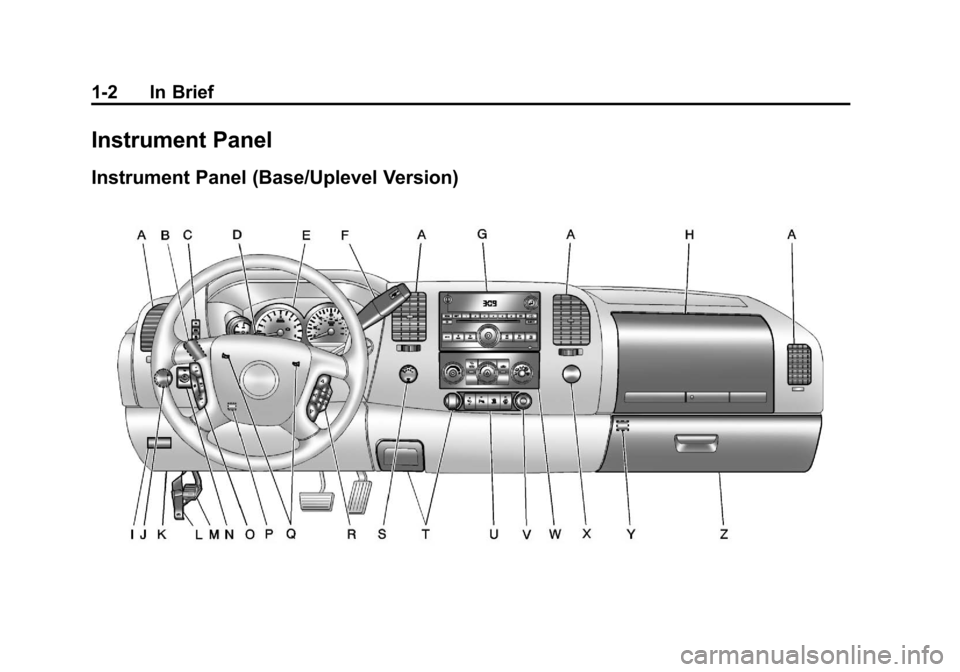
Instrument Panel
Instrument Panel (Base/Uplevel Version)
Page 9 of 588

Black plate (3,1)Chevrolet Silverado Owner Manual - 2011
In Brief 1-3
A.Air Vents on page 8‑11.
B. Turn and Lane-Change Signals
on page 6‑6.
Windshield Wiper/Washer
on
page 5‑5.
C. Driver Information Center (DIC) Buttons. See Driver Information
Center (DIC) on page 5‑34.
D. Hazard Warning Flashers
on
page 6‑5.
E. Instrument Cluster
on
page 5‑13.
F. Shift Lever. See Automatic
Transmission
on page 9‑43.
Tow/Haul Selector Button
(If Equipped). See Tow/Haul
Mode on page 9‑49.
Range Selection Mode (Allison
Transmission and Hydra-Matic
®
6‐Speed Button (If Equipped).
See Manual Modeon
page 9‑47. G.
AM-FM Radio on page 7‑8.
H. Instrument Panel Storage
on
page 4‑1.
I. Integrated Trailer Brake Controller (If Equipped).
See Trailer Towing
on
page 9‑94.
J. Exterior Lamp Controls
on
page 6‑1.
K. Data Link Connector (DLC). See Malfunction Indicator Lamp
on page 5‑27.
L. Hood on page 10‑5.
M. Parking Brake on page 9‑68.
N. Dome Lamps on page 6‑8.
Fog Lamps
on page 6‑6(If Equipped).
O. Cruise Control on page 9‑73. P.
Steering Wheel Adjustment
on
page 5‑2.
Q. Horn on page 5‑5.
R. Steering Wheel Controls
on
page 5‑3(If Equipped).
S. Automatic Transfer Case Control (If Equipped).
See Four-Wheel Drive
on
page 10‑32.
T. Ashtray (If Equipped). See Ashtrays
on page 5‑12andCigarette Lighteron
page 5‑11.
U. StabiliTrak
®Systemon
page 9‑70(If Equipped).
Ultrasonic Parking Assist
on
page 9‑76(If Equipped).
Pedal Adjust Button
(If Equipped). See Adjustable
Throttle and Brake Pedal
on
page 9‑32.
Exhaust Brake (If Equipped).
See "Brakes" in the Duramax
Diesel Supplement.
Page 12 of 588
Black plate (6,1)Chevrolet Silverado Owner Manual - 2011
1-6 In Brief
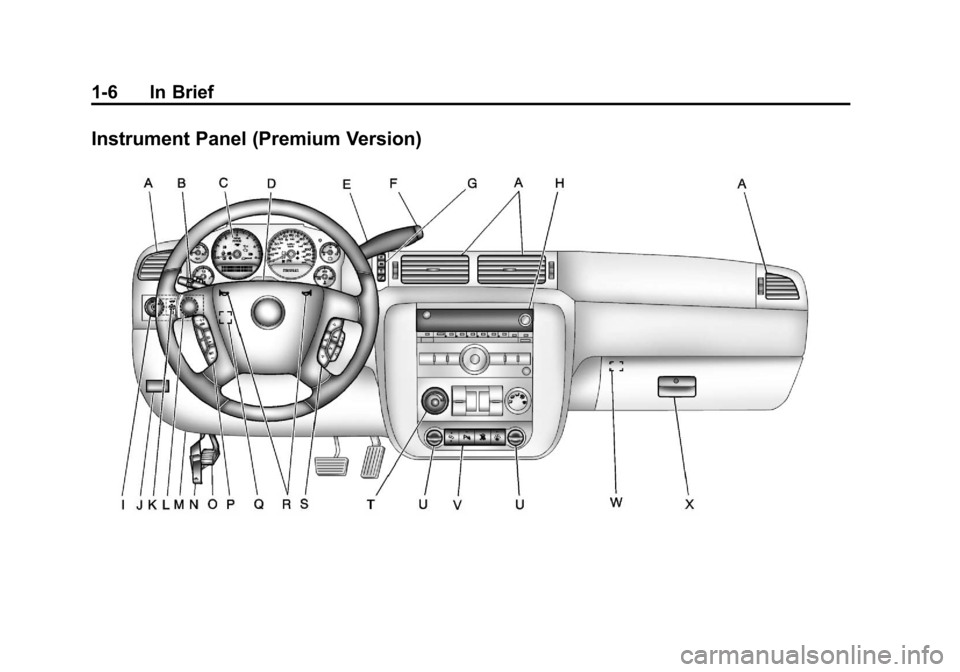
Instrument Panel (Premium Version)
Page 23 of 588
Black plate (17,1)Chevrolet Silverado Owner Manual - 2011
In Brief 1-17
Interior Mirror
Vehicles with a manual rearview
mirror can be adjusted to see
clearly behind the vehicle. Hold
the mirror in the center to move
it up or down and side to side.
To reduce headlamp glare during
nighttime use, pull the tab forward
for daytime use and push it for
nighttime use.
Vehicles with the automatic dimming
feature will automatically reduce
the glare of lights from behind the
vehicle. The dimming feature comes
on and the indicator light illuminates
each time the vehicle is started.
SeeAutomatic Dimming Rearview
Mirror
on page 2‑19for more
information.
Steering Wheel
Adjustment
The tilt lever is located on the lower
left side of the steering column.
To adjust the steering wheel:
1. Hold the steering wheel and pull the lever.
2. Move the steering wheel up or down.
3. Release the lever to lock the wheel in place. Do not adjust the steering wheel
while driving.
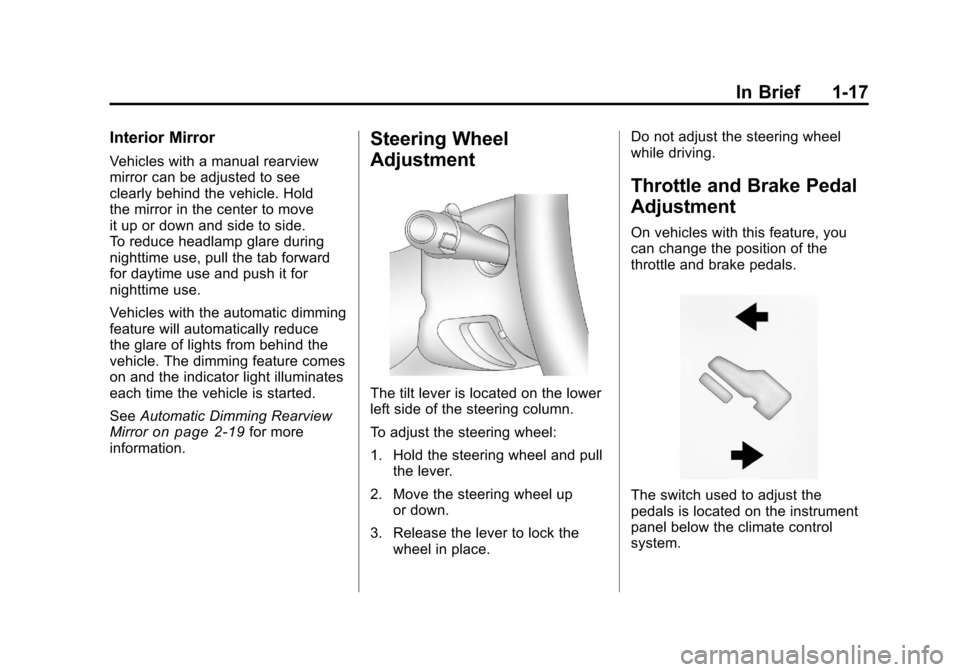
Throttle and Brake Pedal
Adjustment
On vehicles with this feature, you
can change the position of the
throttle and brake pedals.
The switch used to adjust the
pedals is located on the instrument
panel below the climate control
system.
Page 24 of 588
Black plate (18,1)Chevrolet Silverado Owner Manual - 2011
1-18 In Brief
Press the arrow at the bottom of the
switch to move the pedals closer to
your body. Press the arrow at the
top of the switch to move the pedals
away from your body.
SeeAdjustable Throttle and Brake
Pedal on page 9‑32.
Interior Lighting
Dome Lamps
The dome lamps come on when any
door is opened. They turn off after
all the doors are closed.
Turn the instrument panel
brightness knob clockwise to the
farthest position to turn on the
dome lamps. The dome lamps
remain on until the knob is turned
counterclockwise. Dome Lamp Override
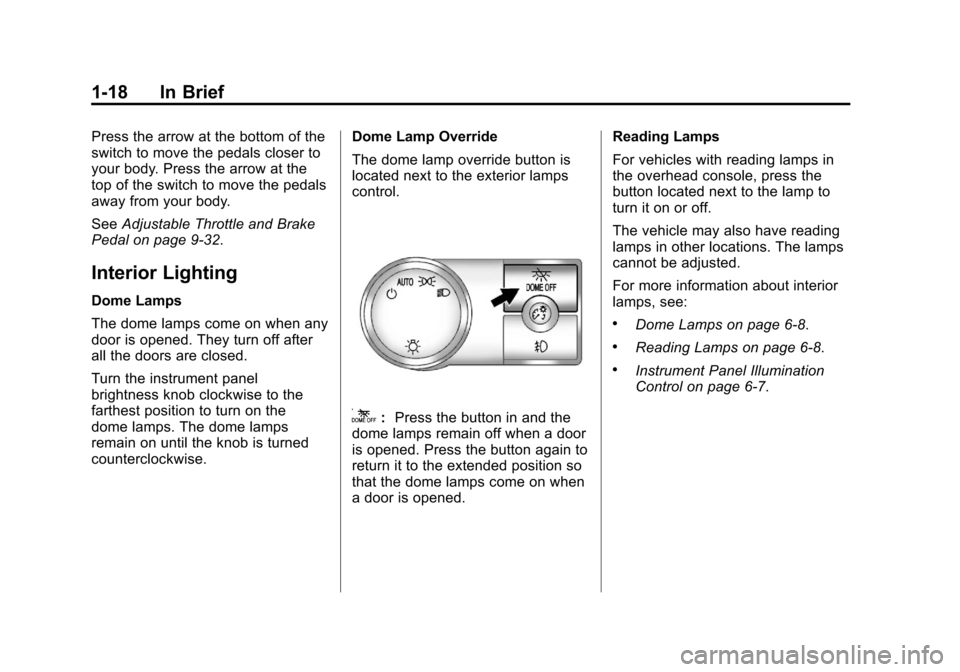
The dome lamp override button is
located next to the exterior lamps
control.
k:
Press the button in and the
dome lamps remain off when a door
is opened. Press the button again to
return it to the extended position so
that the dome lamps come on when
a door is opened. Reading Lamps
For vehicles with reading lamps in
the overhead console, press the
button located next to the lamp to
turn it on or off.
The vehicle may also have reading
lamps in other locations. The lamps
cannot be adjusted.
For more information about interior
lamps, see:
.Dome Lamps on page 6‑8.
.Reading Lamps on page 6‑8.
.Instrument Panel Illumination
Control on page 6‑7.
Page 25 of 588
Black plate (19,1)Chevrolet Silverado Owner Manual - 2011
In Brief 1-19
Exterior Lighting
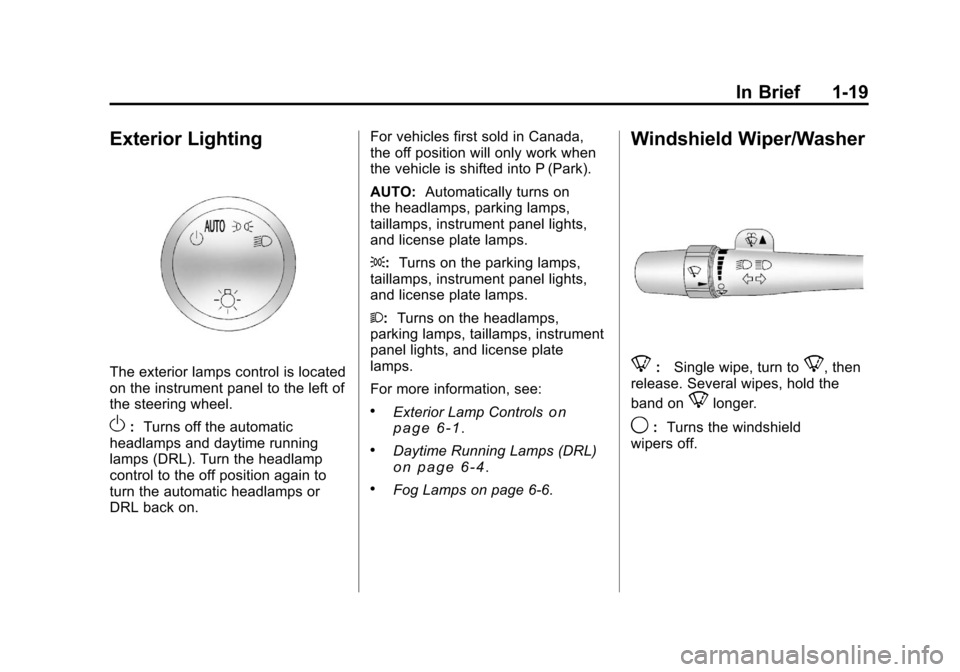
The exterior lamps control is located
on the instrument panel to the left of
the steering wheel.
O:Turns off the automatic
headlamps and daytime running
lamps (DRL). Turn the headlamp
control to the off position again to
turn the automatic headlamps or
DRL back on. For vehicles first sold in Canada,
the off position will only work when
the vehicle is shifted into P (Park).
AUTO:
Automatically turns on
the headlamps, parking lamps,
taillamps, instrument panel lights,
and license plate lamps.
;: Turns on the parking lamps,
taillamps, instrument panel lights,
and license plate lamps.
2: Turns on the headlamps,
parking lamps, taillamps, instrument
panel lights, and license plate
lamps.
For more information, see:
.Exterior Lamp Controlson
page 6‑1.
.Daytime Running Lamps (DRL)on page 6‑4.
.Fog Lamps on page 6‑6.
Windshield Wiper/Washer
8: Single wipe, turn to8, then
release. Several wipes, hold the
band on
8longer.
9: Turns the windshield
wipers off.
Page 34 of 588
Black plate (28,1)Chevrolet Silverado Owner Manual - 2011
1-28 In Brief
Navigation System
The vehicle's navigation system
(if equipped) provides detailed maps
of most major freeways and roads
throughout the United States and
Canada. After a destination has
been set, the system provides
turn-by-turn instructions for reaching
the destination. In addition, the
system can help locate a variety
of points of interest (POI), such
as banks, airports, restaurants,
and more.
See the Navigation System manual
for more information.
Driver Information
Center (DIC)
The DIC display is located at the
bottom of the instrument panel
cluster. It shows the status of
many vehicle systems and enables
access to the personalization menu.
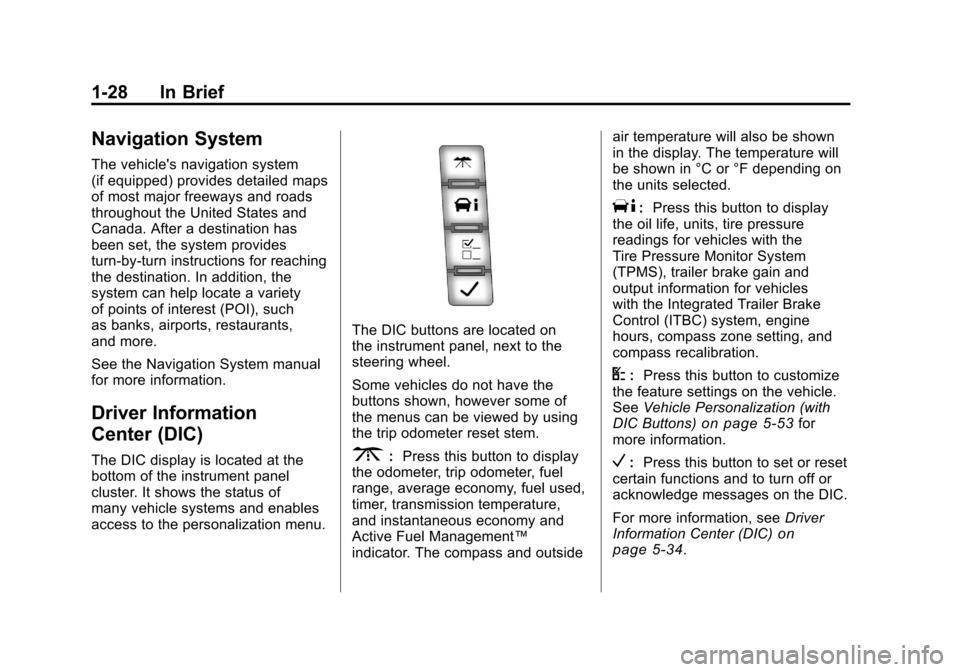
The DIC buttons are located on
the instrument panel, next to the
steering wheel.
Some vehicles do not have the
buttons shown, however some of
the menus can be viewed by using
the trip odometer reset stem.
3:Press this button to display
the odometer, trip odometer, fuel
range, average economy, fuel used,
timer, transmission temperature,
and instantaneous economy and
Active Fuel Management™
indicator. The compass and outside air temperature will also be shown
in the display. The temperature will
be shown in °C or °F depending on
the units selected.
T:
Press this button to display
the oil life, units, tire pressure
readings for vehicles with the
Tire Pressure Monitor System
(TPMS), trailer brake gain and
output information for vehicles
with the Integrated Trailer Brake
Control (ITBC) system, engine
hours, compass zone setting, and
compass recalibration.
U: Press this button to customize
the feature settings on the vehicle.
See Vehicle Personalization (with
DIC Buttons)
on page 5‑53for
more information.
V: Press this button to set or reset
certain functions and to turn off or
acknowledge messages on the DIC.
For more information, see Driver
Information Center (DIC)
on
page 5‑34.
Page 38 of 588
Black plate (32,1)Chevrolet Silverado Owner Manual - 2011
1-32 In Brief
Crew Cab
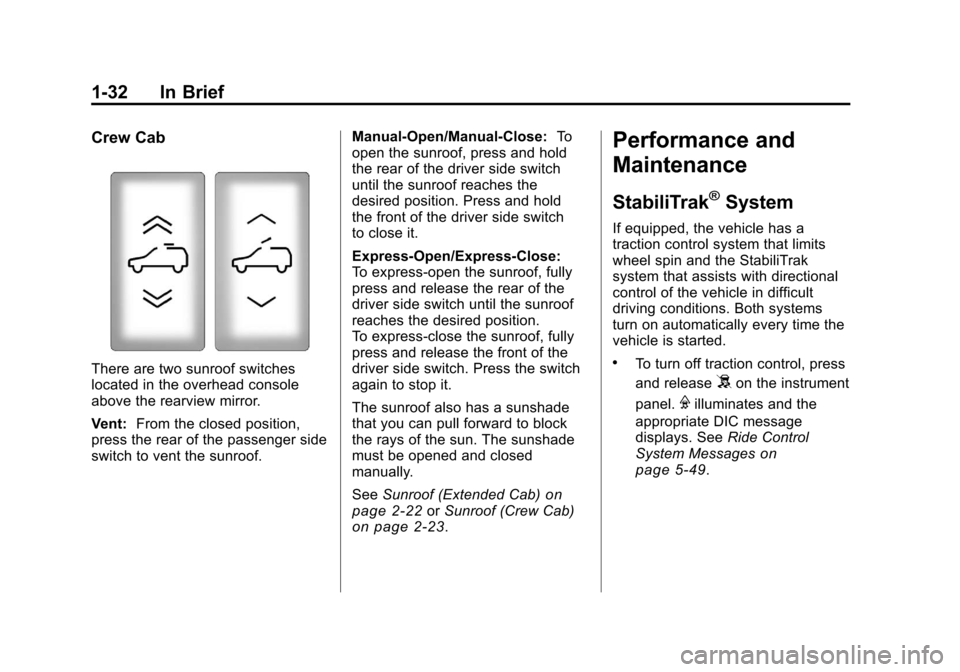
There are two sunroof switches
located in the overhead console
above the rearview mirror.
Vent:From the closed position,
press the rear of the passenger side
switch to vent the sunroof. Manual-Open/Manual-Close:
To
open the sunroof, press and hold
the rear of the driver side switch
until the sunroof reaches the
desired position. Press and hold
the front of the driver side switch
to close it.
Express-Open/Express-Close:
To express-open the sunroof, fully
press and release the rear of the
driver side switch until the sunroof
reaches the desired position.
To express-close the sunroof, fully
press and release the front of the
driver side switch. Press the switch
again to stop it.
The sunroof also has a sunshade
that you can pull forward to block
the rays of the sun. The sunshade
must be opened and closed
manually.
See Sunroof (Extended Cab)
on
page 2‑22or Sunroof (Crew Cab)on page 2‑23.
Performance and
Maintenance
StabiliTrak®System
If equipped, the vehicle has a
traction control system that limits
wheel spin and the StabiliTrak
system that assists with directional
control of the vehicle in difficult
driving conditions. Both systems
turn on automatically every time the
vehicle is started.
.To turn off traction control, press
and release
5on the instrument
panel.
Filluminates and the
appropriate DIC message
displays. See Ride Control
System Messages
on
page 5‑49.