display CHEVROLET SILVERADO 2012 2.G Owners Manual
[x] Cancel search | Manufacturer: CHEVROLET, Model Year: 2012, Model line: SILVERADO, Model: CHEVROLET SILVERADO 2012 2.GPages: 584, PDF Size: 8.03 MB
Page 328 of 584
Black plate (42,1)Chevrolet Silverado Owner Manual - 2012
9-42 Driving and Operating
Manual Mode
Range Selection Mode
(Allison®Transmission or
Hydra-Matic®6-Speed
Transmission)
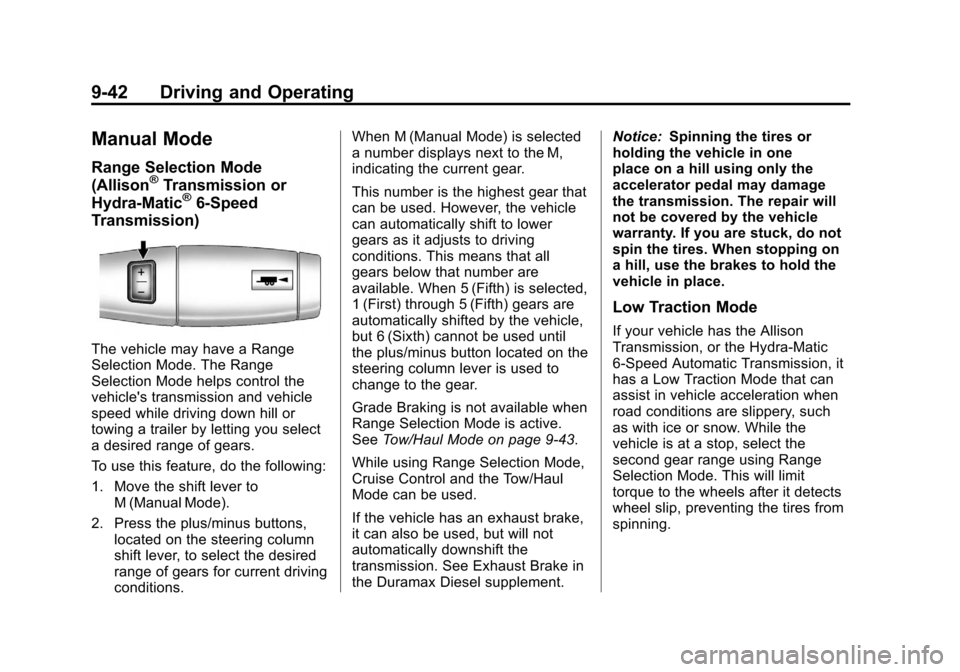
The vehicle may have a Range
Selection Mode. The Range
Selection Mode helps control the
vehicle's transmission and vehicle
speed while driving down hill or
towing a trailer by letting you select
a desired range of gears.
To use this feature, do the following:
1. Move the shift lever to
M (Manual Mode).
2. Press the plus/minus buttons, located on the steering column
shift lever, to select the desired
range of gears for current driving
conditions. When M (Manual Mode) is selected
a number displays next to the M,
indicating the current gear.
This number is the highest gear that
can be used. However, the vehicle
can automatically shift to lower
gears as it adjusts to driving
conditions. This means that all
gears below that number are
available. When 5 (Fifth) is selected,
1 (First) through 5 (Fifth) gears are
automatically shifted by the vehicle,
but 6 (Sixth) cannot be used until
the plus/minus button located on the
steering column lever is used to
change to the gear.
Grade Braking is not available when
Range Selection Mode is active.
See
Tow/Haul Mode on page 9‑43.
While using Range Selection Mode,
Cruise Control and the Tow/Haul
Mode can be used.
If the vehicle has an exhaust brake,
it can also be used, but will not
automatically downshift the
transmission. See Exhaust Brake in
the Duramax Diesel supplement. Notice:
Spinning the tires or
holding the vehicle in one
place on a hill using only the
accelerator pedal may damage
the transmission. The repair will
not be covered by the vehicle
warranty. If you are stuck, do not
spin the tires. When stopping on
a hill, use the brakes to hold the
vehicle in place.
Low Traction Mode
If your vehicle has the Allison
Transmission, or the Hydra-Matic
6-Speed Automatic Transmission, it
has a Low Traction Mode that can
assist in vehicle acceleration when
road conditions are slippery, such
as with ice or snow. While the
vehicle is at a stop, select the
second gear range using Range
Selection Mode. This will limit
torque to the wheels after it detects
wheel slip, preventing the tires from
spinning.
Page 349 of 584
Black plate (63,1)Chevrolet Silverado Owner Manual - 2012
Driving and Operating 9-63
StabiliTrak is on automatically
whenever the vehicle is started.
To assist with directional control of
the vehicle, the system should
always be left on. Trailer Sway
Control (TSC) is also on
automatically when the vehicle is
started. SeeTrailer Sway Control
(TSC) on page 9‑114 for more
information.
When the vehicle is started and
begins to move, the system
performs several diagnostic checks
to insure there are no problems.
The system may be heard or felt
while it is working. This is normal
and does not mean there is a
problem with the vehicle. The
system should initialize before the
vehicle reaches 32 km/h (20 mph).
In some cases, it may take
approximately 3.2 km (2 mi) of
driving before the system initializes. If cruise control is being used when
StabiliTrak activates, the cruise
control automatically disengages.
The cruise control can be
re-engaged when road conditions
allow. See
Cruise Control on
page 9‑66.
If the system fails to turn on or
activate, the StabiliTrak light along
with a message will be displayed on
the Driver Information Center (DIC).
If a DIC message appears, make
sure the StabiliTrak system has not
been turned off using the Traction
Control System (TCS)/StabiliTrak
button. Then turn the vehicle off,
wait 15 seconds, and then turn it
back on again to reset the system.
If any of the messages still appear
on the DIC, the vehicle should be
taken in for service. For more
information on the DIC messages,
see Ride Control System Messages
on page 5‑47.
The StabiliTrak light will flash on the
instrument panel cluster when the
system or the TSC feature is both
on and activated.
The system may be heard or felt
while it is working; this is normal.
The TCS/StabiliTrak button is
located on the instrument panel.
Page 350 of 584
Black plate (64,1)Chevrolet Silverado Owner Manual - 2012
9-64 Driving and Operating
The traction control part of
StabiliTrak can be turned off by
pressing and releasing the
TCS/StabiliTrak button if both
systems (traction control and
StabiliTrak) were previously on.
To disable both TCS and
StabiliTrak, press and hold the
TCS/StabiliTrak button until the
StabiliTrak OFF light illuminates
and the appropriate DIC message
displays. This will also disable the
TSC feature.
Traction control and StabiliTrak can
be turned on by pressing and
releasing the TCS/StabiliTrak button
if they are not automatically shut off
for any other reason. This will also
enable the TSC feature.When the TCS or StabiliTrak system
is turned off, the StabiliTrak light
and the appropriate message will be
displayed on the DIC to warn the
driver. The vehicle will still have
brake-traction control when traction
control is off, but will not be able to
use the engine speed management
system. See
“Traction Control
Operation” next for more
information.
When the TCS has been turned off,
system noises may still be heard as
a result of the brake-traction control
coming on.
It is recommended to leave the
system on for normal driving
conditions, but it may be necessary
to turn the system off if the vehicle
is stuck in sand, mud, ice or snow,
and you want to “rock”the vehicle to
attempt to free it. It may also be
necessary to turn off the system
when driving in extreme off-road
conditions where high wheel spin is
required. See If the Vehicle Is Stuck
on page 9‑16. When the transfer case is in 4LO,
the stability system is automatically
disabled, the StabiliTrak light comes
on, and the appropriate message
will appear on the DIC. Both traction
control and StabiliTrak are
automatically disabled in this
condition.
Traction Control Operation
The TCS is part of the StabiliTrak
system. Traction control limits wheel
spin by reducing engine power to
the wheels (engine speed
management) and by applying
brakes to each individual wheel
(brake-traction control) as
necessary.
The TCS is enabled automatically
when the vehicle is started. It will
activate and the StabiliTrak light
will flash if it senses that any of the
wheels are spinning or beginning
to lose traction while driving.
Page 351 of 584
Black plate (65,1)Chevrolet Silverado Owner Manual - 2012
Driving and Operating 9-65
If traction control is turned off,
only the brake-traction control
portion of traction control will work.
The engine speed management will
be disabled. In this mode, engine
power is not reduced automatically
and the driven wheels can spin
more freely. This can cause the
brake-traction control to activate
constantly.
Notice:If the wheel(s) of one axle
is allowed to spin excessively
while the StabiliTrak
®, ABS, brake
warning lights, and any relevant
DIC messages are displayed, the
transfer case could be damaged.
The repairs would not be covered
by the vehicle warranty. Reduce
engine power and do not spin the
wheel(s) excessively while these
lights and messages are
displayed.
The TCS may activate on dry or
rough roads or under conditions
such as heavy acceleration while turning or abrupt upshifts/downshifts
of the transmission. When this
happens, a reduction in acceleration
may be noticed, or a noise or
vibration may be heard. This is
normal.
If cruise control is being used when
the system activates, the StabiliTrak
light will flash and cruise control
will automatically disengage.
Cruise control may be reengaged
when road conditions allow.
See
Cruise Control on page 9‑66.
StabiliTrak may also turn off
automatically if it determines that a
problem exists with the system.
If the problem does not clear itself
after restarting the vehicle, see your
dealer for service.
Non-hybrid vehicles with StabiliTrak
have a Trailer Sway Control (TSC)
feature. See Trailer Sway Control
(TSC) on page 9‑114. Non-hybrid vehicles with StabiliTrak
have a Hill Start Assist (HSA)
feature. See
Hill Start Assist (HSA)
on page 9‑62.
Adding non‐dealer accessories can
affect the vehicle's performance.
See Accessories and Modifications
on page 10‑3.
Locking Rear Axle
Vehicles with a locking rear axle can
give more traction on snow, mud,
ice, sand, or gravel. It works like a
standard axle most of the time, but
when traction is low, this feature will
allow the rear wheel with the most
traction to move the vehicle.
Page 355 of 584
Black plate (69,1)Chevrolet Silverado Owner Manual - 2012
Driving and Operating 9-69
WARNING (Continued)
or vehicle damage, even with
URPA, always check behind the
vehicle and check all mirrors
before backing.
How the System Works
URPA comes on automatically
when the shift lever is moved into
R (Reverse). A single tone sounds
to indicate the system is working.
URPA operates only at speeds less
than 8 km/h (5 mph).
An obstacle is indicated by audible
beeps. The interval between the
beeps becomes shorter as the
vehicle gets closer to the obstacle.
When the distance is less than
30 cm (12 in) the beeping is a
continuous tone for five seconds.To be detected, objects must be at
least 25 cm (10 in) off the ground
and below tailgate level. Objects
must also be within 2.5 m (8 ft) from
the rear bumper. This distance may
be less during warmer or humid
weather.
Turning the System On and Off
The URPA system can be turned on
and off using the rear park aid
disable button located next to the
radio.
The indicator light comes on when
the system is disabled and turns off
when the system is on.
When the system is off, PARK
ASSIST OFF displays on the
Driver Information Center (DIC).
The message disappears after a
short period of time.
URPA defaults to the on setting
each time the vehicle is started.
Notice:
If you use URPA while the
tailgate is lowered, it may not
detect an object behind your
vehicle, and you might back into
the object and damage your
vehicle. Always verify the tailgate
is closed when using URPA or
turn off URPA when driving with
the tailgate lowered.
Page 356 of 584
Black plate (70,1)Chevrolet Silverado Owner Manual - 2012
9-70 Driving and Operating
When the System Does Not
Seem to Work Properly
The following messages may be
displayed on the DIC:
SERVICE PARK ASSIST:If this
message occurs, take the vehicle to
your dealer to repair the system.
PARK ASST BLOCKED SEE
OWNERS MANUAL: This
message can occur under the
following conditions:
.The ultrasonic sensors are not
clean. Keep the vehicle's rear
bumper free of mud, dirt, snow,
ice, and slush. For cleaning
instructions, see Exterior Care
on page 10‑102.
.The park assist sensors are
covered by frost or ice. Frost or
ice can form around and behind
the sensors and may not always
be seen; this can occur after
washing the vehicle in cold
weather. The message may not
clear until the frost or ice has
melted.
.A trailer was attached to the
vehicle, or an object was
hanging out of the tailgate during
the last drive cycle. Once the
object is removed and the
tailgate is raised, URPA will
return to normal operation.
.A tow bar is attached to the
vehicle.
.The bumper is damaged.
Take the vehicle to your dealer
to repair the system.
.Other conditions, such as
vibrations from a jackhammer or
the compression of air brakes on
a very large truck, are affecting
system performance.
Rear Vision
Camera (RVC)
If available, the Rear Vision Camera
(RVC) system displays part of the
scene behind the vehicle.
{WARNING
The RVC system does not display
pedestrians, bicyclists, animals,
or any other object located
outside the camera's field of view,
below the bumper, or under the
vehicle.
Do not back the vehicle using
only the RVC screen or by
using the screen during
longer, higher speed backing
maneuvers, or where there could
be cross-traffic. Perceived
distances may be different from
actual distances.
(Continued)
Page 357 of 584
Black plate (71,1)Chevrolet Silverado Owner Manual - 2012
Driving and Operating 9-71
WARNING (Continued)
Failure to use proper care before
backing may result in injury,
death, or vehicle damage. Always
check before backing by checking
behind and around the vehicle.
Vehicles without Navigation
System
The RVC system displays a view
of the area behind the vehicle.
When the vehicle is on and shifted
into R (Reverse) the video image
appears on the inside rearview
mirror. The video image disappears
after the vehicle is shifted out of
R (Reverse).Turning the RVC System On or Off
To turn off the RVC system,
press and hold
z, located on the
inside rearview mirror, until the left
indicator light turns off. The RVC
display is now disabled.
To turn the RVC system on, press
and hold
zuntil the left indicator
light comes on. The RVC system
display will appear in the mirror.
Vehicles with Navigation
System
The RVC system is designed to
help the driver when backing up by
displaying a view of the area behind
the vehicle. When the vehicle is
shifted into R (Reverse), the video
image appears on the navigation
screen. After a delay, the navigation
screen displays the last screen
after the vehicle is shifted out of
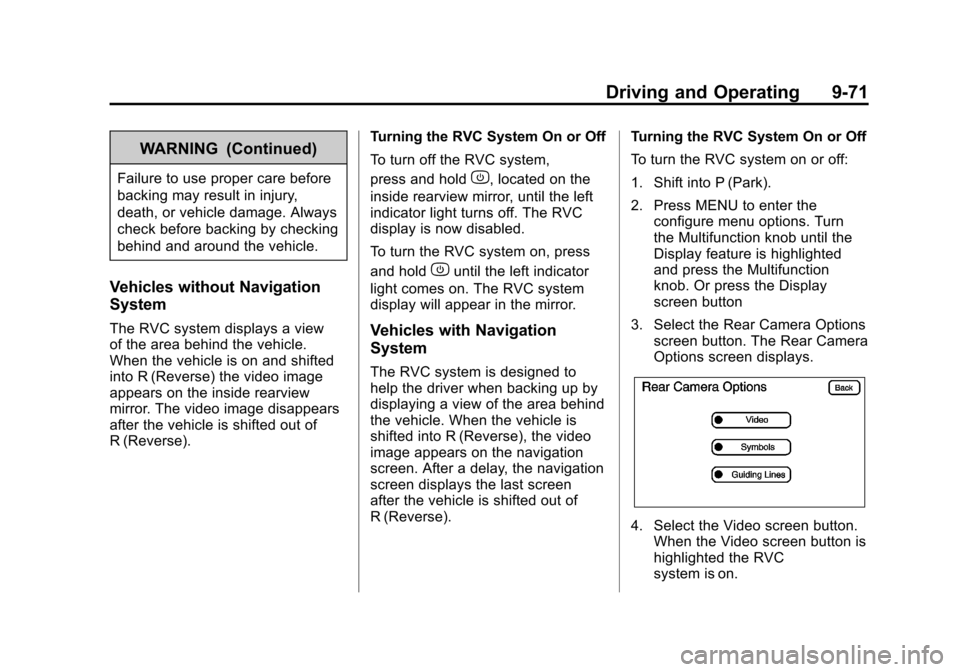
R (Reverse). Turning the RVC System On or Off
To turn the RVC system on or off:
1. Shift into P (Park).
2. Press MENU to enter the
configure menu options. Turn
the Multifunction knob until the
Display feature is highlighted
and press the Multifunction
knob. Or press the Display
screen button
3. Select the Rear Camera Options screen button. The Rear Camera
Options screen displays.
4. Select the Video screen button.When the Video screen button is
highlighted the RVC
system is on.
Page 358 of 584
Black plate (72,1)Chevrolet Silverado Owner Manual - 2012
9-72 Driving and Operating
The delay after shifting out of
R (Reverse) is approximately
10 seconds. The delay can be
canceled by performing one of the
following:
.Pressing a hard key on the
navigation system.
.Shifting into P (Park).
.Reaching a vehicle speed of
8 km/h (5 mph).
Adjusting the Brightness and
Contrast of the Screen
To adjust the brightness and
contrast of the screen, press the
MENU button while the RVC image
is on the display. Any adjustments
made will only affect the RVC
screen.
](Brightness): Touch the + (plus)
or –(minus) screen buttons to
increase or decrease the brightness
of the screen.
_(Contrast): Touch the + (plus) or
– (minus) screen buttons to increase
or decrease the contrast of the
screen.
Symbols
The navigation system may have a
feature that allows for viewing
parking assist symbols on the
navigation screen while using the
RVC. The Ultrasonic Rear Park
Assist (URPA) system must not be
disabled to use the caution symbols.
If URPA has been disabled and the
symbols have been turned on, the
Rear Parking Assist Symbols
Unavailable error message may
display. See Ultrasonic Parking
Assist on page 9‑68.
The symbols appear near objects
detected by the URPA system.
The symbol may cover the object
when viewing the navigation screen. To turn the symbols on or off:
1. Make sure that URPA has not
been disabled.
2. Shift into P (Park).
3. Press MENU to enter the configure menu options. Turn
the Multifunction knob until the
Display feature is highlighted
and press the Multifunction
knob. Or press the Display
screen button
4. Select the Rear Camera Options screen button. The Rear Camera
Options screen displays.
5. Touch the Symbols screen button. The screen button will be
highlighted when on.
Page 359 of 584
Black plate (73,1)Chevrolet Silverado Owner Manual - 2012
Driving and Operating 9-73
Guidelines
The RVC system has a guideline
overlay that can help the driver align
the vehicle when backing into a
parking spot.
If the vehicle has dual rear wheels,
this feature will not be available.
To turn the guidelines on or off:
1. Make sure that URPA has notbeen disabled.
2. Shift into P (Park).
3. Press MENU to enter the configure menu options. Turn
the Multifunction knob until the
Display feature is highlighted
and press the Multifunction
knob. Or press the Display
screen button
4. Select the Rear Camera Options screen button. The Rear Camera
Options screen displays.
5. Touch the Guidelines screen button. The screen button will be
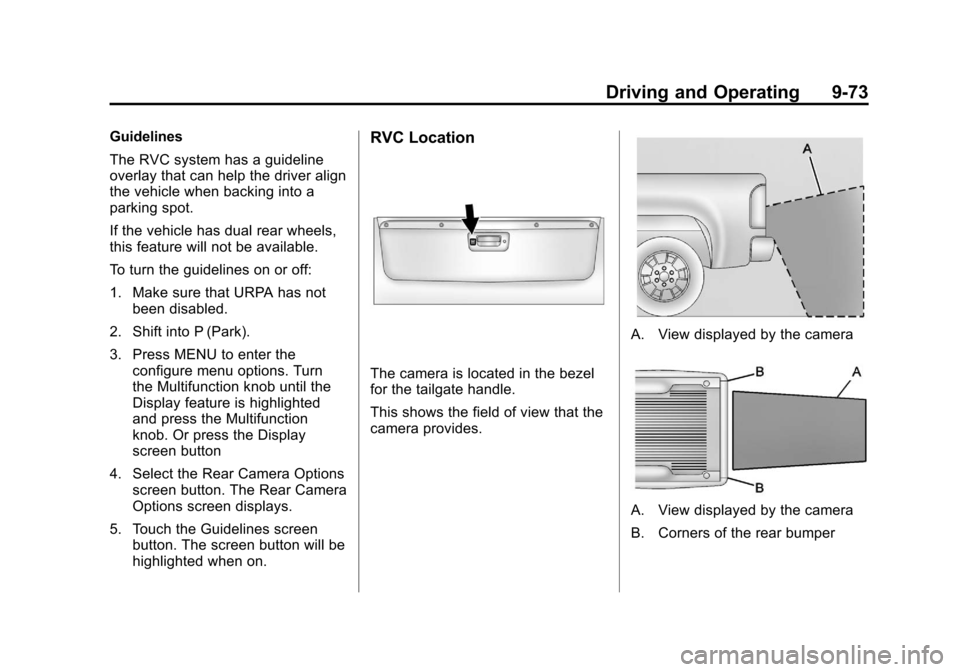
highlighted when on.RVC Location
The camera is located in the bezel
for the tailgate handle.
This shows the field of view that the
camera provides.
A. View displayed by the camera
A. View displayed by the camera
B. Corners of the rear bumper
Page 360 of 584
Black plate (74,1)Chevrolet Silverado Owner Manual - 2012
9-74 Driving and Operating
Displayed images may be further or
closer than they appear. The area
displayed is limited and objects
which are close to either corner of
the bumper or under the bumper do
not display.
Disconnecting the RVC
The rear vision camera must be
disconnected if the tailgate needs to
be removed.
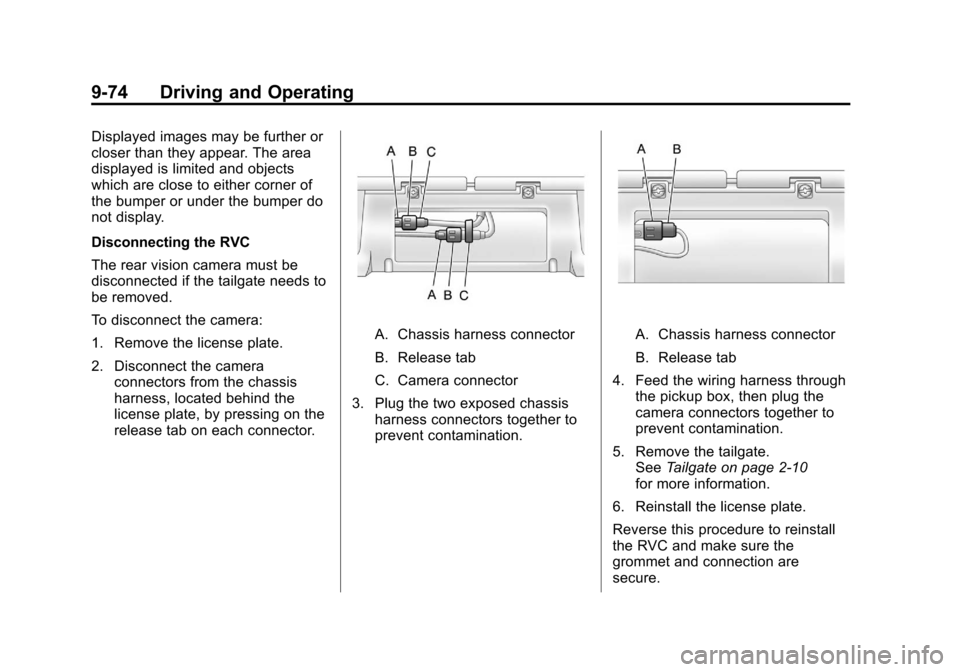
To disconnect the camera:
1. Remove the license plate.
2. Disconnect the cameraconnectors from the chassis
harness, located behind the
license plate, by pressing on the
release tab on each connector.
A. Chassis harness connector
B. Release tab
C. Camera connector
3. Plug the two exposed chassis harness connectors together to
prevent contamination.A. Chassis harness connector
B. Release tab
4. Feed the wiring harness through the pickup box, then plug the
camera connectors together to
prevent contamination.
5. Remove the tailgate. See Tailgate on page 2‑10
for more information.
6. Reinstall the license plate.
Reverse this procedure to reinstall
the RVC and make sure the
grommet and connection are
secure.