odometer CHEVROLET SILVERADO 2012 2.G Owners Manual
[x] Cancel search | Manufacturer: CHEVROLET, Model Year: 2012, Model line: SILVERADO, Model: CHEVROLET SILVERADO 2012 2.GPages: 584, PDF Size: 8.03 MB
Page 34 of 584
Black plate (28,1)Chevrolet Silverado Owner Manual - 2012
1-28 In Brief
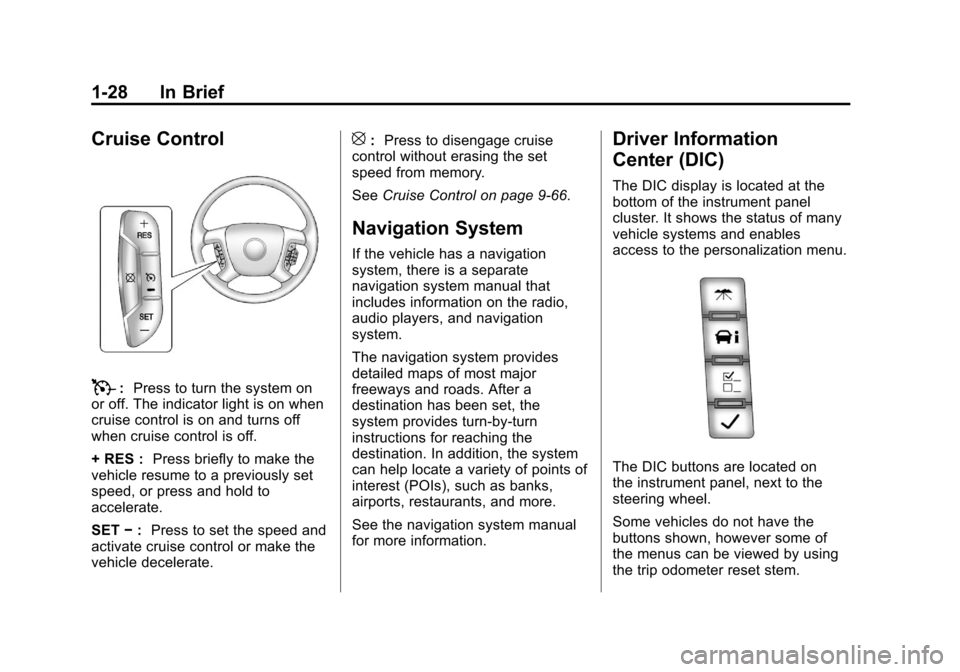
Cruise Control
T:Press to turn the system on
or off. The indicator light is on when
cruise control is on and turns off
when cruise control is off.
+ RES : Press briefly to make the
vehicle resume to a previously set
speed, or press and hold to
accelerate.
SET −: Press to set the speed and
activate cruise control or make the
vehicle decelerate.
[: Press to disengage cruise
control without erasing the set
speed from memory.
See Cruise Control on page 9‑66.
Navigation System
If the vehicle has a navigation
system, there is a separate
navigation system manual that
includes information on the radio,
audio players, and navigation
system.
The navigation system provides
detailed maps of most major
freeways and roads. After a
destination has been set, the
system provides turn-by-turn
instructions for reaching the
destination. In addition, the system
can help locate a variety of points of
interest (POIs), such as banks,
airports, restaurants, and more.
See the navigation system manual
for more information.
Driver Information
Center (DIC)
The DIC display is located at the
bottom of the instrument panel
cluster. It shows the status of many
vehicle systems and enables
access to the personalization menu.
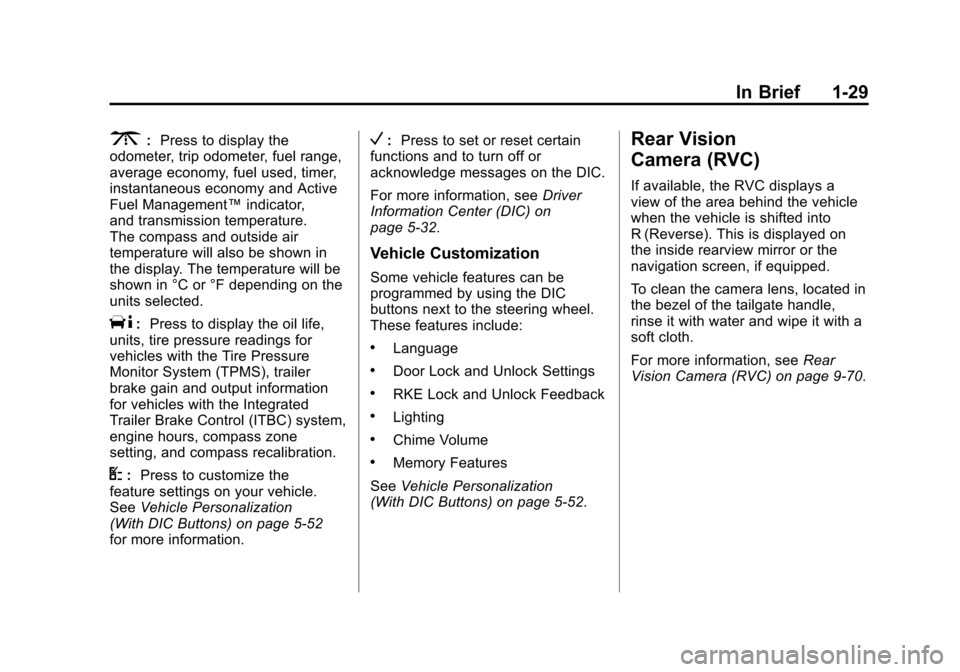
The DIC buttons are located on
the instrument panel, next to the
steering wheel.
Some vehicles do not have the
buttons shown, however some of
the menus can be viewed by using
the trip odometer reset stem.
Page 35 of 584
Black plate (29,1)Chevrolet Silverado Owner Manual - 2012
In Brief 1-29
3:Press to display the
odometer, trip odometer, fuel range,
average economy, fuel used, timer,
instantaneous economy and Active
Fuel Management™ indicator,
and transmission temperature.
The compass and outside air
temperature will also be shown in
the display. The temperature will be
shown in °C or °F depending on the
units selected.
T: Press to display the oil life,
units, tire pressure readings for
vehicles with the Tire Pressure
Monitor System (TPMS), trailer
brake gain and output information
for vehicles with the Integrated
Trailer Brake Control (ITBC) system,
engine hours, compass zone
setting, and compass recalibration.
U: Press to customize the
feature settings on your vehicle.
See Vehicle Personalization
(With DIC Buttons) on page 5‑52
for more information.
V: Press to set or reset certain
functions and to turn off or
acknowledge messages on the DIC.
For more information, see Driver
Information Center (DIC) on
page 5‑32.
Vehicle Customization
Some vehicle features can be
programmed by using the DIC
buttons next to the steering wheel.
These features include:
.Language
.Door Lock and Unlock Settings
.RKE Lock and Unlock Feedback
.Lighting
.Chime Volume
.Memory Features
See Vehicle Personalization
(With DIC Buttons) on page 5‑52.
Rear Vision
Camera (RVC)
If available, the RVC displays a
view of the area behind the vehicle
when the vehicle is shifted into
R (Reverse). This is displayed on
the inside rearview mirror or the
navigation screen, if equipped.
To clean the camera lens, located in
the bezel of the tailgate handle,
rinse it with water and wipe it with a
soft cloth.
For more information, see Rear
Vision Camera (RVC) on page 9‑70.
Page 40 of 584
Black plate (34,1)Chevrolet Silverado Owner Manual - 2012
1-34 In Brief
Engine Oil Life System
The engine oil life system calculates
engine oil life based on vehicle use
and, on most vehicles, displays a
DIC message when it is necessary
to change the engine oil and filter.
The oil life system should be reset
to 100% only following an oil
change.
Resetting the Oil Life System
To reset the Engine Oil Life System
on most vehicles:
1. Display OIL LIFE REMAININGon the DIC. If the vehicle does
not have DIC buttons, the
vehicle must be in P (Park) to
access this display.
2. Press and hold the SET/RESET button on the DIC, or the trip
odometer reset stem if the
vehicle does not have DIC
buttons, for more than
five seconds. The oil life will
change to 100%. On all vehicles, the Engine Oil Life
System can be reset as follows:
1. Turn the ignition to ON/RUN with
the engine off.
2. Fully press the accelerator pedal slowly three times within
five seconds.
3. Display OIL LIFE REMAINING on the DIC. If the display shows
100%, the system is reset.
See Engine Oil Life System on
page 10‑10.
Fuel E85 (85% Ethanol)
Vehicles that have a FlexFuel badge
and a yellow fuel cap can use either
unleaded gasoline or ethanol fuel
containing up to 85% ethanol (E85).
See Fuel E85 (85% Ethanol) on
page 9‑78. For all other vehicles,
use only the unleaded gasoline
described under Recommended
Fuel on page 9‑76.
Driving for Better Fuel
Economy
Driving habits can affect fuel
mileage. Here are some driving tips
to get the best fuel economy
possible.
.Avoid fast starts and accelerate
smoothly.
.Brake gradually and avoid
abrupt stops.
.Avoid idling the engine for long
periods of time.
.When road and weather
conditions are appropriate,
use cruise control.
.Always follow posted speed
limits or drive more slowly when
conditions require.
.Keep vehicle tires properly
inflated.
.Combine several trips into a
single trip.
Page 139 of 584
Black plate (1,1)Chevrolet Silverado Owner Manual - 2012
Instruments and Controls 5-1
Instruments and
Controls
Controls
Steering Wheel Adjustment . . . 5-2
Steering Wheel Controls . . . . . . 5-3
Horn . . . . . . . . . . . . . . . . . . . . . . . . . . 5-5
Windshield Wiper/Washer . . . . . 5-5
Compass . . . . . . . . . . . . . . . . . . . . . 5-6
Clock . . . . . . . . . . . . . . . . . . . . . . . . . 5-8
Power Outlets . . . . . . . . . . . . . . . 5-10
Cigarette Lighter . . . . . . . . . . . . . 5-11
Ashtrays . . . . . . . . . . . . . . . . . . . . . 5-12
Warning Lights, Gauges, and
Indicators
Warning Lights, Gauges, andIndicators . . . . . . . . . . . . . . . . . . 5-12
Instrument Cluster . . . . . . . . . . . 5-13
Speedometer . . . . . . . . . . . . . . . . 5-14
Odometer . . . . . . . . . . . . . . . . . . . . 5-14
Trip Odometer . . . . . . . . . . . . . . . 5-14
Tachometer . . . . . . . . . . . . . . . . . . 5-14
Fuel Gauge . . . . . . . . . . . . . . . . . . 5-14
Engine Oil Pressure Gauge . . . . . . . . . . . . . . . . . . . . . . 5-16 Engine Coolant
Temperature Gauge . . . . . . . . 5-17
Voltmeter Gauge . . . . . . . . . . . . . 5-18
Safety Belt Reminders . . . . . . . 5-19
Airbag Readiness Light . . . . . . 5-20
Airbag On-Off Light . . . . . . . . . . 5-20
Passenger Airbag Status Indicator . . . . . . . . . . . . . . . . . . . . 5-22
Charging System Light . . . . . . 5-23
Malfunction Indicator Lamp . . . . . . . . . . . . . 5-24
Brake System Warning Light . . . . . . . . . . . . . . . . . . . . . . . 5-26
Antilock Brake System (ABS) Warning Light . . . . . . . . . . . . . . 5-27
Four-Wheel-Drive Light . . . . . . 5-28
Tow/Haul Mode Light . . . . . . . . 5-28
StabiliTrak
®OFF Light . . . . . . . 5-28
Traction Control System (TCS)/StabiliTrak
®Light . . . . 5-29
Tire Pressure Light . . . . . . . . . . 5-29
Engine Oil Pressure Light . . . . 5-30
Low Fuel Warning Light . . . . . . 5-30
Security Light . . . . . . . . . . . . . . . . 5-30
High-Beam On Light . . . . . . . . . 5-31
Front Fog Lamp Light . . . . . . . . 5-31
Cruise Control Light . . . . . . . . . 5-31
Information Displays
Driver Information Center (DIC) . . . . . . . . . . . . . . . 5-32
Vehicle Messages
Vehicle Messages . . . . . . . . . . . 5-42
Battery Voltage andCharging Messages . . . . . . . . 5-42
Brake System Messages . . . . 5-42
Door Ajar Messages . . . . . . . . . 5-43
Engine Cooling System Messages . . . . . . . . . . . . . . . . . . 5-44
Engine Oil Messages . . . . . . . . 5-45
Engine Power Messages . . . . 5-46
Fuel System Messages . . . . . . 5-46
Key and Lock Messages . . . . . 5-46
Lamp Messages . . . . . . . . . . . . . 5-46
Object Detection System Messages . . . . . . . . . . . . . . . . . . 5-47
Ride Control System Messages . . . . . . . . . . . . . . . . . . 5-47
Airbag System Messages . . . . 5-48
Anti-theft Alarm System Messages . . . . . . . . . . . . . . . . . . 5-48
Page 144 of 584
Black plate (6,1)Chevrolet Silverado Owner Manual - 2012
5-6 Instruments and Controls
Compass
The vehicle may have a compass in
the Driver Information Center (DIC).
Compass Zone
The zone is set to zone eight upon
leaving the factory. Your dealer will
set the correct zone for your
location.
Under certain circumstances,
such as during a long-distance,
cross-country trip or moving to a
new state or province, it will be
necessary to compensate for
compass variance by resetting the
zone through the DIC if the zone is
not set correctly.
Compass variance is the difference
between the earth's magnetic
north and true geographic north.If the compass is not set to the zone
where you live, the compass may
give false readings. The compass
must be set to the variance zone in
which the vehicle is traveling.
To adjust for compass variance,
use the following procedure:
Compass Variance (Zone)
Procedure
1. Do not set the compass zone
when the vehicle is moving.
Only set it when the vehicle is
in P (Park).
Press the vehicle information
button until PRESS
VTO
CHANGE COMPASS ZONE
displays. Or, if the vehicle does
not have DIC buttons, press the
trip odometer reset stem until
CHANGE COMPASS ZONE
displays.
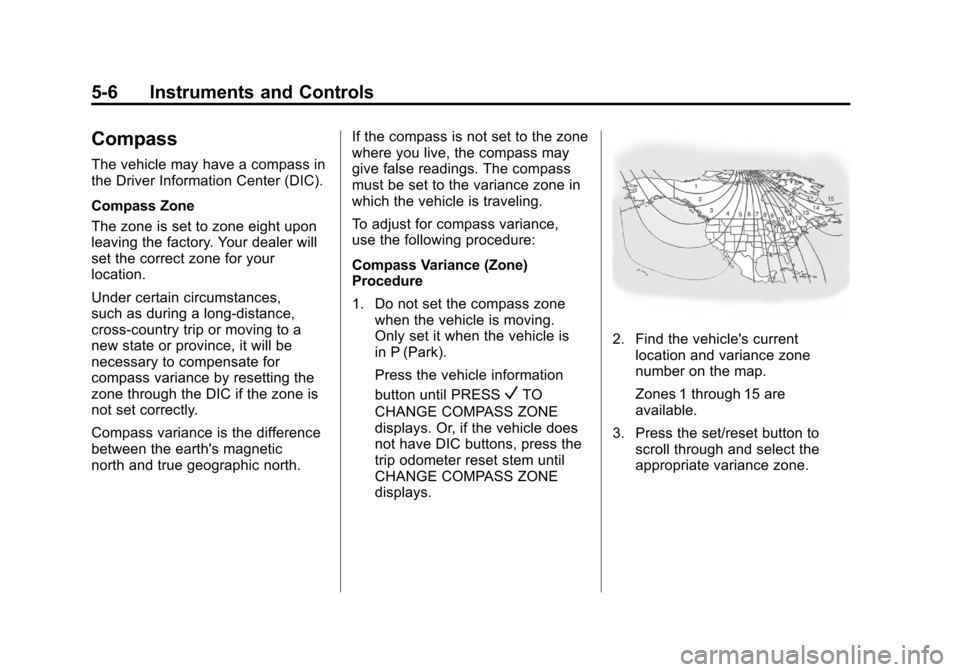
2. Find the vehicle's current location and variance zone
number on the map.
Zones 1 through 15 are
available.
3. Press the set/reset button to scroll through and select the
appropriate variance zone.
Page 145 of 584
Black plate (7,1)Chevrolet Silverado Owner Manual - 2012
Instruments and Controls 5-7
4. Press the trip/fuel button untilthe vehicle heading, for
example, N for North, is
displayed in the DIC. Or, if the
vehicle does not have DIC
buttons, press and hold the trip
odometer reset stem for
two seconds to select the next
available variance zone. Repeat
this step until the appropriate
variance zone is displayed.
5. If calibration is necessary, calibrate the compass.
See “Compass Calibration
Procedure” following.
Compass Calibration
The compass can be manually
calibrated. Only calibrate the
compass in a magnetically clean
and safe location, such as an open
parking lot, where driving the
vehicle in circles is not a danger. It is suggested to calibrate away
from tall buildings, utility wires,
manhole covers, or other industrial
structures, if possible.
If CAL should ever appear in the
DIC display, the compass should be
calibrated.
If the DIC display does not show a
heading, for example, N for North,
or the heading does not change
after making turns, there may be a
strong magnetic field interfering with
the compass. Such interference
may be caused by a magnetic CB
or cell phone antenna mount, a
magnetic emergency light, magnetic
note pad holder, or any other
magnetic item. Turn off the vehicle,
move the magnetic item, then turn
on the vehicle and calibrate the
compass.
To calibrate the compass, use the
following procedure:
Compass Calibration Procedure
1. Before calibrating the compass,
make sure the compass zone
is set to the variance zone in
which the vehicle is located.
See “Compass Variance (Zone)
Procedure” earlier in this
section.
Do not operate any switches
such as window, sunroof,
climate controls, or seats during
the calibration procedure.
2. Press the vehicle information button until PRESS
VTO
CALIBRATE COMPASS
displays. Or, if the vehicle
does not have DIC buttons,
press the trip odometer reset
stem until CALIBRATE
COMPASS displays.
Page 146 of 584
Black plate (8,1)Chevrolet Silverado Owner Manual - 2012
5-8 Instruments and Controls
3. Press the set/reset button tostart the compass calibration.
Or, if the vehicle does not have
DIC buttons, press and hold
the trip odometer reset stem
for two seconds to start the
compass calibration.
4. The DIC will display CALIBRATING: DRIVE IN
CIRCLES. Drive the vehicle
in tight circles at less than
8 km/h (5 mph) to complete the
calibration. The DIC will display
CALIBRATION COMPLETE
for a few seconds when the
calibration is complete. The DIC
display will then return to the
previous menu.Clock
AM-FM Radio and AM‐FM
Radio with CD Player
To set the clock:
1. Turn the ignition key to ACC/
ACCESSORY or ON/RUN, then
press the
Obutton to turn the
radio on.
2. Press the
Hbutton until the hour
numbers begin to flash, then
turn the
fknob to increase or
decrease the hour.
3. Press the
Hbutton until the
minute numbers begin to flash,
then turn the
fknob to increase
or decrease the minutes.
4. Press the
Hbutton until the
12HR or 24HR time format
begins to flash, then turn
the
fknob to change the time
format. 5. Press the
Hbutton again until
the clock display stops flashing
to set the currently displayed
time, or wait until the flashing
stops after five seconds and
the current time displayed
automatically sets.
MP3 Radios with a Single CD
or a Single CD and DVD Player
To adjust the time and date:
1. Turn the ignition key to ACC/ACCESSORY or ON/RUN,
then press the
Obutton to turn
the radio on.
2. Press the
Hbutton to display
HR, MIN, MM, DD, YYYY (hour,
minute, month, day, and year).
3. Press the softkey located under any one of the tabs to change
that setting.
Page 152 of 584
Black plate (14,1)Chevrolet Silverado Owner Manual - 2012
5-14 Instruments and Controls
For vehicles with a DURAMAX®
Diesel engine, see the DURAMAX®
Diesel Supplement for more
information.
For vehicles with a Hybrid, see the
Hybrid Supplement for more
information.
Speedometer
The speedometer shows the
vehicle's speed in either
kilometers per hour (km/h) or
miles per hour (mph).
Odometer
The odometer shows how far the
vehicle has been driven, in either
kilometers or miles.
Engine Hour Meter Display
The Driver Information Center (DIC)
can also display the number of
hours the engine has run. To display
the engine hours, turn the ignition
off, then press and hold the reset
button for at least four seconds.The hour meter displays for up to
30 seconds, or until the ignition is
turned on. See
Driver Information
Center (DIC) on page 5‑32 for more
information.
Trip Odometer
The trip odometer shows how far
the vehicle has been driven since
the trip odometer was last set
to zero.
Press the reset button, located on
the instrument panel cluster next to
the voltmeter, to toggle between the
trip odometer and the regular
odometer. Holding the reset button
for approximately one second while
the trip odometer is displayed will
reset it.
To display the odometer reading
with the ignition off, press the reset
button.
See Driver Information Center (DIC)
on page 5‑32 for more information.
Tachometer
The tachometer displays the engine
speed in revolutions per minute
(rpm). For a description of how
Grade Braking affects vehicle speed
while the Tow/Haul Mode is
activated, see Tow/Haul Mode on
page 9‑43 for more information.
If the vehicle is a hybrid, see the
hybrid supplement for more
information.
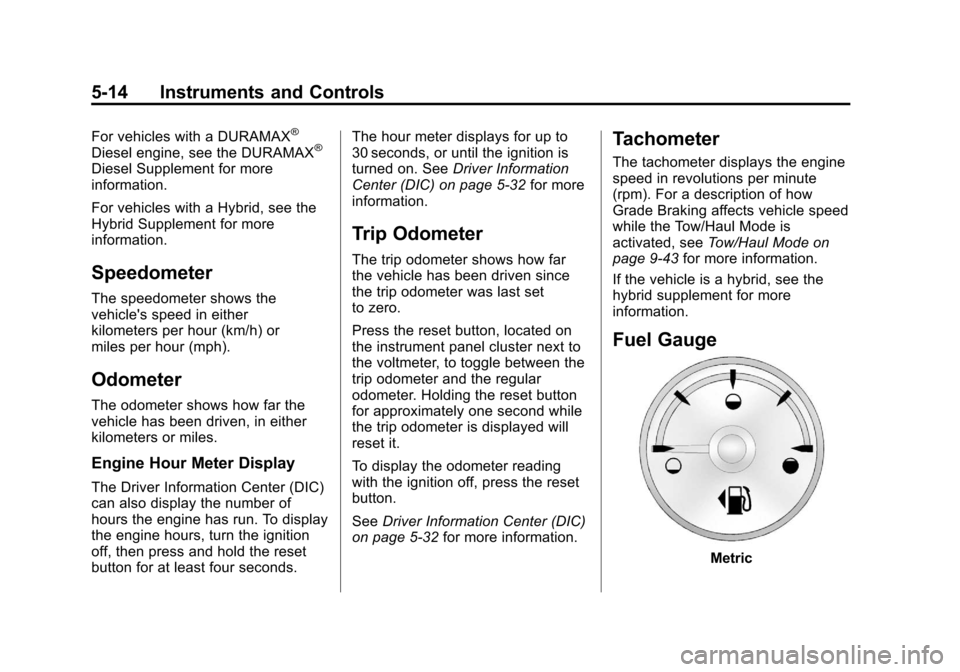
Fuel Gauge
Metric
Page 170 of 584
Black plate (32,1)Chevrolet Silverado Owner Manual - 2012
5-32 Instruments and Controls
Information Displays
Driver Information
Center (DIC)
The vehicle has a Driver Information
Center (DIC).
The DIC displays information about
this vehicle. It also displays warning
messages if a system problem is
detected.
All messages will appear in the
DIC display located below the
tachometer in the instrument panel
cluster.
The DIC comes on when the ignition
is on. After a short delay, the DIC
will display the information that was
last displayed before the engine
was turned off.The DIC has different displays
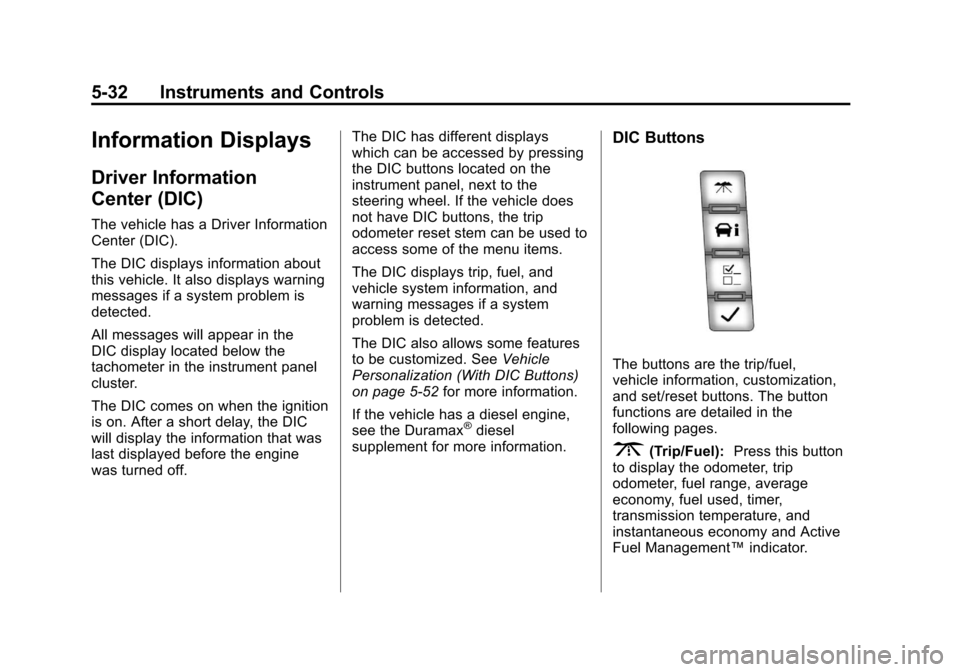
which can be accessed by pressing
the DIC buttons located on the
instrument panel, next to the
steering wheel. If the vehicle does
not have DIC buttons, the trip
odometer reset stem can be used to
access some of the menu items.
The DIC displays trip, fuel, and
vehicle system information, and
warning messages if a system
problem is detected.
The DIC also allows some features
to be customized. See
Vehicle
Personalization (With DIC Buttons)
on page 5‑52 for more information.
If the vehicle has a diesel engine,
see the Duramax
®diesel
supplement for more information.
DIC Buttons
The buttons are the trip/fuel,
vehicle information, customization,
and set/reset buttons. The button
functions are detailed in the
following pages.
3(Trip/Fuel): Press this button
to display the odometer, trip
odometer, fuel range, average
economy, fuel used, timer,
transmission temperature, and
instantaneous economy and Active
Fuel Management™ indicator.
Page 171 of 584
Black plate (33,1)Chevrolet Silverado Owner Manual - 2012
Instruments and Controls 5-33
The compass and outside
temperature will also be shown
in the display. The temperature will
be shown in °C or °F depending on
the units selected.
T(Vehicle Information):Press
this button to display the oil life,
units, tire pressure readings for
vehicles with the Tire Pressure
Monitor System (TPMS), trailer
brake gain and output information
for vehicles with the Integrated
Trailer Brake Control (ITBC) system,
engine hours, compass zone
setting, and compass recalibration.
U(Customization): Press this
button to customize the feature
settings on the vehicle. See Vehicle
Personalization (With DIC Buttons)
on page 5‑52 for more information.
V(Set/Reset):Press this button to
set or reset certain functions and to
turn off or acknowledge messages
on the DIC.
Trip/Fuel Menu Items
(with DIC Buttons)
3(Trip/Fuel): Press this button
to scroll through the following menu
items:
Odometer
Press the trip/fuel button until
ODOMETER displays. This display
shows the distance the vehicle has
been driven in either kilometers (km)
or miles. Pressing the trip odometer
reset stem will also display the
odometer.
To switch between metric and
English measurements,
see “Units” later in this section.
Trip Odometer
Press the trip/fuel button until TRIP
displays. This display shows the
current distance traveled in either
kilometers (km) or miles since the
last reset for the trip odometer. Pressing the trip odometer reset
stem will also display the trip
odometer.
The trip odometer can be reset to
zero by pressing the set/reset
button while the trip odometer is
displayed. You can also reset the
trip odometer while it is displayed
by pressing and holding the trip
odometer reset stem.
The trip odometer has a feature
called the retro-active reset. This
can be used to set the trip odometer
to the number of miles (kilometers)
driven since the ignition was last
turned on. This can be used if the
trip odometer is not reset at the
beginning of the trip.
To use the retro-active reset feature,
press and hold the set/reset button
for at least four seconds. The trip
odometer will display the number
of kilometers (km) or miles driven
since the ignition was last turned
on and the vehicle was moving.